
MO210 - Measurement Extech - Free user manual and instructions
Find the device manual for free MO210 Extech in PDF.


| Product Type | Pin-type Moisture Meter |
| Brand & Model | Extech MO210 |
| Measurement Principle | Electrical resistance |
| Wood Moisture Range | 6 to 44% |
| Building Material Range | 0.2 to 2.4% |
| Display Type | Dual scale LCD with bargraph |
| Electrode Length | 9.5 mm (0.375 in) |
| Electrode Pins | Integrated, replaceable |
| Auto Power Off | After approx. 15 minutes |
| Power Supply | Three (3) CR2032 button cells |
| Meter Housing | Impact-proof plastic |
| Operating Temperature | 0 to 40 °C (32 to 104 °F) |
| Operating Humidity | 85% RH max |
| Dimensions | 130 x 40 x 25 mm (5.1 x 1.6 x 1.0 in) |
| Weight | 108 g (3.8 oz) |
| Material Selector Switch | Wood or Building material |
| Cutoff Switch (Yellow Button) | Wake from auto power off |
| Protective Cap | Auto on/off switch, also stores test points |
| Verification Test Points | On cap (T for wood, B for battery) |
| Low Battery Indicator | LCD battery icon |
| Maintenance | Keep dry, clean electrode pins, wipe with damp cloth |
| Electrode Pin Replacement | Unscrew old, install new pins |
| Repair & Service | Calibration and repair by Teledyne FLIR |
| Safety Warning | Sharp pins; keep away from children; coin battery hazard |
Frequently Asked Questions - MO210 Extech
User questions about MO210 Extech
0 question about this device. Answer the ones you know or ask your own.
Ask a new question about this device
Download the instructions for your Measurement in PDF format for free! Find your manual MO210 - Extech and take your electronic device back in hand. On this page are published all the documents necessary for the use of your device. MO210 by Extech.
USER MANUAL MO210 Extech
Thank you for selecting the Extech Model MO210. This device is shipped fully tested and calibrated and, with proper use, will provide years of reliable service. Please visit our website (www.extech.com) for customer support and to check for the latest version of this User Manual.
Safety Cautions
- The electrode measurement pins are extremely sharp. Use care when handling this instrument. Cover the pins with the protective cap when the instrument is not in use.
- Do not allow children to handle this meter. It contains hazardous objects as well as small parts that can be swallowed.
- Do not leave the batteries and packing material unattended; they can be dangerous for children.
- When storing this device, remove the batteries and store separately, to prevent them from draining.
- Expired or damaged batteries can cause cauterization on contact with the skin. Use protective gloves when handling.
- Do not short circuit the batteries. Do not incinerate the batteries.
Meter Description
- Measurement electrode pin
- Cutoff switch
- LCD (detail below)
- Hand grip
- Verification Test Points
- Battery check Test Points
- Removable cap
- Material Selector Switch
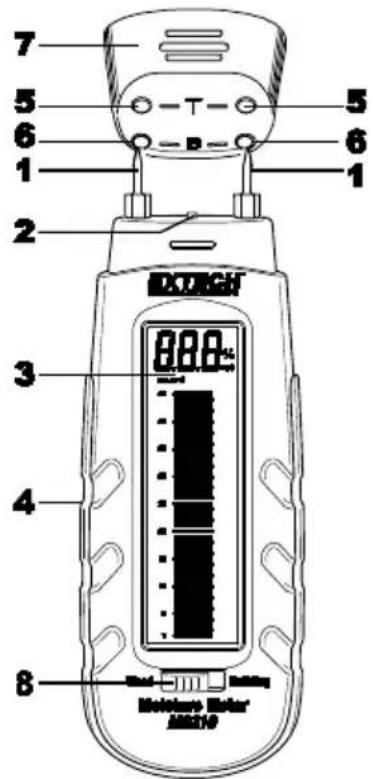
Display Description
- Graphical Display
- Numerical Reading
- Units
- Low Battery Indicator
- Solid lines – even number
- Dashed lines – odd number
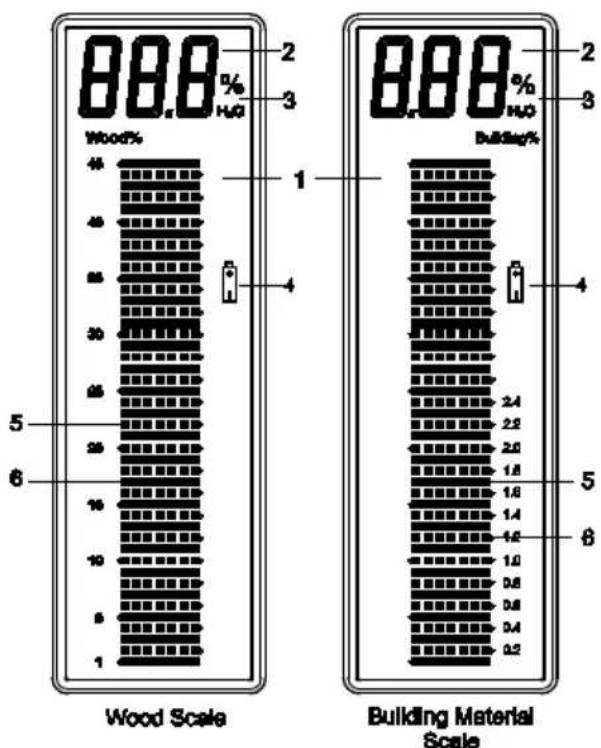
bar
| Category | Value | | -------------------- | ----- | | Wood Scale | 40 | | Wood Scale | 45 | | Wood Scale | 50 | | Wood Scale | 55 | | Wood Scale | 30 | | Wood Scale | 25 | | Wood Scale | 20 | | Wood Scale | 15 | | Wood Scale | 10 | | Wood Scale | 5 | | Wood Scale | 1 | | Building Material Scale | 2.4 | | Building Material Scale | 2.2 | | Building Material Scale | 2.0 | | Building Material Scale | 1.8 | | Building Material Scale | 1.6 | | Building Material Scale | 1.4 | | Building Material Scale | 1.2 | | Building Material Scale | 1.0 | | Building Material Scale | 0.8 | | Building Material Scale | 0.6 | | Building Material Scale | 0.4 | | Building Material Scale | 0.2 |CAUTION: The electrode measurement pins are extremely sharp. Use care when handling this instrument. Cover the pins with the protective cap when the instrument is not in use.
- Remove the protective cap to expose the electrode pins.
- The meter automatically switches ON when the cap is removed.
- The meter automatically shuts OFF when the cap is replaced.
- To conserve battery life, the meter automatically shuts off after 15 minutes when the cap is removed. To wake the meter, short press the yellow cutoff button.
- Slide the material selection switch to the wood moisture or the building moisture position.
- Carefully push the electrode pins as far as possible into the material under test. Note that the pins should be inserted into the wood perpendicular to the wood's fiber structure.
- Take several readings in several locations for the best representation of the moisture.
- Read the measurement values on the display.
- Replace the protective cap when finished.
Reading the Display
- The display has two scales.
- The wood scale indicates wood moisture from 6 to 44%. The building materials scale indicates moisture content from 0.2 to 2.4%. To calculate the Wood % equivalent, multiply the building material reading by 20.
(example: 0.6% building scale x 20 = 12 %WME)
For Drywall (Gypsum), use the WOOD setting - A continuous line indicates an even number. A dotted line indicates on odd number.
- The battery icon appears when the batteries are weak and require replacement.
Auto Power OFF
With the protective cap removed, the meter will switch OFF after 15 minutes. Short press the yellow cutoff switch to wake the meter. Always secure the protective cap when the instrument is not in use.
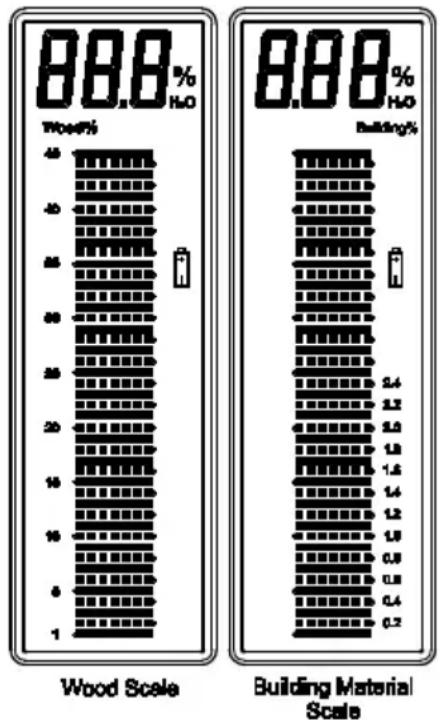
bar
| Category | Wood Scale (%) | Building Material Scale (%) | | :--- | :--- | :--- | | Wood | 88.8 | 88.8 | | Building | 88.8 | 88.8 |Instrument Measurement Verification check
- With the meter set to the wood moisture position, touch the electrode test pins to the two test points 1 and 2 at the top of the protective cap labeled 'T'.
- With the meter ON, and the electrode pins touching the 'T' test points, the meter should read 27% (±2%). If not, the meter may require service.
Battery Check
- With the meter set to the wood moisture position, touch the electrode test pins to the two test points 3 and 4 at the top of the protective cap labeled 'B'.
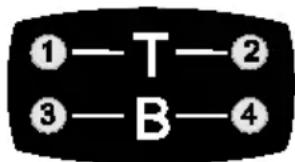
- With the meter ON, and the electrode pins touching the 'B' test points, the meter should read >44% ( ± 2% ) on the wood moisture scale. If not, replace the batteries.
Specifications
| Display | Dual measurement scale LCD with bargraph metering |
| Measurement principle Electrical resistance | |
| Range | Wood: 6 to 44%, Building materials: 0.2 to 2.4% |
| Electrode length | 9.5 mm (0.375 in.) |
| Electrode pins Integrated, replaceable | |
| Auto Power OFF | After approx. 15 minutes |
| Power supply Three (3) CR2032 button cells | |
| Meter housing | Impact-proof plastic |
| Operating Temperature 0 to 40 °C (32 to 104°F) | |
| Operating Humidity | 85% Relative Humidity (maximum) |
| Dimensions | 130 x 40 x 25 mm (5.1 x 1.6 x 1.0 in.) |
| Weight | 108 g (3.8 oz.) |
Maintenance
General Care
• Always keep the instrument dry.
- Prevent dirt from accumulating at the electrode pins.
- Wipe the meter housing with a damp cloth to clean, if necessary. Do not use abrasives or solvents to clean the meter.
Electrode Pin Replacement
- Remove the protective cap
- Unscrew the electrode pins
- Install the new pins
- Replace the protective cap
Battery Replacement
If the instrument does not switch ON, displays the low battery symbol, or if the Battery Check shows < 44% on the wood moisture scale, replace the batteries:
- Remove the Phillips screw from the belt clip/battery compartment on the rear of the instrument.
- Remove the batteries taking note of their orientation and polarity.
- Install three (3) new CR-2032 button batteries observing correct polarity.
- Secure the battery compartment before use.
Battery Safety
- Remove and immediately recycle or dispose of used batteries according to local regulations, keeping the batteries away from children. Do NOT dispose of batteries in household trash or incinerate.
• Even used batteries can cause severe injury or death. - Call a local poison control center for treatment information.
• This unit contains three (3) CR2032, 3.0 V, lithium batteries.
• Non-rechargeable batteries are not to be recharged. - Do not force discharge, recharge, disassemble, heat above 50^ C ( 122^ F), or incinerate. Doing so may result in injury due to venting, leakage, or explosion resulting in chemical burns.
- Ensure that the batteries are installed correctly according to correct polarity (+ and -).
- Do not mix old and new batteries, different brands or types of batteries, such as Alkaline, carbon-zinc, or rechargeable batteries.
- Always completely secure the battery compartment. If the battery compartment does not close securely, stop using the product, remove the batteries, keeping the batteries away from children.
- Remove and immediately recycle or dispose of batteries from equipment not used for an extended period of time, according to local regulations.
WARNING
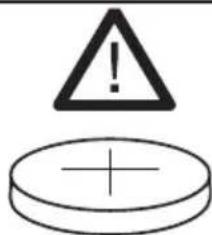
• INGESTION HAZARD : This product contains a button cell or coin battery.
• DEATH or serious injury can occur if ingested.
- A swallowed button cell or coin battery can cause Internal Chemical Burns in as little as 2 hours.
- KEEP new and used batteries OUT OF REACH of CHILDREN.
- Seek immediate medical attention if a battery is suspected to be swallowed or inserted inside any part of the body.
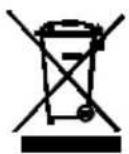
Never dispose of used batteries or rechargeable batteries in household waste.
As consumers, users are legally required to take used batteries to appropriate collection sites, the retail store where the batteries were purchased, or wherever batteries are sold.
Disposal: Do not dispose of this instrument in household waste. The user is obligated to take end-of-life devices to a designated collection point for the disposal of electrical and electronic equipment.
Copyright © 2025 Teledyne FLIR Commercial Systems, Inc.
Service client: https://support.flir.com/ContactService
Soutien technique: https://support.flir.com
Copyright © 2025 Teledyne FLIR Commercial Systems, Inc.
Teledyne FLIR warrants this Extech brand instrument to be free of defects in parts and workmanship for two years from date of shipment. To view the full warranty text please visit: https://www.flir.com/support-center/warranty/instruments/extech-product-warranty/
Calibration and Repair Services
Teledyne FLIR offers calibration and repair services for the Extech brand products we sell. We offer NIST traceable calibration for most of our products.
Customer Support
Local Telephone Support List: https://support.flir.com/contact
Return Material Authorization (RMA): https://customer.flir.com/Home
Customer Service: https://support.flir.com/ContactService
Technical Support: https://support.flir.com
Copyright © 2025 Teledyne FLIR Commercial Systems, Inc.
All rights reserved including the right of reproduction in whole or in part in any form.
www.extech.com
This document does not contain export-controlled information.
Brand : Extech
Model : MO210
Category : Measurement