
WG10 - Waterproof camera PENTAX - Free user manual and instructions
Find the device manual for free WG10 PENTAX in PDF.


| Product type | Waterproof digital camera |
| Brand | PENTAX |
| Model | WG-10 |
| Resolution | 14 megapixels (recorded pixels) |
| Lens | 5-25 mm (equiv. 28-140 mm in 35 mm), aperture F3.5 (wide-angle) - F5.5 (telephoto) |
| Optical zoom | 5× |
| Digital zoom | Up to 33.5× (combined with optical zoom) |
| Screen | LCD 2.7 inches, approx. 230,000 dots |
| Water resistance | JIS grade 8 (IP68): underwater shooting up to 10 meters for 2 hours |
| Shock resistance | Compliant with MIL-STD-810F: drop from 1.5 m onto 5 cm plywood |
| Dimensions (W × H × D) | Approx. 115.5 × 58.5 × 28.5 mm (excluding protrusions) |
| Weight | Approx. 146 g (without battery or card), 166 g (with battery and card) |
| Power supply | Rechargeable lithium-ion battery D-LI92, optional AC adapter (K-AC117) |
| Battery life | Approx. 260 photos (CIPA standard), 280 min playback, 120 min video |
| Scene modes | Auto, Program, Night, Underwater, Landscape, Portrait, Children, etc. |
| Stabilization | Electronic (anti-shake, Movie SR) |
| Video recording | HD 1280×720 at 30 fps, multiple formats |
| Built-in flash | Auto, manual, red-eye reduction; range 0.3-3.9 m (WA) |
| Connectivity | USB 2.0, HDMI type D connector, AV output |
| Maintenance and cleaning | Rinse with clean water after use in sea, wipe with a lint-free cloth, do not use solvents |
| Spare parts | Sealing gasket (annual replacement recommended), battery D-LI92, charger D-BC92, cables |
| Warranty | 12 months against manufacturing defects |
Frequently Asked Questions - WG10 PENTAX
User questions about WG10 PENTAX
0 question about this device. Answer the ones you know or ask your own.
Ask a new question about this device
Download the instructions for your Waterproof camera in PDF format for free! Find your manual WG10 - PENTAX and take your electronic device back in hand. On this page are published all the documents necessary for the use of your device. WG10 by PENTAX.
USER MANUAL WG10 PENTAX
natural_image
Line drawing of a Pentax digital camera with visible lens and buttons (no text or symbols beyond branding)




natural_image
Line drawing of a hand holding a small electronic device inside a bowl (no text or symbols)natural_image
Line drawing of a Pentax digital camera module (no text or symbols on body)Appareil PENTAX WG-10
natural_image
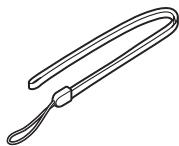
Line drawing of a U-shaped object with a loop handle and a strap (no text or symbols)Courroie O-ST104 (*)

natural_image
Simple line drawing of a circular object with concentric rings (no text or symbols)natural_image
Line drawing of a coiled cable with connectors (no text or symbols)Câble USB I-USB7 (*)
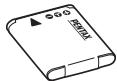
Batterie lithium-ion rechargeable D-LI92 (*)
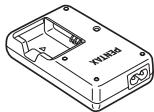
natural_image
Isometric line drawing of a device casing with internal components and mounting holes (no text or symbols)natural_image
Line drawing of a black cable with two terminal connectors (no text or symbols)natural_image
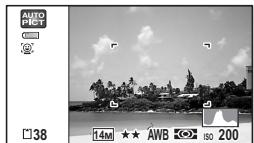
Black-and-white beach scene with palm trees and a distant island under cloudy sky (no text or symbols)OK

Histogramme + Info
natural_image
Black-and-white photo of a coastal town with buildings and trees, no visible text or symbols on the landscape itself.OK


OK

natural_image
Solid gray rectangle with no visible text, symbols, or features.LCD éteint

OK
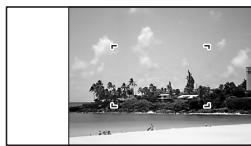
natural_image
Black-and-white beach scene with palm trees, a small island, and clear sky (no text or symbols visible)Aucun aff. d'info
natural_image
Black-and-white photo of a tree-lined street with a fence and bridge, no visible text or symbols

Histogramme + Info
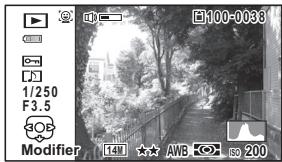


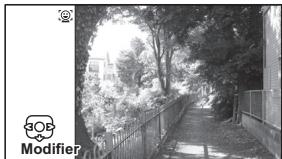
natural_image
Black-and-white photo of a tree-lined pathway with a fence and distant buildings, no visible text or symbols.Aucun aff. d'info
natural_image
Abstract white silhouette on gray background, no text or symbols presentImage correcte
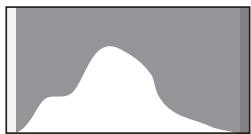
natural_image
Abstract white silhouette on gray background, no text or symbols presentImage claire
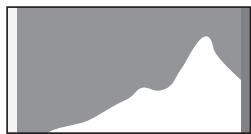
natural_image
Abstract grayscale shape with a white wavy base and a smooth peak, no text or symbols present.natural_image
Black-and-white photo of a coastal town with palm trees and a distant building, no visible text or symbolsÉtat de la mémoire
natural_image
Black-and-white beach scene with palm trees and a distant island under cloudy sky (no text or symbols)natural_image
Black-and-white beach scene with palm trees and a distant island, no visible text or symbolsMENU
MENU
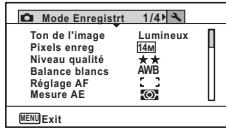
natural_image
Black-and-white photo of a tropical beach scene with palm trees and a distant hilltop, no visible text or symbols.natural_image
Black-and-white photo of a smiling woman with camera lens overlay (no text or symbols on the main subject)natural_image
Black-and-white photo of a coastal town with trees and buildings under a cloudy sky (no visible text or symbols)4
natural_image
Black-and-white beach scene with palm trees, a distant island, and a cloudy sky (no visible text or symbols)natural_image
Black-and-white photo of a smiling woman with a camera lens overlay, no visible text or symbolsnatural_image
Black-and-white photo of two children with framed face frames, no visible text or symbolsnatural_image
Simple circular diagram with concentric rings and a central star-like symbol (no text or labels)natural_image
Simple circular diagram with two concentric rings and a central star-like shape, no text or symbols present.natural_image
Simple diagram of a sun surrounded by concentric circles with no text or symbolsnatural_image
Simple circular diagram with two central gray dots and radiating lines, no text or symbols present.natural_image
Simple diagram of a circular ring with a central dot and radiating lines, no text or symbols present.natural_image
Simple circular diagram with two central dots and radiating lines, no text or symbols present.natural_image
Black-and-white photo of a tropical beach with palm trees and distant buildings under a cloudy sky (no visible text or symbols)natural_image
Black-and-white beach scene with palm trees, a distant island, and a clear sky (no visible text or symbols)natural_image
Black-and-white photo of a wooden pier by the sea with a traditional pavilion, no visible text or symbolsnatural_image
Black-and-white photo of a smiling person with facial features overlaid on the image (no text or symbols visible)natural_image
Black-and-white photo of a child kicking a soccer ball on a field, no visible text or symbolsnatural_image
Black-and-white photo of a tabby cat resting on a surface, with no visible text or symbols in the main image area.natural_image
Black and white photo of a tabby cat resting on ground, with no visible text or symbols in the main image area.natural_image
Black-and-white photo of a child kicking a soccer ball on a field, no visible text or symbols5
natural_image
Black-and-white photo grid showing three children, each with a small inset image and a lock icon (no text or symbols)natural_image
Black-and-white photo of two baby faces with star decorations, no visible text or symbolsnatural_image
Black-and-white photo of a traditional Japanese-style bridge over a river, with mountains in the background (no visible text or symbols)natural_image
Black-and-white photo of a traditional Japanese town with boats and buildings, no visible text or symbolsnatural_image
Black-and-white cityscape photo showing a waterfront with skyscrapers and a lamppost (no visible text or symbols)5
natural_image
Exterior view of a modern office building (no signage)8
natural_image
Black-and-white photo of a wooden pier with a traditional pavilion on the water, showing no visible text or symbols.Témoin MF
natural_image
Black-and-white beach scene with palm trees, a lighthouse, and a shoreline under cloudy sky (no visible text or symbols)natural_image
Black-and-white beach scene with palm trees, a distant island, and camera icons (no readable text or symbols)natural_image
Black and white photo of an orca leaping out of water, captured in a marine environment with camera control buttons (no readable text or symbols)natural_image
Black and white photo of a dolphin swimming in open water, no visible text or symbolsnatural_image
Four grayscale satellite or aerial images labeled S, b, c, and d showing terrain or geological features, with no visible text or symbols in the image itself.
natural_image
Exterior view of a modern building with glass windows and a fence, surrounded by trees (no visible text or signage)Guide
natural_image
Black-and-white photo of a young girl with curly hair, no visible text or symbolsnatural_image
Black-and-white photo of a young girl with blonde hair, holding an object, with a small inset image showing two children (no text or symbols)natural_image
Black-and-white photo of a beach scene with palm trees and water, no visible text or symbolsnatural_image
Black-and-white photo of two children outdoors, one with camera lens bounding boxes (no text or symbols)natural_image
Black-and-white photo of two young girls holding food, no visible text or symbolsnatural_image
Black-and-white photo of a wooden pier at dusk with a pavilion, no visible text or symbolsnatural_image
Black-and-white photo of a young girl with curly hair, wearing a camera lens (no text or symbols visible)natural_image
Black-and-white photo grid showing two children looking at each other (no text or symbols)6
natural_image
Black-and-white photo of two young girls with star-shaped butterflies in the background (no text or symbols)natural_image
Two young children with star patterns in the background, no visible text or symbolsnatural_image
Black-and-white photo of two young girls holding hands, with camera control buttons visible (no text or symbols on main subjects)natural_image
Black-and-white photo of two young girls in a studio setting, no visible text or symbols on the image itself.natural_image
Black-and-white photo of two young girls outdoors, one holding a phone to their ear, with no visible text or symbols.natural_image
Black-and-white photo of a wooden pier with a gabled pavilion on calm water, no visible text or symbolsnatural_image
Black-and-white photo of a wooden pier at dusk with a small building on the water, displayed in a video editing interface (no text or symbols on the image itself)natural_image
Close-up of a black analog clock face with white hands and no visible text or symbols on the dial (no readable text or numbers)
natural_image
Black-and-white photo of a coastal landscape with palm trees and hills, no visible text or symbolsflowchart
graph TD
    A["DCIM"] --> B["100"]
    B --> C["100_0401"]
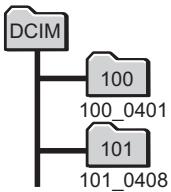
flowchart
graph TD
    A["DCIM"] --> B["100"]
    A --> C["101"]
    B --> D["100_0401"]
    C --> E["101_0408"]
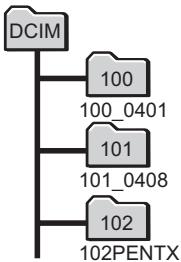
flowchart
graph TD
    A["DCIM"] --> B["100"]
    A --> C["100_0401"]
    A --> D["101"]
    A --> E["101_0408"]
    A --> F["102"]
    F --> G["102PENTX"]
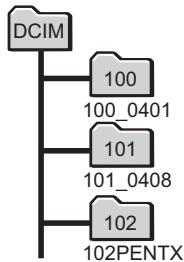
flowchart
graph TD
    A["DCIM"] --> B["100"]
    A --> C["100_0401"]
    A --> D["101"]
    A --> E["101_0408"]
    A --> F["102"]
    F --> G["102PENTX"]
natural_image
Black-and-white beach scene with palm trees and distant buildings under cloudy sky (no visible text or symbols)natural_image
Close-up of a black analog clock face with white hands and no visible text or symbols on the dial (no readable text or symbols beyond standard markings)10
11
natural_image
Black-and-white photo of a tabby cat on grass, no visible text or symbolsnatural_image
Black and white photo of a fluffy tabby cat sitting on grass (no text or symbols visible)For customers in USA STATEMENT OF FCC COMPLIANCE
This device complies with Part 15 of the FCC Rules. Operation is subject to the following two conditions: (1) This device may not cause harmful interference, and (2) this device must accept any interference received, including interference that may cause undesired operation.
Changes or modifications not approved by the party responsible for compliance could void the user's authority to operate the equipment.
This equipment has been tested and found to comply with the limits for a Class B digital device, pursuant to part 15 of the FCC Rules.
These limits are designed to provide reasonable protection against harmful interference in a residential installation. This equipment generates, uses and can radiate radio frequency energy and, if not installed and used in accordance with the instructions, may cause harmful interference to radio communications. However, there is no guarantee that interference will not occur in a particular installation.
If this equipment does cause harmful interference to radio or television reception, which can be determined by turning the equipment off and on, the user is encouraged to try to correct the interference by one or more of the following measures:
- Reorient or relocate the receiving antenna.
Increase the separation between the equipment and receiver.
Connect the equipment into an outlet on a circuit different from that to which the receiver is connected.
* Consult the dealer or an experienced radio/TV technician for help.
For customers in Canada
This Class B digital apparatus complies with Canadian ICES-003.
Perchlorate Material-special handling may apply. The lithium battery used in this camera contains perchlorate material, which may require special handling. See www.dtsc.ca.gov/hazardouswaste/perchlorate
Declaration of Conformity
According to 47CFR, Parts 2 and 15 for
Class B Personal Computers and Peripherals
We: PENTAX RICOH IMAGING AMERICAS CORPORATION
Located at: 633 17 ^th Street, Suite 2600, Denver, Colorado 80202, U.S.A. Phone: 800-877-0155 Fax: 303-790-1131
Declare under sole responsibility that the product identified herein complies with 47CFR Parts 2 and 15 of the FCC rules as a Class B digital device. Each product marketed is identical to the representative unit tested and found to be compliant with the standards. Records maintained continue to reflect the equipment being produced can be expected to be within the variation accepted, due to quantity production and testing on the statistical basis as required by 47CFR §2.909.
Operation is subject to the following two conditions: (1) This device may not cause harmful interference, and (2) This device must accept any interference received, including interference that may cause undesired operation. The above named party is responsible for ensuring that the equipment complies with the standards of 47CFR §15.101 to §15.109.
Product Name: Digital Camera
Model Number: PENTAX WG-10
Contact person: Customer Service Manager
Date and Place: January, 2013, Colorado
natural_image
Symbol of a trash bin crossed out by two diagonal lines (no text or numbers present)

natural_image
Symbol of a trash bin crossed out by two diagonal lines (no text or numbers present)AUTO PICT Image auto (mode)...... 81
Nocturne 89
Portrait nocturne 89
OK/DISPLAY ..... 56, 59
Bouton vert 148
Bouton vert ☐ 56, 59
Bracketing auto 📋 ...... 113
MedialImpression .....274
Mémo vocal 241
Mémoire 170
Mode portrait nocturne ..... 89
Mode programme 83
Mode programme image auto 81
Mode scène 74
Mode simple 84
Mode subaquatique ..... 158
Mode texte 98
Mode vert 84
Réglages DPOF ......234
Brand : PENTAX
Model : WG10
Category : Waterproof camera