
KASC111SI - Kitchen scale NEDIS - Free user manual and instructions
Find the device manual for free KASC111SI NEDIS in PDF.


| Product type | Digital kitchen scale |
| Brand | Nedis |
| Model | KASC111SI |
| Power supply | 1 AAA battery (not included) |
| Measurement units | kg, g, lb, oz |
| Functions | Zero (ZERO), tare (TARE), timer with alarm, temperature sensor, unit conversion |
| Temperature range | 0 to 40 °C, graduation 0.5 °C |
| Auto-off | After 2 minutes of inactivity (display at 0 or stable weight) |
| Manual off | ON/OFF button |
| Display type | Liquid crystal display (LCD) |
| Care and cleaning | Clean with a slightly damp cloth; do not immerse; avoid chemicals and acids |
| Safety precautions | Do not open the device; do not expose to water or moisture; use on a flat, hard surface |
| Warranty | Warranty void in case of modification or incorrect use |
Frequently Asked Questions - KASC111SI NEDIS
User questions about KASC111SI NEDIS
0 question about this device. Answer the ones you know or ask your own.
Ask a new question about this device
Download the instructions for your Kitchen scale in PDF format for free! Find your manual KASC111SI - NEDIS and take your electronic device back in hand. On this page are published all the documents necessary for the use of your device. KASC111SI by NEDIS.
USER MANUAL KASC111SI NEDIS
MANUALE (p. 22) KASUTUSJUHEND (Ik. 87)
MANUAL DE USO (p. 27) NÁVOD (s. 92)
MANUAL (p. 32) ROKASGRĀMATA (Ipp. 97)
HASZNÁLATI ÚTMUTATÓ (o. 37) NAUDOJIMO VADOVAS (102 p.)
natural_image
Close-up of a stainless steel kitchen scale with digital display showing temperature reading (no text or symbols on the bowl itself)AUTO SHUT-OFF
Auto shut-off occurs if the display shows "0" or shows the same weight reading for 2 minutes.

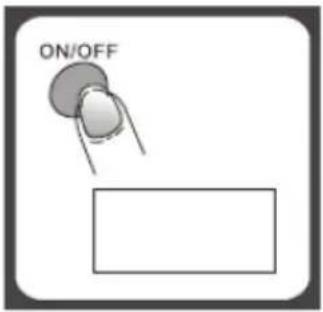
MANUAL SHUT-OFF
To maximize battery life, always press ON/OFF again to turn off the scale after using.
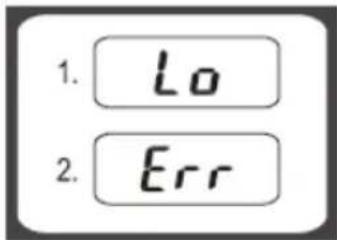
WARNING INDICATORS
1) Replace battery.
2) Scale overload. Remove item to avoid damage.
Maximum weight capacity is indicated on the scale.

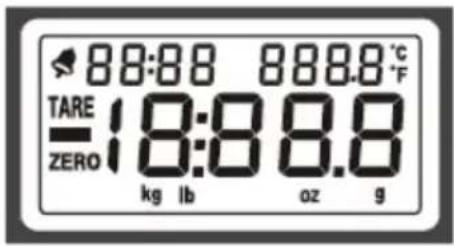
Alarm
kg: Kilograms
TARE: Tare weight
g: Grams
—: Negative value lb: Pounds
ZERO: Zero weight oz: Ounces
0000: Alarm timer °C/°F: Temperature
CLEANING AND CARE
- Clean the scale with a slightly damp cloth. DO NOT immerse the scale in water or use chemical/abrasive cleaning agents.
- All plastic parts should be cleaned immediately after contact with fats, spices, vinegar and strongly flavored/colored foods. Avoid contact with acids and citrus juices.
- Always use the scale on a hard, flat surface. DO NOT use on carpets.
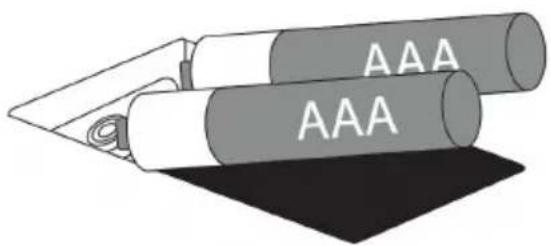
BATTERY
2x AAA 3 V (not included)

TO REPLACE THE BATTERY
Remove the battery compartment cover and attach a new battery onto the battery snaps. Please observe the polarity.
TO OPERATE THE SCALE
- Please put the scale on a hard and flat surface.
- Place the bowl (if used) on the scale before turning on the unit.
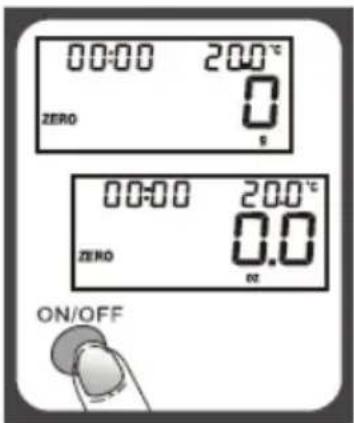
- Press and release the ON/OFF button to turn on the unit.
- Wait until the LCD shows all information.
TO CONVERT THE WEIGHT UNIT
If the scale has both Metric (kilograms, grams) and Imperial (pounds, ounces) measuring systems, you can press UNIT to convert between the two systems during the course of weighing.

"ZERO" OR "TARE" FUNCTION
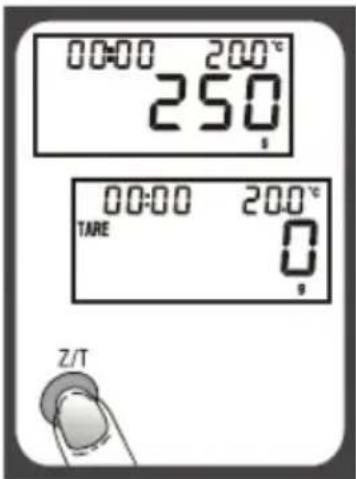
To weigh different loads consecutively without removing loads from the scale, put the first load on the scale and get the weight reading. Press the Z/T button to reset the LCD reading to "0" before adding the next load. You can repeat this operation.
The LCD will show “----” or “0g” each time Z/T is pressed. “----” means not stable, please wait for a moment. “0g” and a “ZERO” icon on the lower left corner of the LCD means the “ZERO” function is active. Maximum capacity remains unchanged.

The LCD will show “----” or “0g” each time Z/T is pressed. “----” means not stable, please wait for a moment. “0g” and a “TARE” icon on the upper left corner of the LCD means the “TARE” function is active. Maximum capacity is reduced by the total weight of all loads.
TO SET THE ALARM TIMER
- Press T-SET to confirm and go to the next digit.
- After setting the time span, press T-SET to start counting down.
- Press any key to stop counting down.
- Press T-SET to clear the time span.
- When the timer counts down to "00:00", the alarm will start beeping 60 times and the scale will automatically shut off.
- Maximum time span: 99:59.

flowchart
graph LR
    A["Press ON/OFF 00:00 25.0°"] -->|Press T-SET| B["0:00:--- 25.0°"]
    B --> C["Press ▲, ▼ to set time span 02:00 25.0°"]
TEMPERATURE SENSOR
- Current temperature is shown on the upper right corner of the LCD.
- Temperature range: 0–40 °C.
- Division: 0.5 °C.

Safety precautions:
To reduce risk of electric shock, this product should ONLY be opened by an authorized technician when service is required.
Disconnect the product from mains and other equipment if a problem should occur.
Do not expose the product to water or moisture.
Maintenance:
Clean only with a dry cloth.
Do not use cleaning solvents or abrasives.
Warranty:
No guarantee or liability can be accepted for any changes and modifications of the product or damage caused due to incorrect use of this product.
General:
Designs and specifications are subject to change without notice. All logos, brands and product names are trademarks or registered trademarks of their respective holders and are hereby recognized as such.
This manual was produced with care. However, no rights can be derived. Nedis can not accept liability for any errors in this manual or their consequences.
Keep this manual and packaging for future reference.
Attention:

This product is marked with this symbol. It means that used electrical and electronic products should not be mixed with general household waste. There is a separate collections system for these products.
This product has been manufactured and supplied in compliance with all relevant regulations and directives, valid for all member states of the European Union. It also complies to all applicable specifications and regulations in the country of sales.
Formal documentation is available upon request. This includes, but is not limited to: Declaration of Conformity (and product identity), Material Safety Data Sheet, product test report.
Please contact our customer service desk for support:
via website: http://www.nedis.com/en-us/contact/contact-form.htm
via e-mail: service@nedis.com
via telephone: +31 (0)73-5991055 (during office hours)
NEDIS B.V., De Tweeling 28, 5215 MC 's-Hertogenbosch, THE NETHERLANDS
AUTOMATISCHES AUSSCHALTEN
2x AAA 3 V (non incluse)

POUR REMPLACER LA PILE
WAARSCHUWINGSINDICATOREN
natural_image
Illustration of two cylindrical objects labeled 'AAA' with a folded paper or cable, placed on a dark surface (no text beyond labels)HET BEDIENEN VAN DE SCHAAL
"ZERO" (NUL) OF "TARE" (TARE) FUNCTIE
natural_image
Illustration of two rolled documents labeled 'AAA' on a dark surface (no additional text or symbols)PER FAR FUNZIONARE LA BILNACIA
natural_image
Illustration of two rolled documents labeled 'AAA' with a pen inserted, placed on a dark surface (no text beyond labels)A MÉRLEG HASZNÁLATA
MANUAALINEN SAMMUTUS
"ZERO" (NOLLAUS) TAI "TARE" (TAARA)-TOIMINTO
natural_image
Illustration of two rolled documents labeled 'AAA' (no additional text or symbols)FÖR ATT ANVÄNDA VÅGEN
FUNCTIA „ZERO" (ZERO) SAU „TARE" (RECIPIENT)
natural_image
Illustration of two cylindrical objects labeled 'AAA' with a pointed tip, no text or symbols presentnatural_image
Illustration of two rolled documents labeled 'AAA' (no additional text or symbols)BETJENING AF VÄGTEN
natural_image
Illustration of two cylindrical containers labeled 'AAA' with a folded cable, placed on a dark surface (no text or symbols beyond the label)BRUK AV VEKTEN
natural_image
Illustration of two cylindrical objects labeled 'AAA' with a folded ribbon, no text or symbols presentЭКСПЛУАТАЦИЯ ВЕСОВ
natural_image
Illustration of two cylindrical objects labeled 'AAA' with a folded ribbon, placed on a dark surface (no text or symbols beyond the label)TARTIYI ÇALIŞTIRMA
natural_image
Illustration of two rolled documents labeled 'AAA' (no additional text or symbols)KAALU KASUTAMINE
natural_image
Illustration of two rolled documents labeled 'AAA' (no additional text or symbols)OBSLUHA VÁHY
natural_image
Illustration of two rolled documents labeled 'AAA' with a folded paper, no text or symbols presentSVARSTYKLIŲ NAUDOJIMAS
natural_image
Illustration of two cylindrical objects labeled 'AAA' with a folded cable, placed on a dark surface (no text or symbols beyond the label)RUKOVANJE VAGOM
natural_image
Illustration of two cylindrical objects labeled 'AAA' with a folded paper or tape, placed on a dark surface (no text or symbols beyond the label)РАБОТА С ВЕЗНАТА
natural_image
Illustration of two cylindrical objects labeled 'AAA' with a pointed tip and base, no text or symbols present.UPRAVLJANJE S TEHTNICO
- AUTO SHUT-OFF
- MANUAL SHUT-OFF
- WARNING INDICATORS
- CLEANING AND CARE
- BATTERY
- TO REPLACE THE BATTERY
- TO OPERATE THE SCALE
- TO CONVERT THE WEIGHT UNIT
- "ZERO" OR "TARE" FUNCTION
- TO SET THE ALARM TIMER
- TEMPERATURE SENSOR
- Safety precautions:
- Maintenance:
- Warranty:
- General:
- Attention:
- AUTOMATISCHES AUSSCHALTEN
- POUR REMPLACER LA PILE
- WAARSCHUWINGSINDICATOREN
- HET BEDIENEN VAN DE SCHAAL
- "ZERO" (NUL) OF "TARE" (TARE) FUNCTIE
- PER FAR FUNZIONARE LA BILNACIA
- A MÉRLEG HASZNÁLATA
- MANUAALINEN SAMMUTUS
- "ZERO" (NOLLAUS) TAI "TARE" (TAARA)-TOIMINTO
- FÖR ATT ANVÄNDA VÅGEN
- FUNCTIA „ZERO" (ZERO) SAU „TARE" (RECIPIENT)
- BETJENING AF VÄGTEN
- BRUK AV VEKTEN
- ЭКСПЛУАТАЦИЯ ВЕСОВ
- TARTIYI ÇALIŞTIRMA
- KAALU KASUTAMINE
- OBSLUHA VÁHY
- SVARSTYKLIŲ NAUDOJIMAS
- RUKOVANJE VAGOM
- РАБОТА С ВЕЗНАТА
- UPRAVLJANJE S TEHTNICO
Brand : NEDIS
Model : KASC111SI
Category : Kitchen scale