S6PB20KC17 - Power bank Sandstrøm - Free user manual and instructions
Find the device manual for free S6PB20KC17 Sandstrøm in PDF.


| Product Type | Portable Charger / Power Bank |
| Model | S6PB20KC17 |
| Brand | Sandstrøm |
| Battery Type | Lithium-ion |
| Capacity | 20100 mAh |
| Input | 5V ⎓ 2.5A |
| Output USB Type-C | 5V ⎓ 3A |
| Output Quick Charge (USB-A) | 5V ⎓ 3A / 9V ⎓ 1.67A / 12V ⎓ 1.25A |
| Number of Devices | Up to 2 simultaneously |
| Charging Time | Approximately 8 hours |
| Dimensions (L x W x H) | 61.5 x 20.9 x 168 mm |
| Net Weight | 400 g |
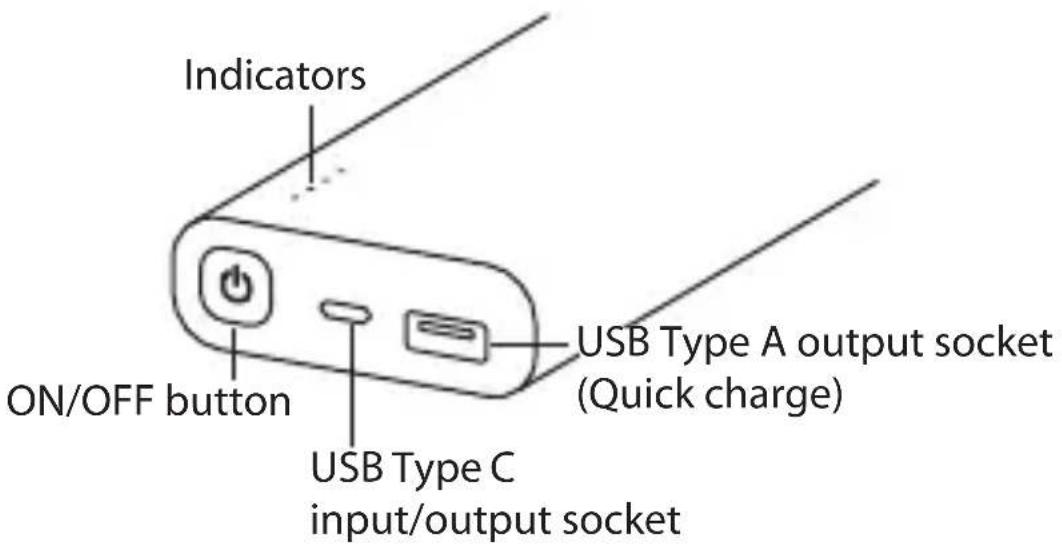
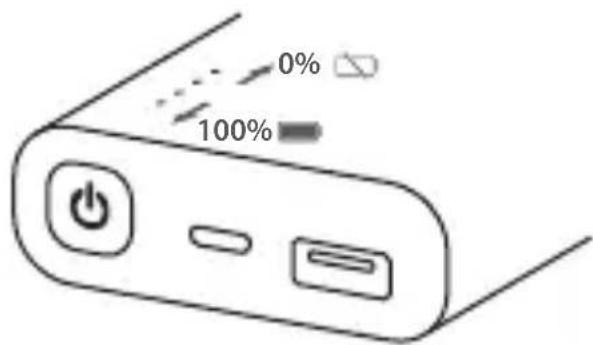
| Battery Level Indicator | LED indicators (4 levels) |
| ON/OFF Button | Yes, press to check battery or start charging |
| USB Type-C Port | Bidirectional (input/output) |
| USB Type-A Output Port | Quick Charge 3.0 compatible |
| Safety Features | Overcharge protection, short-circuit protection, temperature control |
| Compatible Devices | Smartphones, tablets, cameras, and other USB-powered devices |
| Disposal | Do not dispose with household waste; recycle at designated collection points |
| Manual Languages | English, Norwegian, Swedish, Finnish |
Frequently Asked Questions - S6PB20KC17 Sandstrøm
User questions about S6PB20KC17 Sandstrøm
0 question about this device. Answer the ones you know or ask your own.
Ask a new question about this device
Download the instructions for your Power bank in PDF format for free! Find your manual S6PB20KC17 - Sandstrøm and take your electronic device back in hand. On this page are published all the documents necessary for the use of your device. S6PB20KC17 by Sandstrøm.
USER MANUAL S6PB20KC17 Sandstrøm
20100mAh Portable Charger
natural_image
Black rectangular power bank with two ports labeled 'SINKOUT' and 'DECKS/SMOCK OUT', no visible text or symbols on body.GB Contents
Safety Warnings....5
Product Overview......8
Charging the Powerbank 9
Charging Your Digital Devices....9
Specifications.... 10
NO Innhold
- Do not drop, tamper, disassemble or attempt to repair the unit by yourself.
- Do not immerse it in water or expose it to wet conditions.
- Do not expose it to fire or any heat source.
- Do not dispose the unit in your household waste.
- Before charging, please refer to the user's manual of your specific device for manufacture's required charging amperage and determine the appropriate charging cable for your device.
- Always insert the USB device in the correct direction. Failure to do so may result in damage to the USB device and this unit.
- Only use with products designed to be powered or charged via a USB socket.
- Do not use with a damaged USB charging cable as it can cause overheating and damage to your device.
While in use
- Unwind the cable to its full length.
- Never wrap the cable around the unit, or coil it together or leave it tangled. Doing so may result to product damage and related hazards.
- Do not charge the Powerbank and charge a digital device at the same time. This will shorten the Powerbank's battery life.
NO Sikkerhetsadvarsler
Thank you for purchasing your new product.
We recommend that you spend some time reading this instruction manual in order that you fully understand all the operational features it offers. You will also find some hints and tips to help you resolve any issues.
Read all the safety instructions carefully before use and keep this instruction manual for future reference.
Product Overview
Battery Status
Check the power level by pressing the ON/OFF button. Indicators will show the battery level.
GB
Charging the Powerbank
While charging, the indicators will flash. When fully charged, the indicator will light up steadily.

natural_image
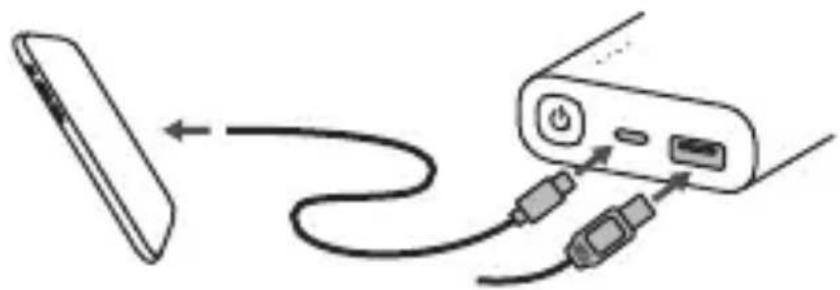
Diagram showing connection between two devices via cable, no text or symbols presentCharging Your Digital Devices
Press the ON/OFF button to start charging if it does not start automatically.
natural_image
Diagram showing cable routing from a remote device to a device with ports and cables (no text or symbols)Specifications
GB
| Battery type Lithium ion | |
| Capacity 20100mAh | |
| Input 5V | == 2.5A |
| Output USB Type-C: 5V | ==3A |
| Quick charge: 5V==3A | |
| 9V== 1.67A | |
| 12V== 1.25A | |
| You may charge up to 2 devices at the same time, sharing a maximum output current. | |
| Charging time About 8 hours | |
| Dimension (L x W x H) | 61.5 x 20.9 x 168 mm |
| Net Weight 400 g | |
Features and specifications are subject to change without prior notice.

natural_image
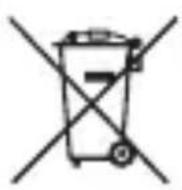
Symbol of a trash bin crossed with a diagonal line, no text or numbers presentThe symbol on the product or its packaging indicates that this product must not be disposed of with your other household waste. Instead, it is your responsibility to dispose of your waste equipment by handing it over to a designated collection point for the recycling of waste electrical and electronic equipment. The separate collection and recycling of your waste equipment at the time of disposal will help conserve natural resources and ensure that it is recycled in a manner that protects human health and the environment.
For more information about where you can drop off your waste for recycling, please contact your local authority, or where you purchased your product.
GB
Notes for battery disposal
The batteries used with this product contain chemicals that are harmful to the environment.
To preserve our environment, dispose of used batteries according to your local laws or regulations. Do not dispose of batteries with normal household waste.
For more information, please contact the local authority or your retailer where you purchased the product.
Takk for at du kjøpte ny produktet.
natural_image
Diagram showing connection between a device with cable and power button (no text or symbols)Lade dine digitale enheter
natural_image
Diagram showing cable routing from a device to a device via cable (no text or symbols)Specifications
NO
natural_image
Symbol of a trash bin crossed with a diagonal line, no text or numbers presentnatural_image
Diagram showing connection between a power adapter and a device via cable (no text or symbols)Ladda dina digitala enheter
natural_image
Diagram showing cable routing from a device to a device via cables (no text or symbols)Specifikationer
natural_image
Symbol of a trash bin crossed with a diagonal line and a black rectangular block below (no text or labels)natural_image
Diagram showing connection between a power outlet and a device via cable (no text or symbols)FI
natural_image
Diagram showing cable connection between a remote device and a control panel (no text or symbols)Tekniset tiedot
natural_image
Symbol of a trash bin crossed with no visible text or labelsnatural_image
Diagram showing connection between a power plug and a remote device via cable (no text or symbols)natural_image
Diagram showing cable routing from a device to a device via cables (no text or symbols)Specifikationer
natural_image
Symbol of a trash bin crossed with a diagonal line, no text or numbers present- 20100mAh Portable Charger
- GB Contents
- NO Innhold
- While in use
- NO Sikkerhetsadvarsler
- Thank you for purchasing your new product.
- Product Overview
- Battery Status
- Charging the Powerbank
- Charging Your Digital Devices
- Specifications
- Notes for battery disposal
- Takk for at du kjøpte ny produktet.
- Lade dine digitale enheter
- Ladda dina digitala enheter
- Specifikationer
- Tekniset tiedot
Brand : Sandstrøm
Model : S6PB20KC17
Category : Power bank