
ORT-3-10-H - Dehumidifier Orima - Free user manual and instructions
Find the device manual for free ORT-3-10-H Orima in PDF.


| Brand | Orima |
| Model | ORT-3-10-H |
| Product Type | Portable Air Purifier |
| Dimensions (L x W x H) | 25 cm x 25 cm x 40 cm |
| Weight | 3.0 kg |
| Power Supply | 220-240V ~ 50/60Hz |
| Power Consumption | 50 W |
| Coverage Area | Up to 30 m² |
| Filtration System | Pre-filter, HEPA filter, Activated Carbon filter |
| Fan Speeds | 3 speed levels |
| Timer | 2, 4, 8 hours |
| Noise Level | 30 - 50 dB |
| Control Type | Touch panel with LED indicators |
| Auto Mode | Yes, with air quality sensor |
| Filter Replacement Indicator | Yes |
| Additional Functions | Negative ion generator, Night mode |
| Maintenance | Clean pre-filter every 2 weeks; replace HEPA filter every 6-12 months |
| Safety Features | Overheat protection, child lock |
| Spare Parts Available | Replacement filters (HEPA and activated carbon) |
| Warranty | 2 years |
Frequently Asked Questions - ORT-3-10-H Orima
User questions about ORT-3-10-H Orima
0 question about this device. Answer the ones you know or ask your own.
Ask a new question about this device
Download the instructions for your Dehumidifier in PDF format for free! Find your manual ORT-3-10-H - Orima and take your electronic device back in hand. On this page are published all the documents necessary for the use of your device. ORT-3-10-H by Orima.
USER MANUAL ORT-3-10-H Orima
natural_image
Black-and-white photo of a young woman holding a small object with a glowing smoke (no text or symbols visible)
natural_image
Black-and-white portrait of a person with short hair and a headband, no visible text or symbols
natural_image
Woman in white shirt pointing to a steam emerging from her hand, with smoke visible in background (no text or symbols)
natural_image
Black-and-white photo of a smiling woman holding a small glass, no visible text or symbols
natural_image
Black-and-white close-up of a smiling person with hands reaching toward the face, surrounded by soft white foam-like bubbles (no text or symbols visible)

natural_image
Black-and-white photo of a woman meditating outdoors with clouds and a small building in the background (no text or symbols visible)
Orima®
electrodomésticos
MANUAL DE INSTRUÇÕES INSTRUCTION MANUAL
natural_image
White orima portable air purifier with circular perforated grille and black base (no text or symbols visible)ORT 3-10 -H

natural_image
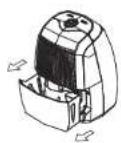
Line drawing of a portable air fryer with handle and side panel, labeled Fig.5 (no text or symbols on diagram)natural_image
Line drawing of a portable air fryer device with an upward arrow indicating motion (no text or symbols)- Vaze a água.

Fig.7

natural_image
Diagram of a portable solar panel with attached cable and indicator lights (no text or labels)Retire a tampa de borracha.
natural_image
Diagram of a portable solar panel with attached cable and indicator lights (no text or labels)natural_image
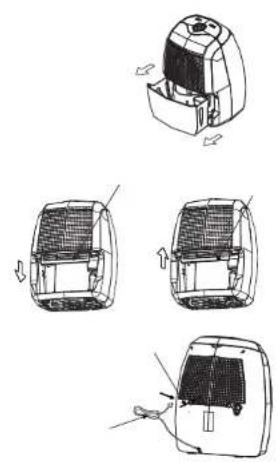
Line drawing of a portable air purifier with a grid cover and attached circuit breaker (no text or symbols)Fig.9a
natural_image
Line drawing of a portable air purifier with a mesh cover and cord (no text or symbols)Fig.9b
natural_image
Technical line drawing of a mechanical device with internal components and directional arrows indicating movement (no text or symbols)Fig. 10
natural_image
Technical line drawing of a car interior with structural details and a directional arrow (no text or symbols)Fig. 11
natural_image
Technical line drawing of a vehicle interior with a mesh grille and directional arrow (no text or symbols)Fig. 12


natural_image
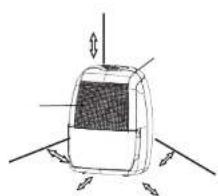
Diagram of a device with labeled components and directional arrows, no readable text or symbols present.





Brand : Orima
Model : ORT-3-10-H
Category : Dehumidifier