S1RADWW11E - Radio Sandstrøm - Free user manual and instructions
Find the device manual for free S1RADWW11E Sandstrøm in PDF.


| Product Type | Portable AM/FM Radio |
| Model | S1RADWW11E |
| Brand | Sandstrøm |
| Dimensions (approx.) | 200 mm x 120 mm x 60 mm |
| Weight (approx.) | 0.5 kg |
| Power Source | 2 x AA batteries (not included) or AC adapter (not included) |
| Battery Life (approx.) | Up to 30 hours |
| Radio Bands | FM 87.5–108 MHz, AM 530–1710 kHz |
| Tuning Method | Digital tuner with automatic seek |
| Display | LCD screen with time and frequency |
| Alarm Function | Yes, with alarm and sleep timer |
| Audio Output | Built-in speaker (max 1W) |
| Headphone Jack | 3.5 mm stereo jack |
| Antenna | Extendable rod antenna for FM |
| Volume Control | Rotary knob |
| Power Indicator | LED power-on light |
| Maintenance | Clean with a soft, dry cloth. Do not use liquids. |
| Safety Precautions | Do not expose to water or moisture. Use only specified batteries. Keep away from heat sources. |
| Spare Parts & Repairability | No spare parts available from manufacturer. Repairs recommended only by qualified personnel. |
Frequently Asked Questions - S1RADWW11E Sandstrøm
User questions about S1RADWW11E Sandstrøm
0 question about this device. Answer the ones you know or ask your own.
Ask a new question about this device
Download the instructions for your Radio in PDF format for free! Find your manual S1RADWW11E - Sandstrøm and take your electronic device back in hand. On this page are published all the documents necessary for the use of your device. S1RADWW11E by Sandstrøm.
USER MANUAL S1RADWW11E Sandstrøm
FM Radio with USB MP3 Playback
Instruksjonsmanual
FM-radio med USB MP3-avspilling
Instruktionsbok
Safety Warnings....7
Unpacking....8
Product Overview....9
Front View....9
Top View....10
Rear View....10
Power Source 11
Mains Power....11
Memory Backup .... 11 -Handling the Batteries .... 11
Connections 12
Using Earphones 12
Playing music from an Audio Device....12
Playing MP3's from a USB Device....13
Basic Operation....14
Powering ON/OFF 14
Selecting Modes....14
Adjusting the Volume....14
Setting the Clock....14
Setting the Alarm....15
Activating the Alarm Function....15
Automatic Alarm Repeat....16
Snooze Function 16
Sleep Function 16
Display Backlight....16
Radio Operation 17
Auto Scan....17
Manual Scan 17
Adjusting the Volume....17
Audio Mode 17
Presetting Stations 17
Recalling a Preset Station....17
Playing MP3's from a USB Device 18
Maintenance 18
Hints and Tips....19
Specifications....19
Innhold
NO
Adjusting the Volume 26
Stille inn alarmen 27
- Read all the instructions carefully before using the unit and keep them for future reference.
- Retain the manual. If you pass the unit onto a third party make sure to include this manual.
- Check that the voltage marked on the rating label matches your mains voltage.
Damage
- Please inspect the unit for damage after unpacking.
- Do not continue to operate the unit if you are in any doubt about it working normally, or if it is damaged in any way - switch off, withdraw the mains adapter and consult your dealer.
Location of Unit
- The unit must be placed on a flat stable surface and not subjected to vibrations.
- Do not place the unit on sloped or unstable surfaces as the unit may fall off or tip over.
- The mains socket must be located near the unit and should be easily accessible.
• This unit is designed for indoor use only.
Temperature
- Avoid extreme degrees of temperature, either hot or cold. Place the unit well away from heat sources such as radiators or gas / electric fires.
- Avoid exposure to direct sunlight and other sources of heat.
Naked Flames
- Never place any type of candle or naked flame on the top of or near the unit.
Moisture
• To reduce the risk of fire, electric shock or product damage, do not expose this unit to rain, moisture, dripping or splashing. No objects filled with liquids, such as vases, should be placed on the unit.
- If you spill any liquid into the unit, it can cause serious damage. Switch it off at the mains immediately. Withdraw the mains plug and consult your dealer.
Ventilation
- To prevent the risk of electric shock or fire hazard due to overheating, ensure that curtains and other materials do not obstruct the ventilation vents.
- A minimum distance of 5cm around the unit should be maintained to allow for sufficient ventilation.
- Do not install or place this unit in a bookcase, built-in cabinet or in another confined space. Ensure the unit is well ventilated.
Safety
- Always disconnect the unit from the mains supply before connecting / disconnecting other devices or moving the unit.
- Unplug the unit from the mains socket during a lightning storm.
- In the interests of safety and to avoid unnecessary energy consumption, never leave the unit switched on while unattended for long periods of time, e.g. overnight, while on holiday or while out of the house. Switch it off and disconnect the mains plug from the mains socket.
Mains Cable
- Make sure the unit or unit stand is not resting on top of the mains cable, as the weight of the unit may damage the mains cable and create a safety hazard.
- If the mains cable is damaged it must be replaced by the manufacturer, its service agent, or similarly qualified persons in order to avoid a hazard.
Interference
- Do not place the unit on or near appliances which may cause electromagnetic interference. If you do, it may adversely affect the working of the unit, and cause a distorted sound.
Batteries
- Batteries used in the unit are easily swallowed by young children and this is dangerous.
- Keep loose batteries away from young children and make sure that the battery holder tray is secure in the unit. Seek medical advice if you believe a cell has been swallowed.
- Please dispose of batteries correctly by following the guidance in this manual.
- Do not expose the battery to direct sunlight or sources of excessive heat.
Supervision
- Children should be supervised to ensure that they do not play with the unit.
- Never let anyone especially children push anything into the holes, slots or any other openings in the case - this could result in a fatal electric shock.


The lightning flash with arrowhead symbol, within an equilateral triangle, is intended to alert the user to the presence of uninsulated "dangerous voltage" within the unit's enclosure that may be of sufficient magnitude to constitute a risk of electric shock.

The exclamation point within an equilateral triangle is intended to alert the user to the presence of important operating and maintenance (servicing) instructions in the manual accompanying the unit.
Service
- To reduce the risk of electric shock, do not remove screws. The unit does not contain any user-serviceable parts. Please leave all maintenance work to qualified personnel.
- Do not open any fixed covers as this may expose dangerous voltages.
Maintenance
- Ensure to unplug the unit from the power supply before cleaning.
- Do not use any type of abrasive pad or abrasive cleaning solutions as these may damage the unit's surface.
- Do not use liquids to clean the unit.
Sikkerhetsadvarsler
NO
Thank you for purchasing your new Sandstrøm FM Radio with USB MP3 Playback.
We recommend that you spend some time reading this instruction manual in order that you fully understand all the operational features it offers. You will also find some hints and tips to help you resolve any issues.
Read all the safety instructions carefully before use and keep this instruction manual for future reference.
Unpacking
Remove all items from the packaging. Retain the packaging. If you dispose of it please do so according to local regulations.
The following items are included:

The Unit Instruction Manual

Product Overview
Front View
GB

- LCD Screen
- CLOCK Button
- MODE Button
- ALARM Button
- BACKLIGHT Button
- Standby Indicator
- STANDBY ⏻ Button
- PLAY/PAUSE Button
-
Preset + Button
-
VOLUME/TUNE Control
- MEMORY Button
- Preset - Button
- Earphones Socket
- USB IN Port
- NEXT▶▶Button
- PREVIOUS Button
- SLEEP Button
- MUTE Button
Top View
GB
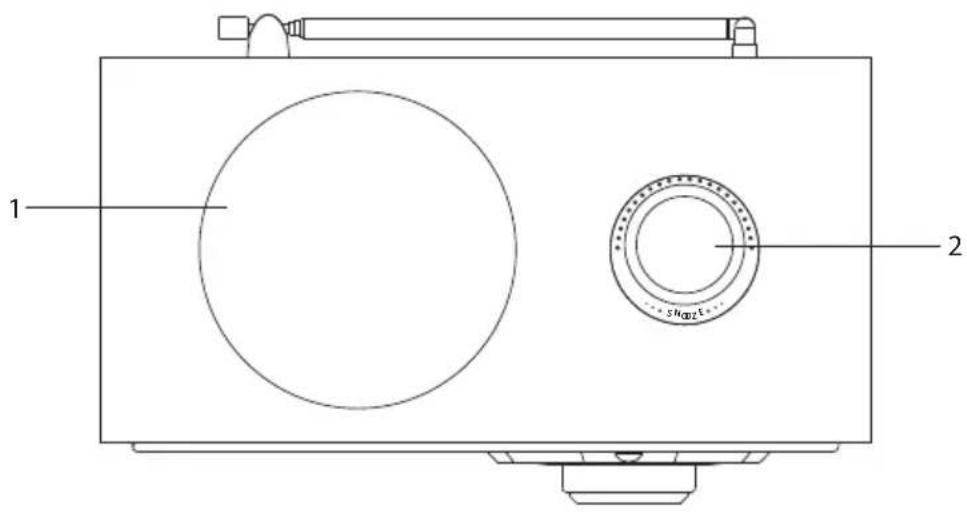
- Speaker
- SNOOZE Button
Rear View
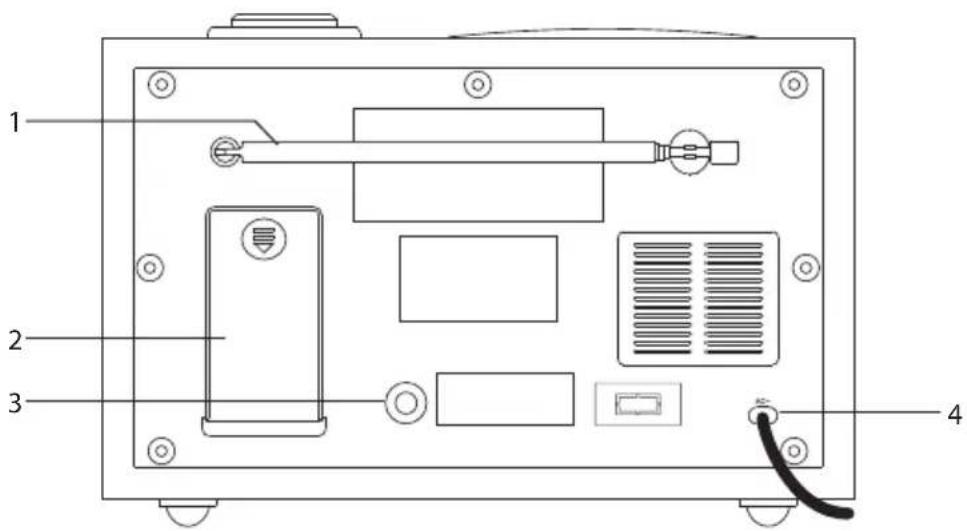
-
FM Aerial
-
AUX IN Socket
-
Battery Compartment
-
Mains Cable
Power Source
Mains Power
Connect the mains cable at the rear of the unit to the mains socket.
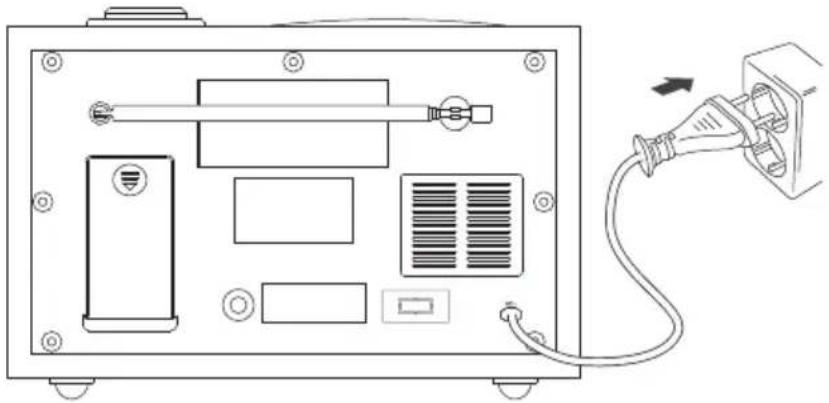
natural_image
Line drawing of an electronic device back panel with connectors and a cable inserted (no text or symbols)Memory Backup
This radio incorporates a battery back up circuit that will keep the clock running in the event of a temporary power interruption.
Insert 2 x 1.5V UM-3, AA or equivalent batteries into the battery compartment located at the back of the cabinet. For best results, replace with fresh batteries every 9 to 12 months. Do not mix old and new batteries or different types of batteries such as alkaline and carbon-zinc batteries together.

natural_image
Diagram of a device rear panel with labeled ports and an arrow indicating a component (no text or symbols present)
This battery is only for clock operation memory backup during power interruption. You cannot operate the unit with only battery power.
Handling the Batteries
- Improper or incorrect use of batteries may cause corrosion or battery leakage, which could cause personal injury or damage to property.
- Install the batteries correctly by following the polarity (+ and -) indications in the battery compartment.
- Use only the types of the batteries which are indicated in this manual.
- Do not install new batteries with used ones and do not mix different types of batteries.
- Do not dispose of the used batteries as domestic waste. Dispose of them in accordance with local regulations.
Connections
GB
Using Earphones
Turn down the volume before connecting the earphones. Slowly raise the volume with the earphones on until you reach your desired volume. When earphones are connected, the speaker is automatically muted.


Long-term exposure to loud music may cause hearing damage. It is best to avoid extreme volume when using earphones, especially for extended periods of time.
Playing music from an Audio Device
When an audio device is connected to the unit, the AUX IN function will be automatically selected. The AUX IN indicator on the front of the unit will illuminate. The audio will be switched to the AUX input signal.


The L/R audio input from audio devices will automatically combined to one single channel to suit the single speaker design for this unit.
Playing MP3's from a USB Device
When a USB device is connected to the unit, press the MODE button to select USB mode. The music will be played automatically.

GB

- If your USB device is loaded with MP3's but the display keeps on showing 'NO DATA' on the display, the format of your USB device might not be compatible with the unit.
- The unit can support USB devices with up to 16GB of memory.
- The unit may not compatible with all USB devices, this is not an indication of a problem with the unit.
Basic Operation
GB
Powering ON/OFF
When you first connect the unit to the mains socket. The unit will be in STANDBY mode and the standby indicator will illuminate.
- Press the STANDBY ⏻ button to switch the unit on.
- Press the STANDBY ⏻ button to switch the unit back to standby mode.
- Disconnect the mains plug from the mains socket if you want to switch the unit off completely.

If the unit is idle for more than 10 mins, it will automatically switch to standby mode.
Selecting Modes
Press the MODE button to switch between TUNER, USB and AUX modes.
Adjusting the Volume
- Adjust the volume to the desired level by turning the VOLUME / TUNE control.
- If you wish to turn the sound off temporarily, press the MUTE button.
- Press the MUTE button again or turn the VOLUME / TUNE control to resume normal listening.
Setting the Clock
When the radio is connected to the mains socket for the first time, the standby indicator will illuminate and the display will show "0:00" (24-Hour Version).
- To set the clock, press and hold the CLOCK button.
-
Press the ◄◀◀▶buttons to select 12-hour or 24-hour format. Press the CLOCK button to confirm.
-
Press the buttons repeatedly to adjust the hour digits. Press the CLOCK button to confirm.
-
Press the ◀◀◀▶buttons repeatedly to adjust the minute digits. Press the CLOCK button to confirm.
-
The clock setting is now complete.
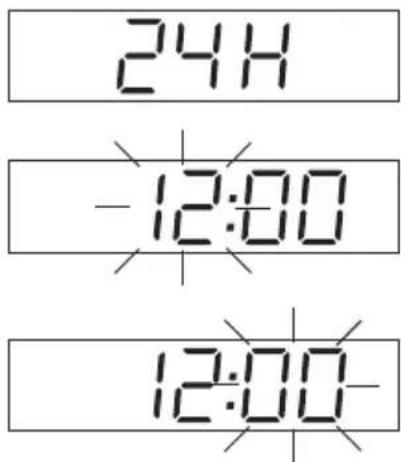

The clock can only be set in Standby mode. The display will show the correct time whenever the radio is in Standby mode (Standby indicator is ON) or when the USB or AUX IN function is selected.
Setting the Alarm
- While in standby mode, press and hold the ALARM button to set the alarm. The 🔗 icon will show on the display.
- Press the button is repeatedly to adjust the hour digits. Press the ALARM button to confirm.
- Press the ◄◀◀▶buttons repeatedly to adjust the minute digits. Press the ALARM button to confirm.
- Press the ◀◀◀▶buttons to select alarm volume level. Press the ALARM button to confirm.
- Press the I◀◀▶Buttons to select preset radio station. Press the ALARM button to confirm.
- Press the ◄◀◀▶buttons to select buzzer tone (Hi/Lo). Press the ALARM button to confirm.
- The alarm setting is now complete.


To check your preset alarm time, press the ALARM button at anytime.
Activating the Alarm Function
- To activate the alarm function, press the ALARM button repeatedly. The alarm wake-up modes will be displayed and switch as the sequence below on every press:

flowchart
graph LR
    A["OFFTUNER"] --> B["SBBUZZER"]
    B --> C[" "]
    C --> D[" "]
- When the display shows your desired alarm wake-up mode, stop pressing the ALARM button. The alarm function is now activated and an alarm icon will be displayed.
- When the alarm time is reached, the selected wake-up mode will be on and the alarm icon in the display will flash to indicate that the alarm is triggered. To disable the alarm function, press the STANDBY button.

If USB mode is selected, but no USB is inserted or the music files cannot not be played, it will automatically switch to Buzzer mode.
Automatic Alarm Repeat
The alarm will automatically repeat each day at the selected time as long as the 🔊 icon is displayed. To cancel this function, press the ALARM button repeatedly until "OFF" is shown on the display.
Snooze Function
When the alarm has triggered, press the SNOOZE button to temporarily switch off the alarm for 5 minutes. The display will show "SNOOZE" to indicate that snooze function is on. Snooze function will continue for 1 hour from the set alarm time.
Sleep Function
This function allows you to programme the unit to turn to standby mode by itself after a set sleep time.
- To activate the sleep function, press the SLEEP button repeatedly. The SLEEP indicator will show on the display. The time will switch as the sequence below on every press:

- When your desired sleep time appears in the display, stop pressing the button and the sleep function will be activated in two seconds.
- When the sleep timer counts to zero, the unit will turn to standby mode. To turn the sleep function off while the sleep timer is still counting down, press the SLEEP button repeatedly until "OFF" is shown on the display. The SLEEP indicator will disappear.
- Press the SLEEP button once to show the sleep timer status on the display when it is turned on.
Display Backlight
During ON mode, press the BACKLIGHT button to turn on/off the brightness of the display. Once the unit is switched on, the backlight will be on.
The unit will reset back to the default setting every time the unit is switched to standby mode.
Radio Operation
Press the MODE button repeatedly to select TUNER mode.
Auto Scan
To search for an FM station, press and hold the I◄◄► buttons to start the auto scan. Once a station has been found, the scanning will stop automatically.
TUNER

Manual Scan
To search for FM stations manually, press the◀buttons until your desired station is reached.

Alternatively, press the VOLUME / TUNE control, then turn it to adjust the frequency.
Adjusting the Volume
Turn the VOLUME / TUNE control to adjust the volume.
Audio Mode
- The unit will automatically switch between stereo and mono mode, when auto mode is selected but you can override this and switch this function manually by changing it to mono mode. This is helpful when receiving poor signal reception.
- During stereo reception, the received L/R stereo sound will be automatically combined into one single channel to suit the single speaker design of this radio.
Presetting Stations
You can store up to 10 of your favourite FM stations to the memory. This will enable you to access your favourite stations quickly and easily.
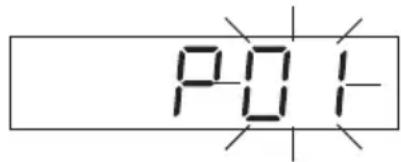
- To store a preset, you must first be listening to the station that you would like to save, press the MEMORY button. The display will show "P#", and the preset number will flash.
- Press the +/- buttons to select your desired station preset number.
- Press the MEMORY button to confirm your station, the display will show "P#".
Recalling a Preset Station
Once you have saved a station, you can recall it by pressing the +/- button, then select your desired preset number.
Playing MP3's from a USB Device
- Press the MODE button repeatedly to select USB function, the display will show "NO DATA" (if no USB device is inserted).
- Connect your USB device to the USB port on the front of the unit. "NO DATA" will disappear from the display.
- Found MP3 tracks will playback automatically from the USB device and the display will show "USB"
- Press the PAUSE ▶II button to pause playback, and the "USB" will flash. Press again to resume playback.
- Press the PREVIOUS ◀◀ button to move back to the beginning of the current track.
- Press the NEXT ▶▶I button to move forward to the next track.


Maintenance

Ensure to unplug the unit from the mains socket before cleaning.
• To clean the unit, wipe the case with a slightly moist, lint-free cloth.
- Do not use any cleaning fluids containing alcohol, ammonia or abrasives.
- Do not spray aerosol at or near the unit.
Hints and Tips
If a problem does occur, it may often be due to something very minor. The following table contains various tips.
| Problem Solution | |
| No Sound Adjust the volume control, it may not be turned up. | |
| Static Sound Signal reception is too low. Adjust the aerial or move the unit to a stronger signal location. | |
| Sound is distorted Volume is too high. Adjust the volume control. | |
| Desired station not found Poor reception. Adjust the position of the aerial. | |
| The LCD display is blank This may occur if the broadcaster changes the label of a service or removes a label while tuned. The unit will try to retune or perform a scan. | |
Specifications
| Model S1RADB11E / S1RADW11E / S1RADWN11E | |
| Power Supply AC 230V | 50Hz |
| Output Power 5.0W | |
| Frequency FM 88 – 108 MHz | |
| USB Interface USB 1.1 (USB hub not supported)USB 1.1 FlashUSB 2.0 High-speed Flash | |
| USB Memory Support up to 16GB | |
| Weight: 1.4kg | |
| Dimensions: | 220mm(L) x 112.5mm(W) x 135mm(H) |
Features and specifications are subject to change without prior notice.
Sett forfra

- LCD-skjerm
- KLOKKE-knapp
- MODUS-knapp
- ALARM-knapp
- BAKLYS-knapp
- Hvilemodus-indiaktor
- VENTEMODUS ⏻ -knapp
- SPILL AV/PAUSE-knapp
-
Forhåndsinnstilling +-knapp
-
VOLUM/S∅K-kontroll
- MINNE-knapp
- Forhåndsinnstilling - -knapp
- ∅retelefon-kontakt
- USB IN-port
- NESTE▶▶-knapp
- FORRIGE ◀-knapp
- SOV-knapp
- DEMPE-knapp
Sett ovenfra
NO

natural_image
Line drawing of an electronic device back panel with connectors and a cable inserted (no text or symbols)NO
natural_image
Diagram of an electronic device rear panel with labeled ports and a directional arrow indicating movement (no text or symbols present)

Adjusting the Volume
Enheten Instruktionsbok
Frontvy

- LCD-skärm
- KLOCK-knapp
- LÄGE-knapp
- ALARM-knapp
- BAKGRUNDSBELYSNINGS-knapp
- Standby-indikator
- STANDBY knapp
- SPELA/ PAUS -knapp
-
Förinställning + knapp
-
VOLYM/FININSTÄLLNING-kontroll
- MINNES-knapp
- Förinställning - knapp
- Hörlursuttag
- USB IN Port
- NÄSTA knapp
- FÖREGÄENDE knapp
- Insomning-knapp
- MUTE-knapp
Vy ovanifrån

- Högtalare
- SLUMRINGS-knapp
Bakre vy

-
FM antenn
-
AUX IN kontakt
-
Batterifack
-
Nätsladd
Strömkälla
Elnät
natural_image
Line drawing of an electronic device back panel with connectors and a cable inserted, no text or symbols presentSE
Säkerhetskopiering minne
natural_image
Diagram of a computer monitor rear panel with labeled ports and an arrow indicating a component (no text or symbols present)
SE

Laite Käyttöopas
natural_image
Line drawing of an electronic device back panel with connectors and a cable inserted (no text or symbols)FI
Muistin varmistus
natural_image
Diagram of a computer monitor rear panel with labeled ports and an arrow indicating a component (no text or symbols present)
FI

Produktoversigt
Set forfra

- LCD skærm
- Ur knap
- TILSTAND knap
- ALARM knap
- BAGGRUNDSLYS knap
- Standby Indikator
- STANDBY knap
- AFSPIL/ PAUSE knap
-
Forindstillet kanal + knap
-
LYDSTYRKE/INDSTILLINGSKNAP
- HUKOMMELSE knap
- Forindstillet kanal - knap
- Høretelefonstik
- USB IN stik
- NÆSTE▶ knap
- FORRIGE knap
- DVALE knap
- LYD FRA knap
Set oppefra

natural_image
Line drawing of an electronic device back panel with connectors and a cable inserted, no text or symbols presentDK
natural_image
Back panel diagram showing internal components with no visible text or symbols
DK

natural_image
Line drawing of an electronic device back panel with connectors and a cable inserted into a socket (no text or symbols)Záloha paměti
natural_image
Back view diagram of a computer chassis showing internal components and a battery with an arrow pointing to a device (no text or labels present)
CZ
natural_image
Line drawing of an electronic device back panel with connectors and a cable inserted, no text or symbols presentnatural_image
Diagram of a computer monitor rear panel with labeled ports and an arrow indicating a component (no text or symbols present)

natural_image
Symbol of a trash bin crossed with a diagonal line, no text or numbers presentGB
This symbol on the product or in the instructions means that your electrical and electronic equipment should be disposed at the end of its life separately from your household waste. There are separate collection systems for recycling in the EU.
For more information, please contact the local authority or your retailer where you purchased the product.
NO
- Innhold
- Damage
- Location of Unit
- Temperature
- Naked Flames
- Moisture
- Ventilation
- Safety
- Mains Cable
- Interference
- Batteries
- Supervision
- Service
- Maintenance
- Sikkerhetsadvarsler
- Unpacking
- Product Overview
- Front View
- Top View
- Rear View
- Power Source
- Mains Power
- Memory Backup
- Handling the Batteries
- Connections
- Using Earphones
- Playing music from an Audio Device
- Playing MP3's from a USB Device
- Basic Operation
- GB
- Powering ON/OFF
- Selecting Modes
- Adjusting the Volume
- Setting the Clock
- Setting the Alarm
- Activating the Alarm Function
- Automatic Alarm Repeat
- Snooze Function
- Sleep Function
- Display Backlight
- Radio Operation
- Auto Scan
- Manual Scan
- Audio Mode
- Presetting Stations
- Recalling a Preset Station
- Hints and Tips
- Specifications
- Sett forfra
- Sett ovenfra
- Frontvy
- Vy ovanifrån
- Bakre vy
- Strömkälla
- Elnät
- Säkerhetskopiering minne
- Muistin varmistus
- Produktoversigt
- Set forfra
- Set oppefra
- Záloha paměti
- NO
Brand : Sandstrøm
Model : S1RADWW11E
Category : Radio