40F2VSAT - Television XD - Free user manual and instructions
Find the device manual for free 40F2VSAT XD in PDF.


| Product Type | Full HD LED TV |
| Brand | XD |
| Model | 40F2VSAT |
| Screen Size (diagonal) | 40 inches (102 cm) |
| Display Resolution | 1920 x 1080 px (Full HD) |
| Energy Efficiency Class | A+ |
| On Mode Power Consumption | 48 W |
| Standby Power Consumption | 0.5 W |
| Annual Energy Consumption | 70 kWh |
| TV Tuner | DVB-T2/C/S2, HEVC H.265 |
| Audio Output Power | 2 x 8 W (Stereo) |
| Inputs | HDMI (x2), USB, SCART, VGA, PC/YPbPr, Headphone, Side AV |
| Remote Control | Yes (with MY BUTTON 1&2) |
| Special Features | Sleep Timer, Child Lock, Game Mode, EPG, Teletext, CEC, USB Media Playback, Auto Standby |
| Wall Mount Compatibility | Yes (optional kit, VESA not specified) |
| Dimensions with Stand (DxLxH) | 220 x 923 x 588 mm |
| Dimensions without Stand (DxLxH) | 79/98 x 923 x 544 mm |
| Power Supply | 220-240V AC, 50Hz |
| Operating Temperature | 0°C to 40°C |
| Accessories Included | Remote Control, Instruction Book, Quick Start Guide |
Frequently Asked Questions - 40F2VSAT XD
User questions about 40F2VSAT XD
0 question about this device. Answer the ones you know or ask your own.
Ask a new question about this device
Download the instructions for your Television in PDF format for free! Find your manual 40F2VSAT - XD and take your electronic device back in hand. On this page are published all the documents necessary for the use of your device. 40F2VSAT by XD.
USER MANUAL 40F2VSAT XD
TELEVISORE A COLORI CON TELECOMANDO COLOUR TELEVISION WITH REMOTE CONTROL

Indicazioni
Accessories Included 22 Standby Notifications 22 TV Control Switch & Operation 22
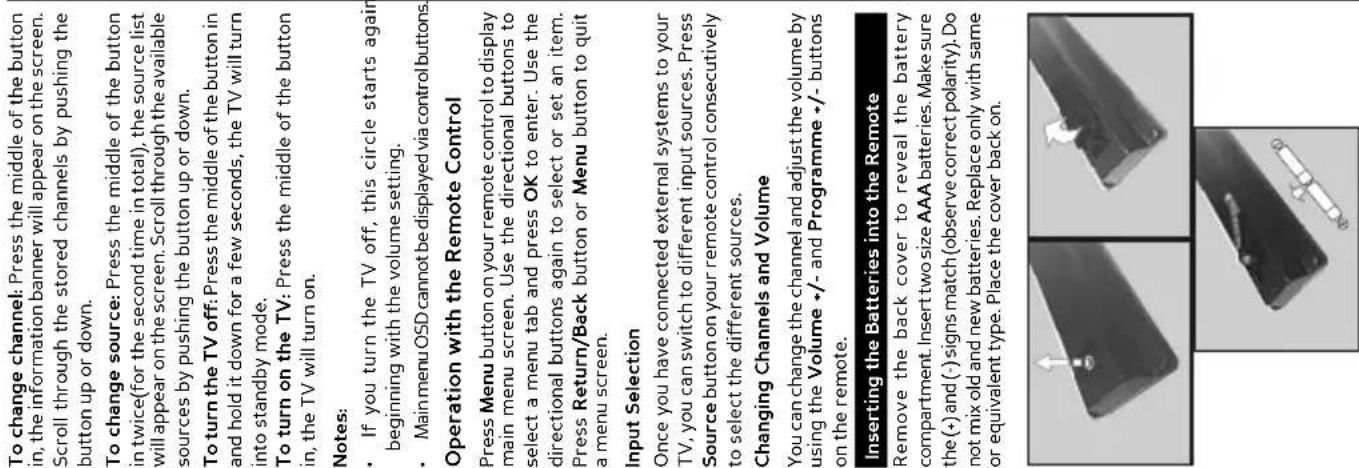
Inserting the Batteries into the Remote 23 Connect Power 23 In extreme weather (storms, lightning) and long inactivity periods (going on holiday) disconnect the TV set from the mains.
| Safety Information | 20 |
| Markings on the Product | 21 |
| Environmental Information | 22 |
| Features | 22 |
| Accessories Included | 22 |
| Standby Notifications | 22 |
| TV Control Switch & Operation | 22 |
| Inserting the Batteries into the Remote | 23 |
| Connect Power | 23 |
| Antenna Connection | 23 |
| Notification | 23 |
| Remote Control | 24 |
| Connections | 25 |
| Switching On/Off | 26 |
| First Time Installation | 26 |
| Media Playback via USB Input | 27 |
| Media Browser Menu | 27 |
| CEC and CEC RC Passthrough | 27 |
| TV Menu Contents | 28 |
| General TV Operation | 31 |
| Using the Channel List | 31 |
| Configuring Parental Settings | 31 |
| Electronic Programme Guide (EPG) | 31 |
| Teletext Services | 32 |
| Software Upgrade | 32 |
| Troubleshooting & Tips | 32 |
| PC Input Typical Display Modes | 33 |
| AV and HDMI Signal Compatibility | 33 |
| Supported File Formats for USB Mode | 34 |
| Supported DVI Resolutions | 35 |
| Scart socket for external devices (such as DVD Players, PVR, video games, etc.) | |
| Stereo sound system | |
| Teletext | |
| Headphone connection | |
| Automatic programming system | |
| Manual tuning | |
| Automatic power down after up to eight hours. | |
| Sleep timer | |
| Child lock | |
| Automatic sound mute when no transmission. | |
| NTSC playback | |
| AVL (Automatic Volume Limiting) | |
| PLL (Frequency Search) | |
| PC input | |
| Game Mode (Optional) | |
| Picture off function | |
| Accessories Included | |
| Remote Control | |
| Instruction Book | |
| Quick Start Guide | |
| Standby Notifications | |
| If the TV does not receive any input signal (e.g. from an aerial or HDMI source) for 3 minutes, it will go into standby. When you next switch-on, the following message will be displayed: “TV switched to stand-by mode automatically because there was no signal for a long time.” Press OK to continue. | |
| If the TV is on and it isn’t being operated for a while it will go into standby. When you next switch-on, the following message will be displayed. “TV switched to stand-by mode automatically because no operation was made for a long time.” Press OK to continue. | |
| TV Control Switch & Operation | |
 | 1. Up direction2. Down direction3. Volume / Info / Sources List selection and Standby-On switchThe Control button allows you to control theVolume/ Programme/ Source and Standby-On functions of the TV. |
| To change volume: Increase the volume by pushing the button up. Decrease the volume by pushing the button down. | |
English - 22 -
| WALL MOUNTING WARNINGS |
| Read the instructions before mounting your TV on the wall.The wall mount kit is optional. You can obtain from your local dealer, if not supplied with your TV.Do not install the TV on a ceiling or on an inclined wall.Use the specified wall mounting screws and other accessories.Tighten the wall mounting screws firmly to prevent the TV from fall. Do not over-tighten the screws. |
| Environmental InformationThis television is designed to be environment friendly. To reduce energy consumption, you can follow these steps:If you set the Energy Saving to Minimum, Medium, Maximum or Auto the TV will reduce the energy consumption accordingly. If you like to set the Backlight to a fixed value set as Custom and adjust the Backlight (located under the Energy Saving setting) manually using Left or Right buttons on the remote. Set as Off to turn this setting off.Note: Available Energy Saving options may differ depending on the selected Mode in the System>Picture menu.The Energy Saving settings can be found in the System>Picture menu. Note that some picture settings will be unavailable to be changed.If pressed Right button while Auto option is selected or Left button while Custom option is selected, "Screen will be off in 15 seconds." message will be displayed on the screen. Select Proceed and press OK to turn the screen off immediately. If you don't press any button, the screen will be off in 15 seconds. Press any button on the remote or on the TV to turn the screen on again.Note: Screen Off option is not available if the Mode is set to Game.When the TV is not in use, please switch off or disconnect the TV from the mains plug. This will also reduce energy consumption. |
| FeaturesRemote controlled colour TVFully integrated digital terrestrial/cable/satellite TV (DVB-T-T2/C/S-S2/HEVC H.265)HDMI inputs to connect other devices with HDMI socketsUSB inputOSD menu system |
| WARNINGDo not ingest the battery, Chemical Burn HazardThis product or the accessories supplied with the product may contain a coin/button cell battery. If the coin/button cell battery is swallowed, it can cause severe internal burns in just 2 hours and can lead to death.Keep new and used batteries away from children.If the battery compartment does not close securely, stop using the product and keep it away from children.If you think batteries might have been swallowed or placed inside any part of the body, seek immediate medical attention. |
| WARNINGNever place a television set in unstable or inclined locations. A television set may fall, causing serious personal injury or death. Many injuries, particularly to children, can be avoided by taking simple precautions such as:Using cabinets or stands recommended by the manufacturer of the television set.Only using furniture that can safely support the television set.Ensuring the television set is not overhanging the edge of the supporting furniture.Not placing the television set on tall furniture (for example, cupboards or bookcases) without anchoring both the furniture and the television set to a suitable support.Not standing the television set on cloth or other materials placed between the television and supporting furniture.Educating children about the dangers of climbing on furniture to reach the television set or its controls. If your existing television set is being retained and relocated, the same considerations as above should be applied. |
| WARNINGApparatus connected to the protective earthing of the building installation through the MAINS connection or through other apparatus with a connection to protective earthing – and to a television distribution system using coaxial cable, may in some circumstances create a fire hazard. Connection to a television distribution system has therefore to be provided through a device providing electrical isolation below a certain frequency range (galvanic isolator, see EN 60728-11) |
| Caution | Serious injury or death risk |
| Risk of electric shock | Dangerous voltage risk |
| Maintenance | Important maintenance component |

1. Standby: Switches On / Off the TV
2. Numeric buttons: Switches the channel, enters a
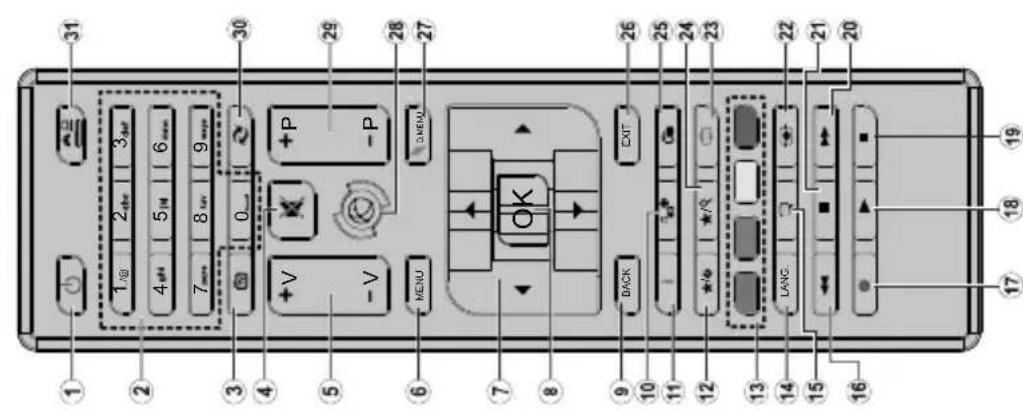
(*) MY BUTTON 1 & MY BUTTON 2:
These buttons may have default functions depending on the model. However you can set a special function to these buttons by pressing on them for five seconds when on a desired source or channel. A confirmation message will be displayed on the screen. Now the selected MY BUTTON is associated with the selected function.
Note that if you perform First Time Installation, MY BUTTON 1&2 will return to their default function.
Remote Control

| Direct: If you have a single receiver and a direct parabola, select this type of antenna. Press OK button to continue. Select a satellite available on the next screen and press OK for the scan of the services.Single Satellite Cable: If you have multiple receivers and a single satellite cable, select this type of antenna. Press OK button to continue. Configure the settings by following the instructions on the next screen. Press OK to scan the devices.DiSEqC switch: In case you have a multiple LNB or multiple satellite dish and a DiSEqC switch, select this type of antenna. Press OK button to continue. It will be possible to set four DiSEqC options (if available) on the next screen. Press OK button to scan the first satellite in the list.If the installation type is Operator - Tivusat will be made a research for the channels on the Hot Bird 13 East satellite according to Tivusat order.It will be possible select Antenna's Type on Direct , Single Satellite Cable or DiSEqC Switch by using the "◀" or "▶" buttons.Direct: If you have a single receiver and a direct parabola, select this type of antenna. Press OK button to continue. On the next screen will appear the Hot Bird (13.OE) satellite imposted, press OK for the scan of the services.Single Satellite Cable: If you have multiple receivers and a single satellite cable, select this type of antenna. Press OK button to continue. Configure the settings by following the instructions on the next screen. Press OK to scan the devices.DiSEqC switch: If you have multiple satellite dishes and a DiSEqC switch, select this antenna type. Then set the DiSEqC version and press OK to continue. You can set up to four satellites (if available) for version v1.0 and sixteen satellites for version v1.1 on the next screen. Press OK button to scan the first satellite in the list.Analogue: If Analogue broadcast search option is turned on, the TV will search for analogue broadcasts after other initial settings are completed.Additionally you can set a broadcast type as your favourite one. Priority will be given to the selected broadcast type during the search process and the channels of it will be listed on the top of the Channel List. When finished, press OK to continue.You can activate Store Mode option at this point. This option will configure your TV's settings for store environment and depending on the TV model being used, the supported features of it may be displayed on the top of the screen as an info banner. This option is intended only for store use. It is recommended to select Home Mode for home use. This option will be available in System>Settings>More menu and can be turned off/on later. |
English -26-
| Switching On/Off |
| To Switch the TV OnConnect the power cord to a power source such as a wall socket (220-240V AC, 50 Hz).To switch on the TV from standby mode either:Press the Standby button, Programme +/- or a numeric button on the remote control.Press the side function switch on the TV until the TV comes on from standby. |
| To Switch the TV OffPress the Standby button on the remote control or press the side function switch on the TV until the TV switches into standby mode.To power down the TV completely, unplug the power cord from the mains socket.Note: When the TV is switched into standby mode, the standby LED can blink to indicate that features such as Standby Search, Over Air Download or Timer is active. The LED can also blink when you switch on the TV from standby mode. |
| First Time InstallationWhen turned on for the first time, the language selection screen is displayed. Select the desired language and press OK.On the next screen, set your preferences using the directional buttons.Note: Depending on the Country selection you may be asked to set and confirm a PIN at this point. The selected PIN cannot be oooo. You have to enter it if you are asked to enter a PIN for any menu operation later. |
| About Selecting Broadcast TypeDigital Aerial: If Digital Aerial broadcast search option is turned on, the TV will search for digital terrestrial broadcasts after other initial settings are completed.Digital Cable: If Digital Cable broadcast search option is turned on, the TV will search for digital cable broadcasts after other initial settings are completed. According to your other preferences a confirmation message may be displayed before starting to search. Select YES and press OK to proceed. To cancel operation, select NO and press OK. You can select Network or set values such as Frequency, Network ID and Search Step. When finished, press OK button.Note: Searching duration will change depending on the selected Search Step.Satellite: If the research option Satellite is switch-on, TV will search for digital satellite channels after other initial settings are completed.Before performing the satellite search, some settings should be made:If the type of installation is standard, you can select Antenna's Type on Direct, Single Satellite Cable or DiSEqC Switch using the button "◀" or ►. |
| Connections | |||
| Connector Type Cables Device | |||
| Scart Connection (back) | |||
| VGA Connection (back) | |||
| SIDE AV | PC/YPbPr Audio Connection (side) | YPbPr/PC Audio Cable | |
| HDMI Connection (back) | |||
| SPDIF | SPDIF (Optical Out) Connection (back) | ||
| SIDE AV | Side AV (Audio/Video) Connection (side) | AV Cable | |
| HEADPHONE | Headphone Connection (side) | ||
| PC to YBPbPr | YPbPr Video | ||
If you want to connect a device to the TV, make sure that both the TV and the device are turned off before making any connection. After the connection is done, you can turn on the units and use them.

| TV Menu Contents | ||
| System - Picture Menu Contents | ||
| Mode | You can change the picture mode to suit your preference or requirements. Picture mode can be set to one of these options: Cinema, Game(optional), Sports, Dynamic and Natural. | |
| Contrast | Adjusts the light and dark values on the screen. | |
| Brightness | Adjusts the brightness values on the screen. | |
| Sharpness | Sets the sharpness value for the objects displayed on the screen. | |
| Colour | Sets the colour value, adjusting the colors. | |
| Energy Saving | For setting the Energy Saving to Custom, Minimum, Medium, Maximum, Auto, Screen Off or Off.Note: Available options may differ depending on the selected Mode. | |
| Backlight | This setting controls the backlight level. The backlight function will be inactive if the Energy Saving is set to an option other then Custom. | |
| Advanced Settings | ||
| Dynamic Contrast | You can change the dynamic contrast ratio to desired value. | |
| Noise Reduction | If the signal is weak and the picture is noisy, use the Noise Reduction setting to reduce the amount of noise. | |
| Colour Temp | Sets the desired colour temperature value. Cool, Normal, Warm and Custom options are available. | |
| White Point | If the Colour Temp option is set as Custom, this setting will be available. Increase the 'warmth' or 'coolness' of the picture by pressing Left or Right buttons. | |
| Picture Zoom | Sets the desired image size format. | |
| Film Mode | Films are recorded at a different number of frames per second to normal television programmes. Turn this feature on when you are watching films to see the fast motion scenes clearly. | |
| Skin Tone | Skin tone can be changed between -5 and 5. | |
| Colour Shift | Adjust the desired colour tone. | |
| RGB Gain (Optional) | You can configure the colour temperature values using the RGB Gain feature. | |
| HDMI Full Range | While watching from a HDMI source, this feature will be visible. You can use this feature to enhance blackness in the picture. | |
| PC Position | Appears only when the input source is set to VGA/PC. | |
| Autoposition | Automatically optimizes the display. Press OK to optimize. | |
| H Position | This item shifts the image horizontally to the right hand side or left hand side of the screen. | |
| V Position | This item shifts the image vertically towards the top or bottom of the screen. | |
| Dot Clock | Dot Clock adjustments correct the interference that appear as vertical banding in dot intensive presentations like spreadsheets or paragraphs or text in smaller fonts. | |
| Phase | Depending on the input source(computer etc.) you may see a hazy or noisy picture on the screen. You can use phase to get a clearer picture by trial and error. | |
| Reset | Resets the picture settings to factory default settings (except Game Mode). | |
| While in VGA (PC) mode, some items in Picture menu will be unavailable. Instead, VGA mode settings will be added to the Picture Settings while in PC mode. | ||
| Start playback with the OK button and activate | The same file will be played continuously (repeat) |
| Start playback with the Play button and activate | All files in the list will be played once in random order |
| Start playback with the Play button and activate | All files in the list will be continuously played in the same random order. |
| CEC and CEC RC Passthrough | |
| This function allows to control the CEC-enabled devices, that are connected through HDMI ports by using the remote control of the TV.The CEC option in the System>Settings>More menu should be set as Enabled at first. Press the Source button and select the HDMI input of the connected CEC device from the Sources List menu. When new CEC source device is connected, it will be listed in source menu with its own name instead of the connected HDMI ports name(such as DVD Player, Recorder 1 etc.).The TV remote is automatically able to perform the main functions after the connected HDMI source has been selected.To terminate this operation and control the TV via the remote again, press Quick Menu button on the remote, highlight the CEC RC Passthrough and set as Off by pressing Left or Right button. This feature can also be enabled or disabled under the System>Settings>More menu.The TV supports also ARC(Audio Return Channel) feature. This feature is an audio link meant to replace other cables between the TV and the audio system (A/V receiver or speaker system).When ARC is active, TV does not mute its other audio outputs automatically. So you need to decrease TV volume to zero manually, if you want to hear audio from connected audio device only (same as other optical or co-axial digital audio outputs). If you want to change connected device's volume level, you should select that device from the source list. In that case volume control keys are directed to connected audio device.Note: ARC is supported only via the HDMI input. | |
| Loop/Shuffle Mode Operation | |
| Menu Timeout | Changes timeout duration for menu screens. | |
| Standby LED | If set as Off, the standby LED will not light up when the TV is in standby mode. | |
| Software Upgrade | Ensures that your TV has the latest firmware. Press OK to see the menu options. | |
| Application Version | Displays current software version. | |
| Subtitle Mode | This option is used to select which subtitle mode will be on the screen (DVB subtitle / Teletext subtitle) if both is available. Default value is DVB subtitle. This feature is available only for the country option of Norway. | |
| Auto TV OFF | Sets the desired time for the TV to automatically go into standby mode when not being operated. | |
| Biss Key | Biss is a satellite signal scrambling system that is used for some broadcasts. If you need to enter Biss key on a broadcast, you can use this setting. Highlight Biss Key and press OK to enter keys on the desired broadcast. | |
| Store Mode | Select this mode for store display purposes. Whilst Store Mode is enabled, some items in the TV menu may not be available. | |
| Power Up Mode | This setting configures the power up mode preference. Last State and Standby options are available. | |
| CEC | With this setting you can enable and disable CEC functionality completely. Press Left or Right button to enable or disable the feature. | |
| CEC Auto Power On | This function allows the connected HDMI-CEC compatible device to turn on the TV and switch to its input source automatically. Press Left or Right button to enable or disable the feature. | |
| Speakers | To hear the TV audio from the connected compatible audio device set as Amplifier. You can use the remote control of the TV to control the volume of the audio device. | |
| OSS | Displays Open Source Software license information. | |
| System - Sound Menu Contents | |
| Volume | Adjusts the volume level. |
| Equalizer | Selects the equalizer mode. Custom settings can be made only when in User mode. |
| Balance | Adjusts whether the sound comes from the left or right speaker. |
| Headphone | Sets headphone volume.Please ensure before using headphones that the headphone volume is set to a low level, to prevent damage to your hearing. |
| Sound Mode | You can select a sound mode (If the viewed channel supports). |
| AVL (Automatic Volume Limiting) | Sets the sound to obtain fixed output level between programmes. |
| Headphone/Lineout | When you connect an external amplifier to your TV using the headphone jack, you can select this option as Lineout. If you have connected headphones to the TV, set this option as Headphone.Please ensure before using headphones that this menu item is set to Headphone. If it is set to Lineout, the output from the headphone socket will be set to maximum which could damage your hearing. |
| Dynamic Bass | Enables or disables the Dynamic Bass. |
| Surround sound | Surround sound mode can be changed as On or Off. |
| Digital Out | Sets digital out audio type. |
| System - Settings Menu Contents | ||
| Conditional Access | Controls conditional access modules when available. | |
| Language | You may set a different language depending on the broadcaster and the country. | |
| Parental | Enter correct password to change parental settings. You can easily adjust Menu Lock, Maturity Lock, Child Lock or Guidance in this menu. You can also set a new PIN or change the Default CICAM PIN using the related options.Note: Some menu options may not be available depending on the country selection in the First Time Installation. Default PIN can not be set to 0000. If you have defined the PIN(is requested depending on the country selection) during the First Time Installation use the PIN that you have defined. | |
| Timers | Sets sleep timer to turn off the TV after a certain time. Sets timers for selected programmes. | |
| Date/Time | Sets date and time. | |
| Sources | Enables or disables selected source options. | |
| Accessibility | Displays accessibility options of the TV. | |
| Hard of Hearing | Enables any special feature sent from the broadcaster. | |
| Audio Description | A norration track will be played for the blind or visually impaired audience. Press OK to see all available Audio Description menu options. This feature is available only if the broadcaster supports it. | |
| More | Displays other setting options of the TV. | |
| General TV OperationUsing the Channel ListThe TV sorts all stored stations in the Channel List.You can edit this channel list, set favourites or set active stations to be listed by using the Channel List options.Press the Red button to open the Channel List. You can filter the listed channels by pressing the Blue button or open the Edit Channel List menu by pressing the Green button in order to make advanced changes in the current list.Managing the Favourite ListsYou can create four different lists of your favourite channels. Enter the Channel List in the main menu or press the Green button while the Channel List is displayed on the screen in order to open the Edit Channel List menu. Select the desired channel on the list. You can make multiple choices by pressing the Yellow button. Then press the OK button to open the Channel Edit Options menu and select Add/Remove Favourites option. Press the OK button again. Set the desired list option to On. The selected channel/s will be added to the list. In order to remove a channel or channels from a favourite list follow the same steps and set the desired list option to Off.You can use the Filter function in the Edit Channel List menu to filter the channels in the Channel list permanently according to your preferences. Using this Filter option, you can set one of your four favourite lists to be displayed every time the Channel list is opened. The filtering function in the Channel list menu will only filter the currently displayed Channel list in order to find a channel and tune in to it. These changes will not remain the next time the Channel list is opened if you don't save them. To save the changes on the list press the Red button after filtering while the Channel list is displayed on the screen.Configuring Parental SettingsThe Parental Settings menu options can be used to prohibit users from viewing of certain programmes, channels and using of menus. These settings are located in the System>Settings>Parental menu.To display parental lock menu options, a PIN number should be entered. After coding the correct PIN number, Parental Settings menu will be displayed.Menu Lock: This setting enables or disables access to all menus or installation menus of the TV.Maturity Lock: If this option is set, TV gets the maturity information from the broadcast and if this maturity level is disabled, disables access to the broadcast.Note: If the country option in the First Time Installation is set as France, Italy or Austria,Maturity Lock's value will be set to 18 as default. | Child Lock:If this option is set to ON,the TV can only be controlled by the remote control. In this case the control buttons on the TV will not work.Set PIN:Defines a new PIN number.Default CICAM PIN:This option will appear as greyed out if no CI module is inserted into the CI slot of the TV. You can change the default PIN of the CI CAM using this option.Note:Default PIN can not be set to 0000.If you have defined the PIN(is requested depending on the country selection) during the First Time Installation use the PIN that you have defined.Some options may not be available depending on the country selection in the First Time Installation.Electronic Programme Guide (EPG)Some channels send information about their broadcast schedules. Press the Epg button to view the Programme Guide menu.There are 3 different types of schedule layouts available, Timeline Schedule, List Schedule and Now/Next Schedule. To switch between them follow the instructions on the bottom of the screen.Timeline ScheduleZoom (Yellow button):Press the Yellow button to see events in a wider time interval.Filter (Blue button):Views filtering options.Highlight Genre (Subtitles button):Displays Highlight Genre menu. Using this feature, you can search the programme guide database in accordance with the genre. Info available in the programme guide will be searched and results matching your criteria will be highlighted.Options (OK button):Displays event options.Event Details (Info button):Displays detailed information about selected events.Next/Prev Day (Programme +/- buttons):Displays the events of previous or next day.Search (Text button):Displays Guide Search menu.Now (Source button):Displays current event of the highlighted channel.List Schedule(*) (*)In this layout option, only the events of the highlighted channel will be listed.Prev. Time Slice (Red button):Displays the events of previous time slice.Next/Prev Day (Programme +/- buttons):Displays the events of previous or next day.Event Details (Info button):Displays detailed information about selected events.Filter (Text button):Views filtering options.Next Time Slice (Green button):Displays the events of next time slice.Options (OK button):Displays event options.Now/Next ScheduleOptions (OK button):Displays event options. | Event Details (Info button):Displays detailed information about selected events.Filter (Blue button):Views filtering options.Event OptionsUse the directional buttons to highlight an event and press OK button to display Event Options menu. The following options are available.Select Channel:Using this option, you can switch to the selected channel.Set Timer on Event / Delete Timer on Event:After you have selected an event in the EPG menu, press the OK button.Select Set Timer on Event option and press the OK button. You can set a timer for future events. To cancel an already set timer, highlight that event and press the OK button. Then select Delete Timer on Event option. The timer will be cancelled.Notes:You cannot switch to any other channel or source while there is an active timer on the current channel. It is not possible to set timer for two or more individual events at the same time interval.Teletext ServicesPress the Text button to enter. Press again to activate mix mode, which allows you to see the teletext page and the TV broadcast at the same time. Press once more to exit. If available, sections in the teletext pages will become colour-coded and can be selected by pressing the coloured buttons. Follow the instructions displayed on the screen.Digital TeletextPress the Text button to view digital teletext information. Operate it with the coloured buttons, cursor buttons and the OK button. The operation method may differ depending on the contents of the digital teletext. Follow the instructions displayed on the digital teletext screen. When the Text button is pressed again, the TV returns to television broadcast.Software UpgradeYour TV is capable of finding and updating the firmware automatically via the broadcast signal.Software upgrade search via user interfaceOn the main menu select System>Settingsand then More. Navigate to Software upgrade and press the OK button. In Upgrade options menu select Scan for upgrade and press OK button to check for a new software upgrade.If a new upgrade is found, it starts to download the upgrade. After the download is completed confirm the question asking about rebooting the TV by pressing the OK to continue with the reboot operation.3 AM search and upgrade modeYour TV will search for new upgrades at 3:00 o'clock if Automatic scanning option in the Upgrade | optionsmenu is set to Enabledand if the TV is connected to an aerial signal. If a new software is found and downloaded successfully, it will be installed at the next power on.Note:Do not unplug the power cord while led is blinking during the reboot process. If the TV fails to come on after the upgrade, unplug, wait for two minutes then plug it back in.Troubleshooting & TipsTv will not turn onMake sure the power cord is plugged in securely to wall outlet. Check if batteries are exhausted. Press the Power button on the TV.Poor pictureCheck if you have selected the correct TV system.Low signal level can cause picture distortion. Please check antenna access.Check if you have entered the correct channel frequency if you have done manual tuning.The picture quality may degrade when two devices are connected to the TV at the same time. In such a case, disconnect one of the devices.No pictureThis means your TV is not receiving any transmission. Make sure the correct source has been selected.Is the antenna connected properly?Is the antenna cable damaged?Are suitable plugs used to connect the antenna?If you are in doubt, consult your dealer.No soundCheck if the TV is muted. Press the Mute button or increase the volume to check.Sound may be coming from only one speaker. Check the balance settings from Sound menu.Remote control - no operationThe batteries may be exhausted. Replace the batteries.Input sources - can not be selectedIf you cannot select an input source, it is possible that no device is connected. If not;Check the AV cables and connections if you are trying to switch to the input source dedicated to the connected device. |
| Supported File Formats for USB Mode | |||
| Media Extension | Format | Notes | |
| Video | .mpg,.mpeg | MPEG1-2 | MPEG1: 768x576 @ 30P, MPEG2:1920x1080 @ 30P |
| .vob | MPEG2 | 1920x1080 @ 30P | |
| .mp4 | MPEG4, Xvid,H.264 | ||
| .mkv | H.264,MPEG4,VC-1 | ||
| .avi | MPEG2, MPEG4,Xvid, H.264 | ||
| .flv | H.264/VP6/Sorenson | H.264/VP6: 1920x1080 @ 30PSorenson: 352x288 @ 30P | |
| .mp4, .mov,.3gpp,.3gp, MPEGtransportstream,.ts.,trp, .tp,mky | HEVC/H.265 | 1080Pe60fps - 50Mbps | |
| .3gp | MPEG4, H.264 | 1920x1080 @ 30P | |
| Audio | .mp3 | MPEG1 Layer 2/3 | Layer2: 32Kbps ~ 448Kbps (Bit rate) / 32kHz, 44.1kHz, 48kHz, 16kHz,22.05kHz, 24kHz (Sampling rate)Layer3: 32Kbps ~ 320Kbps (Bit rate) / 32kHz, 44.1kHz, 48kHz, 16kHz,22.05kHz, 24kHz, 8kHz, 11.025kHz, 12kHz (Sampling rate) |
| (worksonly withvideofiles) | AC3 32Kbps ~ 640Kbps (Bit rate) / 32kHz, 44.1kHz, 48kHz (Sampling rate) | 32Kbps ~ 6Kbps (Bit rate) / 32kHz, 44.1kHz, 48kHz (Sampling rate) | |
| AAC 16Kbps ~ 576Kbps (Bit rate) / 48kHz, 44.1kHz, 32kHz, 24kHz, 22.05kHz,16kHz, 12kHz, 11.025kHz, 8kHz (Sampling rate) | |||
| EAC3 | |||
| LPCM | Unsigned 8bit PCM, Signed/Unsigned 16bit PCM (big / little endian), 24bitPCM (big endian), DVD LPCM 16/20/24bit (Bit rate)/ 6kHz, 8kHz, 11.025kHz, 12kHz, 16kHz, 22.05kHz, 24kHz, 32kHz, 44.1kHz,48kHz , 88.2kHz, 96kHz, 176.4kHz, 192kHz (Sampling rate) | ||
| IMA-ADPCM/MS-ADPCM | 384Kbps (Bit rate) / 8KHz ~ 48Khz (Sampling rate) | ||
| LBR 32Kbps ~ 96Kbps (Bit rate) / 32kHz, 44.1kHz, 48kHz (Sampling rate) | |||
| Picture | .jpeg | Baseline | Resolution(WxH): 17000x10000 |
| Progressive | Resolution(WxH): 4000x4000 | ||
| .bmp | - | Resolution(WxH): 5760x4096 | |
| Subtitle | .sub, .srt | - | - |
PC Input Typical Display Modes
The following table is an illustration of some of the typical video display modes. Your TV may not support all resolutions. Your TV supports up to 1920x1080.
| Index Resolution Frequency | ||
| 1 | 640x480 60 Hz | |
| 2 | 800x600 56 Hz | |
| 3 | 800x600 60 Hz | |
| 4 | 1024x768 60 Hz | |
| 5 | 1024x768 66 Hz | |
| 6 | 1280x768 60 Hz | |
| 7 | 1280x960 60 Hz | |
| 8 | 1280x1024 60 Hz | |
| 9 | 1360x768 60 Hz | |
| 10 | 1400x1050 60 Hz | |
| 11 | 1600x1200 60 Hz | |
| 12 | 1920x1080 60 Hz | |
AV and HDMI Signal Compatibility
| Source Supported Signals Available | |||
| EXT(SCART) | PAL 50/60 O | ||
| NTSC 60 O | |||
| RGB 50 O | |||
| RGB 60 O | |||
| Side AV | PAL 50/60 O | ||
| NTSC 60 O | |||
| PC/YPbPr | 480I, 480P 60Hz O | ||
| 576I, 576P 50Hz O | |||
| 720P | 50Hz,60Hz O | ||
| 1080I | 50Hz,60Hz O | ||
| 1080P | 50Hz,60Hz O | ||
| HDMI | 480I | 60Hz O | |
| 480P | 60Hz O | ||
| 576I, 576P 50Hz O | |||
| 720P | 50Hz,60Hz O | ||
| 1080I | 50Hz,60Hz O | ||
| 1080P | 24Hz, 25Hz30Hz, 50Hz,60Hz | O | |
(X: Not Available, O: Available)
In some cases a signal on the TV may not be displayed
properly. The problem may be an inconsistency with standards from the source equipment (DVD, Set-top
box, etc.). If you do experience such a problem please contact your dealer and also the manufacturer of the
source equipment.
Supported DVI Resolutions
When connecting devices to your TV's connectors by using DVI converter cable(DVI to HDMI cable - not supplied), you can refer to the following resolution information.
| 56Hz 60Hz 66Hz 70Hz | 72Hz 75Hz | |||||
| 640X400 | ☑ | |||||
| 640X480 | ☑ | ☑ | ☑ | ☑ | ||
| 800X600 | ☑ | ☑ | ☑ | ☑ | ☑ | |
| 832X624 | ☑ | |||||
| 1024X768 | ☑ | ☑ | ☑ | ☑ | ☑ | |
| 1152X864 | ☑ | ☑ | ☑ | |||
| 1152X870 | ☑ | |||||
| 1280X768 | ☑ | ☑ | ||||
| 1360X768 | ☑ | |||||
| 1280X960 | ☑ | ☑ | ||||
| 1280X1024 | ☑ | ☑ | ||||
| 1400X1050 | ☑ | ☑ | ||||
| 1440X900 | ☑ | ☑ | ||||
| 1600X1200 | ☑ | |||||
| 1680X1050 | ☑ | |||||
| 1920X1080 | ☑ | |||||
Information regarding EU countries (only)
The symbol indicates that the product must not be disposed of with the normal household wastes. Correct disposal of this product prevents any potentially negative impact on the environment and human health that could arise from any inappropriate handling of the product itself. To receive more detailed information regarding disposal of your unit, we recommend that you contact the competent public agencies, the waste collection service or the shop where you purchased the product.
Due to the continuous evolution of the products, the features and design of this model may change without notice

In conformity with applicable rules and regulations
| TV Broadcasting | PAL BG/DK/II'SECAM BG/DK |
| Receiving Channels | VHF (BAND I/III) - UHF(BAND U) - HYPERBAND |
| Digital Reception | Fully integrated decoder terrestrial-cable-satellite(DVB-T2/C/S2 - HEVC - H.265) |
| Number of Preset Channels | 10 000 |
| Channel Indicator | On Screen Display |
| RF Aerial Input | 75 Ohm (unbalanced) |
| Operating Voltage | 220-240V AC, 50Hz. |
| Audio | German+Nicam Stereo |
| Audio Output Power (WRMS.) (10% THD) | 2 x 8 |
| Power Consumption (W) | 75 |
| TV Dimensions DxLxH (with foot) (mm) | 220 x 923 x 588 |
| TV Dimensions DxLxH (without foot) (mm) | 79/98 x 923 x 544 |
| Display | 40" |
| Operation temperature and operation humidity | 0°C up to 40°C, 85% humidity max |
Specifiche Specification
| A | Product Fiche | ||
| B | Commercial Brand:XD | ||
| C | Product No. | 10117569 | |
| D | Model No. | XD40F2VSAT | |
| E | Energy efficiency class | A+ | |
| F | Visible screen size (diagonal,approx.) (inch/cm) | 40 inches | 102 cm |
| G | On mode average power consumption (Watt) | 48,0 | |
| H | Annual energy consumption (kWh/annum) (*) | 70 | |
| I | Standby power consumption (Watt) | 0,50 | |
| J | Off mode power consumption (Watt) | N/A | |
| K | Display resolution (px) | 1920x1080 | |
| A | B | C | D | E | F | ||
| English | Product Fiche Commercial Brand Product No. | Model No. Energy efficiency class | Visible screen size (diagonal, approx.) (inch/cm) | ||||
| Deutsch | Produkt-Datenblatt | Markenzeichen | Produkt-Nr. | Modell-Nr. | Energieeffizienzklasse | Sichtbare Bildschirmgröße (diagonal,ca.) (Zoll /cm) | |
| عرابي | Logisticsメント | العامة التجارية تيُونكن | رقمメント | رقم الموتيل | قيمةPat laque | الحجم الشتالة المربعة (م outdoors) | |
| Български | Справочен лист с техническите данни | Търговска марка | Продукт No | Модел No | Клас на енергийна ефективност | Видим размер на екрана (диагонал,прибл.) (инча /см ) | |
| čeština | Produktový list | Značka výrobce | Číslo produktu | Model č. | Energetická třída | Viditefna velikost obrazovky (ühlopřička,přibl.)(palcú /cm) | |
| Dansk | Produktoplysningsskema | Varemærke | Produktnr. | Model nr. | Energieffektivitetsklasse | Synlig skarmstorrelse (diagonalt,ca.) (HK/cm) | |
| Suomi | Tuote fiche | Kaupallinen merkki | Tuote nro. | Malli nro. | Virran tehokkuusluokka | Nakyván kuvaruudun koko (diagonaalinen,n.) (tuumaa/cm) | |
| Français | Fiche du produit | Marque commerciale | Produit N° | Modèle N° | Classe d'efficacité énergétique | Taille d'ecran visibie (diagonale,approx.) (pouces/cm) | |
| Hrvatski | SAŽETAK PROIZVODA | Trgovačka marka | Br. proizvoda | Br. modela | Klasa energetske učinkovitosti | Vidljiva veličina ekrana (dijagonalna,približno) (inča/cm) | |
| Nederlands | Productfiche | Commercieel merk. | Productnr. | Modelnr. | Energie efficiëntie klasse | Zichtbare schermgrootie (diagonaal,ca.) (inches/cm) | |
| Español | Ficha del Producto | Marca Comercial | N° de Producto | N° de Modelo | Clasificación Energética | Tamaño de pantalla visibie (diagonal,aprox.) (pulgadas/cm) | |
| Svenska | Produktspecifikation | Varumärke | Produktnr. | Modellnr. | Energiklass | Synlig skarmstorlek (diagonal,ungefärlig) (tum/cm) | |
| Italiano | Scheda prodotto | Marchio commerciale | Numero prodotto | Numero modello | Classe di efficienza energetica | Dimenstoni visibii dello scherm (diagonale,circa)(pollici/cm) | |
| Polski | KARTA PRODUKTU Marka produktu Nr produktu Nr modelu | Klasa efektywności energetycznej | Widoczny obraz ekrani (przekątna,okolo)(cali/cm) | ||||
| Magyar | Termékismertető adatlap | Kereskedelmi marka | Termékszám | Modellszám | Energiahatékonysági osztály | Latható kepitartomany (diagonalis,kb.) (inches/cm) | |
| Norsk | Produktinformasjon | Kommersiell merkevare | Produkt nr. | Modell nr. | Energieffektivitet klasse | Synlig skjermstørrelse (diagonal, ca.) (tommer/cm) | |
| Português | Ficha do produto | Marca Comercial | Produto N° | Modelo N° | Classificação eficiência energética | Tamanho ecrà visível (diagonal, aprox.) (polegadas/cm) | |
| Română | Fişă produs | Marcă comercială | Nr. Produs | Nr. Model | Clasa de eficiență energetică | Dimenstunea ecranului vizibili (diagonală, aprox.) (inch/cm) | |
| Русский | Справочный листок технических данных изделия | Торговая марка | Номер изделия | Номер модели | Класс энергопотребления | Видимый размер экрана (по диагонали, приблизительно) (дюймов/см) | |
| беларуская | Справочный листок технических данных изделия | Торговая марка | Номер изделия | Номер модели | Класс энергопотребления | Видимый размер экрана (по диагонали,Около)(дюймов/см ) | |
| македонски | Технички податоци | Комерцијална марка | Производ бр. | Модел бр. | Класа на енергетска ефикасност | Големина на видлив екран (дијагонала,околу) (инчи/cm) | |
| український | Технічні дані | Кормеційна марка | Артикул | Модель | Клас енергоспоживання | Видимии розмір екрана (диагональ, Приблизно) (дюймів/cm) | |
| Srpski | Tehničke odlike | Komercijalna marka | Proizvod br. | Model br. | Klasa energetske efikasnosti | Veličina vidljivog ekrana (dijagonala, tokom) (inča/cm) | |
| Slovenčina | Produktový list | Značka výrobcu | Číslo produktu | Model č. | Energetická trieda | Viditefna velikost obrazovky (uhlopriečka,zhruba) (palcov/cm) | |
| Slovenščina | Opis izdelka | Komercialna znamka | Št. izdelka | Št. Modela | Razred energetske učinkovitosti | Vidna velikost zaslona (diagonala, pribl.) (palcev/cm) | |
| Еллнік | Делтію проїєю тос | Емторікó о́ніца | Ар. Проїєю тос | Ар. Мотія́Lou | Катіяорія еврүсаікіς ато́боо́ніς | Ордо піруєвоє ововініς (oidayuvioș, терр.) (IVTOECI/cm) | |
| Bosanski | Tehnički podaci | Komercijalna marka | Produkt br. | Model br. | Klasa energetske efikasnosti | Vidljiva velicina ekrana (diagonala, priblžno.) (inča/cm) | |
| Начиц | Китай 0015 | Пітів зіміз | Зап 'оіз | Зап 'оіз | Люз тік Літів' аро | (OLУРК)(ДИУРК),ЛОУРК) ЧАЯ ТОД НА ПО | |
| Türkçe | Ürün fişi | Ticari Marka | Ürün No. | Model No. | Enerji verimiliği sınıfı | Görüten ekran boyotu (çapraz,yakışk.) (inch/cm) | |
| Shqlp | Tě dhěnat e produktit | Marka tregtare | Nr. i produktit. | Nr. i modelit. | Klasa е eficiencès sè energjisë | Madhësia e ekranit të dukshëm (diagonal, afërsisht) (inch/cm) | |
| Lietuvių | Gaminio etiketė | Gamintojas | Gaminio Nr. | Modelio Nr. | Energetinio efektyvumo klasė | Matomas ekranо dydis (jstrizaine, approx.) (colių/cm) | |
| Latviešu | Produkta apraksts | Marka | Produkta nr. | Modeļa nr. | Energoefektivitāles klase | Ekranā izmers (pa diognali, apmçram) (collas/cm) | |
| Eesti | TOOTEKIRJELDUS | Tootja firma | Toote nr. | Mudeli nr. | Energiaklass | vaadatava ekraani suurus (diagonaal, umbes) (tolli/cm) | |
| فراسی | مشخصات محصول | مارک تجاري | ثمازه محصول | ثمازه مثل | گروه کارایی نرزی | کارز صطته میلی سостه (کننی، ۶۰۲۹) (بی) (سنتی متر) | |
| G H I J K | |||||
| English | On mode average power consumption (Watt) | Annual energy consumption (kWh/annum) | Standby power consumption (Watt) | Off mode power consumption (Watt) | Display resolution (px) |
| Deutsch | Durchschnittlicher Stromverbrauch im eingeschalletem Zustand (Watt) | Jährlicher Energieverbrauch (kWh/Jahr) | Standby-Stromverbrauch (Watt) | Stromverbrauch im ausgeschaltetem Zustand (Watt) | Display-Auflösung (px) |
| عربي | متوسط تهلاك الشوي للطتريل وعناطلاك | الاستهلاك الشوي للطتريل وعناطلاك | استهلاك الشوي لفي وضج است Appalachا (متوسط) | استهلاك الشوي لفي وضج است Appalachا (متوسط) | وStrong الشاتباني (متوسط) |
| Български | Средна консумация на електроенергия във включено сьстояние (Watt) | Годишна консумация на електроенергия (kWh/Годишна) | Консумация на електроенергия в режим на готовность (Watt) | Консумация на електроенергия в изключено сьстояние (Watt) | Разделителна способност на дисплея (пиксела) |
| čeština | Prüměrná spotřeba elektrické energie v zannutém režimu (Wattü) | Roční spotřeba energie (kWh/Roční) | Spotřeba elektrické energie v potrotovostním režimu (Wattü) | Spotřeba elektrické energie ve vponutém režimu (Wattü) | Rozlišení displeje (px) |
| Dansk | Gennemsnittligt stromforbrug i tændt tilstand (Watt) | Arligt energiforbrug (kWh/Arligt) | Strømforbrug (standby)(Watt) | Strømforbrug i slukket tilstand (Watt) | Skærmopłosning (px) |
| Suomi | Päällä-tilan keskimääräinen virrankulutus (Wattia) | Vuositainen sähkönkulutu (kWh/Vuosittalnen) | Vaklovirran kulutus (Wattia) | Pols-tilan virrankulutus (Wattia) | Näytön erotelukyky (pikselia) |
| Françals | Consommation énergétique moyenne en mode "marche" (Watt) | Consommation énergétique annuelle (kWh/annuel) | Consommation d'énergie en veille (Watt) | Consommation d'énergie en mode tarrà" (Watt) | Résolution de l'écran (px) |
| Hrvatski | Prosječna potrošnja el. energije kada je proizvod uklıcan (Watta) | Godišnja potrošnja el. Energije (kWh/Godišnia) | Potrošnja el. energije u modu pripravnosti (Watta) | Potrošnja el. energije kada je proizvod skiučen (Watta) | Rezolucija zaslona (piksela) |
| Nederlands | Aan-modus gemiddeld stroomverbruik (Watt) | Jaarlijks energieverbruik (kWh/Jaarlijks ) | Stand-by stroomverbruik (Watt) | Uit-modus stroomverbruik (Watt) | Schermresolutie (px) |
| Español | Consumo eléctrico medio, en funcionamiento (Vatio) | Consumo eléctrico anual (kWh/anual) | Consumo en modo en espera (Valio) | Consumo eléctrico modo apagado (Vatio) | Resolución de pantalla (px) |
| Svenska | Strömkonsumtion i PA-läge (Watt) | Energikonsumtion per år (kWh/Arlig) | Strömkonsumtion i viloläge (Watt) | Strömkonsumtion i AV-läge (Watt) | Skärmupplösning (pixlar) |
| italiano | Consumo di corrente medio da accesa (Watt) | Consumo annuale di energia (kWh/annuo) | Consumo di corrente in modalità standby (Watt) | Consumo di corrente da spenta (Watt) | Risoluzione del display (px) |
| Polski | Srednie zużycie energii w trybie włączonym (Watów) | Roczne zużycie energii (kWh/Roczne) | Srednie zużycie energii w trybie pczekiwania (Watów) | Zużycie energii w trybie wyłączonym (Watów) | Rozdzielczość obrazu (pikseli) |
| Magyar | Energiafogyasztás bekapcsolva hagyott üzemmódban (Watt) | Eves energiafogyasztás (kWh/Éves) | Energiafogyasztás standby üzemmódban (Watt) | Energiafogyasztás kikapcsolt üzemmódban (Watt) | Képernyőfelbontás (px) |
| Norsk | Pámodus gjennomsnittlig stromforbruk (Watt) | Arlig stromforbruk (kWh/Arlig) | Hvilemodus stromforbruk (Watt) | Av-modus stromforbruk (Watt) | Skjermopplösning (piksel) |
| Português | Consumo energia em modo médio (Watt) | Consumo annual energia (kWh/anual) | Consumo energia em stand-by (Watt) | Consumo energia em modo alimentação (Watt) | Resolução do visor (pixel) |
| Română | Consum electric mediu în modul pornit (Wat) | Consum anual de energie (kWh/anual) | Consum electric în stare de repaus (Wat) | Consum electric în modul oprit (Wat) | Rezoluția ecranului (pixel) |
| Русский | Средний расход энергии в режиме работы (Вт) | Ежегодный расход энергии (кВт/Год) | Расход энергии в режиме ожидания (Вт) | Расход энергии в выключенном режиме (Вт) | Разрешение экрана (пикселей) |
| Беларуская | Средний расход энергии в режиме включения (ватт) | Ежегодный расход энергии (kWh/галавое) | Расход энергии в режиме ожидания (ватт) | Расход энергии в режиме выключения (ватт) | Разрешение экрана (пикселей) |
| македонски | Просечна потрошувачка кога е вклучен | Годишна потрошувачка на энергия (kWh/Голишна) | Потрошувачка во мирување (вати) | Потрошувачка кога е исклучен (вати) | Резолуција на екран (пиксели) |
| український | Середня споживана потужність у робочому режимі (Вт) | Середньорічна споживана потужність (kWh/Річне) | Спокивана потужність у режимі рчіквання (Вт) | Спокивана потужність у вимкненому стані (Вт) | Роздільна здатність екрана (пикселів) |
| Srpski | Prosječna potrošnja kada je uključení (Vati) | Godišnja potrošnja energije (kWh/Godišnia) | Potrošnja tokom mirovanja (Vati) | Potrošnja kada je isključení (Vati) | Rezolucija displeja (piks.) |
| Slovenčina | Priemerna spotreba elektrickej energie v zaonutom režime (Wattov) | Ročnă spotreba energie (kWh/Ročnă) | Spotreba elektrickej energie v pototovostnom režime (Wattov) | Spotreba elektrickej energie vo vponutom režime (Wattov) | Rozlišenie displeja (pixl.) |
| Slovensčina | Poraba električne energije v povprećnem načinu (Wattov) | Lettna poraba energije (kWh/Lettna) | Poraba energije v stanlu prípravljenosti (Wattov) | Poraba energije načinu izklopa (Wattov) | Resolucija zaslona (piks.) |
| Еллянік | Месят катоюлшан реúpatоє катоюрійіс (Watt) | Етряюк катоюлшан еvépyeся (kWh/Eтряюк) | Котаюлшан реúpatоє стын аховрівл (Watt) | Котаюлшан реúpatоє ст оптеверутоопогн (Watt) | Аволуан оёвонг (Пієзл) |
| Bosanski | Prosječna potrošnja kada je uključen (Watt) | Godišnja potrošnja energije (kWh/Godišnia) | Potrošnja tokom mirovanja (Watt) | Potrošnja kada je isključen (Watt) | Rezolucija ekrana (piks.) |
| Түнүү | (при)('прин түнү түнү түнү түнү түнү түнү түнү түнү түнү түнү түнү түнү түнү түнү түнү түнү түнү түнү түнү түнү түнү түнү түнү түнү түнү түн | (при)('прин түнү түнү түнү түнү түнү түнү түнү түнү түнү түнү түнү түнү түнү түнү түнү түнү түнү түнү түнү түнү түнү түнү түнү Tүнү түнү түнү түнү түнү түнү түнү түнү түнү түнү түнү түнү түнү түнү түнү түнү түнү түнү түнү түнү түнү түнү түнү түнү түнү Tүнү түн | |||
| Türkçe | Açık moddaki ortalama guç tukelimi (Watt) | Yillik enerji tukelimi (kWh/yillik) | Bekleme durumunda enerji tukelimi (Watt) | Kapali moddaki guç tukelimi (Watt) | Ekran çözunurluğu (piks.) |
| Shqip | Konsumi mesatar i energjisë si i ndezur (Watt) | Konsumi vjetor i energjisë (kWh/vietor) | Konsumi i energjisë si né gatishmëri (Watt) | Konsumi i energjisë si i fikur (Watt) | Rezolucioni i ekranit (piks.) |
| Lietuviq | Vidutinês energijos sąnaudos ljungus (Valai) | Metinês energijos sąnaudos (kWh/Metinês) | Energijos sąnaudos budėjimo režimu (Valai) | Energijos sąnaudos išjungus (Vatai) | Ekrano skinamoji geba (pikselių) |
| Latvleišu | Energijas patērinš aktivă režimă (Vati) | Gada energijas patērinš (kWh/gada) | Energijas patērinš gaidišanas režimă (Vali) | Energijas patērinš izslęgtă stăvokli (Vati) | Displeja rezolúcija (pikseliem) |
| Eesti | Keskmine energiakulu töörežimil (Vatti) | Aastane energiakulu (kWh/aastane) | Energiakulu coterežiimil (Vatti) | Energiakulu väljalultatud olekus (Vatti) | Ekraani resolutsioon (pikslt) |
| قارسي | (прозан متوسط مصرف برق در حات فعل (و」と) | (прозан الززی مصرفی در سازکیکیلوکت ساعادار (1.3- | ( Smışف برق خان اسند به کار (و」と) | (прозан مصرف برق در حات غزامعیل (و」と) | (прозунمایش) [حناکار] |
(*) English Energy consumption kWh per year, based on the power consumption of the television operating 4 hours per day for 365 days. The actual energy consumption will depend on how the television is used.
(*) Deutsch Energieverbrauch kWh/Jahr, auf der Grundlage eines täglich vierständigen Betriebs des Fernsehgerätes an 365 Tagen. Der tatsächliche Energieverbrauch hängt von der Art der Nutzung des Fernsehgerätes ab.
(١) عربية (٢) مكتوبات مكتوبات مكتوبات مكتوبات مكتوبات مكتوبات مكتوبات مكتوبات مكتوبات مكتوبات مكتوبات مكتوبات مكتوبات مكتوبات مكتوبات مكتوبات مكتوبات مكتوبات مكتوبات مكتوبات مكتوبات مكتوبات مكتوبات مكتوبات مكتوبات مكتوبats مكتوبات مكتوبات مكتوبات مكتوبات مكتوبات مكتوبات مكتوبات مكتوبات مكتوبات مكتوبات مكتوبات مكتوبات مكتوبات مكتوبات مكتوبات مكتوبات مكتوبات مكتوبات مكتوبات مكتوبات مكتوبات مكتوبات مكتوبات مكتوبات مكتوبат مكتوبات مكتوبات مكتوبات مكتوبات مكتوبات مكتوبات مكتوبات مكتوبات مكتوبات مكتوبات مكتوبات مكتوبات مكتوبات مكتوبات مكتوبات مكتوبات مكتوبات مكتوبات مكتوبات مكتوبات مكتوبات مكتوبات مكتوبات مكتوبات مكتوبAT
(*) Български Консумация на енергия kWh годишно, изчислена на базата на 4 работни часа дневно при 365 дни. Действително консумираната енергия ще зависи от начина на употреба на телевизора.
(*) čeština Spotřeba elektrické energie kWh za rok vycházeľíci ze spotřebv elektrické energie televizního přílimače. který je v provozu 4 hodiny denně po dobu 365 dní. Skutečná spotřeba elektrické energie závisl na způsobu použití
televizniho prijimače.
(*) Dansk Energiforbrug: kWh om året, beregnet som fjernsynets effektforbrug, hvis det er tændt 4 timer om dagen i 365 dage. Det faktiske energiforbrug vil bero på, hvordan fjernsynet bruges.
(*) Suomi Energiankulutus kWh:a vuodessa, kun oletetaan, että televisiola käytetään 4 luntia päivässä 365 päivän ajan. Todellinen energiankulutus nippuu television käytötavasta.
(*) Francais Consommation d'énergie de kWh par an, sur la base de la consommation électrique d'un téléviseur fonctionnant quatre heures par jour pendant trois cent soixante-cinq jours. La consommation réelle dépend des conditions
d'utilisation du téléviseur
(*) Hrvatski Utrošak enerolie iznosi kWh oodišnie na temeliu utroška enerolie televizora koli radi četiri sata dnevno 365 dana u godini. Stvarni utrošak eneralie ovisit će o tome kako se upotreblava televizor.
(*) Nederlands Energieverbruik kWh per jaar, gebaseerd op het elektriciteitsverbruik van de televisie wanneer deze gedurende 365 dagen 4 uur per dag aanstaat. Het feitelijke energieverbruik is afhankelijk van de manier waarop de
televisie wordt gebruikt.
(*) Español Consumo de energía: kWh al año, suponiendo cuatro horas de funcionamiento diario durante 365 días. El consumo efectivo dependerá de las condiciones reales de uso de la televisión.
(*) Svenska Energiförbrukning kWh per år, beräknad utifrån effektförbrukningen för en tv-mottagare som används fyra timmar per dygn under 365 dygn. Den faktiska energiförbrukningen kommer att bero på hur tv-mottagaren
används.
(*) Italiano Consumo di energia kWh/anno calcolato sulla base del consumo di un televisore in funzione per 4 ore al giorno per 365 giorni. Il consumo effettivo di energia dipende dall'utilizzo reale del televisore.
(*) Polski Zużycie energii kWh/rok na podstawie zużycia energii przez telewizor działający 4 godziny dziennie przez 365 dni. Rzeczywiste zużycie energii zależy od sposobu użytkowania telewizora.
(*) Magyar A televiziókészülék napi 4 órás üzem mellett az év 365 napjára vétitve évente kWh mennyiségű energiál fogyaszt. A lényleges energiafogyasztás a készülék üzemeltelési módjától függ.
(*) Norsk Energiforbruk kWh per år, strømforbruket er basert på bruk av TV-en for 4 timer per dag for 365 dager. Det faktiske energiforbruket vil være avhengig av hvordan TV-en brukes.
(*) Português Consumo de energia de kWh por ano, baseado no consumo, em termos de potência, do televisor a funcionar 4 horas por dia durante 365 dias. O consumo de energia real dependerá do modo como o televisor é utilizado.
(*) Română Consumul de energie de kWh pe an, pe baza puterii consumate de aparatul TV atunci când este în funcțune 4 ore pe zi timp de 365 de zile; consumul real de energie depinde de condițiile de utilizare a aparatului TV.
(*) Русский Энеогопотребление кВт-ч в год приводится из расчета потребления энергии телевизOOM при работе 4 часа в день на протяжении 365 дней. Фактическое потребление электроэнергии будет зависеть от того.
как используется телевизор.
(*) беларуская Энергаспажыванне квт-г у год прыводзіцца з разліку спажывання энергії тэлевізарам пры працы 4 гадзіны ў дзень на працягу 365 дзён. Фактычнає спажыванне электраэнергії будзе запежаць ад таго, як
выкарыстоўваеща талевізар.
(*) македонски Евенргетската потрошувачка е KWн годишно, воз основа на потрошувачката на телевизиски уред што работи 4 часа дневно, 365 денови. Реалната енергетска потрошувачка їе зависи од тоа како се користи
телевизисяют уред.
(*) український Значення ввергоспоживання кВт год на рік базується на потужності, споживаної телевізором, що прашоє протягом 4 годин на день впродовж 365 днів. Фактичне споживання електроенергії залежить від
способу використання телевізора.
(*) Srpski Potrašnja struje od kWh na godišnjem nivou zasnovana je na potrošnji televizora koji je uključen 4 sata dnevno 365 dana godišnje. Stvarna potrošnja struje zavisiće o načina korišćenja televizora.
(*) Slovenčina Spotreba energie kWh za rok na základe spotreby elektrickej energie televizora, ktorý je v činnosti 4 hodiny denne počas 365 dní. Skutočná spotreba energie závisi od toho, ako sa televizor použiva.
(*) Slovenščina Poraba energije je kWh na leto, glede na napajalno energije televizorja, ki deluje 4 ure na dan v vseh 365 dneh. Dejanska poraba energije je odvisna od načina uporabe televizorja.
(*) Ελληνικ Κατανάλωση ενέργειας kWh ανά έτος, με βάση την κατανάλωση ισχύος από την τηλεόραση για τετράωρη λεπουργία ανά ημέρα επί 365 ημέρες. Η προγματική κατανάλωση ενέργειας εξαρτάται από τον τρόπο χρήσης της
συσκευής.
(*) Bosanski Energetska potrošnja je XYZ kWh na godišnjem nivou, na osnovu potrošnje TV-a koji radi 4 h dnevno, 365 dana. Stvarna energetska potrošnja zavisi od toga koliko e TV koristi.
(*) הַרְהָרִי, מַרְהָרִי לַרְהָרִי לַרְהָרִי לַרְהָרִי לַרְהָרִי לַרְהָרִי לַרְהָרִי לַרְהָרִי לַרְהָשׁוֹם, 365 מַרְהָרִי 4 מַרְהָרִי לַרְהָשׁוֹם לַרְהָשׁוֹם לַרְהָשׁוֹם, 365 מַרְהָשׁוֹם לַרְהָשׁוֹם לַרְהָשׁוֹם, 365 מַרְהָשׁוֹם לַרְהָשׁוֹם לַרְהָשׁוֹן, 365 מַרְהָשׁוֹם לַרְהָשׁוֹם לַרְהָשׁוֹם, 365 מַרְהָשׁוֹם לַרְהָשׁוֹם לַרְהָבּוֹם, 365 מַרְהָשׁוֹם לַרְהָשׁוֹם לַרְהָשׁוֹם, 365 מַרְהָשׁוֹם לַרְהָשׁוֹם לַרֵשׁוֹם, 365 מַרְהָשׁוֹם לַרְהָשׁוֹם לַרֵשׁוֹם, 365 מַרְהָשׁוֹם לַרֵשׁוֹם לַר⁵שׁו⁹ם, 365 מַר⁵שׁו⁹ם לַר⁵שׁו⁹ם לַר⁵שׁו⁹ם, 365 מ⁵שׁו⁹ם ל⁵שׁו⁹ם ל⁵שׁו⁹ם, 365 מ⁵שׁו⁹ם ל⁵שׁו⁹ם ל⁵שׁו⁹ם, 365 מ⁵שׁו⁹ם ל⁵שׁו⁹ם, 365 מ⁵שׁו⁹ם ל⁵שׁו⁹ם, 365 מ⁵שׁו⁹ם ל⁵שׁו⁹ם, 365 מ⁵שׁו⁹ם ל⁵שׁו⁹ם, 365
(*) Türkçe 365 gün boyunca günde 4 saat çalışan televizyonun tükettigi güç referans alınarak yılda kWh enerji tüketimi. Güncel enerji tüketimi televizyonun nasıl kullanıldığına bağlı olacaktır.
(*) Shqip Konsumi i energjisë kWh në vit, bazuar në konsumin e energjisë së televizorit kur punon për 4 orë në dite për 365 dite. Konsumi aktual i energjisë varet nga mënyra e përdorimit të televizorit.
(*) Lietuvlu kWh energijos sunaudojimas per metus nurodomas atsižvelgus | tai, kiek energijos sunaudojama televizoriui veikiant 4 valandas per dieną 365 dienas iš eilės. Faktinį energijos sunaudojimą lemš tai, kiek laiko bus
naudojamas televizorius.
(*) Latvicšu Enerģijas patērinš kWh gadā, ānemot vērā televizora elektroenerģijas patērinu, darbojoties 365 dienas, četras stundas dienā. Faktiskais enerģijas patērinš būs atkarīgs no tā, kā televizors tiks izmantots.
(*) Easti Energiatarbimine kWh aastas, celdusel et televilsor töötab neli tundi päevas ja 365 päeva aastas. Tegellk energiatarbimine oleneb televilsori kasutusvilisist.
TR: İşbu belgede; VESTEL Elektronik Sanayi ve Ticaret A.Ş., telsiz ekipmanı tipi TFT IDTV 'nin 2014/53/AB sayılı direktife uygun olduğunu beyan eder. AB uygunluk beyanının tam metni internet adresinde mevcuttur: doc.vosshub.com
EN: Hereby, VESTEL Elektronik Sanayi ve Ticaret A.Ş., declares that the radio equipment type TFT IDTV is in compliance with Directive 2014/53/EU. The full text of the EU declaration of conformity is available at the following internet address: doc.vosshub.com
BG: С настоящото VESTEL Elektronik Sanayi ve Ticaret A.Ş., декларира, че този тип радиосъоръжение TFT IDTV е в съответствие с Директива 2014/53/EC. Цялостният текст на ЕС декларацията за съответствие може да се намери на следния интернет адрес: doc.vosshub.com
CZ: Tímto VESTEL Elektronik Sanayi ve Ticaret A.Ş., prohlašuje, že typ rádiového zařízení TFT IDTV je v souladu se směrnici 2014/53/EU. Úplné znění EU prohlášení o shodě je k dispozici na této internetové adrese: doc.vosshub.com
DA: Hermed erklærer VESTEL Elektronik Sanayi ve Ticaret A.Ş., at radioudstyrstypen TFT IDTV er i overensstemmelse med direktiv 2014/53/EU. EU-overensstemmelseserklæringens fulde tekst kan findes på følgende internetadresse: doc.vosshub.com
DE: Hiermit erklärt VESTEL Elektronik Sanayi ve Ticaret A.Ş., dass der Funkanlagentyp TFT IDTV der Richtlinie 2014/53/EU entspricht. Der vollständige Text der EU-Konformitätserklärung ist unter der folgenden Internetadresse verfügbar: doc.vosshub.com
EL: Με την παρούσα ο/η VESTEL Elektronik Sanayi ve Ticaret A.Ş., δηλώνει ότι ο radioεξοπλισμός TFT IDTV πληροί την οδηγία 2014/53/ΕΕ. Το πλήρες κείμενο της δήλωσης συμμόρφωσης ΕΕ διατίθεται στην ακόλουθη ιστοσελίδα στο διαδίκτυο: doc.vosshub.com
ES: Por la presente, VESTEL Elektronik Sanayi ve Ticaret A.Ş., declara que el tipo de equipo radioeléctrico TFT IDTV es conforme con la Directiva 2014/53/UE. El texto completo de la declaración UE de conformidad está disponible en la dirección Internet siguiente: doc.vosshub.com
ET: Käesolevaga deklareerib VESTEL Elektronik Sanayi ve Ticaret A.Ş., et käesolev raadioseadme tüüp TFT IDTV vastab direktiivi 2014/53/EL nõuetele. ELi vastavusdeklaratsiooni täielik tekst on kättesaadav järgmisel internetiaadressil: doc.vosshub.com
FI: VESTEL Elektronik Sanayi ve Ticaret A.Ş., vakuuttaa, että radiolaitetyppi TFT IDTV on direktiivin 2014/53/EU mukainen. EU-vaatimustenmukaisuusvakuutuksen täysimittainen teksti on saatavilla seuraavassa internetosoitteessa: doc.vosshub.com
FR: Le soussigné, VESTEL Elektronik Sanayi ve Ticaret A.Ş., déclare que l'équipement radioélectrique du type TFT IDTV est conforme à la directive 2014/53/UE. Le texte complet de la déclaration UE de conformité est disponible à l'adresse internet suivante: doc.vosshub.com
HR: VESTEL Elektronik Sanayi ve Ticaret A.Ş., ovime izjavljuje da je radijska oprema tipa TFT IDTV u skladu s Direktivom 2014/53/EU. Cjeloviti tekst EU izjave o sukladnosti dostupan je na sljedećoj internetskoj adresi: doc.vosshub.com
HU: VESTEL Elektronik Sanayi ve Ticaret A.Ş., igazolja, hogy a TFT IDTV típusú rádióberendezés megfelel a 2014/53/EU irányelvnek. Az EU-megfelelőségi nyilatkozat teljes szövege elérhető a következő internetes címen: doc.vosshub.com
IT: Il fabbricante, VESTEL Elektronik Sanayi ve Ticaret A.Ş., dichiara che il tipo di apparecchiatura radio TFT IDTV è conforme alla direttiva 2014/53/UE. Il testo completo della dichiarazione di conformità UE è disponibile al seguente indirizzo Internet: doc.vosshub.com
LT: Aš, VESTEL Elektronik Sanayi ve Ticaret A.Ş., patvirtinu, kad radijo įrenginių tipas TFT IDTV atitinka Direktyvą 2014/53/ES. Visas ES atitikties deklaracijos tekstas prieinamas šiuo interneto adresu: doc.vosshub.com
LV: Ar šo VESTEL Elektronik Sanayi ve Ticaret A.Ş., deklarē, ka radioiekārta TFT IDTV atbilst Direktīvai 2014/53/ES. Pilns ES atbilstības deklarācijas teksts ir pieejams šādā interneta vietnē: doc.vosshub.com
MT: B'dan, VESTEL Elektronik Sanayi ve Ticaret A.Ş., niddikjara li dan it-tip ta' taghmir tar-radju TFT IDTV huwa konformi mad-Direttiva 2014/53/UE. It-test kollu tad-dikjarazzjoni ta' konformità tal-UE huwa disponibbli f'dan l-indirizz tal-Internet li ğej: doc.vosshub.com
NL: Hierbij verklaar ik, VESTEL Elektronik Sanayi ve Ticaret A.Ş., dat het type radioapparatuur TFT IDTV conform is met Richtlijn 2014/53/EU. De volledige tekst van de EU-conformiteitsverklaring kan worden geraadpleegd op het volgende internetadres: doc.vosshub.com
PL: VESTEL Elektronik Sanayi ve Ticaret A.Ş., niniejszym oświadcza, że typ urządzenia radiowego TFT IDTV jest zgodny z dyrektywą 2014/53/UE. Pełny tekst deklaracji zgodności UE jest dostępny pod następującym adresem internetowym: doc.vosshub.com
PT: O(a) abaixo assinado(a) VESTEL Elektronik Sanayi ve Ticaret A.Ş., declara que o presente tipo de equipamento de rádio TFT IDTV está em conformidade com a Diretiva 2014/53/UE. O texto integral da declaração de conformidade está disponível no seguinte endereço de Internet: doc.vosshub.com
RO: Prin prezenta, VESTEL Elektronik Sanayi ve Ticaret A.Ş., declară că tipul de echipamente radio TFT IDTV este în conformitate cu Directiva 2014/53/UE. Textul integral al declarației UE de conformitate este disponibil la următoarea adresă internet: doc.vosshub.com
SK: VESTEL Elektronik Sanayi ve Ticaret A.Ş., týmto vyhlasuje, že rádiové zariadenie typu TFT IDTV je v súlade so smernicou 2014/53/EÚ. Úplné EÚ vyhlásenie o zhode je k dispozícii na tejto internetovej adrese: doc.vosshub.com
SL: VESTEL Elektronik Sanayi ve Ticaret A.Ş., potrjuje, da je tip radijske opreme TFT IDTV skladen z Direktivo 2014/53/EU. Celotno besedilo izjave EU o skladnosti je na voljo na naslednjem spletnem naslovu: doc.vosshub.com
SV: Härmed försäkrar VESTEL Elektronik Sanayi ve Ticaret A.Ş., att denna typ av radioutrustning TFT IDTV överensstämmer med direktiv 2014/53/EU. Den fullständiga texten till EU-försäkran om överensstämmelse finns på följande webbadress: doc.vosshub.com
Brand : XD
Model : 40F2VSAT
Category : Television