
HG1503T - Microwave Profilo - Free user manual and instructions
Find the device manual for free HG1503T Profilo in PDF.


| Product Type | Countertop Microwave |
| Brand | Profilo |
| Model | HG1503T |
| Capacity | 20 L |
| Power Output | 800 W |
| Dimensions (H x W x D) | 28 cm x 45 cm x 35 cm |
| Weight | 12 kg |
| Power Supply | 230 V ~ 50 Hz |
| Cooking Functions | Auto Cook, Defrost, Timer, Clock |
| Control Type | Rotary Knob + Push Button |
| Door Type | Side Opening with Handle |
| Interior Light | Yes |
| Turntable | Glass Turntable (diameter 28 cm) |
| Child Lock | Yes |
| Cleaning Instructions | Wipe interior and exterior with a damp cloth; avoid abrasive cleaners |
| Spare Parts Availability | Available from manufacturer or authorized service centers |
| Safety Features | Auto Shut-off, Door Interlock System |
| Energy Efficiency | Class A |
| Warranty | 2 years |
Frequently Asked Questions - HG1503T Profilo
User questions about HG1503T Profilo
0 question about this device. Answer the ones you know or ask your own.
Ask a new question about this device
Download the instructions for your Microwave in PDF format for free! Find your manual HG1503T - Profilo and take your electronic device back in hand. On this page are published all the documents necessary for the use of your device. HG1503T by Profilo.
USER MANUAL HG1503T Profilo
[en] Instruction manual 15
MIDI firin HG1503T
MIDI oven HG1503T
natural_image
Diagram of a kitchen appliance with a door and handle, showing a directional arrow (no text or symbols)Important safety information.... 15
Causes of damage 17
Installation and connection....17
Your new oven 18
Control panel 18
Function selector.... 18
Temperature selector 18
Timer 18
Accessories 18
Before using the oven for the first time 19
Heating up the oven.... 19
Cleaning the accessories.... 19
Setting the oven.... 19
Type of heating and temperature 19
Cooking time 19
Care and cleaning 20
Cleaning agents.... 20
Troubleshooting 20
Malfunction table.... 20
After-sales service 21
E number and FD number 21
Energy and environment tips.... 21
Saving energy.... 21
Environmentally-friendly disposal.... 21
Tested for you in our cooking studio 21
Tables 22
Meat, poultry, fish 22
Acrylamide in foodstuffs.... 22
⚠️ Important safety information
Read these instructions carefully. Only then will you be able to operate your appliance safely and correctly. Retain the instruction manual for future use or for subsequent owners.
Check the appliance for damage after unpacking it. Do not connect the appliance if it has been damaged in transport.
Only a licensed professional may connect appliances without plugs. Damage caused by incorrect connection is not covered under warranty.
This appliance is intended for domestic use only. The appliance must only be used for the preparation of food and drink. The appliance must be supervised during operation. Only use this appliance indoors.
This appliance is not intended for operation with an external clock timer or a remote control.
This appliance may be used by children over the age of 8 years old and by persons with reduced physical, sensory or mental capacity or by persons with a lack of experience or knowledge if they are supervised or are instructed by a person responsible for their safety how to use the appliance safely and have understood the associated hazards.
Children must not play with the appliance. Children must not clean the appliance or carry out general maintenance unless they are at least 8 years old and are being supervised.
Keep children below the age of 8 years old at a safe distance from the appliance and power cable.
Risk of fire!
■ Combustible items stored in the cooking compartment may catch fire. Never store combustible items in the cooking compartment. Never open the appliance door if there is smoke inside. Switch off
the appliance and unplug it from the mains or switch off the circuit breaker in the fuse box.
■ The appliance becomes very hot. Never use the top of the appliance as a work top or storage area.
- A draught is created when the appliance door is opened. Greaseproof paper may come into contact with the heating element and catch fire. Do not place greaseproof paper loosely over accessories during preheating. Always weight down the greaseproof paper with a dish or a baking tin. Only cover the surface required with greaseproof paper. Greaseproof paper must not protrude over the accessories.
■ The appliance becomes very hot. Pay attention to the information in the section Installation and connection regarding minimum clearances for the appliance. The appliance must not be installed in a fitted unit.
Risk of electric shock!
- Incorrect repairs are dangerous. Repairs may only be carried out and damaged power cables replaced by one of our trained after-sales technicians. If the appliance is defective, unplug the appliance from the mains or switch off the circuit breaker in the fuse box. Contact the after-sales service.
■ The cable insulation on electrical appliances may melt when touching hot parts of the appliance. Never bring electrical
appliance cables into contact with hot parts of the appliance.
■ Penetrating moisture may cause an electric shock. Do not use any high-pressure cleaners or steam cleaners.
■ Penetrating moisture may cause electric shock. Never subject the appliance to intense heat or humidity. Only use this appliance indoors.
- A defective appliance may cause electric shock. Never switch on a defective appliance. Unplug the appliance from the mains or switch off the circuit breaker in the fuse box. Contact the after-sales service.
Risk of burns!
■ The appliance becomes very hot. Never touch the interior surfaces of the cooking compartment or the heating elements. Always allow the appliance to cool down. Keep children at a safe distance.
- The accessible surfaces of the appliance get very hot. Never touch the hot surfaces. Keep children away.
■ Accessories and ovenware become very hot. Always use oven gloves to remove accessories or ovenware from the cooking compartment.
■ Alcoholic vapours may catch fire in the hot cooking compartment. Never prepare food containing large quantities of drinks with a high alcohol content. Only use small quantities of drinks with a
high alcohol content. Open the appliance door with care.
Risk of scalding!
- When you open the appliance door, hot steam may escape. Open the appliance door with care. Keep children at a safe distance.
■ Water in a hot cooking compartment may create hot steam. Never pour water into the hot cooking compartment.
Risk of injury!
Scratched glass in the appliance door may develop into a crack. Do not use a glass scraper, or sharp or abrasive cleaning aids or detergents.
Causes of damage
Caution!
■ Accessories, foil, greaseproof paper or ovenware on the cooking compartment floor: do not place accessories on the cooking compartment floor. Do not cover the cooking compartment floor with any sort of foil or greaseproof paper. Do not place ovenware on the cooking compartment floor if a temperature of over 50 °C has been set. This will cause heat to accumulate. The baking and roasting times will no longer be correct and the enamel will be damaged.
■ Water in a hot cooking compartment: do not pour water into the cooking compartment when it is hot. This will cause steam. The temperature change can cause damage to the enamel.
■ Moist food: do not store moist food in the cooking compartment when it is closed for prolonged periods This will damage the enamel.
■ Fruit juice: when baking particularly juicy fruit pies, do not pack the baking tray too generously. Fruit juice dripping from the baking tray leaves stains that cannot be removed. If possible, use the deeper universal pan.
■ Cooling with the appliance door open: only allow the cooking compartment to cool when it is closed. Even if the appliance door is only open a little, front panels of adjacent units could be damaged over time.
■ Heavily soiled oven seal: if the oven seal is heavily soiled, the oven door will no longer close properly when the oven is in operation. The fronts of adjacent units could be damaged. Always keep the oven seal clean.
■ Oven door as a bearing surface: do not stand or place objects on the oven door when it is open. Do not hang objects on the oven door.
- Carrying the appliance: do not carry or hold the appliance by the door handle. The door handle cannot support the weight of the appliance and could break.
Installation and connection
Place the table-top appliance on a solid, level surface (at least 85 cm above the floor). The ventilation slots on the rear, top and underside must not be obstructed. The minimum distances specified in the picture must be maintained.

The vapour steam extractor on the rear of the device gets very hot. Flammable wall coverings (fabric, wallpaper, etc.) can catch fire. The wall covering must be heat-resistant to at least 90 °C.
The appliance must be pushed directly against the wall, with the spacers.

natural_image
Diagram of a kitchen appliance with a door and handle, showing a black arrow pointing to the handle (no text or symbols present)The appliance corresponds to protection class I and may only be operated in conjunction with a protective earth terminal.
The appliance is fitted with a plug and must only be connected to a properly installed earthed socket. The fuse must be at least 10 amps. The mains voltage must correspond to the voltage specified on the rating plate.
A socket must only be installed or the power cable replaced by a qualified electrician. The appliance plug must always be accessible.
No multi-plugs, multiple connectors or extension leads must be used. Overloading causes a risk of fire.
Your new oven
Here you will learn about your new oven. The control panel and the individual operating controls are explained. You will find information on the cooking compartment and the accessories.
Control panel
Here is an overview of the control panel. These instructions are intended for several models. Details may vary, depending on the appliance model.

Explanation
| 1 Function operating light | ||||||||||||
| 2 | T | i | m | e | r | |||||||
| 3 | F | u | n | c | t | i | o | n | s | e | l | e |
| 4 | T | e | m | p | e | r | a | t | u | r | e | s |
5 Thermostat operating light
Function selector
Use the function selector to set the type of heating.
Setting Use
| ☐ Top/bottom heating For cakes, bakes and lean joints of meat (e.g. beef or game) on one level. The heat is emitted evenly from above and below. |
| ☐ Grill For grilling steaks, sausages, toast and pieces of fish. The whole area below the grill heating element becomes hot. |
Temperature selector
Set the temperature or grill setting using the temperature selector.
Setting Meaning
| I | Off position The oven does not heat up. |
| Setting | Meaning | ||
| 50-250 | Temperature range | The temperature in the cooking compartment in °C. | |
| 250 | Grill | setting | The power settings for the grill ☐. |
The thermostat operating lamp is lit when the oven is heating up. It goes out during heating pauses.
Timer
You can use the timer to set a cooking time of up to 120 minutes, after which the oven will automatically switch off.
Setting Meaning
| 0 Off position | The oven is switched off. | |
| End of the set cooking time | Signal sounds at the end of the set cooking time. | |
| 30-120 | Cooking time | Cooking time in minutes. |
| Manual operation | The oven is switched on.The oven begins to heat up as soon as a temperature is set.The timer is switched off. | |
There is a stop at 120. Do not turn the timer beyond this.
If the oven is switched on, the function operating lamp is lit.
Accessories
The accessories can be inserted into the oven at 3 different positions.
When grilling a single thick piece of food, slide the wire rack in at level 2, otherwise the food may touch the grill.

The accessories may become deformed when they become hot. As soon as they have cooled down, the deformation disappears with no effect on the function.
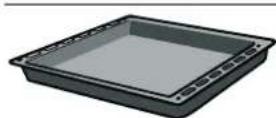
Universal pan
For moist cakes, pastries, frozen meals and large roasts. It can also be used to catch dripping fat when you are grilling directly on the wire rack.
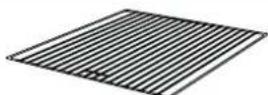
Wire rack
For cookware, cake tins, roasts, grilling and frozen meals.
Slide the wire rack into the oven with the handle holder facing towards the oven door.

Handle
For removing the wire rack. To do so, slot the handle into the handle holder on the wire rack.
Before using the oven for the first time
In this section, you can find out what you must do before using your oven to prepare food for the first time. First read the section on Safety information.
Heating up the oven
To remove the new cooker smell, heat up the oven when it is empty and closed. An hour of ☐ Top/bottom heating at 200 °C is ideal. Ensure that no packaging remnants have been left in the cooking compartment.
- Use the function selector to set ☐ Top/bottom heating.
- Use the temperature selector to set the temperature to 200^ C.
- Set the timer to 60 minutes.
After an hour, the oven switches off.
Cleaning the accessories
Before you use the accessories for the first time, clean them thoroughly with hot soapy water and a soft dish cloth.
Setting the oven
There are various ways in which you can set your oven. Here we will explain how you can select the desired type of heating and temperature or grill setting.
Type of heating and temperature
Example shown below: ☐ Top/bottom heating at 190 °C.
- Use the function selector to set the type of heating.

- Use the temperature selector to set the temperature.

- Switch on the oven using the timer 🔊.

The oven begins to heat up.
Switching off the oven
Turn the timer to the off position 0.
Changing the settings
The type of heating and temperature can be changed at any time with their respective selector.
Cooking time
You can set the cooking time for your dish using the timer. When the cooking time has elapsed, the oven switches itself off automatically. This means that you do not have to interrupt other work to switch off the oven. The cooking time cannot be accidentally exceeded.
Example shown below: Cooking time of 45 minutes.
- Use the function selector to set the type of heating.
- Use the temperature selector to set the temperature.
- Turn the timer clockwise to the stop; do not turn it beyond the stop.

- Then turn it back to the required cooking time.

The oven starts.
The cooking time has elapsed
A signal sounds. The oven stops heating. The timer has reached the off position 0. Turn the temperature selector to the I position.
Changing the cooking time
Turn the timer clockwise to the stop and then back to the new cooking time.
Cancelling the cooking time
Turn the timer to the off position 0.
Care and cleaning
With good care and cleaning, your oven will remain clean and fully-functioning for a long time to come. Here we will explain how to maintain and clean your oven correctly.
Risk of burns!
The appliance becomes very hot. Never touch the interior surfaces of the cooking compartment or the heating elements. Always allow the appliance to cool down. Keep children at a safe distance.
Notes
■ Before cleaning, unplug from the mains.
■ Slight differences in the colours on the front of the oven are caused by the use of different materials, such as glass, plastic and metal.
■ Enamel is baked on at very high temperatures. This can cause some slight colour variation. This is normal and does not affect operation. The edges of thin trays cannot be completely enamelled. As a result, these edges can be rough. This will not impair the anti-corrosion protection.
Cleaning agents
To ensure that the different surfaces are not damaged by using the wrong cleaning agent, observe the information in the table. Do not use
■ sharp or abrasive cleaning agents,
■ cleaning agents with a high alcohol content,
■ hard scouring pads or cleaning sponges,
■ high-pressure cleaners or steam cleaners.
Wash new sponge cloths thoroughly before use.
Area Cleaning agents
| Oven front Hot soapy water: | |
| Clean with a dish cloth and dry with a soft cloth. Do not use glass cleaners or glass scrapers. | |
| Door panels Glass cleaner: | |
| Clean with a soft cloth. Do not use a glass scraper. | |
| Cooking compartment | Hot soapy water or a vinegar solution: Clean with a dish cloth. If there are heavy deposits of dirt, use a stainless steel scouring pad or oven cleaner. Only use when the cooking compartment is cold. |
| Seal | Hot soapy water: |
| Do not remove. | Clean with a dish cloth. Do not scour. |
| Accessories Hot soapy water: | |
| Soak and clean with a dish cloth or brush. | |
Troubleshooting
Malfunctions often have simple explanations. Refer to the table before calling the after-sales service as you may be able to remedy the fault yourself.
Malfunction table
If a dish does not turn out as well as you had hoped, refer to the section Tested for you in our cooking studio, where you will find plenty of cooking tips and tricks.
Problem Possible cause Remedy/information
| The oven does not work. | The plug is not plugged in. | Plug in the plug. |
| Power cut Check | whether the kitchen light or other kitchen appliances are working. | |
| The oven does not heat up. | Dust has collected on the contacts. | Turn the control knobs back and forth several times. |
Risk of electric shock!
Incorrect repairs are dangerous. Repairs may only be carried out and damaged power cables replaced by one of our trained after-sales technicians. If the appliance is defective, unplug the appliance from the mains or switch off the circuit breaker in the fuse box. Contact the after-sales service.
After-sales service
Our after-sales service is there for you if your appliance needs to be repaired. We will always find the right solution in order to avoid unnecessary visits from a service technician.
E number and FD number
When calling us, please give the product number (E no.) and the production number (FD no.) so that we can provide you with the correct advice. The rating plate containing these numbers is found on the rear of the appliance. You can make a note of the numbers of your appliance and the telephone number of the after-sales service in the space below to save time should it be required.
E no.
FD no.
After-sales service

Please note that there will be a fee for a visit by a service technician in the event of a malfunction, even during the warranty period.
Contact details for your nearest in-country after-sales service can be found here as well as in the enclosed directory.
Repairs and advice in the event of a fault
Tel.: 444 77 66 (free phone)
Tel.: 0216 528 90 00 (Pbx) (calls charged)
Rely on the manufacturer's expertise. They are able to ensure that any repair work is carried out by trained service technicians, using only original spare parts designed for your appliance.
Energy and environment tips
Here you can find tips on how to save energy when baking and roasting and how to dispose of your appliance properly.
Saving energy
■ Only preheat the oven if this is specified in the recipe or in the operating instruction tables.
■ Use dark, black lacquered or enamelled baking tins. They absorb the heat particularly well.
■ Open the oven door as infrequently as possible while you are cooking, baking or roasting.
It is best to bake several cakes one after the other. The oven is still warm. This reduces the baking time for the second cake. You can also place two loaf tins next to each other.
For longer cooking times, you can switch the oven off 10 minutes before the end of the cooking time and use the residual heat to finish cooking.
Environmentally-friendly disposal
Dispose of packaging in an environmentally-friendly manner.

This appliance complies with European Directive 2002/96/EC on Waste Electrical and Electronic Equipment (WEEE). The directive gives a framework for the collection and recycling of old appliances, which is valid across the EU.
Tested for you in our cooking studio
Here you will find a selection of dishes and the ideal settings for them. We will show you which type of heating and which temperature are best suited for your dish. You can find information about suitable accessories and the height at which they should be inserted. There are also tips about cookware and preparation methods.
Notes
■ The values in the table always apply to dishes placed into the cooking compartment when it is cold and empty.
Only preheat the appliance if the table specifies that you should do so. Do not line the accessories with greaseproof paper until after they have been preheated.
■ The times specified in the tables are guidelines only. They will depend on the quality and composition of the food.
■ Use the accessories supplied. Additional accessories may be obtained as special accessories from specialist retailers or from the after-sales service.
Before using the oven, remove any unnecessary accessories and ovenware from the cooking compartment.
■ Always use oven gloves when taking hot accessories or ovenware out of the cooking compartment.
Tables
The tables show the ideal type of heating for the various cakes and pastries. The temperature and baking time depend on the
amount and composition of the mixture. A lower temperature produces more even browning. You can increase the temperature next time if necessary.
| Cakes and bread Accessories Position Type of | heating | Temperature in °C | Cooking time in minutes | ||
| Börek Universal pan 2 | ☐ | 190 50 | |||
| Turkish cookies Universal pan 2 | ☐ | 155 50 | |||
| Small yeast bread Universal pan 2 | ☐ | 160 35 | |||
| Flat cake Universal pan 2 | ☐ | 160 40 | |||
| Small cake | Universal pan 2 | ☐ | 160 35 | ||
| Pizza | Universal pan 2 | ☐ | 190 35 | ||
Meat, poultry, fish
Grilling
When grilling a single thick piece of food, slide the wire rack in at level 2, otherwise the food may touch the grill.
If possible, grill items should be of equal thickness. This ensures that they brown evenly while also remaining succulent.
Turn the food you are grilling after 23 of the time.
Only add salt to steaks once they have been grilled.
Place the food to be grilled directly on the wire rack. If you are grilling a single piece, the best results are achieved by placing it in the centre of the wire rack.
The universal pan should also be inserted at level 1. The meat juices are collected in the pan and the oven is kept cleaner.
Meat
Turn pieces of meat halfway through the cooking time.
When the roast is ready, turn off the oven and allow it to rest for an additional 10 minutes. This allows better distribution of the meat juices.
After cooking, wrap sirloin in aluminium foil and leave it to rest for 10 minutes in the oven.
| Meat | Weight | Accessories and ovenware | Position Type of heating | Temperature in °C, grill setting | Cooking time in minutes | |
| Whole chicken | 1.6 kg | Universal pan | 1 | 200 90 | ||
| Lamp | 1.5 kg | Universal pan | 2 | 200 100 | ||
| Roast | 1.5 kg | Universal pan | 2 | 175 120 | ||
| Beef steak | Wire rack | 2 | 250 20+15 | |||
Acrylamide in foodstuffs
Acrylamide is mainly produced in grain and potato products prepared at high temperatures, such as potato crisps, chips,
toast, bread rolls, bread or fine baked goods (biscuits, gingerbread, spiced biscuit).
| Tips for keeping acrylamide to a minimum when preparing food | |
| General | ■ Keep cooking times to a minimum.■ Cook meals until they are golden brown, but not too dark.■ Large, thick pieces of food contain less acrylamide. |
| Baking | With top/bottom heating max. 200 °C. |
| Biscuits | With top/bottom heating max. 190 °C.Egg or egg yolk reduces the production of acrylamide. |
| Oven chips | Spread out a single layer evenly on the baking tray. |
- ⚠️ Important safety information
- Risk of fire!
- Risk of electric shock!
- Risk of burns!
- Risk of scalding!
- Risk of injury!
- Causes of damage
- Caution!
- Installation and connection
- Your new oven
- Control panel
- Function selector
- Temperature selector
- Timer
- Accessories
- Universal pan
- Wire rack
- Handle
- Before using the oven for the first time
- Heating up the oven
- Cleaning the accessories
- Setting the oven
- Type of heating and temperature
- Switching off the oven
- Changing the settings
- Cooking time
- The cooking time has elapsed
- Changing the cooking time
- Cancelling the cooking time
- Care and cleaning
- Notes
- Cleaning agents
- Troubleshooting
- Malfunction table
- After-sales service
- E number and FD number
- Repairs and advice in the event of a fault
- Energy and environment tips
- Saving energy
- Environmentally-friendly disposal
- Tested for you in our cooking studio
- Tables
- Meat, poultry, fish
- Grilling
- Meat
- Acrylamide in foodstuffs
Brand : Profilo
Model : HG1503T
Category : Microwave