
EOR 1515 LCD - Heating appliance ZIBRO - Free user manual and instructions
Find the device manual for free EOR 1515 LCD ZIBRO in PDF.


| Product Type | Oil-filled radiator |
| Brand | Zibro |
| Model | EOR 1515 LCD |
| Dimensions (W x D x H) | 380 x 140 x 650 mm |
| Weight | 9 kg |
| Power Supply | 230 V ~ 50 Hz |
| Current | 6.52 A |
| Max Heating Capacity | 1500 W |
| Heating Settings | 3 (Auto: 600 W / 900 W / 1500 W) |
| Thermostatic Range | 13 - 30 °C |
| Room Size (max) | 60 m³ |
| Protection Class | IP20 |
| Display | LCD |
| Timer Function | Auto On/Off (1 - 24 hours) |
| Overheat Protection | Automatic thermal cut-off + thermal fuse |
| Wheels | 2 castor wheels (included) |
| Cord Storage | Yes (rear) |
| Handle | Yes (top) |
| Color | Black / Silver |
| Warranty | 2 years |
Frequently Asked Questions - EOR 1515 LCD ZIBRO
User questions about EOR 1515 LCD ZIBRO
0 question about this device. Answer the ones you know or ask your own.
Ask a new question about this device
Download the instructions for your Heating appliance in PDF format for free! Find your manual EOR 1515 LCD - ZIBRO and take your electronic device back in hand. On this page are published all the documents necessary for the use of your device. EOR 1515 LCD by ZIBRO.
USER MANUAL EOR 1515 LCD ZIBRO
natural_image
Exterior view of a black and silver electric heater with a digital display and control panel (no visible text or symbols)guarantee
2
YEARS
| GB | OPERATING MANUAL | 2 |
| I | ISTRUZIONI D'USO | 10 |
| NL | GEBRUIKSAANWIJZING | 20 |
Dear Sir, Madam,
Congratulations with your purchase of a portable domestic heater. You have purchased a quality product, which will serve you for many years to come. This, of course, provided you use the heater correctly. Please read these Directions for Use first, to ensure maximum lifetime for your heater.
Your heater comes with a 24-month manufacturer's warranty on all defects in materials or workmanship.
We wish you a warm and comfortable time with your heater.
Yours sincerely,
PVG Holding b.v.
Customer Service Department
1 READ THE DIRECTIONS FOR USE FIRST.
2 IN CASE OF ANY DOUBT, CONTACT YOUR DEALER.
GB


MAIN COMPONENTS
① Castor wheels (2)
② Power button
③ Buttons
4 LCD display screen
⑤ Power switch
6 Control panel
⑦ Front cover
8 Radiator fins
9 Cord storage
10 Handle
⑪ Wing nuts (2)
⑫ Arc-shaped brackets (2)
GB
SAFETY INSTRUCTIONS
Read this user manual carefully before using the appliance and keep it for future reference. Install this device only when it complies with local/national legislation, ordinances and standards. This product is intended to be used as a mobile heater in residential houses and is only suitable for use in normal household conditions, indoors in living room, kitchen, and garage. This unit is only suitable for earthed sockets, connection voltage 230 V. / \~50 Hz.

GENERAL
After unpacking, check the appliance for any damages. When in doubt, do not use the appliance, but contact customer service at your local dealer's. Keep the packaging materials (plastic bags, etc.) away from children, as they may cause hazardous situations to children.
DANGER
- Do not immerse the appliance in water and do not let water run into it.
- Never open the appliance to prevent electric shock.
WARNING
- The installation must be completely in accordance with local regulations, ordinances and standards.
- Check if the voltage indicated on the type plate corresponds to the local mains voltage before you connect the appliance.
• The appliance is suitable for mains voltages ranging from 220V to 240V. - If the mains cord is damaged, you must have it replaced by a service centre authorised by Zibro or similarly qualified persons in order to avoid a hazard.
- Always return the appliance to a service centre authorised by Zibro for examination or repair.
- Repair by unqualified people could cause an extremely hazardous situation for the user.
- Do not attempt to repair the appliance yourself, otherwise your guarantee becomes invalid.
- Keep the mains cord away from hot surfaces.
- This appliance is not intended for use by persons (including children) with reduced physical, sensory or mental capabilities, or lack of experience and knowledge, unless they have been given supervision or instruction concerning use of the appliance by a person responsible for their safety.
• Children should be supervised to ensure that they do not play with the appliance.
• The plug must be accessible at all times. - Do not insert objects into the openings of the device.
- Do not use this heater in the immediate surroundings of a bath, a shower or a swimming pool.
• The device must not be located immediately below a socket outlet.
• In order to avoid overheating, do not cover the device.
CAUTION
- Switch off the appliance and disconnect it from the mains immediately if it produces a
strange smell or an abnormal noise. Take the appliance to an authorised Zibro service centre.
- Switch off the appliance and unplug it according to the user instructions before you move or clean it.
• Make sure the appliance and the mains cord are always out of reach of babies (at least one metre away). - Do not use the appliance if not IPX4 protection class (see type plate) in damp places or close to water. Only IPX4 class appliances are suitable for these circumstances.
- Do not use the appliance in places where the humidity level exceeds 95%.
- Do not expose the appliance to extreme heat or cold or to direct sunlight.
- Do not use the appliance outdoors.
- Never tilt or move the appliance while it is operating.
- Do not use any extension cords or multi-socket adapters.
• Always take the plug out of the socket when the device is not in use. - This heater is filled with a precise amount of special oil. Opening the heater and repairs to it should be carried out by a service centre authorised by Zibro. If the case of oil leakage, contact the manufacturer or an authorized service centre.
- When disposing of the stove, please respect the existing rules on oil recycling.
INSTALLING THE HEATER
1 Carefully remove your heater from the box and check the contents. In addition to the heater, you also need to have:
- castor wheels

- wing nuts

- arc-shaped brackets

- these directions for use
Keep the box and the packaging materials for storage and/or transportation.
2 Unpack the Castor Wheels and Arc-shaped Brackets from the product packaging.
3 Turn the radiator upside-down on a scratch-free and stable surface to prevent damage to the paint finish or your floor surfacing.
4 Fit the two Castor Wheels onto the radiator by placing the Arc-shaped Brackets between the outermost fins on each side of the radiator.
5 Securely fasten the two Castor Wheels onto the radiator by screwing two Wing Nuts onto each Foot.

natural_image
Line drawing of a staircase with decorative elements (no text or symbols)
natural_image
Illustration of a food pyramid with coins and a spoon, no text or symbols present6 Turn the radiator in upright position after the Castor Wheel Assembly fitted.
OPERATION

CAUTION:
Only operate the radiator in normal upright position with Castor Wheel Assemblies attached to the bottom of the unit, any other position could create a hazardous situation
1 Insert the plug in the wall outlet.
2 Use the power switch ⑤ and press the ⏻-button ② to switch the heater on.
The heater starts operating at maximum power. The display shows . The heater will continue operating at full power until the power is switched off manually or if the room temperature exceeds 30^ C.
3 Press the Ⓑ-button ② to turn the heater into low power mode. The displays shows \$. The heater will continue operating in low power mode until the power is switched off manually or if the room temperature exceeds 30°C.
4 Press the ⏻-button ② once again to switch the heater off.
TEMPERATURE SETTING
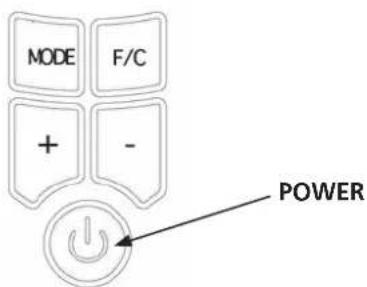
1 Press the Mode button until the temperature icon ↓ blinks. The set temperature is displayed and can be changed as the temperature icon ↓ is blinking.
2 Use the + and - button to set the desired temperature, from 13 to 30°C.
3 The temperature icon ↓ will stop blinking and the current room temperature will appear after the desired temperature is set.
4 Once the room temperature exceeds the set temperature for over 10 seconds, the heater will stop heating and the temperature icon ↓ will blink.
5 Once the room temperature drops 1^ C below the set temperature, the heater will start heating again and the temperature icon on the display will stop blinking.
OVERHEAT PROTECTION
This appliance has two levels of overheat protection:
1. Automatic thermal cut-off
Switches off the heater in the event of overheating or malfunction and resets once the temperature drops to a normal level
2. Thermal fuse
In the event that the automatic thermal cut-off fails to operate, the heater has a further safety device. This is a non-resettable switch which will require the unit be returned to an approved service centre for replacement.
If overheating or malfunctions occur on a regular basis, return the heater to an approved service centre for examination.
TIMER SETTING
AUTO OFF

Make sure to set the desired temperature prior to setting the timer, so that the heater will shut off at the desired temperature setting.
With the Auto OFF timer setting you can decide the time that the heater should automatically switch of.
1 Keep pressing the Mode button until the timer icon blinks. The Auto Off icon will also appear.
2 Use the + and - buttons to set the heater operation time between 1 and 24 hours (default is 10 hours).
3 The heater will automatically turn off when the set timer setting runs out.

NOTE!
When both desired temperature and timer off function have been activated, the heater will switch on and off per the set temperature setting and will stop operating once the programmed timer setting has been reached.
AUTO ON

Make sure to set the desired temperature prior to setting the timer, so that the heater will shut off at the desired temperature setting. If the desired temperature is set, this function will overrule the timer function.
With the Auto ON timer setting you can decide the time that the heater should automatically switch on.
1 Keep pressing the Mode button until the timer icon and the Auto ON icon appear.
2 Use the + and - buttons to set the heater start time between 1 and 24 hours (default is 1 hour).
3 The heater will automatically turn on when the set time expires.

NOTE!
When both desired temperature and timer on function have been activated, the heater will switch on and off per the set temperature setting once the heater begins to operate.

In the Auto-on function the heater will turn on after the set time has elapsed. If no Auto-off time has been selected, a default timer of 10 hours will be applied to the function.
FAHRENHEIT/CELSIUS FUNCTION
This heater offers the option to read the temperature setting in either Fahrenheit or Celsius. Press F/C button to toggle between Fahrenheit and Celsius.
MAINTENANCE AND STORAGE

Allow the product to completely cool before handling or cleaning it.
Ensure the product is in the "O" OFF position and the Power Cord is unplugged from the electrical outlet before cleaning the product.
- Always ensure the product's housing is intact and completely assembled before each use.
- Do not touch hot surfaces. Always use the handle of the product. Use protective mitts or gloves to avoid serious burns or other personal injury.
- Clean the exterior surface of the product by wiping it with a soft, damp cloth.

CAUTION:
Do not allow water or other liquids to run into the interior of the product, as this could create a fire and/or electrical hazard.
- Do not use any abrasive cleaners or solvents, as product damage will occur.
- Store the product in a clean, dry place when it is not in use.
TECHNICAL SPECIFICATIONS
| Model EOR 1515 LCD | ||
| Max. heating capacity W 1500 | ||
| Heating settings | 3 (Auto = 600 W / 900 W / 1500 W) | |
| Thermostatic range | °C | 13 - 30 |
| Current A 6.52 | ||
| Mains V / Hz / Ph 230/50/1 | ||
| Weight kg 9 | ||
| Dimensions (w x d x h) mm 380x140x650 | ||
| Room size | m^3 | 60 |
| Unit protection | IP20 | |
EC DECLARATION OF CONFORMITY
The appliance has been designed, constructed and distributed in conformity with the safety regulations of EC directives.
The appliance is intended for normal domestic use and for the described purposes only.
GUARANTEE CONDITIONS
The appliance is supplied with a 24-month guarantee, commencing on the date of purchase.
All material and manufacturing defects will be repaired or replaced free of charge within this period. The following rules apply:
- We expressly refuse all further damage claims, including claims for collateral damage.
- Repairs to or replacement of components within the guarantee period will not result in an extension of the guarantee.
- The guarantee is invalidated if any modifications have been made, non-genuine parts are fitted or repairs are carried out by third parties.
- Components subject to normal wear, such as filters, batteries, lamps and heating elements are not covered by the guarantee.
- The guarantee is valid only when you present the original, dated purchase invoice and if no modifications have been made.
- The guarantee is invalid for damage caused by neglect or by actions that deviate from those in this instruction booklet.
- Transportation costs and the risks involved during the transportation of the appliance or components of the appliance shall always be for the account of the purchaser
- Damage caused by not using suitable spare parts is not covered by the guarantee.
To prevent unnecessary expense, we recommend that you always first carefully consult the instructions for use. Take the appliance to your dealer for repairs if these instructions do not provide a solution.
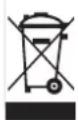
Waste electrical products should not be disposed with household waste. Please recycle where facilities exist. Check with your local authority or retailer for recycling advice.

Distributed in Europe by PVG Holding B.V.
D Benötigen Sie weitere Informationen oder treten Probleme auf, besuchen Sie bitte unsere Website www.zibro.com, oder setzen Sie sich mit unserem Kundendienst in Verbindung (Telefonnummer auf www.zibro.com).
For alle yderligere oplysninger eller ved eventuelle problemer med apparatet henvises til www.zibro.com eller det lokale Kundecenter (telefon-numre findes i www.zibro.com).
Si necesita información o si tiene algún problema, visite nuestra página Web www.zibro.com, o póngase en contacto con el servicio cliente (hallará el número de teléfono en www.zibro.com).
F Si vous souhaitez obtenir des informations supplémentaires ou si vous rencontrez un problème, rendez-vous sur notre site Web (www.zibro.com) ou contactez notre service client (vous trouverez l'adresse et numéro de téléphone sur www.zibro.com).
FIM Jos haluat huoltoapua, lisätietoja tai laitteen kanssa tulee ongelmia, tutustu verkkosivustoon osoitteessa www.zibro.com tai kysy neuvoa PVG kuluttajapalvelukeskuksesta (www.zibro.com).
GB If you need information or if you have a problem, please visit the our website (www.zibro.com) or contact our sales support (you find its phone number on www.zibro.com)
Per informazioni e in caso di problemi, visitate il sito Web www.zibro.com oppure contattate il Centro Assistenza Clienti (per conoscere il numero di telefono, consultate www.zibro.com).
N Hvis du trenger informasjon, eller hvis du har et problem med produktet, kan du gå til nettsidene www.zibro.com. Alternativt kan du kontakte med PVG' forbrukertjeneste (telefonnummeret i www.zibro.com).
Als u informatie nodig hebt of als u een probleem hebt, bezoek dan de onze website (www.zibro.com) of neem contact op met de afdeling sales support (adres en telefoon op www.zibro.com).
Se necessitar de informações ou se tiver problemas, visite o Web site www.zibro.com ou contacte o Centro de Assistência (número de telefone o www.zibro.com)
W przypadku problemów i w celu uzyskania szczegółowych informacji odwiedź stronę internetową Zibro dostępną pod adresem www.zibro.com lub skontaktuj się z Centrum kontaktów Zibro (www.zibro.com)
⑧ Om du behöver service eller information eller har problem med apparaten kan du besöka www.zibro.com eller kontakta Zibro kundtjänst (du hittar telefonnumret på www.zibro.com).
SLO Če želite dodatne informacije, obiščite spletno mesto podjetja na naslovu www.zibro.com ali pokličite na telefonsko (www.zibro.com).
Daha fazla bilgiye ihtiyaç duyarsanız veya bir sorunla karşılaşırsanız, www.zibro.com adresindeki Zibro Internet sitesini ziyaret edin veya ülkenizde bulunan Zibro müşteri merkeziyle iletişim kurun (telefon numarasını: www.zibro.com).



- MAIN COMPONENTS
- SAFETY INSTRUCTIONS
- GENERAL
- DANGER
- WARNING
- CAUTION
- INSTALLING THE HEATER
- OPERATION
- CAUTION:
- TEMPERATURE SETTING
- OVERHEAT PROTECTION
- Automatic thermal cut-off
- Thermal fuse
- TIMER SETTING
- AUTO OFF
- NOTE!
- AUTO ON
- FAHRENHEIT/CELSIUS FUNCTION
- MAINTENANCE AND STORAGE
- TECHNICAL SPECIFICATIONS
- EC DECLARATION OF CONFORMITY
- GUARANTEE CONDITIONS
- Distributed in Europe by PVG Holding B.V.
Brand : ZIBRO
Model : EOR 1515 LCD
Category : Heating appliance