
DV90M6200EW - Tumble dryer SAMSUNG - Free user manual and instructions
Find the device manual for free DV90M6200EW SAMSUNG in PDF.


| Product Type | Front-loading heat pump tumble dryer |
| Model | DV90M6200EW |
| Brand | Samsung |
| Capacity | 9 kg (dry laundry) |
| Dimensions (W x H x D) | 600 x 850 x 600 mm (depth with door: 650 mm) |
| Height with pedestal | 1095 mm |
| Weight | 50 kg |
| Power Supply | 220-240 V, 50 Hz |
| Power Consumption | 550-600 W |
| Energy Efficiency Class | A+++ |
| Annual Energy Consumption (AE_C) | 194 kWh/year |
| Energy Consumption (standard cotton program full load) | 1.54 kWh |
| Program Duration (standard cotton full load) | 188 min |
| Condensation Efficiency Class | B |
| Airborne Noise Emissions | 65 dB(A) |
| Number of Programs | 13 (including AIR WASH, IRON DRY, DELICATES, WOOL, TOWELS, BEDDING, OUTDOOR CARE, COOL AIR, WARM AIR, TIME DRY, QUICK DRY 35', SYNTHETICS, MIXED LOAD, COTTON) |
| Key Features | Digital Graphic Display, Wrinkle Prevent, Delay End (1-24h), Child Lock, Smart Check, Rack Dry (optional), Heat pump technology |
| Lint Filter | Two-part (inner and outer) – clean after each load |
| Heat Exchanger | Clean monthly with brush or vacuum |
| Water Tank | Built-in, empty after each load; optional drain hose connection |
| Refrigerant | R-134a (0.37 kg, GWP 1430) |
Frequently Asked Questions - DV90M6200EW SAMSUNG
User questions about DV90M6200EW SAMSUNG
0 question about this device. Answer the ones you know or ask your own.
Ask a new question about this device
Download the instructions for your Tumble dryer in PDF format for free! Find your manual DV90M6200EW - SAMSUNG and take your electronic device back in hand. On this page are published all the documents necessary for the use of your device. DV90M6200EW by SAMSUNG.
USER MANUAL DV90M6200EW SAMSUNG
What you need to know about the safety instructions 4 Important safety symbols 4 Important safety precautions 5 Critical installation warnings 7 Critical usage warnings 9 Usage cautions 10 Critical cleaning warnings 12 Instructions about the WEEE 13
Installation 14
What's included 14 Installation requirements 16 Dryer Drain hose (if necessary) 19 Installation checklist 22 Before using the dryer 22
Operations 23 Control panel 23 Getting started 28 Special features 32
Maintenance 33 Control panel 33 Exterior 33 Drum 33 Lint filter 33 Water tank 35 Heat exchanger 36
Troubleshooting 38 Checkpoints 38 Information codes 40
English2
Appendix 41
Fabric care chart 41
Protecting the environment 42
Specification
Consumption data 44
Sheet of household tumble driers 45
43
Safety information
Congratulations on your new Samsung dryer. This manual contains important information on the installation, use, and care of your appliance. Please take the time to read this manual to take full advantage of your dryer's many benefits and features.
What you need to know about the safety instructions
Warnings and Important Safety Instructions in this manual do not cover all possible conditions and situations that may occur. It is your responsibility to use common sense, caution, and care when installing, maintaining, or operating your dryer.
Always contact your manufacturer about problems or conditions you do not understand.
Important safety symbols
What the icons and signs in this user manual mean:

WARNING
Hazards or unsafe practices that may result in severe personal injury, death and/or property damage.

CAUTION
Hazards or unsafe practices that may result in personal injury and/or property damage.

NOTE
Indicates that a risk of personal injury or material damage exists.

Read the instructions
These warning signs are here to prevent injury to yourself and others.
Please follow them explicitly.
After reading this manual, store it in a safe place for future reference.
Read all instructions before using the appliance.
As with any equipment that uses electricity and moving parts, potential hazards exist. To safely operate this appliance, familiarize yourself with its operation and exercise care when using it.

WARNING - Risk of Fire
- Clothes dryer installation must be performed by a qualified technician.
- Install the clothes dryer according to the manufacturer's instructions and local codes.
• To reduce the risk of severe injury or death, follow all installation instructions.
English4
Important safety precautions
WARNING
To reduce the risk of fire, electric shock, or injury to persons when using your appliance, follow basic precautions, including the following:
- This appliance is not to be used by persons (including children) with reduced physical, sensory or mental capabilities, or lack of experience and knowledge, unless they have been given supervision or instruction concerning use of the appliance by a person responsible for their safety.
- For use in Europe: This appliance can be used by children aged from 8 years and above and persons with reduced physical, sensory or mental capabilities or lack of experience and knowledge if they have been given supervision or instruction concerning use of the appliance in a safe way and understand the hazards involved. Children shall not play with the appliance. Cleaning and user maintenance shall not be made by children without supervision.
- Children should be supervised to ensure that they do not play with the appliance.
- If the supply cord is damaged, it must be replaced by the manufacturer, its service agent or similarly qualified persons in order to avoid a hazard.
- The new hose-sets supplied with the appliance are to be used and that old hose-sets should not be reused.
- For appliances with ventilation openings in the base, that a carpet must not obstruct the openings.
Safety information
- For use in Europe: Children of less than 3 years should be kept away unless continuously supervised.
- CAUTION: In order to avoid a hazard due to inadvertent resetting of the thermal cut-out, this appliance must not be supplied through an external switching device, such as a timer, or connected to a circuit that is regularly switched on and off by the utility.
- The tumble dryer is not to be used if industrial chemicals have been used for cleaning.
- The lint trap has to be cleaned frequently, if applicable.
- Lint must not to be allowed to accumulate around the tumble dryer. (not applicable for appliances intended to be vented to the exterior of the building)
- Adequate ventilation has to be provided to avoid the back flow of gases into the room from appliances burning other fuels, including open fires.
- Do not dry unwashed items in the tumble dryer.
- Items that have been soiled with substances such as cooking oil, acetone, alcohol, petrol, kerosene, spot removers, turpentine, waxes and wax removers should be washed in hot water with an extra amount of detergent before being dried in the tumble dryer.
- Items such as foam rubber (latex foam), shower caps, waterproof textiles, rubber backed articles and clothes or pillows fitted with foam rubber pads should not be dried in the tumble dryer.
- Fabric softeners, or similar products, should be used as specified by the fabric softener instructions.
English6
- The final part of a tumble dryer cycle occurs without heat (cool down cycle) to ensure that the items are left at a temperature that ensures that the items will not be damaged.
- Remove all objects from pockets such as lighters and matches.
- WARNING: Never stop a tumble dryer before the end of the drying cycle unless all items are quickly removed and spread out so that the heat is dissipated.
- Exhaust air must not be discharged into a flue which is used for exhausting fumes from appliances burning gas or other fuels.
- The appliance must not be installed behind a lockable door, a sliding door or a door with a hinge on the opposite side to that of the tumble dryer, in such a way that a full opening of the tumble dryer door is restricted.
- WARNING: The appliance must not be supplied through an external switching device, such as a timer, or connected to a circuit that is regularly switched on and off by a utility.
Heat pump model only: The instructions shall also include the substance of the following:
WARNING: In the appliance enclosure or in the built-in structure, keep ventilation openings clear of obstruction.
WARNING: Do not damage the refrigerant circuit.
Critical installation warnings
WARNING
The installation of this appliance must be performed by a qualified technician or service company.
- Failure to do so may result in electric shock, fire, an explosion, problems with the product, or injury.
English 7
Safety information
Plug the power cord into a wall socket or higher and use the socket for this appliance only. In addition, do not use an extension cord.
- Sharing a wall socket with other appliances using a power strip or extending the power cord may result in electric shock or fire.
- Ensure that the power voltage, frequency and current are the same as those of the product specifications. Failure to do so may result in electric shock or fire. Failure Plug the power plug into the wall socket firmly.
Remove all foreign substances such as dust or water from the power plug terminals and contact points using a dry cloth on a regular basis.
- Unplug the power plug and clean it with a dry cloth.
- Failure to do so may result in electric shock or fire.
Keep all packaging materials well out of the reach of children, as packaging materials can be dangerous to children.
- If a child places a bag over its head, it may result in suffocation.
This appliance must be properly grounded.
Do not ground the appliance to a gas pipe, plastic water pipe, or telephone line.
- This may result in electric shock, fire, an explosion, or problems with the product
- Never plug the power cord into a socket that is not grounded correctly and make sure that it is in accordance with local and national codes.
Do not install or keep the product exposed to the outdoor elements.
Do not use a damaged power plug, damaged power cord or loose wall socket.
• This may result in electric shock or fire.
If the plug (power supply cord) is damaged, it must be replaced by the manufacturer or its service agent or a similar qualified technician in order to avoid a hazard.
This appliance should be positioned to be accessible to the power plug after installation.
Do not pull or excessively bend the power cord.
Do not twist or tie the power cord.
Do not hook the power cord over a metal object, place a heavy object on the power cord, insert the power cord between objects, or push the power cord into the space behind the appliance.
- This may result in electric shock or fire.
Do not pull the power cord, when unplugging the power plug.
- Unplug the power plug by holding the plug.
- Failure to do so may result in electric shock or fire.
English8
This appliance must be properly grounded. Never plug the power cord into a receptacle that is not grounded adequately and in accordance with local and national codes. See installation instructions for grounding this appliance.
Install this appliance in a location with solid, level floor.
- Failing to do so may result in abnormal vibrations, noise or problems with the product.
Since an ingredient in hair spray may degrade the hydrophile property of the heat exchanger so that dew may appear on the outer surface of the appliance when the cooling operation is running, do not install the appliance in a beauty salon.
This appliance should be positioned so that the power plug, the water supply taps, and the drain pipes are accessible.
Critical usage warnings
WARNING
Do not let children or pets on or into the product. In addition, when disposing of this product, disassemble the door lock (lever).
• This may result in children falling and injuring themselves.
- If children become locked in the product, there is a danger of suffocation.
Do not try to access the inside of the product when the drum is rotating.
Do not sit on the product or lean against the door.
- This may result in the product turning over and resulting in injury.
Dry the laundry only after it was spun by an appropriate washing machine.
Do not dry unwashed items in the tumble dryer.
Do not drink the condensed water.
Never stop a tumble dryer before the end of the drying cycle unless all items are quickly removed and spread out so that the heat is dissipated.
Do not dry laundry contaminated by inflammable materials such as gasoline, kerosene, benzene, thinner, alcohol, etc.
• This may result in electric shock, fire or explosion.
Do not let pets chew or play with the dryer.
• This may result in electric shock or injury.
When disposing of the product, separate the door and the power cord before disposing of the product.
- Failing to do so may result in damage to the power code or an injury.
Do not touch the power plug with wet hands.
• This may result in electric shock.
English 9
Safety information
When gas (city gas, propane gas, LP gas) leaks, do not touch this appliance or the power cord, ventilate immediately.
- At this time, do not use the ventilating fan.
- A spark may cause an explosion or fire.
Do not repair, replace, or attempt to service any part of the appliance unless specifically recommended in the user-repair instructions. You must also have the skills necessary to service this appliance.
Do not attempt to repair, disassemble, or modify the appliance yourself.
- Do not use any fuse(such as cooper, steel wire, etc.) other than the standard fuse.
- When repairing or reinstalling the appliance is required, contact your nearest service center.
- Failure to do so may result in electric shock, fire, problems with the product, or injury.
The product you have purchased is designed for domestic use only.
The use for business purposes qualifies as product misuse. In this case, the product will not be covered by the standard warranty provided by Samsung and no responsibility can be attributed to Samsung for malfunctions or damages resulting from such misuse.
If the product generates strange noise, smells of something burning, or generates smoke, immediately cut-off the power and contact the service center.
- Otherwise, it may cause an electric shock or fire as a result.
Do not let children (or pets) play in or on your product. The product door does not open easily from the inside and children may be seriously injured if trapped inside.
Usage cautions
CAUTION
Do not stand on top of the appliance or place objects (such as laundry, lighted candles, lighted cigarettes, dishes, chemicals, metal objects, etc.) on the appliance.
- This may result in electric shock, fire, problems with the product, or injury.
Do not touch the glass door and inside of the drum during or just after drying as it is hot.
• This may result in burns.
The door glass becomes hot during washing and drying. Therefore, do not touch the door glass.
Also, do not allow children to play around the washing machine or touch the door glass.
• This may result in burns.
Do not press the buttons using sharp objects such as pins, knives, fingernails, etc.
• This may result in electric shock or injury.
English10
Do not dry laundry containing forming rubber (latex) or similar rubber textures.
- If forming rubber is heated, it may start a fire.
Do not dry laundry contaminated by vegetable oil or cooking oil as a large amount of the oil will not be removed when washing the laundry. In addition, use the Cool Down cycle so that the laundry is not heated.
- The oxidization heat of the oil may start a fire.
Make sure that the pockets of all clothing to be dried are empty.
- Hard, sharp objects, such as coins, safety pins, nails, screws, or stones can cause extensive damage to the appliance.
Do not dry clothing with large buckles, buttons, or other heavy metal (zippers, hooks and eyelets, button-up covers).
If necessary, use the laundry net for small and lightweight laundry such as fabric tie belt, apron strings, and underwire bras which can dissolve or break during a cycle.
Dryer sheets are compatible with this model, and are recommended for better drying performance.
Dryer sheets are also beneficial in reducing the static electricity generated during a drying cycle. Static electricity could lead to damage of laundry items and potentially the appliance.
Do not use the dryer near dangerous powders such as coal dust, wheat flour, etc.
- This may result in electric shock, fire or an explosion.
Do not place inflammable materials near the product.
- This may result in toxic gases from the product, damage to parts, electric shock, fire or an explosion.
- The appliance should not be placed behind lockable doors etc.
Do not touch the rear side of the appliance during or immediately after drying is complete.
- The appliance remains hot and may cause burns.
Contains fluorinated greenhouse gases.
Hermetically sealed equipment.
Do not vent gases into the atmosphere.
Refrigerant (Type): R-134a (GWP = 1430)
Refrigerant (Charging): 0.37 kg, 0.529 tCO 2 e
Safety information
Critical cleaning warnings

WARNING
Do not clean the appliance by spraying water directly onto it.
Do not use benzene, thinner or alcohol to clean the appliance.
- This may result in discoloration, deformation, damage, electric shock or fire.
Before cleaning or performing maintenance, unplug the appliance from the wall socket.
- Failure to do so may result in electric shock or fire.
Clean the filter case before and after using the dryer.
Clean the inside of the product on a regular basis by asking an authorized service engineer.
Clean the Heat Exchanger with a soft brush or vacuum cleaner once a month, Do not touch the heat exchanger with your hand. Otherwise, it may cause an injury.
The interior of the dryer should be cleaned periodically by qualified service personnel.
English12
Instructions about the WEEE

natural_image
Symbol of a trash bin crossed with no text or numbers, representing waste sorting or anti-smoking (no text present)Correct Disposal of This Product (Waste Electrical & Electronic Equipment)
(Applicable in countries with separate collection systems)
This marking on the product, accessories or literature indicates that the product and its electronic accessories (e.g. charger, headset, USB cable) should not be disposed of with other household waste at the end of their working life. To prevent possible harm to the environment or human health from uncontrolled waste disposal, please separate these items from other types of waste and recycle them responsibly to promote the sustainable reuse of material resources.
Household users should contact either the retailer where they purchased this product, or their local government office, for details of where and how they can take these items for environmentally safe recycling.
Business users should contact their supplier and check the terms and conditions of the purchase contract. This product and its electronic accessories should not be mixed with other commercial wastes for disposal.
For information on Samsung's environmental commitments and product regulatory obligations, e.g. REACH, WEEE or Batteries, visit our sustainability page available via www.samsung.com
Installation
What's included
Carefully unpack the dryer. Keep all packaging materials away from children. The parts and location of parts shown below may differ from your dryer. Before installation, make sure the dryer has all the parts listed here. If the dryer and/or parts are damaged or missing, contact the nearest Samsung customer service center.
Dryer at a glance

01 Top cover 02 Water Tank
03 Lint filter 04 Heat exchanger
05 Levelling Leg 06 Door
07 Control Panel
English14
Accessories (supplied)

natural_image
Simple line drawing of a symmetrical mechanical bracket or clamp (no text or symbols)
natural_image
Simple line drawing of a curved ribbon or clamp (no text or symbols)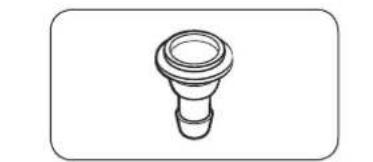
natural_image
Simple line drawing of a bulb-like object with a flared top and base (no text or symbols)Hose guide Cable tie Hose connector

natural_image
Simple line drawing of a coiled cable or hose with two connectors (no text or symbols)
natural_image
Simple line drawing of a closed book with a blank cover (no text or symbols)
natural_image
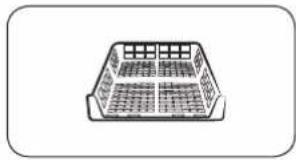
Simple line drawing of a rectangular container with internal compartments (no text or symbols)Long drain hose (2 m) User manual Rack Dry (applicable
models only)

natural_image
Simple line drawing of a laboratory pipette with a bulbous tip (no text or symbols)Cleaning brush
Accessories (not supplied)

natural_image
Simple line drawing of a device with no text or symbolsBracket-Stacking kit (Part # SK-DH; SK-DA; SKK-DF)

natural_image
Isometric line drawing of a rectangular electronic component with mounting holes (no text or symbols)Stacking kit (SKK-DD, SKK-DDX)

NOTE
- The stacking kit allows the dryer to be stacked on top of a washer. Please note that the stacking kit can only be used with Samsung washers and dryers. To purchase a stacking kit (Part # SK-DH; SK-DA; SKK-DF), contact a Samsung service center or local appliance retailer. The stacking kit differs with the model.
- For stacking instructions with the dryer, see the installation manual included in the stacking kit.
- For information about model-specific availability of the stacking kit, see the installation manual included in the stacking kit.
Installation
Installation requirements

NOTE
This dryer must be installed by a qualified installer. If service is required due to poor or faulty installation, it is considered the owner's responsibility and may void the warranty. Keep these instructions for future reference.

WARNING
- Do not plug the power cord into a wall outlet before the dryer is completely installed.
- Have two or more persons help move the dryer.
- Do not let children or pets play in, on, or around the dryer. Proper supervision is necessary at all times.
- Keep all packaging materials away from children.
- Do not replace a damaged power cord or power plug yourself. Have Samsung or a qualified service technician replace a damaged power cord or power plug.
- Do not attempt to repair, disassemble, or modify the dryer. For any repairs, contact the nearest Samsung service center.
- Remove the door/lids from all discarded appliances to avoid children from suffocating.
- If the dryer generates a strange noise, burning smells, or smoke, unplug the power plug immediately and contact the nearest Samsung service center.
- Do not unplug the dryer while it is operating.
- Do not place flammable objects near the dryer.
English16
Location requirements
Select a level, well-constructed surface that will withstand vibrations. Select a location where a grounded, 3-prong outlet is easily accessible.
WARNING
• Install the dryer indoors only.
- Do not install the dryer in areas exposed to the weather.
- Do not install the dryer where the temperature may fall below 5 °C or rise above 35 °C.
- Do not install the dryer where gas may leak.
- Do not block the cooling grill's air inlet located at the dryer front.
Alcove or closet installation
For alcove or closet installation, the dryer requires the following minimum clearances:
| Sides Top Front Rear | ||
| 25 mm 25 mm 490 mm 51 mm |
If installing the dryer with a washer, the front of the alcove or closet must have an unobstructed air opening of at least 490 mm.
Electrical and grounding requirements
- The dryer requires an AC 220-240 V 50 Hz electrical supply.
- The dryer must be properly grounded. If the dryer malfunctions or breaks down, grounding reduces the risk of electric shock by providing a path of least resistance for the electric current. The dryer comes with a power cord that has a 3-prong grounding plug. The plug must be plugged into an appropriate outlet that is properly installed and grounded in accordance with all local codes and ordinances.
- If you have any questions regarding the electrical or grounding requirements, please contact Samsung or a qualified electrician.
WARNING
- Plug into a grounded, 3-prong outlet.
- Do not use a damaged power plug, cord, or loose or damaged wall outlet.
- Do not use an adapter or an extension cord.
- Improper connection of the equipment-grounding conductor may result in electric shock. If you are unsure if the dryer is properly grounded, check with a qualified electrician.
- Do not modify the power plug, power cord, or power outlet in any way.
- Do not connect the ground wire to plastic plumbing lines, gas lines, or hot water pipes.
Installation
Dryer
Before you install the dryer, make sure you have read Installation requirements on page 16. Please note that the following instructions are for installation without using a drain hose. For instructions for using a drain hose, see the next section, Drain hose. For convenience, consider installing the dryer next to your washer.
Installation

natural_image
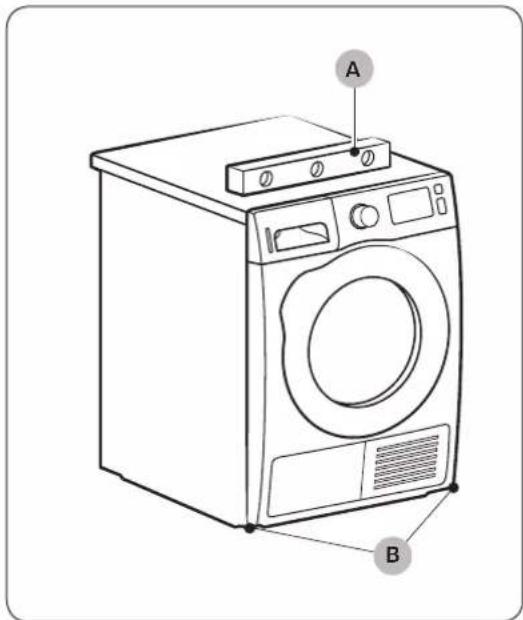
Two identical diagrams showing a mechanical component with arrows indicating rotation, labeled C and D (no text or symbols beyond labels)- Gently slide the dryer into the desired location.
- Use a level (A) and check the levelness of the dryer from side to side and front to back.
- If the dryer is not level, adjust the levelling leg (B). Turning the leg counter-clockwise retracts the leg. Turning the leg clockwise extends the leg.
- Once the dryer is level, make sure the dryer stands firmly on the floor.
- Plug in the dryer.
NOTE
- To set the dryer to the same height as the washer, fully retract (C) the levelling legs by turning them counter clockwise, then loosen (D) the legs by turning them clockwise.
- Extend the levelling leg only as much as necessary. Extending the levelling leg more than necessary can cause the dryer to vibrate.
English18
Drain hose (if necessary)

natural_image
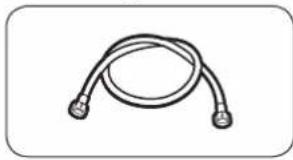
Line drawing of a washing machine casing with internal components and a magnified inset showing internal wiring (no text or symbols)The dryer comes with a built-in water tank. However, if you do not want to use the water tank, you may install the drain hose. The provided accessory hose (long drain hose) can be used as an extension to the drain hose.

- Remove the drain hose from hole (A), and insert it into hole (B).
Installation

natural_image
Technical diagram of a mechanical assembly with labeled component A (no text or symbols present)Over a wash basin:
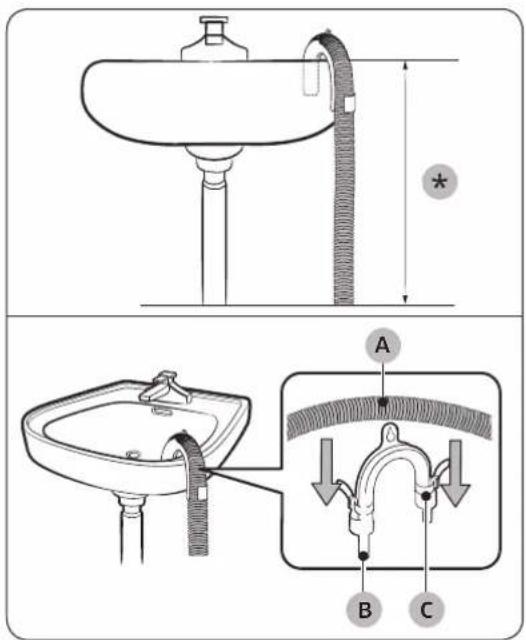
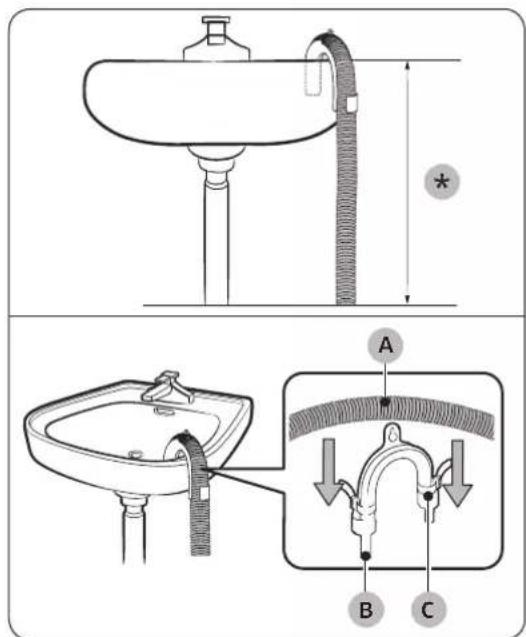
- Insert one end of the accessory hose (long drain hose) into hole (A).
-
Insert the other end (outlet) of the accessory hose to the drainage system in one of the following ways:
-
Make sure to place the end of the accessory hose lower than 90 cm (*) from the bottom of dryer.
- To bend some point of the accessory hose, use the supplied plastic hose guide (B) and secure the guide to the wall with a hook or to the tap with a piece of string. Assemble the drain hose (A) and the hose guide (B) and fix them with the cable-tie (C).
- You can drain the condensed water by connecting the accessory hose (long drain hose) to the drain-outlet directly.
CAUTION
Do not extend the drain hose. Water may leak from the connected area. Use a long drain hose.
English20-
By using the drain pipe of the wash basin:
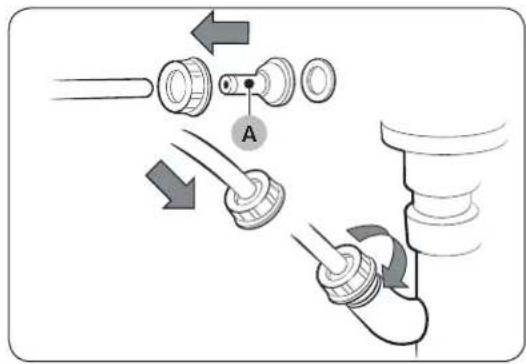
- Assemble the hose connector (A), and attach it to the end of the accessory hose as shown.
CAUTION
To prevent water leak, make sure to connect the hose and the connector firmly.

natural_image
Line drawing of a square sink with a pipe and handle, no text or symbols present- Connect the hose adapter directly to the drain pipe of the wash basin.
Installation
Installation checklist
- The dryer is plugged into a properly grounded outlet.
- All packaging material is completely removed and properly disposed.
- The dryer is level and standing firmly on the floor.
- Start the dryer to make sure that it runs, heats, and shuts off.
- Run a TIME DRY cycle for 20 minutes to see if the HC information code is displayed. If this is the case, contact a local service center.
• After installation, we recommend that you wait at least 1 hour before using the dryer.
Before using the dryer
- Make sure no accessory remains inside the drum.
- Plug in the power cord just before operating the dryer.
- Do not block the air inlet hole of the cooling grill at the front of the dryer.
- Do not place inflammable objects near the dryer and keep the surroundings clean.
- Keep the dryer level with the ground.
- Do not remove the adjustable levelling legs of the dryer. They are necessary to keep the dryer level with the ground.
English22
Operations
Control panel
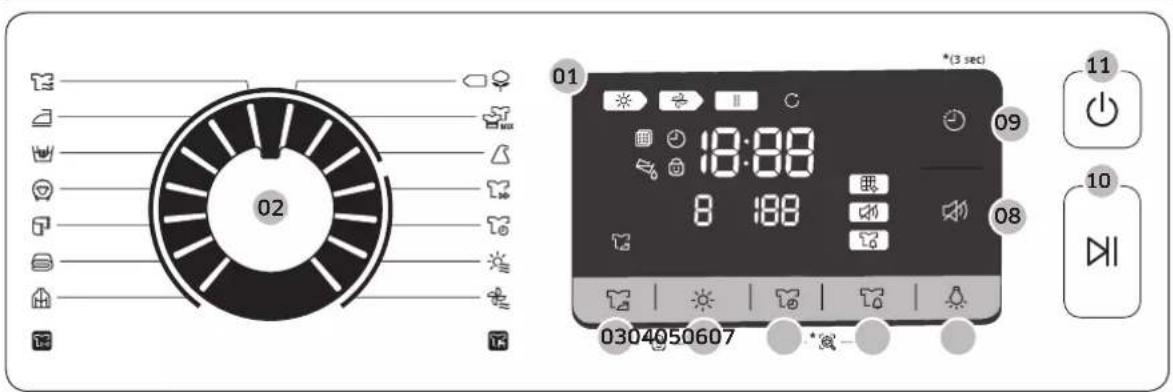
| 01 Digital Graphic Display | Displays all cycle information, including cycle time, information codes, and dryer status. See the table below for status details. | |||
| Drying in progress | Child Lock activated/deactivated | |||
| Cooling in progress Wrinkle Prevent | ||||
| Stop | Heat-exchanger clean alarm | |||
| Wrinkle Prevent in progress | Sound on/off | |||
| Check filter Mixed Load | ||||
| Delay End Smart Check | ||||
| Empty the water tank | ||||
| 02 Cycle Selector | Turn the dial to select a cycle. See theCycle overviewon page 25for available cycles. | |||
| 03 ⚪ Wrinkle Prevent | Adds approximately 2 hours of intermittent tumbling at the end of the selected cycle to reduce wrinkles. A large circle appears in display panel, and the drum rotates intermittently. To activate, press ⚪ Wrinkle Prevent. The corresponding indicator lights up. | |||
Operations
| 04 Dry Level | Press to select the dryness level in the AIR WASH TOWELS, COTTON, MIXED LOAD, and SYNTHETICS cycles. The dryness can be set in three levels (1-3). Level 1 is used to partially dry items that lay flat or hang to dry. Level 3 is the strongest and is used to dry larger or bulk loads. |
| 05 Time | Press to adjust the cycle time for TIME DRY, WARM AIR and COOL AIR cycles.The following time options (unit: minute) are available: 30, 60, 90, 120, and 150.• 120 minutes and 150 minutes are not available for WARM AIR and COOL AIR cycles.• The exact drying time differs depending on the humidity of the load. |
| 06 Mixed Load Bell | This alarm is available only with COTTON, MIXED LOAD, and SYNTHETICS cycle. If a load contains mixed fabrics, the Mixed Load Bell indicator ( ) blinks when the average dryness of the item is 80 % dry. This lets you take items that you don't want fully dried or that dry quickly out of the dryer early while letting others continue to dry. |
| 07 Lamp | Press to turn on or off the interior lamp. The lamp stays lit for 5 minutes after it has turned on, and then turns off automatically. |
| 08 Sound On/Off | Press to mute/unmute the sound of the control panel. The sound setting is retained when you turn the dryer off and turn it on again. |
| 09 Delay End | You can adjust the finish time of the selected cycle in 1-hour increments all the way up to 24 hours. |
| 10 Start/Pause | Press to start or pause a cycle. If the dryer is running, press the button once to pause the dryer. Press again to resume. |
| 11 Power | Press to turn the dryer on/off. If the dryer turns on for 10 minutes without any button being pressed, the dryer automatically turns off. |
English24
Cycle overview
| Cycle Description | Max load (kg) | |
| AIR WASH ≈ | Uses warm air to deodorize and refresh items. You can select from 3 levels depending on the odor of the items. This cycle is best to use for 1~2 items.Level 1: For light odors (default)Level 2: For normal odorsLevel 3: For strong odorsNOTETo Maximize the deodorizing effect, dampen the garments with a little water. Check the colorfastness of the fabric before adding water. | 1 |
| IRON DRY ≈ | This cycle finishes the drying process in a moist state, which facilitates ironing. | 4 |
| DELICATES ≈ | For items to be handled with care such as lingerie. 2 | |
| WOOL ≈ | For machine washable and tumble dryable wool only.For best results, turn laundry inside out before drying. | 2 |
| TOWELS ≈ | Use to dry loads such as bath towels. 6 | |
| BEDDING ≈ | For bulky items such as blankets, sheets, comforters, and light duvets. | 2 |
| OUTDOOR CARE ≈ | For outdoor wear such as skiwear and mountain clothing, and also for fabrics such as spandex, stretch, and microfiber. It is recommended to use this cycle after you have washed your laundry using the OUTDOOR CARE ≈cycle with your washing machine. | 2 |
| COOL AIR ≈ | All types of fabric. For freshening up or airing items of laundry that have not been worn for long. | - |
Operations
| Cycle Description | Max load (kg) | |
| WARM AIR | For small, pre-dried items. The dry time defaults to 30 minutes.Timed cycle for all types of fabric except for wool and silk. Dry laundry that is still slightly damp or has already been pre-dried. Also suitable for the subsequent drying of multi-layered, thick laundry that does not dry readily.NOTEThis cycle is suitable for drying individual woollen fabrics, sports shoes and soft toys. Only dry these using the basket for woollens. | - |
| TIME DRY | Use to set a desired dry time.Turn the Cycle Selector to select TIME DRY2. Press Time to set the drying time between 30 minutes and 150 minutes. Keep pressing Time cycles through the available time options in 30-minute increments.NOTEThe actual cycle time may differ depending on the dryness of items. | - |
| QUICK DRY 35' | For drying light cotton synthetics or items that needs quick drying. The default dry time is 35 minutes. | 1 |
| SYNTHETICS | For lightly soiled blouses, and shirts that are made of polyester (Diolen, Trevira), polyamide (Perlon, nylon), or other similar blends. | 4 |
| MIXED LOAD | For mixed loads consisting of cotton and synthetic fabrics. | Max |
| COTTON | For lightly cottons, bed linen, table linen, underwear, towels, and shirts. | Max |
English26
Cycle chart
NOTE
For best results, follow the load size recommendations for each dry cycle.
- Large load: Fill the drum to about 34 full. Do not add items over this level as they need to tumble freely.
• Medium load : Fill the drum to about 12 full. - Small load: Fill the drum with 3-5 items, not more than 14 full.
| Cycle Recommended items Load size Dry Level | |||
| AIR WASH ≈ | Clothes with excessive accessories (such as beads, spangles, lace, buttons etc.) may be damaged or deformed. Do not use this cycle for fabrics (such as wool, silk, leather, fur, velvet, printed t-shirts, etc.) that can be easily damaged by heat. | 1 | Available |
| IRON DRY ≈ | This cycle finishes the drying process in a moist state, which facilitates ironing. | 4 | Unavailable |
| DELICATES ≈ | Silk, fine fabrics and lingerie. | 2 | Unavailable |
| WOOL ≈ | For machine washable and tumble dryable wool only. | 2 | Unavailable |
| TOWELS ≈ | Use to dry loads such as bath towels. | 6 | Available |
| BEDDING ≈ | For bulky items such as blankets, sheets, comforters, and light duvets. | 2 | Unavailable |
| OUTDOOR CARE ≈ | For outdoor wear such as skiwear and mountain clothing, and also for fabrics such as spandex, stretch, and microfiber. | 2 | Unavailable |
| COOL AIR ≈ | All types of fabric. For freshening up or airing items of laundry that have not been worn for long. | - Unavailable | |
| WARM AIR ≈ | Small Items & damp clothing Everyday items suitable for heat drying | - Unavailable | |
| TIME DRY ≈ | All types of fabric; time programme. - Unavailable | ||
| QUICK DRY 35' ≈ | Synthetics and light cottons | 1 | Unavailable |
| SYNTHETICS ≈ | Synthetic or blended fabrics. | 4 | Available |
| MIXED LOAD ≈ | Mixed load consisting of cotton and synthetic fabrics | 7, 8, 9 | Available |
| COTTON ≈ | For lightly cottons, bed linen, table linen, underwear, towels, and shirts. | 7, 8, 9 | Available |
Operations
Getting started
Simple steps to start
- Press ⏻ Power to turn the dryer on.
- Load the dryer and close the door.
- Turn the Cycle Selector to select a cycle.
- Change the cycle settings (☀️ Dry Level, and 📋 Time) as necessary.
- Select necessary settings and options to your preference. (Wrinkle Prevent, Lamp, Mixed Load Bell, and/or Delay End).
- Press ▷I Start/Pause. The dryer indicator lights up, and the estimated cycle time appears on the display.
NOTE
The number of available settings and options differs with the cycle.
To change the cycle during operation
- Press ▷|Start/Pause to stop operation.
- Select a different cycle.
- Press and hold ▷ll Start/Pause to start new cycle.
Sorting and loading
- Put only one wash load in the dryer at a time.
- Avoid mixing heavy and lightweight items together.
- To increase drying efficiency when drying one or two items, add a dry towel to the load.
- For best results, untangle items before inserting into the dryer.
• Overloading restricts the tumbling process, resulting in uneven drying and wrinkling. - Unless recommended on the care label, avoid drying woolens or fiberglass items.
- Avoid drying unwashed items.
- Do not dry items soiled with oil, alcohol, gasoline, etc.
English28
Rack Dry (applicable models only)
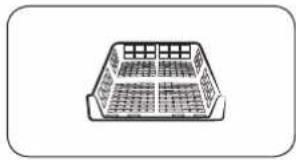
Set the drying time up to 150 minutes according to the moisture and weight of the items to dry. When drying laundry using the drying rack, the TIME DRY cycle is recommended.

natural_image
Line drawing of a car rear bumper with decorative patterned backrest and side door (no text or symbols)
A. Rack dry
- Position the drying rack in the drum, inserting the front lips of the rack into the holes of the door diaphram.
- Place items on the rack, leaving enough space where air can circulate. For clothing items, fold and place flat on the rack. For shoes, place shoes with their soles facing down.
- Close the door and press ⏻ Power. Select TIME DRY 📋, and then press 🔊 Time to select the drying time.
- Press ▷I Start/Pause.
Operations
Drying suggestions
| Items (max 1.5 kg) Description | |
| Washable sweaters (block to shape and lay flat on rack) | When drying the laundry using the rack, fold and place the clothes on the rack to prevent the clothing from becoming wrinkled. |
| Stuffed toys (cotton or polyester fiber filled) | |
| Stuffed toys (foam or rubber-filled) | |
| Foam rubber pillows | |
| Sneakers To dry sports shoes, place the shoes | on the rack so that the soles of the shoes are facing downwards. |

CAUTION
- Drying foam rubber, plastic, or rubber on a heat setting may cause damage to the items and lead to a fire hazard.
• To prevent damage to shoes, use Dry Rack.
English30-
Cycle guide
Always follow the care label when drying. If care label instructions are not available, refer to the following table.
| Bedspreads and comforters | • Use the High temperature settings. |
| Blankets • For best results | , dry only one blanket at a time. |
| Cloth diapers • Use the H | gh temperature settings. |
| Down-filled items | • Do not dry on a heat setting. Doing so may cause a fire hazard. Only use the COOL AIR cycle. |
| Foam rubber (rug backs, stuffed toys, etc.) | • Do not dry on a heat setting. Doing so may cause a fire hazard. Only use the COOL AIR cycle. |
| Pillows • Add a few dry to | towels to help tumble and fluff items.• Do not dry kapok or foam pillows with heat. Use only the COOL AIR cycle. |
| Plastics (shower curtains, outdoor furniture covers, etc) | • Use COOL AIR or TIME DRY• Set the dry level to lower or the lowest. |

CAUTION
Do not use the dryer to dry items that are not listed above.
Operations
Special features
Delay End
You can set the dryer to complete a selected cycle at your set time.
- Select a cycle with necessary options.
- Press 🔒 Delay End repeatedly to set a time between 1 hours and 24 hours in 1-hour increments.
- Press ▷| Start/Pause. The corresponding indicator blinks, and the clock begins counting down to the set time.
NOTE
To cancel the Delay End settings, restart the dryer using the ⏻ Power button.
Child Lock
Child Lock prevents children from playing with the dryer. When Child Lock is activated, all buttons except for the ⏻ Power button are disabled. To activate/deactivate Child Lock, simultaneously press and hold 📋 Mixed Load Bell and Smart Control or 🌐 Wrinkle Prevent and 🌐 Dry Level for 3 seconds.
NOTE
If Child Lock is activated, and the dryer is turned off and then on again, Child Lock remains activated.
Smart Check
If the dryer has detected an issue, Smart Check allows you to check the status of the dryer using a smartphone. Please note that Smart Check can only be used for Galaxy and iPhone series smartphones.
To use Smart Check, make sure you have downloaded the Samsung Smart Washer/Dryer app, and then follow the steps below.
- Press and hold 📋 Time and 📋 Mixed Load Bell for 3 seconds or press Smart Check. The LED's on the display panel rotate, and the Smart Check code is displayed.
- On the smartphone, open the Samsung Smart Washer/Dryer app and tap the Smart Check button.
- Focus the smartphone's camera on the Smart Check code shown on the display panel.
- If the information code is recognized, the app provides detailed information for the issue and further instructions.
NOTE
- If the dryer reflects light on the display, the smartphone may fail to recognize the information code.
- If the smartphone fails to recognize the code, manually enter the information code into the smartphone.
English32
Maintenance

WARNING
- Do not clean the dryer by directly spraying water onto the dryer.
- Do not clean the dryer with benzene, thinner, alcohol, or acetone. This may cause discoloration, deformation, damage, electric shock, or fire.
- Before cleaning the dryer, be sure to unplug the power cord.
Control panel
Clean with a soft, damp cloth. Do not use abrasive cleaners. Do not spray cleaners directly on the panel. Immediately wipe up any spills or liquids from the control panel.
Exterior
Clean with a soft, damp cloth. Do not use abrasive cleaners. Avoid using or placing sharp or heavy objects near/on the dryer. Keep detergent and laundry supplies on the pedestal (sold separately) or in a separate storage container.
Drum
Clean with a damp cloth with a mild, non-abrasive cleaner suitable for stainless steel. Wipe remaining residue with a clean, dry cloth.
Lint filter
Clean the lint filter after each load.

natural_image
Diagram of a car interior with a mounted device and upward arrow indicating motion (no text or symbols)- Open the door and pull the lint filter upward to remove.
Maintenance

natural_image
Technical diagram of a mechanical device with labeled component A and directional arrows indicating motion (no text or symbols beyond label)
natural_image
Diagram showing two steps of a toilet or sink opening process, with no text or symbols present.
natural_image
Diagram of a device with internal components and directional arrows indicating motion (no text or symbols)-
Open the outer filter and remove the inner filter (A).
-
Unfold both the inner filter and the outer filter.
-
Remove the lint from both filters, and then clean the filters with the cleaning brush.
NOTE
To clean the filters thoroughly, clean the filters in running water, and then dry them completely.
- Put the inner filter into the outer filter, and then reinsert the lint filter into the original position.
CAUTION
- Clean the lint filter after each load. Otherwise, the drying performance may decrease.
- Do not operate the dryer without the inner filter inside the outer filter.
- Using the dryer with a wet lint filter may cause mold, bad odors, or a decrease in drying performance.
English34
Water tank
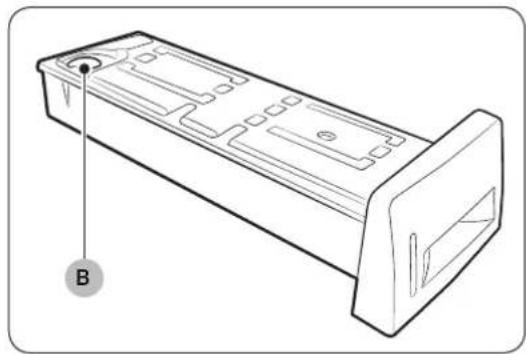
To avoid leaks, empty the water tank after every load.

- Using both hands, pull the water tank (A) forward to remove.
natural_image
Technical line drawing of a mechanical component with labeled point B (no text or symbols beyond label)- Empty the water through the drain hole (B) and place the water tank back into place.
NOTE
If you empty the water tank and press ▷ll Start/Pause, the corresponding indicator turns off.
Maintenance
Heat exchanger
Clean the heat exchanger at least once a month. (or When the Buzzer rings and the heat exchanger indicator lights up on the display.)
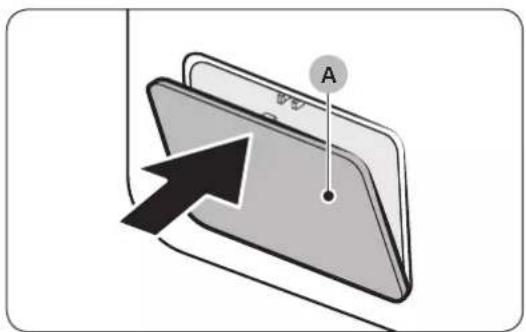
- Gently press the top part of the outer cover (A) to open.

natural_image
Diagram of a door latch mechanism with two clips and a labeled component (B), no text or symbols present.- Unlock the fixers (B).

natural_image
Diagram of a device being inserted into a tray, showing internal components and a black arrow indicating direction (no text or symbols)- Remove the inner cover (C).
English36

natural_image
Diagram of a grater inside a rectangular appliance, showing a toothbrush and handle (no text or symbols)
natural_image
Illustration of a mechanical component with a cloth hanging from its side (no text or symbols)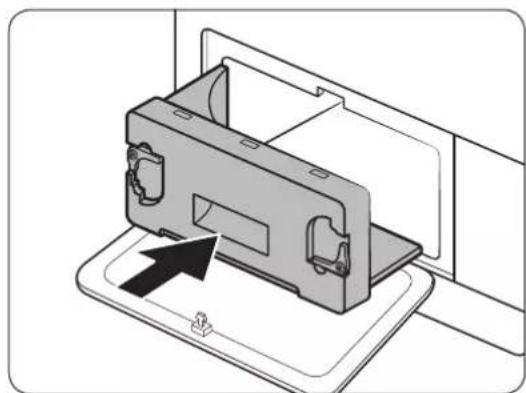
natural_image
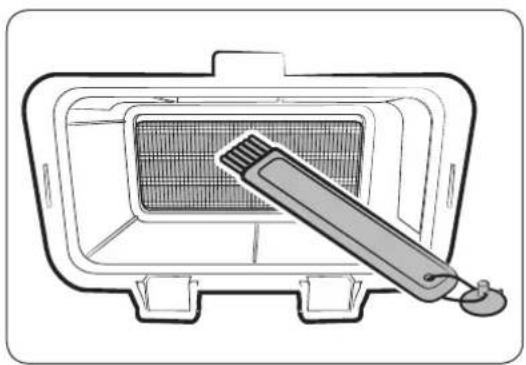
Diagram of a device component with an arrow indicating a specific part (no text or symbols present)- Clean the heat exchanger with the provided cleaning brush or a vacuum cleaner with a brush attachment. Take care not to bend or damage the heat exchanger fins when cleaning. This may lead to a decrease in drying performance.
CAUTION
- To avoid physical injury and burns, do not touch or clean the heat exchanger with bare hands.
-
Do not use water to clean the heat exchanger.
-
Clean the inner cover with a smooth, damp cloth.
-
Reinsert the inner cover to its original position, and then lock the fixers.
- Close the outer cover.
NOTE
After cleaning, make sure the fixers are locked.
Troubleshooting
Checkpoints
If you encounter an issue with the dryer, first check the table below and try the suggestions.
| Symptom Action | |
| Dryer does not run | Make sure the door is completely closed.Make sure the power cord is plugged in.Check the home's circuit breaker and fuses.Empty the water tank.Clean the lint filter. |
| Dryer does not heat | Check the home's circuit breaker and fuses.Select a heat setting other than COOL AIRCheck the lint filter and heat exchanger filter. Clean them if necessary.Dryer may be in the cool-down phase of the cycle. |
| Dryer does not dry | Check the above, plus...Make sure the dryer is not overloaded.Sort light and heavy items separately.Reposition large, bulky items to ensure even drying.Check that the dryer is draining properly.For small loads, add a few dry towels.Clean the lint filter and heat exchanger filter. |
| Dryer is noisy | Check for coins, buttons, lighters, etc.Make sure the dryer is level and standing firmly on the floor.The dryer may hum due to air moving through the drum and fan. This is normal. |
| Dries unevenly | Seams, pockets, and other parts of clothing are harder to dry than others. This is normal.Sort heavy and light items separately. |
| Dryer emits an odor | The dryer may draw household odors in from the surrounding air and then exhaust them. This is normal. |
| Dryer turns off before the load is dry | Dryer load is too small. Add more items and restart the cycle.Dryer load is too large. Remove items and restart the cycle. |
English38
| Symptom Action | |
| Lint on clothes | Make sure the lint filter is clean before every load.Dry lint-producing items (fuzzy towels) separate from lint trappers, such as black linen pants.Divide larger loads into smaller loads. |
| Items still wrinkled after Wrinkle Prevent | Small loads of 1-4 items work best.Load fewer items. Load similar type items. |
| Odors remain in items after Cool Air | Make sure to thoroughly wash items with strong odors. |
Troubleshooting
Information codes
If the dryer fails to operate, you may see an information code on the display. Check the table below and try the suggestions.
| Information code | Meaning Action | |
| tC Air temperature | sensor issue | Clean the lint filter and/or heat exchanger filter. If this continues, call for service. |
| tC5 | Compressor temperature sensor issue | Wait 2-3 minutes. Turn the power on and restart. |
| dC | Running the dryer with door open | Close the door and restart.If this continues, call for service. |
| HC Compressor overheat | Call for service. | |
| 9C2 Low voltage detected | Check if the power cord is plugged in. If this continues, call for service. | |
| 5C | Water tank fullDrain pump is out of order | Empty the water tank, turn the power on, and restart. If this continues, call for service. |
| AC6 | Check communications between the main and the inverter PBAs. | · Depending on the state, the dryer may automatically returns to normal operation.· Turn the dryer off and turn it on again. Then, restart the cycle.· If the information code continues to appear, call for service. |
| 3C Check the motor for operation. | · Try restarting the cycle.· If the information code continues to appear, call for service. | |
| FIL+tEr (Buzzer rings) | Heat exchanger needs to be cleaned | Clean the heat exchanger. |
For any codes not listed above, or if the information code continues to appear, call for service.
English40-
Appendix
Fabric care chart
The following symbols provide garment care direction. The Clothing care labels include symbols for drying, bleaching, drying and ironing, or dry cleaning when necessary. The use of symbols ensures consistency among garment manufacturers of domestic and imported items. Follow care label directions to maximize garment life and reduce laundering problems.
Wash cycle
| [XXXD] | Normal |
 | Permanent Press / Wrinkle Resistant / Wrinkle Control |
| [GZKB] | Gentle / Delicates |
| S449D | Hand Wash |
Water Temperature**
| ●●● | Hot |
| ●● | Warm |
| ● | Cold |
NOTE
** The dot symbols represent appropriate wash water temperatures for various items. The temperature range for Hot is 41-52 °C, for Warm 29-41 °C and for Cold 16-29 °C. (Wash water temperature must be a minimum of 16 °C for detergent activation and effective cleaning.)
Bleach
 | Any Bleach (when needed) |
 | Only Non-Chlorine (color-safe) Bleach (when needed) |
 | Tumble Dry Cycle |
Normal
 | Permanent Press / Wrinkle Resistant / Wrinkle Control |
 | Gentle/ Delicates |
Special instructions
 | Line Dry / Hang to Dry |
| [6&XY] | Drip Dry |
| [WTK0] | Dry Flat |
Heat setting
| High | |
| Medium | |
| Low | |
| Any Heat | |
| No Heat/Air |
Appendix
Iron dry or steam temperatures
| High | |
| Medium | |
| Low |
Warning symbols for laundering
| Do Not Wash | |
| Do Not Wring | |
| Do Not Bleach | |
| Do Not Tumble Dry | |
| No Steam (added to iron) | |
| Do Not Iron |
Dry-clean
| Dry-clean | |
| Do Not dry-clean | |
| Line Dry/ Hang to Dry | |
| Drip Dry | |
| Dry Flat |
Protecting the environment
This appliance is manufactured from recyclable materials. If you decide to dispose of this appliance, please observe local waste disposal regulations. Cut off the power cord so that the appliance cannot be connected to a power source. Remove the door so that animals and small children cannot get trapped inside the appliance.
English42
Specification

natural_image
Line drawing of a front-loading washing machine with control panel and side panel (no text or symbols)
| TYPE FRONT LOADING DRYER | ||
| DIMENSIONS | A 600 mm | |
| B 850 mm | ||
| C 600 mm | ||
| D 650 mm | ||
| E 1095 mm | ||
| WEIGHT 50 kg | ||
| ELECTRICAL REQUIREMENTS | 20-240 V / 50 Hz 550-600 W | |
| ALLOWABLE TEMPERATURE 5-35 °C | ||
Appendix
Consumption data
| Model Program Load (kg)* Energy (kWh) | Max. Duration(Minutes) | |||
| DV9*M62**** | COTTON | 9 1.56 188 | ||
| 4.5 0.9 130 | ||||
| IRON DRY ** | 9 1.1 130 | |||
| SYNTHETICS | 4.5 0.71 86 | |||
| DV8*M62**** | COTTON | 8 1.43 169 | ||
| 4 0.8 120 | ||||
| IRON DRY ** | 8 1.02 118 | |||
| SYNTHETICS | 4 0.65 80 | |||
*: Weight of dry laundry
**: EN 61121:2013 test program
All data without a "star" against it was calculated using EN 61121:2013
Consumption data can vary from the nominal values given above depending in the size of the load, types of textiles, residual moisture levels after spinning, fluctuations in the electricity supply and any extra options selected.
English44
Sheet of household tumble driers
Data sheet for Domestic Tumble Driers
As detailed in EU regulation No. 392/2012

NOTE
"*" Asterisk(s) means variant model and can be varied (0-9) or (A-Z).
| Samsung | |||
| Model Name DV8*M62**** DV9*M62**** | |||
| Capacity kg 8 9 | |||
| Type Condenser Condenser | |||
| Energy Efficiency | |||
| A+++ (highest efficiency) to D (least efficient) A+++ A+++ | |||
| Energy Consumption | |||
| Annual Energy Consumption (AE_C)1 | kWh/yr 176 | 0 194.0 | |
| Automatic tumble drier Yes Yes | |||
| Energy consumption (E_dry) standard cotton programme at full load | kWh 1.43 | 1.54 | |
| Energy consumption (E_dry.1/2) standard cotton programme at partial load | kWh 0.80 | 0.90 | |
| off mode and left-on mode | |||
| The power consumption off-mode (P_o) at full load | W | 0.50 | 0.50 |
| The power consumption in left-on mode (P_I) at full load | W | 5.00 | 5.00 |
| Duration of the left-on mode | min | 10 | 10 |
| Programme to which the information on the label and the Sheet relate2 | Cotton + Dry Level 2 + (Wrinkle Prevent off) | ||
| programme duration of the standard program | |||
| Weighted Programme time standard cotton programme at full load and partial load | min | 141 | 155 |
| Programme Time (T_dry) standard cotton programme at full load | min | 169 | 188 |
| Programme Time (T_dry.1/2) standard cotton programme with partial load | min | 120 | 130 |
| condensation efficiency class | |||
| A (most efficient) to G (least efficient) | B B | ||
| Average condensation efficiency at full load | % | 81 | 81 |
| Average condensation efficiency at partial load | % | 81 | 81 |
| Weighted condensation efficiency | % | 81 | 81 |
| Airborne noise emissions | |||
| Dry at full load | dB (A) re 1 pW | 65 | 65 |
| Name of company | Samsung Electronics Co., Ltd. | ||
Appendix

NOTE
- Energy consumption is measured as the annual 9 kg 258 kWh (8 kg 235 kWh) used per year, based on 160 drying cycles of the standard cotton programme at full and partial load, and the consumption of the low-power modes. Actual energy consumption per cycle will depend on how the appliance is used.
- 'standard cotton programme' used at full and partial load is the standard drying programme to which the information in the label and the fiche relates, that this programme is suitable for drying normal wet cotton laundry and that it is the most efficient programme in terms of energy consumption for cotton. Consumption data can vary from the nominal values given above depending in the size of the load, types of textiles, residual moisture levels after spinning, fluctuations in the electricity supply and any extra options selected.
English46
Memo


SAMSUNG
QUESTIONS OR COMMENTS?
| COUNTRY CALL OR VISIT US ONLINE AT | |
| DENMARK 707 019 70 www.samsung.com/dk/support | |
| FINLAND 030-6227 515 www.samsung.com/fi/support | |
| NORWAY 21629099 www.samsung.com/no/support | |
| SWEDEN 0771 726 786 www.samsung.com/se/support |
Varmepumpetørretumbler
Brugervejledning
DV9*M62****/DV8*M62****


SAMSUNG
Indhold
Installationskrav 15
Tørretumbler 17
natural_image
Symbol of a trash bin crossed with no text or numbers, representing waste sorting or restriction (no text present)natural_image
Simple line drawing of a curved mechanical component (no text or symbols)
natural_image
Simple line drawing of a curved object resembling a stylized bar or clamp (no text or symbols)
natural_image
Simple line drawing of a bulb-like object with a flared top and rounded base (no text or symbols)Slangeholder Kabelbinder Slangetilslutning

natural_image
Simple line drawing of a coiled tube or hose with two connectors (no text or symbols)natural_image
Simple line drawing of a closed book with a blank cover (no text or symbols)Brugervejledning
natural_image
Simple line drawing of a rectangular container with internal grid pattern (no text or symbols)natural_image
Simple line drawing of a pen-like object with a looped tip (no text or symbols)Rengøringsbørste
natural_image
Simple line drawing of a mechanical component or bracket (no text or symbols)Stablingssæt med beslag (del nr. SK-DH; SK-DA; SKK-DF)

natural_image
Isometric line drawing of a rectangular electronic component with mounting holes (no text or symbols)Stablingssæt (SKK-DD, SKK-DDX)
BEMÆRK
natural_image
Two identical diagrams showing a mechanical component with arrows indicating rotation, labeled C and D (no text or symbols beyond labels)natural_image
Line drawing of a washing machine casing with internal components and a magnified inset showing internal wiring (no text or symbols)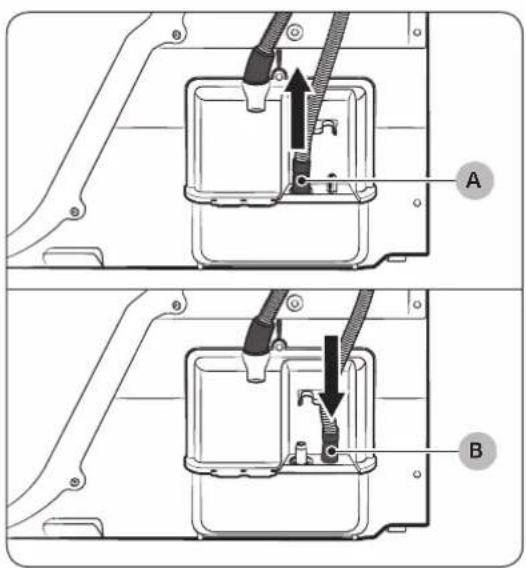
natural_image
Technical diagram of a mechanical assembly with labeled component A (no text or symbols beyond label)Over en vaskekumme:
natural_image
Line drawing of a square sink with a pipe fitting and a handle, no text or symbols present- Slut slangeadapteren direkte til vaskekummens afledningsslange.
Dansk20-
natural_image
Technical line drawing of a car rear bumper with decorative patterned seating and doorways (no text or symbols)natural_image
Diagram of a car interior with a double door and upward arrow indicating motion (no text or symbols)natural_image
Technical diagram of a mechanical device with labeled components and directional arrows (no text or symbols)
natural_image
Illustration of a bathroom sink with an open drawer and a showerhead, showing four different steps (no text or symbols)
natural_image
Diagram of a mechanical device with internal components and directional arrows indicating motion (no text or symbols)natural_image
Technical line drawing of a mechanical component with labeled point B (no text or symbols beyond label)natural_image
Diagram of a door panel with two hanging clips and a labeled component 'B' (no text or symbols beyond label)natural_image
Diagram of a device with a labeled component (C) and an arrow indicating direction, no text or symbols present.natural_image
Diagram of a gridded air vent with a brush applying material inside (no text or symbols)
natural_image
Illustration of a mechanical component with a cloth hanging from its side (no text or symbols)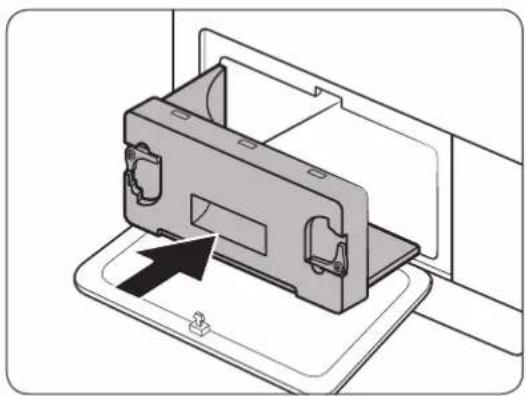
natural_image
Diagram of a device being inserted into a housing, showing internal components and an arrow indicating insertion (no text or symbols present)| ●●● | Lunken |
| ●● | Varm |
| ● | Kold |

BEMÆRK
natural_image
Line drawing of a front-loading washing machine with control panel and side panel (no text or symbols)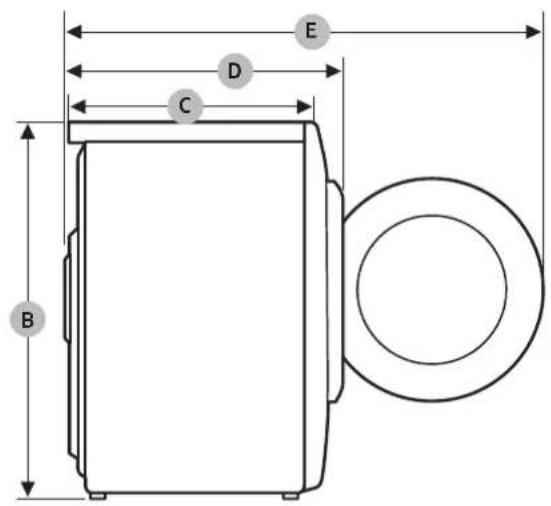
| TYPE | T∅RRETUMBLER MED PÅFYLDNINGFRA FORSIDEN | |
| DIMENSIONER | A 600 mm | |
| B 850 mm | ||
| C 600 mm | ||
| D 650 mm | ||
| E 1095 mm | ||
| VÆGT 50 kg | ||
| ELEKTRISKE KRAV 220-240 V / 50 Hz 550-600 W | ||
| TILLADT TEMPERATUR 5-35 °C | ||
Dansk42-
Forbrugsdata
| Model Program Belastning (kg)* Energi (kWh) | Maks. varighed (minutter) | |||
| DV9*M62**** | BOMULD | 9 1,56 188 | ||
| 4,5 0,9 130 | ||||
| STRYGET∅RT | 9 1,1 130 | |||
| SYNTETISK | 4,5 0,71 86 | |||
| DV8*M62**** | BOMULD | 8 1,43 169 | ||
| 4 0,8 120 | ||||
| STRYGET∅RT | 8 1,02 118 | |||
| SYNTETISK | 4 0,65 80 | |||
natural_image
Symbol of a trash bin crossed with no text or numbers, representing waste sorting or restriction (no text present)natural_image
Simple line drawing of a curved mechanical bracket or clamp (no text or symbols)
natural_image
Simple line drawing of a curved object resembling a stylized bar or clamp (no text or symbols)
natural_image
Simple line drawing of a bulb-like object with a flared top and rounded base (no text or symbols)natural_image
Simple line drawing of a coiled tube or hose with two connectors (no text or symbols)natural_image
Simple line drawing of a closed book with a blank cover (no text or symbols)Käyttöopas

natural_image
Simple line drawing of a rectangular container with internal grid pattern (no text or symbols)Kuivausteline (vain soveltuvissa malleissa)

natural_image
Simple line drawing of a pen-like object with a looped tip (no text or symbols)Puhdistusharja
natural_image
Simple line drawing of a mechanical component or bracket (no text or symbols)natural_image
Isometric line drawing of a rectangular electronic component with mounting holes (no text or symbols)natural_image
Two identical diagrams showing a mechanical component with arrows indicating rotation, labeled C and D (no text or symbols beyond labels)natural_image
Line drawing of a washing machine casing with internal components and a magnified inset showing internal wiring (no text or symbols)
natural_image
Technical diagram of a mechanical assembly with labeled component A (no text or symbols present)Pesualtaan päälle:

natural_image
Line drawing of a square sink with a pipe fitting and a handle, no text or symbols presentnatural_image
Line drawing of a car rear bumper with decorative patterned backrest and side-mounted buttons (no text or symbols)
A. Kuivausteline
natural_image
Diagram of a car interior with a mounted device and upward arrow indicating motion (no text or symbols)natural_image
Technical diagram of a mechanical device with labeled component A and directional arrows indicating motion (no text or symbols beyond labels)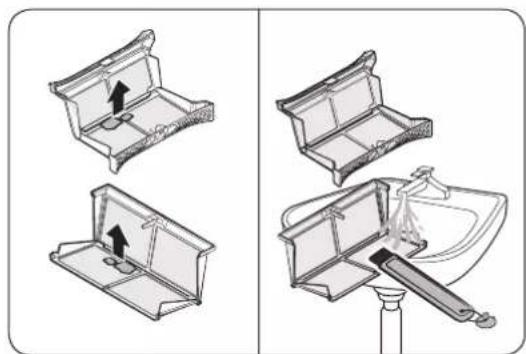
natural_image
Illustration of a bathroom sink with an open drawer and a showerhead, showing four different steps (no text or symbols)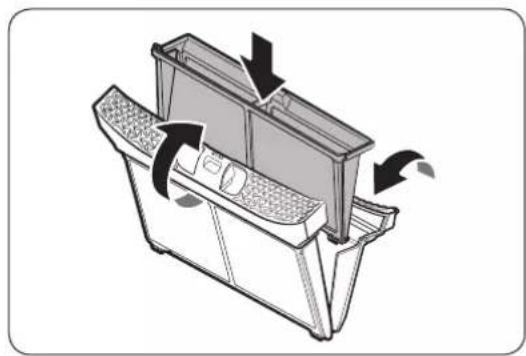
natural_image
Diagram of a mechanical device with internal components and directional arrows indicating motion (no text or symbols)natural_image
Technical line drawing of a mechanical component with labeled point B (no text or symbols beyond label)natural_image
Diagram of a door latch with two hanging clips and a labeled component (B), no text or symbols present.natural_image
Diagram of a device with a labeled component (C) and an arrow indicating direction, no text or symbols present.natural_image
Diagram of a microwave oven with a toothbrush inside, showing internal structure and base (no text or symbols)natural_image
Illustration of a mechanical component with a cloth hanging from its side (no text or symbols)natural_image
Diagram of a device being inserted into a tray, showing internal components and an arrow indicating insertion (no text or symbols present)Vianetsintä
natural_image
Line drawing of a front-loading washing machine with control panel and side panel (no text or symbols)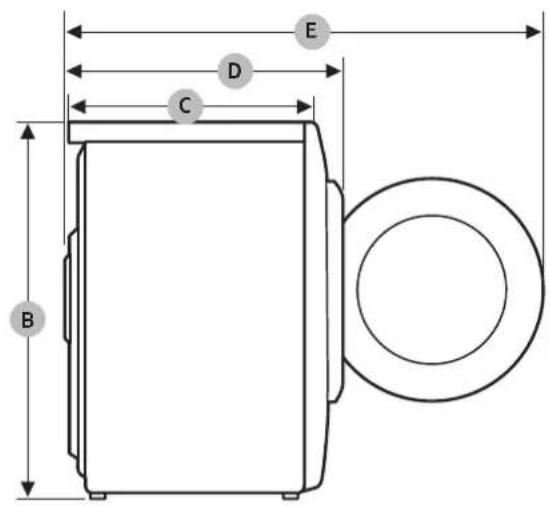
| TYYPPI | EDESTÄ TÄYTETTÄVÄKUIVAUSRUMPU | |
| MITAT | A 600 mm | |
| B 850 mm | ||
| C 600 mm | ||
| D 650 mm | ||
| E 1095 mm | ||
| PAINO 50 kg | ||
| SÄHKÖVAATIMUKSET 220-240 V | / 50 Hz 550-600 W | |
| SALLITTU LÄMPÖTILA 5-35 °C | ||
Suomi42-
Kulutusarvot
| Malli Ohjelma Täyttömäärä (kg)* Energia (kWh) | Enimmäiskesto(minuuteissa) | |||
| DV9*M62**** | PUUVILLA | 9 1,56 188 | ||
| 4,5 0,9 130 | ||||
| SILITYSKUIVA | 9 1,1 130 | |||
| SYNTEETTISET | 4,5 0,71 86 | |||
| DV8*M62**** | PUUVILLA | 8 1,43 169 | ||
| 4 0,8 120 | ||||
| SILITYSKUIVA | 8 1,02 118 | |||
| SYNTEETTISET | 4 0,65 80 | |||
KYSYMYKSET JA KOMMENTIT
| MAA SOITA | TAI VIERAILE VERKKOSIVUILLAMME | |
| DENMARK 707 | 019 70 www.samsung.com/dk/support | |
| FINLAND 030- | 6227 515 www.samsung.com/fi/support | |
| NORWAY 2162 | 29099 www.samsung.com/no/support | |
| SWEDEN 0771 | 726 786 www.samsung.com/se/support |
Varmepumpetørker
Brukerhåndbok
DV9*M62****/DV8*M62****

SAMSUNG
Innhold
natural_image
Symbol of a trash bin crossed with a diagonal line, no text or numbers presentnatural_image
Simple line drawing of a curved mechanical bracket or clamp (no text or symbols)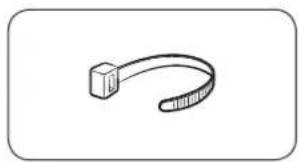
natural_image
Simple line drawing of a curved object resembling a stylized bar or clamp (no text or symbols)
natural_image
Simple line drawing of a bulb-like object with a flared top and rounded base (no text or symbols)Slangeholder Kabelfeste Slangekobling
natural_image
Simple line drawing of a coiled tube or hose with two connectors (no text or symbols)natural_image
Simple line drawing of a closed book with a blank cover (no text or symbols)Brukerhändbok

natural_image
Simple line drawing of a rectangular container with internal grid pattern (no text or symbols)natural_image
Simple line drawing of a pen-like object with a loop handle (no text or symbols)Rengjøringsbørste
natural_image
Simple line drawing of a mechanical component or bracket (no text or symbols)Sett for brakettstabling
(Delenr. SK-DH; SK-DA; SKK-DF)

natural_image
Isometric line drawing of a rectangular electronic component with mounting holes (no text or symbols)Stablesett
(SKK-DD, SKK-DDX)
MERK
natural_image
Two identical diagrams showing a mechanical component with arrows indicating rotation, labeled C and D (no text or symbols beyond labels)natural_image
Line drawing of a washing machine casing with internal components and a magnified inset showing internal wiring (no text or symbols)
natural_image
Technical diagram of a mechanical assembly with labeled component A (no text or symbols present)natural_image
Line drawing of a square sink with a pipe fitting and a handle, no text or symbols present- Koble slangeadapteren direkte til avløpsrøret på vasken.
Norsk20-
natural_image
Line drawing of a car rear bumper with decorative patterned backrest and side-mounted door panel (no text or symbols)natural_image
Diagram of a car interior with a double door and upward arrow indicating motion (no text or symbols)natural_image
Technical diagram of a mechanical device with labeled components and directional arrows (no text or symbols)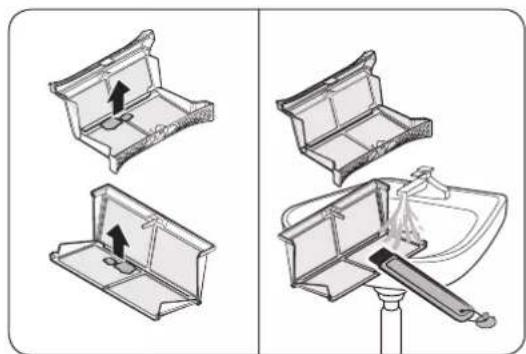
natural_image
Illustration of a bathroom sink with an open drawer and a showerhead, showing four different steps (no text or symbols)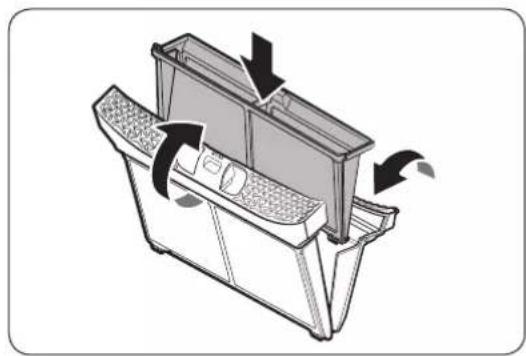
natural_image
Diagram of a mechanical device with internal components and directional arrows indicating motion (no text or symbols)natural_image
Technical line drawing of a mechanical component with labeled point B (no text or symbols beyond label)natural_image
Diagram of a door panel with two hanging clips and a labeled component 'B' (no text or symbols beyond label)natural_image
Diagram of a device with a labeled component (C) and an arrow indicating direction, no text or symbols present.- Fjern innerdekselet (C).
Vedlikehold
natural_image
Diagram of a gridded air vent with a brush applying material inside (no text or symbols)natural_image
Illustration of a mechanical component with a cloth hanging from its side (no text or symbols)natural_image
Diagram of a device being inserted into a housing, showing internal components and an arrow indicating insertion (no text or symbols present)Norsk36
Feilsøking
Kontrollpunkter
Temperaturer for stryking eller damping
| Høy | |
| Middels | |
| Lav |
Varselssymboler for klesvask
natural_image
Line drawing of a front-loading washing machine with control panel and side panel (no text or symbols)
| TYPE FRONTMATET T∅RKETROMMEL | ||
| MÅL | A 600 mm | |
| B 850 mm | ||
| C 600 mm | ||
| D 650 mm | ||
| E 1095 mm | ||
| VEKT 50 kg | ||
| ELEKTRISITETSKRAV 220-240 V / 50 Hz 550-600 W | ||
| TILLATT TEMPERATUR 5-35 °C | ||
Norsk42-
Forbruksdata
| Modell Program Last (kg)* Energi (kWt) | Maks varighet (minutter) | |||
| DV9*M62**** | BOMULL | 9 1,56 188 | ||
| 4,5 0,9 130 | ||||
| STRYKET∅RT ** | 9 1,1 130 | |||
| SYNTETISK | 4,5 0,71 86 | |||
| DV8*M62**** | BOMULL | 8 1,43 169 | ||
| 4 0,8 120 | ||||
| STRYKET∅RT ** | 8 1,02 118 | |||
| SYNTETISK | 4 0,65 80 | |||
Installationskrav 15
Torktumlare 17
Kylmedium (typ): R-134a (GWP = 1430)
Kylmedium (laddning): 0,37 kg, 0,529 tCO 2 e
natural_image
Symbol of a trash bin crossed with a diagonal line, no text or numbers presentnatural_image
Simple line drawing of a curved mechanical component (no text or symbols)
natural_image
Simple line drawing of a curved object resembling a stylized bar or clamp (no text or symbols)
natural_image
Simple line drawing of a bulb-like object with a flared top and rounded base (no text or symbols)natural_image
Simple line drawing of a coiled tube or hose with two connectors (no text or symbols)natural_image
Simple line drawing of a closed book with a blank cover (no text or symbols)Bruksanvisning
natural_image
Simple line drawing of a rectangular container with internal grid pattern (no text or symbols)Ställtorkning (endast tillämpliga modeller)

natural_image
Simple line drawing of a pen-like object with a loop handle (no text or symbols)Rengöringsborste
natural_image
Simple line drawing of a mechanical component or bracket (no text or symbols)Konsol-kombinationssats (artikelnummer SK-DH; SK-DA; SKK-DF)

natural_image
Isometric line drawing of a rectangular electronic component with mounting holes (no text or symbols)Kombinationssats (SKK-DD, SKK-DDX)
OBS!
natural_image
Two identical diagrams showing a mechanical component with arrows indicating rotation, labeled C and D (no text or symbols beyond labels)natural_image
Line drawing of a washing machine casing with internal components and a magnified inset showing internal wiring (no text or symbols)
natural_image
Technical diagram of a mechanical assembly with labeled component A (no text or symbols present)natural_image
Line drawing of a square sink with a pipe fitting and a handle, no text or symbols presentnatural_image
Line drawing of a car rear bumper with decorative patterned seating and doorways (no text or symbols)natural_image
Diagram of a car interior with a mounted appliance and upward arrow indicating motion (no text or symbols)natural_image
Technical diagram of a mechanical device with labeled component A and directional arrows indicating motion (no text or symbols beyond label)
natural_image
Illustration of a bathroom sink with an open drawer and a showerhead, showing four different steps (no text or symbols)
natural_image
Diagram of a mechanical device with internal components and directional arrows indicating motion (no text or symbols)natural_image
Technical line drawing of a mechanical component with labeled point B (no text or symbols beyond label)natural_image
Diagram of a door latch with two hanging clips and a labeled component (B), no text or symbols present.- Lås upp läsen (B).

natural_image
Diagram of a device with a labeled component (C) and an arrow indicating direction, no text or symbols present.- Ta bort den inre luckan (C).
Underhåll

natural_image
Diagram of a microwave oven with a brush and lid, showing internal structure without any text or symbols
natural_image
Illustration of a mechanical component with a cloth hanging from its side (no text or symbols)
natural_image
Diagram of a device being inserted into a tray, showing internal components and an arrow indicating insertion (no text or symbols present)natural_image
Line drawing of a front-loading washing machine with control panel and side panel (no text or symbols)
| TYP FRONTMATAD TORKTUMLARE | ||
| MÄTT | A 600 mm | |
| B 850 mm | ||
| C 600 mm | ||
| D 650 mm | ||
| E 1095 mm | ||
| VIKT 50 kg | ||
| KRAV FÖR ELFÖRSÖRJNING 220-240 V / 50 Hz 550-600 W | ||
| TILLÄTNA TEMPERATURER 5-35 °C | ||
Svenska42-
Förbrukningsdata
| Modell Program Vikt (kg)* Energi (kWh) | Max. längd (minuter) | |||
| DV9*M62**** | BOMULL | 9 1,56 188 | ||
| 4,5 0,9 130 | ||||
| STRYKTORRT ** | 9 1,1 130 | |||
| SYNTET | 4,5 0,71 86 | |||
| DV8*M62**** | BOMULL | 8 1,43 169 | ||
| 4 0,8 120 | ||||
| STRYKTORRT ** | 8 1,02 118 | |||
| SYNTET | 4 0,65 80 | |||
- Installation 14
- Appendix 41
- Safety information
- What you need to know about the safety instructions
- Important safety symbols
- WARNING
- CAUTION
- NOTE
- Read the instructions
- WARNING - Risk of Fire
- Important safety precautions
- Critical installation warnings
- Critical usage warnings
- Usage cautions
- Critical cleaning warnings
- Instructions about the WEEE
- Correct Disposal of This Product (Waste Electrical & Electronic Equipment)
- Installation
- What's included
- Accessories (supplied)
- Accessories (not supplied)
- Installation requirements
- Location requirements
- Alcove or closet installation
- Electrical and grounding requirements
- Dryer
- Drain hose (if necessary)
- By using the drain pipe of the wash basin:
- Installation checklist
- Before using the dryer
- Operations
- Cycle chart
- Getting started
- Simple steps to start
- Sorting and loading
- Rack Dry (applicable models only)
- Cycle guide
- Special features
- Delay End
- Child Lock
- Smart Check
- Maintenance
- Control panel
- Exterior
- Drum
- Lint filter
- Water tank
- Heat exchanger
- Troubleshooting
- Checkpoints
- Information codes
- Appendix
- Fabric care chart
- Protecting the environment
- Specification
- Sheet of household tumble driers
- Memo
- Varmepumpetørretumbler
- Indhold
- BEMÆRK
- Vianetsintä
- Varmepumpetørker
- Innhold
- MERK
- Vedlikehold
- Feilsøking
- Kontrollpunkter
- OBS!
- Underhåll
Brand : SAMSUNG
Model : DV90M6200EW
Category : Tumble dryer