
SC-1 WR - Surveillance Camera Maginon - Free user manual and instructions
Find the device manual for free SC-1 WR Maginon in PDF.


| Product Type | Colour Surveillance Camera with Audio Transmission |
| Model | SC-1 WR |
| Brand | Maginon |
| Receiver Channels | 4 |
| Camera Power Supply | 12 V DC, 0.5 A (via included AC adaptor) |
| Receiver Power Supply | 9–12 V DC (via included AC adaptor) |
| Transmission Frequency | 2.4 GHz |
| Transmission Range (Free Field) | Up to 100 m |
| Infrared Range | Up to 18 m |
| Infrared LEDs | Automatic activation in low light |
| Water Resistance (Camera Only) | IP65 (dust tight, protected against water jets) |
| Video System | PAL |
| Video Output | 1Vp-p, 75 Ω (via AV Cinch cable) |
| Audio Output | 2Vp-p, 600 Ω (via AV Cinch cable) |
| Camera Angle Adjustment | Adjustable via stand wing nuts |
| Channel Selection | Adjustable via dip switches on camera (CH1-CH4) |
| Automatic Channel Change | Selectable intervals: 5, 10, 20, 30 seconds |
| Included Accessories | Camera, receiver, 2x AC adaptors, 2x aerials, stand, AV cable, fixing kit, manual, warranty card |
| Warranty | 3 years |
| Care Instructions | Clean with dry or slightly damp soft cloth; disconnect power before cleaning |
Frequently Asked Questions - SC-1 WR Maginon
User questions about SC-1 WR Maginon
0 question about this device. Answer the ones you know or ask your own.
Ask a new question about this device
Download the instructions for your Surveillance Camera in PDF format for free! Find your manual SC-1 WR - Maginon and take your electronic device back in hand. On this page are published all the documents necessary for the use of your device. SC-1 WR by Maginon.
USER MANUAL SC-1 WR Maginon
natural_image
Black surveillance camera with antenna and control panel, displayed against a blue gradient background (no text or symbols visible)AFTER SALES SUPPORT

00 800 - 78 77 23 68
MODEL: SC-1 WR
• 4-channel receiver
• 2 AC adaptors
(for camera and receiver)
- A/V cable
• Instruction manual
• Warranty documents
3
YEARS WARRANTY
MAGINON
MAGINON
Dear customer,
Congratulations on purchasing a high-quality MAGINON® product. You have acquired a modern digital Colour Surveillance Camera with audio transmission and excellent technical features and respective accessories, which is particularly easy to operate. Please study this information in detail observing, in particular, the safety instructions.
The device comes with a 3-year warranty. You will need the enclosed warranty card and your sales receipt in the event of the camera developing a fault. Keep these in a safe place together with the Instruction Manual. Please include the Instruction Manual when passing on the camera to a third party.
1. Contents of box
Carefully remove camera from packaging and check that all of the below parts are contained in the box:
- MAGINON® Colour Surveillance Camera SC-1 WR
- 4-channel receiver
- 2 AC adaptors (for camera and receiver)
- 2 screw-on aerials (for camera and receiver)
- Stand
- AV Cinch cable
- Fixing screws and dowels
- Instruction Manual
- Warranty and service documentation

Note:
- Caution! Keep plastic foil and bags away from babies and small children, as there is danger of suffocation.
After Sales Support

00 800 - 78 77 23 68
MODEL: SC 1-WR

YEARS WARRANTY
MAGINON
2. Contents
Preface 1
- Contents of box 1
- Contents 2
-
Hazard, Safety and Warning notices 4
-
Your video camera 7
4.1. Parts 7
4.2. Installation of security camera 8
4.2.1. Fitting stand to camera 8
4.2.2. Marking for drilling 8
4.2.3. Fixing to stone/concrete 9
4.2.4. Fixing to timber 9
4.2.5. Completing the camera installation 9
4.3. Connecting the receiver 10
4.3.1. Connecting the receiver to the playback device 10
4.3.2. Completing the receiver installation 11
- Operation 12
5.1. Operating and indicating elements 12
5.2. Automatic channel changing function 12
5.3. Infrared light 13
5.4. Positioning of security camera 13
5.5. Setting the channel on the security camera 14
After Sales Support
00 800 - 78 77 23 68
MODEL: SC 1-WR
3
YEARS WARRANTY
MAGINON
- Conformity 15
- Care 16
- Disposal 16
- Fault removal (FAQ) 17
- Warranty and Service 17
- Technical Specification 18
11.1. Power supply 18
11.2. Security camera with integrated microphone 18
11.3. Receiver (2.4G radio AV receiver) 18 - Index 19
After Sales Support

00 800 - 78 77 23 68
MODEL: SC 1-WR

YEARS WARRANTY
MAGINON
3. Hazard, Safety and Warning notices
Incorrect use of the camera and accessories can be dangerous for you and others and can damage or destroy the camera. We therefore ask you to read and strictly observe the following hazard, safety and warning notices.
Intended use
■ This surveillance camera with audio transmission is solely intended for the audio and image surveillance of interiors. The specified maximum range depends on the building structure and can be impaired by thick walls or reinforced concrete walls and ceilings. You are responsible for ensuring that no personal rights of third parties are violated when using the surveillance camera.
■ The surveillance set has solely been designed for private use. Up to four surveillance cameras can be connected to the receiver.
Hazards for children and persons with limited ability to operate electronic equipment
■ The camera, accessories and packaging are not toys for children to play with and should therefore be kept away from children. There could be a risk of electrocution, poisoning and suffocation.
■ The camera and accessories may not be used by children or persons with a limited ability of operating equipment. The camera may not be used by persons (including children) with limited physical, sensory or mental capacities or limited experience and/or knowledge. The camera, the receiver and mains adapter may only be used by persons that are physically or mentally able to operate the equipment safely, unless they are supervised by a person responsible for their safety or have been instructed by this person as to how to use the equipment. Children should be supervised to ensure that they are not playing with the equipment.
MAGINON
Hazard of electrocution in case of wet and humid conditions
■ The receiver and any supplied components may not be exposed to dripping or spray water. Containers filled with liquid, such as vases or glasses may also not be placed on or close to the receiver. Danger of fire and electrocution.
■ Do not use receiver and its components close to water and protect against moisture and humidity. Danger of fire and electrocution.
■ Do not use receiver and its components in areas exposed to high humidity, steam, smoke or dust. Danger of fire and electrocution.
Electrical hazard
■ Switch off camera or receiver if a foreign body or liquid has entered the camera or receiver. Wait until completely dry, there is danger of fire and electrocution.
■ Switch off if camera or receiver has been dropped or if housing is damaged, there is danger of fire and electrocution.
■ The camera and its components may not be dismantled, modified or repaired, there is danger of fire and electrocution.
■ Only use the supplied power supplies type HL-120/0050-FA6S-EE or power supplies with the same specifications. Only connect power supplies to the mains voltage specified on the rating plate.
■ Do not use power supply or output cable if damaged. Replace with same type of power supply.
■ Check that all used mains sockets are always accessible so that the power supply can be quickly interrupted when necessary. The device is disconnected from the mains by pulling out the plug from the mains socket.
■ The USB power supply may not be used during a thunder storm, there is danger of electrocution.

Note:
- Only the camera unit is water resistant with IP standard IP65. Receiver, AC adaptors and other components are not water resistant.
After Sales Support

00 800 - 78 77 23 68
MODEL: SC 1-WR

YEARS WARRANTY
MAGINON
Damage from heat – fire hazard
■ Do not leave camera and receiver in places that are susceptible to considerable increases in temperature (e.g. in a vehicle). The housing and internal parts may be damaged, which in turn could cause a fire.
■ Do not wrap up camera and receiver or place on textiles. This could produce a build-up of heat in the camera that could cause deformation of the housing and may represent a fire hazard.
Injuries and material damage
■ When setting up and installing the surveillance camera and receiver ensure that there is a 10cm gap on all sides in order to ensure adequate ventilation. In particular ensure that ventilation openings are not covered by newspaper, tablecloths or curtains.
■ Never place open ignition sources on or next to the camera or receiver.
■ Only use the power supply specified for the camera and receiver. No liability is accepted for damage caused by the use of an incorrect power supply.
■ Follow the steps listed in the Instruction Manual when connecting the receiver to a monitor or a TV.
■ Damage to the electronics, lens or accessory caused by external factors, such as impacts, falls or others are not covered by the warranty and are thus chargeable.
After Sales Support
00 800 - 78 77 23 68
MODEL: SC 1-WR
3
YEARS WARRANTY
MAGINON
4. Your video camera
4.1. Parts

- AC adaptors (2x)
- Surveillance camera
- Stand
-
4-channel receiver including base
-
Aerials (2x)
- Fixing material
- AV Cinch cable
- Instruction Manual (not shown)
After Sales Support

00 800 - 78 77 23 68
MODEL: SC 1-WR

YEARS WARRANTY
MAGINON
4.2. Installation of surveillance camera
Install the surveillance camera in such a way that no sun light falls onto the lens. The stand can be connected to the underside or rear of the camera, depending on whether the camera is to be wall or ceiling mounted.
4.2.1. Fitting stand to camera
Screw the retaining screw (A) of the stand into one of the two threaded holes (B) and secure the stand by tightening the clamping nut (C) against the housing of the surveillance camera.


Note:
- When selecting the installation site ensure that a mains socket is in close proximity. The connecting cables of the power supplies each have a length of approx. 1.5 ~m .
4.2.2. Marking for drilling
Hold the base plate (D) of the stand against the surface of the selected place of installation and mark the location of the four holes (E) on the surface through the base plate.

Note:
- Caution! Prior to drilling ensure that no pipes are located behind the wall!
After Sales Support
00 800 - 78 77 23 68
MODEL: SC 1-WR
3
YEARS WARRANTY
MAGINON
4.2.3. Fixing to stone/concrete
To drill suitable holes for dowels use a 6 mm drill bit when installing in masonry or concrete surfaces. After drilling, push dowels into hole until fl ush with surface. Then secure the stand by using the screws supplied.
4.2.4. Fixing to timber
Use a 3 mm masonry drill for pilot drilling respective holes in timber. After drilling the holes, secure the stand using the supplied screws.
4.2.5. Completing the camera installation
Screw an aerial into the aerial connection at the rear of the camera. Then connect the surveillance camera to one of the power supplies. Next, connect the power supply to the mains.


MAGINON
4.3. Connecting the receiver

Note:
- Caution! In order to prevent any damage, only connect the receiver to the power supply and switch on the playback device (monitor, TV) when all other parts have been connected.
4.3.1. Connecting the receiver to the playback device
Using the yellow connector of the supplied AV Cinch cable connect the Video output (H) of the receiver to a suitable video input of your playback device.
Next, using the red connector of the AV Cinch cable, connect the audio output (G) of the receiver to the audio input of your playback device.
Ensure also to observe the notices and information of the Instruction Manual of your playback device.

MAGINON
4.3.2. Completing the receiver installation
Screw an aerial into the aerial socket (I) at the rear of the receiver. The receiver can be operated standing upright on its stand or lying down horizontally. Remove foot (J) when using horizontally.
Connect the cable of the power supply to the socket of the receiver (F). Connect the power supply to the mains. Switch on your playback device and select the respective audio/video input to which the surveillance camera is connected.


Note:
- The aerials of the camera and receiver should be arranged parallel to each other to ensure the best possible reception.
After Sales Support

00 800 - 78 77 23 68
MODEL: SC 1-WR

YEARS WARRANTY
MAGINON
5. Operation

ote:
- The transmission frequencies of the surveillance camera and receiver have been factory preset. The surveillance camera transmits on the frequency of one of the available four reception channels of the receiver. After switch-on, the transmission channel of the used surveillance camera must be selected on the receiver. The transmission channel of the surveillance camera can be selected at the back of the receiver.
5.1. Operating and indicating elements
The front of the receiver contains two indicating panels (K) and (L) and a button (M) for changing the reception channels. The selected reception channel 1-4 is lit up in the indicating panel (K). The left LED (very left on page) is reception channel 1.

The automatic channel change function is active if the LED of the small indicating panel (L) is lit. By pressing the CH SELECT (M) button, the reception channels 1-4 are selected in sequence after which the automatic channel changing function is activated. By pressing the button again, the automatic channel changing function is switched off and reception channel 1 is displayed again.
5.2. Automatic channel changing function
The radio monitoring facility can be extended by a further three cameras. Each camera must transmit to another channel (1-4).
After Sales Support
00 800 - 78 77 23 68
MODEL: SC 1-WR

YEARS WARRANTY
MAGINON
If the automatic channel changing function has been activated, the receiver changes reception channels at regular intervals so that alternating images of all connected cameras are shown on screen. Using the TIME SELECT (O) slide switch at the back of the receiver, channel changing intervals can be set. Available intervals are 5, 10, 20 and 30 seconds.

5.3. Infrared light
The surveillance camera automatically adjusts to surrounding light conditions. An integrated brightness sensor activates the infrared LED during dusk or darkness, which illuminates an area of 18 m in front of the camera. Images can thus also be transmitted in dark conditions.
5.4. Positioning of surveillance camera
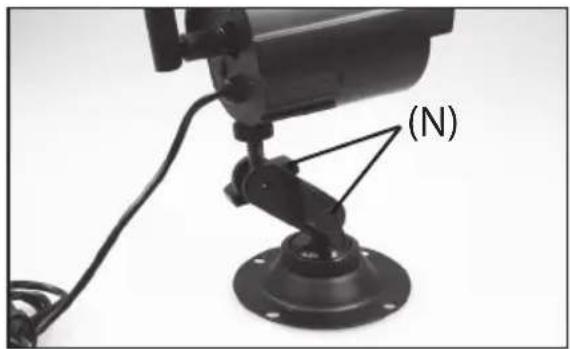
Once images are transmitted, the surveillance camera can be positioned as required. Slightly loosen the two wing nuts (N) on the stand. Maintaining some tension facilitates alignment, as the camera is still being held in place. You can now move the surveillance camera in nearly all directions until the best possible position has been found.
Once positioned correctly, retighten wing nuts on stand.
natural_image
Close-up of a black surveillance camera mounted on a base with a labeled component (N), no visible text or symbols beyond the label.
Note:
• Have a second person at the display unit help you with the positioning.
After Sales Support

00 800 - 78 77 23 68
MODEL: SC 1-WR

YEARS WARRANTY
MAGINON
5.5. Setting the channel on the surveillance camera

ote:
- When using several surveillance cameras ensure that each camera transmits on a separate channel. As 4 channels are provided, a maximum of 4 surveillance cameras can be connected. Even if only one camera is used, changing the transmission channel may improve reception.
- Caution! Always disconnect power supply of camera from mains prior to changing channel!
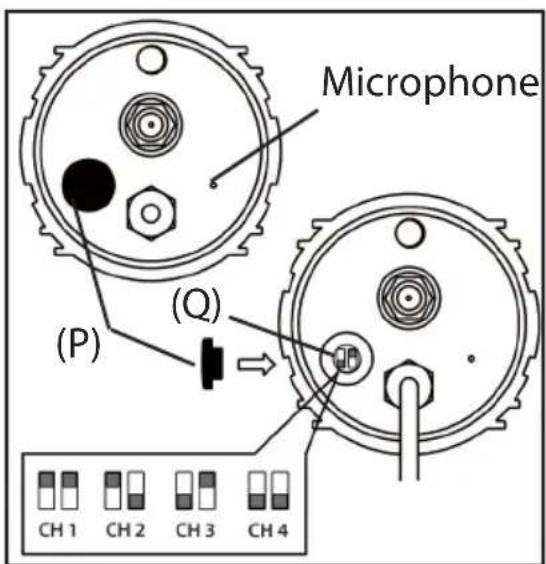
Remove sealing cap (P) covering the camera's channel changer.
Set the desired transmission channel (CH1, CH2, CH3 or CH4) by pushing both channel switches (Q) into the respective position using a pin, as shown in the below illustration.
Then replace sealing cap (P) on channel changer and reconnect the power supply to the mains.
After Sales Support
00 800 - 78 77 23 68
MODEL: SC 1-WR
3
YEARS WARRANTY
MAGINON
6. Conformity
This device was tested according to part 15 of the FCC regulations and it was confirmed that the limits for a digital device of class B have been complied with. These limits should provide accurate protection against unwanted interference when installed in a residential area. If the device is not installed in accordance with the instructions it may interfere with televisions, radios and radio transceivers.
The device can be operated provided the following conditions are met:
(1) This device may not cause any harmful interference.
(2) This device must cope with the effect of interference. This includes interference that can impair the function or cause malfunctioning.
In the event of the device causing radio or television interference – this can be easily determined by switching the device on and off – users should try to remedy the fault using the following measures:
- Turn the receiving aerial into another direction or install it in another position.
- Increase distance between the device and the receiver.
- Contact your dealer or an experienced radio/television technician.
7. Care
The surveillance camera and the receiver do not contain any serviceable components. Clean surfaces using a dry, soft cloth. In case of heavier soiling or for cleaning the lens of the surveillance camera, use a moist soft cloth that has been well wrung out. Finally dry all parts with a soft, lint-free cloth. Do not use any corrosive cleaners, such as ethanol, thinners, etc.

Note:
- Caution! Always disconnect power supply of camera or of receiver from mains prior to cleaning.
After Sales Support
[NO TEXT]
00 800 - 78 77 23 68
MODEL: SC 1-WR

YEARS WARRANTY
MAGINON
8. Disposal
For disposal, separate packaging into different types and dispose of in supplied collection containers line in with environmental regulations.
You product contains the symbol shown on the right. This means that electrical and electronic equipment may not be disposed of in domestic waste but must be recycled separately. By disposing of the equipment correctly you ensure that your equipment is correctly collected, treated and recycled. This prevents potentially harmful effects on the environment and health as a result of incorrect disposal. Dispose of the camera and accessories in accordance with the currently valid regulations. For further information contact the respective department of your local council.


9. Warranty and Service
In the event of problems with the device, our Service department will be able to assist with all queries and problems. The device comes with a 3-year manufacturer's warranty. For details please see the enclosed warranty card.
Please contact our hotline before returning a defective device.
Service address:
Sertronics LTD
MAGINON® Service
45 Regal Drive, Wallsall Enterprise Park
Wallsall, WS2 9HQ
United Kingdom
Manufacturer's address:
supra
10. Fault removal (FAQ)
| Fault Possible cause | use Remedy | |
| No transmission Connected to power? Check mains connection | ||
| Distance between surveillance camera and recipient too large? | ||
| Selected wrong channel? Change channel. | ||
| Display unit incorrectly set up? Check settings. | ||
| Bad reception Two cameras on one channel? Change transmission of camera to unassigned channel? | on channel of camera to unassigned channel. | |
After Sales Support

00 800 - 78 77 23 68
MODEL: SC 1-WR

YEARS WARRANTY
MAGINON
11. Technical Specification
11.1. Power supply
Model: HL-120/0050-FA6S-EE
Input voltage: 100-240 V \~ 50-60 Hz, 200 mA
Output voltage: 12 V=0.5 A
Protection class II
11.2. Surveillance camera with integrated microphone
Model: SC FR-W304C
Input voltage: 12 V DC
System: PAL
Transmission frequency 2,4 GHz
Infrared LEDs with automatic activation during dusk conditions.
Range: infrared light up to 18 m
Transmission range up to 100 m (in free fi eld)
Water resistant, IP standard IP65*
11.3. Receiver (2,4G Radio AV Receiver)
Model: PR FR-W802RX
Input voltage: 9-12V DC
Video output: 1Vp-p 75 Ω
Output signal: 2Vp-p600 Ω
Ambient conditions: 0°-50°C, max. 95% humidity
* IP65: (IP = Ingress Protection Rating)
(6) Dust tight: No ingress of dust; complete protection against contact.
(5) Water jets: Water projected by a nozzle (6.3 mm) against enclosure from any direction shall have no harmful effects.
After Sales Support
00 800 - 78 77 23 68
MODEL: SC 1-WR
3
YEARS WARRANTY
MAGINON
12. Index
A
Accessory 1,7
Aerial 7
Audio output 10
Automatic channel changing function 12
AV Cinch cable 7, 10
B
Base 11
Button CH SELECT 12
C
Camera (Technical Specification) 18
Care 15
Channel indicator panel 12
Channel setting 14
Channels, changing 12
Conformity 15
Connection of receiver 10
D
Disposal 16
Drilling 8
F
Fault removal 17
H
Hazard notices 4
|
Index 19
Indicating elements 12
Infrared light 13
Installation, camera 8ff
Installation, complete 9
Installation, masonry/concrete 9
Installation, receiver 10ff
Installation, timber 9
Intended use 4
0
Operating elements 12
Operation 12
P
Part names 7
Positioning of camera 13
Power supply 7, 18
R
Range (infrared) 18
Range (radio) 18
Receiver 7,10,18
Receiver, completing installation 11
Receiver, connect
S
Service 16
Stand 7,8
After Sales Support
00 800 - 78 77 23 68
MODEL: SC 1-WR
3
YEARS
WARRANTY
MAGINON
T
Technical Specification
TIME SELECT 13
Time setting 13
V
Video output 10
W
Warning notices 4
Warranty 16
After Sales Support

00 800 - 78 77 23 68
MODEL: SC 1-WR

YEARS WARRANTY
MAGINON
MAGINON
supra
- MAGINON
- Dear customer,
- Contents of box
- Note:
- Contents
- Preface 1
- Hazard, Safety and Warning notices
- Intended use
- Hazards for children and persons with limited ability to operate electronic equipment
- Hazard of electrocution in case of wet and humid conditions
- Electrical hazard
- Damage from heat – fire hazard
- Injuries and material damage
- Your video camera
- Parts
- Installation of surveillance camera
- Fitting stand to camera
- Marking for drilling
- Fixing to stone/concrete
- Fixing to timber
- Completing the camera installation
- Connecting the receiver
- Connecting the receiver to the playback device
- Completing the receiver installation
- Operation
- ote:
- Operating and indicating elements
- Automatic channel changing function
- Infrared light
- Positioning of surveillance camera
- Setting the channel on the surveillance camera
- Conformity
- Care
- Disposal
- Warranty and Service
- Service address:
- Manufacturer's address:
- Fault removal (FAQ)
- Technical Specification
- Power supply
- Surveillance camera with integrated microphone
- Receiver (2,4G Radio AV Receiver)
- Index
- A
- B
- C
- D
- F
- H
- |
- 0
- P
- R
- S
Brand : Maginon
Model : SC-1 WR
Category : Surveillance Camera