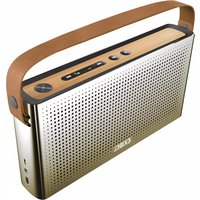
BX320 - Loudspeaker Exibel - Free user manual and instructions
Find the device manual for free BX320 Exibel in PDF.


| Product Type | Portable Bluetooth Speaker |
| Model | BX320 |
| Brand | Exibel |
| Dimensions (W x H x D) | 200 x 80 x 80 mm |
| Weight | 0.6 kg |
| Power Supply | Rechargeable Li-ion battery, 3.7V, 2000 mAh |
| Charging Time | Approx. 4 hours |
| Playback Time | Up to 12 hours (at medium volume) |
| Bluetooth Version | 5.0 |
| Wireless Range | Up to 10 meters |
| Speaker Output | 10 W (RMS) |
| Frequency Response | 80 Hz - 18 kHz |
| Waterproof Rating | IPX5 (water resistant) |
| Buttons | Power, Volume +/-, Play/Pause, Next/Previous, Bluetooth Pairing |
| Inputs | 3.5 mm AUX, Micro-USB (charging) |
| Compatible Devices | Smartphones, tablets, computers with Bluetooth or AUX |
| Materials | Plastic, fabric grille, rubber base |
| Cleaning and Maintenance | Wipe with a soft dry cloth; do not use harsh chemicals |
| Safety Features | Overcharge protection, short-circuit protection |
| Spare Parts Availability | Battery and charging port replaceable by authorized service |
Frequently Asked Questions - BX320 Exibel
User questions about BX320 Exibel
0 question about this device. Answer the ones you know or ask your own.
Ask a new question about this device
Download the instructions for your Loudspeaker in PDF format for free! Find your manual BX320 - Exibel and take your electronic device back in hand. On this page are published all the documents necessary for the use of your device. BX320 by Exibel.
USER MANUAL BX320 Exibel
Art.no. Model
18-8385-1,-2 BX320
38-6117-1,-2 BX320
English 3
Svenska 7
Norsk 11
Suomi 15
Deutsch 19
Bluetooth Speaker
Art.no 18-8385-1,-2 Model BX320
38-6117-1,-2 BX320
Please read the entire instruction manual before using the product and then save it for future reference. We reserve the right for any errors in text or images and any necessary changes made to technical data. In the event of technical problems or other queries, please contact our customer services (see address details on the back).
Safety
- The speaker may be used by children aged 8 or over provided they have been instructed in the safe use of the product and that they understand the hazards and risks involved. Cleaning and maintenance may be carried out by children aged 8 or over, but only under adult supervision. Keep the speaker and its mains lead out of reach of children under the age of 8.
- The speaker may be used by persons with reduced physical, sensory or mental capability, lack of experience or knowledge which could jeopardise their safety, provided they have been instructed in the safe use of the product and understand the hazards involved. Never let children play with the speaker.
- The speaker should not be taken apart or modified. Never try to open the casing of the speaker. The casing houses dangerous current-carrying non-insulated components. Contact with these can lead to fire or electric shock.
- Do not cover the speaker. Adequate ventilation with a distance of at least 5 cm between ventilation ports and the surrounding area is necessary to prevent the speaker from overheating.
- The speaker must only be connected to a 100–240 V, 50/60 Hz wall socket.
- Make sure that the wall socket to which the mains adaptor is connected is easily accessible, since this is the only way to completely disconnect the speaker from the mains supply.
- Place the speaker on a stable, flat surface.
- Do not touch the speaker if your hands are moist or wet.
- Do not place the speaker in an unstable position where there is a risk that it may fall into water or other liquids. Do not place any objects containing liquid on the speaker, such as vases, drinks, etc.
- Do not place the speaker in constant sunlight or near naked flames such as wood stoves, lit candles, etc.
- Place the speaker where there is no risk of people tripping over the mains lead.
- This product is intended for indoor use only.
- Never subject the speaker to high temperature, dust, heavy vibration, impacts, damp or moisture.
-
Do not abuse the mains lead. Do not jerk the mains lead, grip and pull the adapter out of the socket when disconnecting the speaker. Make sure that the mains adaptor does not come into contact with heat, sharp edges or is crushed in any way.
-
Unplug the mains adaptor during thunderstorms or if the speaker is not to be used for a long time.
- The standby switch on the speaker does not completely disconnect it from the mains. To completely disconnect the speaker from the mains, the mains adaptor must be removed from the wall socket.
- Protect your hearing. Listening on high volume for prolonged periods can lead to permanent hearing loss.
- Do not use the speaker if it, its mains adaptor or adaptor lead is damaged in any way.
- The speaker must only be repaired by qualified service technicians.
Buttons and functions
- [Volume/standby/mode]
- LED indicator
- 3.5 mm audio jack
- 2 × RCA audio jacks
- External subwoofer connection socket
- Mains adaptor socket
- Left speaker connection

Operating instructions
Connections
- Connect a PC, DVD player, media player, etc to audio input (3 or 4).
- Connect a subwoofer to the subwoofer socket (5).
- Connect the cable from the left speaker to the left speaker connection (7).
- Connect the mains adaptor cable to the socket (6).
- Connect the mains adaptor to a 100–240 V, 50/60 Hz power socket.
Switch on, standby and mode selection mode
- When the mains adaptor is plugged into a wall socket the speaker automatically enters Bluetooth mode. The LED indicator will begin flashing blue:
-
Press [Volume/standby/mode] once to change the mode and activate the audio inputs 3 and 4. The LED indicator will begin flashing red: The indicator will flash red for 5 seconds and then go off; the audio inputs will remain activated.
-
Another quick press of the mode selection button will return the speaker to Bluetooth mode; it can take a few seconds for Bluetooth to activate.
- Hold in the [Volume/standby/mode] button for 3 seconds to put the speaker in standby mode.
- Once in standby mode, hold in the [Volume/standby/mode] button for 3 seconds in order to turn on the speaker in Bluetooth mode.
Connecting an external Bluetooth device
- Plug the mains adaptor into a wall outlet. The LED indicator will flash blue to show that the speaker is in Bluetooth mode. Alternatively, Bluetooth mode can be selected as described above.
- Activate Bluetooth on the device to be paired with the speaker.
- The speaker will appear on your device as "BX320", select it and pair it with your device. Refer to the instruction manual of your device for further clarification if you are unsure.
- Once connection has been established the LED indicator on the speaker will shine a steady blue.
- Start playback on your device. Set the desired volume levels both on your external device and the speaker. Control other playback settings from the external device.
Note: If you are prompted to enter a PIN code on your device, you should enter 0000 (four zeroes). Certain devices may also require you to approve the connection.
If you have connected a mobile phone to the speaker via Bluetooth and receive a call whilst you are listening to music, the music will be switched off automatically. Once the call has been ended, music playback will be resumed (if your phone settings enable this).
Playback from external devices connected to the audio inputs
- Connect the devices as described in Connections above.
- Activate the audio inputs as described in Switch on, standby and mode selection mode above. Note: If external devices are connected to both input 3 and 4, playback will only be possible via input 3. If you wish to play content from the external device connected to input 4, you will need to disconnect any cable plugged into input 3.
- Start playback on the device. Set the desired volume levels both on your external device and the speaker. Control other playback settings from the external device.
Care and maintenance
- Unplug the mains adaptor if the speaker is not to be used for an extended period.
- Before cleaning the speaker, unplug the mains adaptor and wipe the speaker with a damp cloth. Use only mild cleaning agents, never solvents or corrosive chemicals.
Troubleshooting guide
| The speaker will not switch on. | Make sure that the mains adaptor is undamaged and is securely connected to both the wall socket and the speaker.Ensure that there is power at the wall socket. |
| No sound. Check the volume level on both the device and speaker.If the volume level on the audio source is too low,the speaker will not detect the input signal.Make sure that the correct audio source is selected.Disconnect any cable plugged into input 3 during playback from input 4.Check that none of the electrical cables are damaged and that they are all properly connected.Make sure that a Bluetooth connection has been properly established.Test the playback from your external device before connecting it to the speaker to ensure that it works.Check to see that you don't have the MUTE on the external device.Try playback using another file format e.g. MP3. The file you are attempting to play may be incompatible or damaged.Unplug the mains adaptor from the wall socket to disconnect the speaker completely from the mains. Plug the mains adaptor back in again. | |
| The sound turns off after 10 seconds. | Raise the volume on the external device and then adjust the volume on the speaker. |
| The speaker is malfunctioning. | Unplug the mains adaptor from the wall socket and plug it in again. |
Disposal
This product should be disposed of in accordance with local regulations. If you are unsure how to proceed, contact your local council.
Specifications
Voltage In 100–240 V AC, 50/60 Hz Out 12 V, 1.67 A
Bluetooth V 2.1+EDR
Bluetooth range Approx. 10 m
Power 20 W
Bluetooth-högtalare
Art.nr 18-8385-1,-2 Modell BX320
38-6117-1,-2 BX320
Nettadapter Inn 100–240 V AC, 50/60 Hz
Ut 12 V, 1,67 A
Bluetooth V 2.1+EDR
Declaration of Conformity
CE
Hereby, Clas Ohlson AB declares that following product(s):
38-6117-1, 38-6117-2, 18-8385-1, 18-8385-2 BX320
is in compliance with the essential requirements and other relevant provisions of Directive 1999/5/EC and 2006/95/EC.
Article 3.1a (Health): EMF/SAR 99/519 EC Council Recommendation
Article 3.1a (Safety): EN 60065
Article 3.1b (EMC): EN 301489-1 EN 301489-17
Article 3.2 (Radio): EN 300328
CE 0979
Insjön, Sweden, Jan 2014

Klas Balkow,
President
Clas Ohlson, 793 85 Insjön, Sweden
KUNDTJÄNST tel: 0247/445 00
fax: 0247/445 09
e-post: kundservice@clasohlson.se
INTERNET
www.clasohlson.se
BREV Clas Ohlson AB, 793 85 INSJÖN
NORGE
KUNDESENTER tlf.: 23 21 40 00
faks: 23 21 40 80
e-post: kundesenter@clasohlson.no
INTERNETT
www.clasohlson.no
POST
Clas Ohlson AS, Postboks 485 Sentrum, 0105 OSLO
SUOMI
ASIAKASPALVELU puh.: 020 111 2222
10 – 13 Market Place
Kingston Upon Thames
Surrey
KT1 1JZ
DEUTSCHLAND
KUNDENSERVICE


- BLUETOOTH SPEAKER
- SAFETY
- BUTTONS AND FUNCTIONS
- OPERATING INSTRUCTIONS
- CONNECTIONS
- SWITCH ON, STANDBY AND MODE SELECTION MODE
- CONNECTING AN EXTERNAL BLUETOOTH DEVICE
- PLAYBACK FROM EXTERNAL DEVICES CONNECTED TO THE AUDIO INPUTS
- CARE AND MAINTENANCE
- TROUBLESHOOTING GUIDE
- DISPOSAL
- SPECIFICATIONS
- BLUETOOTH-HÖGTALARE
- DECLARATION OF CONFORMITY
- CE
- CE 0979
- NORGE
- SUOMI
- DEUTSCHLAND
Brand : Exibel
Model : BX320
Category : Loudspeaker