
XSW 52 - Hi-Fi System SENNHEISER - Free user manual and instructions
Find the device manual for free XSW 52 SENNHEISER in PDF.


| Product Type | Wireless Hi-Fi System (Microphone System) |
| Brand | Sennheiser |
| Model | XSW 52 |
| Dimensions (Receiver) | Approx. 200 x 40 x 150 mm (7.9 x 1.6 x 5.9 in) |
| Weight (Receiver) | Approx. 300 g (10.6 oz) |
| Power Supply | External power adapter (12V DC, 300 mA) |
| Frequency Range | UHF 548–572 MHz (depending on region) |
| Audio Output | 6.3 mm (1/4") unbalanced jack |
| Signal-to-Noise Ratio | > 103 dB (A-weighted) |
| Total Harmonic Distortion | < 0.5% (at 1 kHz, peak deviation) |
| Microphone Type | Dynamic, cardioid (included) |
| Battery Life (Transmitter) | Approx. 10 hours (2x AA batteries) |
| Range | Up to 75 m (250 ft) line-of-sight |
| Key Features | Automatic frequency scan, mute, rugged metal housing |
| Maintenance & Cleaning | Wipe with a soft, dry cloth; avoid solvents |
| Safety | Keep dry; do not expose to rain or moisture |
| Spare Parts & Repairability | Contact Sennheiser service; spare parts available for 5 years |
| Package Contents | Receiver, transmitter (handheld mic), power adapter, batteries, user manual |
Frequently Asked Questions - XSW 52 SENNHEISER
User questions about XSW 52 SENNHEISER
0 question about this device. Answer the ones you know or ask your own.
Ask a new question about this device
Download the instructions for your Hi-Fi System in PDF format for free! Find your manual XSW 52 - SENNHEISER and take your electronic device back in hand. On this page are published all the documents necessary for the use of your device. XSW 52 by SENNHEISER.
USER MANUAL XSW 52 SENNHEISER
natural_image
Exterior view of a modern wireless earphone setup including a digital sound analyzer, a USB microphone, and an XENNHEISER device (no visible text or symbols on main components)Instruction manual
A
B
Frequency and transmission power overview
Important safety instructions ....2
The XS WIRELESS systems ....4
Delivery includes 5
Product overview 6
EM 10 receiver ....6
SK 20 bodypack transmitter ....6
SKM 35/SKM 65 radio microphone ....6
Putting the XS WIRELESS systems into operation ....7
Putting the receiver into operation 7
Putting the bodypack transmitter into operation ....8
Putting the radio microphone into operation 8
Using the XS WIRELESS systems 9
Switching the receiver on/off 9
Switching the transmitters on/off 9
Muting the transmitters 10
Adjusting the sensitivity 10
Selecting and changing a receiver channel 10
Synchronizing a transmitter with the receiver 11
Adjusting the squelch threshold 11
Cleaning and maintaining the XS WIRELESS systems 12
If a problem occurs ... 12
Specifications 13
Manufacturer Declarations 16
Important safety instructions
System
- Read this instruction manual.
- Keep this instruction manual. Always include this instruction manual when passing the products on to third parties.
- Heed all warnings and follow all instructions in this instruction manual.
- Only clean the products when they are not connected to the mains. Use a cloth for cleaning.
- Only use attachments/accessories specified by Sennheiser.
• Refer all servicing to qualified service personnel.
Servicing is required if the products have been damaged in any way, liquid has been spilled, objects have fallen inside, the products have been exposed to rain or moisture, do not operate properly or have been dropped.
- WARNING: To reduce the risk of fire or electric shock, do not use the products near water and do not expose them to rain or moisture.
Receiver
- Only use the supplied mains unit.
- Unplug the mains unit from the wall socket,
– to completely disconnect the product from the mains,
– during lightning storms or
– when unused for long periods of time.
- Only operate the mains unit from the type of power source specified in the chapter "Specifications" (see page 13).
- Ensure that the mains unit is
– in a safe operating condition and easily accessible,
– properly plugged into the wall socket,
– only operated within the permissible temperature range,
- not covered or exposed to direct sunlight for longer periods of time in order to prevent heat accumulation (see "Specifications" on page 13).
- Do not block any ventilation openings. Install the products in accordance with the instructions given in this instruction manual.
- Do not install the products near any heat sources such as radiators, stoves, or other devices (including amplifiers) that produce heat.
- Do not overload wall outlets and extension cables as this may result in fire and electric shock.
- Ensure that the mains unit is always accessible so that the connected product can be easily disconnected from the mains at any time.
Bodypack transmitter and radio microphone
- Do not place the products near any heat sources such as radiators, stoves, or other devices (including amplifiers) that produce heat.
- WARNING: These products should be protected against the ingress of liquids (eg: water, sweat, etc.) as this can cause malfunctions due to shortages or corrosion, etc.
Intended use
Intended use of the product of the XS WIRELESS systems includes:
- having read this instruction manual especially the chapter "Important safety instructions" on page 2,
- using the products within the operating conditions and limitations described in this instruction manual.
"Improper use" means using the products other than as described in these instructions, or under operating conditions which differ from those described herein.
Framework requirements and restrictions on frequency usage
Before putting your radio microphone system or other audio transmission systems into operation, ask the relevant wireless regulatory authority for the exact frequency allocations and apply for an individual license if necessary. The table on the inside back cover provides an overview of the different European framework requirements and restrictions on frequency usage. If there is no entry in the supplement, ask the relevant wireless regulatory authority for the current rules governing frequency usage.
The XS WIRELESS systems
Designed for different areas of application, the XS WIRELESS systems are available in five variants.
Presentation Set XSW 12: This system is ideal for presentation applications. The unobtrusive ME 2-2 clip-on microphone is virtually invisible.
Instrument Set XSW 72: This system is for connecting musical instruments (e.g. guitar) which have a 14 " (6.3 mm) jack socket directly to the bodypack transmitter.
Vocal Set XSW 35 and Vocal Set XSW 65: These systems are ideal for vocal and speech applications.
Headset Set XSW 52: The lightweight and comfortable headset system gives absolute freedom of movement for a more animated and impressive performance. High-quality microphone technology provides clear, brilliant sound.
The XS WIRELESS systems are available in five UHF frequency ranges with 960 frequencies per frequency range (except range E = 520 frequencies). Each frequency range (A, GB, B, C, E) offers 8 frequency banks with up to 12 channels each. The frequency banks contain factory-preset frequencies (frequency presets).
Frequency range A 548 to 572 MHz
Frequency range GB 606 to 630 MHz
Frequency range B 614 to 638 MHz
Frequency range C 766 to 790 MHz
Frequency range E 821 to 832 MHz and 863 to 865 MHz
Features
- Up to 12 transmission links per frequency range which can be operated simultaneously
- Reliable transmission technology
- True diversity technology for minimizing dropouts in the reception
- Adjustable squelch for eliminating RF interference
• Rugged metal housing for EM 10 receiver - Crystal-clear reception due to dynamic processor
- Sync function for wireless transmission of frequencies to transmitters
- Scan function searches for unused frequencies
Delivery includes
| XS WIRELESS systems | EM 10 receiver | SKM 35 radio microphone, dynamic | SKM 65 radio microphone, condenser | SK 20 bodypack transmitter | Transmitter bag | NT 2-3 mains unit | ME 2-2 clip-on microphone | CI 1 1⁄4" (6.3 mm) jack cable | MZQ 1 stand mount | ME 3 headmic | 2 rod antennas | 2 AA size batteries | Instruction manual |
| Vocal Set XSW 35 | √ | √ | √ | √ | √ | √ | √ | √ | |||||
| Vocal Set XSW 65 | √ | √ | √ | √ | √ | √ | √ | √ | |||||
| Presentation Set XSW 12 | √ | √ | √ | √ | √ | √ | √ | √ | |||||
| Instrument Set XSW 72 | √ | √ | √ | √ | √ | √ | √ | √ | |||||
| Headset Set XSW 52 | √ | √ | √ | √ | √ | √ | √ | √ |

A list of accessories can be found on the XS WIRELESS product page at www.sennheiser.com. For information on suppliers, contact your local Sennheiser partner: www.sennheiser.com > "Service & Support".
Product overview
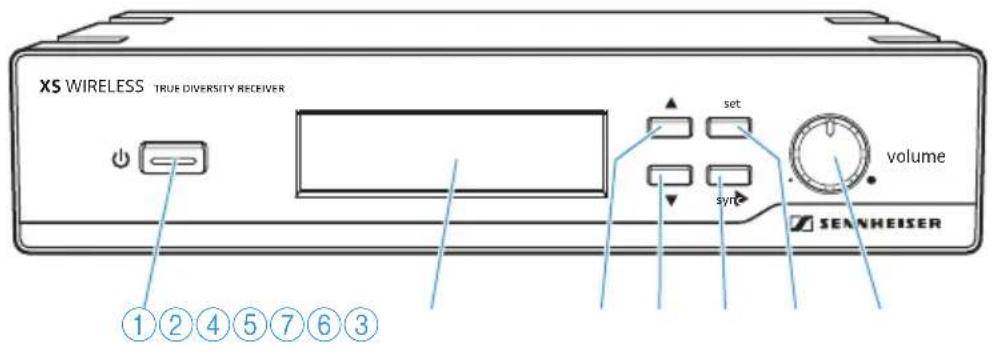
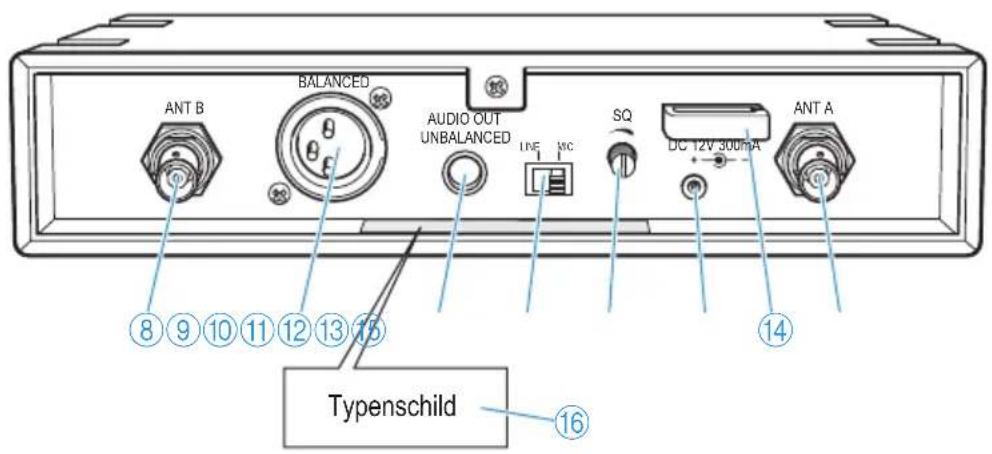
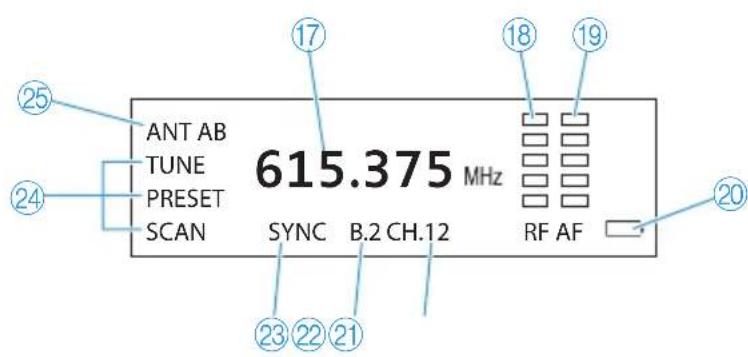
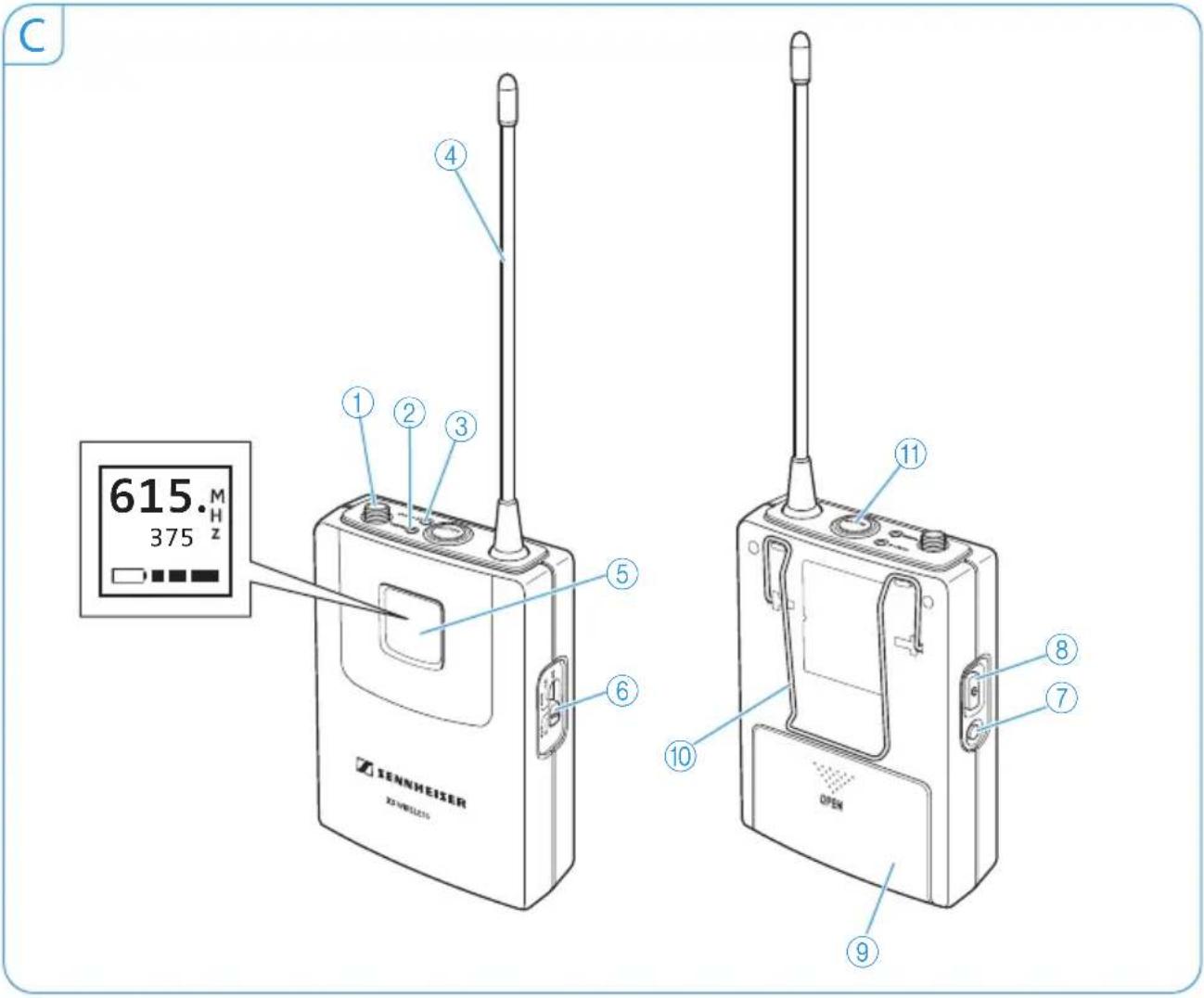
An overview of the products is given on the inside front cover of this instruction manual.
A EM 10 receiver
① Standby button
② Display panel
③UP button ▲
④ DOWN button ▼
⑤ button
⑥ set button
⑦ volume control
⑧ Antenna input (ANT B), BNC socket
⑨ Audio output (BALANCED), XLR-3M socket, balanced
⑩ Audio output (AUDIO OUT UNBALANCED) 14'' (6.3 mm) jack socket, unbalanced
⑪ LINE/MIC slide switch
⑫SQ rotary switch for squelch threshold
⑬ DC socket (DC 12 V, 300 mA) for connection of mains unit
⑭ Cable grip for mains cable
⑮ Antenna input (ANT A), BNC socket
⑯Type plate
B Display panel
⑰ Frequency
⑱ RF signal level "RF"
⑲ Audio level "AF"
⑳Battery charge status of transmitter
②1Channel
⑳Frequency bank
②3SYNC display
⑳ SCAN, PRESET, TUNE menu items
⑲ ANT A/ANT B active antenna input
C SK 20 bodypack transmitter
① Microphone/instrument input
②mute LED, yellow
(lit = muting is activated)
③power LED, red
(lit = switched on;
flashing = batteries are low)
④ Antenna
⑤ Display panel
⑥ Input sensitivity slide switch
⑦ button
⑧ON/OFF button
⑨ Battery compartment cover
⑩Belt clip
⑪MUTE button
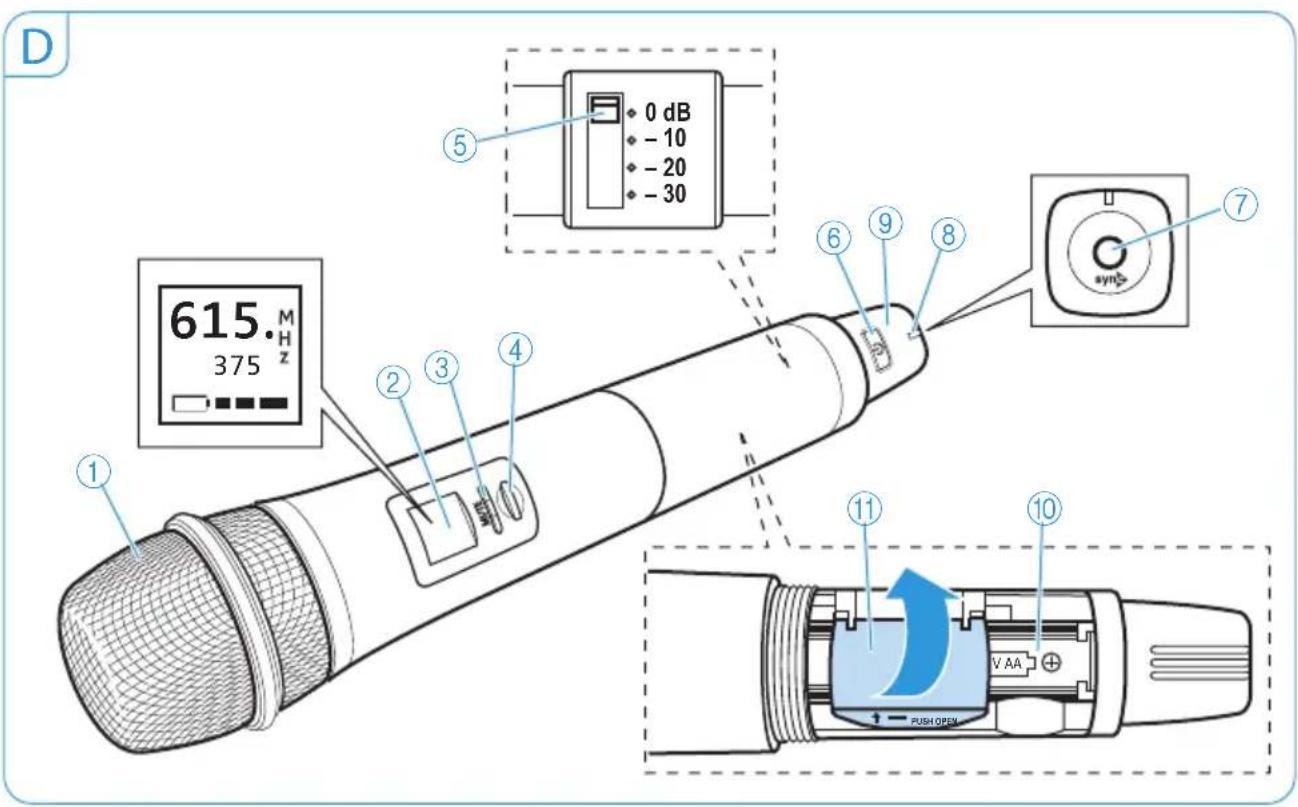
D SKM 35/SKM 65 radio microphone
① Sound inlet basket (SKM 35 = black identification ring; SKM 65 = grey identification ring)
② Display panel
③ mute LED, yellow LED (lit = muting is activated)
④MUTE button
⑤ Input sensitivity slide switch
⑥ON/OFF button
⑦ button
⑧ LED power, red LED
(lit = switched on;
flashing = batteries are low)
⑨ Antenna cover
⑩ Battery compartment
Putting the XS WIRELESS systems into operation
Putting the receiver into operation
You can set up the receiver as a single device or mount it into a 19" rack. For information on rack mounting and optional accessories (e.g. rack mount "ears" and remote antennas), visit the XS WIRELESS product page at www.sennheiser.com.
Setting up the receiver
CAUTION
Risk of staining furniture surfaces!
Furniture surfaces are often treated with varnish, polish or synthetics which might cause stains when they come into contact with other synthetics such as the device feet.
Do not place the receiver on delicate surfaces; if necessary, place a pad under the receiver.
Place the receiver on a flat, even surface.
Connecting the receiver to the mains
Connect the connector of the mains unit to the DC socket ⑬ on the receiver.
Connect the mains unit to a wall socket. The receiver switches on, the display panel is backlit.
Connecting and aligning the rod antennas
The supplied rod antennas are suitable for all applications where – good reception conditions provided – a wireless transmission system is to be used without a large amount of installation work. To increase the range, you can use remote antennas which are available as accessories from your specialist dealer.
Connect the two rod antennas to the BNC sockets ⑮ and ⑧ at the rear of the receiver.
▶ Align the antennas in a V-shape.
Connecting the amplifier/mixing console
Use a suitable cable to connect the amplifier or mixing console to the XLR-3M socket ⑨ or the 14 " (6.3 mm) jack socket ⑩.
For a rough adjustment of the AF audio level, set the LINE/MIC slide switch ⑪ to the corresponding position.
▶ Use the volume control ⑦ of the receiver to optimally adjust the AF audio level to the input of the amplifier or mixing console.
Putting the bodypack transmitter into operation
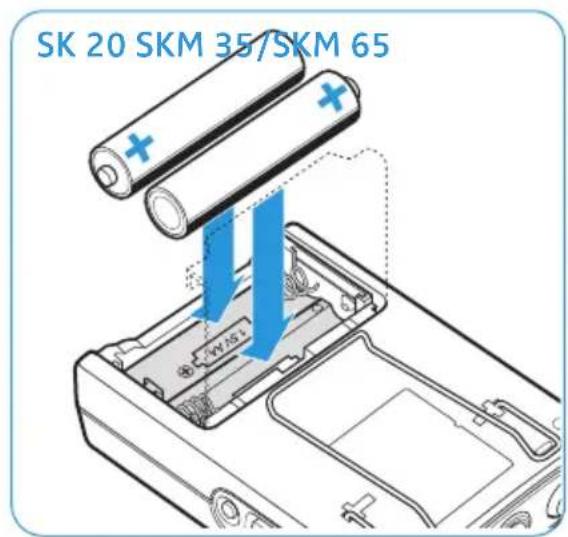
Inserting/replacing the batteries (see fig. "SK 20")
Use two AA size batteries (1.5 V) for powering the SK 20 bodypack transmitter.
▶ Open the battery compartment cover ⑪.
Insert the batteries. Observe correct polarity when inserting the batteries.
Connecting the microphone/instrument cable
The bodypack transmitter's audio input is designed for the connection of both condenser microphones (ME 2-2 clip-on microphone and ME 3 headmic) and instruments (e.g. guitars).
Connect the clip-on microphone, headmic or instrument to the microphone/instrument input ①.
Attaching the clip-on microphone
Use the microphone clip to attach the ME 2-2 clip-on microphone to clothing.
▶ Conduct the cable so that noise due to friction is avoided and that the microphone cable and the antenna do not cross.
Putting on the headmic
Adjust the ME 3 headmic so that a comfortable and secure fit is ensured.
▶ Position the microphone so that its sound inlet is directed towards the sound source.
Attaching the bodypack transmitter to clothing
▶ Use the belt clip ⑩ to attach the bodypack transmitter to clothing. Make sure that the antenna is at least 1 cm away from the body and is not kinked.
Putting the radio microphone into operation
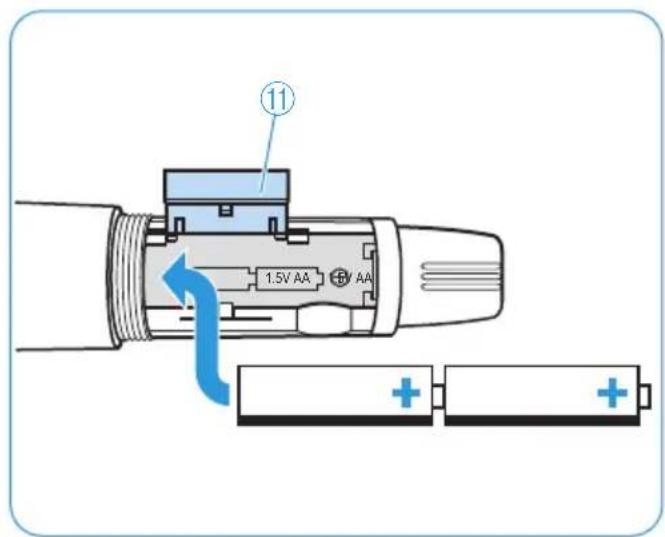
Inserting/replacing the batteries (see fig. "SKM 35/SKM 65")
Use two AA size batteries (1.5 V) for powering the SKM 35/SKM 65 radio microphone.
▶ Unscrew the lower part of the microphone body and open the battery compartment cover.
Insert the batteries. Observe correct polarity when inserting the batteries.
Using the XS WIRELESS systems
Switching the receiver on/off
To switch the receiver on:
▶ Press the standby button ⏻ ①. The receiver switches on, the display panel is backlit.
Check the RF signal level "RF" ⑱ on the receiver's display panel.
- The RF signal level is not displayed: The receiver frequency is unused. You can put your transmitter into operation.
- The RF signal level is displayed: The receiver frequency is already used. Read the chapter "Selecting and changing a receiver channel".
To switch the receiver to standby mode:
Keep the standby button ⏻ ① pressed until "OFF" appears on the display panel.
To completely switch the receiver off:
▶ Disconnect the receiver from the mains by unplugging the mains unit from the wall socket.
Switching the transmitters on/off
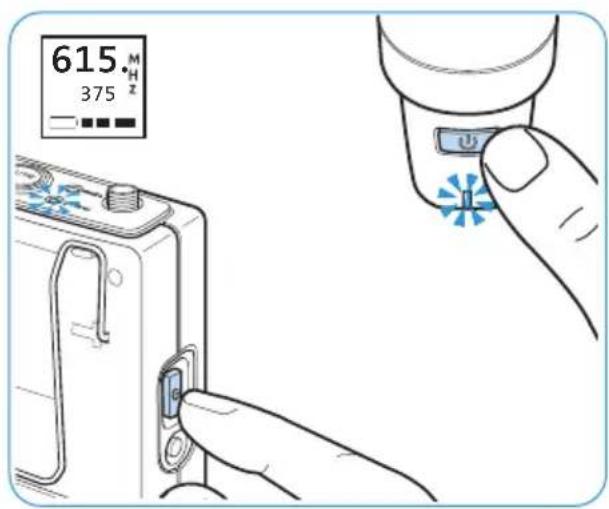
To switch the transmitters on:
Press the ON/OFF button ⏻. The powerLED lights up red. The display panel of the receiver and the transmitters displays the charge status of the batteries:
| Display on the receiver | Display on the transmitter Charge status |
| approx. 100 % | |
 | approx. 70 % |
| approx. 30 % | |
 | The display and the power LED are flashing.The charge status is critical. |
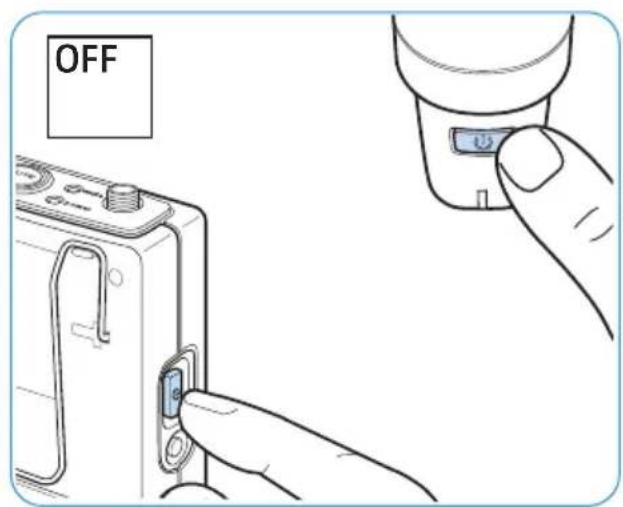
To switch the transmitters off:
Keep the ON/OFF button ⏻ pressed until "OFF" appears on the display panel.
Muting the transmitters
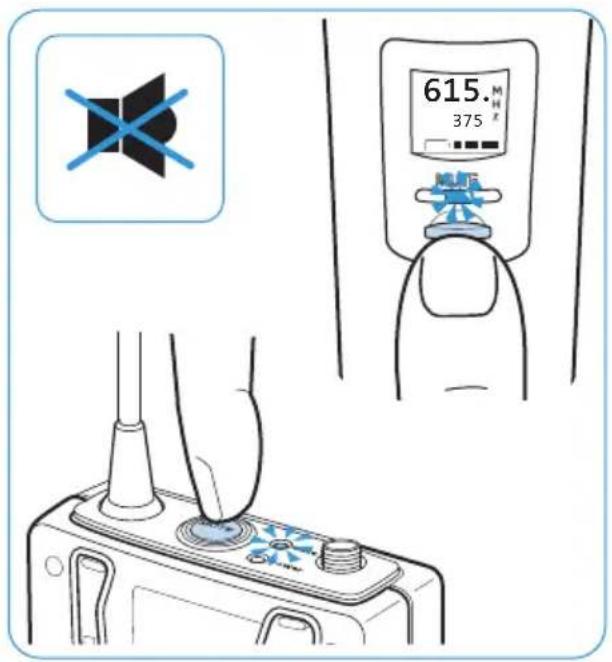
To mute the transmitters:
▶ Press the MUTE button. The mute LED lights up yellow. The audio signal is muted.
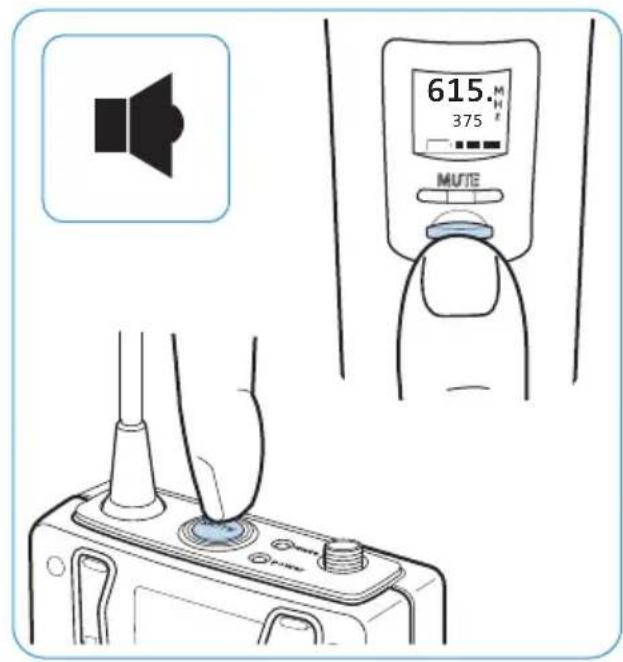
To cancel the muting of the transmitters:
Press the MUTE button. The mute LED goes off. The muting is canceled.
Adjusting the sensitivity
Use the slide switch ⑥ (SK) or ⑤ (SKM) to adjust the sensitivity.

You can vary the volume and the bass reproduction by increasing/decreasing the distance between radio microphone and mouth.
Selecting and changing a receiver channel
Make sure that all receivers are set to the same frequency bank in order to prevent interference and intermodulation to the transmitter.
Selecting a menu item and activating it
▶ Press the UP button ▲③ or DOWN button ▼④ to select the TUNE, PRESET or SCAN menu item.
Press the set button ⑥ to activate the selected menu item.
Menu item Select this menu item to ...
TUNE manually set an unused frequency.
PRESET select a preset channel.
SCAN set an unused channel by automatic searching.
The menu items and their adjustment possibilities
TUNE menu item
▶ Use the UP button ▲ ③ or DOWN button ▼ ④ to select an unused frequency.
▶ Press the set button ⑥ to store your setting.
PRESET menu item
▶ Use the UP button ▲ ③ or DOWN button ▼ ④ to select a frequency bank.
▶ Press the set button ⑥ to store your setting.
▶ Use the UP button ▲ ③ or DOWN button ▼ ④ to select a channel.
▶ Press the set button ⑥ to store your setting.
SCAN menu item
Pressing the set button ⑥ to activate the SCAN menu item automatically selects an unused channel.
To select another frequency bank:
▶ Press the UP button ▲ ③ or DOWN button ▼ ④.
▶ Press the set button ⑥ to store your setting.
Synchronizing a transmitter with the receiver
The receiver always transfers the frequencies to the transmitter.
▶ Switch the transmitter and the receiver on.
Keep the sync button ⑦ of your transmitter pressed until the SYNC display ②3 flashes on the receiver's display panel.
▶ Press the synchthon transmitter.
⑤ of the receiver to transfer the selected frequency to the
You can also synchronize a switched-off transmitter with the receiver. The transmitter automatically switches on during the synchronization process.
Adjusting the squelch threshold
Interference of the RF signal due to other transmission links can be eliminated as follows:
Switch the transmitter off. The receiver should no longer receive a signal.
If the receiver still receives a signal, use the rotary switch for squelch threshold "SQ" to increase the squelch threshold so that the signal will no longer be received. If the signal cannot be eliminated in this way, set the transmitter and the receiver to a different channel.
Switch the transmitter on again and check if the receiver receives the transmitter signal.
If the squelch threshold is adjusted too high, the transmission range will be reduced. Therefore, always adjust the squelch threshold to the lowest possible setting.
Cleaning and maintaining the XS WIRELESS systems
CAUTION
Liquids can damage the electronics of the products!
Liquids entering the housing of the products can cause a short-circuit and damage the electronics.
Keep all liquids away from the products.
Do not use any solvents or cleansing agents.
Before cleaning, disconnect the receiver from the mains.
Only use a soft, slightly damp cloth to clean the products.
If a problem occurs ...
| Problem Cause | Solution Page | ||
| No operation indication | Batteries are flat Replace the batteries. 8 | ||
| No mains connection (receiver) Check the connections of the mains unit. | 7 | ||
| No RF signal Transmitter and receiver are not on the same channel | Set transmitter and receiver to the same channel. | 10 | |
| Transmission range is exceeded Reduce the distance between transmitter and receiver. | - | ||
| RF signal available, no audio signal | Receiver's squelch threshold is adjusted too high | Reduce the squelch threshold. | 11 |
| Audio signal has a high level of background noise or is distorted | Transmitter sensitivity is adjusted too low or too high | Adjust the sensitivity on the transmitter. | 10 |
| Receiver's audio output level is adjusted too low or too high | Use the volume control 7 to adjust the audio level. | 7 | |
| Interference of the RF signal | Distance between transmitting and receiving antennas is too small | Distance >5 m | - |
| Several transmitters/radio microphones are used simultaneously and the distance between two transmitters is too small | Distance >20 cm | - | |
Specifications
System
| Modulation wideband FM |
| Frequency ranges A: 548-572 MHz |
| GB: 606-630 MHz |
| B: 614-638 MHz |
| C: 766-790 MHz |
| E: 821-832 MHz and 863-865 MHz |
Switching bandwidth 24 MHz (range E: 13 MHz)
| Frequencies | 960 (range E: 520), tuneable in steps of 25 kHz |
| 8 frequency banks, each with up to 12 factory-preset channels | |
| Signal-to-noise ratio | ≥ 103 dBa |
| THD | ≤ 1% |
| Temperature range | 0^ to +40^ |
EM 10 receiver
| Receiver principle | true diversity |
| Sensitivity (at peak deviation) | < 3 μV at 52 dB_rms S/N |
| Adjacent channel rejection | ≥ 60 dB |
| Intermodulation attenuation | ≥ 50 dB |
| Blocking | ≥ 65 dB |
| AF frequency response | 50 – 16,000 Hz |
| Pilot tone | 32.768 kHz |
| Antenna input | 2 BNC sockets, 50 Ω |
| AF output voltage (at peak dev., 1 kHz AF) | 14'' (6.3 mm) jack socket (unbalanced): +8 dBu XLR socket (balanced): +14 dBu |
| Power supply | 12 V_DC nom. / 300 mA |
| Dimensions | 200 x 42 x 127 mm |
| Weight | 730 g |
| Transmitter SK 20 SKM 35 SKM 65 | |||
| RF output power 10 mW | 10 mW 10 mW | ||
| AF frequency response | 50 – 16,000 Hz(Line)80 – 16,000 Hz (Mic) | 80 – 16,000 Hz | 80 – 16,000 Hz |
| AF input 3.5 mm jack | socket – – | ||
| Nom. input voltage(Mic/Line) | 0.5 V_RMS / 1.8 V_RMS at -30 dB gain | – | – |
| Power supply 2 AA size batteries,1.5 V | 2 AA size batteries,1.5 V | 2 AA size batteries,1.5 V | |
| Operating time approx. 10 hrs approx. 10 hrs | |||
| Dimensions 66 x 96 x | 24 mm 250 x 54 mm | 250 x 54 mm | |
| Weight | 95 g | 240 g 240 g | |
| Microphone type | – | dynamic | condenser,pre-polarized |
| Input sensitivity | – | 1.5 mV/Pa | 1.8 mV/Pa |
| Pick-up pattern | – | cardioid super-cardioid | |
| Max. SPL | – | 149 dB SPL | 144 dB SPL |
| Microphones | ME 2-2 | ME 3 | |
| Transducer principle | condenser,pre-polarized | condenser,pre-polarized | |
| Sensitivity | 5 mV/Pa | 1.6 mV/Pa | |
| Pick-up pattern | omni-directional | cardioid | |
| Max. SPL | 142 dB | 150 dB | |
In compliance with (EM, SK and SKM)
Europe: EMC

EN 301489-1/-3/-9
Radio
EN 300422-1/-2,
EN 301440, EN 301357
Safety
EN 60065, EN 62311 (SAR)
Approved by (SK)
Canada: Industry Canada RSS 123 (210),
IC 2099A-XSWSK
FCC-Part 74, FCC-ID: DMO XSWSK
FCC-Part 15 C, limited to 698 MHz
Approved by (SKM)
Canada: Industry Canada RSS 123 (210),
IC 2099A-XSWSKM
FCC-Part 74, FCC-ID: DMO XSWSKM
FCC-Part 15 C, limited to 698 MHz
Approved by (EM)
Canada: Industry Canada RSS 123, IC 2099A-XSWEM
FCC-Part 15 C, FCC-ID: DMO XSWEM
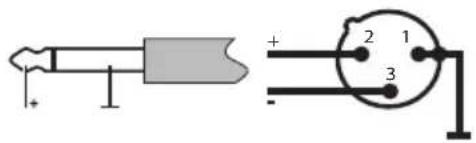
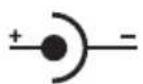
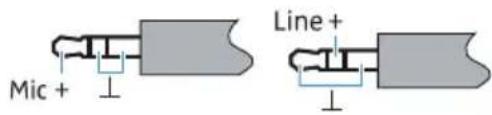
Connector assignment
EM 10 EM 10 EM 10 SK 20 SK 20
1/4'' (6.3 mm)
mono jack plug, unbalanced
XLR-3F
connector, balanced
DC connector for power supply
3.5 mm jack plug (Mic)
3.5 mm jack plug (Line)
Manufacturer Declarations
Warranty
Sennheiser electronic GmbH & Co. KG gives a warranty of 24 months on this product. For the current warranty conditions, please visit our web site at www.sennheiser.com or contact your Sennheiser partner.
In compliance with the following requirements
• RoHS Directive (2002/95/EC)
• WEEE Directive (2002/96/EC)

Please dispose of the products at the end of their operational lifetime by taking them to your local collection point or recycling center for such equipment.
• Battery Directive (2006/66/EC)

The batteries supplied with the transmitters can be recycled. Please dispose of them as special waste or return them to your specialist dealer. In order to protect the environment, only dispose of exhausted batteries.
CE Declaration of Conformity
• EM10: , SK205KM 35, SKM 65:
CE 1856
• R&TTE Directive (1999/5/EC)
• EMC Directive (2004/108/EC)
- Low Voltage Directive (2006/95/EC)
The declaration is available at www.sennheiser.com. Before putting the products into operation, please observe the respective country-specific regulations.
Statements regarding FCC and Industry Canada
This device complies with Part 15 of the FCC Rules and with Industry Canada licence-exempt RSS standard(s). Operation is subject to the following two conditions: (1) this device may not cause harmful interference, and (2) this device must accept any interference received, including interference that may cause undesired operation.
This equipment has been tested and found to comply with the limits for a Class B digital device, pursuant to Part 15 of the FCC Rules. These limits are designed to provide reasonable protection against harmful interference in a residential installation. This equipment generates, uses and can radiate radio frequency energy and, if not installed and used in accordance with the instructions, may cause harmful interference to radio communications. However, there is no guarantee that interference will not occur in a particular installation. If this equipment does cause harmful interference to radio or television reception, which can be determined by turning the equipment off and on, the user is encouraged to try to correct the interference by one or more of the following measures:
- Reorient or relocate the receiving antenna.
- Increase the separation between the equipment and receiver.
- Connect the equipment into an outlet on a circuit different from that to which the receiver is connected.
- Consult the dealer or an experienced radio/TV technician for help.
Changes or modifications made to this equipment not expressly approved by Sennheiser electronic Corp. may void the FCC authorization to operate this equipment. Before putting the device into operation, please observe the respective country-specific regulations!
Sennheiser electronic GmbH & Co. KG
Am Labor 1, 30900 Wedemark, Germany
www.sennheiser.com
Printed in Taiwan, Publ. 01/12, 542696/A03

- Important safety instructions
- System
- Receiver
- Bodypack transmitter and radio microphone
- Intended use
- Framework requirements and restrictions on frequency usage
- The XS WIRELESS systems
- Features
- Product overview
- A EM 10 receiver
- B Display panel
- C SK 20 bodypack transmitter
- D SKM 35/SKM 65 radio microphone
- Putting the XS WIRELESS systems into operation
- Putting the receiver into operation
- CAUTION
- Risk of staining furniture surfaces!
- Connecting the receiver to the mains
- Connecting and aligning the rod antennas
- Connecting the amplifier/mixing console
- Putting the bodypack transmitter into operation
- Inserting/replacing the batteries (see fig. "SK 20")
- Connecting the microphone/instrument cable
- Attaching the clip-on microphone
- Putting on the headmic
- Attaching the bodypack transmitter to clothing
- Putting the radio microphone into operation
- Inserting/replacing the batteries (see fig. "SKM 35/SKM 65")
- Using the XS WIRELESS systems
- Switching the receiver on/off
- To switch the receiver on:
- To switch the receiver to standby mode:
- To completely switch the receiver off:
- Switching the transmitters on/off
- To switch the transmitters on:
- To switch the transmitters off:
- Muting the transmitters
- Adjusting the sensitivity
- Selecting and changing a receiver channel
- Selecting a menu item and activating it
- The menu items and their adjustment possibilities
- TUNE menu item
- PRESET menu item
- SCAN menu item
- To select another frequency bank:
- Synchronizing a transmitter with the receiver
- Adjusting the squelch threshold
- Cleaning and maintaining the XS WIRELESS systems
- Specifications
- In compliance with (EM, SK and SKM)
- Approved by (SK)
- Approved by (SKM)
- Approved by (EM)
- Connector assignment
- EM 10 EM 10 EM 10 SK 20 SK 20
- Manufacturer Declarations
- Warranty
- In compliance with the following requirements
- CE Declaration of Conformity
- Statements regarding FCC and Industry Canada
Brand : SENNHEISER
Model : XSW 52
Category : Hi-Fi System