
RC-18S - Remote control BOSE - Free user manual and instructions
Find the device manual for free RC-18S BOSE in PDF.


| Product Type | Remote Control |
| Brand | Bose |
| Model | RC-18S |
| Compatibility | Bose audio systems (e.g., Wave, Lifestyle series) |
| Dimensions (approx) | 5.1 x 2.1 x 0.6 inches (130 x 53 x 15 mm) |
| Weight (approx) | 3.5 oz (100 g) including batteries |
| Power Source | 2 x AAA batteries (not included) |
| Battery Life (approx) | 6 months under normal use |
| Wireless Technology | Infrared (IR) |
| Range | Up to 20 ft (6 m) line of sight |
| Key Functions | Power, Volume Up/Down, Mute, Input Select, Source, Play/Pause, Skip, Preset Station, Settings, Sleep Timer |
| Number of Keys | 35 |
| Backlight | No |
| Cleaning Instructions | Wipe with a soft, dry cloth. Do not use liquids or cleaners. |
| Safety Warning | Avoid exposure to moisture, heat, or direct sunlight. |
| Spare Parts Availability | Batteries only (standard AAA). Replacement remote may be available through Bose support. |
| Reparability | Not repairable; replace batteries or remote if defective. |
| Manual Languages | English (EN) and other languages via download |
| Manual Format | PDF, 20 pages |
| Download Option | Free download from Bose support website or manual libraries |
Frequently Asked Questions - RC-18S BOSE
User questions about RC-18S BOSE
0 question about this device. Answer the ones you know or ask your own.
Ask a new question about this device
Download the instructions for your Remote control in PDF format for free! Find your manual RC-18S - BOSE and take your electronic device back in hand. On this page are published all the documents necessary for the use of your device. RC-18S by BOSE.
USER MANUAL RC-18S BOSE
Owner's Guide and Bose® Link
Expansion Overview
Thank you for choosing the RC-18S remote
As the owner of a Bose ^® LIFESTYLE ^® RC-18S remote control, you can enjoy a wide variety of new options with your LIFESTYLE ^® Series II DVD home entertainment system.
This remote is one of many Bose ^® link compatible products designed to work with the LIFESTYLE ^® 18 Series II or 28 Series II systems. Built-in compatibility makes this additional remote useful in any area of your home... wherever you want to hear Bose-quality sound from your system!
Where to use this expansion remote
Using the RC-18S remote in another room, you can turn your LIFESTYLE ^® system on and tune in audio from the the media center located in the main room. You can even select a different sound source, changing from CD to FM radio, for example.
The remote works with:
- B o s® link compatible powered speakers
- B o s® link amplifiers with passive speakers
- Other stereo amplifiers.
By using one of the expansion room solutions above, you can enjoy LIFESTYLE® system sound in another area of your house. Depending on which expansion product you choose, it may allow you to connect a local sound source in that expansion room to further extend your choice of audio. Then use the RC-18S remote to control all of connected sources, regardless of where they're located.
Engineered to emit radio frequency signals that work through walls and floors, the RC-18S can command sound from different floors of your residence, too.
How it differs from your primary remote
The RC-18S remote works as a complement to the primary remote that came with your LIFESTYLE® Series II system. This additional remote provides the control you need to listen to your system in other areas of your house.
Where to find...
Setting up your expansion products 4
To get an additional room of sound 4
With a Bose ^® SA-2 or SA-3 amplifier and speakers: 4
With a Series II 3•2•1 or 3•2•1 GS system .... 5
With older Bose products for expansion 6
To add more rooms of sound 6
Getting the remote ready to use 7
To install batteries 7
What each button does 8
System ON, OFF, silenced 8
Select the source 8
Select an audio program 9
Confirm and Return 9
Using the remote to control other audio 10
Two streams, two choices for you 10
Main room requirements 10
Other room and stream scenarios 10
How to make it happen 11
Some simple rules to keep it all straight 12
Additional legacy product rules 13
Make sure the house code settings match 14
How to change the settings, as needed 15
First check the house code setting (switches 1-4) ..... 15
To receive the same audio stream as the main room 15
To set your RC-18S remote for other room use (switches 6-9) ..... 15
Keep the room codes consistent 16
Now for the rewards 16
Troubleshooting 17
Technical information 18
Log for remote switch settings and products 19
Note: Unauthorized modification of the receiver or radio remote control could void the user's authority to operate this equipment.
Setting up your expansion products
If you have purchased other Bose ^® link compatible products, you can pair them to work seamlessly with your new remote. This allows you to command sound from your LIFESTYLE ^® system in an entirely different part of your home.
To get an additional room of sound
It takes only a few steps to set up one additional room of sound with Bose products. With batteries installed in the RC-18S remote, you can then use it for control in the same area with those products.
With a Bose SA-2 or SA-3 amplifier and speakers:
- Arrange and connect the speakers and amplifier as instructed in the amplifier owner's guide. (A Bose® link A cable is supplied with the amplifier only.)
- Check the room setting on the amplifier, as instructed in the owner's guide that came with it. This setting must be different from the main room remote.
-
Check the switch settings inside the battery compartment of the RC-18S remote. These include:
-
House code (switches 1-4): Must match the main room remote control house code setting.
- Audio stream (switch 5): May be set like that of the main room remote or be set to receive a different audio stream instead. Set switch 5 in the RC-18S accordingly.
- Room setting (switches 6-9): These must be different from the main room remote and identical to the room settings in the amplifier.
Note: Your RC-18S remote and the SA-2 or SA-3 amplifier switches are set at the factory with identical house codes, with switch 5 set to command audio stream 2, and with room switches set for use in Room B.
- If your amplifier and remote switches do not match, refer to "How to change the settings, as needed" on page 15.
With a Series II 3·2·1 or 3·2·1 GS system
The 3•2•1 Series II and 3•2•1 GS Series II DVD home entertainment systems are also Bose® link compatible products designed to work with your LIFESTYLE® system.
This gives you the choice of listening to any of the 3•2•1 system sound sources or to audio stream 1 or 2 of the LIFESTYLE® system. All it requires is that the two systems be connected.
This connection requires use of a Bose® link B cable. If you do not yet own one, you can purchase this cable by requesting Part Number 273619 from your authorized Bose dealer. Or, to contact Bose directly, refer to the address list included in the carton with your system.
This cable connects to the rear panel of both the 3•2•1 and LIFESTYLE® system media centers as shown (Figure 1). Use the Bose® link jack for this connection.
Figure 1
Connecting 3•2•1 (or 3•2•1 GS) Series II and LIFESTYLE® Series II media centers
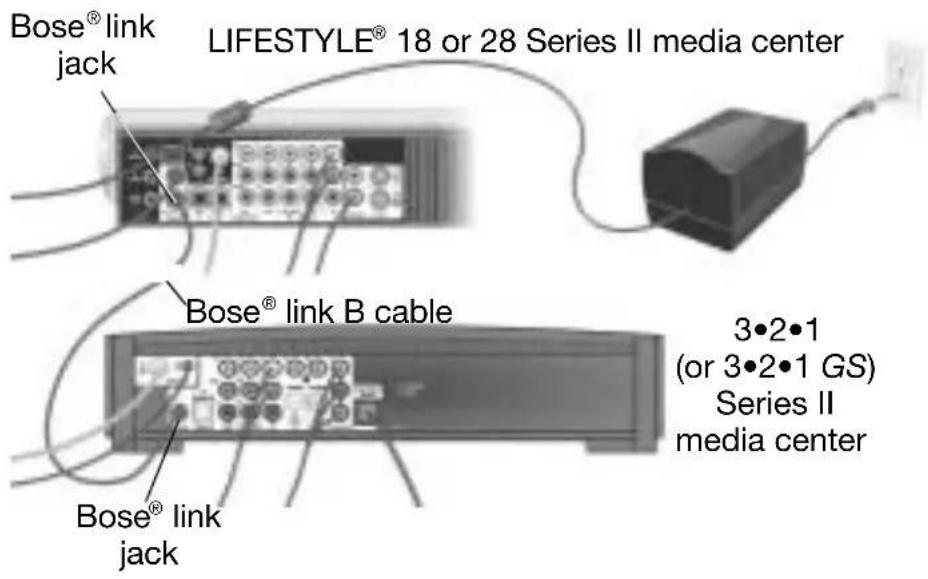
When the connections are completed, you can operate either system using the RC-18S remote.
By pressing the Local button, you tell the remote to control your 3•2•1 system. For access to the more advanced features of the 3•2•1 system, however, be sure to use the remote that came with it.
With older Bose products for expansion
Some other Bose products, which you may already own, can also connect to your LIFESTYLE ^® system. However, if the product you add is not Bose ^® link compatible, you are limited to expanding your system to one additional room.
How you make this connection will depend on the type of product you have. It could be:
- powered speakers, such as an Acoustimass® 5 powered speaker system
- an earlier system, such as a 3•2•1 Series I system, a Wave® radio or Wave® radio/CD
- indoor or outdoor speakers connected to a Bose SA-1 amplifier
For details, refer to “Some simple rules to keep it all straight” on page 12.
For more information on compatibility and cables, please contact Bose. Refer to the address list provided with your LIFESTYLE® system.
To add more rooms of sound
To set up Bose ^® link products in multiple rooms, you can connect Bose SA-2 and SA-3 amplifiers in a daisy-chain arrangement. To include more than one non-amplifier solution, such as a 3•2•1 or Wave ^® product, you need the 50-foot extension/expansion cable from Bose. This cable connects to the Bose ^® link jack on your system media center, or to the pass through jack on the last connected amplifier. Then, at the other end, its 4-jack connector allows you to connect more products.
To purchase the extension/expansion cable from your authorized Bose dealer, ask for part number 275475-050. Or, to contact Bose directly, refer to the address list provided with your LIFESTYLE® system.
Getting the remote ready to use
You can use your RC-18S remote control as soon as the batteries are installed. It is pre-set at the factory for use outside the main room where your LIFESTYLE® system is located, in an area where another Bose® system or speaker pair is set up.
Or, you can use it as a secondary remote in the same room with the LIFESTYLE® system instead. To learn how to set switches inside the battery compartment for that purpose, refer to “How to change the settings, as needed” on page 15.
To install batteries
- Slide the battery cover off the back of the remote.

Note: You may notice the small switches just above the batteries inside the compartment. These are the house code, stream selection, and room code switches, explained on page 12.
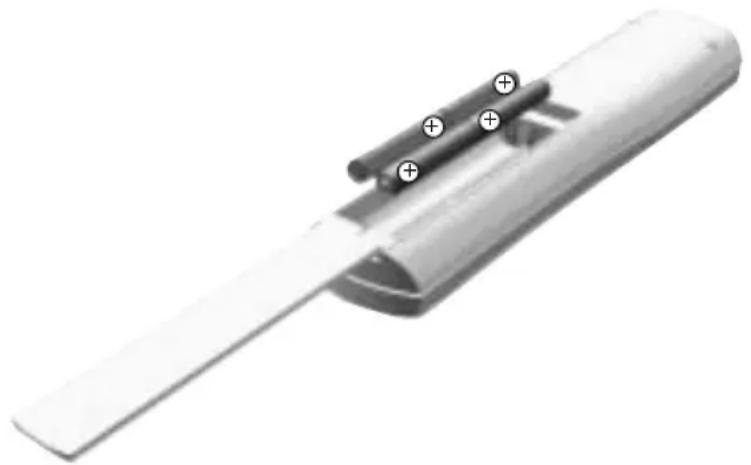
- As you install the four supplied batteries, match the polarity markings (+ and -) on each one to markings inside the battery compartment (Figure 2).
Figure 2
Polarity marked on the batteries
natural_image
3D rendered image of a mechanical component with cylindrical pins and a flat blade (no text or symbols visible)- Slide the battery cover back into place until it snaps closed.

Note: If you notice a decrease in the range or response of the RC-18S remote control, the batteries may need to be changed.
What each button does
Styled after the primary remote, which is packed with the media center, the RC-18S remote has similar buttons.
System ON, OFF, silenced
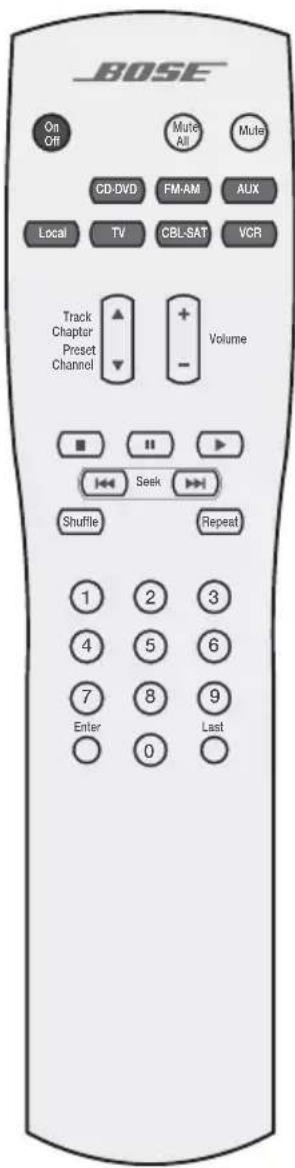

Turns the system on and off. Selects the source last used.

Mutes the volume for all connected speakers (main and in other rooms).

Mutes or unmutes the volume in the current room.
Select the source
Local
Selects the audio source located in the room where the remote is designated for use. Also switches between the local source inputs.
TV
Turns the system on and selects the source connected to the TV input on the media center.
CBL·SAT
Turns the system on and selects the source connected to the CBL/SAT input on the media center.
VCR
Turns the system on and selects the source connected to the VCR input on media center.
CD·DVD
Turns the system on and selects the built-in disc player as source.
FM·AM
Turns the system on and selects the built-in FM/AM radio tuner set to the station last selected. Switches between FM and AM when the radio is on.
AUX
Turns the system on and selects an AUX source connected to the media center.
Select an audio program
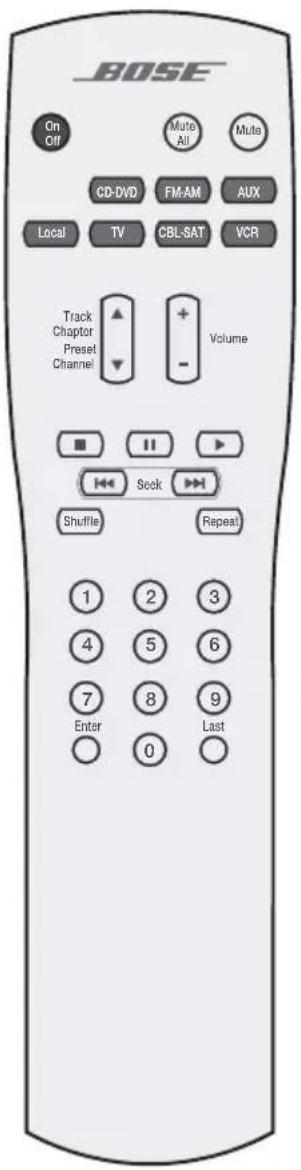
Seek backward or forward to the next strong radio station.
Skip backward or forward to the next CD track, DVD chapter, radio preset, or TV channel.
Select a CD track, DVD chapter, radio station, or TV channel that corresponds to the numbers pressed.
Select a play mode

Starts the disc player.
Pauses the disc player.

Stops the disc player.

Plays CD tracks out of order. Press Shuffle again to cancel this mode.
Repeats a whole CD or track, DVD chapter, or DVD title. Press Repeat again to cancel the repeat mode.
Confirm and return
Enter

Confirms the channel selection on certain TVs.
Last

Returns to the previous TV channel (if the TV supports this feature).
Using the remote to control other audio
Your RC-18S remote is capable of working with other audio components connected to your LIFESTYLE® system media center. While it cannot turn these components on or off, it can change the volume, start or stop play, and control other basic operation.
Try it and see.
Note: With a CD changer connected to your LIFESTYLE® system, commands from the RC-18S remote will affect the current CD, but cannot change to another CD.
Two streams, two choices for you
When you set up speakers in another room, you have some choices for what those speakers will play.
Your LIFESTYLE® system provides an exciting set of options for you by offering two independent audio streams. So, even when you are in the other room, you can choose to listen to whatever is playing in the main room, or to another audio source that's part of the system.
Two streams are simply the means to these added choices. They can carry audio from the same source or from two sources, like the CD player and the FM tuner at the same time, to a multitude of rooms — up to 15 in all!
So before you use an RC-18S remote control in that other room, you can plan how you want the audio assigned.
Main room requirements
To simplify your choices, some LIFESTYLE® system assignments are fixed, and do not vary. These include:
- Stream 1 audio always goes to the main room (Room A) where your LIFESTYLE® system is installed.
- Room switches in the primary remote control are always set for use in Room A.
Other room and stream scenarios
It is possible for a total of 15 rooms (A - O) to have Bose ^® link products installed.
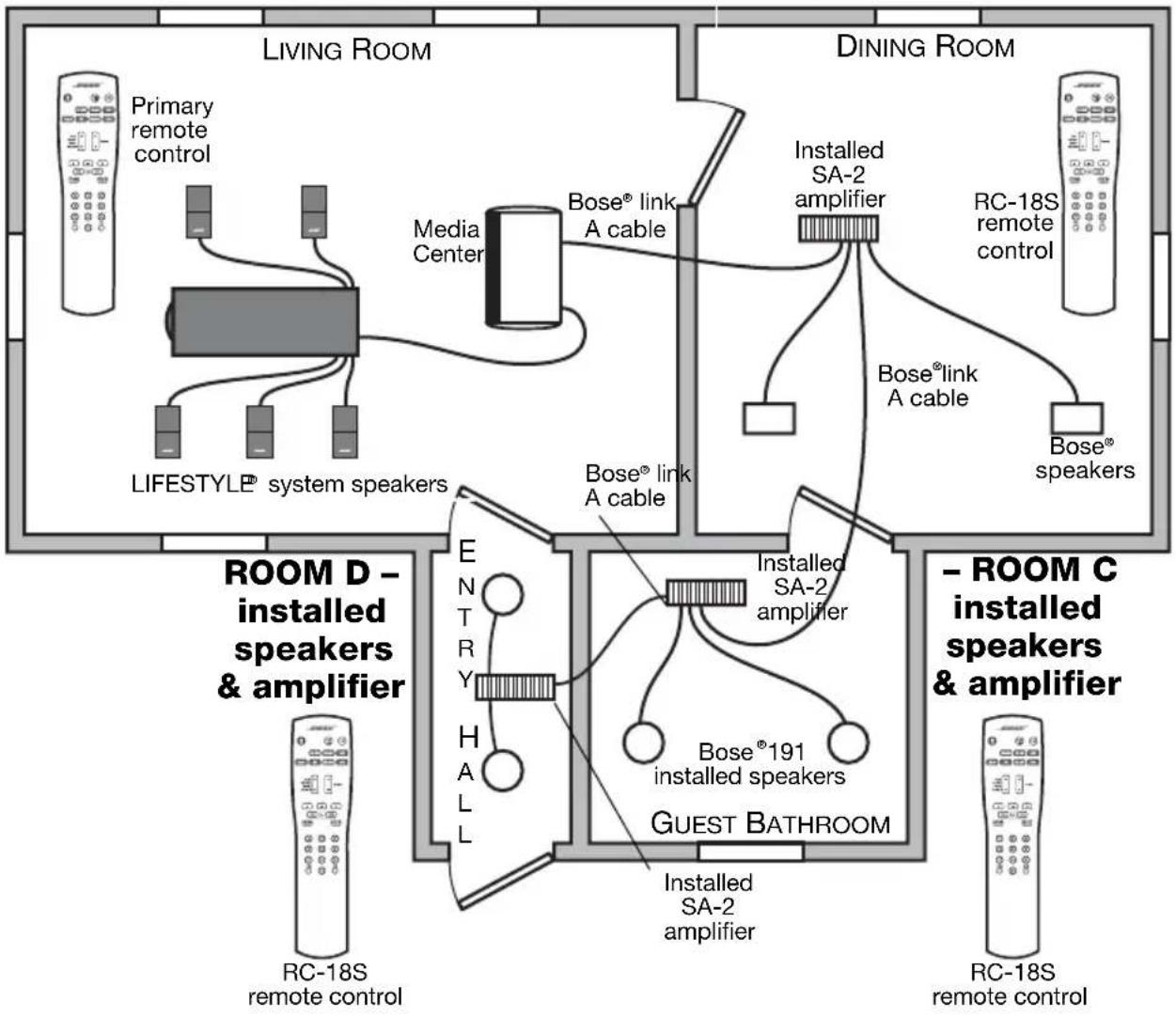
Here are some other rooms where the Stream 1 audio might be appreciated, if Room A is your living room:
Audio Stream 1 Listening Area
ROOM A – home theater system
ROOM B - Bose® link amplifier and speakers
flowchart
graph TD
    subgraph Living Room
        A["Primary remote control"] --> B["LIFESTYLE® system speakers"]
        B --> C["Media Center"]
        C --> D["Bose® link A cable"]
        D --> E["Installed SA-2 amplifier"]
        E --> F["RC-18S remote control"]
        G["DINING ROOM"] --> H["Bose® link A cable"]
        H --> I["Bose® speakers"]
    end

    subgraph Dining Room
        J["ROOM D - installed speakers & amplifier"] --> K["E N T R Y H A L L"]
        K --> L["INSTALLED SA-2 amplifier"]
        L --> M["Bose®191 installed speakers"]
        M --> N["GUEST BATHROOM"]
        N --> O["Installed SA-2 amplifier"]
        P["- ROOM C installed speakers & amplifier"] --> Q["RC-18S remote control"]
        Q --> R["RC-18S remote control"]
    end

    style Living Room fill:#f9f,stroke:#333
    style Dining Room fill:#bbf,stroke:#333
    style Room D fill:#dfd,stroke:#333
    style Room C fill:#dfd,stroke:#333
• Dining area, assigned as Room B
- Guest bathroom, assigned as Room C
• Hallway to the front door, assigned as Room D
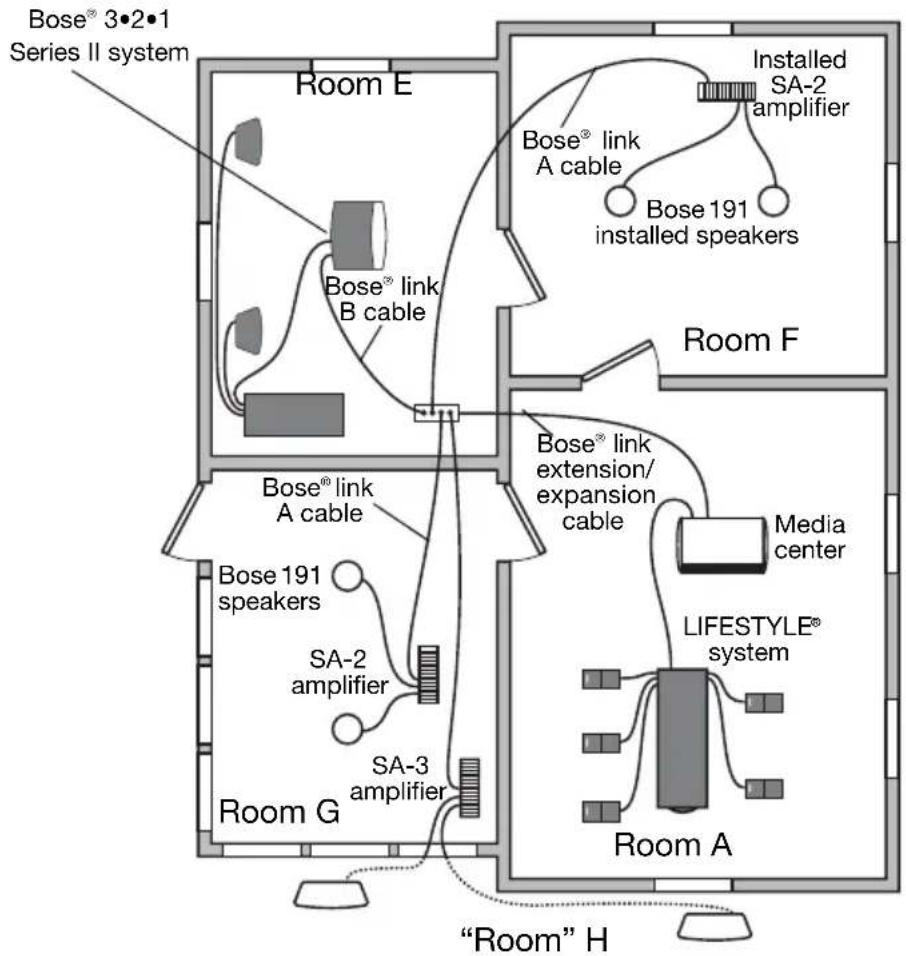
In this case, here are some rooms you might want to have receive Stream 2, instead (see “Other room and stream scenarios - 2” on page 18):
- Kitchen, assigned as Room E
- Den next to kitchen, assigned as Room F
• 3-season porch off the kitchen, assigned as Room G - Area around the pool outside, assigned as Room H
You can assign a Bose ^® link compatible device to rooms B through N. Room O is reserved for non-Bose amplifiers and legacy (older) Bose powered speakers.
For connecting an SA-1 amplifier, see the instructions on page 13.
How to make it happen
First decide which rooms you want to group to receive the same audio stream. Then adjust the room and stream settings, using the small switches inside the RC-18S remote control battery compartment.
For details, refer to “How to change the settings, as needed” on page 15.
Some simple rules to keep it all straight
Whether you use just one or many RC-18S remotes, keep these guidelines in mind.
- Remote controls for other-room use must be set with:
- the same house code as the primary remote.
- a different room code from the primary remote.
- a different room code from every other RC-18S remote, with one exception. If you want to use the RC-18S in the same room with the primary remote, it must be set for use in Room A, the same as the primary remote.
- If the RC-18S remote will be used with Bose ^® link compatible products, such as:
- with a B® bFORESTYLE® SA-2 or SA-3 amplifier and passive speakers, the amplifier and remote must be set to the same room code.
- with a Bose 3•2•1 Series II or 3•2•1 GS Series II system, the remote and system must be set to the same room code.
- If the remote will be used with older non-Bose® link products:
- with Bose legacy speakers or systems (purchased before 2004), only the remote needs a room code setting. Set it as Room 0.
- with a LIFESTYLE® stereo amplifier (SA-1) the RC-18S must be set to Room B so it matches the amplifier room setting.
Additional legacy product rules
With a few special settings, and operational limitations, legacy Bose (and other brand) products can work with your LIFESTYLE® 18 Series II or 28 Series II DVD home entertainment system. They may pre-date the Bose® link system of multi-room expansion, but older speakers and systems can still benefit from its flexibility for renewed performance.
Please note the special rules that apply below.
- To use a Bose LIFESTYLE® stereo amplifier (SA-1), which is set to receive audio stream 2:
- keep the RC-18S remote set to receive audio stream 2.
- set the Protocol option under the Media Center feature in the System menu to Legacy. Refer to your system Operation Guide for details on making System menu changes.
- T o u s e a B o s ^ radio, a wave ^ radio/CD, Acoustimass ^ 5 powered speakers, or LIFESTYLE ^ powered speakers:
- set the RC-18S remote in that expansion room for Room O and to receive audio stream 2.
- if your expansion product includes a remote control (the Wave radio, for example) set that remote to the maximum volume you want. Then use the RC-18S remote to adjust the volume as needed.
Make sure the house code settings match
For all of your secondary remote controls to work, the house code in each must match the one in your primary remote.
The first four switches define the house code and establish which media center the remote can control.
Figure 3
Nine switches inside the battery compartment
House code switches
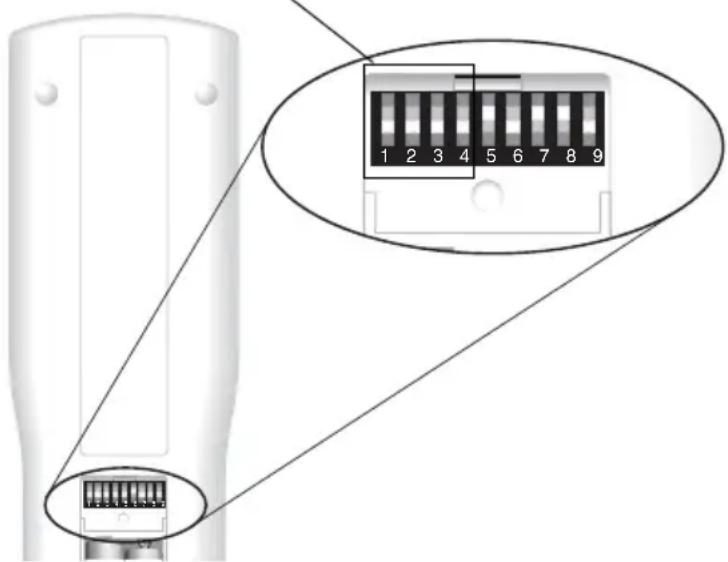
At the factory, all RC-18S remotes are set with the same house code as your LIFESTYLE® system. Usually, you do not need to change these first four switches.
However, in the case of a house code conflict with another nearby LIFESTYLE® system, you can change the house code in the primary remote to resolve the conflict. If you ever use this option, the changed house code must be applied to any expansion remote controls used with this system, too.
At the factory, each RC-18S remote has its remaining switches set:
- To receive audio stream 2 (switch 5)
• To be used in Room B (switches 6-9)
To check the settings in your new remote, remove the battery cover to see the small switches just above the batteries.
How to change the settings, as needed
Use a fine-pointed pen or other small tool to move each switch to its new position.
First check the house code setting (switches 1-4)
Make sure that the first four switches on the left, as you face them, match the house code settings in your primary remote. For more details on these switches, refer to the Operation Guide provided with your system.
To receive the same audio stream as the main room
Switch 5, the middle switch in the row, is set currently to receive audio stream 2, which is different from the stream heard in the main room (A).
To receive audio stream 1 instead, set switch 5 down.
To set your RC-18S remote for other room use (switches 6-9)
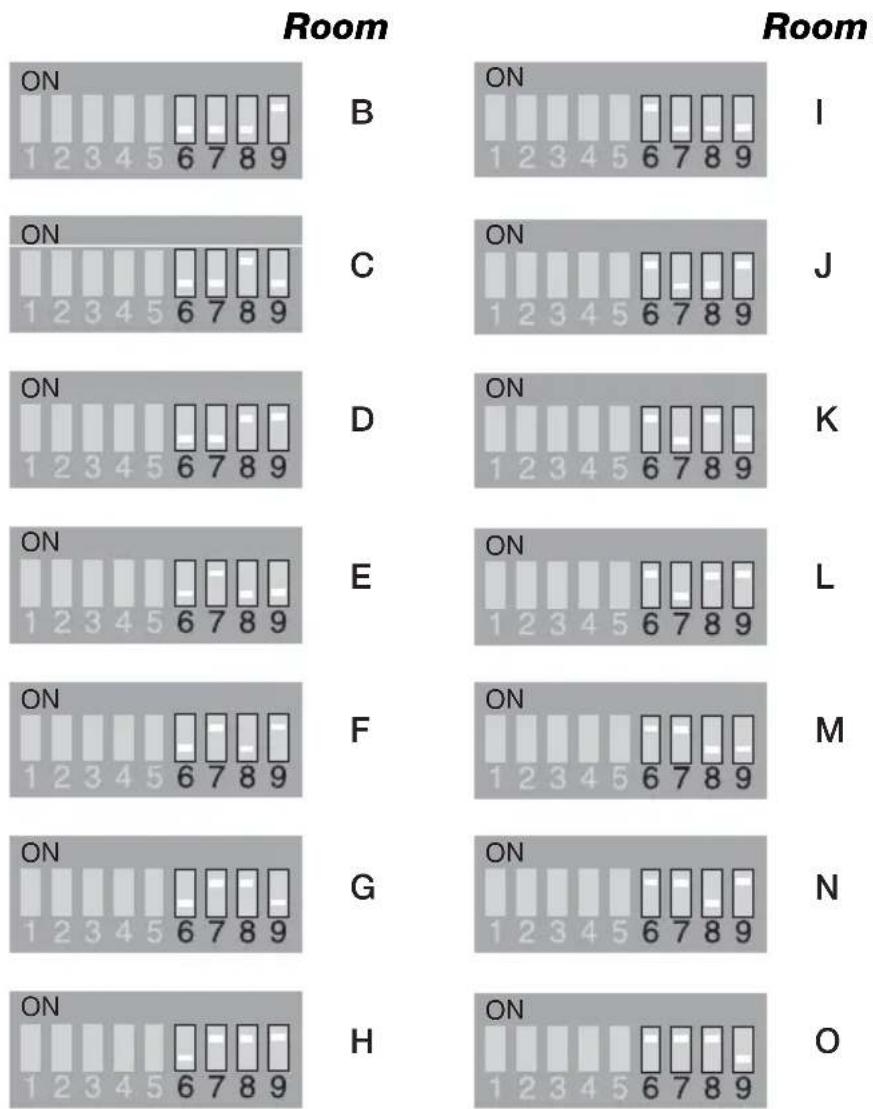
Before you change them, the RC-18S room switches are set for its use in Room B (as shown in the table on page 16).
If you use more than one RC-18S remote, each one must have unique room switch settings, to operate independent of the others. It must also match the room settings of any Bose ^® link amplifiers you will control using the RC-18S in that room.
Keep the room codes consistent
Use one of the codes shown in the chart below for each room where a remote will be used.
You may also use the log on the inside back cover of this guide to note the room and audio stream assignments for multiple rooms and remotes.
other
| Room | Category | Value | | :--- | :--- | :--- | | I | ON | 1 2 3 4 5 6 7 8 9 | | I | ON | 1 2 3 4 5 6 7 8 9 | | J | ON | 1 2 3 4 5 6 7 8 9 | | J | ON | 1 2 3 4 5 6 7 8 9 | | K | ON | 1 2 3 4 5 6 7 8 9 | | K | ON | 1 2 3 4 5 6 7 8 9 | | L | ON | 1 2 3 4 5 6 7 8 9 | | L | ON | 1 2 3 4 5 6 7 8 9 | | M | ON | 1 2 3 4 5 6 7 8 9 | | M | ON | 1 2 3 4 5 6 7 8 9 | | N | ON | 1 2 3 4 5 6 7 8 9 | | N | ON | 1 2 3 4 5 6 7 8 9 | | O | ON | 1 2 3 4 5 6 7 8 9 | | O | ON | 1 2 3 4 5 6 7 8 9 |Now for the rewards
By following these instructions, you can be sure your new RC-18S remote is set to work with your LIFESTYLE® system. And you can get set for wide-area Bose® quality audio performance.
Enjoy!
Troubleshooting
Problem What to do
No sound • Make sure the remote house code setting
matches the house code setting in the primary remote.
- Make sure the remote room code setting is correct.
- If used in a room where a Bose ^ amplifier is located make sure:
- the remote and amplifier room codes match.
- the indicator on the amplifier is lit to show it is working.
Intermittent response from the LIFESTYLE® system to RC-18S remote commands
- Check the batteries to see if they need changing.
- Move the remote to see if the problem is simply caused by “dead spots” in the building.
- If the above efforts do not solve the problem, you may need to obtain a remote control extender cable.
- To request one by contacting Bose, refer to the address list provided with your system.
Your system turns on or off unexpectedly or other tuning changes occur when no buttons on the RC-18S remote have been pressed
- Check to see if someone in the main room is using the primary remote control in that way.
- If not, you may be experiencing a control conflict with another LIFESTYLE® system near your home. Changing the house codes in the primary and in the RC-18S remotes should solve this problem.
- Refer to your system Operation Guide for details on when and how to change the house code and get your system to respond to the new code.
Technical information
Remote control range: 65 ft (20 m)
Size: 9"H x 2.2"W x .9"D; 23 x 5.7 x 2.4 cm
Weight: 5.3 ounces; 150 grams
Battery type
AAA or IEC-LR3 1.5V batteries (4)
Frequency: U.S./Canada: 27.145 MHz
EU/other: 40.685 MHz
RF Field Strength: < 80dB _μ V/m @ 3 meters (average)
Other room and stream scenarios - 2
Audio Stream 2 Listening Area
natural_image
Simple hand-drawn oval shape with no text or symbolsLog for remote switch settings and products
Use the table below to list the Bose ^® link products you add, and note which:
• area of your house where you will use the remote
• room code you assign to it
• audio stream you choose to receive in that area.
| Floor & Location | Room Code | Audio Stream | Remote type | Product in the Room |
| A | 1 | P | r i® systemm | |
| B | R | C | ||
| C | ||||
| D | ||||
| E | ||||
| F | ||||
| G | ||||
| H | ||||
| I | ||||
| J | ||||
| K | ||||
| L | ||||
| M | ||||
| N | ||||
| O |
BOSE®
Better sound through research®