
One - Hi-Fi System LYNX - Free user manual and instructions
Find the device manual for free One LYNX in PDF.


| Product Type | Hi-Fi System |
| Brand | Lynx |
| Model | One |
| Dimensions (W x H x D) | Approx. 42 x 14 x 28 cm (main unit) |
| Weight | Approx. 5.5 kg (system) |
| Power Supply | AC 100-240 V, 50/60 Hz |
| Power Consumption | 60 W (max) |
| Speaker Output Power | 2 x 30 W RMS |
| Supported Disc Formats | CD, CD-R, CD-RW, MP3 CD |
| Radio Tuner | FM/AM with preset memory |
| Bluetooth Version | 5.0 |
| USB Port | USB-A for playback of MP3/WMA files |
| Auxiliary Input | 3.5 mm stereo jack |
| Headphone Jack | 3.5 mm stereo jack |
| Remote Control | Included (batteries not included) |
| Display Type | LED dot matrix |
| Care Instructions | Clean with soft dry cloth; avoid solvents |
| Safety Features | Class II insulation, automatic standby after 15 min inactivity |
| Spare Parts Availability | Contact Lynx support for remote control or power adapter |
| Repair Information | Refer to qualified service center for repairs |
| General Information | Compact Hi-Fi system ideal for home use with multiple playback sources |
Frequently Asked Questions - One LYNX
User questions about One LYNX
0 question about this device. Answer the ones you know or ask your own.
Ask a new question about this device
Download the instructions for your Hi-Fi System in PDF format for free! Find your manual One - LYNX and take your electronic device back in hand. On this page are published all the documents necessary for the use of your device. One by LYNX.
USER MANUAL One LYNX
Installation and Users Guide
Lynx Studio Technology, Inc.
support@lynxstudio.com
Contents
Introduction 4
Before you begin 4
Manual Conventions....5
Warranty Registration 5
Windows 95/98® Installation....6
Running Setup 6
Installing the LynxONE 6
Restarting Your Computer 6
Windows NT® Installation 7
Installing the LynxONE 7
Running Setup 7
External Connections 8
Analog Audio....8
Digital Audio 9
MIDI Connections 9
Clock Input and Output 9
Header Connectors 9
Using Your LynxONE 10
The LynxONE Mixer.... 10
Quick Audio Test 12
Mixer Reference.... 13
Mixer Menu 13
Settings Menu 13
Controls 14
Working with Third Party Applications 17
Compatibility 17
LynxONE Devices 17
Audio I/O Selection 18
MIDI I/O Selection.... 18
Controlling Audio Bit Depth 18
Digital Input Recording and Monitoring Issues 18
Simultaneous Device and Four-track Operation.... 19
Configuring Multiple LynxONE's 20
Adapter ID's in a Multiple Card System 20
Selection of Master and Slave Clocks 20
Cable Connections.... 21
Mixer Settings 21
Troubleshooting 22
Support 25
Appendix 26
Specifications 26
XLR Connector Wiring and Adapters 28
Connector Pinouts 31
Introduction
Thank you for purchasing the LynxONE™! We are proud to provide you with a reliable, professional quality product for your digital audio and MIDI needs. This Installation and Users Guide provides basic information to help you get started.
Before you begin
Before you begin the installation of your LynxONE card, we recommend that you read through the Installation and Users Guide to acquire an overview of the installation procedure and use of the LynxONE. You should have a working knowledge of Windows and general PC concepts. Additionally, refer to your computer's documentation for any special instructions regarding the installation of expansion cards and peripheral equipment.
Contents
Verify that you received the following in the LynxONE shipping carton:
• LynxONE PCI Card in cushioned antistatic bag
- LynxONE Audio Cable (6 foot cable with XLR connectors)
- LynxONE MIDI/Clock Cable (2 foot cable with DIN and BNC connectors)
• LynxONE Installation and Users Guide
- Setup Disk for Windows
• Warranty Registration card
Optional Equipment
The following equipment may be required depending on the configuration of your system and the type of devices the LynxONE is connected to:
• Lynx Internal Clock Cable (available from Lynx)
- XLR to TRS or XLR to RCA adapter cables
System Requirements
Verify that your computer meets or exceeds either of the following configurations:
Minimum System
• A 90MHz Pentium-class or Alpha processor.
• VGA display and adapter.
- 16MB of RAM.
• Windows 95/98/98SE, Windows NT 4.0 or Windows 2000
- 1 Empty PCI Slot
Recommended System
• A 166MHz Pentium-class or Alpha processor.
• S-VGA display and adapter.
- 32MB of RAM.
- Windows 95/98/98SE, Windows NT 4.0 or Windows 2000
- 1 Empty PCI Slot
Manual Conventions
This manual uses the following typographic conventions:
- Underlined text denotes characters that are to be typed using the keyboard.
- ALL UPPER CASE text denotes the names of specific connectors.
- First Character Upper Case text denotes LynxONE Mixer control names or menu options.
- Italic text denotes emphasis or a warning.
- Phrases, such as Start > Programs > Lynx Studio Technology, use the greater than (“>”) sign to separate multiple menu options or icon names that are selected with a keyboard or mouse action.
Warranty Registration
We are committed to providing you with the best service possible. To help us serve you better, please be sure to register your LynxONE using one of the following methods:
- Fill out and mail the Warranty Registration Card included with your LynxONE.
- Use the Online Registration Wizard. To start the wizard, click on Start > Programs > Lynx Studio Technology > Online Registration Wizard. If you do not have an internet connection on the computer you installed your LynxONE in, simply copy the REGISTER.EXE program from the C:\Program Files\Lynx Studio Technology folder to a computer with an internet connection and run REGISTER.EXE from there.
- Register on the web at:
http://www.lynxstudio.com/support.html
Once you are registered you will automatically receive notifications of new products and upgrades.
Locating the Serial Number of Your LynxONE
To register your LynxONE, you must supply its serial number. The serial number is located on a label attached to the back of the card and on the shipping carton. You can also determine the serial number of your card by selecting About Mixer in the Mixer menu of the LynxONE Mixer. When registering with the Online Registration Wizard, the serial number will be automatically entered.
Windows 95/98/98SE® Installation
The procedure for installing the LynxONE in Windows 95/98/98SE requires that the LynxONE Setup Program be run before you install your LynxONE inside your computer. This program will install the required driver files needed for the Windows Plug-and-Play configuration manager to recognize the LynxONE as a new device and will install the LynxONE Mixer application.
Running Setup
- With your computer running Windows 95 or Windows 98, insert the 3^1/2 floppy supplied with your LynxONE into your computer's floppy disk drive.
- Select "Start" from your system menu, then "Run...".
- Type A:\SETUP.EXE into the Run window and select the OK button.
- The "LynxONE Windows 95 Driver Installation Wizard" will appear.
- After reading the instructions on the screen, press "Continue".
- The Driver Installation Wizard will copy all of the files needed to the appropriate directories.
- When the “Installation Complete” message appears, read the instructions on the screen, then press “Shutdown”.
Installing the LynxONE
- Turn OFF the power to your computer system and disconnect the power cords.
- Touch a metal plate on your computer system to ground yourself and discharge any static electricity.
- Remove the cover from your computer system case. You should refer to your computer system documentation for any special instructions on installing expansion cards and peripheral equipment.
- Find an empty PCI slot in your computer.
- Unscrew and remove the slot cover from your selected PCI slot.
- Remove your LynxONE from its static bag and gently insert it into the selected PCI slot. Press it down firmly so that the contacts are securely seated in the slot.
- Secure the LynxONE card with the screw removed from the slot cover.
- Replace the computer system case and plug in your computer.
- Connect the Audio and MIDI/Clock cables to the LynxONE. See the External Connections section for more information.
Restarting Your Computer
- Turn on your computer and start Windows 95 or Windows 98.
- After the Windows logo splash screen is complete, the Plug-and-Play configuration manager will display a “Found New Hardware” message.
- Windows will ask where the driver is located. You should enter:
C:\Windows\System Then click on "OK". - Depending on your hardware setup, Windows may need to restart before proceeding.
- Please read the “Release Notes” in the startup menu “Lynx Studio Technology” group.
Windows NT® Installation
The procedure for installing the LynxONE in Windows NT requires that you install your LynxONE inside your computer before the LynxONE Setup Program is run. This program will install all the required driver files and the LynxONE Mixer application as well as configure your system to recognize the LynxONE.
Installing the LynxONE
- Turn OFF the power to your computer system and disconnect the power cords.
- Touch a metal plate on your computer system to ground yourself and discharge any static electricity.
- Remove the cover from your computer system case. You should refer to your computer system documentation for any special instructions on installing expansion cards and peripheral equipment.
- Find an empty PCI slot in your computer.
- Unscrew and remove the slot cover from your selected PCI slot.
- Remove your LynxONE from its static bag and gently insert it into the selected PCI slot. Press it down firmly so that the contacts are securely seated in the slot.
- Secure the LynxONE card with the screw removed from the slot cover.
- Replace the computer system case and plug in your computer.
- Connect the Audio and MIDI/Clock cables to the LynxONE. See the External Connections section for more information.
Running Setup
- With Windows NT running, insert the 3½” floppy supplied with your LynxONE into your computer’s floppy disk drive.
- Select "Start" from your system menu, then "Run...".
-
If your computer has a DEC Alpha processor, type A:\SETUPA.EXE into the Run window and select the OK button. If your computer has a Intel processor, type A:\SETUP.EXE into the Run window and select the OK button.
-
The “LynxONE Windows NT Driver Installation Wizard” will appear.
-
After reading the instructions on the screen, press "Continue".
-
The Driver Installation Wizard will copy all of the files needed to the appropriate directories.
-
When the “Installation Complete” message appears, read the instructions on the screen, then press “Close”.
-
Please read the “Release Notes” in the startup menu “Lynx Studio Technology” group.
External Connections
The LynxONE includes two break-out cables that provide connections for external equipment. The six-foot Audio Cable provides XLR connectors for analog and digital audio signals. The two-foot MIDI/Clock Cable provides 5-pin DIN connectors for the two MIDI ports and female BNC connectors for clock input and output.
Two bracket mounted D-connectors provide connection ports for the break-out cables: the Audio Port is a 25-pin female D-connector and the MIDI/Clock port is a high-density 15-pin female D-connector.
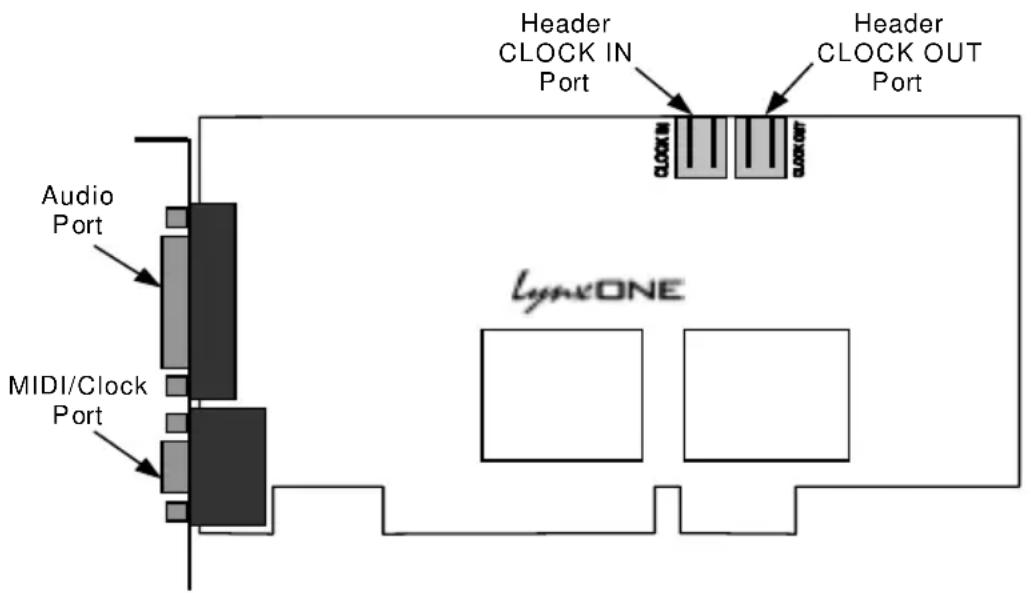
Referring to figure above, locate the Audio Port and the MIDI/Clock Port on the mounting bracket of the LynxONE. Insert the Audio Cable into the Audio Port and tighten the thumb screws on the cable shell. Insert the MIDI/Clock Cable into the MIDI/Clock Port and tighten the thumb screws on the cable shell.
Use of both cables is not a requirement. If you will be using only the audio capabilities of the LynxONE, for example, there is no reason to connect the MIDI/Clock cable.
Analog Audio
The XLR connectors on the Audio Cable, labeled LEFT IN, LEFT OUT, RIGHT IN, and RIGHT OUT, are used to connect balanced and unbalanced analog equipment to the two analog inputs and outputs of the LynxONE. Make connections to professional consoles and other balanced equipment directly with these connectors. Connect to balanced equipment with 14 " TRS jacks using XLR-to-TRS adapters such as the Lynx CBL-XF2TM18 (female XLR) and the Lynx CBL-XM2TM18 (male XLR). Connect to unbalanced consumer devices with RCA jacks using XLR-to-RCA adapters such as the Lynx CBL-XF2RM18 (female XLR) and the Lynx CBL-XM2RM18 (male XLR). Adapters with line transformers are not required. Refer to the "XLR Connector Wiring and Adapters" section for information regarding XLR adapter construction.
The nominal analog signal levels are compatible with either professional or consumer equipment. Use the Trim control on the LynxONE Mixer application to select +4dBu for balanced professional devices or -10dBV for balanced or unbalanced consumer devices. The Trim control affects both inputs and outputs.
Please note that with 16 dB of headroom, the LynxONE's analog outputs are capable of delivering +20 dBu signal levels. It is important to verify that the equipment you are driving is capable of handling these signal levels in order to prevent clipping or possible damage.
Digital Audio
The XLR connectors on the Audio Cable, labeled DIGITAL IN and DIGITAL OUT are used for AES/EBU and S/PDIF digital audio connections. Connect AES/EBU devices directly and select AES/EBU Digital Format in the LynxONE mixer application.
Connect to S/PDIF devices using XLR-to-RCA adapters such as the Lynx CBL-XF2RM18 (female XLR) and the Lynx CBL-XM2RM18 (male XLR). Select S/P DIF Digital Format in the LynxONE mixer application. Refer to the “XLR Connector Wiring and Adapters” section for information regarding XLR adapter construction.
MIDI Connections
The 5-pin DIN connectors on the MIDI/Clock Cable are used to connect to the LynxONE's two MIDI ports. The MIDI IN 1 and MIDI OUT 1 connectors provide connections for MIDI port 1. The MIDI IN 2 and MIDI OUT 2 connectors provide connections for MIDI port 2. Use standard shielded MIDI cables to connect to external MIDI equipment.
Clock Input and Output
The BNC connectors on the MIDI/Clock Cable, labeled CLOCK IN and CLOCK OUT are used to synchronize the LynxONE with external equipment. The connectors support TTL level signals and should be connected with 75-ohm coaxial cable. Connect the CLOCK IN connector to the clock output of an external device and select External as the Sample Clock Source in the LynxONE mixer. Adjust the clock Reference to match the incoming clock type.
CLOCK OUT is a word clock that tracks the sample rate of the LynxONE. Connect this output to the word clock input of an external device.
Header Connectors
The Header connectors labeled CLOCK IN and CLOCK OUT are used to synchronize the LynxONE with internal equipment located inside your computer. For systems containing multiple LynxONE's, these connectors are utilized to synchronize the sample clocks of each card. The connectors support TTL level signals and should be connected using the Lynx Internal Clock Cable or similar 75-ohm coaxial cable.
Connect the CLOCK IN connector to the clock output of an internal device and select Header as the clock source in the LynxONE mixer. Adjust the clock Reference to match the incoming clock type.
The signal on the CLOCK OUT header is a word clock that tracks the sample rate of the LynxONE. Connect this output to the word clock input of an internal device or another LynxONE.
Using Your LynxONE
With the LynxONE and its drivers properly installed in your computer, you can begin to use its capabilities with any third party audio or MIDI application running under Windows. In order for these applications to access the LynxONE you must select one of the LynxONE audio or MIDI devices in an application's configuration menu for audio, wave or MIDI devices. Refer to the “Working with Third Party Applications” section for more information regarding device selection.
Prior to audio recording or playback, you should also use the LynxONE Mixer application to adjust the Trim and Digital Format to match the equipment connected to your LynxONE. Failure to do so may result in improper operation or damage to external equipment.
The LynxONE Mixer
The LynxONE Mixer, which is installed during setup, provides software control of the features of the LynxONE and a visual indication of audio signal level during recording and playback.
It can be used dynamically to change operational settings of the LynxONE, but in most cases once the settings are configured for a particular studio installation they require no adjustment.
Starting the Mixer
After installation, the LynxONE Mixer icon, will appear on the Windows task bar in the lower right corner of your screen. By double clicking on this icon with your left mouse button, the LynxONE Mixer will launch. Alternatively, a single click with your right mouse button on this icon will open a menu that provides access to basic mixer controls and an “Open Mixer” selection that will also start the mixer.
If the icon does not appear on the Windows task bar, the LynxONE mixer can be started by selecting Start > Programs > Lynx Studio Technology > Mixer.
General Operation
If you are simply recording and playing digital audio without synchronizing to an external clock source, you can begin using the LynxONE by simply setting the analog Trim level and/or the Digital Format if required. Input monitoring can be enabled by selecting the desired Monitor Source and then clicking the Monitor buttons on the Analog and/or Digital Out panels.
Typically, it is convenient to keep the Mixer running on your Windows desktop to monitor signal levels or to allow instant access to Mixer controls requiring dynamic changes. The Mixer can be forced to appear on top of other applications by selecting the “Always On Top” option in the Settings pull-down menu.
For further information about the LynxONE Mixer controls refer to the “LynxONE Mixer Reference” section for a complete description.
Mixer Configuration Recall
The state of the Mixer settings are saved each time Windows is shut down. The stored settings are automatically recalled the next time Windows is restated.
Clock Source Requirements
A valid clock source signal must be connected to the appropriate LynxONE clock connector when the Sample Clock Source is set to either Digital, External, or Header. If a signal is not present, the sample clock generator will run very slow or erratically. Symptoms of this condition include audio files that sound either fast, slow or garbled.
When a valid clock source is present, the frequency and type of clock signal must match the Sample Clock Reference setting selected in the Mixer. The frequency of word clock sources, chosen by setting the Sample Clock Source/Reference to either Digital/Auto, External/Word, or Header/Word, must match the sample rate specified when recording new files or the sample rate associated with a previously recorded file during playback. For example, if a 44.1 kHz word clock is connected to the external clock input, the Sample Clock Source/Reference must be set to External/Word and the sample rate must be set to 44.1 kHz when a new file is being recorded in an application. Failure to do so will result in files being recorded at the wrong sample rate.
Volume Faders and Signal Quality
The faders in the LynxONE Mixer perform digital attenuation on audio signals in the digital domain. On the input side, the attenuation is applied to the digitized signals from the A/D converters. Similarly, output attenuation occurs just prior to the D/A converters.
As with any digital signal processing function, the digital attenuation calculations used by the LynxONE can introduce arithmetic errors that can add small amounts of noise to signals. To insure the highest signal quality it is highly recommended that the faders be left in their maximum position during critical recording and playback. In this position, no attenuation calculations are performed.
Mono Recording and Playback Operation
When recording a file in mono, the LynxONE will provide an audio signal that is sum the left and right inputs. Please note that this may cause an overload condition (clipping). To record a single input only, turn the volume up for the desired input, and turn the volume down for the input to be muted.
When playing back a file in mono, the LynxONE will send the signal to both the left and right outputs. To force playback on a single output, turn up the volume for the desired output, and turn down the volume for the output to be muted.
Quick Audio Test
The installation of your LynxONE can be tested using the LynxONE Mixer and the Sound Recorder application that ships with Windows 95/98 and Windows NT. Any other audio application capable of audio recording and playback can be used in a similar manner.
- Connect a stereo analog signal source to the LEFT IN and RIGHT IN connectors on the Audio cable.
- Connect the LEFT OUT and RIGHT OUT connectors to an amplifier or mixer capable of delivering an audio signal for listening via headphones or speakers.
- Open the LynxONE Mixer by double clicking on the mixer icon.
- In the LynxONE Mixer, set the Trim to either +4 dBu or -10 dBV to match the signal level of the connected equipment.
- In the LynxONE Mixer, set the Monitor Source to Analog In (this is the default setting). Click on the Monitor button on the Analog Out panel to enable analog input monitoring. You should hear the signal from the audio source which is connected to the analog inputs. If this is not the case, check your connections. Note, in this monitoring mode the peak level meters in the LynxONE mixer do not operate.
- Disable input monitoring by again clicking on the Monitor button on the Analog Output panel. After doing so, this button should look like it is in the “out” or non-depressed position.
- Start Sound Recorder by clicking Start > Programs > Accessories > Multimedia > Sound Recorder. Position Sound Recorder on your screen so it be easily viewed along with the LynxONE Mixer.
- In Sound Recorder, select the LynxONE's audio devices by opening the Edit menu and selecting Audio Properties. Select LynxONE Analog Out as the Preferred device for playback and LynxONE Analog In as the Preferred device for recording.
- Record a short sample by clicking the red record button followed by the stop button in Sound Recorder. During recording, you should observe a graphic display of the waveform being recorded in the center display in Sound Recorder. You should also see activity on the Analog In peak meters of the LynxONE Mixer.
- Playback the test sample by clicking the play button in Sound Recorder. During playback, you should observe a graphic display of the waveform being played in Sound Recorder. You should also hear the recorded audio and see activity on the Analog Out peak meters of the LynxONE Mixer.
If the test did not operate as described or you received any errors, please refer to the “Troubleshooting” section of this manual.
Mixer Reference
The LynxONE Mixer provides complete software control of the audio features of the LynxONE and an indication of signal level during recording and playback. This section describes the function of each menu and control of the mixer.
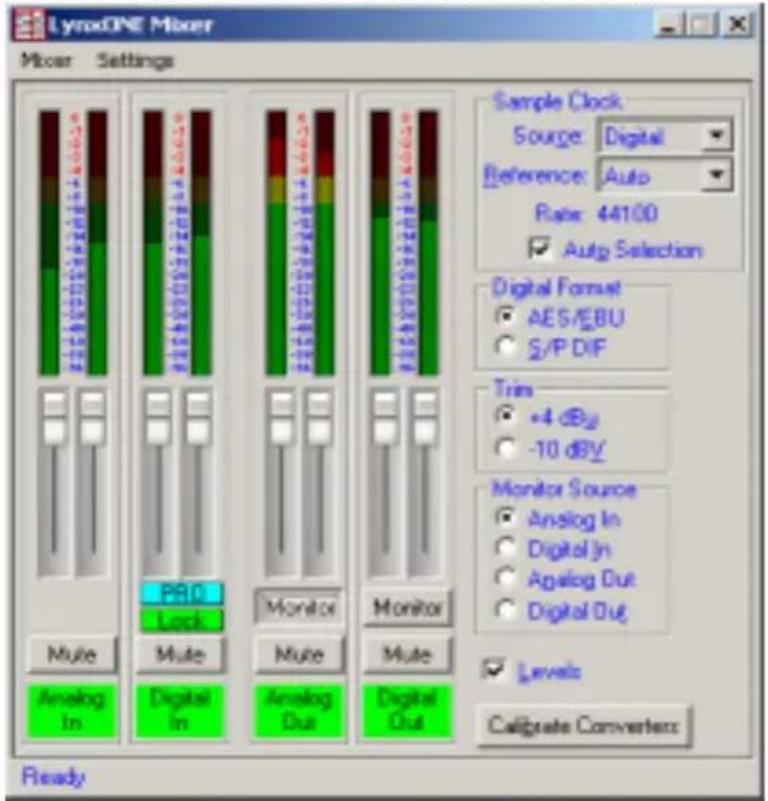
Mixer Menu
With one LynxONE installed in your computer the first selection in the Mixer Menu will be “LynxONE Mixer” proceeded by a check mark. With more than one LynxONE installed in your computer, the Mixer Menu will list each LynxONE with a numeric suffix, and allow you to select which card is being controlled by the Mixer application. A check mark will appear next to the currently selected LynxONE. Refer to the section on “Configuring Multiple LynxONE’s” for a more information regarding the use of multiple cards.
About Mixer – Shows the mixer version and date and the serial number and manufacture date of the LynxONE selected.
Exit - Closes the mixer window and exits.
Settings Menu
Monitor Off Play – Enables or disables automatic input monitor muting during playback. When enabled, and a wave device begins playback, input monitoring for that device is turned off. Input monitoring returns to it’s previous state when the wave device stops playback. When disabled, no extra action is taken when a wave device begins playback.
Monitor On Record – Enables or disables automatic input monitoring during recording. When enabled, input monitoring for all devices is turned on during audio recording. Input monitoring returns to it’s previous state when the recording stops. When disabled, no extra action is taken during recording.
Record Dither – Enables the addition of dither during recording of 8-bit or 16-bit files or when the record Volume Fader is set below full-scale. Dither is not added to the signal for 24-bit or 32-bit files when the Volume Fader is at full-scale.
Play Dither – Enables the addition of dither during recording of 8-bit or 16-bit files or when the record Volume Fader is set below full-scale. Dither is not added to the signal for 24-bit or 32-bit files when the Volume Fader is at full-scale.
None - Dither is disabled. Volume processing utilizes rounding prior to truncation.
Triangular - Enables the addition of triangular probability density dither. This type of dither is free of data-dependent noise modulation effects, but decreases signal-to-noise ratio by 3 dB. Triangular is the preferred dither type in most cases.
Shaped Triangular - Enables the addition of shaped triangular probability density dither. This type of dither is essentially high-pass filtered triangular dither that places most of the dither energy at higher frequencies making it less audible to the human ear. Shaped triangular dither also decreases signal-to-noise by 3 dB.
Rectangular - Enables the addition of rectangular probability density dither. This type of dither decreases the signal-to-ratio by 1.25 dB (less than triangular), but is less desirable because of its noise modulation effects.
Channel Lock – Volume controls for the Left and Right channels move together when checked, and can be adjusted independently when unchecked. Holding the shift key down while adjusting a volume control reverses the action of the channel lock.
Show Options - Shows or hides the card options portion of the mixer window.
Always on Top – If checked, the Mixer window will be displayed on top of all application windows. This allows the Mixer control to be seen even if another application is the currently active window. If unchecked, the Mixer window can be obscured by other applications.
Controls
Peak Meters – Displays the instantaneous level of the audio being recorded or played. Peak meters do not reflect the level of input monitoring.
Volume Faders – Controls digital attenuation of the audio being recorded or played. This control acts on the digital signals after A/D conversion and before D/A conversion. With the volume fader at its maximum position, the vertical line within the fader turns black, no volume calculation is performed and the audio stream is unaltered. This is the recommended position for critical recording and mixdown sessions in which the highest signal quality is required. Volume control processing is done prior to peak meter readings causing the peak meters to reflect any volume control changes. Since volume changes act on the digitally converted signals, they have no affect on the analog full-scale input and output levels. This must be done with Trim control. The volume control does not affect the input monitor levels. When the volume fader is not at its maximum or minimum position, the vertical line within the fader turns red to indicate that the volume control is active.
Digital Input Status – Just below the Volume Faders on the Digital In panel are two status indicators. The top indicator delineates professional or consumer channel status with PRO or CON labels. Professional status is generally associated with an AES/EBU signal, and consumer status is generally associated with an S/P DIF signal. The bottom indicator shows Lock/Unlock status or an error code for the digital input:
Code Color DIGITAL IN Status/Error
Lock Green Locked and receiving audio data flagged as valid.
Lock Yellow Locked and receiving audio data flagged as invalid.
Unlock Red Not locked – caused by an unstable signal or loss of connection.
Conf Red Indicates a degraded signal typically caused by long or lossy cables.
Biphase Red Indicates a signal that violates the biphas encoding rules.
Parity Red Indicates a signal that does not have even parity.
CRC Red Indicates a signal whose CRC channel status does not match the calculated CRC.
These indicators are updated four times per second.
Monitor – Enables or disables input monitoring for each output device. The Monitor Source control selects which input is monitored. The monitor circuitry on the LynxONE digitally mixes the selected monitor source with the output signal with a one sample period delay. Because of this extremely low delay, the use of the LynxONE’s monitor function is recommended instead of the monitoring features of third party applications when performing overdubs.
Mute - Provides a mute function for each associated input or output.
Input / Output Activity Indicators – The names at the bottom of the analog and digital I/O panels reflect the name of its associated wave device. When a device is inactive its name is shown as blue text. When a device is active (currently open for play or record) its name appears in black with a green background.
Sample Clock – This section of the LynxONE mixer provides control of the sample clock source and reference. Since the sample clock is the master timing source, all LynxONE audio devices on a single card must have identical sample rates. Sample clock settings cannot be changed if any LynxONE audio device is playing or recording.
Source - Allows selection of the sample clock source from one of the following:
Internal - Clock derived from the on-board crystal oscillator.
External - Clock signal from the CLOCK IN connector on the MIDI/Clock cable.
Header - Clock signal from the board-mounted CLOCK IN header.
Digital – Clock signal from the DIGITAL IN connector on the Audio cable. The Digital Format control must be correctly selected when selecting this clock source.
Reference - Provides selection of the clock source reference type from one of the following:
Auto - Automatic selection. Valid for Internal and Digital clock sources.
13.5MHz - 13.5MHz video dot clock. Valid for External and Header clock sources.
27MHz - 27MHz video dot clock. Valid for External and Header clock sources.
Word - Word clock. Valid for External and Header clock sources.
Word256 - 256 times word clock. Valid for External and Header clock sources.
Rate – Displays the current sample clock rate of the LynxONE. When the Sample Clock Source/Reference are set to Digital/Auto, External/Word, External/Word256, Header/Word, or Header/Word256 the displayed sample rate must match the rate of the incoming clock being used for synchronization. This will ensure the correct sample rate is stored in the file’s WAV header, and that audio will playback at the correct sample rate.
Auto Selection – Enables automatic recall of the Sample Clock Source after the digital input is used for recording or monitoring. When an application using the Digital In device starts recording, or the Monitor Source is set to Digital In, the Sample Clock Source is automatically switched to Digital. When Auto Selection is on, the Sample Clock Source will be reset to it’s previous state when an application using the Digital In device stops recording or the Monitor Source is set back to Analog In. When Auto Selection is off, the Sample Clock Source will not be reset to it’s previous state. In this mode the user must manually select a different Sample Clock Source, if required, after using the digital input for monitoring or recording.
Digital Format – Allows selection of either AES/EBU or S/P DIF formats for Digital In and Digital Out.
Trim - Sets the nominal analog input and output levels for the LynxONE to either +4dBu or -10dBV .
Monitor Source – Allows selection of Analog In, Digital In, Analog Out or Digital Out as the monitor source. NOTE: When the Monitor Source is set to Digital In, the Sample Clock Source is forced to Digital in order for the LynxONE to lock to the incoming digital signal. In this mode, the Mixer will not respond to changes to the Sample Clock Source. If Auto Selection is enabled, the Sample Clock Source will return to its previous setting when the Monitor Source is changed from Digital In to Analog In. Please refer to the Auto Selection description.
Levels – Enables or disables peak meter calculations. Levels are enabled when checked. Peak Meter values are calculated in real-time by the driver based on the audio currently being played or recorded by the LynxONE. Although this is done very quickly, disabling this function will free the system processor slightly.
Calibrate Converters – Used to calibrate DC offset of the A/D and D/A converters. When the LynxONE driver first loads, the converters are calibrated for optimum fidelity. Over time temperature changes inside your computer may cause the DC offset to drift slightly. Because of this, Lynx recommends recalibration 15 to 30 minutes after your computer has been turned on and whenever significant changes in room temperature occur.
Working with Third Party Applications
Compatibility
The drivers included with your LynxONE provide compatibility with all standard third party audio editing and MIDI sequencing applications that communicate with Windows Wave audio, DirectSound and MIDI devices. A list of applications that have been tested for compatibility will be provided on the Lynx web site in the near future.
LynxONE Devices
Third party applications communicate with the LynxONE through its installed driver. The driver presents the LynxONE's audio and MIDI capabilities to applications as standard multimedia or DirectSound devices.
Selection of these devices is the control mechanism used to route audio and MIDI data between an application and the inputs and outputs of the LynxONE. In other words, in order to record from the LynxONE's digital input, for example, you must select the LynxONE Digital In as the record device in an application.
Most, if not all, third party applications provide device selection in configuration, options, or preference setting windows or menus. For two channel or stereo audio applications, a separate selection option is typically provided for the input or recording device and the output or playback device. Multitrack applications provide multiple input and output device selection menus or windows. Similarly, MIDI applications typically provide configuration options for MIDI input and output ports. Refer to the documentation included with your application to determine how to select audio devices and MIDI devices.
With the LynxONE properly installed in your computer, the digital audio and MIDI devices will be available to applications and their names will appear in their device selection menus as follows:
LynxONE Analog In
LynxONE Analog Out
LynxONE Digital In
LynxONE Digital Out
LynxONE MIDI In 1
LynxONE MIDI Out 1
LynxONE MIDI In 2
LynxONE MIDI Out 2
When more than one LynxONE is installed in your system, the device names will contain a numeric adapter ID assigned by the operating system. For example, the analog output device on adapter 2 would be listed as “LynxONE 2 Analog Output”. Refer to the “Configuring Multiple LynxONE’s” section for more information regarding this topic.
Audio I/O Selection
The selection of a desired audio input or output is accomplished by choosing the associated audio device name in an application. Each device name is associated with a connection on the LynxONE Audio cable, as listed in the table below. Using the table, make the desired signal connections to the LynxONE Audio Cable and select the appropriate audio device in your application.
Device Name Audio Cable Connector Usage
LynxONE Analog In LEFT IN, RIGHT IN Analog recording
LynxONE Analog Out LEFT OUT, RIGHT OUT Analog playback
LynxONE Digital In DIGITAL IN Digital recording
LynxONE Digital Out DIGITAL OUT Digital playback
MIDI I/O Selection
The selection of a desired MIDI input or output is accomplished by choosing the associated MIDI device name in an application. Each device name is associated with a connection on the LynxONE MIDI/Clock cable, as listed in the table below. Using the table, make the desired signal connections to the LynxONE MIDI/Clock Cable and select the appropriate MIDI device in your application.
MIDI/Clock
Device Name Cable Connector Usage
LynxONE Midi In 1 MIDI IN 1 MIDI Port 1 recording
LynxONE Midi Out 1 MIDI OUT 1 MIDI Port 1 playback
LynxONE Midi In 2 MIDI IN 2 MIDI Port 2 recording
LynxONE Midi Out 2 MIDI OUT 2 MIDI Port 2 playback
Controlling Audio Bit Depth
Creating a audio file with a particular bit depth (or resolution) is controlled through an application's recording settings. These settings are typically adjusted in an audio device configuration menu or in a recording setup window just prior to recording. When recording is initiated the LynxONE will generate audio samples of the desired resolution.
Bit depth control during playback of an audio file is also is also an application issue. When a file is played, the recorded bit depth is read from the file's header by the application. The application uses this information to set the resolution of the LynxONE.
The LynxONE supports file types with 8, 16, 24, or 32 bit word widths. Note that 32-bit files contain 24-bit data with zero data in the least significant bit positions.
Digital Input Recording and Monitoring Issues
When the digital input is selected for recording or as the Monitor Source in the LynxONE Mixer, the LynxONE must synchronize its sample clock to the word clock embedded in the incoming digital signal in order to extract the digital data. To accomplish this, the source of sample clock generator is automatically switched to Digital. This action can be observed by inspecting the Sample Clock Source in the LynxONE Mixer.
When Digital is selected as the sample clock source the sampling rate of all audio devices on the LynxONE will equal the sample rate of the digital input source.
In order to generate an audio file with the correct sample rate stored in its header, the sample rate specified for the recorded file must match the sample rate of the equipment driving the digital input. Failure to do so will cause subsequent playback of the recorded file at the wrong sample rate.
If the Auto Selection box is checked in the LynxONE mixer, the source of the sample clock generator will be restored to its previous setting at the completion of recording or when the Monitor Source is changed to Analog In.
If the Auto Selection box is not checked, then the Sample Clock Source must be manually changed before analog input recording or monitoring.
Simultaneous Device and Four-track Operation
The four audio devices of the LynxONE operate completely independent in terms of whether they are in recording or playback modes and their associated audio files. This implies that the devices can operate simultaneously and support the so-called “full-duplex” mode where, for instance, the LynxONE Analog In device is recording while the LynxONE Analog Out device is playing.
Although the devices act independently, when multiple devices are being used to record or play multiple audio files simultaneously, the LynxONE driver has the capability to synchronously start all devices with sample accuracy. This is especially important for maintaining synchronization during playback of multiple devices and overdubbing.
By using both the analog and digital inputs and outputs, four track recording and playback is possible. On the input side, the left and right signals associated with the LynxONE Analog In device act as input channels 1 and 2, while the left and right signals associated with the LynxONE Digital In device act as input channels 3 and 4. The outputs are used in a similar manner. Again, control of this four-channel operation is simply a matter of device selection in any compatible multitrack audio application.
Configuring Multiple LynxONE's
Up to four LynxONE cards can be installed in a computer for additional audio and MIDI channels. If required, all LynxONE's in a computer can be configured to maintain sample accurate synchronization during digital audio recording and playback.
Cards are synchronized in a master-slave arrangement. One card is selected as the master which provides the word clock source for the other slave cards in the system. From the master, the word clock signal is daisy-chained from one slave to the next.
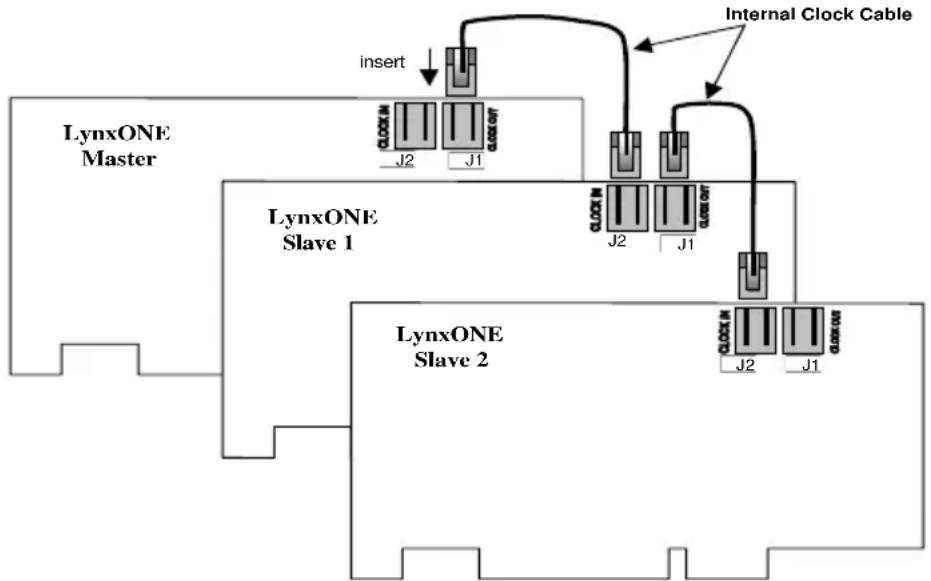
Word clock signals can be connected internally using the Internal Clock Cable, which is available from Lynx. The CLOCK OUT header of one card is connected to the CLOCK IN header of the next card. A separate cable is required for each slave card in the system.
Alternatively, the CLOCK IN and CLOCK OUT connectors on the MIDI/Clock cable can be connected externally with a standard 75 ohm BNC cable.
Adapter ID's in a Multiple Card System
When multiple LynxONE cards are installed in a computer they are automatically assigned unique adapter ID numbers. These adapter ID's provide a means to identify and communicate with each LynxONE when using the LynxONE Mixer application and to select audio devices in third party applications.
In the LynxONE Mixer, the adapter that a user wishes to control is selected from the Mixer pull-down menu. In a system with four LynxONE's the adapters will be listed as follows:
LynxONE 1 Mixer LynxONE 2 Mixer LynxONE 3 Mixer LynxONE 4 Mixer
In each case, the adapter ID is the numeric character in each selection.
Most third party applications provide a setup or configuration menu for selecting a desired wave audio device for recording and playback. With multiple LynxONE's in a system, each device name will contain the adapter ID. For example, the analog output device on adapter 2 would be listed as “LynxONE 2 Analog Output”.
Selection of Master and Slave Clocks
In order to select master and slave LynxONE's in a system, each adapter ID must be first physically associated with a LynxONE installed in a computer slot. Since ID assignment is automatic, determining this association is somewhat trial and error. The procedure is as follows:
- Connect at least one analog output channel of each LynxONE to an amplifier, mixing console or other equipment that will provide audio monitoring.
- Choose an audio application that allows selection of wave audio devices for audio playback.
-
Select "LynxONE 1 Analog Output" as the playback device.
-
Listen to the playback of any wave file and note which LynxONE card is generating the audio signal. In this case, the card generating audio is adapter 1.
- Repeat steps 3 and 4, for “LynxONE 2 Analog Output”, “LynxONE 3 Analog Output”, and so on until all LynxONE’s in your system have been identified.
The next step is to choose which LynxONE will act as a master. This choice is based on preference only, but for ease of connection it makes sense to choose a LynxONE that is on one end of the PCI slot array on your motherboard.
Cable Connections
Starting with the master LynxONE, insert the plug on one end of a Lynx Internal Clock Cable into the CLOCK OUT header, labeled J1, until it clicks and locks into place. This header is polarized to ensure the correct orientation of the cable plug. Insert the plug on the free end of the cable into the CLOCK IN header, labeled J2, on the nearest slave LynxONE. Connect each slave in a similar manner. Refer to the figure below. Alternatively, if clock connections are made externally using the CLOCK IN and
flowchart
graph TD
    A["LynxONE Master"] --> B["LynxONE Slave 1"]
    B --> C["LynxONE Slave 2"]
    C --> D["Internal Clock Cable"]
    D --> E["insert"]
    E --> F["J2"]
    E --> G["J1"]
    F --> H["CLOCK IN"]
    G --> I["CLOCK IN"]
    H --> J["J2"]
    I --> K["J1"]
    J --> L["CLOCK IN"]
    K --> M["CLOCK IN"]
    L --> N["J2"]
    M --> O["J1"]
CLOCK OUT connectors on the MIDI/Clock Cable, use BNC cables to make connections between cards in the same sequence as described above.
Mixer Settings
With the clock connections in place, the sample clock settings of each LynxONE must be adjusted using the LynxONE Mixer.
For the master LynxONE:
- Select the master LynxONE from the Mixer pull-down menu.
- Select a desired Sample Clock Source.
- Select a desired Sample Clock Reference.
For each slave LynxONE:
- Select the slave LynxONE from the Mixer pull-down menu.
- Set the Sample Clock Source to Header if internal clock connections are used or External if external clock connections are used.
- Set the Sample Clock Reference to Word.
Troubleshooting
When Windows starts I see a LynxONE Mixer error - "No mixer device drivers are available".
This error will appear when the LynxONE Mixer is loading during Windows startup and the LynxONE is not installed correctly. You should check the following items:
- With the computer power off, verify that the card is properly seated in the PCI slot.
- Verify the LynxONE's resources are not conflicting with some other device in your system. For Windows 95/98, check in the Device Manager (Start > Control Panel > System > Device Manager > Sound, video and game controllers > LynxONE > Resources) to verify there are no resource conflicts. For Windows NT check in Windows NT Diagnostics (Start > Programs Administrative Tools > Windows NT Diagnostics > Resources) to verify there are no resource conflicts. If there is a resource conflict, you may need to move the LynxONE to a different slot in your computer as some motherboards have specific resources assigned to specific slots, or change the interrupt setting in the BIOS setup screen. Please refer to your motherboard/computer documentation to determine how to change the interrupt for a PCI device.
I installed the LynxONE in the PCI slot before I ran Setup.exe for Windows 95/98, what do I do now?
The device manager in Windows 95/98 requires the .INF file for a device to be installed before the Plug and Play scan to detect new hardware (which happens on each boot). This is why Setup.exe should generally be run before you install the LynxONE into your computer. To correct this follow the steps listed here:
- Load the device manager by clicking on Start > Control Panel > System > Device Manager.
- There should be an entry called “+ ? Other Devices” listed about 3/4 down the page. Click on the + sign. “PCI Multimedia Audio Device” should appear.
- Click on "PCI Multimedia Audio Device", then click on "Remove".
- A "Confirm Device Removal" dialog box should appear, click on "OK". It might take a couple of seconds for this dialog box to close.
- Click on "Refresh". After several seconds, a "New Hardware Found" dialog box will appear. Depending on your installation of Windows 95/98, another dialog box may appear asking for setup disk. The location you need to specify is: C:\Windows\System Click on "OK" after entering this path.
- You may need to reboot your machine once this completes to get everything running properly.
The meters in the LynxONE Mixer do not show activity when I am monitoring from the analog or digital inputs.
This is normal. The meters will show activity only when the card is in record or playback mode while being used with a third party application. If metering is required for monitoring, most applications offer this functionality by simply putting the card in record mode without saving data to a disk file. However, for the lowest latency monitor listening, use the LynxONE's on-board monitor capabilities.
I cannot record from the LynxONE's digital input.
The LynxONE Digital Input device must be configured as the record device in your application. Select this device in the audio or wave device configuration menu. With the device properly set, the meters in the LynxONE mixer will indicate the digital input signal level while recording. See “Working with Third Party Applications” for more information.
There is no signal on the digital output during playback.
The LynxONE Digital Output device must be configured as the playback device in your application. Please refer to the previous question.
Audio playback sounds really slow or erratic.
The Sample Clock Source selected in the LynxONE Mixer is not connected to an active clock source. In this case, the sample clock generator on the LynxONE runs very slow or erratic. This will occur if Digital is selected as the Sample Clock Source and there is either no connection to the LynxONE's digital input or the device connected is turned off. The same situation will occur if either External or Header is the selected as the clock source and there is no connection to the corresponding inputs on the card.
Audio playback sounds fast or slow when I am using the digital input as the clock source.
When the digital input is selected as the clock source, the LynxONE's sample clock will run at the sample rate of the incoming digital input signal. In the case when the sample rate of this signal is 48kHz and a file being played was actually recorded at 44.1kHz , the audio will playback fast. To solve this problem either change the sample rate of the device driving the digital input or select Internal as the sample clock source using the LynxONE mixer.
I cannot change the Sample Clock Source from Digital in the LynxONE Mixer.
Either the Monitor Source is set to Digital In or an application is actively recording from the digital input. Under either condition, the LynxONE must synchronize to the digital input in order to extract data. If the Monitor Source is set to Digital In change it to Analog In. If an application is recording from the digital input discontinue that operation first, then change the Clock Source selection.
How do I minimize record monitor latency when I am doing overdubs?
Use the LynxONE's on-board monitor circuitry. This is controlled by the LynxONE mixer.
What does the green LED on the LynxONE indicate?
When lit, the LED indicates successful initialization of the LynxONE and the driver.
How do I synchronize my LynxONE with a DPS Perception Video Recorder card?
Using the Internal Clock Cable available from Lynx, you can connect the PVR's 27 MHz clock to the LynxONE to maintain perfect A/V sync. Instructions for making this connection and configuring the sample clock are included with the cable.
When I connect the LynxONE analog outputs to the MIC inputs on my Mackie mixer I hear distortion.
The MIC inputs are being overdriven. Even with the mic gain adjusted to its lowest setting, the maximum signal level that the MIC inputs of the smaller Mackie mixers can handle is +14 dBu. In the +4 dBu trim setting, the LynxONE is capable of delivering a +20 dBu signal. To solve this problem use 1/4" line inputs of the mixer. This requires the use of XLR to TRS adapters as described in the "External Connections" section.
I connect my microphone directly to the LynxONE Analog Input connectors, but the level is very low, what is going on?
The LynxONE Analog Input connectors should be connected line level devices only. To record from a microphone, first route the signal through a microphone pre-amplifier or mixer and then into the LynxONE.
Where on the LynxONE do I connect my internal CD-ROM drive?
The LynxONE has no connector for an internal CD-ROM drive. We recommend using digital audio extraction software to capture the audio data from your CD's and saving it to your hard disk drive as .WAV files. Using this method, the audio files can be played back using the D/A converters on the LynxONE which have far superior performance to those found in most CD-ROM drives. If your CD-ROM/DVD drive can reliably extract digital audio then you could use Windows Media Player (Version 7 or higher) to extract digital audio from CDs and play it in real-time with no physical connection between the LynxONE and the CD-ROM drive.
Can I leave my current sound card in my computer while using the LynxONE?
You may leave your existing sound card in your computer as long as you have a free PCI slot and interrupt for the LynxONE. You may need to reconfigure certain software to access the LynxONE instead of your existing sound card. Please refer to the “Working with Third Party Applications” section for details.
When I look at the LynxONE resources using Windows 95 Device Manager, the computer hangs.
This is a bug in Windows 95. The computer is not actually hung, it is just scanning a very large portion of memory. If you wait a couple of minutes, it will come back to life! The only fix we know of is to upgrade to Windows 95 OEM Service Release 2 (950B) or Windows 98.
Can the LynxONE share interrupts with other devices?
The LynxONE is able to share interrupts with other PCI devices, as long as the other PCI device's driver is written correctly to share interrupts. The LynxONE is not able to share interrupts with ISA devices (such as a modem, serial port, printer port, keyboard or mouse). The BIOS on many motherboards require the user to manually reserve an interrupt (IRQ) for an ISA device. If this is not done the BIOS may assign an ISA device and a PCI device the same interrupt which results in a conflict.
Why don't I hear anything when I play a MIDI file?
The LynxONE has two MIDI ports (2 in & 2 out) which can be connected to external MIDI hardware. To play a MIDI file you must have an external synthesizer connected to one of the MIDI outputs, and that synthesizer must have it's audio output connected to your amplifier/speakers or to headphones. The LynxONE has no on-board synthesizer.
Does the LynxONE support Dolby® AC-3 (Dolby Digital) and DTS?
The LynxONE supports Dolby AC-3 and DTS through its Digital In and Digital Out ports. This allows an application to record an incoming Dolby or DTS encoded audio stream, as well as play an encoded stream through an external decoder. This ability is available for both S/PDIF and AES/EBU modes. The LynxONE is able to recognize the "Non-Audio" bit while recording for both S/PDIF and AES/EBU, as well as generate the "Non-Audio" bit during playback while in AES/EBU mode.
Is it safe to connect the LynxONE analog outputs to a mixer whose inputs provide "phantom" power?
The LynxONE should never have phantom power applied to it's output. This can easily be avoided by connecting the LynxONE to the line inputs in your mixer, and not the microphone inputs. Generally, lower cost mixers have line inputs on TRS connectors. If you use XLR to TRS adapters cables you should be able to connect the LynxONE to your mixer and avoid any phantom powering problems.
Support
We are devoted to making your experience with LynxONE trouble-free and productive. If you have questions or comments regarding the operation of your LynxONE please check the “Troubleshooting” section of this manual and the FAQ and Troubleshooting topics on the Support section of the Lynx web site at:
http://www.lynxstudio.com/support.html
If you are unable to find information about your problem please email us at:
support@lynxstudio.com
In your email message include the following information:
• The serial number of your LynxONE.
- Which operating system you are using.
- The type of computer you are using.
- The name of the application you are using.
- A detailed description of the problem including any error messages you received.
We will provide a response in a timely manner.
Telephone support is available by calling (949) 515-8265 from 9AM to 5PM Pacific Time, Monday through Friday, excluding Holidays. Please be sure to have the above information available before calling.
Appendix
Specifications
Analog I/O
| Number / Type Two inputs and two outputs / cross-coupled electronically balanced or unbalanced, XLR connectors on Audio cable | |
| Level +4 dBu nominal /+20dBu max. or -10dBV nominal / +6dBV max., 600 Ω load on outputs | |
| Input Impedance | Balanced mode: 24 kΩ , Unbalanced mode: 12 kΩ |
| Output Impedance | Balanced mode: 100 Ω , Unbalanced mode: 50 Ω |
| Output Drive Capability | 600 Ω impedance, 0.16 μF capacitance |
| A/D and D/A Type Crystal Semiconductor, 24-bit, 128X oversampling, delta-sigma | |
| Sample Rates 8 kHz to 50 kHz, including all standard rates with high-resolution adjustment | |
| Bit Depth 8, 16, 24 or 32 bit file types | |
| On-board Buffer Size 8 Kbytes X 2, for L/R input and output | |
Analog Performance (measured in 24-bit mode with card installed in computer)
| Frequency Response 20 – 20 kHz, +0/-0.35 dB | |
| Dynamic Range >103 dB, A-wtd., analog in to analog out using -60 dBFS measurement method | |
| Signal-to-Noise >99 dB, A-wtd., analog in to analog out | |
| Channel Crosstalk <-103 dB, analog in to analog out, 1 kHz signal @ -1 dBFS | |
| Input THD+N 0.0022% typ., 1 kHz signal @ -1 dBFS, 22 – 22kHz BW, analog input to digital output | |
| Output THD+N | 0.0015% typ., 1 kHz signal @ -1 dBFS, 22 – 22kHz BW, digital input to analog output |
Digital I/O
| Number / Type | One input and one output / AES/EBU or S/P DIF format, transformer coupled, XLR connectors on Audio cable |
| Sample Rates 32 kHz, 44.1 kHz, 48 kHz, 88.2 kHz, 96 kHz | |
| Bit Depth 8, 16, 24 or 32 bit file types | |
| On-board Buffer Size 8 Kbytes X 2, one each for input and output | |
MIDI I/O
| Number / Type Two ports each with input and output / Standard opto-isolated, 5-pin female DIN connectors on MIDI/Clock cable | |
| Buffer Size | 64 bytes, receive and transmit |
Clock I/O
| Number | External: one BNC input and output on MIDI/Clock cableInternal: one input and output on board-mounted headers |
| Level / Impedance TTL / 75 ohm | |
| Input Frequency Range | 25 kHz to 27 MHz |
General
| PCI Bus Version 2.1 compliant, Transfer rate: up to 132 Mbytes/sec |
| Power +5V @ 400 mA, +12V @ 220 mA, -12V @ 95 mA |
| Size 5.0” H X 7.4” W X 0.75” D (half-size PCI card) |
| Shipping Weight 2.7 lbs. with cables |
| Certifications CE and FCC Class B |
Connections
| Audio Port Bracket-mounted 25-pin female D-sub connector for L/R analog in, L/R analog out, digital in and out |
| MIDI/Clock Port Bracket-mounted 15-pin high-density female D-sub connector for MIDI port 1 in and out, MIDI port 2 in and out, clock in and out |
Cables
| Audio (included) Six foot, 25-pin male D-sub to (3) male XLR and (3) female XLR connectors, shielded twisted pair cabling |
| MIDI/Clock (included) Two foot, 15-pin high-density male D-sub to (4) 5-pin female DIN connectors with shielded twisted pair cabling and (2) female BNC connectors with 75 Ω coaxial cabling |
XLR Connector Wiring and Adapters
This section describes the proper wiring of cables that can be used to adapt both the analog and digital audio XLR connectors on the LynxONE Audio Cable.
Balanced Connections
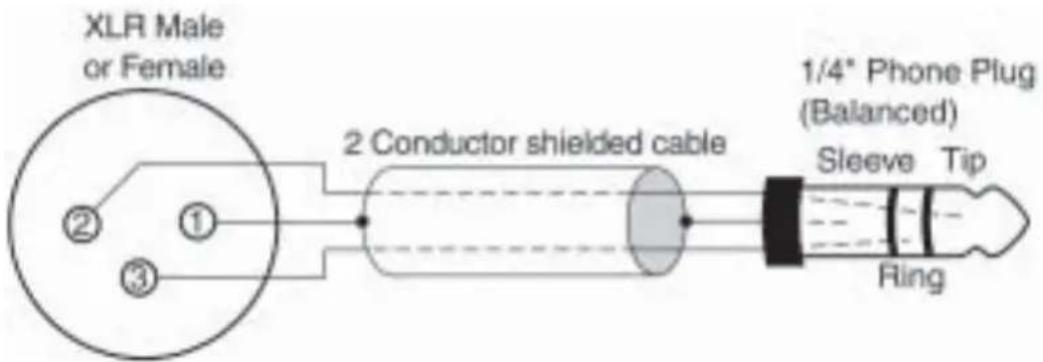
The wiring method for balanced connections with XLR connectors to balanced TRS ( 14 ” phone) connectors using shielded twisted pair cable (2 wire + shield) is as follows:
XLR Pin 1 (GND) to cable shield and to the TRS sleeve
XLR Pin 2 (+) to one signal wire and to the TRS tip
XLR Pin 3 (-) to the other signal wire and to the TRS ring
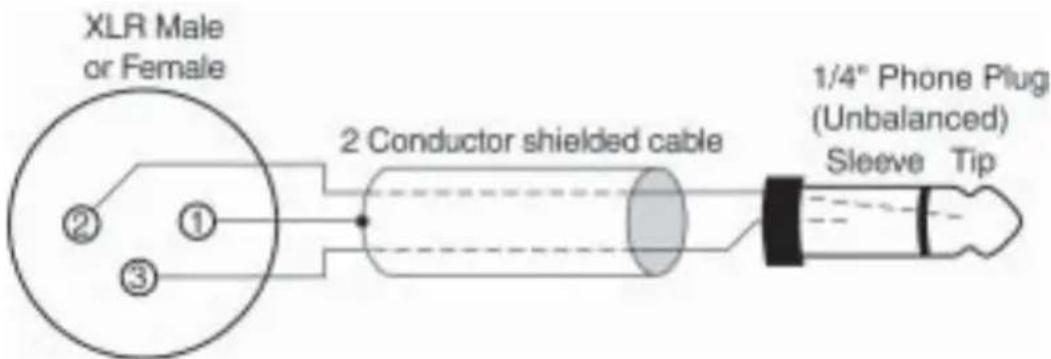
Unbalanced Connections with Twisted Pair Cable
The wiring method for unbalanced connections with XLR connectors to 14 " phone connectors (tip and sleeve only) using shielded twisted pair cable (2 wire + shield) is as follows:
XLR Pin 1 (GND) to cable shield with no connection on the other end
XLR Pin 2 (+) to signal wire and to the 14 " phone tip
XLR Pin 3 (-) to the other signal wire and to the 14 " phone sleeve
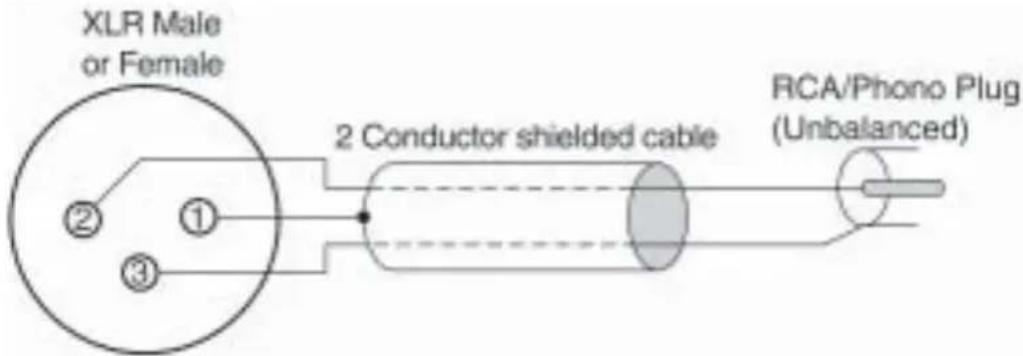
The wiring method for unbalanced connections with XLR connectors to RCA/Phono phone connectors using shielded twisted pair cable (2 wire + shield) is as follows:
XLR Pin 1 (GND) to cable shield with no connection on the other end XLR Pin 2 (+) to signal wire and to the Phono center pin XLR Pin 3 (-) to the other signal wire and to the Phono sleeve
Unbalanced Connections with Single Conductor Cable
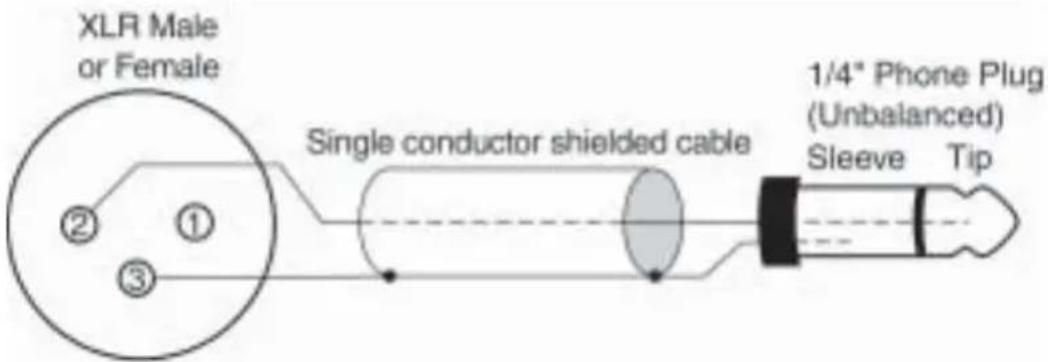
In some cases it may be necessary to use single-conductor cable to adapt to unbalanced devices. These cables are considerably more susceptible to interference and grounding problems than the two conductor cables shown above. Two-conductor cables should be used whenever possible.
The wiring method for unbalanced connections with XLR connectors to unbalanced 14 " phone connectors (tip and sleeve only) using coaxial cable (1 wire + shield) is as follows:
XLR Pin 1 (GND) no connection
XLR Pin 2 (+) to signal wire and to the 14 " phone tip
XLR Pin 3 (-) to the cable shield and to the 1/4" phone sleeve
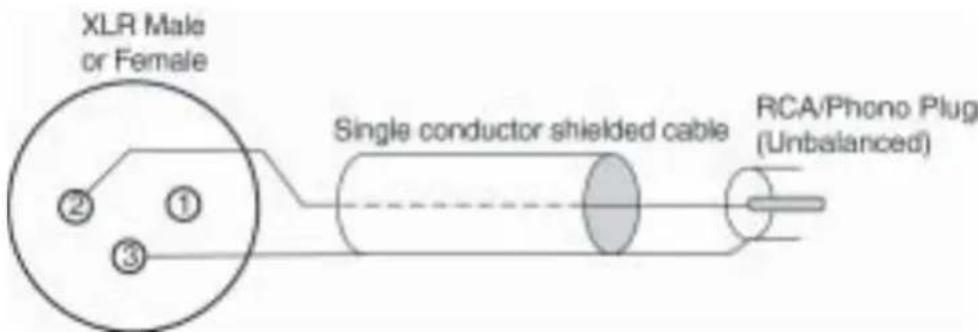
The wiring method for unbalanced connections with XLR connectors to unbalanced RCA/Phono phone connectors using coaxial cable (1 wire + shield) is as follows:
XLR Pin 1 (GND) no connection
XLR Pin 2 (+) to signal wire and to the Phono center pin
XLR Pin 3 (-) to the cable shield and to the Phono sleeve
Connector Pinouts
Audio Port
The Audio Port is a female 25-pin D-connector with the following connections:
| Pin | Signal | Pin | Signal |
| 1 | t | oHtuOlatigiD | |
| 2 | Digital Out Gnd | 15 | Digital In Hot |
| 3 | Digital In Cold | 16 | Digital In Gnd |
| 4 | none | 17 | none |
| 5 | none | 18 | none |
| 6 | none | 19 | none |
| 7 | Right Out Hot | 20 | Right Out Cold |
| 8 | Right Out Gnd | 21 | Right In Hot |
| 9 | Right In Cold | 22 | Right In Gnd |
| 10 | Left Out Hot | 23 | Left Out Cold |
| 11 | Left Out Gnd | 24 | Left In Hot |
| 12 | Left In Cold | 25 | Left In Gnd |
| 31 | ne |
MIDI/Clock Port
The MIDI/Clock Port is a female, high-density 15-pin D-connector with the following connections:
| Pin | Signal | Pin | Signal |
| 1 | none | 9 | Midi In 2 - |
| 2 | Midi Out 2 + | 10 | Midi Out 1 - |
| 3 | Midi In 2 + | 11 | Clock Out Gnd |
| 4 | Midi Out 1 + | 12 | Clock In Gnd |
| 5 | Midi In 1 + | 13 | Midi Out 2 Gnd |
| 6 | Clock Out + | 14 | Midi Out 1 Gnd |
| 7 | Clock In + | 15 | Midi In 1 - |
| 8 | Midi Out 2 - |
Header Connectors
The CLOCK IN and CLOCK OUT ports are two-pin headers shrouded in black plastic. For both connectors, Pin 1 carries the clock signal and Pin 2 is a ground signal. Pin 1 is located on the left side of each connector when viewing the component side of the board.
Instructions to the User
This equipment has been tested and found to comply with the limits for a class B digital device, pursuant to part 15 of the FCC Rules. These limits are designed to provide reasonable protection against harmful interference in a residential installation. This equipment generates, uses and can radiate radio frequency energy and if not installed and used in accordance with the instructions, may cause harmful interference to radio communications. However, there is no guarantee that interference will not occur in a particular installation. If this equipment does cause harmful interference to radio or television reception, which can be determined by turning the equipment off and on, the user is encouraged to try to correct the interference by one or more of the following measures:
- Reorient or relocate the receiving antenna.
- Increase the separation between the equipment and receiver.
- Connect the equipment into an outlet on a circuit different from that to which the receiver is connected.
- Consult the dealer or an experienced radio/TV technician for help.
In order to maintain compliance with FCC regulations, shielded cables must be used with this equipment. Operation with non-approved equipment or unshielded cables is likely to result in interference to radio and TV reception. The user is cautioned that changes and modifications made to the equipment without the approval of manufacturer could void the user's authority to operate this equipment.
EMC Certifications
FCC DECLARATION OF CONFORMITY
TRADE NAME: Computer Audio Card
MODEL NUMBER: LynxONE
COMPLIANCE TEST REPORT NUMBER: B80812D1
COMPLIANCE TEST REPORT DATE: August 12, 1998
RESPONSIBLE PARTY (IN USA): Lynx Studio Technology, Inc.
ADDRESS: 1048 Irvine Ave, PMB 468, Newport Beach, CA 92660
TELEPHONE: (949) 515-8265
This equipment has been tested and found to comply with the limits for a Class B digital device, pursuant to Part 15 of the FCC rules. These limits are designed to provide reasonable protection against harmful interference in a residential installation. This equipment generates, uses, and can radiate radio frequency energy and, if not installed and used in accordance with the instructions, may cause harmful interference to radio communications. However, there is no guarantee that interference will not occur in a particular installation.
If the unit does cause harmful interference to radio or television reception, please refer to your user's manual for instructions on correcting the problem.
I the undersigned, hereby declare that the equipment specified above conforms to the above requirements.
Newport Beach, California
October 18, 1998

Robert Bauman
Compliance Engineer
EC DECLARATION OF CONFORMITY
APPLICATION OF COUNCIL DIRECTIVES: 89/336/EEC, 72/23/EEC
MANUFACTURERS NAME: Lynx Studio Technology, Inc.
MANUFACTURER ADDRESS: 1048 Irvine Ave, PMB 468
Newport Beach, CA 92660
EUROPEAN REPRESENTATIVE'S NAME: STG Distribution
EUROPEAN REPRESENTATIVE'S ADDRESS: 48 Chemin Naville, CH - 1231 Conches
Geneva, Switzerland
TYPE OF EQUIPMENT: Information Technology Equipment
EQUIPMENT CLASS: Residential, Commercial and Light Industry
MODEL NUMBER: LynxONE
CONFORMS TO THESE STANDARDS: EN50022: 1995, EN50082-1:1992, EN60950:
1994
YEAR OF MANUFACTURE: 1998
I the undersigned, hereby declare that the equipment specified above conforms to the above directives and standards.
Newport Beach, California
October 18, 1998

Robert Bauman
Compliance Engineer
License Agreement
This legal document is an agreement between you and Lynx Studio Technology, Inc. By opening the sealed board package, or written materials, you are agreeing to become bound by the terms of the agreement, which includes this License and Limited Warranty (collectively the “Agreement”). This Agreement constitutes the complete agreement between you and Lynx Studio Technology, Inc. If you do no agree to the terms of the Agreement, DO NOT OPEN the anti-static bag containing the LynxONE board. Promptly return the unopened package and all other items using the original packaging to the location of purchase.
Limited Warranty
Lynx Studio Technology, Inc. (“Lynx”) warrants this product to be free of defects in material and workmanship for a period of one year from the date of original retail purchase. This warranty is enforceable only by the original retail purchaser. To be protected by this warranty, the purchaser must complete and return the enclosed warranty card within 14 days of purchase.
During the warranty period Lynx shall, at its sole and absolute option, either repair or replace free of charge any product that proves to be defective on inspection by Lynx or its authorized service representative. In all cases disputes concerning this warranty shall be resolved as prescribed by law.
To obtain warranty service, the purchaser must first call or write Lynx at the address and telephone number printed below to obtain a Return Authorization Number and instructions concerning where to return the unit for service. All inquiries must be accompanied by a description of the problem. All authorized returns must be sent to Lynx or an authorized Lynx repair facility postage prepaid insured and properly packaged. Proof of purchase must be presented in the form of a bill of sale, canceled check or some other positive proof that the product is within the warranty period. Lynx reserves the right to update any unit returned for repair. Lynx reserves the right to change or improve design of the product at any time without prior notice. This warranty does not cover claims for damage due to abuse, neglect, alteration or attempted repair by unauthorized personnel, and is limited to failures arising during normal use that are due to defects in material or workmanship in the product.
ANY IMPLIED WARRANTIES, INCLUDING IMPLIED WARRANTIES OF MERCHANTABILITY AND FITNESS FOR A PARTICULAR PURPOSE, ARE LIMITED IN DURATION TO THE LENGTH OF THIS LIMITED WARRANTY. Some states do not allow limitations on how long an implied warranty lasts, so the above limitation may not apply to you.
IN NO EVENT WILL LYNX BE LIABLE FOR INCIDENTAL, CONSEQUENTIAL OR OTHER DAMAGES RESULTING FROM THE BREACH OF ANY EXPRESS OR IMPLIED WARRANTY, INCLUDING, AMONG OTHER THINGS, DAMAGE TO PROPERTY, DAMAGE BASED ON INCONVENIENCE OR ON LOSS OF USE OF THE PRODUCT, AND, TO THE EXTENT PERMITTED BY LAW, DAMAGES FOR PERSONAL INJURY. Some states do not allow the exclusion or limitation of incidental or consequential damages, so the above limitation or exclusion may not apply to you.
This warranty gives you specific legal rights, and you may also have other rights which vary from state to state.
This warranty only applies to products sold in the United States of America or Canada. The terms of this warranty and any obligations of Lynx under this warranty shall apply only within the country of sale. Without limiting the foregoing, repairs under this warranty shall be made only by a duly authorized Lynx service representative in the country of sale. For warranty information in all other countries please refer to your local distributor.
Your warranty will be in effect and you will receive warranty information ONLY IF YOU REGISTER YOUR LynxONE as described in the “Warranty Registration” section.
Lynx Studio Technology, LynxONE and the LynxONE Logo are trademarks of Lynx Studio Technology, Inc. All other product or company names are the trademarks or registered trademarks of their respective owners.
LynxONE™ Installation and User's Guide
Copyright © 1998-2001, Lynx Studio Technology, Inc. All rights reserved.
Printed December 18, 2001
- Installation and Users Guide
- Contents
- Introduction 4
- Windows 95/98® Installation....6
- Windows NT® Installation 7
- External Connections 8
- Using Your LynxONE 10
- Mixer Reference.... 13
- Working with Third Party Applications 17
- Configuring Multiple LynxONE's 20
- Troubleshooting 22
- Support 25
- Appendix 26
- Introduction
- Before you begin
- Optional Equipment
- System Requirements
- Minimum System
- Recommended System
- Manual Conventions
- Warranty Registration
- Locating the Serial Number of Your LynxONE
- Windows 95/98/98SE® Installation
- Running Setup
- Installing the LynxONE
- Restarting Your Computer
- Windows NT® Installation
- External Connections
- Analog Audio
- Digital Audio
- MIDI Connections
- Clock Input and Output
- Header Connectors
- Using Your LynxONE
- The LynxONE Mixer
- Starting the Mixer
- General Operation
- Mixer Configuration Recall
- Clock Source Requirements
- Volume Faders and Signal Quality
- Mono Recording and Playback Operation
- Quick Audio Test
- Mixer Reference
- Mixer Menu
- Settings Menu
- Controls
- Code Color DIGITAL IN Status/Error
- Working with Third Party Applications
- Compatibility
- LynxONE Devices
- Audio I/O Selection
- Device Name Audio Cable Connector Usage
- MIDI I/O Selection
- MIDI/Clock
- Device Name Cable Connector Usage
- Controlling Audio Bit Depth
- Digital Input Recording and Monitoring Issues
- Simultaneous Device and Four-track Operation
- Configuring Multiple LynxONE's
- Adapter ID's in a Multiple Card System
- Selection of Master and Slave Clocks
- Cable Connections
- Mixer Settings
- For the master LynxONE:
- For each slave LynxONE:
- Troubleshooting
- When Windows starts I see a LynxONE Mixer error - "No mixer device drivers are available".
- I installed the LynxONE in the PCI slot before I ran Setup.exe for Windows 95/98, what do I do now?
- The meters in the LynxONE Mixer do not show activity when I am monitoring from the analog or digital inputs.
- I cannot record from the LynxONE's digital input.
- There is no signal on the digital output during playback.
- Audio playback sounds really slow or erratic.
- Audio playback sounds fast or slow when I am using the digital input as the clock source.
- I cannot change the Sample Clock Source from Digital in the LynxONE Mixer.
- How do I minimize record monitor latency when I am doing overdubs?
- What does the green LED on the LynxONE indicate?
- How do I synchronize my LynxONE with a DPS Perception Video Recorder card?
- Why don't I hear anything when I play a MIDI file?
- Does the LynxONE support Dolby® AC-3 (Dolby Digital) and DTS?
- Is it safe to connect the LynxONE analog outputs to a mixer whose inputs provide "phantom" power?
- Support
- http://www.lynxstudio.com/support.html
- support@lynxstudio.com
- Appendix
- Specifications
- XLR Connector Wiring and Adapters
- Balanced Connections
- Unbalanced Connections with Twisted Pair Cable
- Unbalanced Connections with Single Conductor Cable
- Connector Pinouts
- Audio Port
- MIDI/Clock Port
- Instructions to the User
- EMC Certifications
- FCC DECLARATION OF CONFORMITY
- EC DECLARATION OF CONFORMITY
- License Agreement
- Limited Warranty
- Your warranty will be in effect and you will receive warranty information ONLY IF YOU REGISTER YOUR LynxONE as described in the “Warranty Registration” section.
Brand : LYNX
Model : One
Category : Hi-Fi System