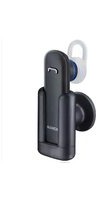
BH-217 - Headphones NOKIA - Free user manual and instructions
Find the device manual for free BH-217 NOKIA in PDF.


| Product Type | Bluetooth Stereo Headset |
| Brand | Nokia |
| Model | BH-217 |
| Connectivity | Bluetooth 2.1 + EDR |
| Supported Profiles | HSP, HFP, A2DP, AVRCP |
| Operating Range | Up to 10 meters (33 feet) |
| Dimensions (Headset) | Approx. 48 x 18 x 12 mm |
| Weight | Approx. 10 grams |
| Battery Type | Rechargeable Li-Ion |
| Battery Capacity | 90 mAh |
| Talk Time | Up to 6 hours |
| Standby Time | Up to 150 hours |
| Charging Time | Approx. 2 hours |
| Charging Connector | Micro-USB |
| Driver Size | 9 mm |
| Frequency Response | 20 Hz – 20 kHz |
| Microphone | Built-in omnidirectional |
| Controls | Multi-function button, volume controls |
| Compatible Devices | Most Bluetooth-enabled phones and media players |
| Color Options | Black, White |
| In the Box | Headset, ear hook, ear buds, Micro-USB cable, user manual |
| Warranty | 1 year |
Frequently Asked Questions - BH-217 NOKIA
User questions about BH-217 NOKIA
0 question about this device. Answer the ones you know or ask your own.
Ask a new question about this device
Download the instructions for your Headphones in PDF format for free! Find your manual BH-217 - NOKIA and take your electronic device back in hand. On this page are published all the documents necessary for the use of your device. BH-217 by NOKIA.
USER MANUAL BH-217 NOKIA
Nokia Bluetooth Headset BH-217
Issue 1.0
Copyright © 2010 Nokia. All rights reserved.
flowchart
graph TD
    A["Step 9: Earbuds"] --> B["Step 10: Rearband"]
    B --> C["Step 11: Rearbuds"]
    C --> D["Step 12: Rearbuds"]
    D --> E["Step 13: Rearbuds"]
    E --> F["Step 14: Rearbuds"]
Copyright © 2010 Nokia. All rights reserved.
DECLARATION OF CONFORMITY Hereby, NOKIA CORPORATION declares that this BH-217 product is in compliance with the essential requirements and other relevant provisions of Directive 1999/5/EC. A copy of the Declaration of Conformity can be found at http://
Introduction
With the Nokia Bluetooth Headset BH-217, you can make and answer calls hands-free with your compatible mobile device.
Read this user guide carefully before using the headset. Also, read the user guide for the device that you connect to the headset.
Warning: The connector of the clip and car cradle may contain a small amount of nickel. Persons who are sensitised to nickel may
www.nokia.com/phones/ declaration_of_conformity/.
CE2150
© 2010 Nokia. All rights reserved.
Bluetooth is a registered trademark of Bluetooth SIG, Inc.
have symptoms from prolonged skin contact with the connector.
Bluetooth compatibility
The headset is compliant with the Bluetooth Specification 2.1 + EDR supporting the Headset Profile 1.1 and Hands-Free Profile 1.5. Check with the manufacturers of other devices to determine their compatibility with this device.
Get started
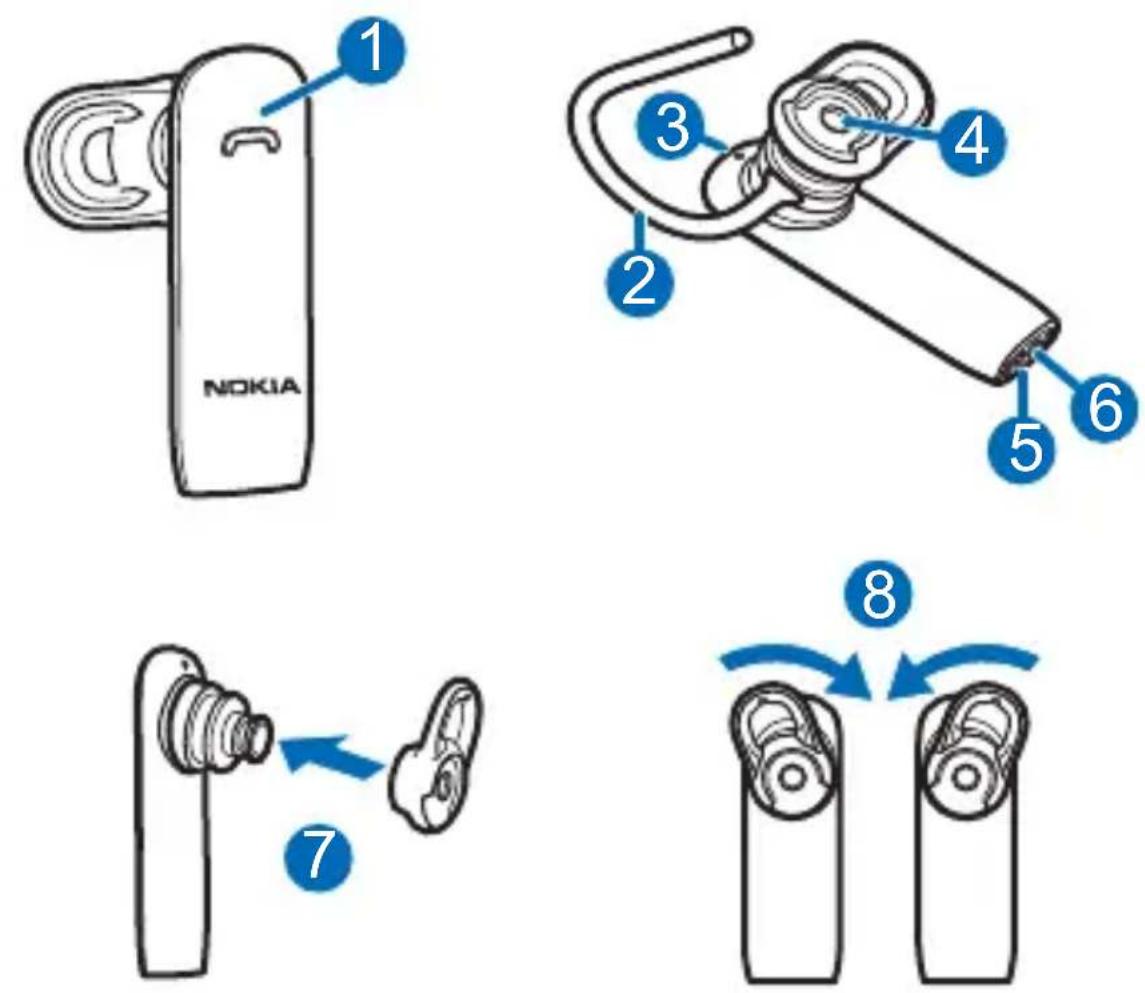
The headset contains the following parts shown on the title page: multifunction key (1), earloop (2), indicator light (3), earpiece (4), microphone (5), and charger connector (6).
Before using the headset, you must charge the battery and pair the headset with a compatible device.
Compatible chargers
This device is intended for use when supplied with power from the following chargers: AC-3, AC-4, AC-5, AC-8, DC-4 and DC-9. The exact charger model number may vary depending on the type of plug. The plug variant is identified by one of the following: E, X, AR, U, A, C, K, or B.
Charge the battery
- Connect the charger to a wall outlet.
- Connect the charger cable to the charger connector.
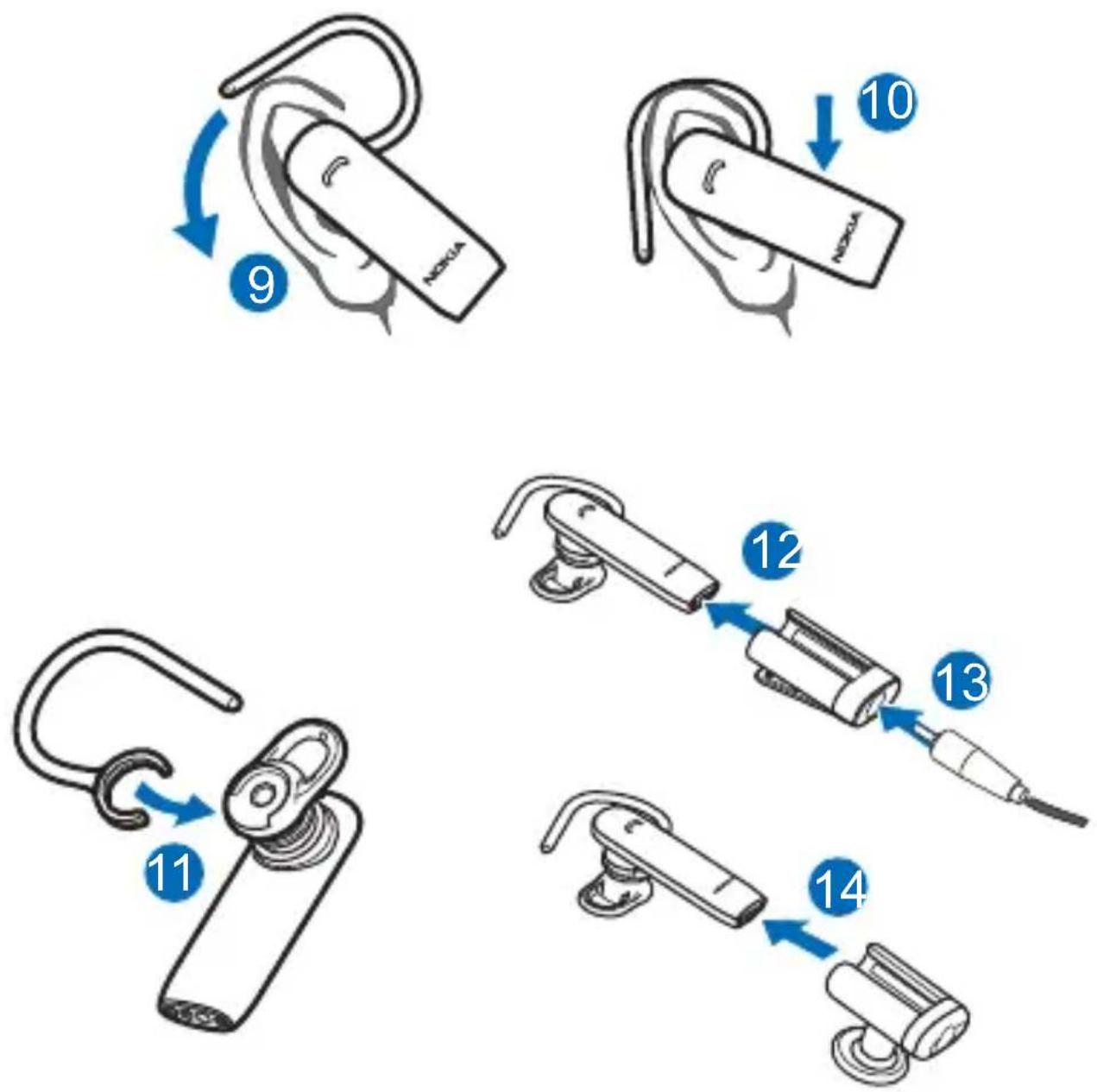
To charge the headset when it is in the clip or car cradle, insert the lower end of the headset into the clip or car cradle (12), and connect the charger cable to the charger connector on the clip or cradle (13).
The red indicator light is displayed during charging.
Charging the battery fully may take up to 2 hours. - When the battery is fully charged, the green indicator light is displayed. Disconnect the charger from the headset (or
from the clip or car cradle), then from the wall outlet.
The fully charged battery has power for up to 5 hours of talk time. When you keep the headset in the clip or car cradle, the fully charged battery has power for up to 3 months of standby time. When you use the headset without the clip or cradle, the standby time is up to 100 hours.
To check the battery charge when the headset is not connected to a charger, press the multifunction key when the headset is connected to a mobile device. If the indicator light is green, the charge level is sufficient. If the light is yellow, you may need to recharge the battery soon. If the light is red, recharge the battery.
When the battery charge is low, the headset beeps every 5 minutes, the red indicator light flashes, and if voice prompts are activated, there is an audible notification. If voice prompts are activated, there is also an audible notification when the battery is completely discharged.
Switch the headset on
Remove the headset from the clip or car cradle. If the headset is not in the clip or cradle, press the multifunction key. The headset beeps, and the green indicator light flashes slowly while the headset tries to connect to the last or two last connected devices.
When the headset is connected to at least one device and is ready for use, the blue indicator light flashes slowly. If the headset has not been paired with a device, it automatically enters pairing mode.
Switch the headset off
Place the headset into the clip or car cradle, or press and hold the multifunction key for about 5 seconds. The headset beeps, and the red indicator light is briefly displayed.
If the headset is not connected to a device within about 30 minutes, it switches off automatically.
Pair and connect the headset
Before using the headset, you must pair and connect it to a compatible device.
You can pair the headset with up to eight devices, but you can connect it to a maximum of two devices at a time.
To pair and connect the headset to a device:
- Make sure your mobile device is switched on and the headset is off.
- If the headset has not been previously paired with a device, switch on the headset. The headset enters pairing mode, and the blue indicator light starts to flash quickly.
If the headset has been previously paired with a device, make sure the headset is switched off and not placed in the clip or car cradle, and press and hold the multifunction key for about 5 seconds until the blue indicator light starts to flash quickly.
-
Within about 3 minutes, activate Bluetooth on your device, and set it to search for Bluetooth devices. For details, see the user guide of your mobile device.
-
Select the headset from the list of found devices.
- If necessary, enter the passcode 0000 to pair and connect the headset to your device.
In some devices, you may need to make the connection separately after pairing.
When the headset is connected to at least one device and is ready for use, the blue indicator light flashes slowly.
To manually connect the headset to the last used device, press and hold the multifunction key for about 2 seconds (when no other device is connected), or make the connection in the Bluetooth menu of the device.
You may be able to set your device so that the headset connects to it automatically. To activate this feature in a Nokia device, modify the paired device settings in the Bluetooth menu.
Basic use
Change the earpad
The headset may be provided with different sized earpads. Select the earpad that fits the best and is the most comfortable for your ear.
To change the earpad, pull the current earpad from the earpiece, and push the new earpad into place (7).
Place the headset on the ear
To use the headset with the earloop, attach the earloop to it (11). To detach the earloop, gently pull it from the headset.
You can rotate the earpad to keep the headset securely in the ear (8). For example, if you use the headset on the right ear, you may need to rotate the earpad to the right for the best fit. If you wear an earring, make sure it is not accidentally attached to the earpad.
To place the headset on the ear, slide the earloop behind your ear (9), and gently push the earpiece against your ear. Point the headset towards your mouth (10).
Store in the clip or car cradle
When you do not keep the headset on your ear, store it in the clip or car cradle. When the headset is in the clip or cradle, it is switched off. When you remove the headset from the clip or cradle, the headset automatically switches on.
To place the headset into the clip or cradle, slide the headset into place (14). To remove the headset, slide it out.
Install the car cradle
When you install the cradle in a car, make sure it does not interfere with or hinder the steering or braking systems or other systems used in the operation of the vehicle (for example, airbags) or disturb your field of vision while driving. Check that the deployment of the airbag is not blocked or impaired in any way. To install the car cradle, peel off the protective sheet from the cradle, and press the cradle against a flat surface so that it stays firmly in place. Do not install the cradle in a place where you might come in contact with it in the event of an accident or collision.
Use the car cradle
When you use the headset with the cradle in a car, obey all local laws. Always keep your hands free to operate the vehicle while driving. Your first consideration while driving should be road safety. Only operate the headset or car cradle if it is safe to do so under all driving conditions.
Periodically check that the adhesive at the bottom of the car cradle is firmly attached, especially if the ambient temperature changes a lot. It is recommended that you do not leave the car cradle inside the vehicle in direct sunlight or in excessive heat.
Adjust volume
The headset automatically adjusts the volume according to ambient noise. To manually adjust the volume, use the volume controls of the connected device.
The selected volume level is saved for the device that is currently connected to the headset.
Calls
To make a call, use your mobile device in the normal way when the headset is connected to it.
To redial the number you last called (if your mobile device supports this feature with the headset), when no call is in progress, press the multifunction key twice when the headset is not in the clip or car cradle.
To activate voice dialling (if your mobile device supports this feature with the headset), when no call is in progress, press and hold the multifunction key for about 2 seconds when the headset is not in
the clip or cradle. Proceed as described in the user guide of the mobile device.
To answer a call, remove the headset from the clip or cradle. If the headset is not in the clip or cradle, press the multifunction key. To reject a call, press the multifunction key twice, or place the headset into the clip or cradle.
To end a call, place the headset into the clip or cradle, or press the multifunction key when the headset is not in the clip or cradle.
To switch a call between the headset and a compatible connected device, press and hold the multifunction key for about 2 seconds.
Connect to two devices
The headset can be connected to two devices at the same time.
Pair and connect to two devices
To pair the headset with two devices, switch on the headset, activate pairing mode, and pair it with the first device. Switch off the headset, activate pairing mode, and pair it with the second device.
To connect the headset to the two devices, switch the headset off and back on.
Handle calls
If the headset can connect to two devices at the same time and you use redialling or voice dialling, the call is made on the device that you last used to make a call when the headset was connected to it.
To answer a call on one connected device and end the active call on the other device, press the multifunction key.
To answer a call on one connected device and put the active call on hold on the other device, press and hold the multifunction key for about 2 seconds.
To end the active call on one connected device and make the call on hold active on the other device, press the multifunction key.
To switch between the active call on one device and the call on hold on the other device, press and hold the multifunction key for about 2 seconds.
Activate or deactivate voice prompts
Make sure the headset is switched off and not placed in the clip or car cradle. Press and hold the multifunction key for about 5 seconds, and press and hold the multifunction key again for about 2 seconds. When you activate the prompts, the green indicator light flashes once. When you deactivate the prompts, the yellow light flashes once. In both cases, there is also an audible notification.
Clear pairings
To clear the pairings from the headset, switch off the headset, and press and hold the multifunction key for about 8 seconds. The headset beeps twice, the red and green indicator lights alternate, and the headset enters pairing mode.
Troubleshooting
If you cannot connect the headset to your compatible device, make sure the headset is charged, switched on, and paired with the device.

- Nokia Bluetooth Headset BH-217
- Introduction
- CE2150
- Bluetooth compatibility
- Get started
- Compatible chargers
- Charge the battery
- Switch the headset on
- Switch the headset off
- Pair and connect the headset
- Basic use
- Change the earpad
- Place the headset on the ear
- Store in the clip or car cradle
- Install the car cradle
- Use the car cradle
- Adjust volume
- Calls
- Connect to two devices
- Pair and connect to two devices
- Handle calls
- Activate or deactivate voice prompts
- Clear pairings
- Troubleshooting
Brand : NOKIA
Model : BH-217
Category : Headphones