
PadFone mini 4.3 A11-1A023WWE - Smartphone ASUS - Free user manual and instructions
Find the device manual for free PadFone mini 4.3 A11-1A023WWE ASUS in PDF.


| Product Type | Smartphone |
| Model | PadFone mini 4.3 A11-1A023WWE |
| Dimensions (H x W x D) | 129.3 x 65.5 x 8.7 mm |
| Weight | 105 g |
| Display | 4.3-inch IPS LCD, 540 x 960 pixels |
| Processor | Intel Atom Z2560 dual-core 1.6 GHz |
| RAM | 1 GB |
| Internal Storage | 8 GB (expandable via microSD up to 64 GB) |
| Rear Camera | 8 MP with autofocus and LED flash |
| Front Camera | 2 MP |
| Battery | 2100 mAh Li-Po (removable) |
| Operating System | Android 4.3 Jelly Bean |
| Connectivity | Wi-Fi 802.11 b/g/n, Bluetooth 4.0, GPS, microUSB 2.0 |
| Sensors | Accelerometer, proximity, compass |
| SIM | Dual Micro-SIM |
| Care & Cleaning | Wipe with a soft, dry cloth. Avoid exposure to liquids and extreme temperatures. |
| Safety | Use only approved chargers and batteries. Do not disassemble or expose to water. |
| Spare Parts & Repairability | Battery, screen, and back cover are replaceable. Moderate repairability with common tools. |
| General Information | 3.5 mm headphone jack, microSD slot, removable back cover. |
Frequently Asked Questions - PadFone mini 4.3 A11-1A023WWE ASUS
User questions about PadFone mini 4.3 A11-1A023WWE ASUS
0 question about this device. Answer the ones you know or ask your own.
Ask a new question about this device
Download the instructions for your Smartphone in PDF format for free! Find your manual PadFone mini 4.3 A11-1A023WWE - ASUS and take your electronic device back in hand. On this page are published all the documents necessary for the use of your device. PadFone mini 4.3 A11-1A023WWE by ASUS.
USER MANUAL PadFone mini 4.3 A11-1A023WWE ASUS
All Rights Reserved.
No part of this manual, including the products and software described in it, may be reproduced, transmitted, transcribed, stored in a retrieval system, or translated into any language in any form or by any means, except documentation kept by the purchaser for backup purposes, without the express written permission of ASUSTeK COMPUTER INC. ("ASUS").
Product warranty or service will not be extended if: (1) the product is repaired, modified or altered, unless such repair, modification of alteration is authorized in writing by ASUS; or (2) the serial number of the product is defaced or missing.
ASUS PROVIDES THIS MANUAL "AS IS" WITHOUT WARRANTY OF ANY KIND, EITHER EXPRESS OR IMPLIED, INCLUDING BUT NOT LIMITED TO THE IMPLIED WARRANTIES OR CONDITIONS OF MERCHANTABILITY OR FITNESS FOR A PARTICULAR PURPOSE. IN NO EVENT SHALL ASUS, ITS DIRECTORS, OFFICERS, EMPLOYEES OR AGENTS BE LIABLE FOR ANY INDIRECT, SPECIAL, INCIDENTAL, OR CONSEQUENTIAL DAMAGES (INCLUDING DAMAGES FOR LOSS OF PROFITS, LOSS OF BUSINESS, LOSS OF USE OR DATA, INTERRUPTION OF BUSINESS AND THE LIKE), EVEN IF ASUS HAS BEEN ADVISED OF THE POSSIBILITY OF SUCH DAMAGES ARISING FROM ANY DEFECT OR ERROR IN THIS MANUAL OR PRODUCT.
SPECIFICATIONS AND INFORMATION CONTAINED IN THIS MANUAL ARE FURNISHED FOR INFORMATIONAL USE ONLY, AND ARE SUBJECT TO CHANGE AT ANY TIME WITHOUT NOTICE, AND SHOULD NOT BE CONSTRUED AS A COMMITMENT BY ASUS. ASUS ASSUMES NO RESPONSIBILITY OR LIABILITY FOR ANY ERRORS OR INACCURACIES THAT MAY APPEAR IN THIS MANUAL, INCLUDING THE PRODUCTS AND SOFTWARE DESCRIBED IN IT.
Products and corporate names appearing in this manual may or may not be registered trademarks or copyrights of their respective companies, and are used only for identification or explanation and to the owners' benefit, without intent to infringe.


Thank you for purchasing this ASUS product!
Before you start, ensure that you have read all the safety information and operating instructions in this User Manual to prevent injury or damage to your device.
NOTE: For the latest updates and more detailed information, please visit www.asus.com.
Getting started with the PadFone mini 4.3
Front
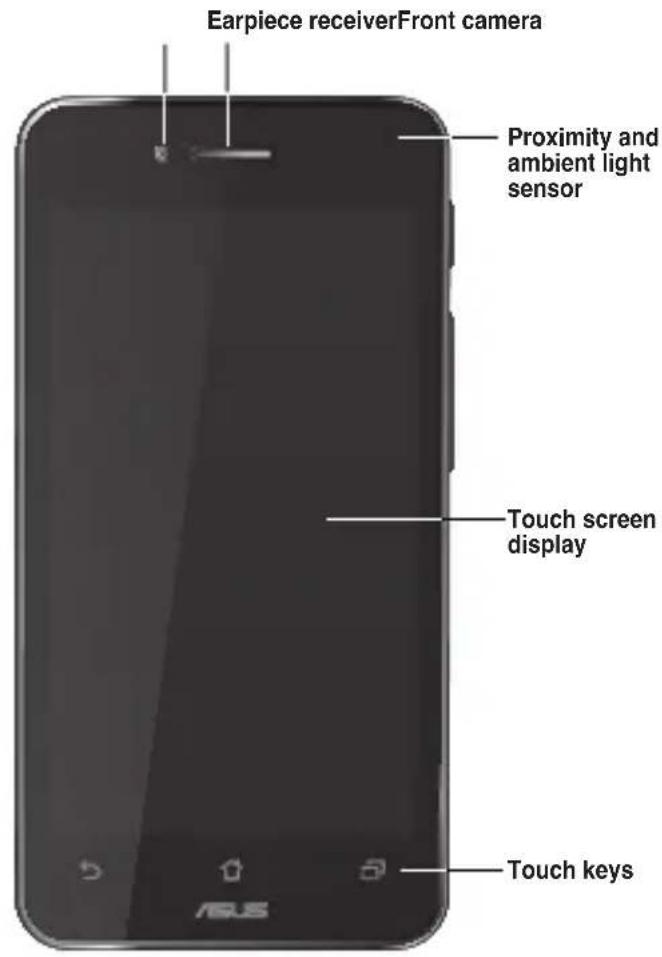
WARNING: If you plan to use your PadFone mini 4.3 with a PadFone mini Station, we do not recommend adding a protective film or cover to your PadFone mini 4.3 as it can result in difficulty when inserting/removing the PadFone mini 4.3 to/from the PadFone mini Station. mini Station.Station.
Side
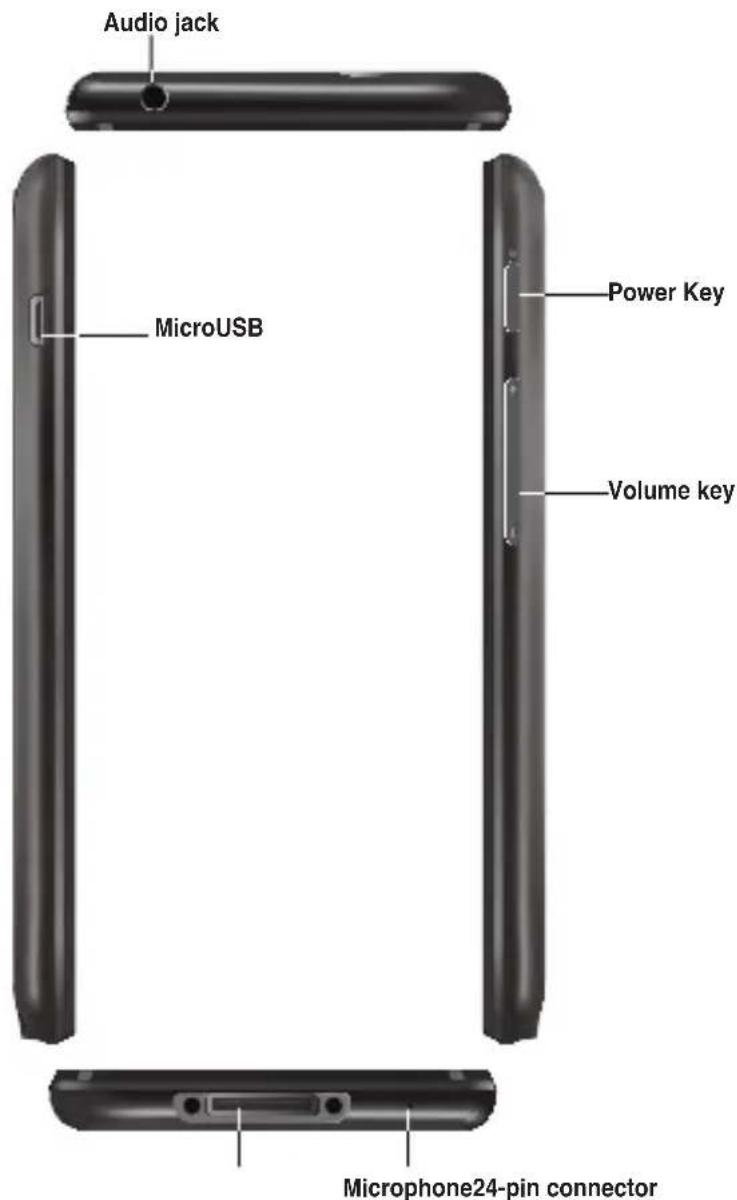
NOTE: The 24-pin connector is for connecting to the PadFone mini Station and is not used for charging the PadFone mini 4.3.

natural_image
Color palette bar with grayscale gradient and a central crosshair symbol (no text or labels)Rear
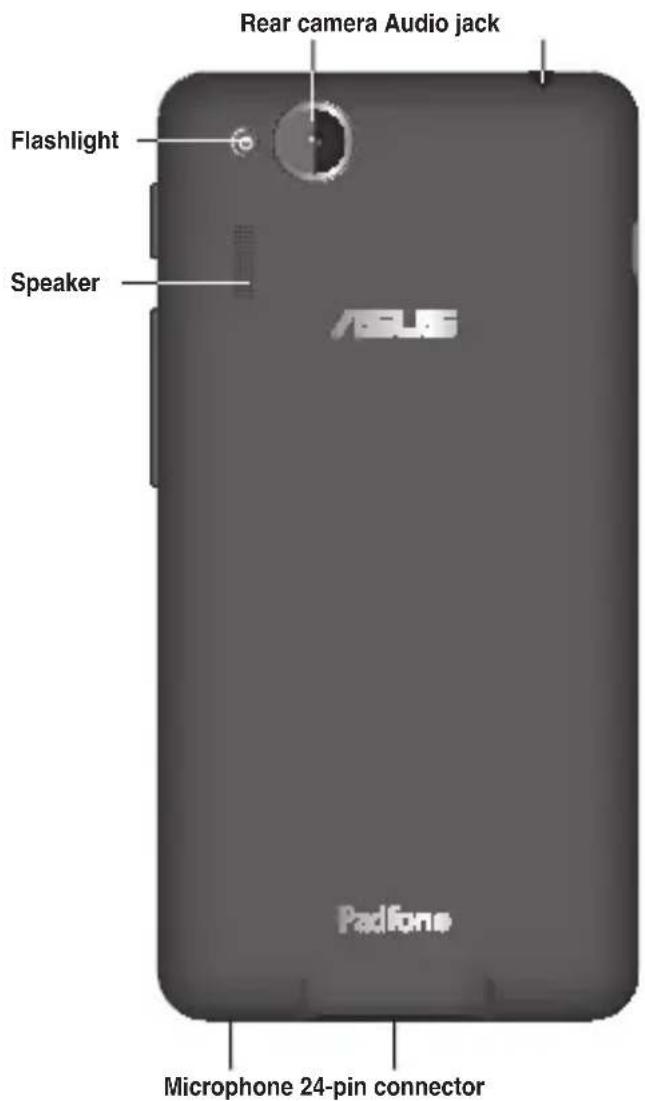
Charging the PadFone mini 4.3
After installing your Micro-SIM card, we strongly recommend that you charge your device fully before powering it ON.
To charge your PadFone mini 4.3:
- Connect the USB connector into the power adapter's USB port.
- Connect the other end of the USB cable to the PadFone mini 4.3.
- Plug the power adapter into a wall socket.
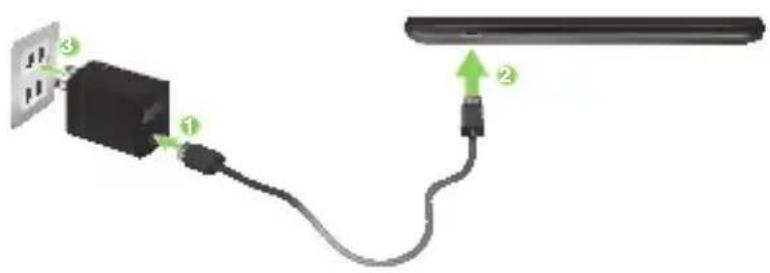


NOTES:
- Use only the power adapter that came with your device. Using a different power adapter may damage your device.
- Using the bundled power adapter and PadFone mini 4.3 signal cable to connect your PadFone mini 4.3 to a power outlet is the best way to charge your PadFone mini 4.3.
- The input voltage range between the wall outlet and this adapter is AC 100V - 240V. The output voltage of the micro USB cable is DC 5.2V, 1.35A.
Turning your PadFone mini 4.3 on or off
Press the power key at the side of your PadFone mini 4.3 to power the device on or to power it off.
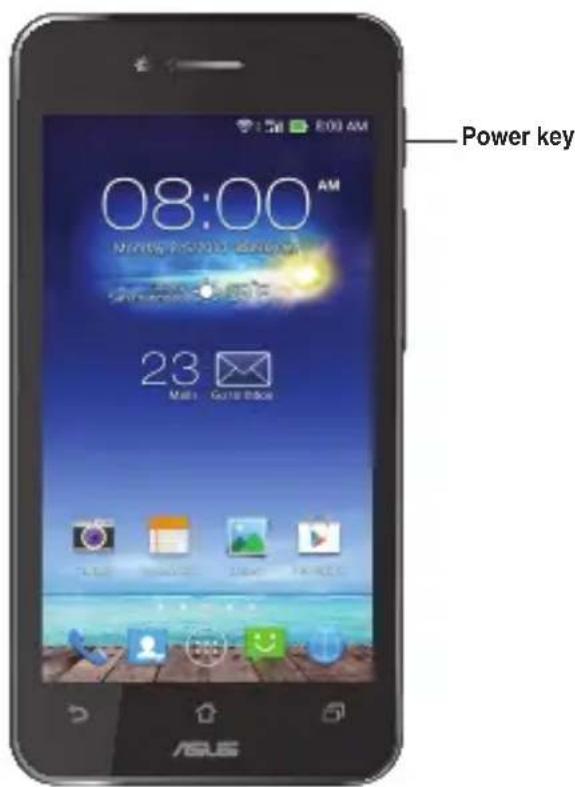
IMPORTANT: The first time you power on your PadFone mini 4.3, you will see the Welcome screen. Touch the menu to select your preferred language then touch Next Step. Follow the onscreen instructions to set up your PadFone mini 4.3.
Removing the battery of the PadFone mini 4.3
To remove the battery of your PadFone mini 4.3:
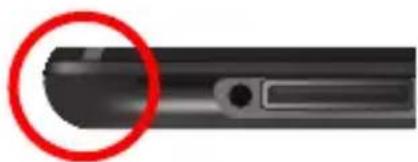
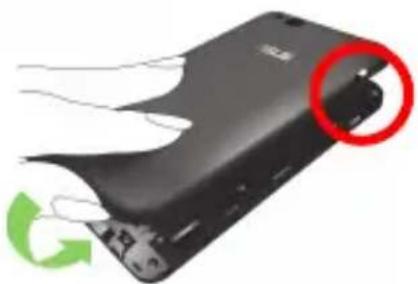
- Locate the groove on the lower-left corner of the PadFone mini 4.3.
natural_image
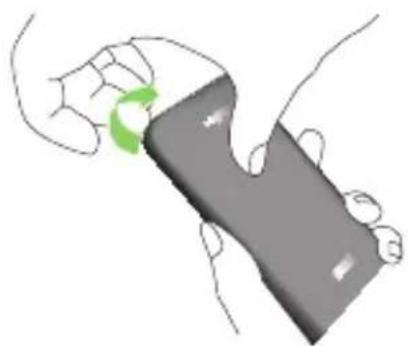
Close-up of a black mechanical component with a red circle highlighting a specific area (no text or symbols visible)- While pressing the rear cover with one finger, pull the cover off.
natural_image
Illustration of a hand holding a gray rectangular object with a green circular arrow indicating rotation (no text or symbols)
-
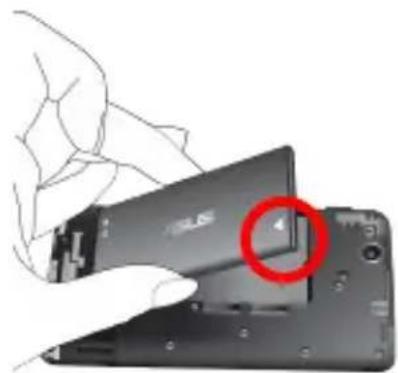
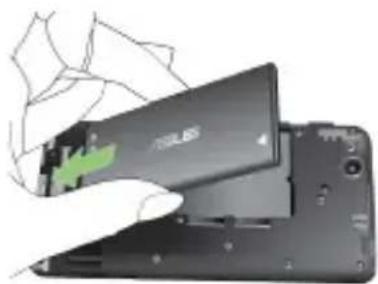
Locate the triangular logo on the battery.
-
Using your finger, push the battery in the direction of the triangle.
-
Remove the battery.
natural_image
Close-up of a hand holding a smartphone with a red circle highlighting the screen area (no visible text or symbols)Inserting the Micro-Sim card
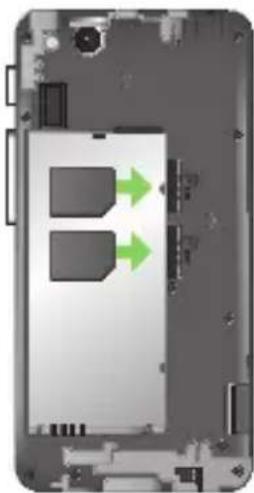
To insert the Micro-SIM card into the PadFone mini 4.3:
- Locate the Micro-SIM card slots.
- Insert the Micro-SIM card into one of the slots.
natural_image
Interior view of a smartphone showing two ports with green arrows indicating flow or movement (no text or symbols)
IMPORTANT: This device uses the Micro-SIM standard. A Micro-SIM card is available from your mobile service provider. Avoid cutting the Micro-SIM card yourself as this may cause problems with the device's SIM card slot.
NOTE: All specifications are subject to change without notice and may vary by country and region.

Inserting the battery of the PadFone mini 4.3
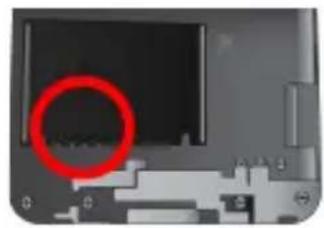
To insert the battery of your PadFone mini 4.3:
- Locate the contact points on one end of the battery and align them with the metallic pins on the PadFone mini 4.3.
natural_image
Close-up of a computer monitor with a red circle highlighting the screen area (no visible text or symbols)- Insert the battery into your PadFone mini 4.3.
natural_image
Close-up of a smartphone showing the battery cover and internal components (no visible text or symbols)
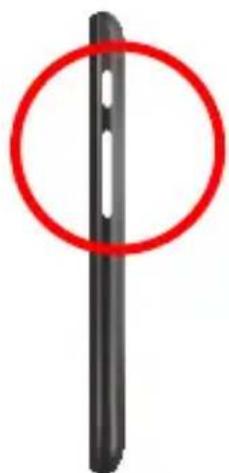
- Locate the openings for the side buttons on the rear cover.
natural_image
Black vertical object with a red circle highlighting its top edge, no text or symbols present.
- Align the side buttons of the PadFone mini 4.3 with the rear cover and ease the PadFone mini in place.
natural_image
Close-up of a black electronic device with a red circular highlight and green recycling symbol (no text or symbols on the device itself)Safety information
- Do notDo not leave your PadFone mini 4.3 exposed to strong sunlight or excessive heat for a prolonged period. This may damage it.
- Do not handle your PadFone mini 4.3 device with wet hands or expose it to moisture or liquids of any kind. Continuous changes from a cold to a warm environment may lead to condensation inside your PadFone mini 4.3, resulting in corrosion and possible damage.
- When traveling, avoid packing the device inside a suitcase. Cramming the device into a suitcase may crack the LCD display. Remember to switch off your wireless connection during air travel.
- Use your PadFone mini 4.3 in an environment with ambient temperatures between -10 °C (14 °F) and 35 °C (95 °F).

IMPORTANT! To provide electrical insulation and maintain electrical safety, a coating is applied to insulate the ASUS PadFone mini 4.3 body except on the sides where the I/O ports are located.

The battery
- Avoid charging in extremely high or low temperature. The battery performs optimally in an ambient temperature of +5 °C to +35 °C.
-
Do not remove and immerse the battery in water or any other liquid.
-
Never try to open the battery as it contains substances that might be harmful if swallowed or allowed to come into contact with unprotected skin.
- Do not remove and short-circuit the battery, as it may overheat and cause a fire. Keep it away from jewellery and other metal objects.
- Do not remove and dispose of the battery in fire. It could explode and release harmful substances into the environment.
- Do not remove and dispose of the battery with your regular household waste. Take it to a hazardous material collection point.
- Do not touch the battery terminals.
CAUTION:
- Risk of explosion if battery is replaced by an incorrect type.
- Dispose of used batteries according to the instructions.
The charger
- Use only the charger supplied with your PadFone mini 4.3.
- Never pull the charger cord to disconnect it from the power socket. Pull the charger itself.
Cleaning and storing
- Your PadFone mini 4.3 should always be handled with care and protected from dirt, dust and dampness. To avoid scratches, never place your PadFone mini 4.3 face down.
- If cleaning is necessary, turn your PadFone mini 4.3 off and wipe carefully with a soft, slightly damp (not wet) cloth. Use a cotton swab to clean the camera lens. Allow your PadFone mini 4.3 to dry completely before switching it on. Never use solvents for cleaning.
- If you are not going to use your PadFone mini 4.3 for some time, fully charge the battery and store your PadFone mini 4.3 in a dry place away from direct sunlight. Your PadFone mini 4.3 should be switched off during storage. Recharge every 6 to 12 months.


- Never expose your PadFone mini 4.3 to heat or strong sunlight.
- Never expose your PadFone mini 4.3 to moisture or liquids of any kind.
- Do not place stickers that may block the keypad or affect other components such as the microphone, earpiece or camera lens.
WARNING! Failure to follow these instructions may lead to serious personal injury and possible property damage.
Driving safely
Never use handheld phones while driving. It is an offence, that while driving, to hold a phone or cradle it in your neck at any point, during the setup, making or taking of a phone call, text message or any other data related mobile communication. Use of fully installed car kits are still permitted, as are the use of alternate handsfree accessories.
In the interest of safety, we would recommend the use of a cradle while using any form of handsfree accessory.
While driving, we recommend that you use voicemail wherever possible, and that you listen to your messages when you are not in the car. If you must make a handsfree call when driving, keep it brief.
Do not place objects, including both installed or portable wireless equipment, in the area over the airbag or in the airbag deployment area. An airbag inflates with great force. If the airbag inflates, serious injury could result.
Electronic devices
Most modern electronic equipment is shielded from RF energy.
However, certain electronic equipment may not be shielded against the RF signals from your device.
Pacemakers
The Health Industry Manufacturers' Association recommends that a minimum separation of six (6") inches be maintained between a phone and a pacemaker to avoid potential interference with the pacemaker. These recommendations are consistent with the independent research by and recommendations of Wireless Technology Research.
If you have a pacemaker:
• Always keep your PadFone mini 4.3 more than six inches (15cm) from your pacemaker when turned on.
- Do not carry your PadFone mini 4.3 in your breast pocket.
- Use the ear opposite the pacemaker to minimize the potential for interference.
- If you have any reason to suspect that interference is taking place, switch off your PadFone mini 4.3 immediately.
Hearing aids
Some digital phones may interfere with some hearing aids. In the event of such interference, call ASUS Customer Service to discuss alternatives.
Other medical devices
If you use any other personal medical device, consult the manufacturer of your device to determine if it is adequately shielded from external RF energy. Your physician may be able to assist you in obtaining this information.
Turn your PadFone mini 4.3 off in healthcare facilities when any regulations posted in these areas instruct you to do so.
Hospitals or healthcare facilities may be using equipment that could be sensitive to external RF energy.
Vehicles
RF signals may affect improperly installed or inadequately shielded electronic systems in motor vehicles. Check with the manufacturer or its representative regarding your vehicle. You should also consult the manufacturer of any equipment added to your vehicle.


Posted facilities
Turn your PadFone mini 4.3 off where posted notices so require.
Magnetic media
Magnetic fields generated by mobile devices may damage data on magnetic storage media, such as credit cards, computer discs or tapes. Do not place your PadFone mini 4.3 next to such media.
You should never expose your PadFone mini 4.3 to strong magnetic fields as this may cause temporary malfunction.
Other Safety Guidelines
Aircraft
Regulations prohibit using your mobile device while onboard an aircraft. Switch off your PadFone mini 4.3 before boarding an aircraft or turn off the wireless connection.
Blasting areas
To avoid interfering with blasting operations, turn your PadFone mini 4.3 off when in a 'blasting area' or in areas posted: "Turn off two-way radio." Obey all signs and instructions.
Potentially explosive environments
Turn your PadFone mini 4.3 off when in any area with a potentially explosive environment and obey all signs and instructions.
Sparks in such areas could cause an explosion or fire resulting in bodily injury or even death.
Areas with a potentially explosive environment are often, but not always, clearly marked. They include fuelling areas such as gas stations, below decks on boats, fuel or chemical transfer or storage facilities, vehicles using liquified petroleum gas (such as propane or butane), areas where the air contains chemicals or articles, such as grain, dust, or metal powders, and any other area where you would normally be advised to turn off your vehicle's engine.
Choking
Keep your PadFone mini 4.3 away from children as the SIM card and other small parts present a choking hazard.


Caution
Your PadFone mini 4.3 is a high quality piece of equipment. Before operating, read all instructions and cautionary markings on the (1) AC Adapter.
- Do not use the PadFone mini 4.3 in an extreme environment where high temperature or high humidity exists. The PadFone mini 4.3 performs optimally in an ambient temperature between -15 °C (5 °F) and 35 °C (95 °F).
- Do not abuse the PadFone mini 4.3. Avoid striking, shaking, or subjecting the device to impact. When not using the unit, place the device in a safe place to avoid damage to the product.
- Do not expose the PadFone mini 4.3 to rain or moisture.
- Do not use unauthorized accessories.
- Do not disassemble the PadFone mini 4.3 or its accessories. If service or repair is required, return the unit to an authorized service center. If the unit is disassembled, a risk of electric shock or fire may result.
- Do not short-circuit the battery terminals with metal items.
Operator access with a tool
If a TOOL is necessary to gain access to an OPERATOR ACCESS AREA, either all other compartments within that area containing a hazard shall be inaccessible to the OPERATOR by the use of the same TOOL, or such compartments shall be marked to discourage OPERATOR access.
An acceptable marking for an electric shock hazard is (ISO 3864, No. 5036).
Equipment for restricted access locations
For equipment intended only for installation in a RESTRICTED ACCESS LOCATION, the installation instructions shall contain a statement to this effect.
WARNING: The user needs to switch off the device when exposed to areas with potentially explosive atmospheres such as petrol stations, chemical storage depots and blasting operations.


This equipment may be operated in:
| AE BH CZ DA DE FI FR HK | |||
| HU ID IT MY NO PL RU SG | |||
| SK SW TH TW UK VN WB |
Specific Absorption Rate (SAR)
Body worn operation
For body worn operation, this device has been tested and meets the FCC RF exposure guidelines for use with an accessory that contains no metal and is positioned a minimum of 1.5 cm from the body. Use of other enhancements may not ensure compliance with FCC RF exposure guidelines. If you do not use a body worn accessory and are not holding the device to the ear, position the handset a minimum of 1.5 cm from your body when the device is switched on.

CE (SAR)
This device meets the EU requirements (1999/519/EC) on the limitation of exposure of the general public to electromagnetic fields by way of health protection.
The limits are part of extensive recommendations for the protection of the general public. These recommendations have been developed and checked by independent scientific organizations through regular and thorough evaluations of scientific studies. The unit of measurement for the European Council's recommended limit for mobile devices is the "Specific Absorption Rate" (SAR), and the SAR limit is 2.0 W/ kg averaged over 10 gram of body tissue. It meets the requirements of the International Commission on Non-Ionizing Radiation Protection (ICNIRP).

For body worn operation, this device has been tested and meets the ICNIRP exposure guidelines and the European Standard EN 62311 and EN 62209-2, for use with dedicated accessories. Use of other accessories which contain metals may not ensure compliance with ICNIRP exposure guidelines.
SAR is measured with the device at a separation of 0 cm and 1.5 cm to the body, while transmitting at the highest certified output power level in all frequency bands of the mobile device.
The maximum SAR value of PadFone mini 4.3 for each frequency band is listed below:
| Band Position | SAR 10g (W/kg) | |
| GSM900 | Head 0.472 | |
| Body (1.5cm Gap) 0.396 | ||
| GSM1800 | Head 0.371 | |
| Body (1.5cm Gap) 0.321 | ||
| WCDMA Band I | Head 0.486 | |
| Body (1.5cm Gap) 0.275 | ||
| WCDMA Band VIII | Head 0.337 | |
| Body (1.5cm Gap) 0.306 | ||
| WLAN 2.4 GHz | Head 0.421 | |
| Body (1.5cm Gap) 0.127 | ||
| Bluetooth | Head N/A | |
| Body (1.5cm Gap) N/A | ||
This device have been tested to comply with the Sound Pressure Level requirement laid down in the applicable EN 50332-1 and/or EN 50332-2 standards. Permanent hearing loss may occur if earphones or headphones are used at high volume for prolonged periods of time.
The maximum SAR value of the PadFone mini Station for each frequency band is listed below:
| Band Position | SAR 10g (W/kg) | |
| GSM900 Body (0.5cm Gap) 0.897 | ||
| GSM1800 Body (0.5cm Gap) 0.728 | ||
| WCDMA Band 1 Body (0.5cm Gap) 0.514 | ||
| WCDMA Band VIII Body (0.5cm Gap) 0.522 | ||
| WLAN 2.4GHz Body (0.5cm Gap) 0.507 | ||
| Bluetooth Body (0.5cm Gap) N/A | ||
Prevention of Hearing Loss
Warning statement requirement under EN 60950-1:A12.

WARNING: To prevent possible hearing damage, do not listen at high volume levels for long periods.
C€0560
NOTE: For France, headphones/earphones for this device are compliant with the sound pressure level requirement laid down in the applicable EN 50332-1: 2000 and/or EN50332-2: 2003 standard as required by French Article L.5232-1.

Address: 15 Li-Te Road, Peitou, Taipei, Taiwan
Tel: 886228943447; Fax: 886228907698
Declaration
We declare that the IMEI codes for this product, ASUS PadFone mini 4.3, are unique to each unit and only assigned to this model. The IMEI of each unit is factory set and cannot be altered by the user and that it complies with the relevant IMEI integrity related requirements expressed in the GSM standards.
Should you have any questions or comments regarding this matter, please contact us.
Sincerely yours,
ASUSTeK COMPUTER INC.
Tel: 886228943447
Fax: 886228907698
Email: http://vip.asus.com/eservice/techserv.aspx


EC Declaration of Conformity
ASUS®
IN SEARCH OF INCREDIBLE
We, the undersigned,
| Manufacturer: | ASUSTeK COMPUTER INC. |
| Address, City: | 4F, No. 150, LI-TE Rd., PEITOU, TAIPEI 112, TAIWAN |
| Country: | TAIWAN |
| Authorized representative In Europe: | ASUS COMPUTER GmbH |
| Address, City: | HARKORT STR. 21-23, 40880 RATINGEN |
| Country: | GERMANY |
declare the following apparatus:
| Product name : PadFone mini 4.3 | |
| Model name : T00C |
conform with the essential requirements of the following directives:
2004/108/EC-EMC Directive
| EN 55022:2010+AC:2011EN 61000-3-2:2006+A2:2009EN 55013:2001+A1:2003+A2:2006 | EN 55024:2010EN 61000-3-3:2008EN 55020:2007+A11:2011 |
1999/5/EC-R &TTE Directive
| EN 300 328 V1.7.1(2006-10)EN 300 440-1 V1.6.1(2010-08)EN 300 440-2 V1.4.1(2010-08)EN 301 511 V9.0.2(2003-03)EN 301 908-1 V5.2.1(2011-05)EN 301 908-2 V5.2.1(2011-07)EN 301 908-13 V5.2.1(2011-05)EN 301 893 V1.6.1(2011-11)EN 62209-1(2006-07)EN 62209-2(2010-06)EN 62479:2010EN 62311:2008 | EN 301 489-1 V1.9.2(2011-09)EN 301 489-3 V1.4.1(2002-08)EN 301 489-7 V1.3.1(2005-11)EN 301 489-17 V2.2.1(2012-09)EN 301 489-24 V1.5.1(2010-10)EN 302 291-1 V1.1.1(2005-07)EN 302 291-2 V1.1.1(2005-07)EN 50332-1(2000-03)EN 50332-2(2003-12)EN 50360 (2001-07)EN 50360/A1 (2012-03) |
2006/95/EC-LVD Directive
| EN 60950-1 / A12:2011 EN 60065:2002 / A12:20 |
2009/125/EC-ErP Directive
| ☐ Regulation (EC) No. 1275/2008☐ Regulation (EC) No. 642/2009 | ☐ Regulation (EC) No. 278/2009☐ Regulation (EC) No. 617/2013 |
2011/65/EU-RoHS Directive
CE marking
Ver. 130816
C€0560
(EC conformity marking)
Position : CEO
Name: Jerry Shen

Declaration Date: 18/11/2013
Year to begin affixing CE marking:2013
Signature :


- Getting started with the PadFone mini 4.3
- Charging the PadFone mini 4.3
- To charge your PadFone mini 4.3:
- NOTES:
- Turning your PadFone mini 4.3 on or off
- Removing the battery of the PadFone mini 4.3
- Inserting the Micro-Sim card
- Inserting the battery of the PadFone mini 4.3
- Safety information
- The battery
- CAUTION:
- The charger
- Cleaning and storing
- Driving safely
- Electronic devices
- Pacemakers
- If you have a pacemaker:
- Hearing aids
- Other medical devices
- Vehicles
- Posted facilities
- Magnetic media
- Other Safety Guidelines
- Aircraft
- Blasting areas
- Potentially explosive environments
- Choking
- Caution
- Operator access with a tool
- Equipment for restricted access locations
- This equipment may be operated in:
- Specific Absorption Rate (SAR)
- Body worn operation
- CE (SAR)
- Prevention of Hearing Loss
- C€0560
- Declaration
- ASUSTeK COMPUTER INC.
- EC Declaration of Conformity
Brand : ASUS
Model : PadFone mini 4.3 A11-1A023WWE
Category : Smartphone