
SJ-F73SPSL - Refrigerator SHARP - Free user manual and instructions
Find the device manual for free SJ-F73SPSL SHARP in PDF.


| Product Type | Refrigerator (Free standing) |
| Model | SJ-F73SPSL (SJ-F73SP-SL) |
| Refrigerant | HFC-134a |
| Insulation Blowing Gas | Cyclopentane |
| Power Supply | 220-240 V, 50 Hz (typical, refer to rating label) |
| Cooling Technology | Indirect cooling via Aluminum panel (gentle airflow) |
| Plasmacluster Ionizer | Yes, automatically inactivates airborne mold |
| Express Ice Making | Yes, produces ice faster (approx. 1 hour) |
| Express Freezing | Yes, high-quality home freezing (approx. 2 hours) |
| Quick Ice Maker Tray | Yes, with refrigerant material for rapid ice (approx. 20 min) |
| Timer | Yes, up to 99 min 30 sec (30 sec steps) |
| Temperature Control | Refrigerator: 0°C to 6°C (0.5°C steps); Freezer: -13°C to -21°C (0.5°C steps) |
| Door Alarm | Yes, sounds after 1 min open, continuous after 3 min |
| Child Lock | Yes, disables control panel buttons |
| Vacation Mode | Yes, sets fridge to 10°C (energy saving) |
| Deodorizing Unit | Yes, catalytic, no maintenance required |
| Defrosting | Automatic (energy saving system) |
| Interior Light | LED (non-user replaceable, contact service) |
| Adjustable Feet | Yes, front two feet for leveling |
| Casters | Yes, back and forth movement |
| Door Seal | Magnetic |
| Cleaning | Use warm soapy water; avoid solvents; wipe control panel dry |
| Safety | Do not store flammable materials; earth wire required; keep ventilation space |
Frequently Asked Questions - SJ-F73SPSL SHARP
User questions about SJ-F73SPSL SHARP
0 question about this device. Answer the ones you know or ask your own.
Ask a new question about this device
Download the instructions for your Refrigerator in PDF format for free! Find your manual SJ-F73SPSL - SHARP and take your electronic device back in hand. On this page are published all the documents necessary for the use of your device. SJ-F73SPSL by SHARP.
USER MANUAL SJ-F73SPSL SHARP
Refrigerant; HFC-134a
Insulation blowing gas; Cyclopentane
冷媒種類;HFC-134a
絕緣發泡材主要成份;環戊烷

Plasmacluster is a trademark of SHARP Corporation

natural_image
Line drawing of a double refrigerator with front and back panels (no text or symbols)SJ-F78SP
SJ-F73SP-SL SJ-F78SP-SL
SJ-F73SP-BK SJ-F78SP-BK
Household use only Free standing type
原裝進口電冰箱 使用説明書
目錄
Thank you very much for buying this SHARP product. Before using your SHARP refrigerator, please read this operation manual to ensure that you gain the maximum benefit from it.
WARNING
■Highly volatile and flammable materials such as ether, petrol, propane gas, adhesive agents and pure alcohol etc. are liable to explode. Do not store these materials in the refrigerator.
■Dust deposited on the power plug may cause fire. Wipe it off carefully.
■Do not attempt to change or modify this refrigerator. This may result in fire, electric shock or injury.
■Ensure that the refrigerator presents no danger to children while being stored for disposal. (e.g. remove the door to prevent child entrapment.)
■This refrigerator should be disposed appropriately. Take the refrigerator to a recycling plant for flammable insulation blowing gases.
CAUTION
■Do not touch foods or metal containers in the freezer compartment with your wet hands. This may cause frostbite.
■Do not use an extension cord or adapter plug.
■Do not place bottled and canned drinks in the freezer as they may crack when frozen.
■Make sure that the power cord has not been damaged during installation or moving. If the power plug or cord is loose, do not insert the power plug. There is a risk of electric shock or fire.
■Disconnect from the mains electricity supply by removing the mains plug from the electricity supply socket. Do not remove by pulling the mains lead. This may cause electric shock or fire.
■The refrigeration system behind and inside the refrigerator contains refrigerant. Do not allow any sharp objects to come into contact with the refrigeration system.
■Should the flexible supply cord be damaged, it must be replaced by service agent approved by SHARP as a special cord is required.
■In case of gas leak, ventilate the area by opening a window, etc. Do not touch the refrigerator or the power outlet.
■Do not place objects containing liquid or unsteady objects on top of refrigerator.
■This refrigerator is not intended for use by persons (including children) with reduced physical, sensory or mental capabilities, or lack of experience and knowledge, unless they have been given supervision or instruction concerning use of the refrigerator by a person responsible for their safety. Young children should be supervised to ensure that they do not play with the refrigerator.
INSTALLATION
WARNING
■Do not install the refrigerator in a damp or wet location as this may cause damage to the insulation and a leak. Condensation may also build on the outer cabinet and cause rust.
■In order to prevent possible electric shock, connect the earth wire to the grounding terminal properly. (2 pin plug region)
1 Keep adequate ventilation space around the refrigerator.
- The figure shows the minimum required space for installing the refrigerator. It differs from the space in the measurement condition of the amount of power consumption.
- It is possible to use the refrigerator with a less amount of power consumption by keeping greater space.
- If using the refrigerator in the space below dimension of the figure, it may cause the temperatures in the unit to rise, loud noise, and failure.


2 Using the two front adjustable feet, ensure that the refrigerator is positioned firmly and level on the floor.

3 When right and left doors are not properly aligned, adjust using the adjustable feet.
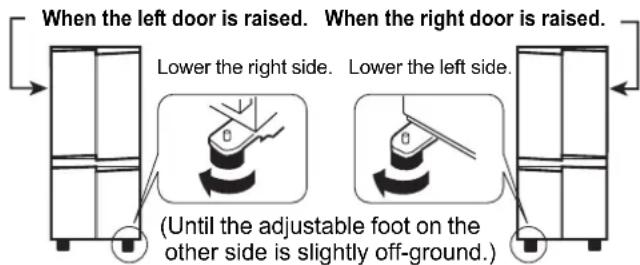
4 Remove the 4 screws of the cabinet lower part, and then set the foot cover (supplied inside the refrigerator compartment) with removed 4 screws.
Foot cover

Screw (4 screws)
NOTE
- Position your refrigerator so that the plug is accessible.
- Keep your refrigerator out of direct sunlight.
- Do not place next to heat generating appliance.
- Do not place directly on the ground. Provide suitable stand.
- To insert the power plug when the door is opened, door alarm sounds but it is not abnormal. This sound stops when closing the door.
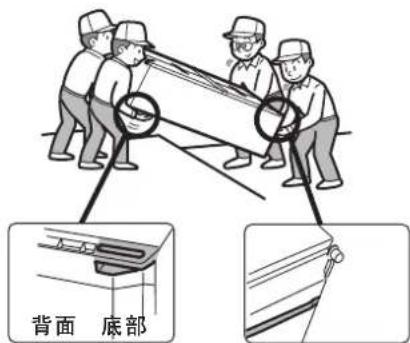
When transporting
• Using the casters, it is possible to move back and forth.
- Carry the refrigerator by holding the handles located on the rear and bottom.
Before using your refrigerator
Clean the inside parts with a cloth soaked in warm water. If soapy water is used, wipe it off thoroughly with water.

natural_image
Illustration of a person in a hard hat pushing a cabinet with an arrow indicating left motion (no text or symbols)Casters

DESCRIPTION


- Door pocket
- Refrigerator shelf
- Shelf
- Bottle pocket (left)
- Vegetable crisper
The cover of the Vegetable crisper opens as the case is pulled.

- Quick ice maker
The bottom of the tray contains refrigerant material used in ice packs to speed up the ice making process. The tray can also be used to freeze small food items such as meat and fruits by removing the ice making partition.
- Freezer case (small)
- Freezer case (large)
- Casters
- Adjustable feet
- Foot cover
- Aluminum panel
The panel is cooled from the rear, thus indirectly cooling the refrigerator compartment. In this way, food is refrigerated gently, without exposing it to cold air flow.
- Refrigerator LED light
- Plasmacluster light
-
Utility pocket cover
-
Utility pocket
- Egg holder
- Egg pocket
- Bottle rack
- Fruit case
- Fresh case
- Bottle pocket (right)
To store large-size bottles, move the partition all the way back.


Partition

-
Ice cube maker
-
Do not over fill the tray; otherwise the ice cubes will be joined together when frozen.
-
When the ice cubes are made, turn the lever clockwise to empty the ice into the Ice cube box.
-
Ice cube box
To prevent damage to the Ice cube box, do not make ice in the Ice cube box or pour oil into it.
- Magnetic door seal
- Control panel
Lever

Ice cube box
Control panel


Plasmacluster

Express Ice Making

Express Freezing

Timer

Refrigerator temp. control

Freezer temp. control

Door alarm

Child lock

Vacation mode
- Marks of features in operation are displayed.
- Features that start automatically when inserting the power plug.
- When the refrigerator stops with power failure and the like, display at the time of re-power distribution shows similarly as before having a power failure. However, when it has a power failure during operation of Express Ice Making, Express Freezing, and Timer, operation is stopped at the time of re-power distribution.

NOTE
- When no operation is made for 30 seconds, the display will automatically return to the initial content.
The backlight will become dark when there is no operation for 3 minutes.
The backlight will turn off when there is no operation for 6 minutes. - Do not hit or apply sharp object on to the LCD panel.
Deodorizing unit
Deodorizing catalyst is installed on the routes of cold air. No operation and cleaning are required.
Defrosting
Defrosting is fully automatic due to a unique energy saving system.
OPERATION (USING THE CONTROL PANEL)


Controlling Temperature
The refrigerator controls its temperature automatically. However, if needed, adjust the temperature as follows.
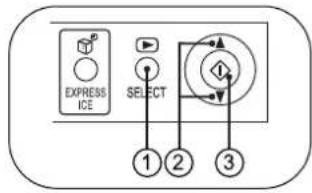
Refrigerator compartment
① Press the "SELECT" button and select the "Refrigerator temp." mark.

② Press the ▲ button and set the temperature.
[ ▲increase, : decrease ]

③ Press the "Button.
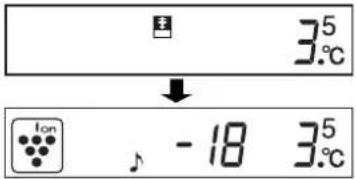
Adjustable between 0^ C and 6^ C in steps of 0.5^ C.
| When the refrigerator provides excessive cooling. | |
| For normal operation. | |
| For keeping foods fresher tasting. When the refrigerator does not provide sufficient cooling. |
Freezer compartment
① Press the "SELECT" button and select the "Freezer temp." mark.

② Press the /▲buton and set the temperature.
[ ▲increase, :decrease]

③ Press the "button.
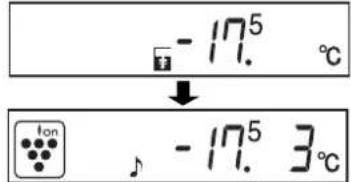
Adjustable between -13^ and -21^ in steps of 0.5^ .
| ↑-13°C | When frozen food or ice cream is not stored. |
| -18°C | For normal freezing. |
| ↓-21°C | For making ice rapidly or fast freezing. |

Express Ice Making
Ice cubes can be made quicker than normal.
- This feature cannot be used simultaneously with Express Freezing.
① Press the "EXPRESS ICE" button.
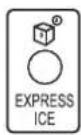
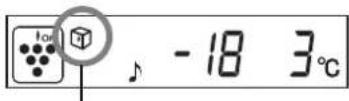
The mark appears and operation starts.
② When the ice is completed, remove the ice.
To cancel operation
Press the "EXPRESS ICE" button again.
NOTE
- Express Ice Making ends automatically in about 1 hour regardless of ice condition. (The mark disappears.)
- Express Ice Making may require more than 1 hour in the case operation overlaps with defrosting as operation is started after defrosting is completed.
- Avoid opening the door as much as possible during operation of this feature.
How to use the Quick ice maker
• Cool the Quick ice maker beforehand in the freezer (for at least 1 day).
- When the ice cubes are made, remove the partition from the tray, after that twist the both ends of the partition and drop the ice.


- Standard time until the ice is completed: approx. 20 minutes
- When using the water stored in the refrigerator compartment, at a room temperature of 30^ and with the refrigerator set to 3^ and the freezer to -18^ .
- Ice making time may become longer than above description depending upon room temperature and water temperature and the opening and closing frequency of the door etc.
- Ice making cannot be completed in approx. 20 minutes if pouring the water exceeding the water level line. Also it becomes difficult to remove the ice.


Plasmacluster
The plasmcluster automatically starts operating when the refrigerator is powered on.
Plasmacluster light of the refrigerator compartment lights up blue during operation.
To cancel operation
① Press the "SELECT" button and select the "Plasma-cluster" mark.
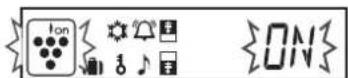
② Press the ▲button and select "OFF".

③ Press the " " button.

To start operation
Select "ON" in step ②
Notes about PLASMACLUSTER operation
The ionizer inside your refrigerator releases clusters of ions, which are collective masses of positive and negative ions, into the freezer and refrigerator compartments. These ion clusters inactivate airborne mold fungus.

chemical
Diagram showing the transformation of a mold fungus to a cross-shaped organic molecule with multiple hydroxyl groups- There may be a slight odors in the refrigerator. This is the smell of ozone generated by the ionizer. The amount of ozone is minimal, and quickly decomposes in the refrigerator.

Timer
Up to 99 minutes 30 seconds can be set in interval of 30 seconds.
① Press the "SELECT" button and select the "Timer" mark. Previous set time is displayed.
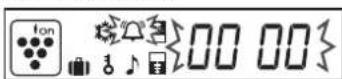
② Press the ▲button and set the time.
[ ▲increase, : decrease ] Push the button continuously, the setting can be configured quickly.

③ Press the "button.

Timer starts. The remaining time is displayed.

When the set time is reached, the end tone will sound. (About 30 sec.)
To stop the end tone, press "I"
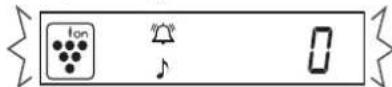
To cancel the timer
① Press "SELECT" to select the "Timer" mark.
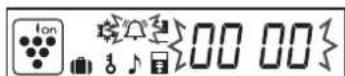
② Press the "button.
NOTE
During Timer operating it is not possible for the second time to set Timer.

Express Freezing
High-quality frozen foods can be made using this feature and is convenient for home-freezing.
- This feature cannot be used simultaneously with Express Ice Making.
① Press the "SELECT" button and select the "Express freezing" mark.

② Press the /▲button and select "ON".

③ Press the "button.


Express Freezing ends automatically in about 2 hours. (The mark disappears.)
To cancel operation
Select "OFF" in step ②
NOTE
• Large foods cannot be frozen in a single operation.
- Express Freezing may require more than 2 hours in the case operation overlaps with defrosting as operation is started after defrosting is completed.
- Avoid opening the door as much as possible during operation of this feature.


Door Alarm
When the refrigerator or freezer door is left open, the door alarm will sound.
• The door alarm will sound 1 minute after opening the door and again after 1 minute (once in each case).
- If the door is left open for approx. 3 minutes, the alarm will sound continuously.
To cancel operation
① Press the "SELECT" button and select the "Door alarm" mark.

② Press the ▲button and select "OFF".

③ Press the "Button.

To start operation
Select "ON" in step ②

Child Lock
Key operations of the control panel can be disabled. Use this feature to prevent children or someone from tampering with the panel.
① Press the "SELECT" button and select the "Child lock" mark.
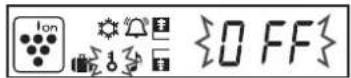
② Press the /▲button and select "ON".

③ Press the "button.
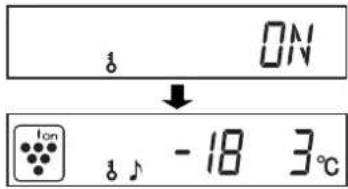
To cancel operation
① Press the "SELECT" button continuously 2 seconds or more.
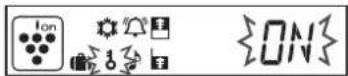
② Select "OFF" with the /button and press the "button.

Vacation Mode
Use this feature when going on a trip or leaving the house for a long time.
① Press the "SELECT" button and select the "Vacation mode" mark.
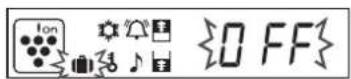
② Press the /▲button and select "ON".

③ Press the "button.

The temperature inside the refrigerator compartment will be adjusted to 10^ C. This temperature cannot be modified.
To cancel operation
Select "OFF" in step ②
NOTE
Food storage period in the refrigerator compartment becomes approx.1/2 - 1/3 of normal operation, because the temperature of the refrigerator compartment inside becomes 10^ . Please utilize only when there is no perishable food.
STORING FOOD

Refrigeration reduces the rate of food spoilage. To maximize the shelf life of perishable food products, ensure that the food is the freshest possible quality. The following is a general guide to help promote longer food storage.
Fruit / Vegetables
To minimize moisture loss, fruit and vegetables should be loosely enclosed in a plastic material e.g. wrap, bags (do not seal) and place in the Vegetable crisper or the Fruit case. Those fruits and vegetables with thick skins e.g. oranges do not require wrapping.
Dairy Products & Eggs
- Most dairy products have a use by date on the outer packaging which informs the recommended temperature and shelf life of the product.
- Eggs should be stored in the Egg holder.
Meats / Fish / Poultry
- Place on a plate or dish and cover with paper or plastic wrap.
- For larger cuts of meat, fish, or poultry, place to the rear of the shelves.
- Ensure all cooked food is wrapped securely or placed in an airtight container.
NOTE
• Evenly place the food on the shelves to allow the cooling air to circulate efficiently.
• Hot foods should be cooled before storing. Storing hot foods increases the temperature in the unit and increases the risk of food spoilage.
- Do not block the outlet and inlet of the cool air circulating circuit with foods or containers; otherwise the foods will not be evenly cooled throughout the refrigerator.
- Keep the door securely closed.
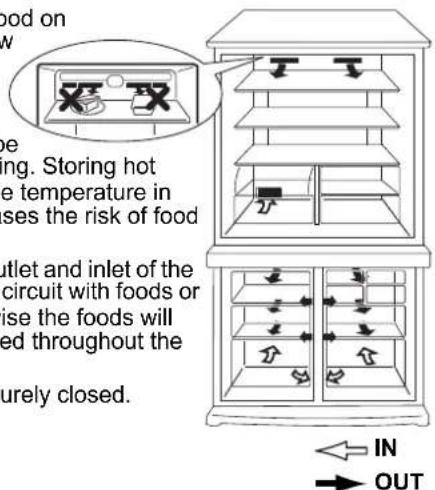
Do not place food directly in front of cold air outlet. This may lead to the food freezing.
For best freezing
• Quality of foods should be fresh.
- Freeze small quantities of food at a time to freeze them quickly.
- Food should be properly stored or covered and the air should be removed to seal tightly.
• Evenly place the food in the freezer.
- Label bags or containers to keep an inventory of freezing food.
CARE AND CLEANING
WARNING
■Unplug the refrigerator first to prevent electric shock.
■Do not splash water directly on the outer cabinet or the interior. This may lead to rusting and deterioration of the electrical insulation.
IMPORTANT
To prevent cracking on inside surfaces and plastic components, follow these tips.
- Wipe any food oils adhered to plastic components.
- Some household chemicals may cause damage, so use only diluted washing-up liquid (soapy water).
- If undiluted detergent is used or soapy water is not wiped off thoroughly, cracking of plastic parts can result.
1 Remove the shelves and pockets from the cabinet and door. Wash them in warm soapy dishwashing water; rinse in clean water and dry.
2 Clean the inside with a cloth soaked in warm soapy dishwashing water. Then, use cold water to wipe off soapy water.
3 Wipe the exterior with a soft cloth each time it is soiled.
4 Clean the Magnetic door seal with a toothbrush and warm soapy dishwashing water.
5 Wipe the control panel with the dry cloth.
NOTE
- To prevent damage to your refrigerator, do not use heavy duty cleansers or solvents (lacquer, paint, polishing powder, benzine, boiled water, etc.).
- If the power supply is disconnected, please wait for at least 5 minutes before re-connecting power.
- The glass shelves weigh approximately 3 kg each. Hold firmly when removing from the cabinet or carrying.
- When dropped the juice and the like near the control panel, wipe off directly. It becomes cause of failure of the control panel.
- Do not drop objects inside the refrigerator or strike the inner wall. This may cause the inner surface to crack.
When the compartment light is blown
Contact the service agent approved by SHARP to request a replacement compartment light. The compartment light is not to be removed other than by qualified service personnel.
Switching off your refrigerator
If you switch your refrigerator off when you are going away for an extended period, remove all food, clean the interior thoroughly. Remove the power cord plug from the power socket and leave all doors open.
WHAT TO DO BEFORE YOU CALL FOR SERVICE
Before you call for service, check the following points.
| Problem Solution | |
| The outside of a cabinet is hot when touched. | It is normal. The hot pipe is in the cabinet in order to prevent dew generation. |
| When there is refrigerator noise. It is normal for the refrigerator to produce the following sounds.Loud noise produced by the compressor when operation starts--- Sound becomes quieter after a while.Loud noise produced once a day by the compressor--- Operating sound produced immediately after automatic defrost operation.Sound of flowing fluid (gurgling sound, fizzing sound)--- Sound of refrigerant flowing in pipes (sound may become louder from time to time).Cracking or crunching sound, squeaking sound--- Sound produced by expansion and contraction of inner walls and internal parts during cooling. | |
| Frosting or dew generation occurs inside or outside the refrigerator. | This may occur in one of the following cases. Use a wet cloth for wiping frost and a dry cloth for wiping dew.When the ambient humidity is high.When the door is frequently opened and closed.When foods containing plenty of moisture are stored. (Wrapping is required.) |
| The foods in the refrigerator compartment freeze. | Is the refrigerator operated for a long time with refrigerator temp. control set at 0°C?Is the refrigerator operated for a long time with freezer temp. control set at -21°C?Low ambient temperature may cause placed foods to freeze even if refrigerator temp. control is set to 6°C. |
| It smells in the compartment. | Wrapping is required for the foods with strong smell.Deodorizing unit cannot remove all of smell. |
IF YOU STILL REQUIRE SERVICE
Refer to your nearest service agent approved by SHARP.
警告
natural_image
Illustration of a person in a hard hat pushing a cabinet with directional arrows (no text or symbols)移動車輪
各部位名稱


chemical
Chemical reaction diagram showing dehydrogenase (微菌) reacting with a trioxide ion (OH⁻)
- 原裝進口電冰箱 使用説明書
- 目錄
- WARNING
- CAUTION
- INSTALLATION
- NOTE
- When transporting
- Before using your refrigerator
- DESCRIPTION
- Deodorizing unit
- Defrosting
- OPERATION (USING THE CONTROL PANEL)
- Controlling Temperature
- Refrigerator compartment
- Freezer compartment
- Express Ice Making
- To cancel operation
- How to use the Quick ice maker
- Plasmacluster
- To start operation
- Notes about PLASMACLUSTER operation
- Timer
- To cancel the timer
- Express Freezing
- Door Alarm
- Child Lock
- Vacation Mode
- STORING FOOD
- Fruit / Vegetables
- Dairy Products & Eggs
- Meats / Fish / Poultry
- For best freezing
- CARE AND CLEANING
- IMPORTANT
- When the compartment light is blown
- Switching off your refrigerator
- WHAT TO DO BEFORE YOU CALL FOR SERVICE
- IF YOU STILL REQUIRE SERVICE
- 警告
- 各部位名稱
Brand : SHARP
Model : SJ-F73SPSL
Category : Refrigerator