
RM-V402T - Uncategorized SONY - Free user manual and instructions
Find the device manual for free RM-V402T SONY in PDF.
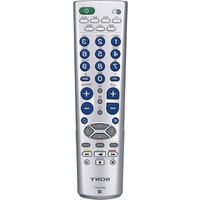


| Product Type | Universal Remote Control |
| Brand | Sony |
| Model | RM-V402T |
| Dimensions (W x H x D) | Approx. 55 x 200 x 32 mm |
| Weight (without batteries) | Approx. 95 g |
| Power Supply | 2 x AAA batteries (1.5 V each) |
| Controlled Devices | TV, DVD, MD, and other audio/video equipment |
| Control Type | Infrared (IR) |
| Key Features | Pre-programmed for Sony devices, learning function, multi-brand support |
| Programming Method | Manual code entry or auto-search |
| Battery Life | Approx. 6 months under normal use |
| Operating Range | Up to 8 meters |
| Coverage Angle | Approx. 30 degrees |
| Material | Plastic with rubberized buttons |
| Care Instructions | Wipe with a soft, dry cloth. Do not use liquids or solvents. |
| Safety Precautions | Avoid dropping or exposing to moisture. Keep away from heat sources. |
| Spare Parts Availability | Contact Sony support for replacement batteries or remote |
| Repairability | Not user-serviceable; internal components sealed |
| Manufacturing Date | c. 2004 |
Frequently Asked Questions - RM-V402T SONY
User questions about RM-V402T SONY
0 question about this device. Answer the ones you know or ask your own.
Ask a new question about this device
Download the instructions for your Uncategorized in PDF format for free! Find your manual RM-V402T - SONY and take your electronic device back in hand. On this page are published all the documents necessary for the use of your device. RM-V402T by SONY.
USER MANUAL RM-V402T SONY
(DEPENDING ON MODEL) Dimensions approx. 55×200×32 mm (w/h/d)
Weight approx. 95 g (without batteries)
Quick start guide
2011: Suspension.
MD deck operation


Brand : SONY
Model : RM-V402T
Category : Uncategorized