
Micro X-Clean ADD5980S - Water tank PHILIPS - Free user manual and instructions
Find the device manual for free Micro X-Clean ADD5980S PHILIPS in PDF.


| Product Type | Water Dispenser with Filtration, Heating, and Cooling |
| Model | Philips Micro X-Clean ADD5980S |
| Filter Model | AWP230 |
| Rated Voltage | 220-240 V~ |
| Rated Frequency | 50-60 Hz |
| Total Power Consumption | 2200 W |
| Heating Power | 2100 W |
| Cooling Power | 70 W |
| Applicable Water Source | Municipal tap water |
| Inlet Water Temperature | 5-30 °C |
| Filtered Capacity (non-chilled) | 1.4 L |
| Filter Replacement Cycle | Every 100 liters or 30 days |
| Dimensions (approximate) | Not specified; typical countertop dispenser size |
| Weight (approximate) | Not specified; estimated 5-7 kg |
| Main Functions | Instant heating (multiple temperatures), chilled water down to 8°C, filtration via Micro X-Clean filter, adjustable volume, descaling program |
| Control Panel Features | On/Off, Safety Lock, Dispense, Descale indicator, Cooling indicator, Water shortage indicator, Filter lifetime indicator, Temperature and volume selection |
| Cleaning and Maintenance | Wash inner water tank, water tank, and lid regularly; descale with vinegar solution; replace filter per indicator |
| Safety Features | Safety lock for hot water, auto sleep mode, overheat protection, child lock, do not immerse |
| Spare Parts and Repairability | Replacement filter cartridge (AWP230), drip tray, power cord; contact Philips consumer care for service |
| General Information | Indoor use only; not for commercial purposes; consumes filtered water within 24 hours |
Frequently Asked Questions - Micro X-Clean ADD5980S PHILIPS
User questions about Micro X-Clean ADD5980S PHILIPS
0 question about this device. Answer the ones you know or ask your own.
Ask a new question about this device
Download the instructions for your Water tank in PDF format for free! Find your manual Micro X-Clean ADD5980S - PHILIPS and take your electronic device back in hand. On this page are published all the documents necessary for the use of your device. Micro X-Clean ADD5980S by PHILIPS.
USER MANUAL Micro X-Clean ADD5980S PHILIPS
natural_image
Exterior view of a Philips water dispenser with control panel and water drop buttons (no visible text or symbols on main body)User manual
1. Important
Necessary precautions must be taken when using electrical appliances, and these include the following:
- Keep the power cord out of reach of children.
- The appliance is not to be used by persons (including children) with reduced physical, sensory or mental capabilities, or lack of experience and knowledge, unless they have been given supervision or instruction.
• Children being supervised not to play with the appliance.
• Install the appliance according to the installation instructions in this user manual. - Use on a flat heat resistance surface.
- Use in a well ventilated area. This appliance emits hot steam.
- Ensure the voltage on the appliance rating plate corresponds to that of the mains electricity.
- Never place the appliance on or close to sources of heat or very damp places.
- Ensure that the power cord does not come into contact with hot surfaces.
- Never place the appliance body, plug or power cord in water or other liquids. Always wipe clean with a damp cloth.
- Always ensure that your hands are thoroughly dry before using or adjusting the switches on the appliance, or before touching the power plug or power connections.
- Do not obstruct the ventilation on the sides of the appliance.
- This product is intended to filter tap water only. Do not put water of unknown quality or that has been microbiologically impaired into the product. Use only cold or room temperature water. Do not use for the preparation of baby food.
- Consume filtered water within 24 hours.
- To unplug the appliance, grip the plug and remove it directly from the power socket. Never pull the power cord to unplug the appliance.
- Never use the appliance if the power cord or plug are damaged or if the appliance itself is faulty.
- Any changes to this product that have not been expressly authorized by the manufacturer may lead to the user's guarantee being rendered null and void.
- Packaging must never be left within the reach of children since it is potentially dangerous.
- This appliance is designed for filtering, chilling and heating water. Please do not use the appliance to chill other liquids as this will damage the appliance and void the warranty.
- Do not store or use this appliance outdoors.
- If the appliance is used incorrectly, please remove the plug from the socket and contact customer services.
- The appliance is designed for use with Philips Micro X-Clean filter, the performance is not guaranteed if any other filters are used.
- Do not leave the appliance unattended during operation.
- Do not clean with solvents or harsh chemicals.
- Do not move appliance when in use.
- Do not operate appliance with a damaged cord, plug or after the appliance has malfunctioned or been damaged in any manner. If the cord is damaged it must be changed by a qualified person to avoid a hazard.
- Do not fill the appliance with hot water. The applicable inlet water temperature is 5-30°C.
- Do not remove filter whilst the appliance is running.
- Do not use appliance without the filter correctly placed or if the filter is damaged or broken.
- At first use or after the appliance has been completely drained of water in all tanks, ensure the instructions for first use are followed.
- The appliance is designed for domestic and small office use only. It should not be used for commercial purpose.
- Do not store explosive substances such as aerosol cans with a flammable propellant in this appliance.
- During the first-time usage, it will need several minutes to fill the cold water tank so no water comes out yet when you dispense cold water.
• After plug in, please press the Power Button to turn on the appliance and control panel.
- This appliance is intended to be used in household and similar applications such as:
- staff kitchen areas in shops, offices and other working environments;
- by clients in hotels, motels and other residential type environments;
- bed and breakfast type environments;
- farm houses.
- Appliances normally cleaned after use and not intended to be immersed in water for cleaning, state that the appliance must not be immerse.
- The appliance shall not be placed in a cabinet when in use.
- Cleaning and user maintenance shall not be made by children without supervision.
- Appliances can be used by persons with reduced physical, sensory, or mental capabilities or lack of experience and knowledge if they have been given supervision or instruction concerning use of the appliance in a safe way and understand the hazards involved. Children shall not play with the appliance.
- The heating element surface is subject to residual heat after use.
- Appliance outlet and other items may be hot after cycle.
- Be cautious of the hot steam when dispensing water ≥ 40^ .
- Do not move the appliance unless cutting off the power.
- Failure to follow these instructions could cause scalding or damage to the product.
- WARNING: Do not locate multiple portable socket-outlets or portable power supplies at the rear of the appliance
2. Parts and features
This is a water dispenser. With instant heating technology, it provides hot water with different temperatures within seconds. The chilled water can be down to 8°C on demand. Thanks to Philips Micro X-Clean filter, you can always enjoy the crisp and pure tasting water at home.
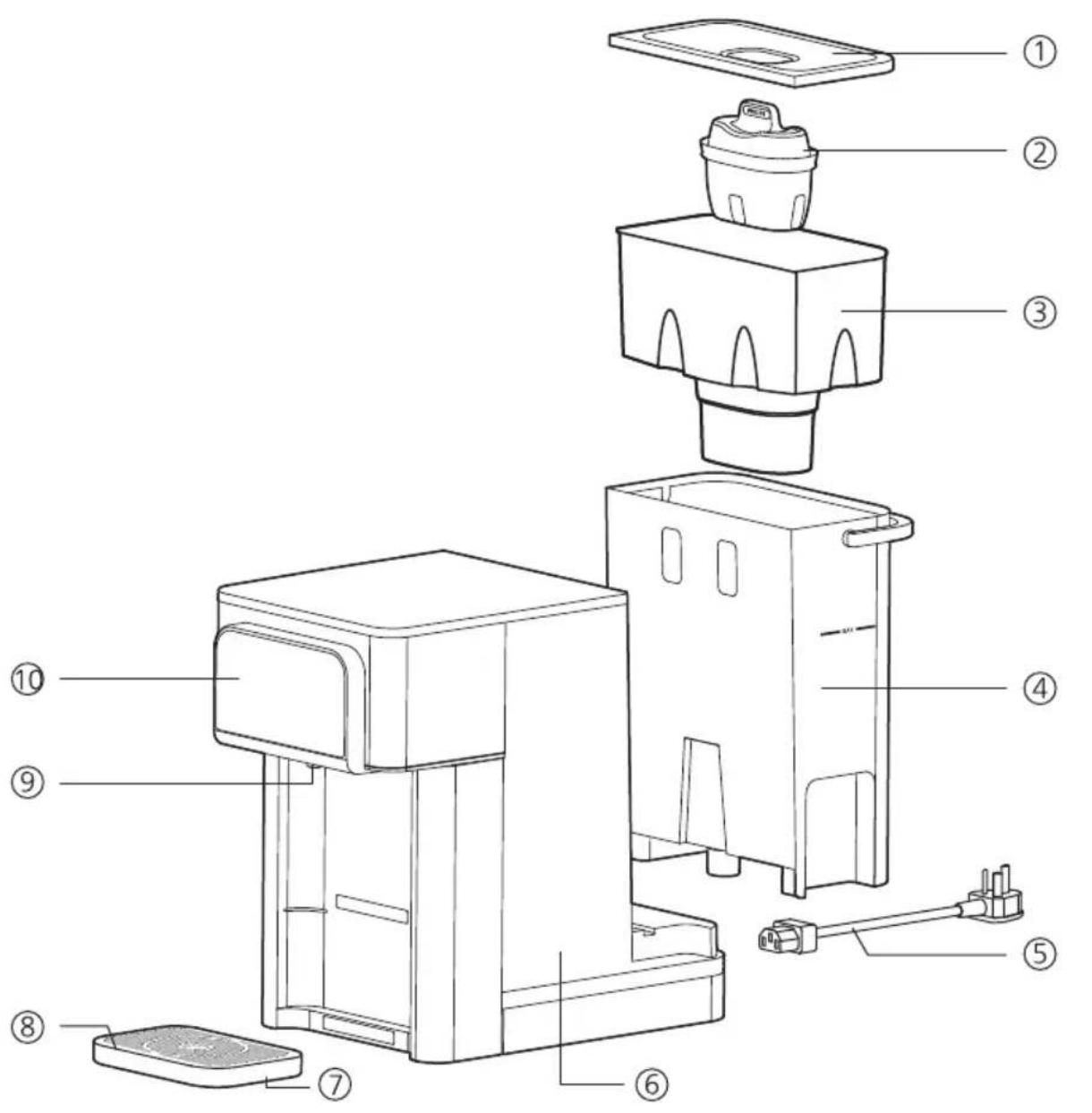
① Water tank cover
② Filter
③ Inner water tank
④ Water tank
⑤ Power cord
⑥ Main body
⑦ Drip tray
⑧ Drip tray plate
⑨ Nozzle
⑩ Control Panel
Control panel

On/Off Button
Press to activate the appliance. Long press for 3 seconds to deactivate the appliance.

Safety Lock
When hot water ≥40^ is chosen, press to unlock before pressing the dispense button. Press to lock the appliance.

Dispense Button
Press to start or stop dispensing. Long press for 3 seconds to continuously dispense 1L of water at the temperature you selected.

Descale Indicator/Button
Lights up when it is time to descale. Long press for 3 seconds to start the descaling process. During descaling, press Dispense Button to pause, and press Descale or Dispense Button to restart.
Note: detailed descale procedure please refer to the instruction in chapter 5. The descale process cannot be stopped till it is finished.

Cooling Indicator
Lights flashing when the water is being cooled. Lights up constantly when the cooling is done.

Water Shortage Indicator
Flashes when there is not enough water in the water tank. Please fill the water tank. The light will turn off.

Filter Lifetime Indicator
Flashes: the filter is about to reach the end of life.
Lights up constantly: the filter reaches the end of life.

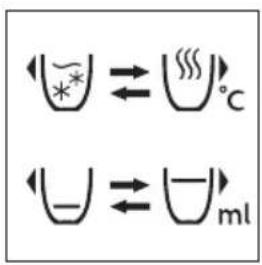
Water Temperature Selection
Keep pressing one of the buttons to choose through settings.

Water Volume Selection
Keep pressing one of the buttons to choose through settings.

Filter Lifetime Reset
Long press both buttons for 3 seconds to reset the filter lifetime. The filter lifetime indicator turns off.

Switch off the cooling system
Long press both buttons for 3 seconds to turn off/turn on the cooling system. After the cooling system is turned off, select cold water temperature to dispense ambient water.
Main technical specifications
| Product model | ADD5980S |
| Filter model | AWP230 |
| Rated voltage | 220-240V~ |
| Rated frequency | 50-60Hz |
| Rated power consumption | Total: 2200W; Heating: 2100W; Cooling: 70W |
| Applicable water source | Municipal tap water |
3. Installation
Before using the appliance for the first time
- Remove all packaging.
- Remove the tank lid and extract the inner water tank and water tank. Wash rinse and dry thoroughly.
- Clean the appliance as per the first time cleaning instruction in chapter 5.
WARNING: PLEASE DO NOT DISASSEMBLE THIS APPLIANCE YOURSELF. ELECTRIC ELEMENTS WILL BE EXPOSED AND THERE IS A RISK OF ELECTRIC SHOCK.
Positioning of appliance
- Do not install this appliance in a very damp or hot place, near heat source.
- Place appliance on a flat and even surface.
• Install the appliance in a dry place to avoid damage, moisture or rust. - Do not use this appliance outdoors. This appliance is only suitable for use indoors.
- Do not overhang the power cord and water tray on a table, counter or other surface and avoid contact with hot surfaces.
- WARNING: DO NOT INSTALL THIS APPLIANCE IN DIRECT SUNLIGHT.
- Ensure that the ventilation on both sides is never blocked or covered.
4. How to use
Fill water tank through to the "MAX" mark; water will flow through the filter at a set rate and may take some time due to the action of the filter cartridge.
- Plug in. Press the Power Button. The power button will light up and the appliance is ready to work. (A-1)
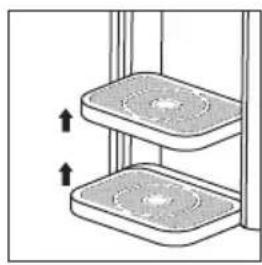
- Adjust the height of the drip tray to accommodate the size of the mug used. There are 2 height options. (A-2)
- Place mug or glass on drip tray.
- Select the desired temperature and volume. (A-3)
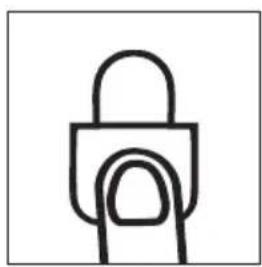
- Press the Safety Lock Button to unlock the appliance (not applicable for chilled water). (A-4)
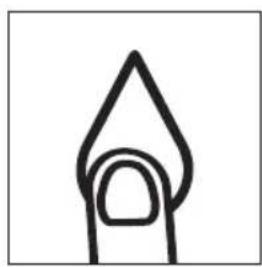
- Press the Dispense Button to start dispensing. (A-5)

natural_image
Simple line drawing of a hand holding a glowing object (no text or symbols)A-1
natural_image
Diagram of two stacked rectangular containers with upward arrows indicating movement or force (no text or symbols)A-2
A-3
natural_image
Simple line drawing of a padlock (no text or symbols)A-4
natural_image
Simple line drawing of a flame or flame shape with a circular opening (no text or symbols)A-5
Note
- Pressing any button during dispensing can stop the cycle. Once the cycle has stopped it cannot be continued. A new cycle must be started.
- The appliance will automatically go to sleep mode if no operation within 1 minute. Touch any button can wake up the appliance.
- The total filtered (not chilled) capacity for this appliance is 1.4L as long as both the inner water tank and the water tank are kept topped up.
5. Clean and maintenance
First time cleaning
1. Preparing the filter cartridge
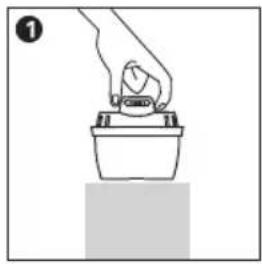
- Remove the packaging. It is common that its surface may have some carbon powder, this is normal. These particles are harmless and are washed off during the preparation process.
- Soak the filter cartridge in clean water for 15 minutes. Shake the filter cartridge slightly to wash the carbon powder on the surface.
natural_image
Simple line drawing of a hand pressing down on a container (no text or symbols)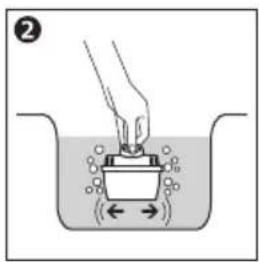
2. Preparing the appliance
- Remove the inner water tank.
- Ensure the seal ring is installed correctly.
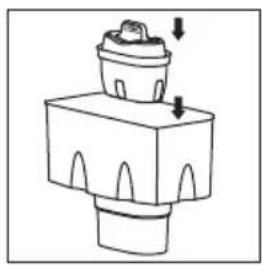
- Press the filter cartridge into the the inner water tank. Ensure it is firmly secure. (B-1)
- Reinsert the inner water tank into the water tank.
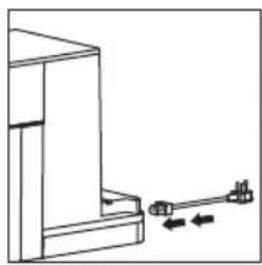
- Attach the power cord to the socket at the base of the appliance. (B-2)
- Fill the water tank with 2L of cold tap water and refit the water tank into the appliance.
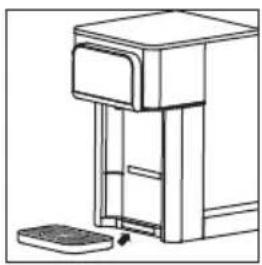
- Place drip tray and drip tray plate on the front of the appliance. (B-3)
- Place a jug or vessel under the dispense outlet.
- Plug the power cord into the mains socket and turn on.
- Press ☒ _c to choose cold water. Long press for 3 seconds. Dispense cold water till the water tank is empty.
- Discard the water dispensed. Your appliance is now ready to use.
natural_image
Simple line drawing of a mechanical component with arrows indicating direction (no text or symbols)B-1
natural_image
Pure mechanical diagram showing a bracket and lever mechanism without any text or symbolsB-2
natural_image
Line drawing of a desktop computer with a scroll and keyboard (no text or symbols)B-3
Cleaning
ATTENTION: NEVER PLACE THE APPLIANCE BODY, PLUG OR POWER CORD IN WATER OR OTHER LIQUIDS. ALWAYS WIPE CLEAN WITH A DAMP CLOTH.
• Always switch off and unplug appliance before cleaning.
- Ensure the appliance is cool before cleaning.
- Wash, rinse and dry the inner water tank, water tank and the tank lid regularly, at least when the filter cartridge is replaced.
- Wash drip tray with soapy water. Rinse all soap away with clean water. Allow to air dry.
- Do not use scouring pads, solvents or abrasives to clean as they may damage the appliance.
- For hygiene and safety reasons you should always clean the inner water tank, water tank and tank lid if it has been unused or in storage for longer than 2 weeks.
Descaling
- For safe and efficient operation of your appliance it is important to descale regularly.
- Untreated scale deposits prevent the element conducting heat efficiently and may affect its performance.
- The Descale Indicator/Button lights up when the appliance requires the descale process. You can not dispense water at or above 40°C until you perform descaling. You can only dispense cold or ambient water.
- Ensure the water tank is empty and filter is removed before starting descale process.
Descale Procedure
- Remove the filter and the inner water tank.
- Fill water tank with 2 liters of 4% vinegar solution.
- Place jug under dispense nozzle.
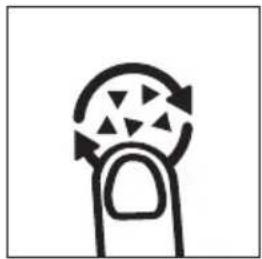
- Long press the Descale Button for 3 seconds. (C-1)
- The Descale Button will flash and the appliance will run a descale process. It will need around 30 mins. Caution: Dispense solution will be hot.
- When the water tank is empty, refill with 2 liters of cold water and long press the Descale Button again.
- The appliance will run a cleaning cycle. Caution: Dispense solution will be hot.
- The Descale Button will turn off once complete.
- Re-insert the filter after descale process is complete.
natural_image
Simple line drawing of a finger with arrows indicating rotation or movement (no text or symbols)C-1
Note
- During descaling, press Dispense Button to pause, and press Descale or Dispense Button to restart.
- The descale process cannot be stopped till it is finished.
- When it is time to descale, you can not dispense water at or above 40°C until you perform descaling. You can only dispense cold or ambient water.
Replacing the filter cartridge
To ensure the best performance, please change the filter cartridge according to the Filter Lifetime Indicator, or the suggested replacement cycle.
- Please clean and install the filter cartridge as per the first time cleaning instruction above.
- Reset the filter lifetime by long press ⏻ and ⏻ for 3 seconds.
| Model | Suggested Replacement Cycle |
| AWP230 | After 100 liters or every 30 days, whichever comes first. |
Filter lifetime indicator flashes: the filter is about to reach the end of life.
Filter lifetime indicator lights up constantly: the filter reaches the end of life.
Note
- Water is a foodstuff. We recommend using the filtered water within 1 day. If the appliance is not used for more than 72 hours fill it twice with cold water and empty the water before continuing to use it normally.
- Should the appliance not be used for an extended period of time (for example a holiday) we recommend that the filter is removed and placed in a sealed plastic bag and stored in the fridge. This will help to maintain the filter when not in use. Before using the filter after storage, follow the preparation and installation instructions for use as normal.
- Do not overfill the water tank, do not fill above the "max" fill to avoid risk of water overflow in the raw water tank.
• Always switch off and unplug appliance before cleaning - Ensure the appliance is cool before cleaning.
-
Wash, rinse and dry the raw water tank, water tank and the tank cover regularly, at least when the filter cartridge is replaced.
-
Wash drip tray with soapy water. Rinse all soap away with clean water. Allow to air dry.
- Do not use scouring pads, solvents or abrasives to clean as they may damage the appliance.
-
For hygiene and safety reasons you should always clean the raw water tank, water tank and tank cover if it has been unused or in storage for longer than 2 weeks.
-
Trouble shooting
| Problem | Possible causes | Solutions |
| The display panel does not light up | The appliance is in sleep mode. | Touch any button to wake up the appliance. |
| The appliance is not connected with power. | Plug in the power plug, and press the power button to turn it on. If it does not work, please contact consumer care. | |
| The appliance does not dispense hot water. | The appliance is not connected with power. | Plug in the power plug, and press the power button to turn it on. |
| There is no water in the water tank. | Fill up the water tank. | |
| The dispense button is locked. | Press the safety lock button to unlock. | |
| The appliance requires descaling. | Descale according to the instruction in chapter 5. | |
| Button/display panel does not respond. | The appliance is not connected with power. | Plug in the power plug, and press the power button to turn it on. |
| The appliance is in sleep mode. | Touch any button to wake up the appliance. | |
| There is condensed water on the display after dispensing hot water. | Wipe the panel with a dry cloth. | |
| Leakage of the water tank. | The water tank is filled beyond the maximum water level. | Fill the water tank up to the maximum water level. If leakage continues, please contact consumer care. |
| Water drips from the outlet. | The water tank is filled beyond the maximum water level. | Fill the water tank up to the maximum water level. |
| There is condensed water on the display after dispensing hot water. | Wipe the panel with a dry cloth. | |
| The appliance does not dispense cold water. | The appliance is not connected with power. | Plug in the power plug, and press the power button to turn it on. |
| There is no water in the water tank. | Fill up the water tank. | |
| During the first use, the cold water tank is not filled yet. | Follow the first time cleaning instruction in chapter 5. | |
| The appliance does not dispense cold water. | The cooling system is turned off. | Long press and for 3 seconds to turn on the cooling system. After the cooling system is turned on, you will hear the cooling sound, and the Cooling Indicator will light up. If it does not work, please contact consumer care. |
| Unstable water flow. | Limescale builds up in the heating element. | Follow the descaling instruction to descale. |
| Slow water flow. | Limescale builds up in the heating element. | Follow the descaling instruction to descale. |
| There is air in the water pump. | Fill up the water tank. | |
| Water shortage indicator flashes. | There is no water in the water tank. | Fill up the water tank. |
| The filter is blocked. | Replace with a new filter cartridge. | |
| Odd taste of the water. | The appliance is not cleaned thoroughly after descaling. | Follow step 6-9 in chapter 5 descale instruction to clean the appliance. |
| The filtered water is not used for a long time. | Discard the remaining water in the water tank and refill with fresh tap water. | |
| The filter has reached the end of life. | Please replace with a new filter cartridge. | |
| Safety lock does not work | The safety lock function is turned off. | Long press the safety lock button for 10s to turn it on. |
| Safety Lock and 90°C flash, with a buzzing sound | The heating element is abnormal. | Cut off the power and wait for 5 minutes. Plug in again and descale according to the instruction in chapter 5. If this does not resolve the problem, please contact consumer care. |
| Safety Lock and 200ml flash, with a buzzing sound | The inlet water temperature sensor is abnormal. | Please contact consumer care. |
| Safety Lock and 250ml flash, with a buzzing sound | The inlet water temperature sensor is abnormal. | Please contact consumer care. |
| Safety Lock flashes, with a buzzing sound | Display malfunction. | Please contact consumer care. |
| Safety Lock and 100°C flash, with a buzzing sound | Overheating. | Cut off the power and wait for 5 minutes. Plug in again and descale according to the instruction in chapter 5. If this does not resolve the problem, please contact consumer care. |
7. Guarantee and service
If you need information or if you have any problems, please visit the Philips website at www.philips.com or contact the consumer care center in your country. If there is no consumer care center in your country, go to the local dealer.
8. Packing list
| Water dispenser | x1 |
| Filter cartridge | x1 |
| Drip tray | x1 |
| User manual | x1 |
| Power cord | x1 |
| Quick start guide | x1 |
| Warranty leaflet | x1 |
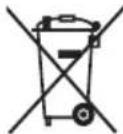
This symbol on the products and accompanying documents means that used electrical and electronic products should not be mixed with general household waste. For proper disposal or treatment, recovery and recycling, please take these products to designated collection points

where they will be accepted on a free of charge basis. In some countries you may be able to
return your products to your local retailer upon the purchase of a new product.
Disposing of this product correctly will help you save valuable resources and prevent any possible effects on human health and the environment, which could otherwise arise from inappropriate waste handling.
Please contact your local authority for further details of your nearest collection point for WEEE.
Penalties may be applicable for the incorrect disposal of this product in accordance with national legislation.

Register your product and learn more via the website link below:
www.philips.com/water
Specifications are subject to change without notice
© 2023 AquaShield
All rights reserved.
Philips and the Philips Shield Emblem are registered trademarks of
Koninklijke Philips N.V. and are used under license.
This product has been manufactured by and is sold under the responsibility of
Hong Kong AquaShield Health Technology Company Limited
and Hong Kong AquaShield Health Technology Company Limited is the warrantor in relation to this product.
Rev A JUL 23

- Important
- Parts and features
- Control panel
- On/Off Button
- Safety Lock
- Dispense Button
- Descale Indicator/Button
- Cooling Indicator
- Water Shortage Indicator
- Filter Lifetime Indicator
- Water Temperature Selection
- Water Volume Selection
- Filter Lifetime Reset
- Switch off the cooling system
- Installation
- Before using the appliance for the first time
- Positioning of appliance
- How to use
- Note
- Clean and maintenance
- First time cleaning
- Preparing the filter cartridge
- Preparing the appliance
- Cleaning
- Descaling
- Descale Procedure
- Replacing the filter cartridge
- Guarantee and service
- Packing list
Brand : PHILIPS
Model : Micro X-Clean ADD5980S
Category : Water tank