
T3010 - Headphones NOKIA - Free user manual and instructions
Find the device manual for free T3010 NOKIA in PDF.


Pick your language and provide your email: we'll send you a specifically translated version.
| Product Type | Wired Headphones |
| Brand | Nokia |
| Model | T3010 |
| Driver Size | 40 mm |
| Impedance | 32 ohms |
| Frequency Response | 20 Hz - 20 kHz |
| Connectivity | 3.5 mm audio jack |
| Cable Length | 1.2 m |
| Weight | 180 g |
| Dimensions (W x H x D) | 180 x 200 x 80 mm |
| Power Source | None (passive) |
| Controls | In-line microphone and remote |
| Microphone | Built-in omnidirectional |
| Compatibility | Smartphones, tablets, PCs |
| Ear Cushion Material | Faux leather |
| Headband Material | Plastic with steel reinforcement |
| Foldable | Yes |
| Package Contents | Headphones, user manual |
| Maintenance & Cleaning | Wipe with dry cloth; avoid moisture |
| Safety | Do not use at high volume for extended periods |
| Spare Parts & Repairability | Cable and ear cushions replaceable |
| General Information | Designed for everyday audio use |
Frequently Asked Questions - T3010 NOKIA
How do I connect the Nokia T3010 headphones to my phone?
Plug the 3.5 mm audio jack into your phone's headphone port. If your phone lacks a headphone jack, use a compatible adapter.
Can I use the headphones with a computer?
Yes, the Nokia T3010 headphones work with any device that has a 3.5 mm audio port, including computers, tablets, and laptops.
How do I adjust the volume or skip tracks?
Use the in-line remote on the cable. Press the + and - buttons to adjust volume. Press the center button once to play/pause or twice to skip to the next track.
Is there a microphone for calls?
Yes, the headphones have a built-in omnidirectional microphone located on the in-line remote, allowing you to take calls hands-free.
How do I clean the headphones?
Wipe the ear cushions and headband with a soft, dry cloth. Do not use any liquids or cleaning agents, and avoid getting moisture into the openings.
Can I replace the ear cushions?
Yes, the ear cushions are replaceable. You can purchase compatible replacements from third-party retailers. Gently pull off the old cushions and snap on the new ones.
Is the cable detachable?
No, the cable is fixed to the headphones. If the cable is damaged, you may need to repair or replace the entire unit.
What should I do if there is no sound?
First, ensure the audio jack is fully inserted. Check the volume on your device. Try another device to rule out source issues. If the problem persists, inspect the cable for damage.
Are these headphones foldable for portability?
Yes, the Nokia T3010 headphones fold flat at the hinges, making them compact for storage and travel.
Where can I find the user manual?
The user manual is available for free download on notice-facile.com in PDF format. Search for 'Nokia T3010' on the site.
User questions about T3010 NOKIA
0 question about this device. Answer the ones you know or ask your own.
Ask a new question about this device
No questions yet. Be the first to ask one.
Download the instructions for your Headphones in PDF format for free! Find your manual T3010 - NOKIA and take your electronic device back in hand. On this page are published all the documents necessary for the use of your device. T3010 by NOKIA.
USER MANUAL T3010 NOKIA
| NOKIA | Contents | Powering on | Pairing mode | Charging | NOKIA |
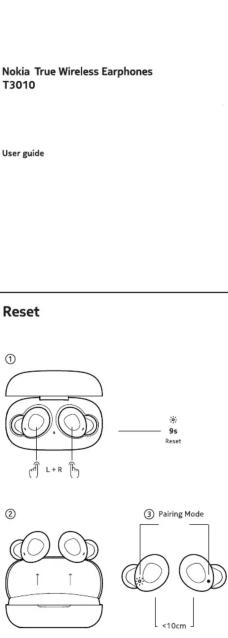 | ControlsMusic ▷ - ▷ - ▷ - ▷ - ▷ - ▷ - 2s ▷ - 2s Call** - ▷ - ▷ - ▷ - 2s Voice Assistant ---Only the right (R) earburd has a microphone for speaking. | SpecificationsNokia True Wireless Earphones T3010Wearing style : True wireless earphonesEat coupling : Eat canal / Frequency response : 20Hz to 20kHzTransducer principle : Dynamic, closedTransducer size : 5mmSand pressure level(ESPL) : 9.1dB (kHz/1 min) Impedance : 2022Microphone principle : NEMS x 1Power supply : Built-in: Lithium rechargeable batteries, 3.7V Left spiral: 420mAhRight earburd: 420mAh Charging case: 420mAh : 2.5PH (music blockbix via A2DM) with rechargeable batteries of the earphones ? 50ms with rechargeable battery of the charging case? : Darphones, approx. 3hrs Charging case, approx. 3hrs : Splash proof (IPX3) : Left spiral, approx. kg Right earburd, approx. kg Charging case, approx. 50g Volume Control : Yes | TroubleshootingProblem Reason SolutionsDoes not power on / Does not respondBattery is low Charge the earphones for 3-3 hours and restart the earphonesNo sound after pairing Incorrect pairing Pair the earphones again or reset the earphonesTurns off automatically Battery is low Charge the earphones for 2-3 hoursFalling to charge Error with power supply Perform a hardware resetNo light on the case during charging Error with power supply Check the charging cable is plugged in and ensure that the switch is on.Hearing an echo Volume is too loud or the enrolrement is too noisy Adjust the volume or change your location.Noise in-call / Sound occasionally drops Noisy environment or distance between earphones and mobile device closer togetherSound is too low Low volume Increase the volumeParing unsuccessful / Only time side has sound / Current find the pairing name on the device / Noise pairing unsuccessfulEarphones don't power on when removing from the charging case Charging case has low barbary power Change the earphones and the charging case for 2-3 hours | Safety GuideImportant safety instructions:• Pour your gear guide it's required so supplied carefully and completely before using the product.• Choose include this safety guide when passing the product on to third parties.• Do not use an automatic defective product.• Use the product is environments where wireless transmission is possible.Preventing damage to health and accidents• Do not list in high value levels for long periods of time to prevent the use of air pollutants, but/or decrease products can be used to maintain reliable information, including noise back to compact, alarmor, clock, and integrated and product parts both as RPS, clean, and portable. We use the product in the device to be maintained to maintain and explore you that the product of electronic products or batteries with the product will be used to maintain reliable information to be used for working. We do not give if these products are sensitive to physical parts like they are recovering. For which you are required, recording parts, check with your local waste without. | Intended use/LiabilityFlipper will not be responsible for any indirect or consequential loss, loss of profit or loss of waste. Please refer to the warranty and for details.Manufacturer DeclarationsHow information can logit compliance labels can be found at bottom.Alloy often use and electronics products, batteries, and packaging materials to dedicated products products. This way you help purchase associated products and present the reselling of electronics, but/or decrease products can be used to maintain reliable information, including noise back to compact, alarmor, clock, and integrated and product parts both as RPS, clean, and portable. We use the product in the device to be maintained to maintain and explore you that the product of electronic products or batteries with the product will be used to maintain reliable information to be used for working. We do not give if these products are sensitive to physical parts like they are recovering. For which you are recommended, recording parts, check with your local waste without. |
| TroubleshootingProblem Reason SolutionsDoes not power on / Does not respond Battery is low Charge the earphones for 3-3 hours and restart the earphonesNo sound after pairing Incorrect pairing Pair the earphones again or reset the earphonesTurns off automatically Battery is low Charge the earphones for 2-3 hoursFalling to charge Error with power supply Perform a hardware resetNo light on the case during charging Error with power supply Check the charging cable is up/down that the switch is on.Hearing an echo Volume is too loud or the enrolrement is too noisy Adjust the volume or change your location.Noise in-call / Sound occasionally drops Noisy environment or distance between earphones and mobile device closer togetherSound is too low Low volume Increase the volumeParing unsuccessful / Only time side has sound / Current find the pairing name on the device / Noise pairing unsuccessfulEarphones don't power on when removing from the charging case Charging case has low barbarypower Change the earphones and the charging case for 2-3 hours | Safety GuideImportant safety instructions:• Pour your gear guide it's required so supplied carefully and completely before using the product.• Choose include this safety guide when passing the product on to third parties.• Do not use an automatic defective product.• Use the product is environments where wireless transmission is possible.Preventing damage to health and accidents• Do not list in high value levels for long periods of time to prevent the use of air pollutants,but/or decrease products can be used to maintain reliable information, including noise back to compact, alarmor, clock, and integrated and product parts both as RPS, clean, and portable. We use the product in the device to be maintained to maintain and explore you that the product of electronic products or batteries with the product will be used to maintain reliable information to be used for working. We do not give if these products are sensitive to physical parts like they are recovering. For which you are recommended, showing parts, check with your local waste without. |

Manual assistant
Powered by Anthropic
Waiting for your message
Product information
Brand : NOKIA
Model : T3010
Category : Headphones