
impression Spot One - Printer GLP - Free user manual and instructions
Find the device manual for free impression Spot One GLP in PDF.


| Product Type | Moving head LED spotlight (DMX-controlled) |
| Dimensions (Base) | 472 mm x 230 mm (18.6 x 9 in) |
| Height | 618 mm (24.3 in) with head vertical |
| Weight | Fixture: 23 kg (50.7 lbs); Floor stand: 2 kg (4.4 lbs) |
| Power Supply | Auto-sensing 100–240 V AC, 50–60 Hz; Max power consumption 700 VA |
| Fuse | Micro-fuse 6.3x32 mm, T8A |
| Light Source | 400W RGB LED Chipset, lifetime 20,000 h |
| Zoom Range | 10° to 32° (stepless, 8/16 bit) |
| Pan / Tilt | Pan: 660°; Tilt: 280° (position feedback, 3-phase stepper motor) |
| Gobos | 2 gobo wheels, each with 7 interchangeable rotating gobos + open; glass or aluminum (Ø27 mm, image size max 20 mm) |
| Prism | Rotating 3-facet prism, bi-directional, variable speed |
| Effect Wheel | Rotating and indexable effect wheel, interchangeable patterns |
| Iris | High-speed iris, 100% to 4% opening (0.2 sec) |
| Shutter / Dimmer | Strobe up to 50 Hz, random strobe, pulse effects; continuous dimmer 0–100% (8/16 bit) |
| Color Mixing | Additive RGB mixing with 12 predefined colors and rainbow effect |
| Control | USITT DMX-512 via 3-pin and 5-pin XLR; Art-Net (ACN ready) |
| DMX Modes | Normal (24 ch), Compressed (20 ch), High Resolution (31 ch) |
| Mounting | Floor (upright), hanging, sideways; safety wire required |
| Safety Distance | Minimum 0.5 m to flammable materials; LED class 2M, do not look into beam |
| Maintenance | Clean external optics weekly; vacuum fans monthly; replace gobos yearly |
| Spare Parts | Original GLP spare parts recommended; gobos, effect wheels, fuses available |
| Repairability | Repair by qualified/GLP certified staff; opening casing voids warranty |
| Operating Temperature | Max ambient 45°C (113°F); overheating switch integrated |
| General Information | Manufacturer: GLP (German Light Products GmbH); Support: service@glp.de |
Frequently Asked Questions - impression Spot One GLP
User questions about impression Spot One GLP
0 question about this device. Answer the ones you know or ask your own.
Ask a new question about this device
Download the instructions for your Printer in PDF format for free! Find your manual impression Spot One - GLP and take your electronic device back in hand. On this page are published all the documents necessary for the use of your device. impression Spot One by GLP.
USER MANUAL impression Spot One GLP
natural_image
Black industrial radar or lighting fixture with a circular lens and mounting base (no visible text or symbols)from software version 1.61 (Instruction version 1.97)

chemical
Chemical structure of a polymer with GLP side groupGERMAN LIGHT PRODUCTS
e-mail: service@glp.de Internet: http://www.glp.de
Notes:
Table of contents
1 Description of Device....4
1.1 Safety Instructions 5
2 Preparation and Installation 6
2.1 Mounting 6
2.1.1 Mounting on the floor (upright) 7
2.1.1 Mounting in hanging position (Head down) 7
2.1.2 Mounting in sideways position 8
2.2 Securing the device 8
2.3 Connections 9
2.3.1 Power Supply....9
2.3.2 DMX 9
3 The Menu Field....9
4 Changing Gobos and the Effect wheel 22
4.1 Changing Gobos and the Effect wheel 22
4.1.1 General remarks for changing gobos 22
4.1.2 Changing rotating gobos 23
4.1.3 Changing the effect wheel 26
5 Colored Error Code 28
6 Maintaining and Cleaning the Impression Spot one 28
6.1 Safety regulations 28
6.2 Maintenance Intervals (rule-of-thumb) 29
7 Technical Specifications .... 30
8 Index....31
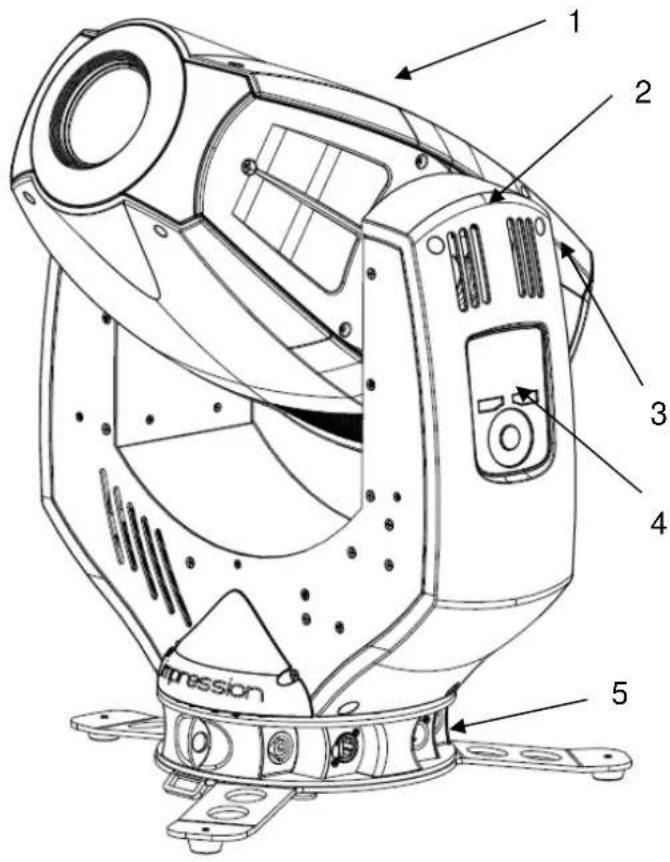
Description of Device
- Moving Head
- Arm with various cooling vents
- Tilt-lock to secure and lock the tilt movement
- Backlight LCD graphical menu (data entry)
- Base with various connectors and Camlock mounting system
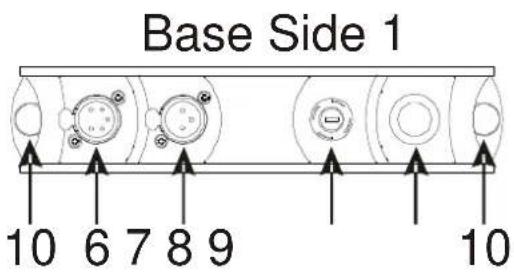
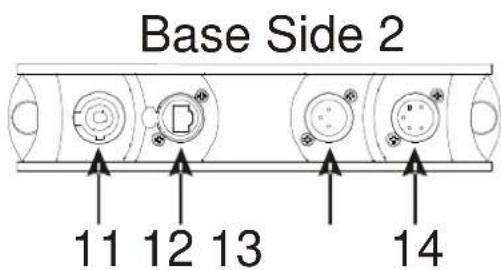
- DMX- Output (5 Pin)
- DMX- Output (3 Pin)
- Micro-fuse 6.3x32mm, T8A
- Power Switch
- 2x Safety wire points
- Neutrik Powercon (Mains power input)
- Blank panel (primed for Ethernet)
- DMX- Input (3 Pin)
- DMX- Input (5 Pin)
Note: Only connect one cable to the DMX Input / Output at the same time!
GLP ♦ German Light Products GmbH
1.1 Safety Instructions

The Impression Spot one is an advanced technology product. To guarantee smooth operation, it is necessary to follow the following instructions.
The manufacturer of this device will not take responsibility of damages through any disregard of the information in this user manual. Warranty claims will also be cancelled in the event of the system casing being opened.
- Make sure that before powering up the fixture, the fans and air inlets are clean and not blocked by anything.
- Before powering up the fixture, ensure that the moving head part of the fixture can rotate unhindered through its full range of movement.
- A safety distance of at least 0.5 m to any easily flammable material (e.g. decoration material) must be adhered to.
- Attention! Don't touch the device during operation. Parts of the fixture can become hot and can cause injuries and / or damages.
- Use only one DMX Input / Output at the same time.
- Never look directly into the beam of light or one of the LEDs. Never use optical apertures with a distance less than 0.5 ~m to observe the beam of light. LED Class 2M. Not following these precautions can result in serious injury to your eyes and in particular, your retina.
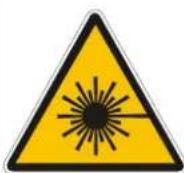
Attention: LED Class 2M can cause injuries of your eyes even without optical instruments in front of them or within a distance of less than 0.5m and short exposure time.
Avoid direct radiation to your eyes!
-
To ensure proper operation, you must also follow the installation guide described in chapter 1 of this manual. Operating the Impression Spot one without suitable mounting devices can increase the risk of an accident.
-
The Impression Spot one features a unique small and lightweight design with no specific carrying handles. Care needs to be shown when handling the fixture to ensure that no unnecessary damage should occur. Fragile areas include the LCD display and cover on one side arm and the front bezel. Pressure in these areas could result in damages which will not be covered by the standard warranty.
-
Repair, maintenance and installation work should only be performed by qualified or GLP certified staff. You need to pay attention to the common
GLP ♦ German Light Products GmbH
rules of technology that are not explicitly mentioned in this manual.
- Use only original spare parts. Any structural modification on the system will terminate all warranty claims.
- Please keep this instruction manual for future reference.
1 Preparation and Installation
1.1 Mounting
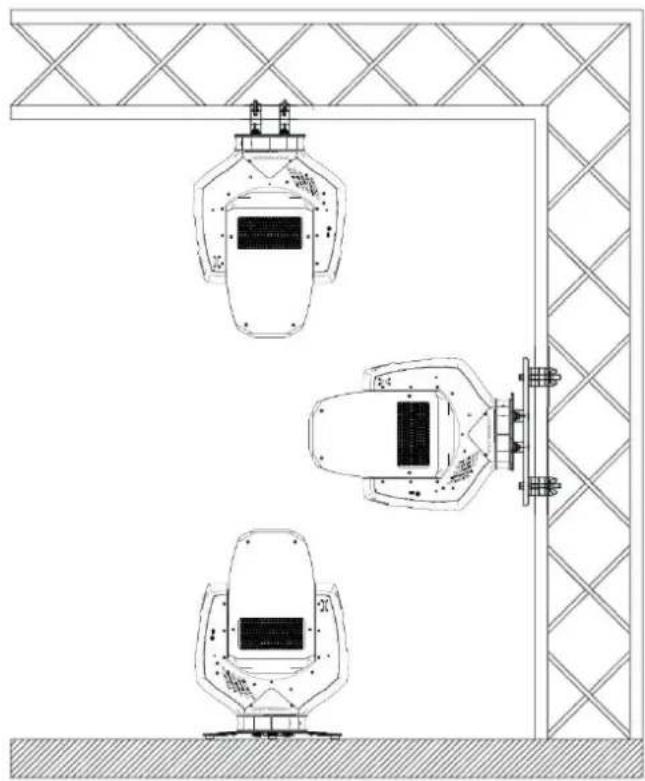
The Impression Spot one is fully operational whether it hangs or is mounted to a wall. It can also be operated while standing on the floor. Keep a safety distance of 0.5 m from any easily inflammable materials (decoration etc.).
natural_image
Technical line drawing of three identical industrial equipment units mounted on a structural frame, with no visible text or symbols.
Pay attention to the regulations of: BGV C1 (former VBG 70) and DIN VDE 0711-217.
The installation shall be done by qualified personal only.
For the various mounting positions of the Impression Spot one (standing on the floor, sideways or hanging) different accessories kits are available. Using any required kits, along with the standard mounting connectors on the base of the fixture, will ensure a safe and firm installation.
1.1.1 Mounting on the floor (upright)
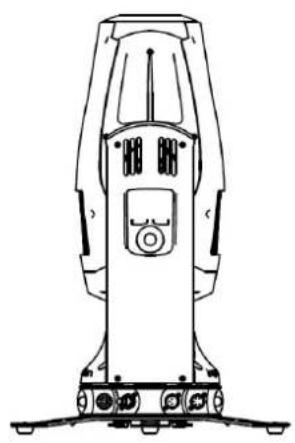
To operate the Impression Spot one in an upright position, please use the dedicated floor-stand which is shipped with all original fixtures. The
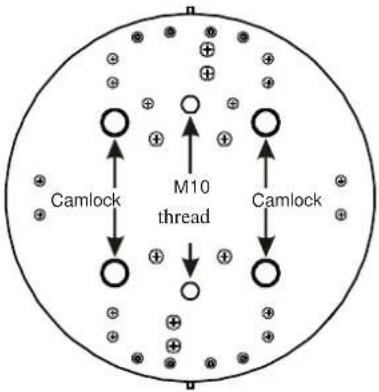
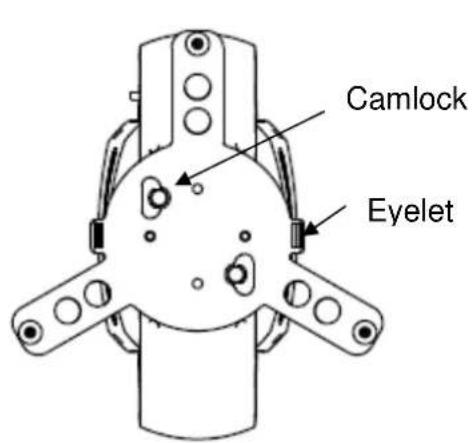
floor stand is mounted to the base of the fixture using the two Camlock quarter turn fasteners. Line up and engage the camlock connectors from the floor stand into the base of the fixture and turn the two fasteners 90° to lock them. Do the opposite to release them again. On both sides you'll find eyelets to pull though a ratchet strap. This allows additional bracing of the floor-stand during upright operation.
natural_image
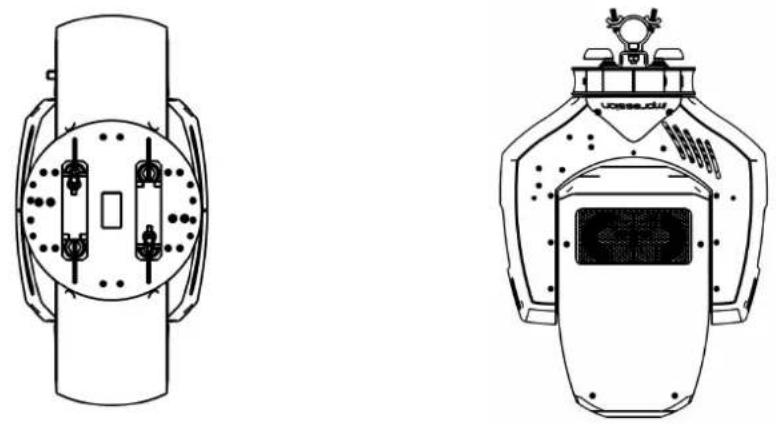
Technical line drawing of a surveying instrument (no text or symbols)1.1.1 Mounting in hanging position (Head down)
To operate the Impression Spot one in a hanging position, two omega brackets can be mounted directly to the bottom of the base using the four Camlock connectors.
1.1.2 Mounting in sideways position
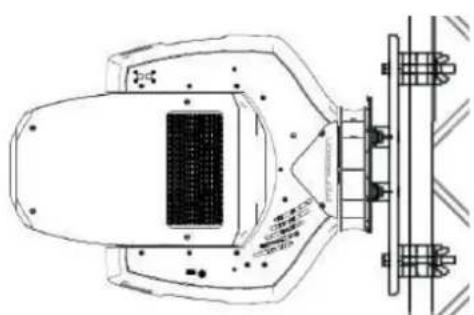
To operate the Impression Spot one in a sideways position, please use an additional mounting bar, available from GLP or one of their agents.
This mounting bar is fixed via the four camlock quick-release connectors.
Two half-couplers or clamps are then used to hang fixture. This technique is necessary to cope with the additional torque in this mounting position. Never use the "Mounting in hanging position"
technique described above to secure the fixture in a sideway position, as the fixtures base can become damaged, and a secure installation cannot be assured.
natural_image
Technical line drawing of a mechanical assembly with mounting flanges and a central component (no text or symbols)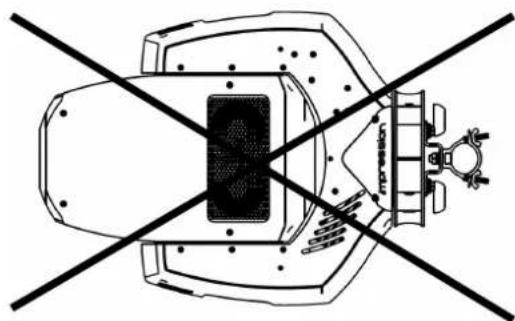
natural_image
Diagram of a mechanical device with intersecting diagonal lines and no visible text or symbols1.2 Securing the device
Regardless of the mounting method of the Impression Spot one you'll have to use a secondary safety wire. This safety wire can be attached to the fixture by threading it through one of the two holes provided on the base of the fixture.
Ensure that the safety wire is securely fastened through the fixture and the fixtures mounting support. Install a safety wire that can hold at least 10 times the weight of the fixture.
1.3 Connections
1.3.1 Power Supply
Autosensing \~100-240 Volt AC, 50-60 Hz, earth contact type plug via Powercon
Connected load 450 VA (W) <=> T8A (micro-fuse 6.3x32mm)
Disconnect from the mains supply before changing the fuse and use only the above described micro-fuse type.
1.3.2 DMX
USITT DMX-512 Standard input/output via 3 pin and 5 pin connectors.
3 pole: Pin 1 = [Ground] / Pin 2 = [-] / Pin 3 = [+]
5 pole: Pin 1 = [Ground] / Pin 2 = [-] / Pin 3 = [+] / Pin 4/5 n.c.
Ethernet (Artnet II compatible, ACN ready)
Neutrik RJ-45 plug (for Neutrik EtherCon connector with body)
2 The Menu Field
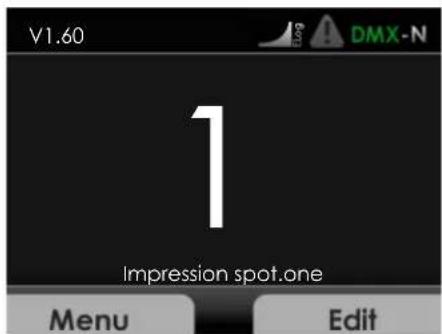
You'll find the control board on the side of the arm. It allows you to make all necessary adjustments of the IMPRESSION Spot One. With the Menu-key you get into the main menu. Afterwards you can navigate through the menu with the Touchwheel. Push the Enter-key to get to the next menu level or to confirm your settings. Select ON/OFF function settings with the Touchwheel. Confirm and save with the Enter-key. Push the Back-key to cancel the entry and go back to the main menu.
← Back - Enter →
| Layer 1 Layer 2 Layer 3 Layer 4 Notes | ||||
| DMX Start Address | Set the DMX | start address | ||
| Personality | Pan/Tilt | Pan/Tilt settingsSelects Inverse | ings | |
| DMX Address | Pan invert | se Pan, on or off | ||
| Tilt invert | Selects Inverse Tilt, on or off | |||
| Feedback | Automatic position feedback selection for pan/tilt movement | |||
| Color | Dimmer Curve | Set the Dimmer Curve | ||
| press | Set the DMX start address | |||
| Mode | Allows selection of the desired DMX Mode | |||
| Compressed | Fixture works in "Compressed" mode → see also section 4 | |||
| Normal | Fixture works in "Normal" mode → see also section 4 | |||
| High-Resolution | Fixture works in "High Resolution" mode → see also section 4 | |||
| Hold Values | Defines whether the last DMX signal is stored, or the lamp is switched OFF in case of signal interruption | |||
| Manual | Manual control of all system functions | |||
| Pan | Manual control | |||
| Tilt | Manual control | |||
| Colorwheel | Manual control | |||
| Red | Manual control | |||
| Green | Manual control | |||
| Blue | Manual control | |||
| Shutter | Manual control | |||
| Dimmer | Manual control | |||
| Color temp. | Manual control | |||
| Special | Manual control | |||
| Movement | Manual control | |||
| Movement Speed | Manual control | |||
| Zoom | Manual control | |||
| Focus | Manual control | |||
| Gobo1 | Manual control | |||
| Gobo 1 rot. | Manual control | |||
| Gobo 2 | Manual control | |||
| Gobo 2 rot. | Manual control | |||
GLP ♦ German Light Products GmbH
| Effectwheel | Manual control | |||
| Effectwheel rot. | Manual control | |||
| Prism | Manual control | |||
| Iris | Manual control | |||
| Display | Artnet | Artnet adjustment | ||
| Priority | Set the priority of Artnet and DMX input (Artnet, DMX or Merge) | |||
| DMX/RDM out | Set the output of Artnet oder DMX | |||
| Universe | Set the Universe | |||
| IP Mode | Set the Artnet Mode (10.x.x.x oder 2.x.x.x) | |||
| Custom IP | Set the manual IP address | |||
| Custom Subnet | Manual set of the Subnet address | |||
| Custom Gateway | Manual set of the Gateway address | |||
| Blackout | Adjustments for the Display | |||
| Sets the display On or Off | ||||
| Auto-Rot | Display will rotate automatically | |||
| Display Inv | Display will rotate manual | |||
| Brightness | Display backlight | |||
| Set Default | Resetting all functions to original values | |||
| Status Version | Current software version | |||
| Temperature LED Info | Reset Hardware | Hardware reset adjust | ||
| All | Reset all boards | |||
| Head | Reset only headboard | |||
| GI | Reset only Gobo & Iris | |||
| FZP | Reset only Focus, Zoom, Prism | |||
| Pan | Reset only Pan | |||
| Tilt | Reset only Tilt | |||
| Display all temperatures | ||||
| Display the values for the LED's | ||||
| Red | Current value for red | |||
| Green | Current value for green | |||
| Blue | Current value for blue | |||
| Error Status | Shows the error status | |||
| Timer | Shows the life time | |||
| DMX Input | Shows the current DMX signal per DMX channel | |||
GLP ♦ German Light Products GmbH
| Pan | Instantaneous value for pan | |
| Tilt | Instantaneous value for tilt | |
| Colorwheel | Instantaneous value for color | |
| Red | Instantaneous value for red | |
| Green | Instantaneous value for green | |
| Blue | Instantaneous value for blue | |
| Shutter | Instantaneous value for shutter | |
| Dimmer | Instantaneous value for dimmer | |
| Colortemp. | Instantaneous value for color temp. | |
| Special | Instantaneous value for special | |
| Movement | Instantaneous value for movement | |
| Movement Speed | Instantaneous value for movement speed | |
| Zoom | Instantaneous value for zoom | |
| Focus | Instantaneous value for focus | |
| Gobo1 | Instantaneous value for gobo1 | |
| Gobo 1 rot. | Instantaneous value for gobo 1 rot. | |
| Gobo 2 | Instantaneous value for gobo 2 | |
| Gobo 2 rot. | Instantaneous value for gobo 2 rot. | |
| Effectwheel | Instantaneous value for effect wheel | |
| Effectwheel rot. | Instantaneous value for effect wheel rot. | |
| Prisma | Instantaneous value for prism | |
| Iris | Instantaneous value for iris | |
| DMX Quality | Shows the DMX Quality | |
| Service Adjust | Adjustments for all functions. Use code to enter calibration. (only for authorized persons) | |
| Pan | Adjust for pan | |
| Tilt | Adjust for tilt | |
| Gobo1 | Adjust for gobo 1 | |
| Gobo 1 rot. | Adjust for gobo 1 rotation | |
| Gobo 2 | Adjust for gobo 2 | |
| Gobo 2 rot. | Adjust for gobo 2 rotation | |
| Effectwheel | Adjust for effect wheel | |
| Effectwheel rot. | Adjust for effect wheel rotation | |
| Prisma | Adjust for prism | |
| Prisma End Pos. | Adjust for prism end position | |
| Prisma Index | Adjust for prism index | |
| Iris | Adjust for iris |
GLP ♦ German Light Products GmbH
| Zoom | |
| Focus | |
| AdjustDefault set | |
| FactoryAdjust | |
| Testmode | |
| Error Log |
| Adjust for zoom |
| Adjust for focus |
| Set all adjustments to default |
| Factory internal adjustments |
| Test mode |
| Shows all errors in lifetime |
DMX Channels
Normal-Mode 24 DMX Channels
| Channel | Function | Time and Value | DMX | HEX | % |
| 1) PAN- coarse | 0..660° 0..255 00..FF 0..100 | ||||
| 2) PAN-fine | High- Pos ... High- Pos + 2,6° (16 Bit) | 0..255 00..FF 0..100 | |||
| 3) Tilt- coarse | 0..280° 0..255 00..FF 0..100 | ||||
| 4) Tilt-fine | High- Pos ... High- Pos + 1,2° (16 Bit) | 0..255 00..FF 0..100 | |||
| 5) Color (fixed) | Colors adjustable via RGB | 0..7 00..07 0..2,5 | |||
| Color 01 - Red 8..15 08..0F 3..5,5 | |||||
| Color 02 - Amber | 16..23 | 10..17 | 6..8,5 | ||
| Color 03 - Yellow warm | 24..31 | 18..1F | 9..12,5 | ||
| Color 04 - Yellow | 32..39 | 20..27 | 13..15,5 | ||
| Color 05 - Green | 40..47 28..2F 16..18,5 | ||||
| Color 06 - Turquoise | 48..55 | 30..37 | 19..21,5 | ||
| Color 07 - Cyan | 56..63 38..3F 22..24,5 | ||||
| Color 08 - Blue | 64..71 | 40..47 | 25..27,5 | ||
| Color 09 - Lavender | 72..79 48..4F 28..30,5 | ||||
| Color 10 - Malve | 80..87 | 50..57 | 31..34,5 | ||
| Color 11 - Magenta | 88..95 | 58..5F | 35..37,5 | ||
| Color 12 - Pink | 96..103 | 60..67 | 38..40,5 | ||
| White - CTO | Color temp. 3200K | 104..111 | 68..6F | 41..43,5 | |
| White | Color temp. 5600K | 112..119 | 70..77 | 44..46,5 | |
| White - CTB | Color temp. 7200K | 120..127 | 78..7F | 47..49,5 | |
| Rainbow Effect Stop | Stop | 128 | 80 | 50 | |
| Rainbow Effect | slow - fast Color 01 -> Color 12 | 129..255 | 81..FF | 51..100 | |
| 6) Red | Color mixing system - Red | 0 - 100% | 0..255 00..FF 0..100 | ||
| 7) Green | Color mixing system - Green | 0 - 100% | 0..255 00..FF 0..100 | ||
| 8) Blue | Color mixing system - Blue | 0 - 100% | 0..255 00..FF 0..100 | ||
| 9) Shutter | Shutter closed | 0..15 | 00..0F | 0..5,5 | |
| Shutter pulse random | slow - fast | 16..47 | 10..2F | 6..18,5 | |
| Shutter ramp up | slow - fast | 48..79 30..4F 19..31 | |||
| Shutter ramp down | slow - fast 80..111 | 50..6F 32..43 | |||
| Shutter ramp up/down | slow - fast | 112..143 | 70..8F | 44..56 | |
| Random strobe | slow - fast | 144..159 | 90..9F | 57..62 | |
GLP ♦ German Light Products GmbH
| Shutter open 24 | Strobe effect pause 5s ...0,1s 160..199 A0..C7 63..77 | |||
| Strobe effect slow - fast 1 Hz .. 25 Hz 200..241 C8..F1 78..95 | ||||
| 242..255 F2..FF 96..100 | ||||
| 10) Dimmer | Dimmer | 0% - 100% | 0..255 | 0..FF |
| 11) Color temp. | No color temperature correction | 0..7 0..07 0..2,5 | ||
| Continuous color temperature correction between 7200k - 3200k | Applicable for ALL colors ^5) | 8..255 | 08..FF | |
| 12) Gobo Shake & Special | Gobo Shake for Gobowheel 1+2 off | 0..15 | 00..0F | |
| Gobo Shake Gobowheel 1 | Speed 1 Size 1..8 | 16..23 | 10..17 | |
| Speed 2 Size 1..8 | 24..31 | 18..1F | ||
| Speed 3 Size 1..8 | 32..39 | 20..27 | ||
| Speed 4 Size 1..8 | 40..47 | 28..2F | ||
| Speed 5 Size 1..8 | 48..55 | 30..37 | ||
| Speed 6 Size 1..8 | 56..63 | 38..3F | ||
| Speed 7 Size 1..8 | 64..71 | 40..47 | ||
| Speed 8 Size 1..8 | 72..79 | 48..4F | ||
| Gobo Shake Gobowheel 2 | Speed / Size see Gobo Shake Gobowheel 1 | 80..143 | 50..90 | |
| Gobo Shake Gobowheel 1+2 | Speed / Size see Gobo Shake Gobowheel 2 | 144..207 | 91..CF | |
| Reset 1 | Only Head | 250..253 | FA..FC | |
| Reset 2 | All Funktions | 254..255 | FD..FF | |
| 13) Movement | No movement | 0 | 0 | |
| Movement | Size | Phase | ||
| PAN | 1 | 0° | ||
| 1 | 90° | |||
| 1 | 180° | |||
| 1 | 270° | |||
| PAN | 2 | 0° | ||
| 2 | 90° | |||
| 2 | 180° | |||
| 2 | 270° | |||
| PAN | 3 | 0° | ||
| 3 | 90° | |||
| 3 | 180° | |||
| 3 | 270° | |||
| PAN | 4 | 0° | ||
| 4 | 90° | |||
| 4 | 180° | |||
| 4 | 270° | |||
| TILT | size / phase see also PAN | 32..63 | 20..3F | |
| PAN / TILT | size / phase see also PAN | 64..95 | 40..5F | |
| PAN / TILT (inverse) | size / phase see also PAN | 96..127 | 60..7F | |
| Circle | size / phase see also PAN | 128..159 | 80..9F | |
| Circle (inverse) | size / phase see also PAN | 160..191 | A0..BF 63..75 | |
GLP ♦ German Light Products GmbH
| Lying eight size / phase see also PAN | 192..223 | C0..DF 76..87 | ||
| Random movement size see also PAN 224..255 E0..FF 88..100 | ||||
| 14) Speed Pan/Tilt | Pan/Tilt relative movement | 0..1 00..01 0..0,5 | ||
| Pan/Tilt slow - fast Use this channel 14) also for the speed of the movements (channel 13). | Pan Min. 660° Pan Max. 660° Tilt Min. 280° Tilt Max. 280° | 2..255 | 02..FF | |
| 15) Zoom | Stepless adjustable Zoom | 10°- 32° | 0..255 | 0..F F |
| 16) Focus | Stepless adjustable Focus | infinity - near | 0..255 | 0..FF |
| 17) Gobo1 (indexed) | Gobo 1 (open,) | 0...15 | 00..0F | |
| Gobo 2 | 16..31 | 10..1F | ||
| Gobo 3 | 32..47 | 20..2F | ||
| Gobo 4 | 48..63 | 30..3F | ||
| Gobo 5 | 64..79 | 40..4F | ||
| Gobo 6 | 80..95 | 50..5F | ||
| Gobo | 96..111 | 60..6F | ||
| Gobo 8 | 112..126 | 70..82 | ||
| Gobo rotation STOP | 127 | 7F | ||
| Gobo rotation, slow-fast, CW | 128..192 | 80..C0 | ||
| Gobo rotation, fast-slow, CCW | 193..255 | C1..FF | ||
| 18) Gobo 1 Posi./Rot | Gobo position 0 ... 540° | 0..127 | 00..7F | |
| Gobo rotation STOP | 128..129 | 80..81 | ||
| Gobo rotation, slow-fast, CW | 130..192 | 82..C0 | ||
| Gobo rotation, fast-slow, CCW | 193..253 | C1..FD 76..99 | ||
| Gobo rotation STOP | 254..255 | FD..FF | ||
| 19) Gobo2 (indexed) | Gobo 1 (open) | 0...15 | 00..0F | |
| Gobo 2 | 16..31 | 10..1F | ||
| Gobo 3 | 32..47 | 20..2F | ||
| Gobo 4 | 48..63 | 30..3F | ||
| Gobo 5 | 64..79 | 40..4F | ||
| 80..95 | 50..5F | |||
| Gobo 6 | 96..111 | 60..6F | ||
| Gobo 7 | 112..126 | 70..82 | ||
| Gobo 8 | 127 7F 49 | |||
| Gobo rotation STOP | 128..192 | 80..C0 | ||
| Gobo rotation, slow-fast, CW | 193..255 | C1..FF | ||
| 20) Gobo 2 Posi./Rot | Gobo position 0 ... 540° | 0..127 | 00..7F | |
| Gobo rotation STOP | 128..129 | 80..81 | ||
| Gobo rotation, slow-fast, CW | 130..192 | 82..C0 | ||
| Gobo rotation, fast-slow, CCW | 193..1253 | C1..FD 76..99 | ||
| Gobo rotation STOP | 254..255 | FD..FF | ||
GLP ♦ German Light Products GmbH
| 21) Effect wheel swing | Stepless swing of the "Motion Wheel" | 0 - 100% 0..255 | 00..FF | 0..100 | |
| 22) Effect wheel Posi./Rot | Rotating stop 0..1 00..01 00..1 | ||||
| Rotating slow - fast CW 1..128 01..80 1..50 | |||||
| Rotating fast - slow CCW 129...254 | 81..FD | 51..99 | |||
| Rotating stop | 254..255 | FD..FF | 99..100 | ||
| 23) Prism | Prism swing out | 0..5 00..05 0..2 | |||
| Prism position 0 ... 540° | 6..127 | 06..7F | 0..50 | ||
| Prism rotation stop | 128..129 | 80..81 | 50,1 | ||
| Prism rotation, slow-fast, CW | 130..192 | 82..C0 | 51..75 | ||
| Prism rotation, fast-slow, CCW | 193..253 | C1..FD | 76..99 | ||
| Prism rotation stop | 254..255 | FD..FF | 99.100 | ||
| 24) Iris | Iris open – closed | 0..131 00..83 00..52 | |||
Compress-Mode 20 DMX Channels
| Channel | Function | Time and Value | DMX | HEX | % |
| 1) PAN- coarse | 0 .. 660° | 0..255 | 00..FF | 0..100 | |
| 2) PAN-fine | High- Pos ... High- Pos +(16 Bit) | 0..255 | 00..FF | 0..100 | |
| 3) Tilt- coarse | 0 .. 280° | 0..255 | 00..FF | 0..100 | |
| 4) Tilt-fine | High- Pos ... High- Pos + (16 Bit) | 0..255 | 00..FF | 0..100 | |
| 5) Color (fixed) | Colors adjustable via RGB | 0..7 00..07 0..2,5 | |||
| Color 01 - Red | 8..15 | 08..0F | 3..5,5 | ||
| Color 02 - Amber | 16..23 | 10..17 | 6..8,5 | ||
| Color 03 – Yellow warm | 24..31 | 18..1F | 9..12,5 | ||
| Color 04 - Yellow | 32..39 | 20..27 | 13..15,5 | ||
| Color 05 – Green | 40..47 | 28..2F | 16..18,5 | ||
| Color 06 – Turquoise | 48..55 | 30..37 | 19..21,5 | ||
| Color 07 – Cyan | 56..63 | 38..3F | 22..24,5 | ||
| Color 08 - Blue | 64..71 | 40..47 | 25..27,5 | ||
| Color 09 - Lavender | 72..79 | 48..4F | 28..30,5 | ||
| Color 10 - Malve | 80..87 | 50..57 | 31..34,5 | ||
| Color 11 – Magenta | 88..95 | 58..5F | 35..37,5 | ||
| Color 12 - Pink | 96..103 | 60..67 | 38..40,5 | ||
| White - CTO | Color temp. 3200K | 104..111 | 68..6F | 41..43,5 | |
| White | Color temp. 5600K | 112..119 | 70..77 | 44..46,5 | |
| White – CTB | Color temp. 7200K | 120..127 | 78..7F | 47..49,5 | |
| Rainbow Effect Stop | 128 | 80 | 50 | ||
| Rainbow Effect | slow – fast Color 01 -> Color 12 | 129..255 | 81..FF | 51..100 | |
| 6) Red | Color mixing system - Red | 0 - 100% 0..255 00..FF | 0..100 | ||
| 7) Green | Color mixing system - Green | 0 - 100% 0..255 00..FF | 0..100 | ||
| 8) Blue | Color mixing system - Blue | 0 - 100% 0..255 00..FF | 0..100 | ||
| 9) Shutter | Shutter closed | 0..15 | 00..0F | 0..5,5 | |
| Shutter pulse random | slow – fast | 16..47 | 10..2F | 6..18,5 | |
| Shutter ramp up | slow – fast | 48..79 | 30..4F | 19..31 | |
GLP ♦ German Light Products GmbH
| Shutter ramp down slow - fast 80..111 50..6F 32..43 | ||||
| Shutter ramp up/down slow - fast 112..143 70..8F 44..56 | ||||
| Random strobe slow - fast 144..159 90..9F 57..62 | ||||
| Strobe effect pause 5s ...0,1s 160..199 A0..C7 | 63..77 | |||
| Strobe effect slow - fast 1 Hz .. 25 Hz 200..241 C8..F1 | 78..95 | |||
| Shutter open | 242..249 F2..F9 | 95,5..96,5 | ||
| RESET 1 | Only Head | 250 | FA | |
| RESET 2 | All Funktions | 251 | FB | |
| Shutter open | 252..255 FC..FF | 99..100 | ||
| 10) Dimmer | Dimmer | 0% - 100% | 0..255 | 0..FF |
| 11) Zoom | Stepless adjustable Zoom | 10°- 32° | 0 .. 255 | 0..F F |
| 12) Focus | Stepless adjustable Focus | infinity - near | 0 .. 255 | 0..FF |
| 13)Gobo1 (indexed) | Gobo 1 (open) | 0...15 00..0F | 0..5,9 | |
| Gobo 2 | 16..31 10..1F | 6..11,9 | ||
| Gobo 3 | 32..47 20..2F | 12..17,9 | ||
| Gobo 4 | 48..63 30..3F | 19..24,5 | ||
| Gobo 5 | 64..79 40..4F | 25..30,5 | ||
| Gobo 6 | 80..95 50..5F | 31..37,5 | ||
| Gobo | 96..111 60..6F | 38..43,5 | ||
| Gobo 8 | 112..126 70..82 44..48 | |||
| Gobo rotation STOP | 127 | 7F 49 | ||
| Gobo rotation, slow-fast, CW | 128..192 | 80..C0 | ||
| Gobo rotation, fast-slow, CCW | 193..255 C1..FF | 77..100 | ||
| 14) Gobo 1 Posi./Rot | Gobo position 0 ... 540° | 0..127 | 00..7F | |
| Gobo rotation STOP | 128..129 | 80..81 | ||
| Gobo rotation, slow-fast, CW | 130..192 | 82..C0 | ||
| Gobo rotation, fast-slow, CCW | 193..253 C1..FD | 76..99 | ||
| Gobo rotation STOP | 254..255 FD..FF | 99..100 | ||
| 15)Gobo2 (indexed) | Gobo 1 (open, fast) | 0...15 00..0F | 0..5,9 | |
| Gobo 2 | 16..31 10..1F | 6..11,9 | ||
| Gobo 3 | 32..47 20..2F | 12..17,9 | ||
| Gobo 4 | 48..63 30..3F | 18..24,5 | ||
| Gobo 5 | 64..79 40..4F | 25..30,5 | ||
| Gobo 6 | 80..95 50..5F | 31..37,5 | ||
| Gobo 7 | 96..111 60..6F | 38..43,5 | ||
| Gobo 8 | 112..126 70..82 44..48 | |||
| Gobo rotation STOP | 127 | 7F 49 | ||
| Gobo rotation, slow-fast, CW | 128..192 | 80..C0 | ||
GLP ♦ German Light Products GmbH
| 17) Effect wheel swing | Stepless swing of the "Motion Wheel" | 0 - 100% 0..255 00..FF | 0..100 | ||
| 18) Effect wheel Posi./Rot | Rotating stop 0..1 00..01 00..1 | ||||
| Rotating slow - fast CW 1..128 01..80 1..50 | |||||
| Rotating fast - slow CCW 129..254 | 81..FD | 51..99 | |||
| Rotating stop 254..255 FD..FF | 99..100 | ||||
| 19) Prism | Prism swing out | 0..5 00 | .05 | 0..2 | |
| Prism position 0 ... 540° | 6..127 | 06..7F | 0..50 | ||
| Prism rotation stop | 128..129 | 80..81 | 50,1 | ||
| Prism rotation, slow-fast, CW | 130..192 82..C0 | 51..75 | |||
| Prism rotation, fast-slow, CCW | 193..253 C1..FD | 76..99 | |||
| Prism rotation stop | 254..255 FD..FF | 99.100 | |||
| 20) Iris | Iris open – closed | 0..131 00..83 00..52 |
High Resolution (Extended)-Mode 31 DMX Channels
| Kanal | Funktion | Zeiten und Werte | DMX | HEX | % |
| 1) PAN- coarse | 0 .. 660° | 0..255 | 00..FF | 0..100 | |
| 2) PAN-fine | High- Pos ... High- Pos + (16 Bit) | 0..255 | 00..FF | 0..100 | |
| 3) Tilt- coarse | 0 .. 280° | 0..255 | 00..FF | 0..100 | |
| 4) Tilt-fine | High- Pos ... High- Pos + (16 Bit) | 0..255 | 00..FF | 0..100 | |
| 5) Color | Colors adjustable via RGB | 0..7 00..07 | 0..2,5 | ||
| (fixed) | Color 01 - Red | 8..15 | 08..0F | 3..5,5 | |
| Color 02 - Amber | 16..23 | 10..17 | 6..8,5 | ||
| Color 03 – Yellow warm | 24..31 | 18..1F | 9..12,5 | ||
| Color 04 - Yellow | 32..39 | 20..27 | 13..15,5 | ||
| Color 05 – Green | 40..47 | 28..2F | 16..18,5 | ||
| Color 06 – Turquoise | 48..55 | 30..37 | 19..21,5 | ||
| Color 07 – Cyan | 56..63 | 38..3F | 22..24,5 | ||
| Color 08 - Blue | 64..71 | 40..47 | 25..27,5 | ||
| Color 09 - Lavender | 72..79 | 48..4F | 28..30,5 | ||
| Color 10 - Malve | 80..87 | 50..57 | 31..34,5 | ||
| Color 11 – Magenta | 88..95 | 58..5F | 35..37,5 | ||
| Color 12 - Pink | 96..103 | 60..67 | 38..40,5 | ||
| White - CTO | Color temp. 3200K | 104..111 | 68..6F | 41..43,5 | |
| White | Color temp. 5600K | 112..119 | 70..77 | 44..46,5 | |
| White – CTB | Color temp. 7200K | 120..127 | 78..7F | 47..49,5 | |
| Rainbow Effect Stop | 128 | 80 | 50 | ||
| Rainbow Effect | slow – fast Color 01 ->Color 12 | 129..255 | 81..FF | 51..100 | |
| 6) Red- coarse | Color mixing system – Red | 0 - 100% | 0..255 | 00..FF | 0..100 |
| 7) Red-fine | Color mixing system – Red-low | 0..255 | 00..FF | 0..100 | |
| 8) Green- coarse | Color mixing system – Green | 0 - 100% | 0..255 | 00..FF | 0..100 |
| 9) Green- fine | Color mixing system – Green-low | 0..255 | 00..FF | 0..100 |
GLP ♦ German Light Products GmbH
| 10) Blue- coarse | Color mixing system - Blue 0 | - 100% 0..255 00..FF | 0..100 | ||
| 11) Blue-fine | Color mixing system - Blue-low | 0..255 00..FF | 0..100 | ||
| 12) Shutter | Shutter closed 0..15 00..0F | 0..5,5 | |||
| Shutter pulse random slow - fast | 16..47 10..2F | 6..18,5 | |||
| Shutter ramp up slow - fast 48..79 30..4F | 19..31 | ||||
| Shutter ramp down slow - fast | 80..111 | 50..6F | 32..43 | ||
| Shutter ramp up/down | slow - fast | 112..143 | 70..8F | 44..56 | |
| Random strobe | slow - fast | 144..159 | 90..9F | 57..62 | |
| Strobe effect pause | 5s ...0,1s 160..199 | A0..C7 | 63..77 | ||
| Strobe effect slow - fast | 1 Hz .. 25 Hz | 200..241 | C8..F1 | 78..95 | |
| Shutter open | 242..255 | F2..FF | 96..100 | ||
| 13) Dimmer-coarse | Dimmer | 0% - 100% | 0..255 | 0..FF | 0..100 |
| 14) Dimmer- fine | Dimmer low | 0..255 0..FF | 0..100 | ||
| 15) Color temp. | No color temperature correction | 0..7 | 0..07 | 0..2,5 | |
| Continuous color temperature correction between 7200k - 3200k | Applicable for ALL colors ^5) | 8..255 08..FF | 3..100 | ||
| 12) Gobo Shake & Special | Gobo Shake for Gobowheel 1+2 off | 0 .. 15 00..0F | 0..5,5 | ||
| Gobo Shake Gobowheel 1 | Speed 1 Size 1..8 | 16..23 10..17 | 6..9 | ||
| Speed 2 Size 1..8 | 24..31 18..1F | 9,5..12 | |||
| Speed 3 Size 1..8 | 32..39 20..27 | 12,5..15 | |||
| Speed 4 Size 1..8 | 40..47 28..2F | 15,5..18 | |||
| Speed 5 Size 1..8 | 48..55 30..37 | 18,5..21,5 | |||
| Speed 6 Size 1..8 | 56..63 38..3F | 22..24,5 | |||
| Speed 7 Size 1..8 | 64..71 40..47 | 25..27,5 | |||
| Speed 8 Size 1..8 | 72..79 48..4F | 28..30,5 | |||
| Gobo Shake Gobowheel 2 | Speed / Size see Gobo Shake Gobowheel 1 | 80..143 | 50..90 | 31..56 | |
| Gobo Shake Gobowheel 1+2 | Speed / Size see Gobo Shake Gobowheel 2 | 144..207 | 91..CF | 56,5..81 | |
| Reset 1 | Only Head | 250..253 | FA..FC | 98..99 | |
| Reset 2 | All Funktions | 254..255 | FD..FF | 100 | |
| 17) Zoom coarse | Stepless adjustable Zoom | 10°- 32° | 0 .. 255 | 0..F F | 0..100 |
| 18) Zoom fine | Zoom low | (0% - 100%) | 0..255 | 0..FF | 0..100 |
| 19) Focus coarse | Stepless adjustable Focus | infinity - near | 0 .. 255 | 0..FF | 0..100 |
| 20) Focus fine | Focus low | (0% - 100%) | 0..255 | 0..FF | 0..100 |
| 21) Gobo1 (indexed) | Gobo 1 (open) | 0...15 | 00..0F | 0..5,9 | |
| Gobo 2 | 16..31 | 10..1F | 6..11,9 | ||
| Gobo 3 | 32..47 | 20..2F | 12..17,9 | ||
| Gobo 4 | 48..63 | 30..3F | 19..24,5 | ||
| Gobo 5 | 64..79 | 40..4F | 25..30,5 | ||
| Gobo 6 | 80..95 | 50..5F | 31..37,5 | ||
| Gobo 7 | 96..111 | 60..6F | 38..43,5 | ||
| Gobo 8 | 112..126 | 70..82 | 44..48 | ||
| Gobo rotation STOP | 127 | 7F | 49 | ||
| Gobo rotation, slow-fast, CW | 128..192 | 80..C0 | 50..76 | ||
| Gobo rotation, fast-slow, CCW | 193..255 | C1..FF | 77..100 |
GLP ♦ German Light Products GmbH
| 22) Gobo 1 Posi./Rot coarse | Gobo position 0 ... 540° 0..1 | 27 00..7F | 0..49 | ||
| Gobo rotation STOP 128..129 | 80..81 | 50 | |||
| Gobo rotation, slow-fast, CW | 130..192 | 82..C0 | 51..75 | ||
| Gobo rotation, fast-slow, CCW | 193..253 | C1..FD | 76..99 | ||
| Gobo rotation STOP 254..255 | FD..FF | 99..100 | |||
| 23) Gobo 1 rot fine | Gobo 1 rot. low (0% - 100%) | 0..255 0..FF 0..100 | |||
| 24)Gobo2 (indexed) | Gobo 1 (open) | 0...15 | 00..0F | 0..5,9 | |
| Gobo 2 | 16..31 | 10..1F | 6..11,9 | ||
| Gobo 3 | 32..47 | 20..2F | 12..17,9 | ||
| Gobo 4 | 48..63 | 30..3F | 19..24,5 | ||
| Gobo 5 | 64..79 | 40..4F | 25..30,5 | ||
| Gobo 6 | 80..95 | 50..5F | 31..37,5 | ||
| Gobo 7 | 96..111 | 60..6F | 38..43,5 | ||
| Gobo 8 | 112..126 | 70..82 | 44..48 | ||
| Gobo rotation STOP | 127 | 7F | 49 | ||
| Gobo rotation, slow-fast, CW | 128..192 | 80..C0 | 50..76 | ||
| Gobo rotation, fast-slow, CCW | 193..255 | C1..FF | 77..100 | ||
| 25) Gobo 2 Posi./Rot coarse | Gobo position 0 ... 540° 0..1 | 27 00..7F | 0..49 | ||
| Gobo rotation STOP 128..129 | 80..81 | 50 | |||
| Gobo rotation, slow-fast, CW | 130..192 | 82..C0 | 51..75 | ||
| Gobo rotation, fast-slow, CCW | 193..253 | C1..FD | 76..99 | ||
| Gobo rotation STOP 254..255 | FD..FF | 99..100 | |||
| 26) Gobo 2 rot fine | Gobo 2 rot. Low | (0% - 100%) 0..255 | 0..FF 0..1 | 00 | |
| 27) Effect wheel swing | Stepless swing of the "Motion Wheel" | 0 - 100% | 0..255 | 00..FF | 0..100 |
| 28) Effect wheel Posi./Rot | Rotating stop | 0..1 | 00..01 | 00..1 | |
| Rotating slow - fast CW | 1..128 01..80 | 1..50 | |||
| Rotating fast - slow CCW | 129..254 | 81..FD | 51..99 | ||
| Rotating stop | 254..255 | FD..FF | 99..100 | ||
| 29) Prism | Prism swing out | 0..5 | 00..05 | 0..2 | |
| Prism position 0 ... 540° | 6..127 06..7F | 0..50 | |||
| Prism rotation stop | 128..129 | 80..81 | 50,1 | ||
| Prism rotation, slow-fast, CW | 130..192 | 82..C0 | 51..75 | ||
| Prism rotation, fast-slow, CCW | 193..253 | C1..FD | 76..99 | ||
| Prism rotation stop | 254..255 | FD..FF | 99.100 | ||
| 30) Iris coarse | Iris open - closed 0..131 00..83 | 00..52 | |||
| 31) Iris fine | Iris low | 0..255 00..FF | 00..100 | ||
Locking and unlocking the Control Panel
The Display will auto look automatically if the Touch Panel will not use for 10s. To unlock the Touch Panel you have to press one of the menu buttons for 2s..
1) Colors
The predefined colors can be used as start colors for the Rainbow effect. First select a desired start color, then activate the rainbow effect. All Impression Spot One will then begin from that color and execute the rainbow effect synchronously. Different Impression Spot One can have different start colors but will still execute the rainbow effect synchronously. If you choose a color different from the ones marked with ^1) in the tables above the rainbow start-color will be red.
2) Rainbow-effect Stop
will pause this function. After resuming the rainbow-effect will be continued with the current color.
3) The Rainbow-effect
will run synchronously only if it is started from one of the predefined colors (see also ^1) before).
4) Attention:
Please note that shutter frequencies over 10 Hz are prohibited in some countries. Especially frequencies in the range of 5 - 12 Hz can possibly cause epileptic seizures → continuous blink irritation with a latency period of min. 70 ms. Please also refer to the relevant legislation of each country (For Germany for example: BGI 810-4 (Anhang 2) "Sicherheit bei Produktionen und Veranstaltungen - Scheinwerfer").
5) Color Temperature
At anytime the IMPRESSION Spot One can be used the color correction for every RGB color.
3 Changing Gobos and the Effect wheel
3.1 Changing Gobos and the Effect wheel
The Impression Spot One is equipped both with Aluminum- and Glass gobos (outside diameter 27 mm, image size 20 mm). When using customized Gobos like company logos and writing the recommended image size is 18 mm. You can use either Aluminum (thickness = 0.5 mm) or glass gobos (thickness = 1.1 - 3.0 mm).
There are two gobo wheels with rotating gobos, with all gobos being interchangeable.
3.1.1 General remarks for changing gobos
All gobos or other optical effects have a dedicated mounting direction.
To prevent undesired damages and to optimize the optical performance of your gobos, all gobos should be mounted with their reflecting side towards the LED light source.
a) Aluminum gobos must be mounted with their unpainted side towards the LED light source, and the black painted side towards the front lens.
b) Glass gobos must be mounted with their reflecting, or coated side, towards the LED light source.
To find out which is the coated side of a glass gobo, take a pencil and place the point gently on the gobo. If you have touched the coated side, there will be no distance between the pencil tip and its reflection in the gobo. If you have touched the uncoated side, there will be a small distance between the pencil tip and its reflection
Attention: Customized gobos like company logos, or those with writing also need to be placed in the holder with the correct orientation to ensure that the projected image reads correctly. Place the side of the gobo which reads correctly towards the LED light engine to ensure that it projects properly. Remember that the reflective side of the gobo should also be towards the LED light source, so please instruct the gobo manufacturer accordingly when having customized gobos made.
c) Glass Gobos with a structured surface must be mounted with the structured surface towards the LED light source and the flat side towards the front lens.
3.1.2 Changing rotating gobos
1) Open the fixture, using the quarter turn screws on the top cover.
2) Press the gobo holder at the outer part of the wheel carefully out of the hub. Pull it softly out of the central spring holder jig.
3) Now the gobo itself can be exchanged inside the gobo holder. Remove the concentric spring with a small screwdriver or gripping pliers. Change the gobo and put the spring in again.
4) Place the gobo holder back into the central spring holder jig in the middle of the gobo wheel and snap it into place. You can open the central spring holder with a bent screwdriver through a hole from the opposite side of the wheel.
5) Push the gobo holder in the dedicated hub.
Attention: There must be no gap between the gobo holder and the wheel afterwards. Check for a tight fit.
Gobowheel 1 (Rotation Gobos ∅ 27 mm)
| Position 1 |  | 4 Circles | |
| 2 |  | Vertical Bars | |
| 3 |  | Two Light Tunnels | |
| 4 |  | Triangles Random | |
| 5 |  | Dash Mini | |
| 6 | 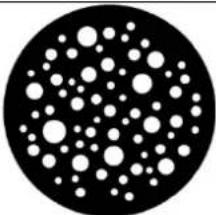 | Dots Medium | |
| 7 | 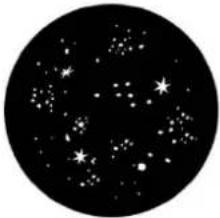 | Starry Night Dense |
Gobowheel 2 (Rotation Gobos ∅ 27 mm)
| Position 1 |  | Cone | ||
| 2 | 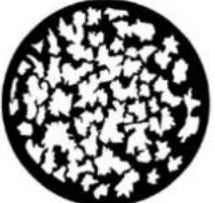 | Leaves Foliage | ||
| 3 |  | Teeth | ||
| 4 | 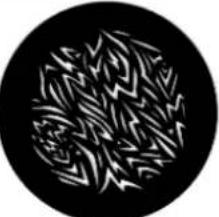 | Shreds | ||
| 5 | 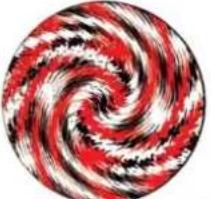 | Angry Hurricane | ||
| 6 | 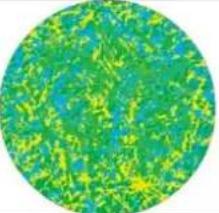 | Shredded Earth | ||
| 7 | 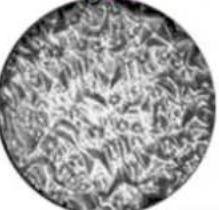 | Diamond Pattern |
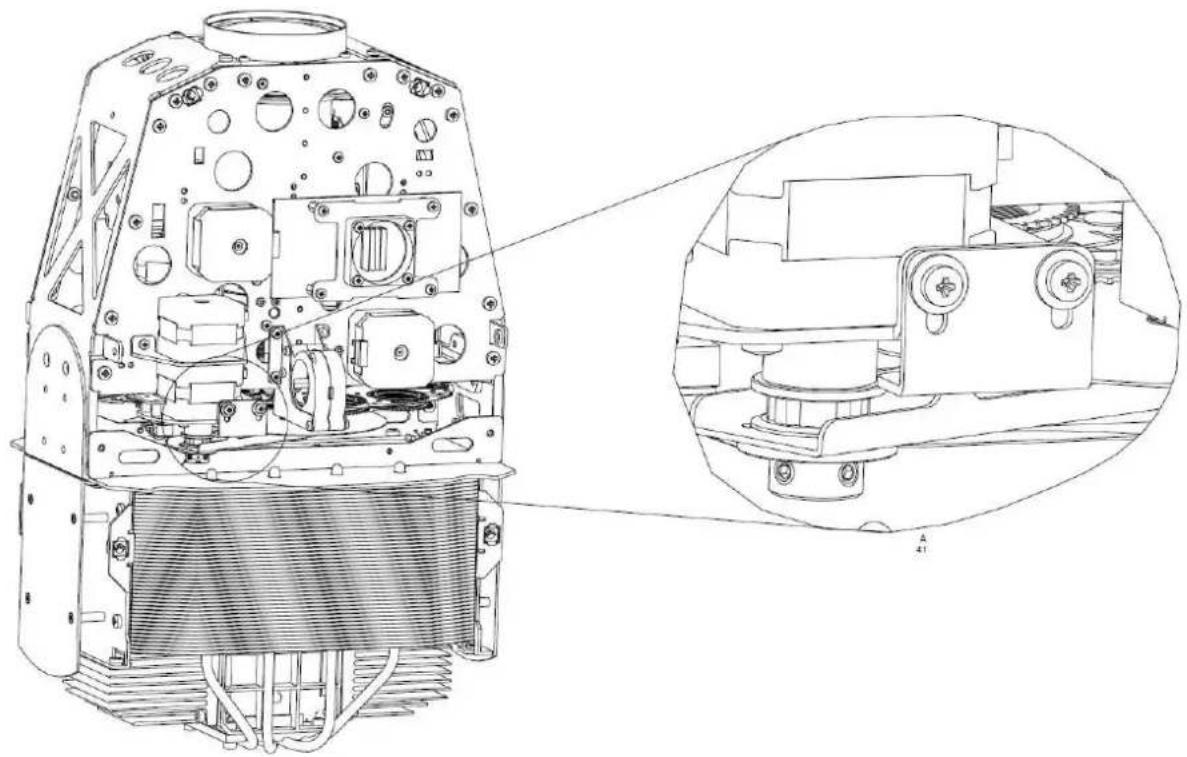
3.1.3 Changing the effect wheel
1) Open the fixture.
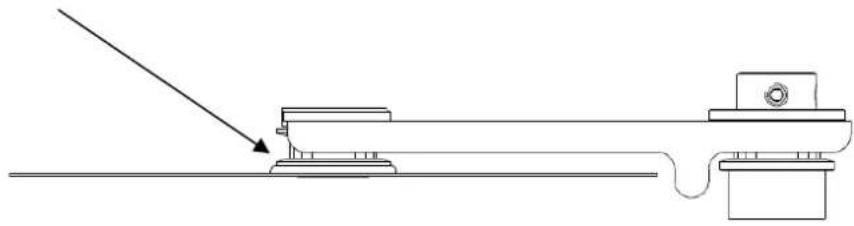
2) Release the mechanical stop of the effect and move it up.
natural_image
Technical line drawing of a mechanical device with internal components and an inset close-up view (no text or symbols)3) The Effect wheel can now be tilt out by hand.
4) The wheel itself is clipped on the wheel axis.
5) To remove it please use a slotted screwdriver and lift it out carefully from the wheel axis of the effect wheel.
natural_image
Pure mechanical assembly diagram showing a lever and pivot point without any text or symbols6) Attention: Don't pull the effect wheel out by grapping it with the hands at the border!
7) Change Effect wheel as desired and close the module in reverse order again.
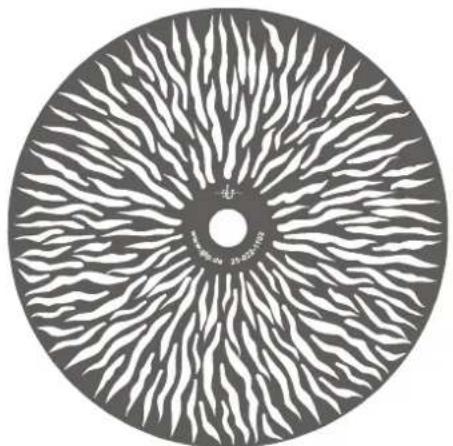
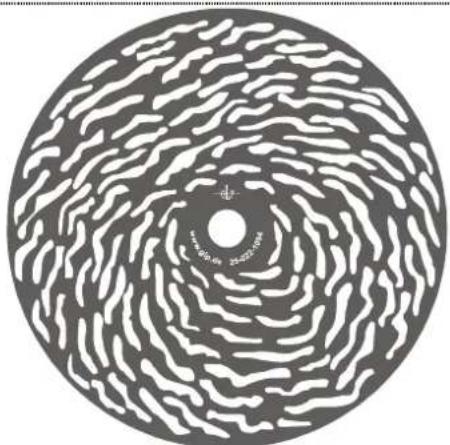
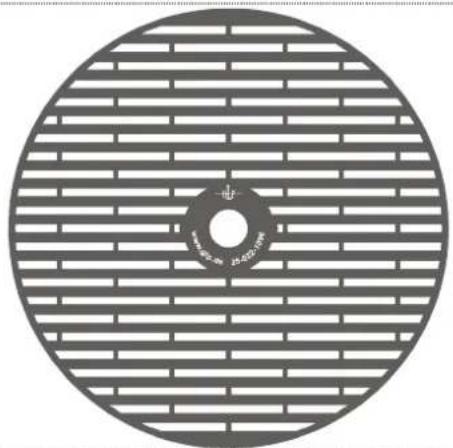
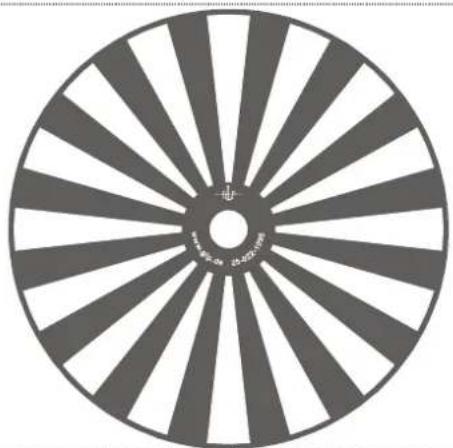
Effect wheel insertion and spares:
natural_image
Circular object with abstract white wavy pattern radiating from center, no text or symbols visibleSTANDARD
natural_image
Circular abstract pattern with concentric wavy lines and a central dot (no text or symbols)SPARE SPARE
natural_image
Circular diagram with horizontal striped pattern and central hole, no text or symbols present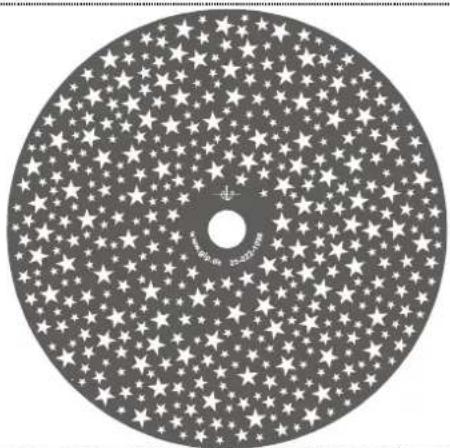
natural_image
Circular arrangement of white stars on a dark background, resembling a CD or DVD disc (no text or symbols)SPARE SPARE
natural_image
Circular object with radial striped pattern and central hole, resembling a wheel or wheel rim (no text or symbols)4 Colored Error Code
These state match to the following errors of the Impression Spot one:
| Color | Meaning | Comment |
| Red | critical state | PCB could not find |
| Yellow | abnormal state | PCB send error back (hall sensor not found, encoder error, ...) |
| Green | normal state | Reset successful / finished error freet |
| White | neutral | Reset activ, no state determined at the moment |
5 Maintaining and Cleaning the Impression Spot one
The Impression Spot one is a low maintenance fixture. It is only necessary to clean the lenses, air inlets and outlets from time to time. For safe operation it is absolutely essential that the fixture is kept clean and that dust, dirt and smoke-fluid residues must not build up on, or within, the fixture. If they do, the fixture's light output will be significantly reduced, and damages to the fixture may occur. Regular cleaning will not only ensure the maximum light output, but will also allow the fixture to operate reliably throughout its entire life. Under no circumstances should alcohol or solvents be used to clean the fixture or its lenses!
5.1 Safety regulations
- Disconnect the fixture from the mains power before commencing any maintenance work!
- Wait minimum 15 minutes after removing the power to allow the fixture to cool down.
5.2 Maintenance Intervals (rule-of-thumb)
The maintenance schedule of any given fixture depends on the installation environment. Hence no specific guidelines can be given. The cleaning intervals given below are suggestions, based on practical experience. We suggest that you start with these and develop your own maintenance schedule as you see the fixtures performance in your specific environment.
| Maintenance Task Interval | How | |
| Outside optic weekly soft | cloth and glass cleaning fluid | |
| Gobos yearly vacuum cle | aner, airbrush, etc. | |
| Glass gobos | yearly soft cloth and glass cleaning fluid | |
| Prism | yearly soft cloth and glass cleaning fluid | |
| Iris | yearly vacuum cleaner, airbrush, etc. | |
| Inside lens | yearly soft cloth no glass cleaning fluid | |
| Fan and air channel | monthly vacuum cleaner, airbrush, etc. | |
| Moveable parts | yearly suitable fatty oil | |
Attention:
- Never let optical parts come into contact with oil or fat.
- Before running the fixture wait until all parts are touch dry.
- Never touch lenses with bare fingers.
6 Technical Specifications
| Power supply | |
| Power consumption | 700 VA (Watt) |
| Power input | Auto sensing 100-240 V AC, 50-60 Hz |
| Fuse protection | Micro-fuse 6.3x32 mm, T8A |
| Operational Parameters | |
| Max. ambient temp. | 45°C / 113°F (integrated overheating switch) |
| Mounting position | Any (See Mounting chapter) |
| Lighting System - Additive Color mixing | |
| LED type | 400W RGB LED Chipset |
| Lifetime | 20.000 h |
| Shutter / Dimmer (8/16 Bit) | |
| Strobe Effect with variable speed between 1 & 50 flashes per second, Random strobe, Pulse effects | |
| Continuous dimmer 0 - 100% | |
| Prism (8 Bit) | |
| Rotating 3-facet prism, bi-directional and variable in speed | |
| Focus (8/16 Bit) | |
| Motor driven focus from near (1 mtr.) to infinity | |
| Iris (8Bit) | |
| High speed iris 100% - 4% (0,2 Sec. opening time) | |
| Effect wheel (8/16 Bit) | |
| Rotating and indexable effect wheel, bi-directional and variable in speed.Interchangeable for different patterns | |
| Zoom (8/16 Bit) | |
| Zoom range 10° - 32° | |
| Gobos (8/16 Bit) | |
| Gobo wheel 1 & 2: each 7 interchangeable rotating and indexed gobos plus open, variable speed and bi-directional | |
| Gobo dimensions:Glass gobo thickness: 1.1 - 3.0mmAluminium gobo thickness: 0.5mm / Outside diameter: 27 mm / Image size: max. 20 mm.For customized gobos like company logos and text the recommended image size is 18 mm. | |
| DMX Control | |
| Standard USITT DMX-512, 3/5 pole XLR; [+] = Pin 3 [-] = Pin 2 [Ground] = Pin 1. | |
| Pan / Tilt (8/16 Bit) - 3 phase stepper motor | |
| Pan- movement 660° (Position Feedback) | |
| Tilt- movement 280° (Position Feedback) | |
| Weights and Measures | |
| Width of the base | 472 mm / 18.6 inch. |
| Length of the base | 230mm / 9 inch. |
| Height (head vertical) | 618mm / 24.3 inch. |
| Fixture weight | 23 kg / 50.7 lbs. |
| Floor stand weight | 2 kg / 4.4 lbs. |
GLP ♦ German Light Products GmbH
7 Index
A
Changing Effect wheel 26
Circumference 29
Cleaning....28
D
Description of Device 4
DIN VDE 0711-217 6
DMX 9
E
e-mail 1
Enter-key 9
Eyelets 7
G
Geräteübersicht 4
Gobowechsel 22
H
Half-couplers (clamps) 8
/
Internet....1
L
LED Class 2M 5
M
Maintenance 28
Menu Field 9
Menüfeld 9
Micro-fuse 9
Mode-key 9
Mounting 6
Mounting in hanging Position 7
Mounting on the Floor 7
0
Optical parts 29
P
Pan-Movement 30
Power Supply 9
Safety Instructions 5
Secure the Device 8
Software Version 1
T
Tilt- Movement 30
U
Up/Down-keys 9
v
VBG 70 6
W
Warranty claims 6
Wartung 22
Weights and Measures 30

natural_image
Abstract black-and-white graphic with curved arrows and a circular shape, no text or symbols present.- Notes:
- Table of contents
- Description of Device....4
- Preparation and Installation 6
- The Menu Field....9
- Changing Gobos and the Effect wheel 22
- Colored Error Code 28
- Maintaining and Cleaning the Impression Spot one 28
- Technical Specifications .... 30
- Description of Device
- Safety Instructions
- Avoid direct radiation to your eyes!
- Preparation and Installation
- Mounting
- Mounting on the floor (upright)
- Mounting in hanging position (Head down)
- Mounting in sideways position
- Securing the device
- Connections
- Power Supply
- DMX
- The Menu Field
- DMX Channels
- Locking and unlocking the Control Panel
- 1) Colors
- 2) Rainbow-effect Stop
- 3) The Rainbow-effect
- 4) Attention:
- 5) Color Temperature
- Changing Gobos and the Effect wheel
- Changing Gobos and the Effect wheel
- General remarks for changing gobos
- Changing rotating gobos
- Changing the effect wheel
- Effect wheel insertion and spares:
- Colored Error Code
- Maintaining and Cleaning the Impression Spot one
- Safety regulations
- Maintenance Intervals (rule-of-thumb)
- Attention:
- Index
- A
- D
- E
- G
- H
- /
- L
- M
- 0
- P
- T
- U
- v
- W
Brand : GLP
Model : impression Spot One
Category : Printer