
ION Guardian G2 Battery - Security Camera Niceboy - Free user manual and instructions
Find the device manual for free ION Guardian G2 Battery Niceboy in PDF.


| Product Type | Wireless Battery-Powered Security Camera |
| Brand | Niceboy |
| Model | ION Guardian G2 Battery |
| Resolution | 1080p Full HD |
| Field of View | 130° |
| Night Vision | Up to 10m with infrared LEDs |
| Motion Detection | PIR sensor with adjustable sensitivity |
| Two-Way Audio | Built-in microphone and speaker |
| Power Source | Rechargeable lithium-ion battery, 5200 mAh |
| Battery Life | Up to 6 months on a single charge (typical use) |
| Connectivity | Wi-Fi 2.4 GHz b/g/n |
| Storage | MicroSD card up to 128 GB or cloud subscription |
| Weather Resistance | IP65 dust and water resistant |
| Dimensions | 7.5 x 7.5 x 10.5 cm |
| Weight | 320 grams |
| Operating Temperature | -20°C to 50°C |
| Audio Detection | Supports sound alerts |
| Privacy Mode | Physical shutter available (via app control) |
| Mounting | Includes wall mount and screws |
| App Support | Niceboy Smart Home (iOS and Android) |
| Certifications | CE, RoHS |
| Maintenance | Wipe with dry cloth; avoid harsh chemicals |
Frequently Asked Questions - ION Guardian G2 Battery Niceboy
User questions about ION Guardian G2 Battery Niceboy
0 question about this device. Answer the ones you know or ask your own.
Ask a new question about this device
Download the instructions for your Security Camera in PDF format for free! Find your manual ION Guardian G2 Battery - Niceboy and take your electronic device back in hand. On this page are published all the documents necessary for the use of your device. ION Guardian G2 Battery by Niceboy.
USER MANUAL ION Guardian G2 Battery Niceboy
natural_image
Diagram of a mechanical or optical setup with a central flange and two parallel plates, showing directional arrows (no text or symbols)flowchart
graph LR
    A["Grid panel with red arrows indicating assembly"] --> B["Motor component with red arrows indicating assembly"]
    B --> C["Motor assembly with red arrows indicating assembly"]
natural_image
Diagram of a solar panel with rotating arm and wiring, no text or symbols presentnatural_image
Illustration of a solar panel being held by a wall-mounted device, with sunlight rays and a 10° angle label (no text or symbols beyond basic diagram)KAM UMÍSTIT SOLÁRNÍ PANEL
natural_image
Diagram of a mechanical or optical setup with a central flange and directional arrows, adjacent to a textured rectangular block (no text or symbols)- Na držiak najprv nasadte istiacu maticu. Následne na koniec držiaka naskrutkujte solárny panel.
- Pre natočenie solárneho panelu nal'avo/napravo povol'te istiacu maticu a po nastavení maticu znovu utiahnite.
natural_image
Diagram of a solar panel with rotating arm and connecting rod (no text or symbols)natural_image
Illustration of a solar panel being held by a bulb, with sunlight rays and a 10° angle indicator (no text or symbols)KAM UMIESTNIŤ SOLÁRNY PANEL
https://niceboy.eu/sk/declaration/ion-solar-panel-guardian-g2-battery
BEZPEČNOSTNÉ POKYNY
Place the solar panel in a location with consistent sunlight throughout the year. For the battery camera to last as long as possible, the solar panel needs at least a few hours of sunlight per day, all year round. The amount of energy a solar panel produces is affected by weather conditions, geographic location, etc.
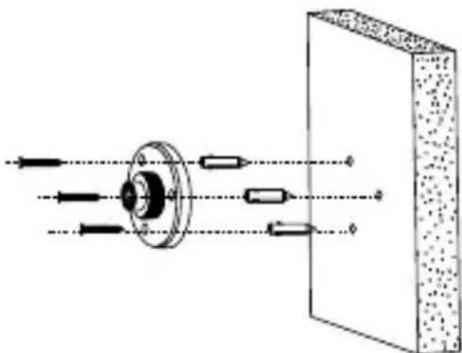
- Secure the base in place using the included screws. First, use the M6 drill bit and drill a hole for all the dowels and screws. Screw the base to the wall.
natural_image
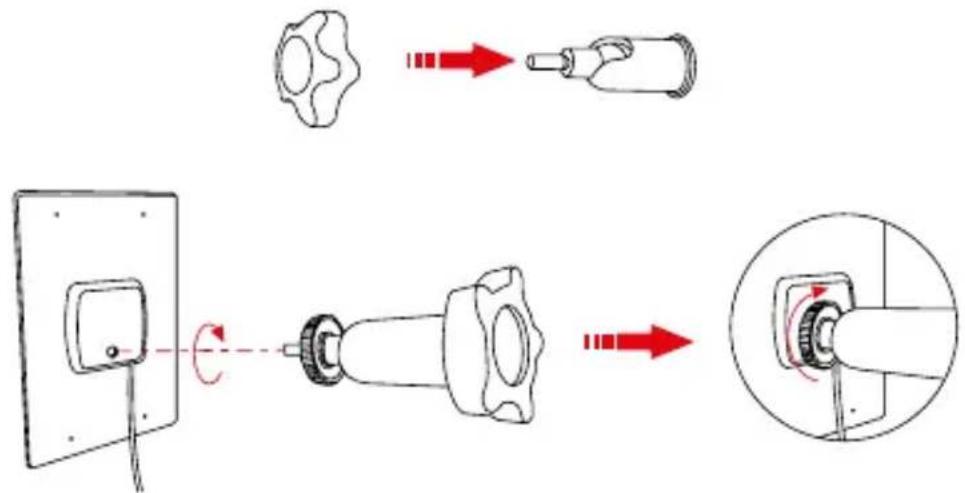
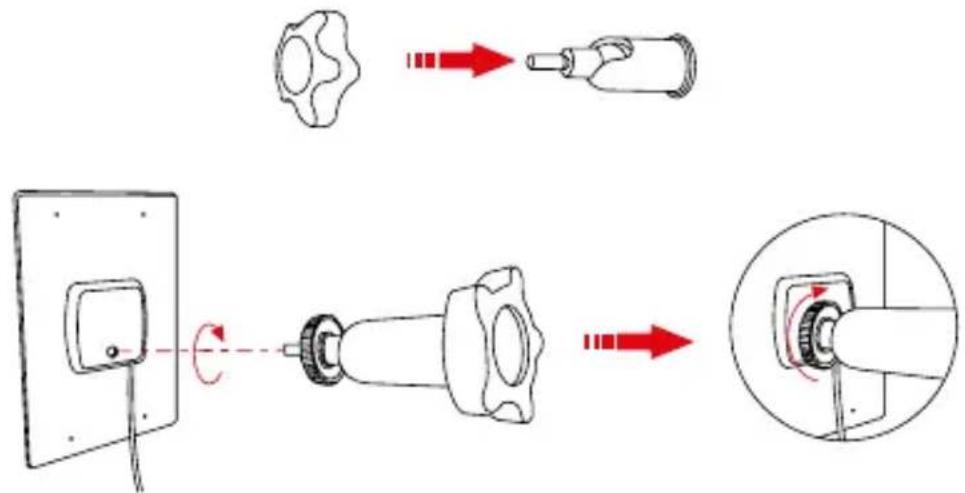
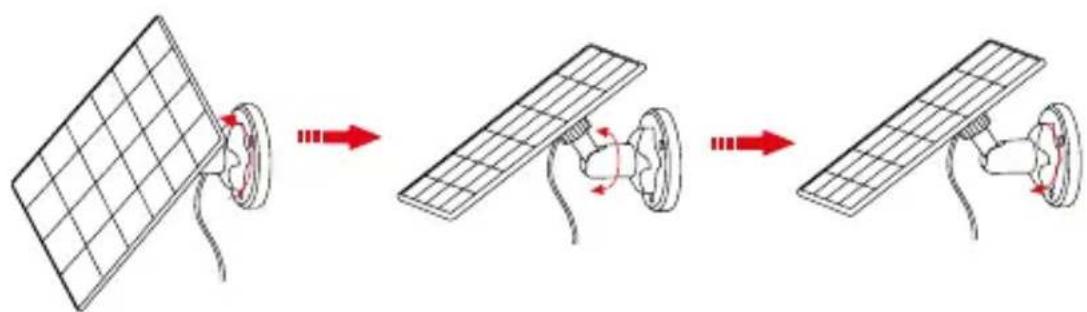
Diagram of a mechanical or optical setup with directional arrows and components, no text or symbols present.- First put the locking nut on the holder. Then screw the solar panel onto the end of the holder.
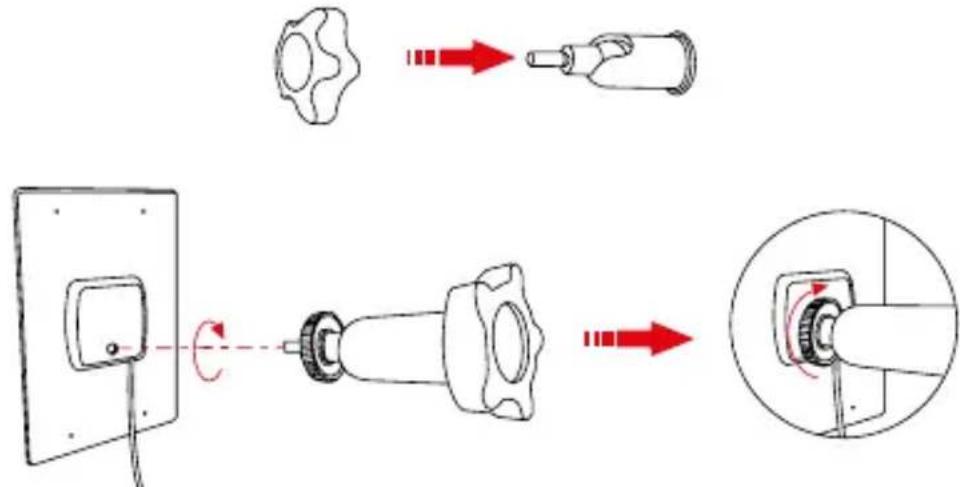
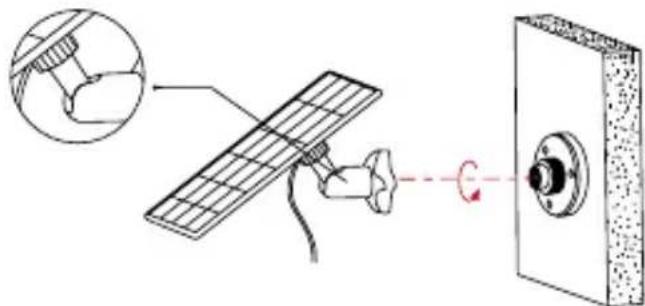
- Then screw the holder with the panel to the base attached to the wall.
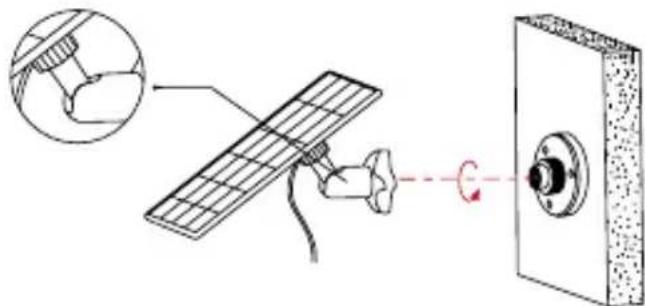
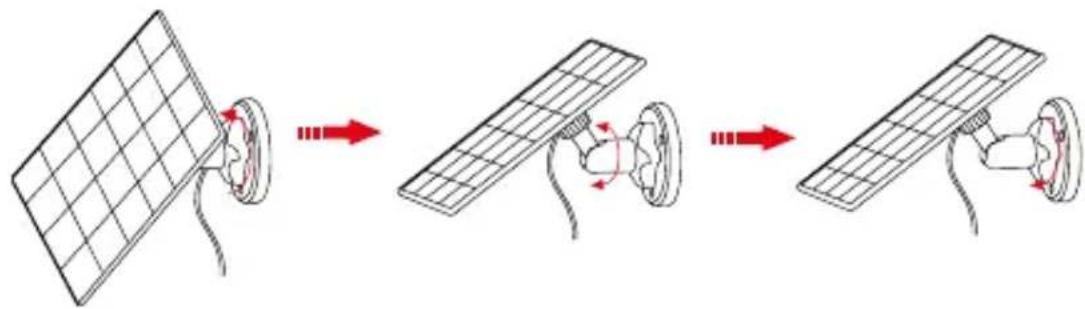
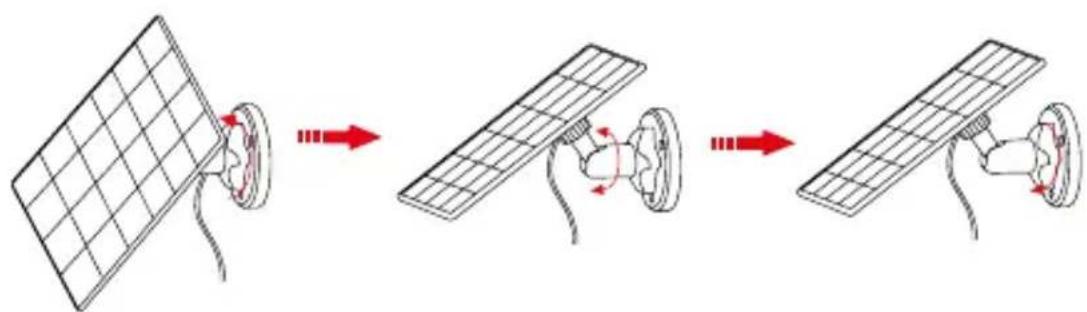
- To rotate the solar panel left/right, loosen the lock nut and tighten the nut again after adjustment.
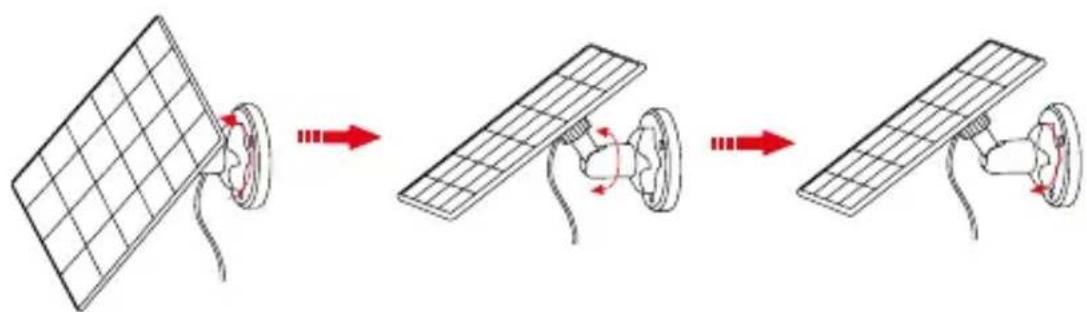
flowchart
graph LR
    A["Grid panel with red arrows indicating assembly"] --> B["Motor component with red arrows indicating assembly"]
    B --> C["Motor assembly with red arrows indicating assembly"]
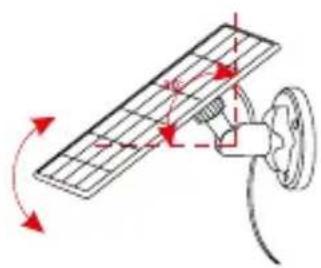
- The angle of the solar panel can be set within 90^ .
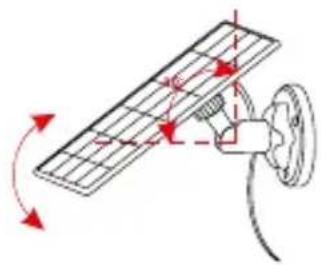
natural_image
Diagram of a solar panel with rotating arm and wiring, no text or symbols presentNote: After installation is complete, make sure that all parts of the bracket are tightly tightened.
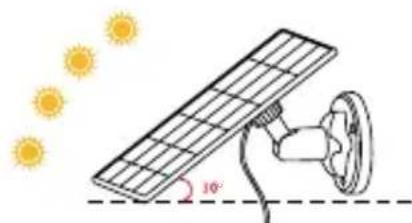
natural_image
Illustration of a solar panel being held by a hand against a wall, with sunlight rays and a 10° angle label (no text or symbols beyond basic diagram)WHERE TO PLACE THE SOLAR PANEL
- Choose a place where the sunlight shines the most for the longest time during the day and throughout the year. This will increase the battery life of the camera.
- Adjust the inclination of the solar panel to approx. 30^ .
- Point the panel towards the south for best results.
IMPORTANT
- Regularly clean the surface of the solar panel with a soft, damp cloth to clean all dirt blocking the sunlight.
- Make sure you are using the latest firmware for your camera.
PARAMETERS
Cable length: 3 m
Connector: USB-C
Operating voltage: 5 V / 0,6 A
Operating Temperature: -20.5 to 48.5°C (-5 to 120°F)
Niceboy s.r.o. hereby declares that NICEBOY ION Solar panel – Guardian G2 Battery complies with Directives 2014/30/EU, 2014/35/EU, and 2011/65/EU. The full content of EU Declaration of Conformity is available on the following websites:
https://niceboy.eu/cs/declaration/ion-solar-panel-guardian-g2-battery
SAFETY INSTRUCTIONS
- Please observe the following safety instructions before using the product.
- Please read this manual carefully before using the product and use the product according to the instructions in this manual.
- Any operation not in accordance with this manual may result in product damage and personal injury.
- This product may only be dismantled by an authorized technician. In case of disassembly by an unauthorized person, product damage and personal injury may occur.
- This appliance is not intended as a toy. When using it, take care of your safety and those around you, especially children. Children under 8 years of age and persons with reduced physical, sensory and mental abilities and knowledge must not operate the product unless they are supervised by a person responsible for their safety.
- Do not use the product if it does not function properly due to dropping, damage, or water ingress. To avoid injury, the product should be repaired by the manufacturer or its after-sales service.
- Do not touch the cable with a wet hand.
- Do not use the product with a damaged power cord.
- Do not wipe or clean the connector with a wet cloth or wet hands.
- Use the product in accordance with the instructions for use. Any loss or damage caused by improper use is the responsibility of the user.
- The use of the product in an environment with an open fire is prohibited.
USER INFORMATION FOR DISPOSING ELECTRICAL AND ELECTRONIC DEVICES (HOME USE)
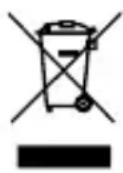
This symbol located on a product or in the product's original documentation means that the used electrical or electronic products may not be disposed together with the communal waste. In order to dispose of these products correctly, take them to a designated collection site, where they will be accepted for free. By disposing of a product in this way, you are helping to protect precious natural resources and helping to prevent any potential negative impacts on the environment and human health, which could be the result of incorrect waste disposal. You may receive more detailed information from your local authority or nearest collection site. According to national regulations, fines may also be given out to anyone who disposes of this type of waste incorrectly. User information for disposing electrical and electronic devices (Business and corporate use). In order to correctly dispose of electrical and electronic devices for business and corporate use, refer to the product's manufacturer or importer. They will provide you with information regarding all disposal methods and, according to the date stated on the electrical or electronic device on the market, they will tell you who is responsible for financing the disposal of this electrical or electronic device. Information regarding disposal processes in other countries outside the EU. The symbol displayed above is only valid for countries within the European Union. For the correct disposal of electrical and electronic devices, request the relevant information from your local authorities or the device seller.
DE
INSTALLATION
natural_image
Diagram of a mechanical assembly with directional arrows and a rectangular block, no text or symbols presentnatural_image
Diagram of a solar panel with rotating arm and connecting rod (no text or symbols)natural_image
Illustration of a solar panel being mounted on a wall with sunlight effects (no text or symbols)WO IST DAS SOLARPANEEL ZU PLATZIEREN?
natural_image
Diagram of a mechanical or optical setup with a central flange and directional arrows, adjacent to a textured rectangular block (no text or symbols)flowchart
graph LR
    A["Grid panel with red arrows indicating assembly"] --> B["Motor component with red arrows indicating assembly"]
    B --> C["Motor assembly with red arrows indicating assembly"]
natural_image
Diagram of a solar panel installation with rotating arm and wiring (no text or symbols)natural_image
Illustration of a solar panel being held by a hand against a wall, with sunlight rays and a 10° angle label (no text or symbols beyond basic diagram)HOL HELYEZZE EL A NAPELEM PANELET
https://niceboy.eu/cs/declaration/ion-solar-panel-guardian-g2-battery
BIZTONSÁGI UTASÍTÁSOK
natural_image
Diagram of a mechanical assembly with directional arrows and components, no text or symbols present- Prvo stavite sigurnosnu maticu na držač. Zatim pričvrstite solarnu ploču na kraj držača.
- Zatim pričvrstite držač s pločom na bazu pričvršćenu na zid.
- Za okretanje solarne ploče lijevo/desno, otpustite sigurnosnu maticu i ponovno je zategnite nakon podešavanja.
flowchart
graph LR
    A["Grid panel with red arrows indicating assembly"] --> B["Motor component with red arrows indicating assembly"]
    B --> C["Motor assembly with red arrows indicating assembly"]
- Kut solarne ploče može se postaviti unutar 90°.
natural_image
Diagram of a solar panel with rotating arm and wiring, no text or symbols presentnatural_image
Illustration of a solar panel being held by a hand against a wall, with sunlight rays and a 10° angle label (no text or symbols beyond basic diagram)GDJE POSTAVITI SOLARNI PLOČU
https://niceboy.eu/cs/declaration/ion-solar-panel-guardian-g2-battery
SIGURNOSNE UPUTE
natural_image
Diagram of a mechanical or optical setup with directional arrows and components, no text or symbols present.natural_image
Diagram of a solar panel being connected to a power plug, showing rotation arrows (no text or symbols)natural_image
Illustration of a solar panel being held by a wall-mounted device under sunlight (no text or symbols)GDZIE UMIEŚCIĆ PANEL SŁONECZNY
https://niceboy.eu/cs/declaration/ion-solar-panel-guardian-g2-battery
INSTRUKCJE BEZPIECZEŃSTWA
natural_image
Diagram of a mechanical or optical setup with directional arrows and components, no text or symbols present.- Če želite solarno ploščo zavrteti levo/desno, popustite protimatico in jo po nastavitvi ponovno privijte.
flowchart
graph LR
    A["Grid panel with red arrows indicating assembly"] --> B["Motor component with red arrows indicating assembly"]
    B --> C["Motor assembly with red arrows indicating assembly"]
natural_image
Diagram of a solar panel with rotating arm and wiring, no text or symbols presentnatural_image
Illustration of a solar panel being mounted on a wall with sunlight rays, no text or symbols presentKJE POSTAVITI SONČNI PANEL
natural_image
Diagram of a mechanical or optical setup with a central flange and directional arrows, adjacent to a textured rectangular block (no text or symbols)flowchart
graph LR
    A["Grid panel with red arrows indicating assembly"] --> B["Motor component with red arrows indicating assembly"]
    B --> C["Motor assembly with red arrows indicating assembly"]
natural_image
Diagram of a solar panel with rotating arm and wiring, no text or symbols presentnatural_image
Illustration of a solar panel being held by a hand against a wall, with sunlight rays and a 10° angle label (no text or symbols beyond basic diagram)UNDE SA PLASARE PANOUL SOLAR
https://niceboy.eu/cs/declaration/ion-solar-panel-guardian-g2-battery
INSTRUCTIUNI DE SIGURANTĂ
natural_image
Diagram of a mechanical assembly with directional arrows and components, no text or symbols presentflowchart
graph LR
    A["Grid panel with red arrows indicating assembly"] --> B["Motor component with red arrows indicating assembly"]
    B --> C["Motor assembly with red arrows indicating assembly"]
natural_image
Diagram of a solar panel installation with rotating arm and wiring (no text or symbols)natural_image
Illustration of a solar panel being held by a hand against a wall, with sunlight rays and a 10° angle label (no text or symbols beyond basic diagram)VAR SKA DU PLACERA SOLPANELEN
https://niceboy.eu/cs/declaration/ion-solar-panel-guardian-g2-battery
SÄKERHETSINSTRUKTIONER
Prague 4, Czech Republic, ID: 294 16 876.
Made in China.

- KAM UMÍSTIT SOLÁRNÍ PANEL
- KAM UMIESTNIŤ SOLÁRNY PANEL
- BEZPEČNOSTNÉ POKYNY
- WHERE TO PLACE THE SOLAR PANEL
- IMPORTANT
- PARAMETERS
- SAFETY INSTRUCTIONS
- USER INFORMATION FOR DISPOSING ELECTRICAL AND ELECTRONIC DEVICES (HOME USE)
- DE
- INSTALLATION
- WO IST DAS SOLARPANEEL ZU PLATZIEREN?
- HOL HELYEZZE EL A NAPELEM PANELET
- BIZTONSÁGI UTASÍTÁSOK
- GDJE POSTAVITI SOLARNI PLOČU
- SIGURNOSNE UPUTE
- GDZIE UMIEŚCIĆ PANEL SŁONECZNY
- INSTRUKCJE BEZPIECZEŃSTWA
- KJE POSTAVITI SONČNI PANEL
- UNDE SA PLASARE PANOUL SOLAR
- INSTRUCTIUNI DE SIGURANTĂ
- VAR SKA DU PLACERA SOLPANELEN
- SÄKERHETSINSTRUKTIONER
Brand : Niceboy
Model : ION Guardian G2 Battery
Category : Security Camera