
KLOCKIS 705.597.11 - Clock IKEA - Free user manual and instructions
Find the device manual for free KLOCKIS 705.597.11 IKEA in PDF.


Pick your language and provide your email: we'll send you a specifically translated version.
| Product Type | Digital Alarm Clock |
| Model Number | KLOCKIS 705.597.11 |
| Brand | IKEA |
| Dimensions | Approx. 10 x 10 x 5 cm (3.9 x 3.9 x 2.0 inches) |
| Weight | Approx. 150 g (0.33 lbs) |
| Power Supply | 2 x AAA batteries (not included) |
| Display Type | LED digital display |
| Time Format | 12-hour or 24-hour selectable |
| Alarm Function | Yes, with alarm set and snooze |
| Snooze Duration | 5 or 10 minutes (depends on setting) |
| Backlight | Yes, for easy reading in dark |
| Material | Plastic casing |
| Care Instructions | Wipe with a soft, dry cloth. Do not use abrasive cleaners. |
| Safety | Indoor use only. Keep away from water and heat sources. |
| Spare Parts | Batteries are replaceable. No other spare parts available. |
| Repairability | Not designed for user repair. Contact IKEA for issues. |
| Warranty | 1 year limited warranty (check local policy) |
| Country of Origin | China |
Frequently Asked Questions - KLOCKIS 705.597.11 IKEA
How do I set the time on my KLOCKIS clock?
Press and hold the SET button for about 3 seconds until the hour digits blink. Use the + and - buttons to adjust. Press SET to switch to minutes, adjust, then press SET again to confirm and exit.
How do I set the alarm?
Press the ALARM button (if present) or follow the manual. Typically, press and hold SET while in alarm mode, then adjust hour and minute similarly. Toggle alarm on/off with the ALARM button.
What type of batteries does the KLOCKIS clock need?
The clock requires 2 AAA batteries (not included). Alkaline batteries are recommended for longer life.
How do I switch between 12-hour and 24-hour format?
While setting the time, press the + or - button to toggle between 12H and 24H format. The display will show AM/PM in 12-hour mode.
Why is the display not showing anything?
First, check that the batteries are inserted correctly with the correct polarity (+/-). If the display remains blank, replace the batteries with new ones. If the issue persists, contact IKEA support.
How do I enable or disable the snooze function?
When the alarm sounds, press the SNOOZE button (usually a large button on top) to snooze for the preset time (often 5 or 10 minutes). To disable snooze, press the OFF or ALARM button.
Is the clock suitable for bathrooms or outdoor use?
No, the KLOCKIS clock is designed for indoor use only and should be kept away from moisture, steam, and extreme temperatures to avoid damage.
Can I adjust the brightness of the display?
Some models have a dimmer button or automatic brightness sensor. If your clock has a DIMMER button, you can cycle through brightness levels. Otherwise, brightness is fixed.
What should I do if the clock is not keeping time accurately?
Ensure the batteries are fresh. If the clock loses or gains time, it may be a sign of low battery. Replace batteries. If problem continues, the clock may be defective.
Where can I find the user manual for KLOCKIS?
You can download the PDF manual from notice-facile.com or the IKEA website. The manual includes detailed setup instructions and troubleshooting.
User questions about KLOCKIS 705.597.11 IKEA
0 question about this device. Answer the ones you know or ask your own.
Ask a new question about this device
No questions yet. Be the first to ask one.
Download the instructions for your Clock in PDF format for free! Find your manual KLOCKIS 705.597.11 - IKEA and take your electronic device back in hand. On this page are published all the documents necessary for the use of your device. KLOCKIS 705.597.11 by IKEA.
USER MANUAL KLOCKIS 705.597.11 IKEA
Design and Quality IKEA of Sweden
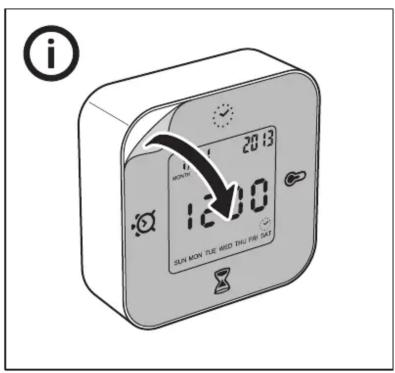
i
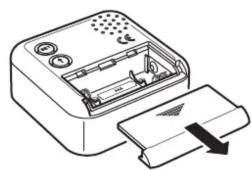
natural_image
Line drawing of a device with an open lid and internal components, showing no text or symbols.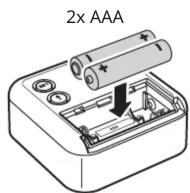
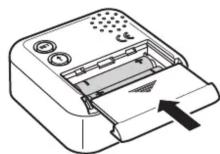

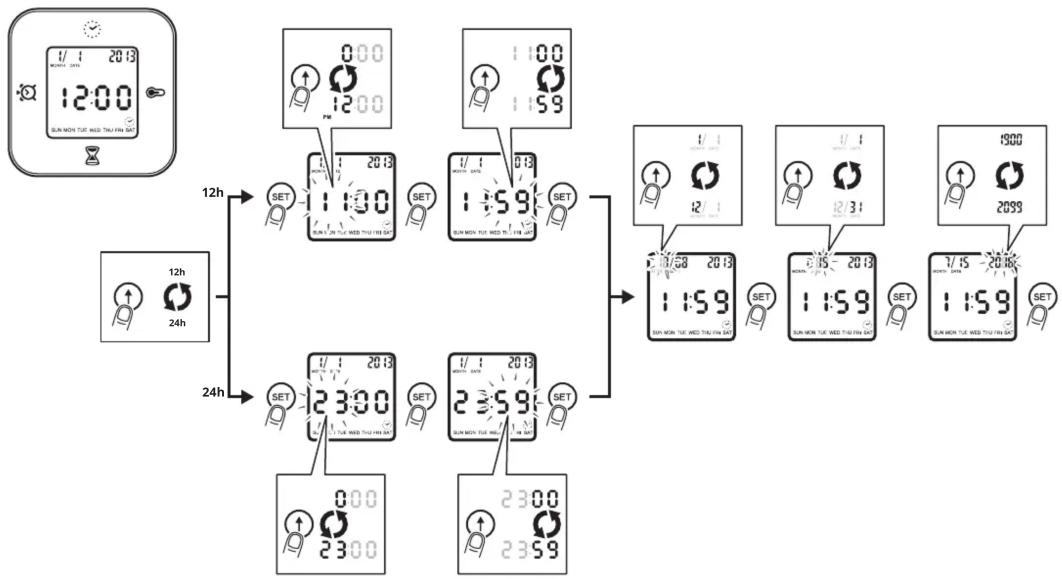
flowchart
graph TD
    A["12:00"] --> B["12h"]
    A --> C["24h"]
    B --> D["SET"]
    C --> E["SET"]
    D --> F["1:30"]
    E --> G["1:59"]
    F --> H["1:58"]
    G --> I["1:59"]
    H --> J["1:58"]
    I --> K["1:59"]
    J --> L["1:58"]
    K --> M["1:59"]
    L --> N["1:58"]
    M --> O["1:59"]
    N --> P["1:58"]
    O --> Q["1:59"]
    P --> R["1:58"]
    Q --> S["1:59"]
    R --> T["1:58"]
    S --> U["1:59"]
    T --> V["1:58"]
    U --> W["1:59"]
    V --> X["1:58"]
    W --> Y["1:59"]
    X --> Z["1:58"]
    Y --> AA["1:59"]
    Z --> AB["1:58"]
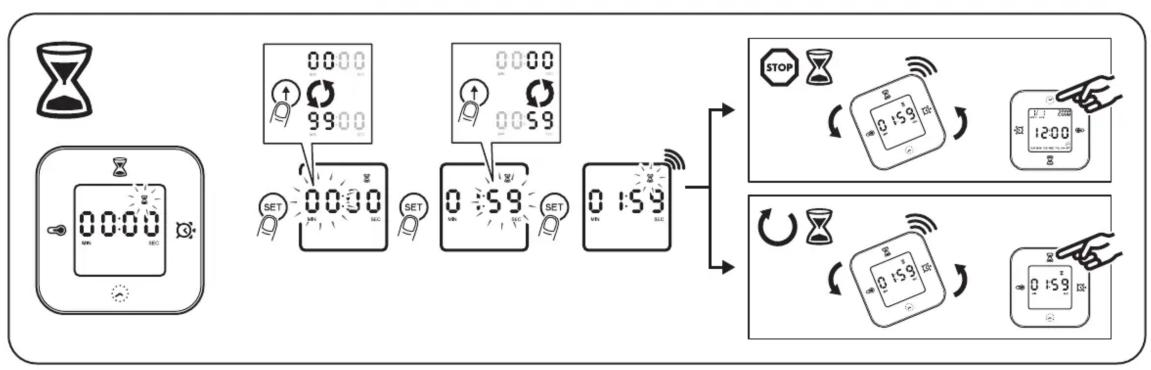
flowchart
graph TD
    A["00:00"] --> B["SET"]
    B --> C["0:59"]
    C --> D["SET"]
    D --> E["0:159"]
    E --> F["STOP"]
    F --> G["1200"]
    G --> H["Control buttons with Wi-Fi signals"]
    H --> I["0:159"]
    I --> J["Control buttons with Wi-Fi signals"]
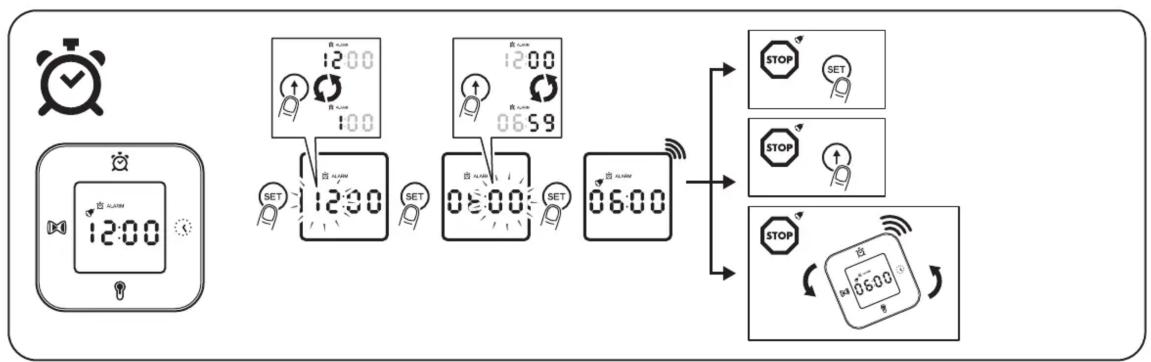
flowchart
graph TD
    A["Digital Clock"] --> B["12:00"]
    B --> C["12:00"]
    C --> D["06:00"]
    D --> E["STOP"]
    D --> F["SET"]
    D --> G["STOP"]
    D --> H["STOP"]
    style A fill:#f9f,stroke:#333
    style B fill:#ccf,stroke:#333
    style C fill:#cfc,stroke:#333
    style D fill:#fcc,stroke:#333
    style E fill:#ffc,stroke:#333
    style F fill:#ffc,stroke:#333
    style G fill:#ffc,stroke:#333
    style H fill:#ffc,stroke:#333
Manual assistant
Powered by Anthropic
Waiting for your message
Product information
Brand : IKEA
Model : KLOCKIS 705.597.11
Category : Clock