
ION K30 - Keyboard Niceboy - Free user manual and instructions
Find the device manual for free ION K30 Niceboy in PDF.


| Product Type | Keyboard |
| Brand | Niceboy |
| Model | ION K30 |
| Dimensions | 427 x 122 x (6.8-12) mm |
| Power Source | Built-in rechargeable battery 3.7V, 180 mAh |
| Input Voltage | DC 5V, 100 mA via USB-C |
| Connectivity | 2.4GHz, Bluetooth 5.1, USB-C |
| Number of Keys | 110 |
| Switch Type | Chocolate (chiclet) |
| Battery Life | 80 hours |
| Bluetooth Range | Up to 10 m |
| Compatible Operating Systems | iOS, Android, Windows |
| Multimedia Shortcuts | Yes (via FN keys) |
| Standby Current | ~1 mA |
| Sleep Current | <50 µA |
| Sleep Time | 20 minutes (Bluetooth & 2.4G modes) |
| Wake-up Method | Press any key |
| Pairing | Bluetooth (up to 3 devices) and 2.4GHz |
| Package Contents | Keyboard, manual, USB dongle |
| Safety | Keep away from children; avoid extreme temperatures (0-45°C) and humidity (20-90%); do not disassemble or expose to liquids |
| Cleaning | Wipe with a dry cloth; avoid moisture and abrasives |
| Regulatory Compliance | EU Directives 2014/53/EU, 2014/30/EU, 2011/65/EU; CE, RoHS |
| Disposal | WEEE - do not dispose with household waste; take to designated collection point |
Frequently Asked Questions - ION K30 Niceboy
User questions about ION K30 Niceboy
0 question about this device. Answer the ones you know or ask your own.
Ask a new question about this device
Download the instructions for your Keyboard in PDF format for free! Find your manual ION K30 - Niceboy and take your electronic device back in hand. On this page are published all the documents necessary for the use of your device. ION K30 by Niceboy.
USER MANUAL ION K30 Niceboy
Just connect the keyboard to your computer using the 2.4 GHz USB dongle, case via Bluetooth interface. In case the keyboard is not recognized, please check if the USB driver is up to date on your computer (please check with your PC/laptop manufacturer to make sure it is up to date).
PAIRING (BLUETOOTH INTERFACE):
- Slide the power switch to (ON - Bluetooth part - rear side), the blue indicator will light up, long press the "1" key (3 seconds). The Bluetooth keyboard will start pairing, during this process the indicator will flash at a frequency of approx. 0.25 seconds.
- Switch on the device and select the settings icon on the device. Click on this icon to display a list of system preferences.
- Click on the Bluetooth icon to search for nearby devices
- Please find the "Niceboy K30" device in the Bluetooth device list. Click on this name to connect the keyboard to the device.
- Your keyboard is ready for use.
- By long pressing "2" for 3 seconds, the keyboard will start preparing to pair with the device. The red indicator will flash at a frequency of 0.25 seconds.
- Long press „3" for 3 seconds to prepare the keypad for pairing with the device. The red indicator will flash at a frequency of 0.25 seconds.
- Please follow steps 2-4 to pair other devices via Bluetooth interface.
PAIRING (2.4 GH INTERFACE):
Press the „2.4G“ button, switch to 2.4G mode, then long press the „2.4G“ button for 3 seconds to make the keyboard enter the pairing state. The blue light will flash for a few seconds and then go out to indicate successful code assignment.
MULTIMEDIA SHORTCUTS (FN):
| Key | iOS | Fn + iOS | Android | Fn + Android | Windows | Fn + Windows |
| [ADOK] | Home | Esc | Home | Esc | Browser | Esc |
| [WDYS] | Reduction of brightness | F1 | Reduction of brightness | F1 | Reduction of brightness | F1 |
| [WZWD] | Increasing of brightness | F2 | Increasing of brightness | F2 | Increasing of brightness | F2 |
| [KEKN] | Select all | F3 | Select all | F3 | Select all | F3 |
| [BHZD] | Copy | F4 | Copy | F4 | Copy | F4 |
| Paste | F5 | Paste | F5 | Paste | F5 | |
| Clipping | F6 | Clipping | F6 | Clipping | F6 | |
| Previous | F7 | Previous | F7 | Previous | F7 | |
| Play/pause | F8 | Play/pause | F8 | Play/pause | F8 | |
| Next | F9 | Next | F9 | Next | F9 | |
| Mute | F10 | Mute | F10 | Mute | F10 | |
| Wolume down | F11 | Wolumedown | F11 | Wolumedown | F11 | |
| Wolume up | F12 | Wolume up | F12 | Wolume up | F12 | |
| Lock screen | Del | Lock screen | Del | Lock screen | Del |
TECHNICAL SPECIFICATIONS:
| Voltage: | 3.7 V, 180 mAh |
| DC input voltage: | 5.0 V/ 100 mA |
| Keypad size: | 427 x 122 x (6.8-12) mm |
| Number of keys: | 110 |
| Switch: | chocolate |
| Battery life: | 80 hours |
| Bluetooth range: | -10 m |
| Compatible operating systems: | iOS, Android, Windows |
| Connectivity: | 2.4GHz, BT5.0, USB C |
| Multimedia buttons: | Yes |
| Bluetooth version: | 5.1 |
| Standby current: | ~1 mA |
| Sleep current: | -50uA |
| Sleep time (Bluetooth mode): | 20 minutes |
| Sleep time (2.4G mode): | 20 minutes |
| Wake-up method: | wake up the keyboard by pressing any button |
FURTHER INFORMATION:
- This package contains small parts that may be hazardous to children. Therefore, keep the product out of their reach.
- Do not use the keyboard in places where the temperature is too low or high (0 °C or less/ 45 °C or more) or the humidity is too high (20% or less/ 90% or more).
- Do not store the keyboard in places where the temperature is too low or high (-20 °C or more/ 60 °C or more) or the humidity is too high (90% or more).
- Protect the product from rain, moisture and liquids and do not attempt to disassemble it.
• This product complies with all essential requirements of the EU directives. - Protect the equipment from sharp objects and falls from height.
- Battery - improper handling (long charging time, short circuit, breaking against another object, etc.) may cause fire, overheating or battery discharge.
- Improper handling (long charging time, short-circuit, breakage by another object, etc.) can cause, for example, fire, overheating or battery discharge.
-
The standard warranty period for the battery or batteries is 24 months. However, the warranty does not cover a drop in capacity caused by normal use. The standard battery life is six months, but can be extended by proper handling and care of the battery or accumulator.
-
The battery or accumulator that may be included in the product is covered by the six-month lifetime as it is a consumable.
• In the case of radio equipment that intentionally transmits radio waves, the instructions and safety information shall include information on all frequency bands in which the radio equipment operates and the maximum radio frequency power emitted in the frequency band in which the radio equipment operates.
• This product complies with all the essential requirements of the EU Directives.
The manual can be downloaded electronically at www.niceboy.eu in the support section. Niceboy s.r.o. hereby declares that the Niceboy K30 radio type is in Directive 2014/53/EU, 2014/30/EU and 2011/65/EU. Declaration of Conformity is available on this website: https://niceboy.eu/cs/declaration/office-k30
INFORMATION FOR USERS ON THE DISPOSAL OF ELECTRICAL AND ELECTRONIC EQUIPMENT (HOUSEHOLDS)
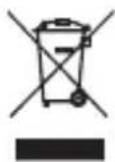
The symbol on the product or in the accompanying documentation means that used electrical or electronic products must not be disposed of with municipal waste. In order to dispose of the product correctly, please take it to the designated collection points where it will be accepted free of charge. Proper disposal of this product will help conserve valuable natural resources and help prevent potential negative environmental and human health impacts that could result from improper waste disposal. For further details, contact your local authority or nearest collection point. Fines may be imposed for improper disposal of this type of waste in accordance with national regulations.
Information for users on the disposal of electrical and electronic equipment (corporate and business use). For proper disposal of electrical and electronic equipment for business and enterprise use, please consult the manufacturer or importer of this product. The latter will provide you with information on how to dispose of the product and, depending on the date of marketing of the electrical equipment, will tell you who is obliged to finance the disposal of this electrical equipment. Information on disposal in other countries outside the European Union. The above symbol is only valid in European Union countries. For proper disposal of electrical and electronic equipment, please ask your authorities or equipment dealer for detailed information.
DE
INHALT DES PAKETS:
- Niceboy K30
- Handbuch
• USB-Dongle
INSTALLATION:



Brand : Niceboy
Model : ION K30
Category : Keyboard