
MT1520wh - Oven Concept - Free user manual and instructions
Find the device manual for free MT1520wh Concept in PDF.


| Product Type | Built-in Electric Oven |
| Brand | Concept |
| Model | MT1520wh |
| Energy Class | A |
| Power Supply | 230 V ~ 50 Hz |
| Power Consumption | 3000 W |
| Dimensions (W x H x D) | 595 x 595 x 550 mm |
| Oven Capacity | 70 L |
| Number of Functions | 8 (convection, grill, fan, etc.) |
| Temperature Range | 50 - 250 °C |
| Cleaning System | Easy-clean enamel interior |
| Safety Features | Child lock, automatic shut-off, cool-touch door |
| Weight | 35 kg |
| Installation Type | Built-in |
| Control Type | Mechanical timer and knobs |
| Included Accessories | 1 baking tray, 1 wire shelf |
| Special Features | Interior light, removable door glass for cleaning |
Frequently Asked Questions - MT1520wh Concept
User questions about MT1520wh Concept
0 question about this device. Answer the ones you know or ask your own.
Ask a new question about this device
Download the instructions for your Oven in PDF format for free! Find your manual MT1520wh - Concept and take your electronic device back in hand. On this page are published all the documents necessary for the use of your device. MT1520wh by Concept.
USER MANUAL MT1520wh Concept
natural_image
White conceptual microwave oven with control knobs and a digital display (no visible text or symbols on the device body)PODĚKOVÁNÍ
Thank you for purchasing the Concept product. We want you to be satisfied with everything we make every day you use it.
Please read the instructions carefully before initial use. You should retain them for a future reference. Ensure that anyone using the warming drawer is familiarized with the instructions.
TABLE OF CONTENTS
Technical specifications
Important safety information
Radio interference
Product description
Control panel description
Individual functions
User manual
Basic functions
Suitable/unsuitable cookware for microwave heating
Advanced functions
Cleaning and maintenance
Installation of the appliance
Trouble shooting
Environmental protection
| Technical specifications | |
| Voltage 230 V ~ 50 Hz | |
| Microwave input power 1 050 W | |
| Microwave energy output 700 W | |
| Wave frequency 2 450 MHz | |
| External dimensions (W x D x H) 440 x 355 x 259 mm | |
| Internal volume 20 l | |
| Weight 10,2 kg | |
| Turntable plate diameter 255 mm | |
| Sound performance level < 63 dB(A) | |
The manufacturer reserves the right to make potential technical changes, typographical errors and any differences in the representation without prior notice.
Follow the instructions for positioning the appliance. Pay special attention to the distance from flammable materials such as curtains, drapes, blankets, paper, clothing, etc.!
IMPORTANT SAFETY INFORMATION
- Use the unit only as described in this operating manual.
- This appliance is intended to be used in household and similar applications such as: staff kitchen areas in shops, offices and other working environments; by clients in hotels, motels and other residential type environments; farm houses; bed and breakfast type environments.
- This appliance can be used by children aged from 8 years and above and persons with reduced physical, sensory or mental capabilities or lack of experience and knowledge if they have been given supervision or instruction concerning use of the appliance in a safe way and understand the hazards involved.
• Children shall not play with the appliance.
- Cleaning and user maintenance stall not be made by children unless they are older than 8 and supervised.
- Keep the appliance and its cord out of reach of children less than 8 years.
- WARNING: The appliance and its accessible parts become hot during use. Care should be taken to avoid touching heating elements. Children less than 8 years of age shall be kept away unless continuously supervised. surface of a storage cabinet can get hot.
- Remove all the covering and marketing materials from the unit before the first use.
• Make sure the mains voltage matches the value marked on the rating plate.
- Do not leave the unit unattended during operation.
- Make sure to place the unit on a stable heat-resistant surface, out of the reach of other heat sources. This surface shall have a sufficient load capacity to hold the unit with its contents.
- Do not cover the unit's openings. There is a risk of overheating.
- Do not remove the feet.
- Only use dishes designed for microwave ovens (non-metal, no metal prints or decorations). Plastic containers or packages can become heat-deformed or ignite, so watch them during preparation.
- Do not store anything inside the unit.
- Never touch the hot surface. Use the handles and buttons.
- Use potholders to handle hot accessories.
- Follow the building-in instructions for the unit. Make sure there is a safe distance between the unit and flammable materials, such as furniture, curtains, lace, blankets, paper, clothing etc.!
- Keep the unit clean. Do not let any objects enter the unit through the grille. Contaminants may short out the unit, causing dam-age or fire.
• These could cause a fire.
- Never pull the cord to disconnect the plug from the wall outlet; hold the plug instead.
- The appliance is not intended for and should not be accessible to children or people with reduced capabilities.
• Take extra care when using the unit near children.
- Do not use the appliance as a toy.
- Make sure the power cord does not hang over the working area, to prevent children from reaching it.
- The stovetop is intended for interior use only; do not expose it to moisture. Otherwise, a risk of electrical shock may occur.
- Use manufacturer-recommended accessories only.
- Never use the appliance if the supply cord or plug is damaged.
- Immediately refer to an authorised service centre for repair.
- Never pull the supply cord or use it to carry the unit.
- Keep the stovetop away from any other heat sources such as radiators, ovens etc. Do not expose the unit to direct sunlight or moisture.
- Never operate the appliance with wet hands.
- Turn off the unit and disconnect the plug from the mains outlet in case of any failure.
- Do not touch the moving parts during operation of the unit.
- The appliance is intended for domestic use only, not for commercial use.
- The unit is designed solely for cooking, heating or defrosting food.
- Do not use the unit to fry food. Hot oil can damage parts of the unit, or cause skin burns.
- Do not use the unit if the door or packing is damaged. Have the unit repaired in an authorised service centre.
- For the purpose of protection from microwave radiation no unauthorised person is allowed to perform any servicing or repair, e.g. removing the cover that protects against microwave radiation.
- Do not use the unit for preparing or heating food in sealed vessels, as they may explode.
- Do not try to repair the appliance; instead, refer to an authorised service centre.
- Do not attempt to operate this oven with the door open as this may result in harmful exposure to microwave energy. Do not attempt to break or tamper with security locks.
- If the appliance is not kept in good condition or is dirty, it may degrade the surface and affect the life of the appliance or lead directly to dangerous situations.
• The appliance must not be cleaned with a steam cleaner. - To avoid overheating, the appliance must not be installed in a cabinet behind a decorative door.
• The appliance is intended for free-standing use. - The rear wall of the appliance must be placed towards the wall.
Failure to follow the manufacturer's instructions may lead to refusal of warranty repair.
GROUNDING INSTRUCTIONS
This appliance has to be grounded. It is equipped with a supply cable with a grounding conductor and grounding plug. It must be connected to a socket that is correctly installed and grounded. In the case of a short circuit this grounding reduces the risk of electric shock. It is recommended to connect the unit to a separate electric circuit. The use of high voltage is dangerous, and any damage to the oven can cause a fire or other emergency.
WARNING!
Incorrect use of the protective conductor can cause the risk of electric shock.
Note: If you have any questions concerning the grounding or electrical connection, contact a qualified electrician or servicing technician. Neither the manufacturer nor the distributor is responsible for injury or damage caused by incorrect electric connection. The conductors in the supply cable are colored as follows:
Green and yellow - protective/grounding conductor
Blue - medium conductor
Brown/black - phase conductor
If an extension cord is required, use only a 3-wire extension cord.
A short power cord is available to reduce the risk of tangling or tripping over a longer cord.
When using a long cord set or extension cord, the following must be observed:
- The marked electrical ratings of the cord set or extension cord should be at least as large as the electrical ratings of the appliance.
- The extension cord must be a 3-wire cord with a grounding conductor.
- The long cord should not hang over a worktop or table where children can pull it or trip over it unintentionally.
RECEIVER SIGNAL INTERFERENCE
Operation of the appliance can cause interference with the signal of your radio receiver, TV receiver, or similar appliances. This interference may be reduced or eliminated by taking the following measures:
- Clean the door and sealing surfaces of the oven.
- Readjust the receiver antenna of the radio or TV.
- Place the unit further from the receiver.
- Plug the unit in a different socket to make sure other appliances are connected to different circuits.
PRODUCT DESCRIPTION
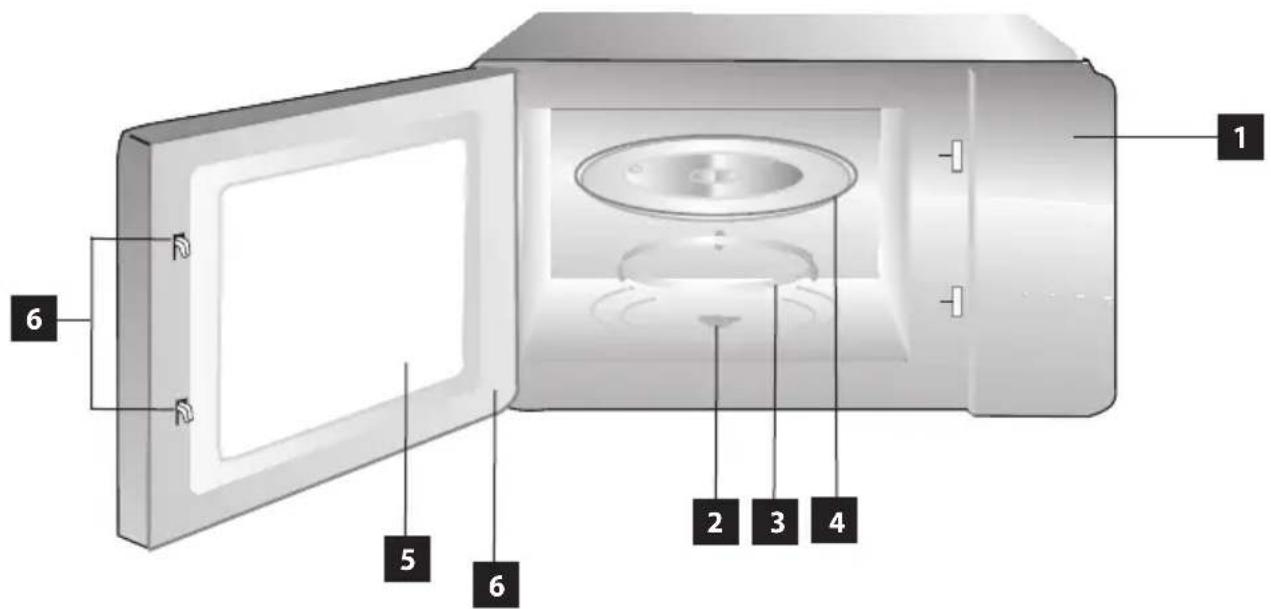
1 Control panel
2 Pin of plate drive
3 Roller wheel
4 Turntable glass plate
5 Oven door window
6 Door
7 Safety locking system
DESCRIPTION OF CONTROL PANEL AND ITS FUNCTIONS
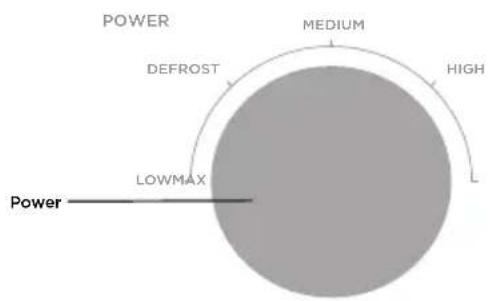
- Adjust the cooking power by turning the power knob to the desired level.
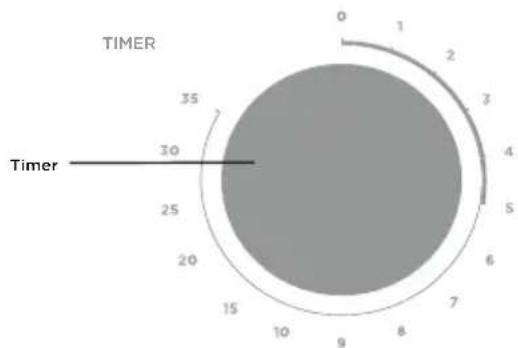
- Set the cooking time by turning the timer knob to the desired time according to your meal preparation guide.
- The microwave oven automatically starts cooking after setting the power level and time.
- After the set cooking time has elapsed, a "clink" signal sounds and the appliance switches off.
- If the appliance is not in use, always set the time to "0".
Installation
- Remove all the covering and marketing materials from the unit before the first use. Do not remove the plastic foil on the inner side of the door.
- Check the appliance and power cord for damage regularly. Never switch on a damaged appliance. There can be none of the following: door askew or damaged, door sealing damaged, broken or damaged hinges or damaged safety closing system.
- Make sure to place the unit on a stable heat-resistant surface, out of the reach of other heat sources. This surface shall have a sufficient load capacity to hold the unit with its contents.
- Do not switch the unit on without a properly mounted rolling wheel and rotating glass tray.
- The supply cable plug has to be easily accessible so that it can be disconnected quickly, if need be.
Installation of turntable plate
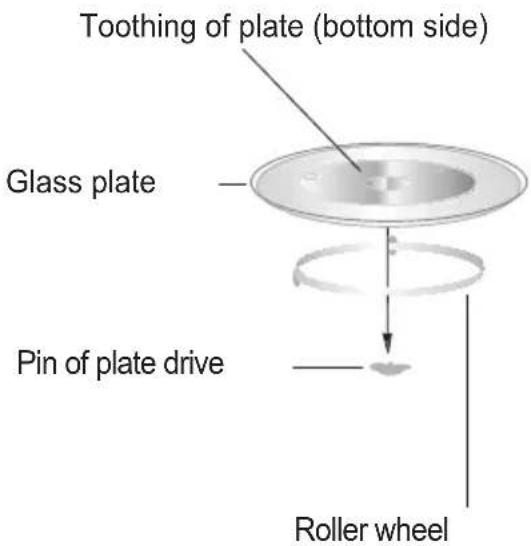
- Never place the glass plate upside down. Nothing should prevent the glass plate from turning.
- The turntable plate and roller wheel assembly must always be used during cooking.
- All meals and food containers must always be placed on a glass plate.
- If the glass plate or roller wheel breaks, contact the nearest authorized service centre.
NOTE
Prior to using a new unit, wipe the surface and the inside with a wet cloth for hygienic reasons. Wash all the removable parts in warm water with detergent.
WARNING!
Open the door slowly and carefully. When opening the door during operation, or after preparation, a large volume of steam is released, and condensed hot water may drip from the lower door edge. There is a risk of scalding.
Microwave oven cooking principles
Place the food evenly. Place thicker areas at the edges.
Watch the cooking time. Cook for the shortest of the prescribed times, and if necessary, for longer.
Overcooked food can ignite.
Cover the food when cooking. Covers prevent spattering and enable more even heating.
Turn around pieces of food such as chicken or hamburger when cooking. Big pieces, such as roast meat, must be turned more than once.
Move meatballs and similar food from the edge towards the centre and vice versa halfway through the cooking time.
Selection of dishes
Ideal dishes for microwave ovens are transparent, for microwaves. They allow the energy to penetrate the cover and food. Microwaves can't penetrate metal, which is why metal or metal-decorated dishes should not be used.
Do not use products made of recycled paper in the microwave oven, as these can contain small metal parts that may cause sparks or fire.
We recommend circular or oval dishes rather than square or rectangular ones, as the food in the corners tends to be overcooked.
If you are unsure of the suitability of your dishes for heating in a microwave, perform the following test:
-
Fill the microwave-safe container with 1 cup of cold water (250 ml). Put it in the microwave together with the empty dishes in question.
-
Cook at maximum power for 1 minute.
-
When done, touch the dishes carefully. If the empty dishes are warm, do not use them for microwave cooking.
-
Do not exceed 1 minute of cooking.
Dishes SUITABLE for heating food in a microwave oven
| Dishes Description | |
| Kneading bowl | Follow the manufacturer's instructions. The bottom of the kneading bowl must be at least 5 mm above the turntable plate. Improper use may cause the plate to break. |
| Ceramic dishes | Only intended for microwave use. Follow the manufacturer's instructions. Do not use cracked or battered dishes. |
| Glasses | Always remove the lid. Use only for heating the food, not boiling. Most glasses are not heat resistant and can break. |
| Glass dishes | Only heat resistant glass dishes. Make sure there is no metal rim on the dishes. Do not use cracked or battered dishes. |
| Oven bags | PFollow the manufacturer's instructions. Do not close the bags with a metal clip. Make holes in the bag to allow excess steam to escape. |
| Paper plates and cups | Use only for short-term cooking/heating. Do not leave the oven unattended during cooking. |
| Paper towels | Used to cover food for reheating and to absorb fat. Use only under supervision for short-term cooking. |
| Baking paper Used as a cover to prevent splashing or as a wrap for steam cooking. | |
| Plastic dishes | Only intended for microwave use. Follow the manufacturer's instructions. The dishes should be labelled "Microwave Safe". Some plastic containers soften when the food inside heats up. "Cooking bags" and tightly sealed plastic bags should be cut, punctured or otherwise altered as described on the packaging. |
| Plastic cover | POnly intended for microwave use. Used to cover food during cooking to maintain moisture. Do not allow the plastic cover to touch food. |
| Thermometers Microwave | only (meat and candy thermometers). |
| VoWax paper Used as a cover to prevent splashing or as a wrap for steam cooking. | |
Dishes NOT SUITABLE for heating food in a microwave oven
| Dishes Description | |
| Aluminium tray May cause | sparking. Put the food in the dishes designed for microwave use. |
| Food box with metal handle | May cause sparking. Put the food in the dishes designed for microwave use. |
| Metal clips, twisted metal cords | Metal prevents microwave energy from heating food. A metal rim may cause sparking. |
| Metal clips, twisted metal cords | May cause sparking, which may lead to fire in the oven. |
| Paper bags May cause fire | in the oven. |
| Plastic foam, polystyrene | Upon exposure to high temperature, the plastic foam may melt or contaminate the liquid inside. |
| Wood When used in a microwave oven, the wood dries out and may split or crack. | |
WARNING!
If you remove the food before the preset time expires, or you aren't using the oven, always reset the current program.
CLEANING AND MAINTENANCE
Clean the unit after each use to prevent the accumulation of grease, burned-on remnants of food, and unpleasant smells.
Turn the unit off, unplug the power cord from the wall outlet, and let the unit cool before cleaning and after use.
Do not immerse the power cord, plug, or appliance into water or any other liquid.
Wash the replaceable parts in tepid water with detergent and rinse in clean water.
Clean the inner and outer surfaces and door sealing with a wet cloth. You can use a liquid cleaning agent. Do not use sponges, steel wool, abrasive cleaners or solvents (gasoline, thinners, etc.). You might damage the protective layer.
You can remove odors from the inside by pouring lemon juice and the skin from a lemon into a microwave bowl filled with water, and leaving the bowl for 5 minutes in the oven while operating. Dry the inside with a soft cloth afterwards. If you need to replace the inner light bulb, contact the distributor.
If you do not keep the unit clean, the surfaces can be damaged, which may lead to a shorter service life and dangerous situations.
Installation
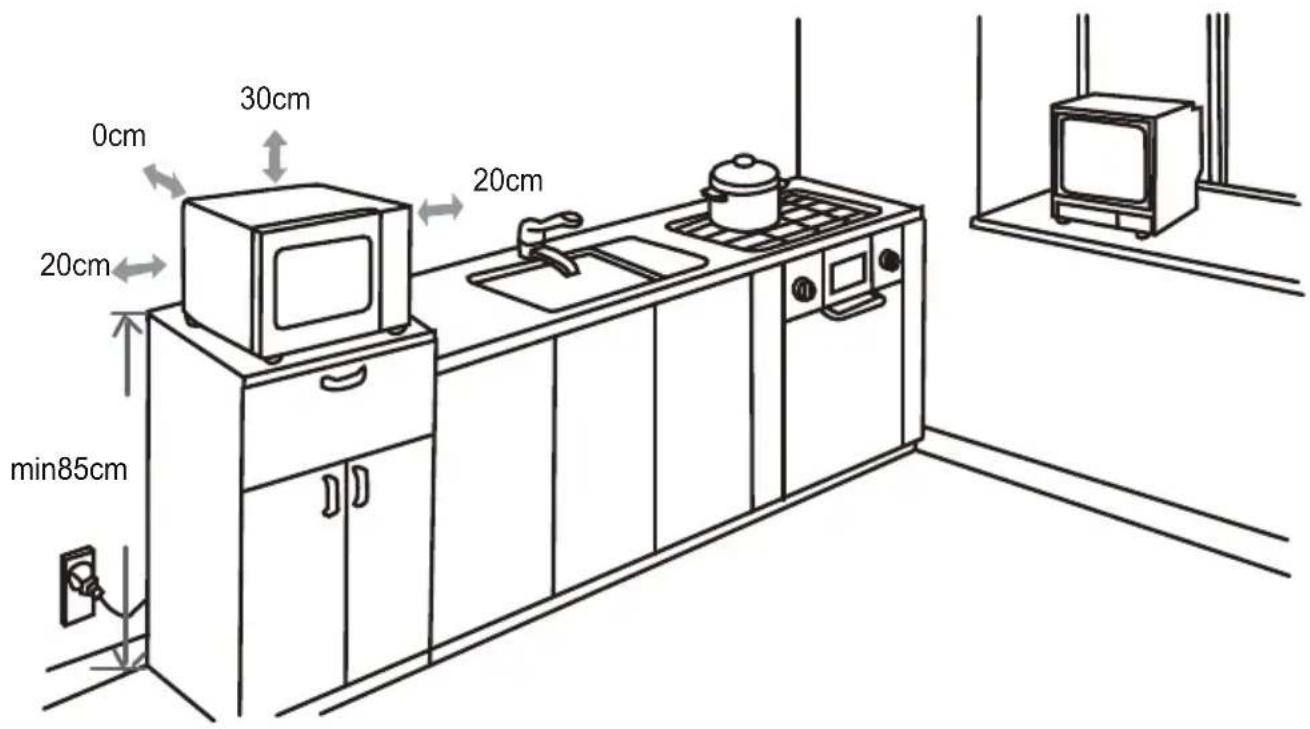
- To install the appliance, select a flat surface that provides enough free space for ventilation openings.
- The minimum height for installation of the appliance is 85 cm.
- The rear of the appliance must be placed against the wall. Leave a minimum distance of 30 ~cm above the top surface of the oven, a minimum distance of 20 ~cm is required between the oven and adjacent walls.
- Do not remove the feet from the bottom of the oven.
- Blocking the ventilation openings can damage the oven.
- Plug the oven into a standard household socket. Make sure the voltage and frequency are the same as the voltage and frequency on the rating plate.
Warning: Do not install the oven on a hob or other heat-producing appliance. Installation near or above the heat source could damage the oven and void the warranty.
Freely accessible walls of the appliance may become hot during operation.
TROUBLE SHOOTING
| Problem Cause Solution | ||
| The appliance does not work. | The plug has been inserted into the socket incorrectly or insufficiently. | Check the plug connection. |
| The socket is not supplied with electricity. | Check to make sure voltage is present, e.g. by using another appliance. | |
| The oven door is not closed properly. | Check the door. Remove all impurities and foreign objects. | |
| Turning of the tray is noisy. | Dirty wheels of the turning mechanism. | Clean the wheels with a damp cloth. |
ENVIRONMENTAL PROTECTION
- Prefer recycling of packaging materials and old appliances.
- Package materials may be disposed of as sorted waste.
- Dispose the plastic bags made of polyethylene (PE) of as sorted waste.
Appliance recycling at the end of its service life:
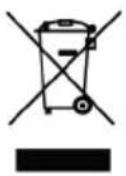
This appliance is labelled in accordance with European Directive 2012/19/EU concerning used electrical and electronic appliances (waste electrical and electronic equipment – WEEE). The symbol on the product or its packaging indicates that this product may not be treated as household waste. It is necessary to take it to a container park for the recycling of electrical and electronic equipment. By ensuring the correct disposal of this appliance you will help prevent potential negative consequences for the environment and human health, which could otherwise result from inappropriate disposal of this product. Disposal must be performed in accordance to the regulations for waste disposal. For more detailed information about recycling of this appliance see the authorized local office or service for household waste disposal or the shop, where you purchased the appliance.
CONCEPT POLSKA sp. z o.o.

- PODĚKOVÁNÍ
- TABLE OF CONTENTS
- IMPORTANT SAFETY INFORMATION
- Failure to follow the manufacturer's instructions may lead to refusal of warranty repair.
- GROUNDING INSTRUCTIONS
- WARNING!
- Green and yellow - protective/grounding conductor
- Blue - medium conductor
- Brown/black - phase conductor
- RECEIVER SIGNAL INTERFERENCE
- PRODUCT DESCRIPTION
- DESCRIPTION OF CONTROL PANEL AND ITS FUNCTIONS
- Installation
- Installation of turntable plate
- NOTE
- Microwave oven cooking principles
- Selection of dishes
- Dishes SUITABLE for heating food in a microwave oven
- CLEANING AND MAINTENANCE
- TROUBLE SHOOTING
- ENVIRONMENTAL PROTECTION
- Appliance recycling at the end of its service life:
- CONCEPT POLSKA sp. z o.o.
Brand : Concept
Model : MT1520wh
Category : Oven