
DECKO MIKROFON - Loudspeaker GoGen - Free user manual and instructions
Find the device manual for free DECKO MIKROFON GoGen in PDF.


| Product Type | Karaoke Microphone with Speaker |
| Brand | GoGen |
| Model | DECKO MIKROFON |
| Dimensions (W x D x H) | 80 x 80 x 272 mm |
| Weight | 370 g |
| Power Output | 5 W |
| Battery Type | Li-ion 3.7 V / 1200 mAh |
| Charging Time | Approx. 3 hours |
| Playback Time | 15 hours (at 50% volume) |
| Bluetooth Version | 5.0 |
| Bluetooth Range | 10 m |
| Supported Audio Formats | MP3 |
| Micro SD / USB Support | FAT32/exFAT, up to 128 GB |
| Charging Port | USB-C (5 V / 1 A, charger not included) |
| Special Features | Magic voice effects, echo control, microphone volume control, LED lights, vocal cancellation |
| Package Contents | Microphone, USB charging cable, user manual |
| Maintenance | Use soft cloth; avoid abrasive chemicals |
| Safety | Keep away from heat, liquids, and sharp objects; do not disassemble; supervise children |
| Warranty | Battery capacity decreases over time (normal wear) |
Frequently Asked Questions - DECKO MIKROFON GoGen
User questions about DECKO MIKROFON GoGen
0 question about this device. Answer the ones you know or ask your own.
Ask a new question about this device
Download the instructions for your Loudspeaker in PDF format for free! Find your manual DECKO MIKROFON - GoGen and take your electronic device back in hand. On this page are published all the documents necessary for the use of your device. DECKO MIKROFON by GoGen.
USER MANUAL DECKO MIKROFON GoGen
natural_image
Red children's microphone with colorful cartoon graphics and a bee, set against a white background with cloud and speech bubble icons (no text or symbols on the device itself)
natural_image
Vertical color block image with six horizontal bands of blue, green, yellow, orange, and red (no text or symbols)NÁVOD K POUŽITÍ / NÁVOD NA POUŽITIE INSTRUKCJA OBSŁUGI / HASZNÁLATI UTASÍTÁS USER MANUAL / BEDIENUNGSANLEITUNG
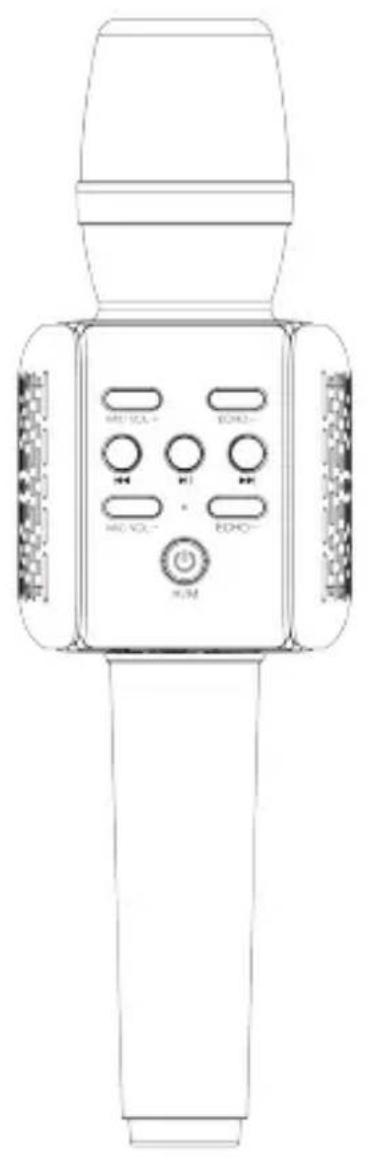
VYOBRAZENÍ VÝROBKU A OVLÁDACÍ TLAČÍTKA / VYOBRAZENIE VÝROBKU A OVLÁDACIE TLAČIDLÁ WYGLĄD URZĄDZENIA I PRZYCISKI KONTROLNE / KÉSZÜLÉK LEÍRÁSA ÉS VEZÉRLÓ GOMBOK PRODUCT OVERVIEW AND CONTROL BUTTONS
natural_image
Line drawing of a handheld microphone with control panel and buttons (no text or symbols)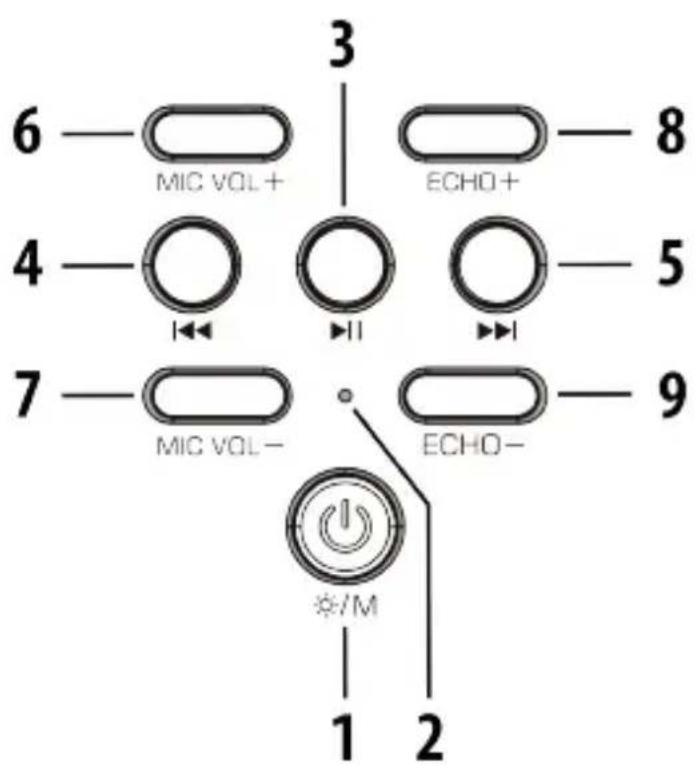
ÚVOD
DÔLEŽITÉ BEZPEČNOSTNÉ POKYNY
11. USB-C charging port
Thank you for buying our product. Please read through these operating instructions, so you will know how to operate your equipment properly. After you finished reading the instructions manual, put it away in a safe place for future reference.
IMPORTANT SAFETY PRECAUTIONS
When using your Microphone, basic safety precautions should always be followed, including the following:
✗ Children should be supervised to ensure that they do not play with the device.
✗ Keep this microphone and its accessories away from excessive heat.
✗ No sharp object should be subjected to the speaker/speaker-drivers as it may damage the speakers.
✗ Only use a soft cloth, no harsh abrasives or chemicals to clean, as it may damage the surface finishing.
✗ Keep away from dripping or splashed fluids.
✗ This product has no user-serviceable parts. Do not attempt to repair this product yourself. Only qualified service personnel should perform servicing. Take the product to the electronics repair shop of your choice for inspection and repair.
✗ NEVER operate this microphone with a damaged cable or after it has malfunctioned or has been damaged in any manner.
✗ NEVER leave the microphone unattended while charging. If the microphone becomes hot, smokes, or gives off an odor during charging, terminate charging immediately.


To avoid danger of suffocation, keep the plastic bag away from babies and children. Do not use this bag in cribs, beds, carriages or playpens.
This bag is not a toy.
HEADPHONE VOLUME WARNING
Connect headphones with volume set low and increase it if required. Prolonged listening through some headphones at high volume settings can result in hearing damage. To prevent possible hearing damage, do not listen at high volume levels for long periods.
PACKAGE CONTENTS
Microphone, USB Charging cable, User manual
CONTROL BUTTONS AND INPUTS
1. //M button
Press and hold to turn on/off the microphone.
Press twice to turn on/off LED light.
Press to change mode (Bluetooth / SD card / USB).
2. LED indicator
3. button
Press to start/pause playback.
Press and hold to launch the Magic voice effect mode.
4. button
Press to decrease the volume.
Press and hold to skip to the previous track.
5. Button
Press to increase the volume.
Press and hold to skip to the next track.
6. MIC VOL+ button
Press to increase the microphone volume.
7. MIC VOL- button
Press to decrease the microphone volume.
8. ECHO+ button
Press to increase the echo effect.
9. ECHO- button
Press to decrease the echo effect.
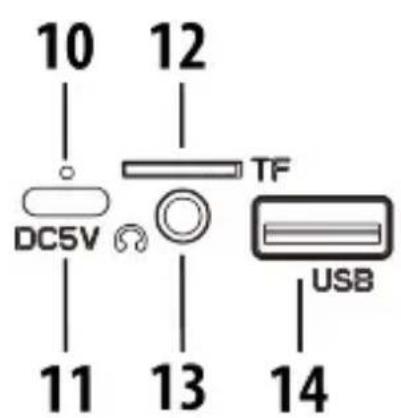
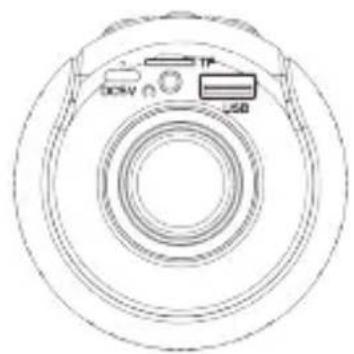
10. Charging LED indicator
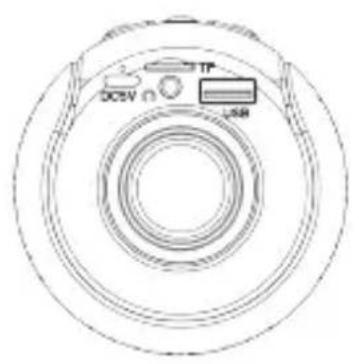
11. USB-C charging port
Use the USB charging cable (included) for charging.
12. Micro SD card slot
13. Headphone output
14. USB input
The charger is not included in the package, please charge the microphone via a standard 5 V / 1 A charger or via a PC. The LED indicator will glow red during charging. The LED indicator turns off when the microphone is fully charged.
IMPORTANT: Please do not use the microphone during charging. Please make a complete charge every three months to avoid shortening the battery lifespan.
MAGIC VOICE EFFECT
× Press and hold the 1 button to turn on the microphone.
✗ Press and hold the 3 button to launch the Magic voice effect mode.
✗ There are four different effects, press the 3 button to switch to another effect.
✗ Press and hold the 3 button to turn off this mode.
KARAOKE
✗ Press and hold the 1 button to turn on the microphone.
✗ Start playing music from Bluetooth / SD card / USB.
✗ Press the 6 and 7 buttons to adjust the microphone volume.
✗ Press the 8 and 9 buttons to adjust the echo level.
Note: Press twice 3 button to turn on/off the Vocal (singing) cancellation feature in the music you are playing.
BLUETOOTH MODE
× Press and hold the 1 button to turn on the microphone.
✗ The microphone is ready to pair if the LED indicator flashes blue.
× Activate Bluetooth of mobile phone and search for device name "MIKROFON PRGA" then connect it. If the pairing is successful, the LED indicator will be solid.
Note: For more information, see your mobile phone's user manual. If you are asked to enter a passcode, enter 0000. After you've paired a mobile phone, the microphone remembers it for the next time. The microphone will auto power off after 5 minutes if there is no operate.
SD CARD / USB MODE
Insert USB drive / Micro SD card into the the microphone. The microphone will play the stored music automatically.
USING HEADPHONES
Plug in the 3,5 mm headphones to the Headphone output. Turn the listening volume to the lowest setting before adjusting the volume up to your chosen level.
Note: The speakers will not operate when headphones are fitted.
TROUBLESHOOTING
× There is no power
Make sure your microphone is charged.
Ensure the microphone is switched on correctly.
× There is no backing sound output
Adjust the Music volume.
Make sure the Bluetooth device is playing and adjust the volume.
Make sure that your Bluetooth device is in effective range.
Ensure that the Bluetooth device is paired.
Make sure you have selected the correct audio source.
The track format may be incompatible, ensure the file format is MP3.
× There is no voice output
Adjust the Microphone volume.
× There is a ringing/squealing noise
Reduce the echo effect.
Reduce the Music and Microphone volume.
SPECIFICATION
Bluetooth version: 5.0
Built-in battery: Li-ion 3,7 V / 1200 mAh
Battery Charging Time: approx. 3 hours
Battery Playback Time: 15 hours (50 % Volume)
Bluetooth Frequency: 2402 - 2480 MHz, EIRP 3,51 dBm
Bluetooth connecting range: 10 m
Supported Micro SD card / USB drive: FAT32 / exFAT, 128GB (max)
Supported audio formats: MP3
Power output: 5 W
Product size: 80 x 80 x 272 mm / Weight: 370 g
We reserve the right to change technical specifications.
Warranty
The capacity of the product battery decreases over time. Decreasing of battery capacity occurs during normal use of the appliance and is considered usual wear and tear of the appliance.
Decreasing battery capacity is not a defect of the appliance.
Disposal of old Electrical & Electronic Equipment (Applicable in the European Union and other European countries with separate collection systems)
This symbol on the product or on its packaging indicates that this product shall not be treated as household waste. Instead it shall be handed over to the applicable collection point for the recycling of electrical and electronic equipment. By ensuring this product is disposed of correctly, you will help prevent potential negative consequences for the environment and human health, which could otherwise be caused by inappropriate
waste handling of this product. The recycling of materials will help to conserve natural resources.
For more detailed information about recycling of this product, please contact your local Civic Office, your household waste disposal service or the shop where you purchased the product.
Hereby, ETA a.s. declares that the radio equipment type DECKOMIKROFON, DECKOMIKROFONB is in compliance with Directive 2014/53/EU. The full text of the EU declaration of conformity is available at the following internet address: http://www.gogen.cz/declaration_of_conformity
EINLEITUNG
natural_image
Line drawing of a handheld microphone with control panel and buttons (no text or symbols)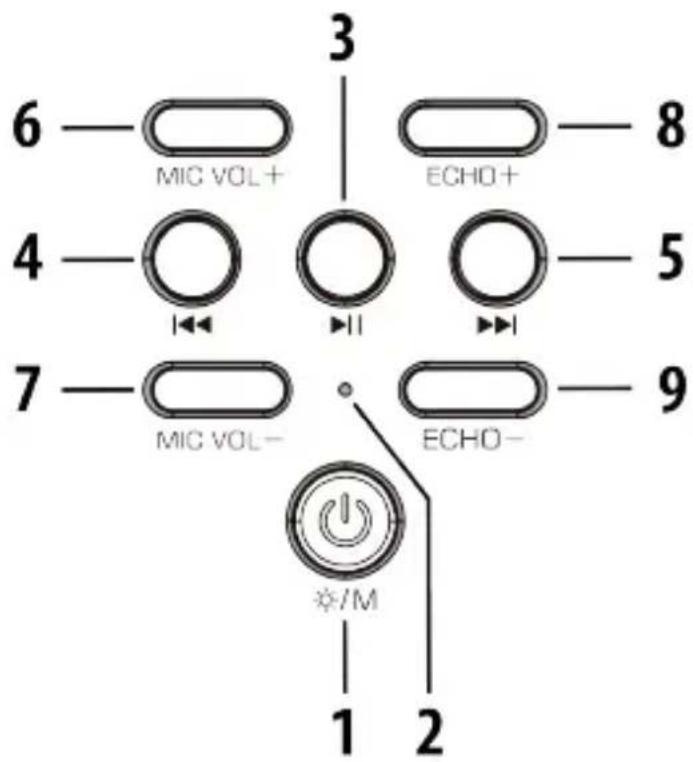
natural_image
Technical line drawing of a circular mechanical component with labeled ports (no text or symbols beyond labels)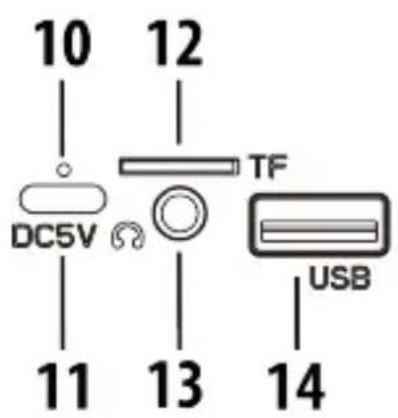
- VYOBRAZENÍ VÝROBKU A OVLÁDACÍ TLAČÍTKA / VYOBRAZENIE VÝROBKU A OVLÁDACIE TLAČIDLÁ WYGLĄD URZĄDZENIA I PRZYCISKI KONTROLNE / KÉSZÜLÉK LEÍRÁSA ÉS VEZÉRLÓ GOMBOK PRODUCT OVERVIEW AND CONTROL BUTTONS
- ÚVOD
- DÔLEŽITÉ BEZPEČNOSTNÉ POKYNY
- USB-C charging port
- IMPORTANT SAFETY PRECAUTIONS
- HEADPHONE VOLUME WARNING
- PACKAGE CONTENTS
- CONTROL BUTTONS AND INPUTS
- //M button
- LED indicator
- button
- button
- Button
- MIC VOL+ button
- MIC VOL- button
- ECHO+ button
- ECHO- button
- Charging LED indicator
- Micro SD card slot
- Headphone output
- USB input
- MAGIC VOICE EFFECT
- KARAOKE
- BLUETOOTH MODE
- SD CARD / USB MODE
- USING HEADPHONES
- TROUBLESHOOTING
- SPECIFICATION
- We reserve the right to change technical specifications.
- Warranty
- Disposal of old Electrical & Electronic Equipment (Applicable in the European Union and other European countries with separate collection systems)
- EINLEITUNG
Brand : GoGen
Model : DECKO MIKROFON
Category : Loudspeaker