
Omada RP108GE - Uncategorized TP-LINK - Free user manual and instructions
Find the device manual for free Omada RP108GE TP-LINK in PDF.


| Product Type | 8-Port Gigabit Managed Reverse PoE Switch |
| Model Number | RP108GE V1.20 |
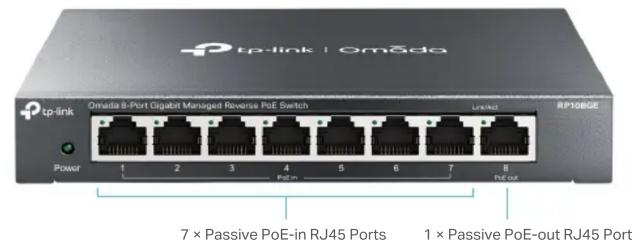
| Ports | 7 x Passive PoE-in RJ45 (10/100/1000 Mbps), 1 x Passive PoE-out RJ45 (10/100/1000 Mbps), 1 x DC Output (5/12 V) |
| PoE Input Voltage | 24 V or 48 V (mixture not supported) |
| Switching Capacity | 16 Gbps |
| Forwarding Rate | 11.9 Mpps |
| MAC Address Table | 4K |
| Jumbo Frame | 16 KB |
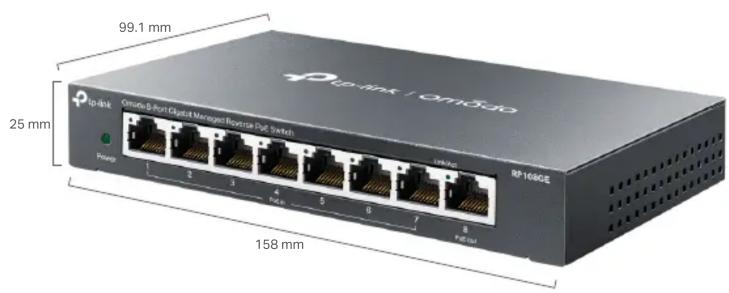
| Dimensions (W x D x H) | 158 x 99.1 x 25 mm (6.2 x 3.9 x 1.0 in) |
| Weight | Approximately 0.75 kg (1.65 lbs) |
| Power Consumption | Max 32.74 W (with 48 V input and PD connected) |
| Fanless | Yes |
| Operating Temperature | 0°C to 40°C (32°F to 104°F) |
| Mounting | Desktop or wall mounting |
| Management | Web-based GUI, Easy Smart Configuration Utility |
| L2 Features | IGMP Snooping, Static Link Aggregation, Port Mirroring, Loop Prevention, VLAN (32), QoS (4 queues), Rate Limit, Storm Control |
| Certifications | CE, FCC |
| Green Technology | Reduces power consumption |
| Enclosure | Durable metal casing |
| Maintenance & Cleaning | Disconnect power before cleaning. Use a soft, dry cloth. Keep vents unobstructed. |
| Safety Precautions | Do not operate near water. Use only with supplied accessories. Ensure proper ventilation. |
Frequently Asked Questions - Omada RP108GE TP-LINK
User questions about Omada RP108GE TP-LINK
0 question about this device. Answer the ones you know or ask your own.
Ask a new question about this device
Download the instructions for your Uncategorized in PDF format for free! Find your manual Omada RP108GE - TP-LINK and take your electronic device back in hand. On this page are published all the documents necessary for the use of your device. Omada RP108GE by TP-LINK.
USER MANUAL Omada RP108GE TP-LINK
Omada Reverse PoE Switch | Datasheet
RP108GE
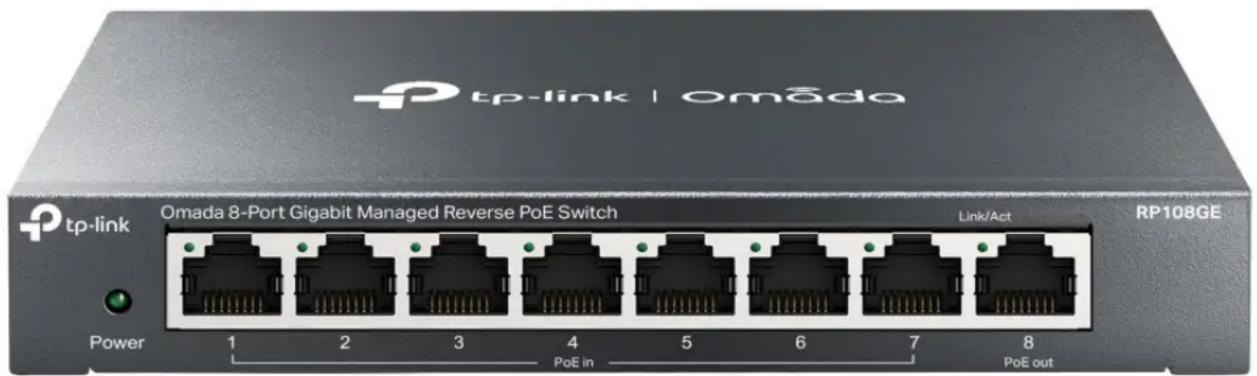
Omada 8-Port Gigabit Reverse PoE Switch
Highlights
- 7 PoE input and 1 PoE output 10/100/1000 Mbps RJ45 Ports
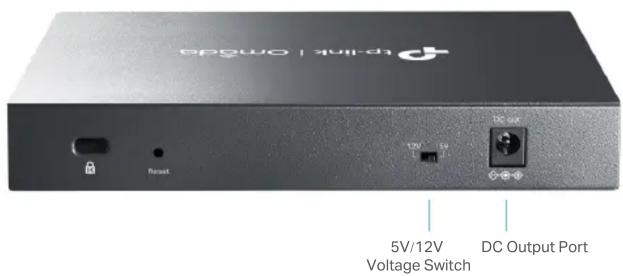
• 1 DC output port that supports both 5V and 12 V voltage switching - Durable metal casing of superior quality and professional appearance
- Intelligent management via a web user interface and downloadable utility
- Green technology reduces power consumption
Product Pictures
Specifications
| Hardware Features & Performance | ||
| Model RP108GE V1.20 | ||
| General | Interfaces | 7 Passive PoE-in RJ45 Ports:10/100/1000Mbps Auto-NegotiationVoltage: 24/48 V (mixture is not supported)Power pin of Ethernet cable: 4/5+ 7/8-1 Passive PoE-out RJ45 Port:10/100/1000Mbps Auto-NegotiationVoltage: depending on the input voltage of PoE-in portsPower pin of Ethernet cable: 4/5+ 7/8-1 DC Output Port:Voltage: 5/12 V |
| Mounting Desktop/Wall Mounting | ||
| Performance | Switching Capacity 16 Gbps | |
| Forwarding Rate 11.9 Mpps | ||
| MAC Address Table 4K | ||
| Jumbo Frame 16 KB | ||
| Physical & Environment | Maximum PowerConsumption | 3.98 W (no PD connected)18.01 W (24 V voltage with PD connected)32.74 W (48 V voltage with PD connected) |
| Maximum HeatDissipation | 13.57BTU/h (no PD connected)61.41BTU/h (24 V voltage with PD connected)111.64BTU/h (48 V voltage with PD connected) | |
| Dimensions (W×D×H) 6.2 × 3.9 × 1.0 in. (158 × 99.1 × 25 mm) | ||
| Fan Quantity Fanless | ||
| Operating Temperature 0 °C–40 °C (32 °F–104 °F) | ||
| Storage Temperature -40 °C–70 °C (-40 °F–158 °F) | ||
| Operating Humidity 10%–90%RH, non-condensing | ||
| Storage Humidity | 5%–90%RH, non-condensing | |
| Certification | CE, FCC | |
| Software Features | ||
| Model RP108GE V1.20 | ||
| L2 Features | • IGMP Snooping | |
| • Static Link Aggregation | ||
| • Port Mirroring | ||
| • Loop Prevention | ||
| VLAN | • 32 VLANs (out of 4K VLAN IDs) | |
| • MTU/Port/802.1Q VLAN | ||
| QoS | • 4 Priority Queues | |
| • 802.1p/DSCP QoS | ||
| • Rate Limit | ||
| • Storm Control | ||
| Management | • Web-based Graphic User Interface (GUI) | |
| • Easy Smart Configuration Utility | ||
Disclaimers:
- When the reverse switch functions, do not use the alternation switch to change output voltage of the DC output port, and do not plug in or plug out cables connected to port 1–8.
- It is recommended to use PoE injectors with overcurrent protection.
- The input voltage of PoE-in ports should be higher than 18 V and lower than 51 V.
- When the input voltage of port 1–7 is 24 V ( ±5% ), the total output power should be ≤10 W, the maximum output current of DC out is 1.2 A/5 V and 0.8 A/12 V. When the input voltage of port 1–7 is 48 V ( ±5% ), the total output power should be ≤26 W, the maximum output current of DC out is 0.9 A/5 V and 1.0 A/12 V.
- The device connected to port 8 should support passive PoE, otherwise, the impedance between pair 4&5 and pair 7&8 should be higher than 1 MΩ.
Some models featured in this guide may be unavailable in your country or region. Visit TP-Link website for local sales information: www.tp-link.com.
Specifications are subject to change without notice. TP-Link is a registered trademark of TP-Link Technologies Co., Ltd. Other brands and product names are trademarks or registered trademarks of their respective holders. Copyright © 2024 TP-Link Technologies Co., Ltd. All rights reserved.

Brand : TP-LINK
Model : Omada RP108GE
Category : Uncategorized