
AC-116 - Memory card reader Sven - Free user manual and instructions
Find the device manual for free AC-116 Sven in PDF.


| Product Type | Memory Card Reader |
| Brand | Sven |
| Model | AC-116 |
| Interface | USB 2.0 (backward compatible with USB 1.1) |
| Compatibility | USB Plug & Play |
| Supported Memory Cards | CF, MD, SD, MMC, RS-MMC, SM, XD, MS, MS PRO, MS Duo, MS PRO Duo, and more |
| Card Slots | M2, Micro SD, XD, CF, SD, MS |
| Data Transfer | Read/Write operations |
| LED Indicator | Power/Activity LED: lights up when connected and card inserted, flashes during read/write |
| Operating System | Windows XP/Vista/7/8, Mac OS 10.1x/10.2x+, Linux 2.4.x+ |
| Power Supply | USB bus powered (5V DC) |
| Cable | Included USB cable |
| Package Contents | Card reader, USB cable, user manual, warranty card |
| Safety Precautions | Do not disconnect during read/write to avoid data loss |
| Usage | Insert one memory card at a time |
| Construction | Compact external design |
| Color | Black |
| Manufacturer | SVEN PTE. LTD, Singapore; produced under control of Oy Sven Scandinavia Ltd, Finland; made in China |
Frequently Asked Questions - AC-116 Sven
User questions about AC-116 Sven
0 question about this device. Answer the ones you know or ask your own.
Ask a new question about this device
Download the instructions for your Memory card reader in PDF format for free! Find your manual AC-116 - Sven and take your electronic device back in hand. On this page are published all the documents necessary for the use of your device. AC-116 by Sven.
USER MANUAL AC-116 Sven
This Manual and information contained in it are copyrighted. All rights reserved.
USAGE
Sven AC-116 card reader is designed for reading/writing memory cards.
SAFETY PRECAUTIONS
- Do not disconnect the device while reading/writing a memory card to avoid data loss.
- Insert a memory card into the slot according to the table below. Use one memory card at a time only!
SPECIAL FEATURES
- Compatible with USB connectors supporting Plug & Play technology
- Supports most modern memory cards: CF, MD, SD, MMC, RS-MMC, SM, XD, MS, MS PRO, MS Duo, MS PRO Duo, etc.
SYSTEM REQUIREMENTS
• Available USB 1.1 or 2.0 port
- OS Windows XP/Vista/7/8, Mac
system B10.1x, B10.2x or up, Linux 2.4.x or up
DESCRIPTION
① LED
② Mini USB port
③ SD/MMC slot
④ MS slot
⑤ Micro SD slot
⑥ M2 slot
⑦ CF/MD slot
⑧ XD slot
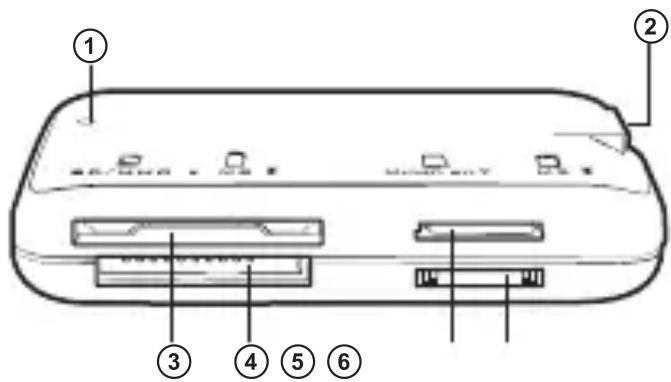
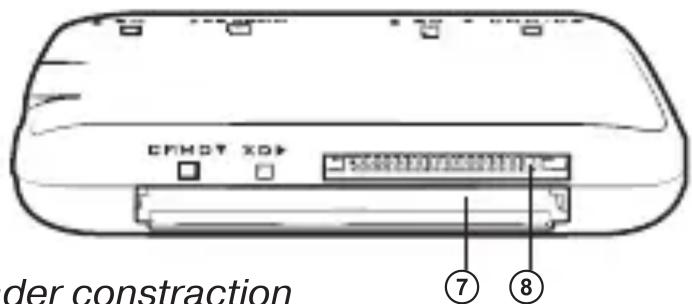
Fig. 1. Card reader construction
MEMORY CARD INSTALLATION TABLE
| Slots | Memory cards supported |
| M2 Slot | M2 |
| Micro SD Slot | Micro SD, T-FLASH |
| XD Slot | XD, XD H Type, XD M TYPE |
| CF Slot | CF I/II, CF Ultra I, CF Extreme, CF Extreme III, MD |
| SD Slot | SD, SDHC, Extreme SD, Extreme III SD, Ultra II SD, MMCI, MMCII, MMC 4.0, Ultra MMC |
| MS Slot | MS, MS Pro, MS Duo, MS Pro Duo, Extreme MS Pro, Extreme III MS Pro, HS MS MG Pro Duo, MS MagicGate, MS MG Pro, MS MG Duo, MS MG Pro Duo, MS ROM, HS MS, MG Pro, Ultra II MS |
OPERATION MODE LED
- If the device is connected to a USB port and the memory card is inserted into the slot correctly, Access LED ① will light up.
- During reading/writing Access LED flashes.
PACKAGE CONTENTS
- Card reader – 1 pc
- USB cable – 1 pc
- User's manual – 1 pc
- Warranty card – 1 pc
TROUBLESHOOTING
- If the device does not operate after its connection to a USB port, make sure the memory card is inserted into the slot correctly.
External Card Reader
SVEN®
YOU WANT - WE CAN
natural_image
Black rectangular electronic device with internal components and display (no visible text or symbols)Модель: AC-116
Manufacturer: SVEN PTE. LTD, 176 Joo Chiat Road, N° 02-02, Singapore, 427447. Produced under the control of Oy Sven Scandinavia Ltd. 15, Kotolahdentie, Kotka, Finland, 48310. Made in China.
® Registered Trademark of Oy SVEN
Scandinavia Ltd. Finland.
AC-116
Brand : Sven
Model : AC-116
Category : Memory card reader