
CL80 - Robot vacuum Navitel - Free user manual and instructions
Find the device manual for free CL80 Navitel in PDF.


| Product Type | Portable Cordless Vacuum Cleaner |
| Model | NAVITEL CL80 |
| Battery Type | Li-ion, 7.4 V |
| Battery Capacity | 37 W·h |
| Suction Power (Low Speed) | Up to 8 kPa |
| Suction Power (High Speed) | Up to 11 kPa |
| Charging Input | 5 V, 2 A |
| Charging Port | USB-C |
| Charging Time | ≈ 2 hours |
| Fast Charging Support | FC 3.0 |
| Weight | 345 g |
| Filtration System | Two-stage |
| Nozzles Included | Crevice nozzle, Brush nozzle |
| Dust Container | Removable, washable |
| Operating Temperature | 0 to +35 °C |
| Storage Temperature | +5 to +45 °C |
| Relative Humidity | 5% to 90% (non-condensing, 25 °C) |
| Charging Indicator | Flashing red when low, solid white when full |
| Cannot Operate While Charging | Yes |
| Waterproof | No; do not inhale liquids |
| Package Contents | Vacuum cleaner, dust container, crevice nozzle, brush nozzle, USB-C cable, user manual, warranty card |
Frequently Asked Questions - CL80 Navitel
User questions about CL80 Navitel
0 question about this device. Answer the ones you know or ask your own.
Ask a new question about this device
Download the instructions for your Robot vacuum in PDF format for free! Find your manual CL80 - Navitel and take your electronic device back in hand. On this page are published all the documents necessary for the use of your device. CL80 by Navitel.
USER MANUAL CL80 Navitel
natural_image
Black Navitel hair dryer with visible branding and handle (no text or symbols on body)NAVITEL CL80
Portable Cordless Vacuum Cleaner
Úvod
CZ
Thank you for purchasing this NAVITEL® product.
NAVITEL CL80 – cordless portable vacuum cleaner with a two-stage filtration system for dry cleaning in the car interior. Two replaceable attachments included guarantee quick and high-quality cleaning even in the most difficult to reach places.
Before starting operation, please read this manual carefully.
Device layout
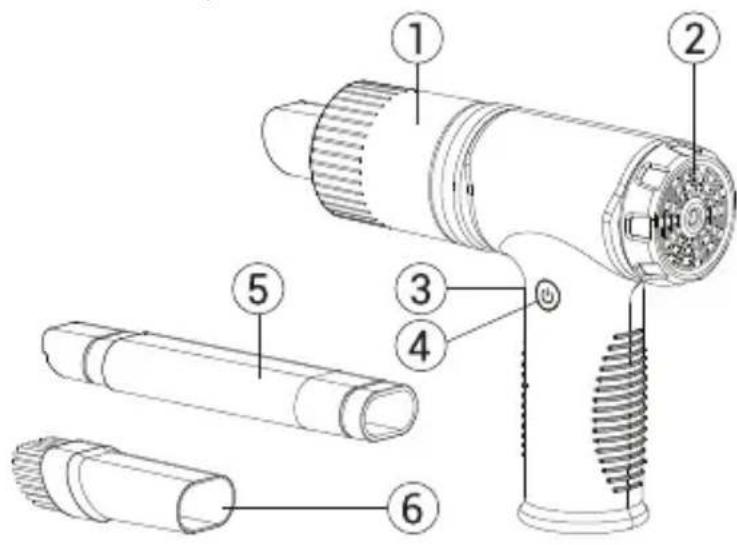
- Dust container
- Air exhaust filter cover
- USB-C charging port
- Power on/off button.
- Crevice nozzle
- Brush nozzle
Package contents
- Portable cordless vacuum cleaner NAVITEL CL80
- Dust container
- Crevice nozzle
- Brush nozzle
- USB-C charging cable
- User manual
- Warranty card
Specifications
| Model NAVITEL CL80 | |
| Battery Li-ion, 7.4 V | |
| Battery power 37 W·h | |
| Suction power | low speed - up to 8 kPahigh speed - up to 11 kPa |
| Power 5 V, 2 A | |
| Charging port USB-C | |
| Charging time ≈ 2 h | |
| Fast charging support FC 3.0 | |
| Weight 345 g |
Before you start
- Before the use, confirm whether the parts are assemble correctly, especially pay attention to the filter assembly in the dust box.
-
Charge the vacuum cleaner before use or after long periods of storage.
-
When the battery level is low, the light on the power button flashes red. When the battery is fully charged, the indicator lights up solid white.
- When using the included USB-C charging cable, this product supports FC3.0 fast charging. To reduce charging time, choose chargers that support the fast charging protocol.
- Use only a compatible power adapter in your car. Using a different adapter may adversely affect the performance of the device. We recommend to use NAVITEL USP 45 SLIM and NAVITEL USP 55 PRO car power adapters to feed your device.

Attention! The vacuum cleaner cannot be turned on while charging.
• After using the device, allow it to cool down not less 10 minutes before charging the battery.
- This product has no waterproof function, please do not suck a lot of water or liquid to avoid the damage, especially flammable and explosive substances such as chemical solvents or alcohol.
- Do not inhale highly hot substances (such as burning cigarette butts or hot ash) to avoid burning the filter or plastic parts to make them lose their filtering function.
- Use only the original charger cable. Using another cable may negatively affect the device's battery. Use accessories only approved by manufacturer.
- Permissible ambient temperature in operating mode: 0 to +35 °C. Storage temperature: +5 to +45 °C. Relative humidity: 5% to 90% without condensation (25°C).
- Put the device away from fire sources to avoid explosion or fire.
- Do not expose the device to physical impacts.
Using nozzles
- The crevice nozzle is ideal for removing dust, etc. from hard-to-reach narrow spaces in the vehicle interior.
• The brush nozzle is designed to thoroughly clean dust, dirt and other debris from upholstery, carpets and other similar surfaces. - It is allowed to use the CL80 without nozzles, in this mode the vacuum cleaner most effectively collects large debris.
Filter cleaning
- Rotate the dust box counterclockwise to detach it from the body, then remove the filters.
- Rinse the mesh and dry air filters under running warm water.
• After washing, let the filters dry completely.
• Install the clean filters back into the dust box, and then attach it to the body.

ATTENTION: Never wash the vacuum cleaner by completely immersing it in water, because. this may damage the electronics of the vacuum cleaner. Make sure all filters are dry before vacuuming.
IMPORTANT! Always charge your device immediately after use. It is also recommended to recharge an unused device once a month to avoid deep battery discharge.
NAVITEL s.r.o. hereby declares that the device NAVITEL CL80 is compatible with the European directive EMC 2014/30/EU.
Note. The package, appearance, specifications that do not change the overall functionality of the device may be changed by the manufacturer without prior notice
Possible problems and solutions
| Problem Possible reason | Possible solution | |
| The device does not turn on | Low batteryPower button is not pressedDevice is charging | Charge the batteryPress the power buttonDisconnect charger |
| Insufficient suction power | Dust container not installedFilter clogged | Check that the dust container is installed correctlyClean filter |
| The device makes an unusual noise | Foreign objects in the dust containerMissing filter | Remove foreign objects from the dust containerSet filter |
| Foreign smell from the vacuum cleaner during operation | The smell can come from the dust in the dust containerIf a damp filter is installed in the vacuum cleaner, it may give off an odor | Wash filterAfter washing, dry the filter completely before installation. |
| Dust is poured out of the vacuum cleaner | Dust container fullDust container or filter installed incorrectly | Empty the dust containerInstall the dust container and filter correctly |
Wstep
Brand : Navitel
Model : CL80
Category : Robot vacuum