
UNC-NMS - Network Management Software Planet - Free user manual and instructions
Find the device manual for free UNC-NMS Planet in PDF.


| Product Type | Network Management Software |
| Brand | Planet |
| Model | UNC-NMS |
| Category | Network Management Software |
| Platform | Windows, Linux |
| Main Functions | Network monitoring, device discovery, configuration management, performance analysis, fault management, security management |
| Supported Devices | Planet switches, routers, access points, and third-party SNMP-compatible devices |
| Management Interface | Web-based GUI, CLI, SNMP |
| Alerting | Email, SMS, SNMP traps, syslog |
| Reporting | Customizable reports, charts, and logs |
| Scalability | Supports small to large networks |
| Database | MySQL or PostgreSQL |
| Security | Role-based access control, SSL/TLS encryption |
| Backup & Restore | Configuration backup and restore for devices |
| Auto Discovery | Automatic network topology discovery |
| Multi-language | English, Chinese, others (based on version) |
| System Requirements | Quad-core CPU, 8GB RAM, 100GB disk, network interface |
| License | Perpetual or subscription-based |
| Support | Online documentation, email support, optional maintenance contract |
Frequently Asked Questions - UNC-NMS Planet
User questions about UNC-NMS Planet
0 question about this device. Answer the ones you know or ask your own.
Ask a new question about this device
Download the instructions for your Network Management Software in PDF format for free! Find your manual UNC-NMS - Planet and take your electronic device back in hand. On this page are published all the documents necessary for the use of your device. UNC-NMS by Planet.
USER MANUAL UNC-NMS Planet
Networking & Communication
Quick User Guide
UNC-NMS
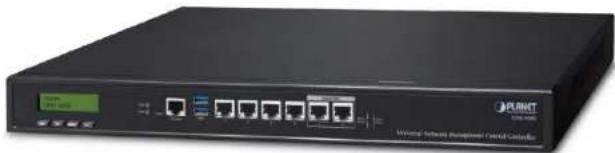
natural_image
Front view of a black networking device labeled 'PLANT' with ports and indicator lights (no readable text beyond branding)
PLANET
Networking & Communication
Overview
Overview

PLANET
Networking & Communication
Main Features:
| Dashboard | Providing an at-a-glance view of center system, site summary, site map, traffic, and PoE network status. |
| Site Management | Creating a site list and site map for NMS agent management. |
| Device List | Managing all site devices or filtering devices for specific sites for NMS agent functions. |
| Statistic | Displaying top 10 event reports, history comparisons, and critical events for devices. |
| Topology Viewer | A topology of network devices compliant with MQTT, SNMP, ONVIF, Smart Discovery and LLTD Protocol with or without a map. |
| Event Reports | The status of a network can be reported via network alarm, and system log. |
| Alarm System | Email alerts for the administrator via the SMTP server |
| Switch Virtual Panel | Directly configuring the switch for basic functions. |
| Batch Provisioning | Enabling multiple APs to be configured and upgraded at one time by using the designated profile for each site. |
| Coverage Heat Map | Real-time signal coverage of APs on the user-defined floor map to optimize Wi-Fi field deployment. |
| Customized Profile | Allowing the creation and maintenance of multiple wireless profiles |
| Auto Provisioning | Multi-AP provisioning with one click |
| Cluster Management | Simplifying high-density AP management. |
| Zone Plan | Optimizing AP deployment with actual signal coverage. |
| Authentication | Built-in RADIUS server seamlessly integrated into the enterprise network |
| User Control | Allowing on-demand account creation and user-defined access policy |
| Scalability | Offering free system upgrades and bulk upgrades for AP firmware. |
| Maximum Scalability | Supporting 100 sites, 100 site maps and 102,400 nodes |
Overview

PLANET
Networking & Communication
Network Management Characteristics
● Built-in DHCP Server
● Built-in RADIUS Server
- SSL secure access
• Certification Authentication
● Web-based GUI management interface
- SNMP v1, v2c, and v3 management
● Supports PLANET DDNS/Easy DDNS
Industrial-grade Physical Hardware
- 6 x 10/100/1000BASE-T Gigabit Ethernet RJ45 ports (LAN 5 and LAN 6 are bypass ports.)
- 1 x LCM for basic system setting
- 2 x LEDs (power and HDD)
- 2 x USB 3.0 ports for configuration backup and restoration
- 1 x RJ45 console port
- 1 x reset button
- 1 x 3-pin AC power input socket for 100\~240V
• 1U rack mounting

PLANET
Networking & Communication
APPLICATIONS
Applications

PLANET
Networking & Communication
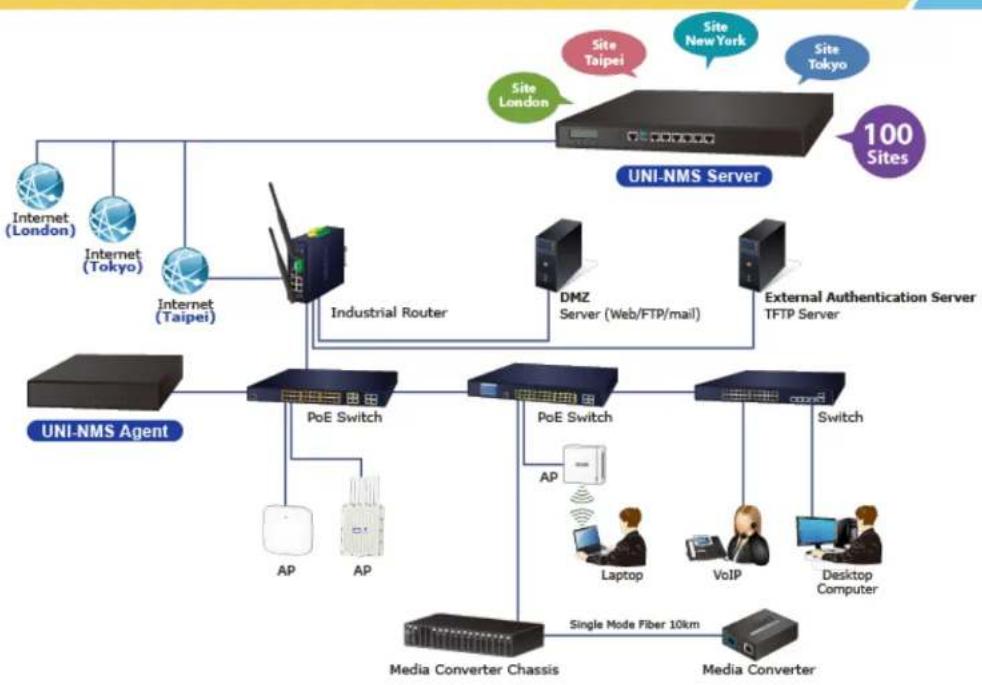
flowchart
graph TD
    A["UNI-NMS Server"] --> B["Internet (London)"]
    A --> C["Internet (Tokyo)"]
    A --> D["Internet (Taipei)"]
    A --> E["Industrial Router"]
    A --> F["DMZ Server (Web/FTP/mail)"]
    A --> G["External Authentication Server TFTP Server"]
    H["UNI-NMS Agent"] --> I["PoE Switch"]
    I --> J["AP"]
    I --> K["AP"]
    L["Media Converter Chassis"] --> M["Laptop"]
    L --> N["VoIP"]
    O["Media Converter"] --> P["Switch"]
    Q["Site London"] --> R["Site New York"]
    S["Site Taipei"] --> T["Site Taipei"]
    U["Site Tokyo"] --> V["Site Tokyo"]
    W["100 Sites"] --> X["UNI-NMS Server"]
    style A fill:#f9f,stroke:#333
    style H fill:#ccf,stroke:#333
    style O fill:#cfc,stroke:#333

PLANET
Networking & Communication
Before First Login
Product Overview

PLANET
Networking & Communication
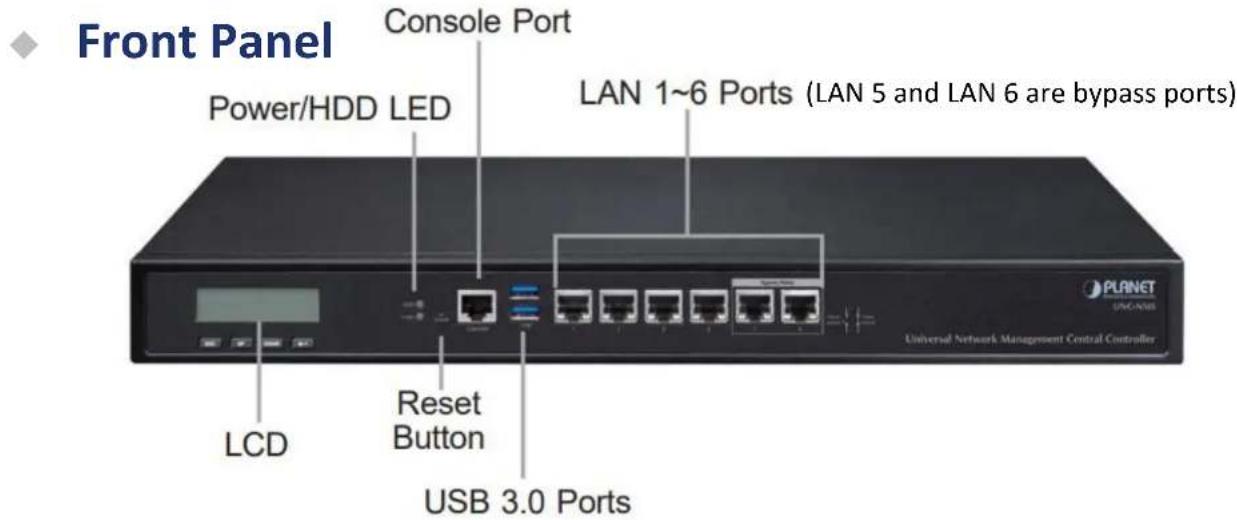
Product Overview

PLANET
Networking & Communication
Back Panel
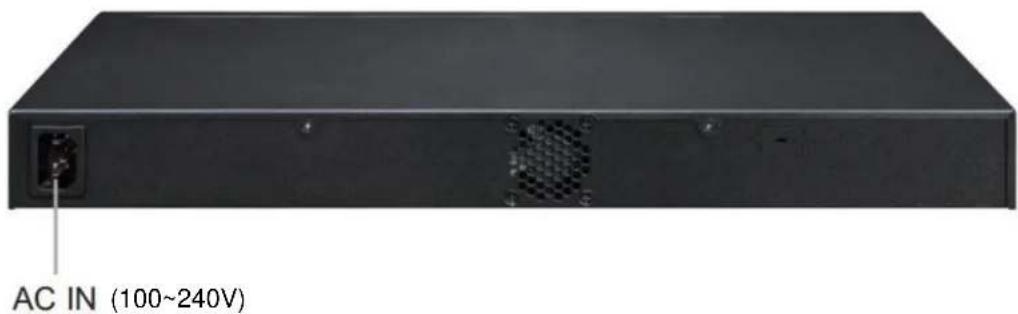
Remote Logging in NMS

PLANET
Networking & Communication
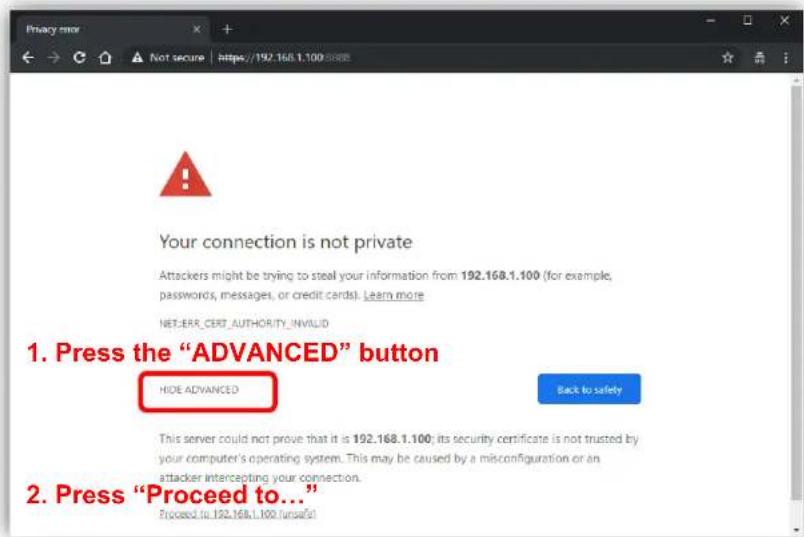
Open Chrome/Firefox to log in the NMS.( Default IP: https://192.168.1.100:8888)
Please use Chrome/Firefox to get fully supported. (UI Resolution 1280 x 1024)

PLANET
Networking & Communication
Setup Wizard
Account Modification

PLANET
Networking & Communication
Steps to modifying account:
- Please create a new account, avoiding the use of "admin".
- New Password must include at least 1*[a\~z], 1*[A\~Z], 1*[0\~9], 1*[\~, !, @, ..., w/o "?"] and must contain at least 8 characters.
Account Modification

"Please key in a new account, except using "admin"
New Password must be included at least 1*[a\~z], 1*[A\~Z], 1*[0\~9], 1*[\~, I, @, ..., w/o \~?]
Next
IP Configuration Setting

PLANET
Networking & Communication
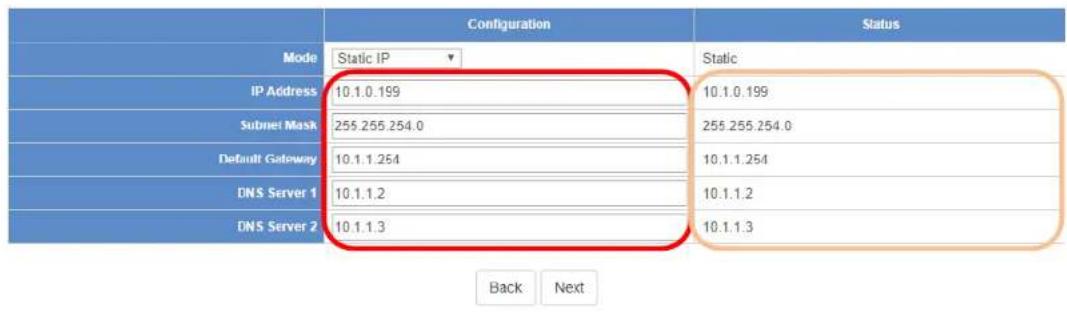
- Select "Static IP" or "DHCP Client" for IP configuration setting.
- IP status is shown in real time.
*If you want to use the SMTP Alarm function, you must at least enter one DNS server.
IP Configuration Setting
How to Add a New Site
How to add a New Site

PLANET
Networking & Communication
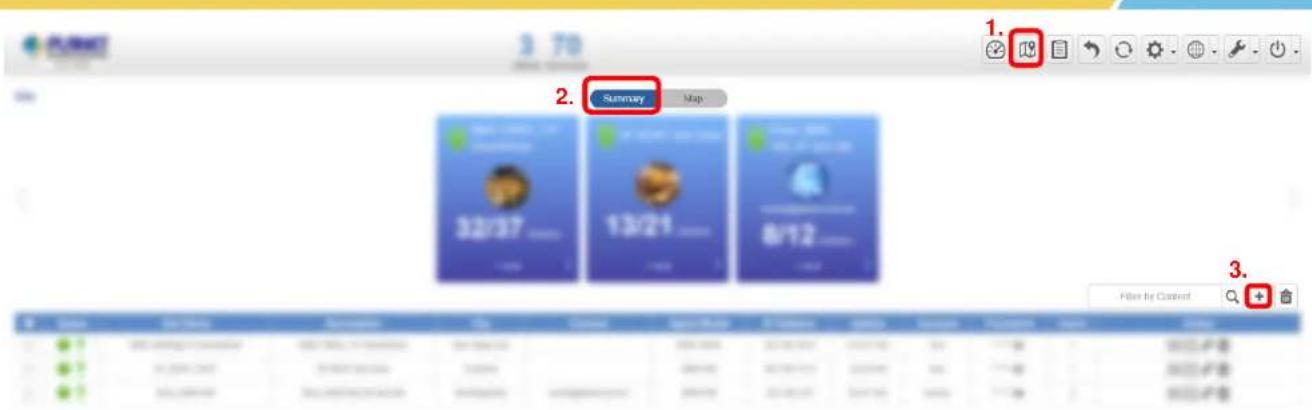
Steps to add a new site:
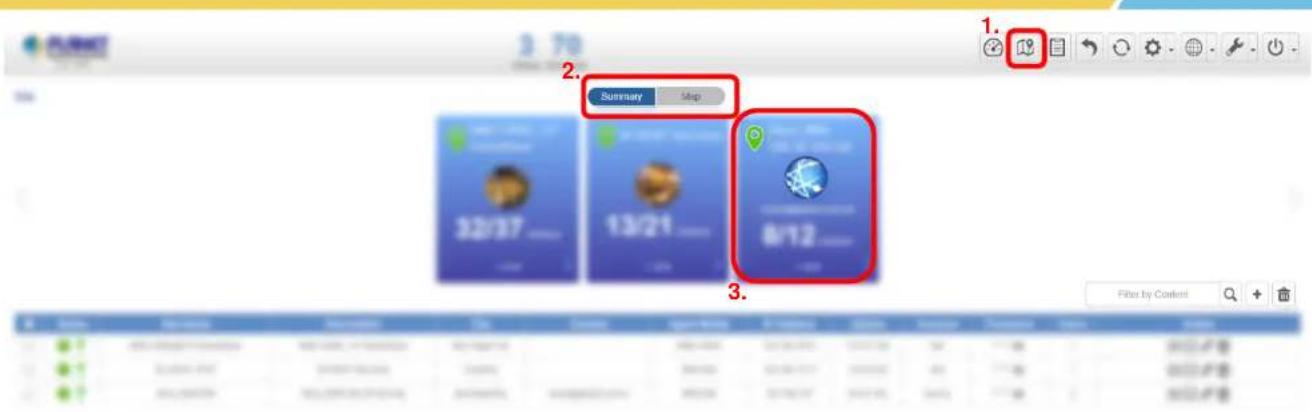
- Press the "1. Site" button to go to the site, and then, navigate to "2. Summary or Map" page. (The default page is Summary.)
- Press the "3. +" button to open the "Add New Site" page.
How to add a New Site

PLANET
Networking & Communication
Site
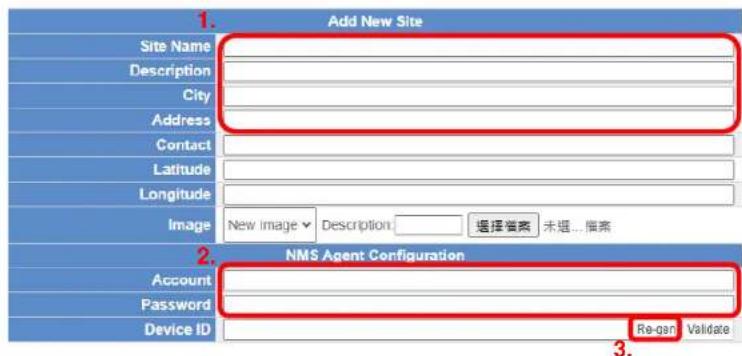
Steps to add a new site: (Fields marked in red are required)
- Enter the Site information for "1. Site Name, Description, City, Address, Latitude, Longitude and Image".
- Enter the NMS Agent Configuration for "2. Account and Password" and then press the "3. Re-gen" button to create a Device ID. After filling in the required fields, press the 4. Apply button.
How to add a New Site

PLANET
Networking & Communication
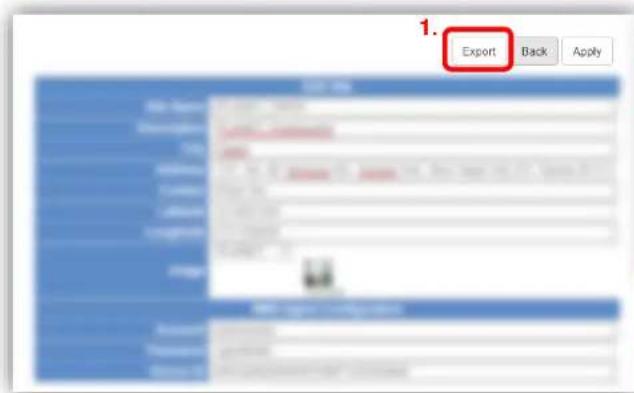
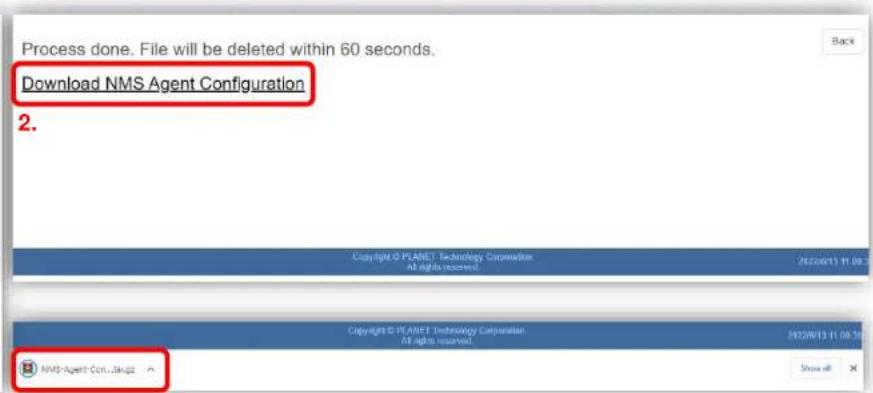
Steps to add a new site:
- Press the "1. Export" button to create an "NMS-Agent-Conf" file.
- Click the "2. Download NMS Agent Configuration" link to get the "3. file".
How to add a New Site

PLANET
Networking & Communication
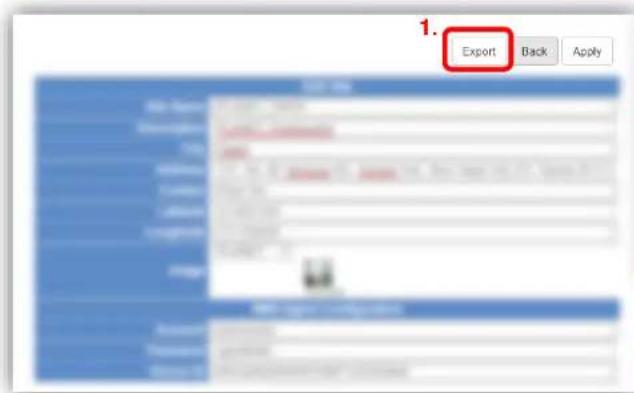
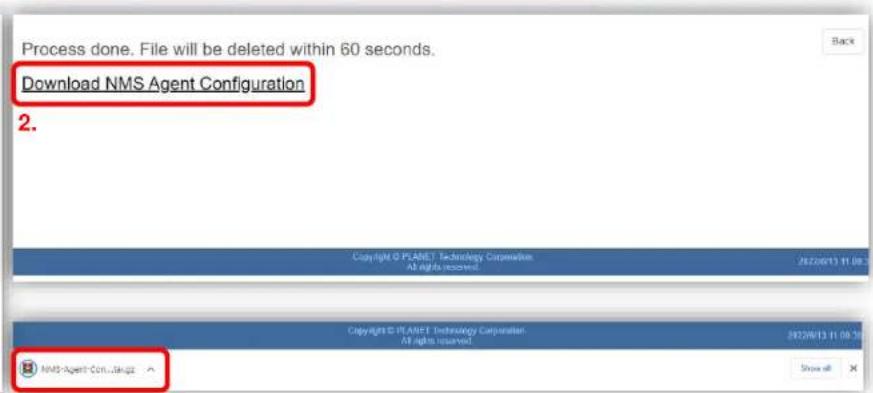
Steps to add a new site:
- Press the "1. Export" button to create an "NMS-Agent-Conf" file.
- Click the "2. Download NMS Agent Configuration" link to get the "3. file".
How to add a New Site

PLANET
Networking & Communication
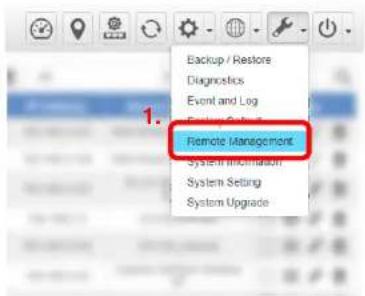
Home > Maintenance > Remote Management
3.

2.
Steps to add a new site:
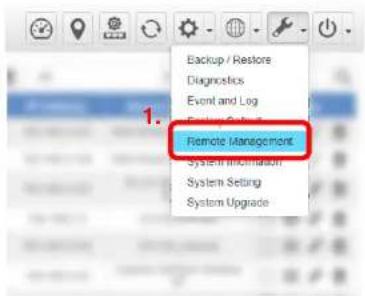
- Going to the NMS-500/NMS-1000V web in 1. Remote Management page.
-
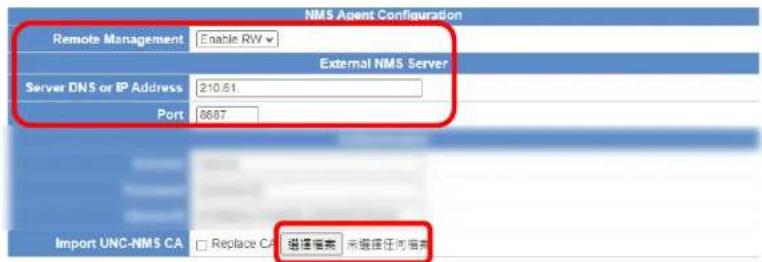
- Upload the "NMS Agent Configuration file" in the Step 6. and press "3. Apply". (It will auto-Import authentication info.)
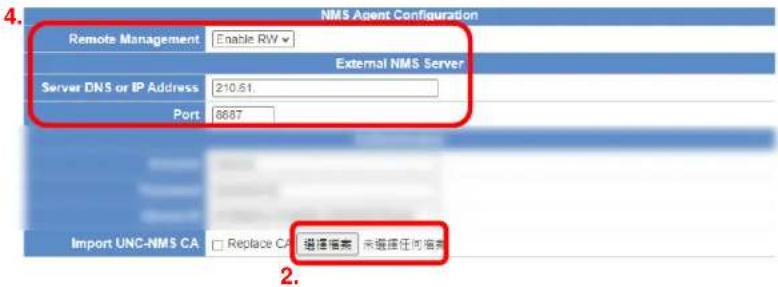
- Select the "4. Enable RO or Enable RW" for remote management function and enter the Server DNS or IP Address, Port (default is 8887) fields. After above step, press "3. Apply" again.
How to add a New Site

PLANET
Networking & Communication
Home > Maintenance > Remote Management
3.

Steps to add a new site:
- Going to the NMS-500/NMS-1000V web in 1. Remote Management page.
-
- Upload the "NMS Agent Configuration file" in the Step 6. and press "3. Apply". (It will auto-Import authentication info.)
- Select the "4. Enable RO or Enable RW" for remote management function and enter the Server DNS or IP Address, Port (default is 8887) fields. After above step, press "3. Apply" again.
How to add a New Site
Steps to add a new site:


- Go back to the UNC-NMS web "Site/Summary" page to check the site status is on-line or off-line
※ In case of issues, please utilize Maintenance/Diagnostics to conduct a ping test between UNC-NMS and NMS-500/NMS-1000V. Ensure successful package transmission between the systems

PLANET
Networking & Communication
Appendix
Appendix – MQTT Devices Support List
Please click

PLANET CloudViewer

PLANET
Networking & Communication
PLANET Website
Support list
Supported Devices
Switch / Industrial Switch / Router / AP
| Photo | Model | Description | Version | Release Date | Download |
| Switch | |||||
 | GS-4210-24T2S | 24-Port Layer 2 Managed Gigabit Ethernet Switch W/2 SFP Interfaces | v2.305b201130 | 2020-11-30 | |
 | GS-4210-16T2S | 16-Port Layer 2 Managed Gigabit Ethernet Switch W/2 SFP Interfaces | v2.305b200904 | 2020-09-04 | |
 | GS-4210-8P2S | 8-Port 10/100/1000T 802.3at PoE + 2-Port 100/1000X SFP Managed Switch | v2.305b200904 | 2020-09-04 | |
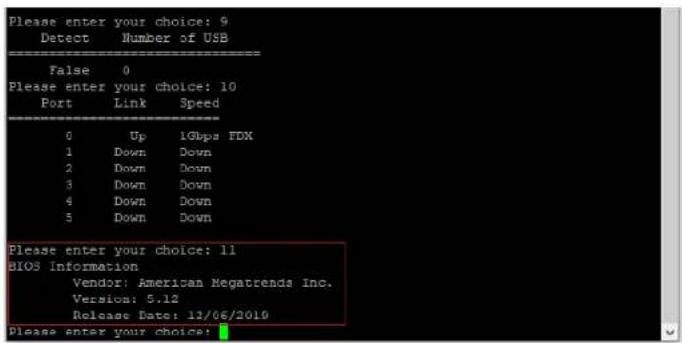
Appendix – Console

PLANET
Networking & Communication
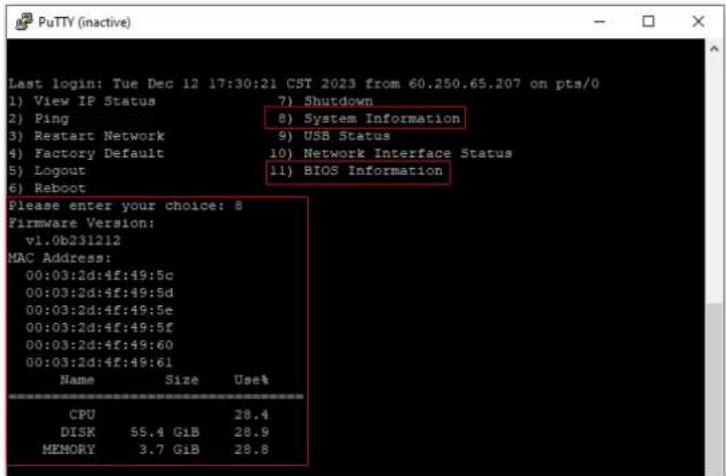
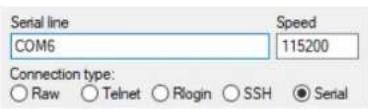
When the "UNC-NMS login" appears, please enter user login account "adminuser", and password "adminuser".


PLANET
Networking & Communication
THANK YOU
- Quick User Guide
- UNC-NMS
- PLANET
- Overview
- Network Management Characteristics
- Industrial-grade Physical Hardware
- APPLICATIONS
- Before First Login
- Product Overview
- Back Panel
- Remote Logging in NMS
- Setup Wizard
- Account Modification
- Steps to modifying account:
- IP Configuration Setting
- How to Add a New Site
- Steps to add a new site:
- Appendix
- Appendix – MQTT Devices Support List
- Appendix – Console
- THANK YOU
Brand : Planet
Model : UNC-NMS
Category : Network Management Software