
Crater 8 - Charging Station / Docking Station Orava - Free user manual and instructions
Find the device manual for free Crater 8 Orava in PDF.


| Product Type | Portable Bluetooth Speaker |
| Brand | Orava |
| Model | Crater 8 |
| Dimensions (H x W x D) | 74 x 97 x 38 mm |
| Weight | 190 g |
| Audio Output Power | 5 W RMS (4 Ohm) |
| Frequency Range | 150 Hz – 16 kHz |
| Signal-to-Noise Ratio | 70 dB |
| Bluetooth Version | 5.0 |
| Bluetooth Profiles | A2DP, AVRCP |
| Bluetooth Range | Up to 10 m |
| FM Radio | 87.5 – 108 MHz |
| Playback Time | Up to 10–12 hours (depending on volume) |
| Charging Time | Approx. 3 hours |
| Battery Type | Built-in rechargeable Li-Ion, 3.7 V, 800 mAh |
| Charging Input | 5 V DC, 1 A via microUSB (charger not included) |
| USB Playback | USB port for MP3/WMA/WAV/APE/FLAC, up to 32 GB |
| Protection Rating | IP65 (dust-tight and protected against water jets) |
| TWS (True Wireless Stereo) | Yes (pair two Crater 8 speakers) |
| Phone Call Support | Answer, end, reject, dial last call via Bluetooth |
| Accessories Included | microUSB charging cable, user manual |
| Cleaning Instructions | Wipe with a soft damp cloth; do not use solvents |
| Battery Replacement | Not user-replaceable; built-in battery only |
Frequently Asked Questions - Crater 8 Orava
User questions about Crater 8 Orava
0 question about this device. Answer the ones you know or ask your own.
Ask a new question about this device
Download the instructions for your Charging Station / Docking Station in PDF format for free! Find your manual Crater 8 - Orava and take your electronic device back in hand. On this page are published all the documents necessary for the use of your device. Crater 8 by Orava.
USER MANUAL Crater 8 Orava
Portable Bluetooth speaker
Orava
Crater
Instruction manual
EN
CE
Crater 8
Intended use of the device
The device is intended solely for playback of audio signal from a mobile phone or other digital device or source (wirelessly using Bluetooth® technology, or even via a cable connection), to the extent determined by technical and operational parameters and functions, security and user instructions and external impacts of the operating environment.
ORAVA electrical appliances are manufactured according to the state of the art and recognized safety rules. Nevertheless, improper and unprofessional use or use contrary to the intended use may result in injury or danger to the life of the user or third party. damage to equipment and other material values.
Safety instructions for operation and use
- Electrical equipment is designed and manufactured in such a way as to allow for safe operation and use by persons without a professional qualification. Despite all the measures that have been
to the manufacturer for safe use and handling, carry some residual risks and associated potential hazards. - The following symbols and their meanings have been used on the device and in the accompanying documentation to warn of possible hazards:

This symbol alerts users that the following precautions can be avoided if the following precautions are observed when operating the device:
Danger of serious injury or life threatening!
Danger of damage to equipment or other damage to property!
IP65 This designation of electrical equipment means that the device is made with an outer cover which protects the internal electrical components against intrusion of foreign objects and the ingress of water. In this case, it is the highest level of resistance to intrusion of foreign bodies- dust-proof
Warning!
The degree of protection of the device is tested under specific technical conditions and does not mean that the device is intended to be used under permanent conditions of dust and water.
General safety instructions and warnings
- Before commissioning, we recommend that you carefully read the operating instructions and operate the equipment in accordance with the instructions.
- Failure to follow the safety instructions and warnings is forbidden by the manufacturer for any damage to health or property.
- Always keep the operating instructions together with the device for future use and use by new users.
- Use the appliance only for the intended purpose and in the manner specified by the manufacturer.
It is not a professional device for commercial use.
Operating environment characteristics:
- Do not use the device in an industrial environment or in an outdoor, adverse environment!
Do not expose your device to:
- direct sunlight, sources and equipment producing excessive heat,
- fall, vibration and mechanical stress,
- excessive dust,
- water,
- insect,
- aggressive effects of the external environment.
- The operating environment of the device must always be in accordance with the basic characteristics set out.
Operating environment characteristics:
- Ambient temperature: +10 °C to +40 °C
- Relative humidity: max. 75%
- Altitude: ≤ 2 000 m
- Occurrence of water: intermittent condensation of water and occurrence of water vapor
-
Occurrence of foreign bodies: quantity and type of dust are insignificant
-
The basic IPX0 protection class (when the device is not protected by its waterproof cover) is not marked on the product and in the technical parameters listed in the operating instructions.
- If the protection class of the product is different from IPX0, this information is then displayed on the label of the appliance or in the technical data of the operating instructions.
- The appliance is not primarily intended for use in environments with significant water effects.
Safety of persons
- This device may be used by children under the age of 8 and persons with reduced physical, sensory or mental capabilities or lack of experience or knowledge when supervised or instructed to use the appliance safely and understand the dangers involved.
- This appliance can also be used by small children (children between the ages of 3 and 8) if the controls are set by their parent or authorized guardian, or if the child has been instructed enough to operate the controls safely.
• Children may not play with the device. - Cleaning and maintenance for users may not be performed by children unattended.
Cleaning, maintenance and repairs
- Perform the normal user cleaning and maintenance of the electrical equipment only as recommended. Do not use chemical solvents or abrasive cleaners for cleaning.
- Never clean the appliance in a way that could cause it to dampen and drip into the device.
- Clean the device with a damp cloth only and wipe dry or let it dry.
- Keep the appliance clean and dry.
- Do not disassemble the electrical/electronic equipment!
- Never repair the electrical / electronic equipment yourself!
Special Safety Instructions and cautions
- When transporting, be careful when moving, to avoid equipment fall and damage.
- Unpack the equipment and accessories before putting it into service and remove all parts of packaging material and labels. Store the packaging in a safe place, especially out of the reach of children and unaccompanied persons, or dispose of them safely.
-
If the device was stored at low temperatures (eg in winter) or excessive humidity, first leave it for about 1 hour to “acclimatize” to remove any moisture in electronic parts that occurs when the ambient temperature changes.
-
Do not expose the appliance to indoor use by water or excessive moisture. Do not dispose of any containers with water or other liquids.
- Do not install the appliance near heat sources or other heat generating devices.
- Do not place objects on the device that can cause a dangerous situation (eg burning candles, etc.).
- To avoid the risk of electric shock (in the case of a device that operates with a dangerous power supply), do not disassemble or attempt to service yourself. Have any repairs to electrical equipment carried out by qualified personnel.
Operation/Use Warning!
- In places where mobile phone use is not allowed or where the device may cause interference or danger, such as in an aircraft, in hospitals and near high-sensitive electronic medical devices, fuels, chemical substances or in locations, where blasting is carried out using explosives, switch off mobile devices.
- Follow these safety instructions and cautions in these locations.
- Wireless 2.4 GHz wireless audio devices can interfere with other wireless devices or networks.
- If this device is located too close to other Bluetooth® devices or devices that use the 2.4 GHz or 5 GHz frequency band, they may not work properly and there may be noise and/or sound interruptions caused by radio waves interference.
Warning!
- The loudspeaker system for a mobile phone is a device that when used, it may alter (reduce) the perception of ambient sounds. If you perform any activities that are accompanied by an increased risk to yourself or others in close vicinity, always check your surroundings to avoid injuring yourself or others.
- Be very careful when using the device. Pay particular attention to: driving, cycling, or drivining on other means of transport, where ATTENTION is required in conditions of movement on public roads or public spaces where there is a large number of people involved in the pursuit of interests.
Warning!
- The device is intended for use only with a built-in rechargeable battery which can not be exchanged by the user (the device is not dismantled) and the type and specifications of which are specified in the technical guide of the operating instructions.
- Ensure that all cable connections are secure and properly connected. Do not insert any conductive objects into the device connectors.
- When connecting and disconnecting the connector, pull out the connections behind the connectors, never pull the connection on the cable itself.
- Do not connect signal cables to bundles. Do not pull the cables together. Do not expose the signal cables to mechanical stress and damage.
- Do not let the signal cables hang freely and do not allow them to be freely accessible and reachable by children.
There is a risk of serious injury!
There is a risk of electric shock!
- The device contains parts of covers (eg ventilation grilles) that can be heated during normal operation. Do not cover the ventilation grilles.
- Never leave your device freely accessible and do not leave it with a freely accessible cable. Children could overthrow the device for the cable.
There is a risk of serious injury!
- Do not store the device with wrapped cord around its body. Wipe the cable loosely in the way it was folded in the original packaging by the manufacturer.
- Never overload the equipment beyond the limits specified by the technical specifications!
- If you notice any unusual occurrences (sounds, odors, smoke, etc.) during use of the device, switch off the device immediately and disconnect it from the power supply. Have the appliance checked by a specialist workshop.
- Never underestimate the potential hazards and take extreme caution !!!
Bluetooth® technology
- Bluetooth ^® technology is a wireless short-range radio signal transmission technology that enables wireless data communication and synchronization between a digital device, mobile phone, and headset.
- ORAVA is not responsible for any incidental or consequential damages or other damages or disclosure of data and/or information that may occur during wireless transmission.
Frequency band
- This technology uses the 2.4 GHz non-licensed microwave radio frequency band.
Certifications
- This device adheres to frequency constraints and has been certified to comply with statutory regulations concerning frequency bands. Therefore, no wireless transmission authorization is required.
The following actions are illegal:
- separation from the main device,
- removing parameter labels.
Designation of use
- This system is intended for normal general use.
- Microwaves from Bluetooth devices may adversely affect the functions of electronic medical devices.
-
Do not use this system near equipment or in a high-frequency interference sensitive environment, for example:
-
places with the presence of combustible gas,
- spaces near automatic door systems, alarm systems such as:
- airports,
- Hospital
- laboratories
- gas stations etc.,
as interference to broadcasting can cause an accident
Restrictions in use
- Wireless transmission and/or use with all Bluetooth® devices can not be guaranteed.
- All devices must comply with standards set by Bluetooth SIG, Inc.
- Depending on the parameters and settings of the devices, connection may not be performed or some operations may be different.
- This system supports Bluetooth® security features. However, in some operating environments or under certain settings this may not be sufficient. Be careful when transmitting data wirelessly to this system.
Range of use
- Use a wireless device at a distance of up to 10 m.
- Various types and environmental characteristics, barriers or interference can reduce the range of transmission (eg metal barriers, walls, people ...).
Interference with other devices
- If this device is located too close to other Bluetooth ^ devices or devices using the 2.4 GHz frequency band, they may not work properly and may problems with noise and/or sound interruptions caused by radio waves interference.
- This system may not work properly if radio waves broadcast by a nearby radio station or similar device are too strong.
Other
- If you feel inconvenience when using Bluetooth ^® , stop using the Bluetooth device immediately.
- If any problem persists, contact your nearest ORAVA dealer.
Licenses
- The Bluetooth ^® word mark and logo are owned by Bluetooth SIG, Inc. and any use thereof by ORAVA retail 1, a.s. is subject to a license.
- Other trademarks and trade names are the property of their respective owners.
Power supply
Power from built-in rechargeable battery
The device is powered by a built-in 3.7 V, 800 mAh rechargeable battery. Charge the battery before using it for the first time or whenever the battery is weak (the sound is weak, distorted, the message “Low battery” sounds, or the device turns off completely).
You can charge the device battery from the mains using a suitable microUSB charger (not supplied, 5 V, 1 A). Charge the battery at least once a month when not in use.
Plug the charger into an electrical socket and connect the microUSB connector to the microUSB connector on the device (open the rubber cover of the connector).
The red LED will light and the battery will charge. Charging a fully discharged battery takes about 3 hours.
The LED indicator goes out after charging. During operation, the LED indicator turns blue and flashes blue during pairing.
You can charge while the device is turned on and off.
Note
If you do not have a suitable charger, you can charge the battery by connecting the device to the PC with the supplied USB cable. This will charge the device's battery from the PC.
Control elements
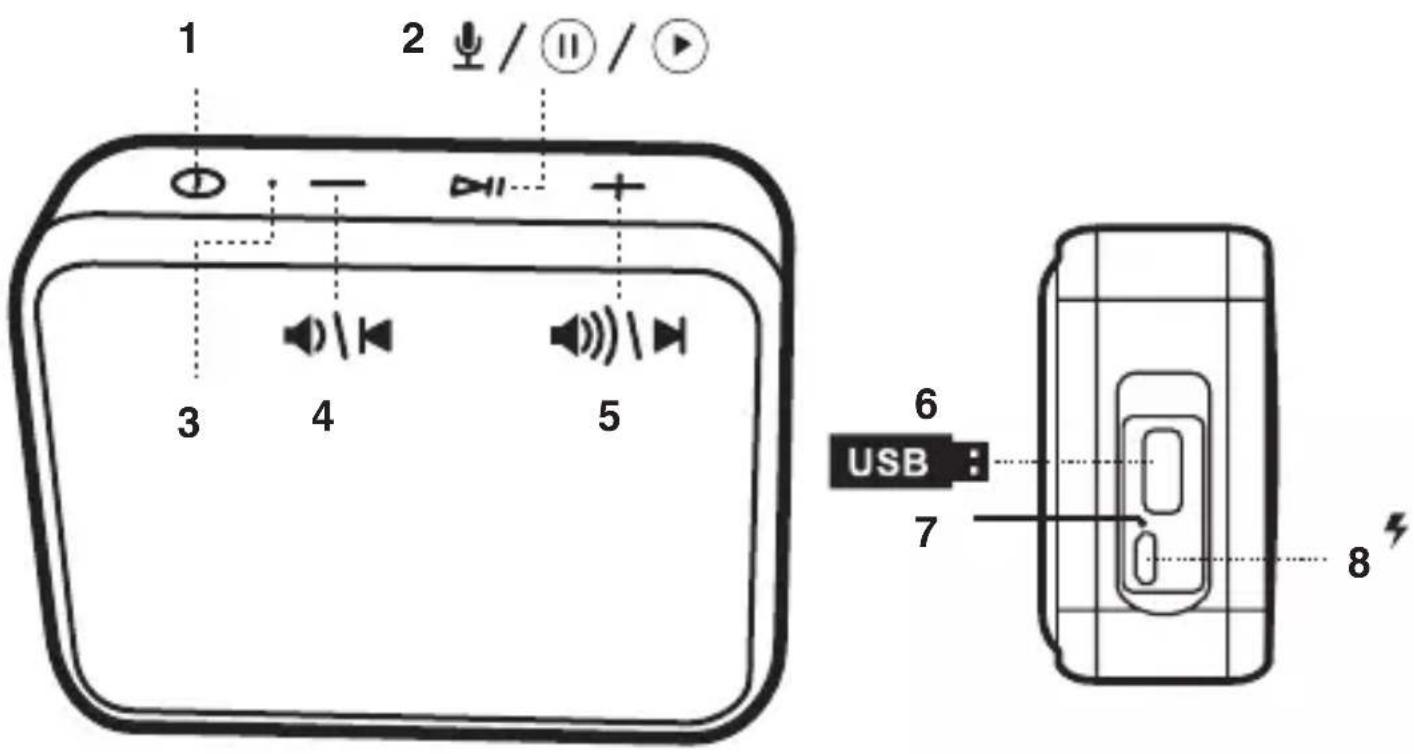
1 Button ⏻ (on/off/Bluetooth/FM/USB mode switch/TWS (True wireless stereo) mode on)
Short press: switch TWS on/off
Push and hold: Disconnect two TWS paired speakers
Two short presses: delete TWS pairing from memory
2 Button ▷□□
Short press: play/pause/stop/answer/end call
Push and hold: tunes and stores all available FM stations in memory
3 LED indicator
It lights up blue during operation and flashes blue during pairing.
4 Button -
Short press: toggle tracks backward / toggle FM stations backward / toggle call sound from speaker to phone and vice versa Push and hold: decrease volume Two short presses: switches back to the previous folder
5 Button +
Short press: switch tracks forward / switch FM stations forward / switch call sound from speaker to phone and vice versa Push and hold: increase the volume Two short presses: switch to the next folder forward
6 USB connector (USB media connection)
7 LED charging indicator Illuminates red while the battery is charging.
5 MicroUSB connector (connect charger/connect from USB PC connector for charging)
Sound settings
1 Turn on the device by pressing and holding button ⏻ for more than 3 seconds. The device turns on (LED blinks (or blinks) in blue.
2 Press ⏻ briefly to select the desired sound source. 3 Press and hold + and - to adjust the volume during playback.
Radio control
Tuning and storing stations
1 Turn on the device by pressing and holding button ⏻ for more than 3
seconds.
The device turns on (LED blinks (or blinks) in blue.
2 Press ⏻ briefly to select the radio source (FM) (“FM radio” (FM mode)).
3 Press and hold ▷ for about 3 seconds. All available FM stations are automatically tuned in and stored in the unit's memory.
4 Press the + and - buttons briefly to toggle between the listening presets.
5 Press and hold down the buttons + and - adjust the volume during playback.
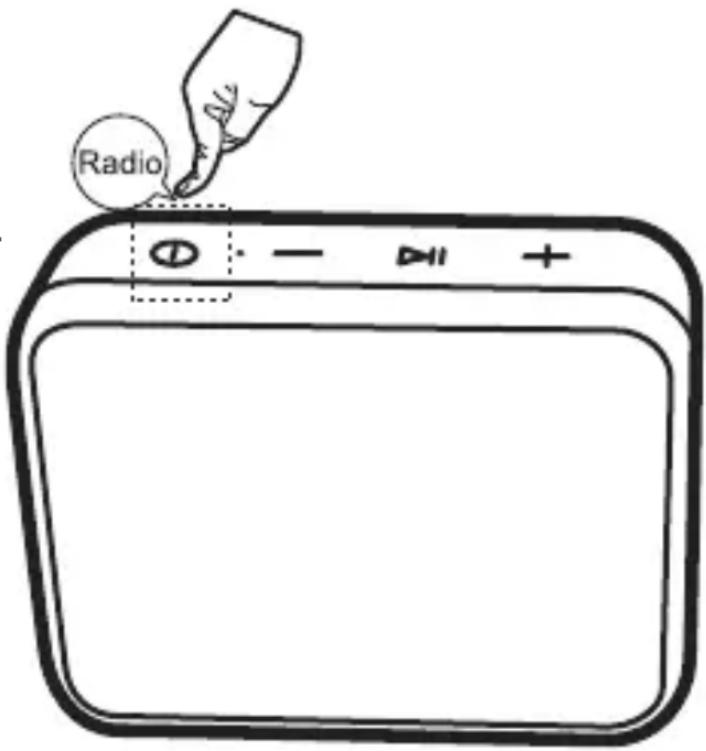
Switch presets
In radio mode, press the + and - buttons briefly.
Switches 1 preset in the appropriate direction (up / down).
Listening to the radio
For the best reception, choose the location of the device to make the reception the best.
remark
Remark
When you turn the FM mode off and on again, the last station you listen to is tuned in.
Bluetooth playback from Bluetooth device
1 Turn on the Bluetooth interface on your Bluetooth device (phone, tablet, etc.). See your device's instruction manual for details.
2 Turn on this unit by pressing and holding button ⏻ for more than 3 seconds. The device will switch to Bluetooth mode and be ready to pair (LED indicator will blink blue).
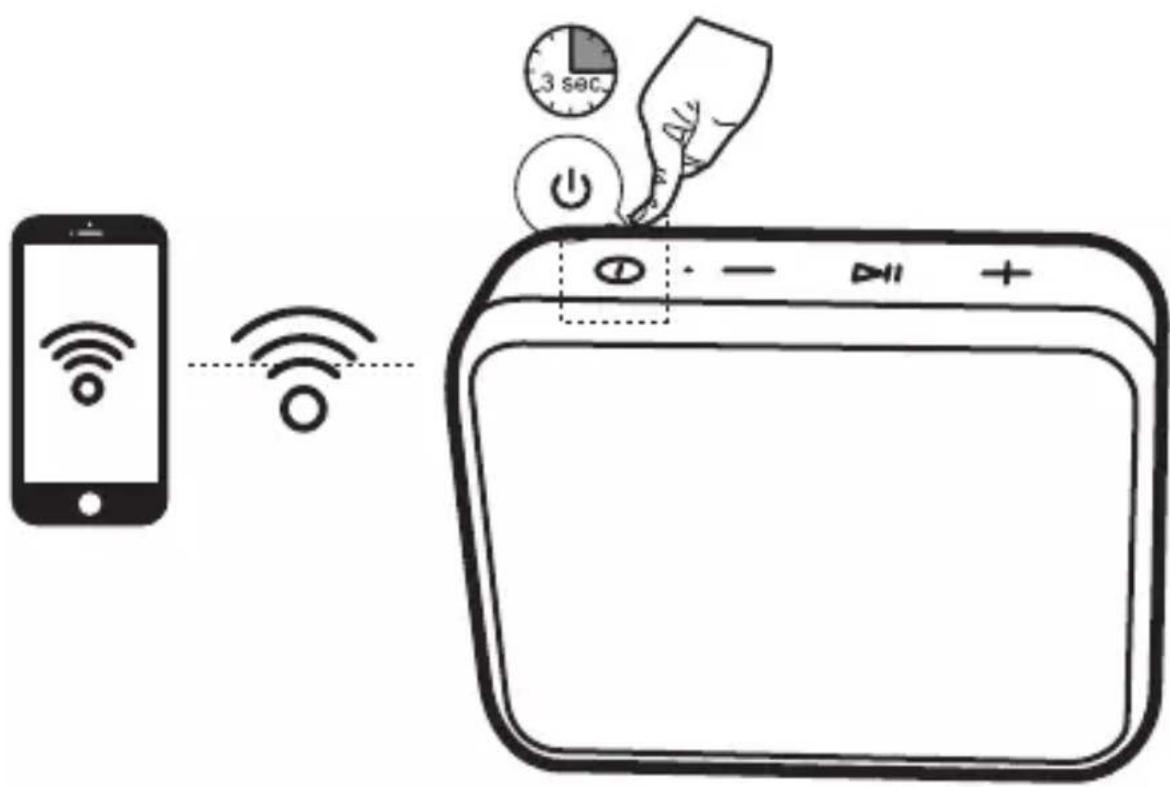
3 On your Bluetooth device (phone, tablet, etc.), search for available Bluetooth devices.
See your device's instruction manual for details.
When Crater 8 appears on the display of your Bluetooth device, select it and wait until the pairing confirmation with the Crater 8 is displayed on your Bluetooth device display. Device paired". The devices are paired.
4 After pairing, you can start playback on your Bluetooth device and adjust the volume accordingly.
For details on playback control, refer to the device's instruction manual.
The sound from the paired device will be reproduced by this speaker system.
Playback operations
Playing
Press ▷ to start playback.
Suspension
Press ▷ during playback. Playback pauses. Press ▷ again while pausing. Playback resumes.
Feedback: -
Switch to the beginning of the current or previous track (short press).
Advance: +
Switch to the next track (short press).
For playback control to work, the connected device must support the AVRCP Bluetooth profile.
5 Press and hold + and - to adjust the volume during playback.
6 Phone calls
If you receive a phone call while playing music via the Bluetooth interface, answer the call by briefly pressing the ▷ button on this unit or the mobile answer button.
The sound of the call will be reproduced by this speaker.
End a call
Press ▷ briefly during a call to end the call.
Dial last call
Press ▷▶ briefly to call the last call number.
Call rejection
Press and hold▷□ while ringing to reject the call. During a call, press and hold + or - to add sound.
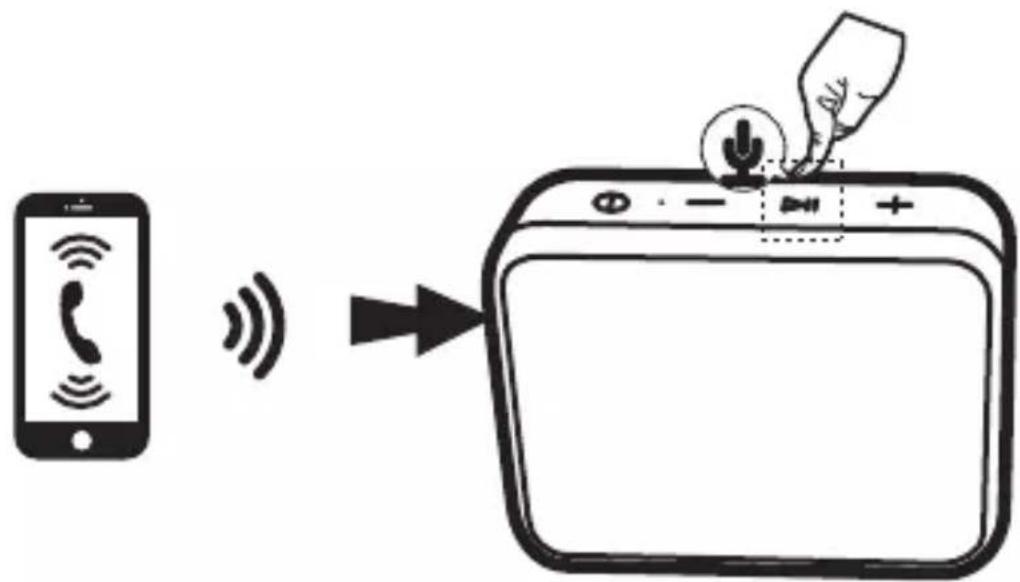
7 When playback is complete, turn off the Bluetooth source on this unit, stop playback on your Bluetooth device, and turn off the Bluetooth interface on it.
Note
After pairing your devices, pairing is no longer required. Devices are automatically switched again when you turn on the Bluetooth audio source on this device and turn on the Bluetooth interface on your Bluetooth device.
Cancel current Bluetooth pairing
When the loudspeaker is paired with a Bluetooth device, and these devices are currently connected and you want to cancel this pairing, press and hold down ▷□□ to connect another device.
A “Device disconnected” message will be heard. You can then pair with another Bluetooth device.
Warning!
Sound may be lost when playing via Bluetooth.
These failures are caused by interference, greater distance, obstacles, and so on. This is not a malfunction of the device.
TWS function
(True Wireless Stereo)
If you have two Crater 8 speakers, you can pair them with each other and reproduce real stereo sound from a connected and paired Bluetooth device via a Bluetooth interface with two speakers.
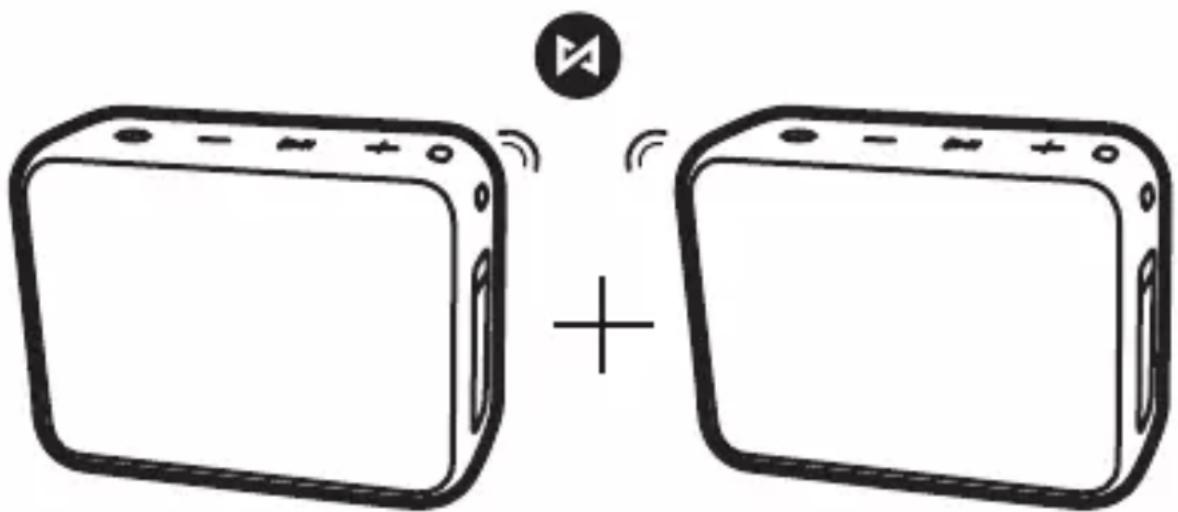
1 Turn on the Bluetooth interface on your Bluetooth device (phone, tablet, etc.).
See your device's instruction manual for details.
2 Turn on the two Crater 8 at the same time by pressing and holding button ⏻ for more than 3 seconds.
The devices will turn on Bluetooth mode and will be ready to pair with another Bluetooth device (the device LEDs will blink blue).
3 Both speakers will automatically pair with each other and join each other. One speaker will reproduce the left channel and the other speaker will reproduce the right channel.
4 On your Bluetooth device (phone, tablet, etc.), search for available Bluetooth devices.
See your device's instruction manual for details.
When Crater 8 appears on the display of your Bluetooth device, select it and wait until the pairing confirmation with the Crater 8 appears on the display of your Bluetooth device. and a “Device paired” message is heard from the left device. The devices are paired.
Now both speakers can simultaneously play music via Bluetooth interface in real stereo.
For playback, refer to “Playing via Bluetooth from a Bluetooth Device”. Press ⏻ to turn off both speakers.
5 To unplug two paired speakers.
Press and hold ▷ on any of the two speakers. A “Device disconnected” message will be heard.
Notes
- This feature requires 2 Crater 8 enabled speakers.
- If no Crater 8 speaker has been connected to another Bluetooth device before the TWS pairing, the LEDs of both Crater 8 speakers will blink blue when turned on.
- TWS is only available in Bluetooth mode.
USB drive playback
Play MP3/WMA files
The speaker can play MP3/WMA/WAV/APE/FLAC format in audio quality comparable to a CD.
You can play files from a USB storage device with a capacity of up to 32 GB. You can play files using the buttons on the device.
1 Connect a USB storage device to the USB port. The unit must contain audio files.
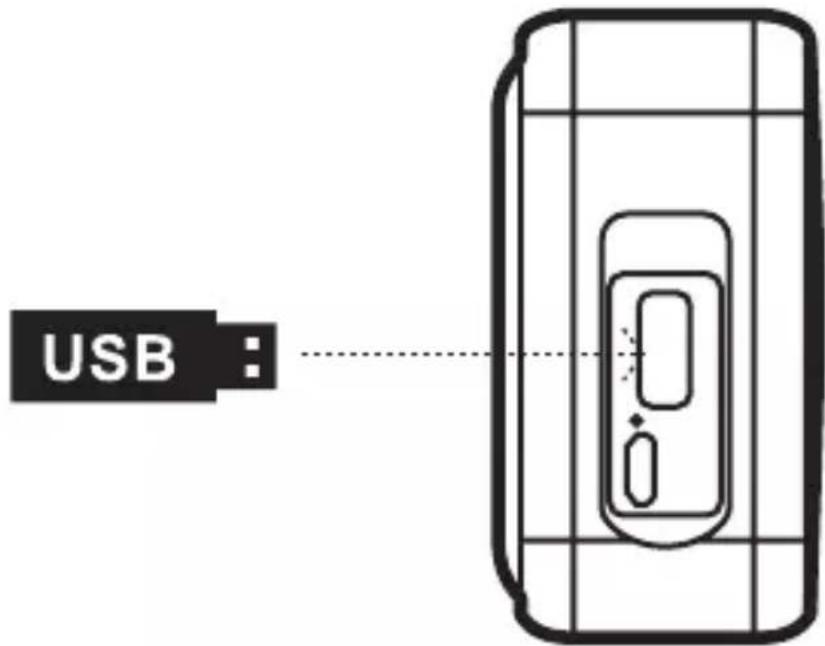
2 Press ⏻ briefly to select USB source (“USB mode” will be heard).
3 Media playback starts automatically from the first audio file on the media. If playback does not start automatically, press ▷ on the unit to start playback.
4 Press the + and - buttons briefly to switch forward and backward tracks during playback.
5 Press and hold + and - to adjust the volume during playback.
Playback operations
Playback
Press 7 to start playback from the first track.
Suspension
Press ▷ during playback. Playback pauses. Press ▷ again while pausing. Playback resumes.
Feedback: -
Scroll to the beginning of the current (single press) or previous (repeat) tracks and play them automatically.
Advance: +
Scroll to the next track (press once or press repeatedly) and play it back.
Rewind: -
Two short presses switch to the previous folder on the USB drive.
Move to forward: +
Two short presses switch to the next folder on the USB drive.
More details
Wireless Bluetooth technology
Wireless Bluetooth technology is a short-range technology that allows wireless data communication between digital devices such as wireless devices. PC and digital camera. Wireless Bluetooth technology works within a range of about 10 m.
Connecting two devices is mutual, but some devices can be connected to multiple devices at the same time.
No cable is needed to connect, nor is it necessary to place the devices facing each other as with infrared technology. For example, you can use your devices when they are in your backpack or pocket.
The Bluetooth standard is an international standard supported and used by many companies around the world.
Notes
- In order to use the Bluetooth function, the connected Bluetooth device must have the same profile as this system.
- Even if the profiles are the same, the devices may work differently depending on their specifications.
- Due to the features of Bluetooth wireless technology, the sound reproduced by this system is slightly delayed from the sound from a Bluetooth device during a phone call or listening to music.
- This system supports security standards that are compliant with Bluetooth standards to ensure secure connectivity when using Bluetooth wireless technology. However, depending on your settings, security may not be sufficient. Be cautious when using Bluetooth wireless technology.
-
Orava is not responsible for leakage of Bluetooth communications.
-
To ensure compliance with Bluetooth standards specified by Bluetooth SIG and authentication, a device with a Bluetooth function is required. Even if the connected device is compliant specified by the Bluetooth standard, some devices may not be able to connect or function properly depending on the features or technical specifications of the device.
- Depending on the Bluetooth device connected to this system, the communication environment, or the operating environment, noise or audio dropouts may occur.
Troubleshooting
Warning!
If you experience any problems with this device, try removing it using this report. If measures do not help, do not attempt to remove the device cover or repair it yourself. There is a risk of electric shock!
No sound
- Check if the sound is turned off.
- Make sure the device is connected properly.
The device does not turn on.
- Check that the battery is charged. Problems with Bluetooth connectivity Bluetooth is disturbed:
The effective distance between the speakers and the device is up to 10 m. The signal will be interrupted if the distance between the Bluetooth device and the speakers is more than 10 m.
Bluetooth device finds more other Bluetooth devices when searching: Wait for the search to finish and select “Crater 8” for pairing. When using the phone, do not hold the mobile device too close to the speaker to avoid echoing.
Phoning
The caller / recipient is not heard.
- Make sure that both the Bluetooth mobile phone and the device are turned on.
- Check the connection of the Bluetooth mobile phone and this speaker.
- Check if the mobile phone's Bluetooth output is set for this speaker.
- Check if the speaker is set to a low volume level.
- Check that the volume on the Bluetooth mobile phone that is equipped with the volume control is not set to a low level.
Weak sound from caller / recipient
- Increase the volume on the speaker.
- Increase the volume of the Bluetooth mobile phone that has a volume control.
Maintenance
Cleaning the device surface
Use a soft cloth slightly moistened with a mild cleaning solution to clean the surface, panel and controls. Do not use abrasive cloths, cleaning powders or solvents such as thinner, petrol or alcohol.
Technical specifications
Generally
Audio output power: 5 W (RMS), 4 Ohm
Connectors - input: USB connector for microUSB USB (charge)
Bluetooth: Bluetooth Standard 5 Profile: A2DP
(Advanced Audio Distribution Profile)
profile for wireless music transfer
in stereo quality
Profile: AVRCP (Advanced Audio Distribution Profile)
profile for playback control band: 2.402 -
2.480 Ghz
FM radio: tuning range: 87.5 MHz \~ 108 MHz
Power: Built-in rechargeable lithium (Li-Ion)
battery 3.7V, 800 mAh
charging time approx. 3 hours
max. play time approx. 10-12 hours
(depending on the volume set) charge
source: 5 V DC, 1 A (not supplied)
Frequency range: 150 Hz to 16 kHz
Signal/noise ratio: 70 dB
Dimensions: approx. 74 x 97 x 38 mm (H x W x D)
Weight: 190 g
Supplied accessories: operating instructions (1)
microUSB cable (1)
Subject to change!
Producer:
ORAVA retail 1, a.s.
Seberíniho 2
821 03 Bratislava
Slovenska republika
Importer:
ORAVA retail 1, a.s.
Seberiniho 2
821 03 Bratislava
Slovenská republika
ORAVA distribution CZ, s.r.o.
Ostravská 494
739 25 Sviadnov
Ceská republika
natural_image
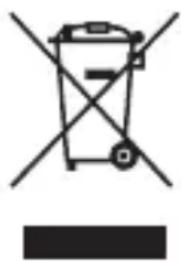
Symbol of a trash bin crossed with a diagonal line and a horizontal bar below (no text or labels)DISPOSAL OF USED ELECTRICAL AND ELECTRONIC EQUIPMENT
The symbol on the product or on its packaging indicates that this product does not belong to household waste. It is necessary to take it to a collection point for electrical recycling and electronic equipment.
By ensuring proper disposal of this product, you will help prevent negative consequences to the environment and human health that would otherwise be caused by inappropriate disposal of this product. For more detailed information about recycling of this product, please contact your local authority, your household waste disposal service or the shop where you purchased the product.

This product meets all the essential requirements of the EU directives that apply to it.
DECLARATION OF CONFORMITY
Short text Declaration of Conformity:
ORAVA retail 1, a.s. hereby declares that the Crater 8 complies with the essential requirements and other relevant conditions of Directive 2014/53/EU of the European Parliament and of the Council.
The full text of the Declaration of Conformity is available at: www.orava.eu

- Portable Bluetooth speaker
- Orava
- Crater
- Instruction manual
- Intended use of the device
- Safety instructions for operation and use
- Warning!
- General safety instructions and warnings
- Operating environment characteristics:
- Safety of persons
- Cleaning, maintenance and repairs
- Special Safety Instructions and cautions
- Operation/Use Warning!
- Bluetooth® technology
- Frequency band
- Certifications
- Designation of use
- Restrictions in use
- Range of use
- Interference with other devices
- Other
- Licenses
- Power supply
- Power from built-in rechargeable battery
- Note
- Control elements
- Button -
- Button +
- USB connector (USB media connection)
- Sound settings
- Radio control
- Tuning and storing stations
- Switch presets
- Listening to the radio
- Remark
- Bluetooth playback from Bluetooth device
- Playback operations
- Playing
- Suspension
- Cancel current Bluetooth pairing
- TWS function
- (True Wireless Stereo)
- To unplug two paired speakers.
- Notes
- USB drive playback
- Play MP3/WMA files
- Playback
- Feedback: -
- Advance: +
- Rewind: -
- Move to forward: +
- More details
- Wireless Bluetooth technology
- Troubleshooting
- No sound
- The device does not turn on.
- Phoning
- Maintenance
- Cleaning the device surface
- Technical specifications
- Generally
- Producer:
- Importer:
- DISPOSAL OF USED ELECTRICAL AND ELECTRONIC EQUIPMENT
- DECLARATION OF CONFORMITY
Brand : Orava
Model : Crater 8
Category : Charging Station / Docking Station