HD7088 - Uncategorized Emerson - Free user manual and instructions
Find the device manual for free HD7088 Emerson in PDF.


| Product Type | MP3 Personal CD Player with 45-Second Digital Anti-Skip Protection |
| Playable Disc Formats | CD, CD-R, CD-RW, MP3 CD |
| Anti-Skip Protection | 45 seconds for standard CDs, up to 120 seconds for MP3 CDs |
| Power Source | 2 x AA batteries (not included) or included AC adapter (120V 60Hz) |
| Battery Life | Approximately 7 hours (Anti-Skip off) / 6 hours (Anti-Skip on) with alkaline batteries |
| Dimensions (Approx.) | 5.5 x 5.5 x 1.5 inches (estimated) |
| Weight (Approx.) | 0.5 lbs (estimated) |
| Programmable Tracks | Up to 24 tracks |
| Playback Modes | Normal, Repeat 1, Repeat All, Repeat Folder (MP3), Intro, Random, Program |
| MP3 Features | File/Directory search by name, fast track selection, up to 99 files, 300 directories |
| Resume Function | Continues playback from last stopped position |
| Bass Boost | DBBS (Dynamic Bass Boost System) on/off |
| Outputs | Headphones (3.5mm), Line Out (3.5mm) for external amplifier |
| Display | 2-line scrolling text display, alpha-numeric keypad |
| Included Accessories | Stereo headphones, AC adapter, Owner's Manual |
| Safety | Class 1 laser; safety interlocks; do not open CD compartment when disc rotating |
| Care & Cleaning | Avoid direct sunlight, heat, vibration, humidity, dust; clean lens with soft cloth if needed |
| Warranty | 90 days limited warranty (parts and labor) in USA |
| Manufacturer | Emerson Radio Corp., 1901 Diplomat Drive, Farmers Branch, TX 75234 |
Frequently Asked Questions - HD7088 Emerson
User questions about HD7088 Emerson
0 question about this device. Answer the ones you know or ask your own.
Ask a new question about this device
Download the instructions for your Uncategorized in PDF format for free! Find your manual HD7088 - Emerson and take your electronic device back in hand. On this page are published all the documents necessary for the use of your device. HD7088 by Emerson.
USER MANUAL HD7088 Emerson
HD7088 O/M.QXD 4/12/02 3:24 PM Page 26
Emerson
MP3 PERSONAL CD PLAYER with 45 SECOND DIGITAL ANTI-SKIP PROTECTION
OWNER'S MANUAL
HD7088
Visit our web site at www.emersonradio.com
HD7088 O/M.QXD
4/12/02
3:24 PM
Page 1
BEFORE WE BEGIN
Thank you.
For purchasing this state-of-the-art Emerson personal CD player with MP3 decoder. In addition to normal audio CD's, this player will also read discs that have been recorded in CD-R, CD-RW, and compressed MP3 formats. It has an electronic anti-skip memory of 45 seconds for normal CD's and up to 120 seconds for MP3 encoded CD's. Since MP3 CD's can hold up to 10 hours of recorded music, this player allows you to search an MP3 CD by File, by Directory, or even by individual song title. The large, 2-line scrolling text display, and alpha-numeric keypad make all operations clear and simple. Digital quality, lightweight stereo headphones, and an AC adaptor, are included.
Please read this manual carefully and completely to make sure you get the maximum enjoyment from all the features included in this high tech CD player and keep this manual for future reference.
The serial number of your unit is located on the bottom cabinet. Please record the serial number in the space below for future reference.
Model No. HD7088
Serial No.
SAFETY PRECAUTIONS

DANGEROUS VOLTAGE
The lightning flash with arrowhead symbol, within an equilateral triangle is intended to alert the user to the presence of uninsulated dangerous voltage within the product's enclosure that may be of sufficient magnitude to constitute a risk of electric shock to persons.

ATTENTION
The exclamation point within an equilateral triangle is intended to alert the user to the presence of important operating and maintenance (servicing) instructions in the literature accompanying the appliance.

DANGER:
This product utilizes a Class 1 laser to read Compact Discs. This laser Compact Disk Player is equipped with safety switches to avoid exposure when the CD door is open and the safety interlocks are defeated. Invisible and hazardous laser radiation when open and interlock failed or defeated. Avoid direct exposure to beam. Please do not attempt to defeat or bypass the safety switches.
SAFETY PRECAUTIONS

CAUTION
RISK OF ELECTRIC SHOCK
DO NOT OPEN

CAUTION: TO REDUCE THE RISK OF ELECTRIC SHOCK, DO NOT REMOVE COVER (OR BACK). NO USER-SERVICEABLE PARTS INSIDE. REFER SERVICING TO QUALIFIED SERVICE PERSONNEL.
- Do not open the CD compartment while the CD is rotating.
• Always keep the CD compartment closed when not in use. - Keep all foreign objects out of the CD compartment.
- Place the unit on a stable surface.
- Avoid installing the unit is locations described below:
- Places exposed to direct sunlight or close to heat radiating appliances such as electric heaters.
- On top of other stereo equipment that radiates too much heat.
- Placed lacking ventilation or dusty places.
- Places subject to constant vibration.
• Humid or moist places.
INFORMATION
This equipment has been tested and found to comply with the limits for a Class B digital device, pursuant to Part 15 of the FCC Rules. These limits are designed to provide reasonable protection against harmful interference in a residential installation. This equipment generates, uses, and can radiate radio frequency energy and, if not installed and used in accordance with instructions, may cause harmful interference to radio communications. However, there is no guarantee that interference will not occur in a particular installation. If this equipment does cause harmful interference to radio or television reception, which can be determined by turning the equipment off and on, the user is encouraged to try to correct the interference by one or more of the following measures:
- Reorient or relocate the receiving antenna.
- Increase the separation between the equipment and receiver.
- Connect the equipment into an outlet on a circuit different from that to which the receiver is connected.
- Consult the dealer or an experienced radio/TV technician for help.
HD7088 O/M.QXD 4/12/02 3:24 PM Page 3
LOCATION OF CONTROLS
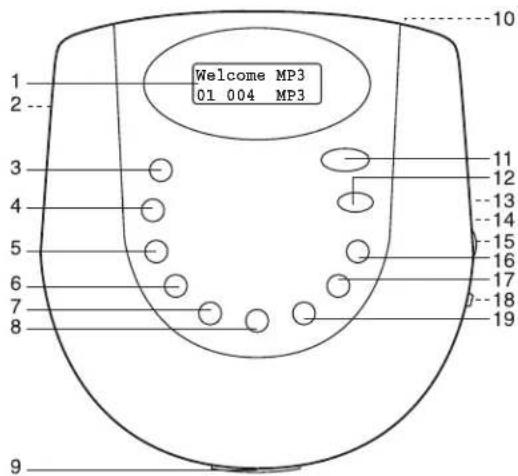
Many of the buttons have dual functions, meaning they will perform one function in the Normal mode and a different function in the Search mode. The descriptions on the following page will indicate the function while in the Normal mode, followed by the function in the File Search mode (if applicable).
3
HD7088 O/M.QXD
4/12/02
3:24 PM
Page 4
LOCATION OF CONTROLS (CONTINUED)
No. Name Normal Mode File Search
1 Display LCD Function Display
2 Battery Insert Batteries, see
Compartment page 5
3 FILE SEARCH Search for MP3 files ENTER
4 DISPLAY MP3 Display select 0, CLEAR
5 FILE/DIR. Locate MP3 file 9, "Space"
6 RESUME CD: Continues playback from 8.W.X.Y.Z
last track played.
MP3: Continues playback from
last position played.
7 ANTI-SKIP Electronic Anti Skip Protection 7,T,U,V
(ESP) ensures continuous playback.
8 PROGRAM Memorizes & reviews programs. 6,P,Q,R,S
9 OPEN Switch Slide to the right to open the CD
compartment.
10 DC4.5V Jack Use with external Power Supply.
11 PLAY/PAUSE Turns the unit on. Also starts 1,A,B,C
and pauses playback.
12 STOP Stops CD play, clears a 2,D,E,F
program. Also turns the unit off
13 LINE OUT Jack Connect to an external amplifier,
such as a car stereo.
14 PHONES Jack Connect 3.5mm headphones.
15 VOLUME Adjusts the volume.
16 SKIP/SEARCH+ Press & release:Skip forward. 3.G.H.I
Press & Hold: Search forward
17 SKIP/SEARCH—Press & release:Skip backward. 4,J,K,L
Press & Hold: Search backward.
18 DBBS Tums BASS enhancement on/off.
19 PLAY MODE Cycles between RANDOM, 5,M,N,O
INTRO, REPEAT A, REPEAT1.
HD7088 O/M.QXD

3:24 PM
Page 5
INSTALLATION
This CD player can be powered by either 2 "AA" batteries or the provided AC adapter.
AC Operation
To operate the unit using AC power, connect the AC adapter (included) to the DC4.5V jack on the rear of the CD Player and to a wall outlet having 120V, 60Hz AC only. The batteries are automatically disconnected when the AC adapter is used.
CAUTION: Use only the AC adapter provided with this unit. Disconnect the adapter when not in use.
Battery Installation
Batteries need to be replaced when "LOW BATTERY" appears in the display. Fresh Alkaline batteries will last approximately 7 hours with Anti-Skip off, and 6 Hours with Anti-Skip on.
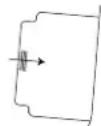
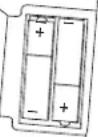
- Open the battery compartment door on the bottom of the unit by sliding it out and then lifting it. To prevent the possibility of losing the cover, it cannot be removed.
- Insert two (2) "AA" batteries (not included) according to the polarity diagram. Alkaline batteries are recommended for longer playing time.
BATTERY PRECAUTIONS
Follow these precautions when using batteries in this device:
- Do not mix different types of batteries together (e.g. Alkaline and Carbon-zinc) or old batteries with fresh ones.
- If the device is not to be used for a long period of time, remove the batteries to prevent damage or injury from possible battery leakage.
- Do not try to recharge batteries not intended to be recharged; they can overheat and rupture. (Follow battery manufacturer's directions.)
HD7088 O/M.QXD
4/12/02
3:24
Page 6
INSTALLATION (CONTINUED)
Playback Through a Home Audio System:
By using a home audio connection cable, superb CD sound can be heard through your home audio system. Before making any connections, turn off the power to all equipment. Plug a connection cable (not included) between the LINE OUT jack on the side of the CD player and the amplifier's CD or AUX input jacks. (Do not connect it to the amplifier's PHONO jacks.)
NOTE: If the CD player interferes with TV or radio reception, move the CD player away from the TV or radio or turn off the power to the CD player.
Headphones:
Connect the supplied headphones into the green PHONES (Headphones) jack.
Use your common Sense when using headphones:
- Hearing Safety: Do not play your unit at high volume. Hearing experts advise against continuous extended play. If you experience a ringing in your ears, reduce the volume or discontinue use.
- Traffic Safety: Do not use while operating a motor vehicle. It may create a traffic hazard and it is illegal in many areas. You should use extreme caution or temporarily discontinue use in potentially hazardous situations. Even if your headset is an open-air type designed to let you hear outside sounds, do not turn up the volume so high that you can't hear what's around you.
HD7088 O/M.QXD
4/12/02
3:24 PM
Page 7
OPERATION
TO INSERT AND PLAY A CD
This CD player is designed to play all kinds of Audio Discs and MP3 CD ROMS, such as CD recordables and rewritables. Do not try to play CDI, CDV, DVD or computer CDs.
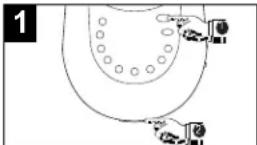
Press the PLAY/PAUSE button ① to turn the unit on.
Open the CD compartment lid by sliding the OPEN switch ②. Gently press a disc, label side up, onto the spindle until it locks in place. Close the CD compartment lid; the total tracks and playing time (and folders, if using MP3) will appear in the display.
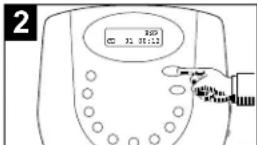
Press the PLAY/PAUSE button to begin playback; the current track and elapsed playing time (and folder, if using MP3) will appear in the display.
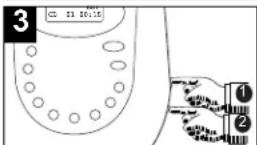
Adjust the VOLUME control ① and DBBS switch ② as desired.
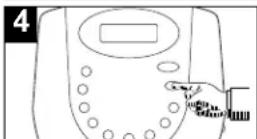
When the disc is through playing, it will stop. Press the STOP button to stop the disc before it is finished. Press the STOP button again to turn the unit off.
HD7088 O/M.QXD
4/12/02
3:24 PM
Page 8
OPERATION (CONTINUED)
CD PLAYBACK NOTES:
• See page 15 for more information on MP3's.
- When recording ("burning") CDs, make sure the session is "finalized", or simply record ("burn" only one session). You can find more information on "finalizing" in your CD recorder's manual.
- This unit is capable of playing standard CDs or 3" singles; no adapter is required.
- If a disc is inserted incorrectly, dirty, damaged or not present at all, "no disc" will appear in the display.
- If a disc is not recorded properly, "disc error" will appear in the display.
- Playback will stop when you open the CD compartment, but it is not recommended to open the compartment before the STOP button is pressed.
- If there is no activity for 60 seconds, the unit will turn itself off to save the batteries.
- It may take 10 to 30 seconds for the player to read an MP3 CD and begin playback, depending on the number of tracks burned on the CD.
CD PAUSE CONTROL
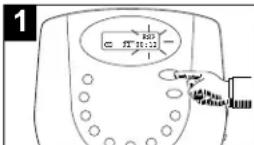
During CD playback, if you wish to pause the disc momentarily, press the PLAY/PAUSE button. Playback stops but the disc continues to spin and the elapsed time flashes in the Display.
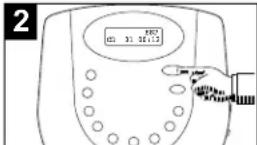
Press the PLAY/PAUSE button again to release Pause and resume playback. The sound returns and the elapsed time in the Display stops flashing.
8
HD7088 O/M.QXD
4/12/02
3:24 PM
Page 9
OPERATION (CONTINUED)
TO BEGIN PLAYBACK FROM A SPECIFIC TRACK
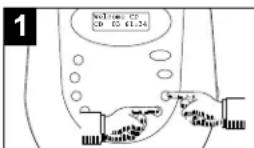
After you insert the disc into the CD player and the total number of tracks appear on the display, you may press either the SKIP/SEARCH + or - buttons to select a specific track for playback.
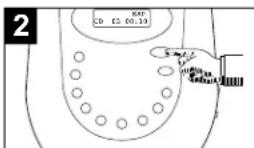
When the desired track number (and file number if using MP3) appears in the display, press the PLAY/PAUSE button. Playback will begin with the track (or file) you selected.
FORWARD/REVERSE SKIP TRACK
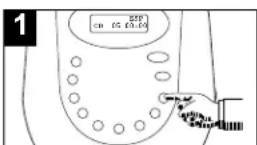
During playback, press and release the SKIP/SEARCH + button once to advance the player to the beginning of the next track. Press the SKIP/SEARCH + button repeatedly to advance the player to higher number tracks.
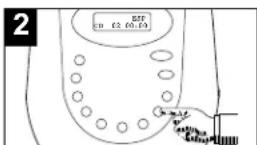
During playback, press and release the SKIP/SEARCH – button once to move the player back to the beginning of the currently playing track. Press the SKIP/SEARCH – button repeatedly to move the player back to lower numbered tracks.
HD7088 O/M.QXD
4/12/02
3:24 PM
Page 10
OPERATION (CONTINUED)
HIGH-SPEED MUSIC SEARCH
1
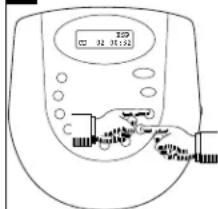
During playback, depress and hold either the SKIP/SEARCH + or - button to move the player forward or backward within a track to locate a specific musical passage. The player will move forward or backward at high speed as long as the buttons are depressed. When you release the SKIP/SEARCH button, normal playback will resume at that point.
REPEAT PLAYBACK OF ONE TRACK
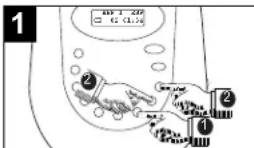
To repeat a single track, press the PLAY MODE button ① once; "REP 1" will appear in the display. Press the SKIP/SEARCH + or - button ② to select the specific track that you wish to repeat.
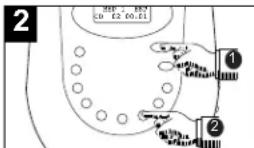
When the desired track number appears in the display, press the PLAY/PAUSE button ① to begin playback. The specific track you selected will be repeated continuously. To cancel Repeat playback, press the PLAY MODE button ② repeatedly until the mode indicator disappears.
HD7088 O/M.QXD
4/12/02
3:24 PM
Page 11
OPERATION (CONTINUED)
REPEAT PLAYBACK OF ALL TRACKS ON A CD
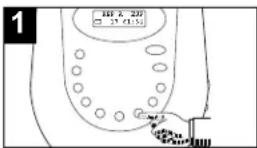
To repeat all the tracks on the CD, press the PLAY MODE button twice; "REP A" will appear in the display.
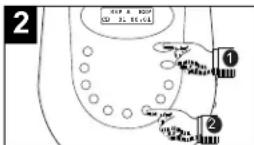
Press the PLAY/PAUSE button ① to begin playback. All tracks on the disc will be repeated continuously. To stop Repeat playback, press the PLAY MODE button ② repeatedly until the mode indicator disappears.
REPEAT PLAYBACK OF A FOLDER (MP3 ONLY)
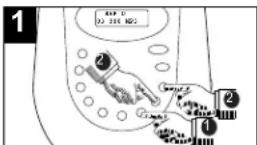
To repeat all files in a directory (MP3 CD only), press the PLAY MODE button ① 3 times; "REP D" will appear in the display. Press the SKIP/SEARCH + or - button ② to select the specific folder that you wish to repeat.
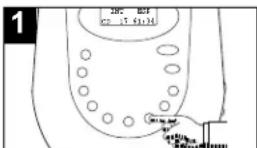
Press the PLAY/PAUSE button ① to begin playback. All files in the selected directory will be repeated continuously. Press the PLAY MODE button ② repeatedly until the mode indicator disappears to stop Repeat playback.. See page 15 for more info on MP3 format.
HD7088 O/M.QXD
4/12/02
3:24 PM
Page 12
OPERATION (CONTINUED)
INTRO PLAYBACK (Will play the first 10 seconds of each track)
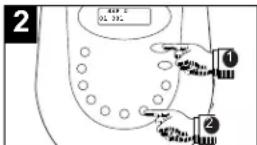
While in the Stop mode, press the PLAY MODE button 3 times (4 times if an MP3 CD with multiple directories is inserted); "INT" will appear in the display.
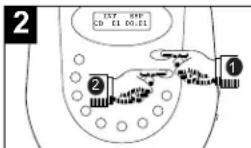
Press the PLAY/PAUSE button ① to begin Intro playback. The first 10 seconds of all tracks on the disc will be played in sequence. Press the STOP button ② to stop Intro playback.
TO RANDOMLY PLAY BACK A CD
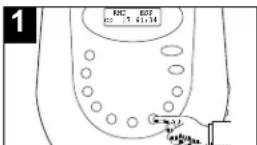
While in the Stop mode, press the PLAY MODE button 4 times (5 times if an MP3 CD with multiple directories is inserted; "RND" will appear in the display.
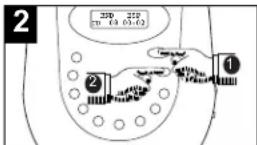
Press the PLAY/PAUSE button ① to begin playback. The unit will play all the tracks in random order. When all the tracks have been played, the unit will stop. Press the STOP button ② to stop Random playback.
HD7088 O/M.QXD
4/12/02
3:24 PM
Page 13
OPERATION (CONTINUED)
TO PROGRAM THE MEMORY (UP TO 24 TRACKS)
Programming is the ability to preselect the order in which a series of tracks will be played.
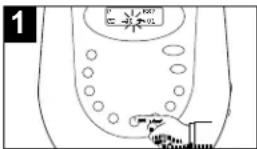
While in the Stop mode, press the PROGRAM button. The track number will blink and "P-01" will appear in the display. If using a MP3 disc, see the note on page 14.
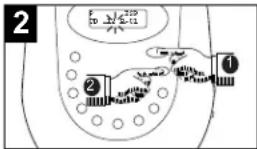
Within 10 seconds, select a track to be programmed by directly entering it. For example, press PLAY/PAUSE/1 ① and STOP/2 ② to enter in track number 12.
NOTE: If an error is made while programming, hold the DISPLAY/CLEAR button for 2 seconds to clear it.
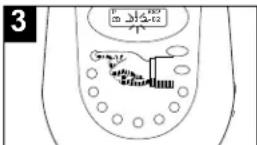
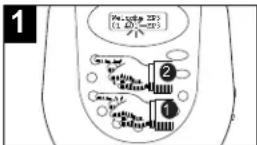
Press the FILE SEARCH/ENTER button to memorize the track. Repeat steps 2 and 3 to program additional tracks up to a maximum of 24 tracks.
Press the FILE SEARCH/ENTER button ① again to finalize the program. Press the PLAY/PAUSE button ② to begin program playback.
See the top of the following page for notes on Program playback.
HD7088 O/M.QXD
4/12/02
3:24 PM
Page 14
OPERATION (CONTINUED)
NOTES ON PROGRAM PLAYBACK
- MP3: If an MP3 CD is inserted, you will first select the directory number in step 1, and then the file.
- You can review the program by pressing the PROGRAM, then the SKIP/SEARCH button when playback is stopped.
- If you press the PROGRAM button, but do not enter a file number within 10 seconds, the player exits the Program mode and returns to the Normal mode.
- Press the REPEAT button twice during program playback to repeat the program repeatedly until the STOP button is pressed.
- Press the STOP button to stop and cancel the program before it is finished.
• Each file may be stored in the program memory as many times as desired (up to 24 files). - If an error is made while programming or searching, hold the DISPLAY/CLEAR button for 2 seconds.
- If an error is made while programming, hold the DISPLAY/CLEAR button for 2 seconds to clear it.
ELECTRONIC ANTI-SKIP PROTECTION
This feature protects against loss of sound caused by vibrations and shocks. Continuous playback is ensured once some of the music has been stored into memory. ESP will automatically be activated when listening to standard or MP3 CDs. You cannot deactivate ESP while listening to an MP3 CD. However, you can deactivate it when playing a standard CD by simply pressing the ANTI-SKIP button; the ESP indicator will disappear from the display. Deactivating the ESP will conserve battery life.
RESUME
This will allow you to resume playback of a CD that was previously stopped. If you stopped a CD in the middle of playing, simply press the RESUME button and the CD will continue at the start of the last played track location where the CD was stopped.
HD7088 O/M.QXD
4/12/02
3:24 PM
Page 15
OPERATION (CONTINUED)
MP3 FAQs - Frequently Asked Questions
Please read before playing an MP3 CD.
Can the HD7088 read CD-RW (Rewriteable CDRs)?
Yes it can. However, you must reformat the CD-RW every time you want to record new group of MP3 files. No multi-session recording allowed.
Can the HD7088 read regular music CDs?
Yes it can. However you can not mix MP3s and WAV files on the same CD. If you do this your Portable MP3 CD Player will play only the MP3 files.
Does the HD7088 have Anti-Skip Protection built-in?
Yes it has a 45 seconds Anti-Shock buffer. What it means for everyday user is that it can withstand road bumps, shaking, etc. There will be no skipping when you jog, or run on a tread mill or drive on a bumpy road.
Can I use the MP3 extension for non-audio data files?
No, this may result in serious malfunction and harmful noise interference.
Can I mix MP3 files with other file types on the CDR?
Yes, but your Portable MP3 CD Player will ignore those files and read only the MP3 files on the CDR.
Does the HD7088 support multi-session CDRs?
Yes, it does but you will not be able to play the tracks outside the first session.
Does the HD7088 support subdirectories (subfolders)?
Yes, the HD7088 can read MP3 files from subfolders.
What appears on the display when playing back MP3 CDs??
The album, title and artist (it sets when MP3 was recorded).
HD7088 O/M.QXD
4/12/02
3:24 PM
Page 16
OPERATION (CONTINUED)
MP3 FAST TRACK (DIR.) SELECT
If an MP3 CD with or without Multiple Directories is inserted, you can directly enter the desired file number as follows:
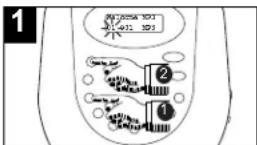
While the unit is in the Stop mode, press the FILE/DIR. button ① once; the track number will blink. Then, press the ENTER button ②.
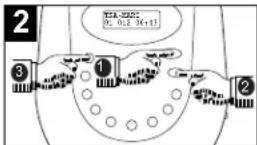
Select a track by directly entering it. For example, press PLAY/PAUSE/1 ① and STOP/2 ② to enter in file number 12. Press the ENTER button ③ to begin playback from that track.
MP3 FAST FILE SELECT
If an MP3 CD with Multiple Directories is inserted, you can directly enter the file number as follows:
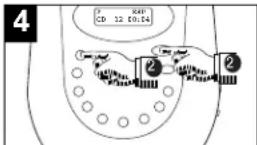
While the unit is in the Stop mode, press the FILE/DIR. button ① twice; the file number will blink. Then, press the ENTER button ②.
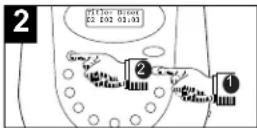
Select a file by directly entering it. For example, press STOP/2 to enter in directory number 2. Press the ENTER button to begin playback of that directory.
Display the total file and track numbers by pressing the FILE/DIR. three times.
HD7088 O/M.QXD
4/12/02
3:24 PM
Page 17
OPERATION (CONTINUED)
MP3 SELECTING FILES BY NAME
You can search for a file by name, using the letter buttons to enter the name of the song.
First, press the FILE SEARCH/ENTER button, followed by the appropriate letters to enter the name of the file. Remember that each letter button can enter 4 or 5 letters/numbers depending on the number of times you press the button. If you press the 1ABC button once, the number "1" appears. Press twice for "A", 3 times for "B" and 4 times for "C". For example, if the first word in the song title is "Funny", you would enter the word "Funny" on the display as follows:
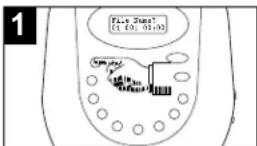
Press the FILE SEARCH/ENTER button once.
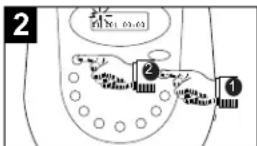
Press the 2DEF button ① 4 times to select the letter "F", then press the FILE SEARCH/ENTER button ② to enter the "F" and move the cursor to the next position.
CONTINUED ON THE NEXT PAGE
MP3 SELECTING DIRECTORIES BY NAME
You can search for a directory by name by following the same procedure as the MP3 SELECTING FILES BY NAME section on pages 17 and 18, but press the FILE SEARCH/ENTER button twice.
HD7088 O/M.QXD
4/12/02
3:24 PM
Page 18
OPERATION (CONTINUED)
3
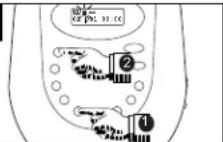
Press the 7TUV button ① 3 times to select the letter "U", then press the FILE SEARCH/ENTER button ② to enter the "U" and move the cursor to the next position.
4
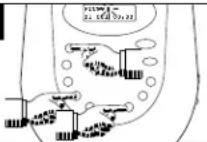
Continue to enter the word "Funny" as follows: "N'-Press 5MNO button 3 times, press FILE SEARCH/ ENTER. "N'-Press 5MNO button 3 times, press FILE SEARCH/ ENTER. "Y'-Press 8WXYZ button 4 times, press FILE SEARCH/ ENTER.
4
When done entering the name, press the FILE SEARCH button once again and the player will search for the name. Once found, playback will begin automatically.
To insert a space between 2 words in a name, press the 9/SPACE button twice.
It may not be necessary to enter the entire name to select the song. After entering the first few letters as describe above, press the FILE name that begins with those letters and playback begins automatically. If the player finds more than one name that begins with the same letters, the display will flash. If this occurs, you must continue entering letters until the player can identify the specific name you are looking for.
NOTES:
- The maximum number of letters that can be entered is 6.
- The maximum number of files that can be located by name is 99.
HD7088 O/M.QXD
4/12/02
3:24 PM
Page 19
OPERATION (CONTINUED)
SINGLE SESSION
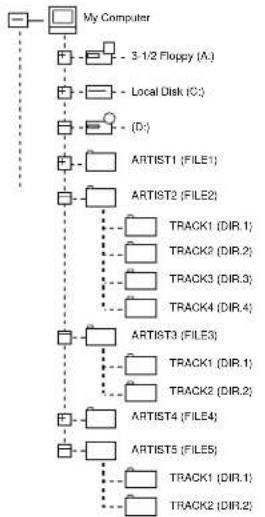
The following chart is an example of a Windows Explorer display that will appear on your computer monitor for a single session MP3 CD ROM with Files/Directories. Check the added notes to help you understand the MP3 CD unit display and the playback sequence of Files/Directories and tracks on a single session MP3 CD.
flowchart
graph TD
    A["My Computer"] --> B["3-1/2 Floppy (A)"]
    A --> C["Local Disk (C)"]
    A --> D["(D)"]
    A --> E["ARTIST1 (FILE1)"]
    A --> F["ARTIST2 (FILE2)"]
    E --> G["TRACK1 (DIR.1)"]
    E --> H["TRACK2 (DIR.2)"]
    E --> I["TRACK3 (DIR.3)"]
    E --> J["TRACK4 (DIR.4)"]
    F --> K["ARTIST3 (FILE3)"]
    F --> L["TRACK1 (DIR.1)"]
    F --> M["TRACK2 (DIR.2)"]
    F --> N["ARTIST4 (FILE4)"]
    F --> O["ARTIST5 (FILE5)"]
    G --> P["TRACK1 (DIR.1)"]
    G --> Q["TRACK2 (DIR.2)"]
See the following page for notes regarding this diagram.
19
HD7088 O/M.QXD
4/12/02
3:24 PM
Page 20
OPERATION (CONTINUED)
ABOUT THE DIAGRAM ON THE PREVIOUS PAGE:
- The arrow pathway shows the sequence of MP3 directory and file playback.
- When the MP3 CD is inserted into the CD player, the Display will appear as the following figure.
Welcome MP3 05 010 MP3
The "05" represent the total files and "010" represents the total directories.
- When an album contains mixed format files, the non-MP3 files will be skipped.
SPECIFICATIONS
MPEG Rate....32-384Kbps
Sampling frequency 16KHz, 22.05KHz, 24KHz
32KHz, 44.1KHz, 48KHz
MPEG1,2....Layer 2,3
MP3 Playback....ISO9660 format compatible
Max. File Support.....Album (File) 99, Track (Dir.) 300
Check the CD burner/recorder's documentation to see if it complies with these specifications.
20
TROUBLESHOOTING GUIDE
Should this unit exhibit a problem, check the following before seeking service.
| SYMPTOM | POSSIBLE CAUSE | POSSIBLE SOLUTION |
| Unit will not turn on. | Batteries inserted incorrectly. | Insert batteries correctly. |
| Batteries dead or weak. | Replace batteries. | |
| Power connection loose, or not connected. | Properly connect AC adapter securely. | |
| Power not on. | Press the PLAY/PAUSE button to turn the power on. | |
| CD will not play. | CD compartment not closed. | Close CD compartment door. |
| Disc inserted incorrectly. | Insert disc correctly. | |
| Dirty or defective CD. | Try another CD. | |
| Erratic playback. | Condensation is on the lens. | Wait until the lens has cleared. |
| Dirty or defective CD. | Try another CD. | |
| Error in the MP3 recording of the CD. | This is an error with the CD/burner, not the unit. Try another CD. | |
| Unit locks up. | Press and hold the DISPLAY/CLEAR button for 2 seconds to reset. | |
| Playback does not start from track 1. | The Resume or Program function was activated. | Clear the program, and do not start with the resume function. |
| No sound, or poor sound. | Headphone or Line Out plugs not inserted properly. | Check connections. |
| The volume is set too low. | Raise the volume. | |
| Plugs are dirty. | Clean plugs and reinsert. |
HD7088 O/M.QXD
4/12/02
3:24 PM
Page 22
EMERSON RADIO CORP. LIMITED WARRANTY
What does this warranty cover? Any manufacturing defects in original material, including original parts and workmanship, under normal use and conditions.
For how long? For a period of ninety (90) days from the date of original purchase in the U.S.
What will we do? If you need service under this Warranty, and you provide us with the dated proof of purchase, we will provide repair service at no charge for labor and parts at an authorized Depot Repair Facility, or replace the product in our discretion.
How do you make your warranty claim? If it becomes necessary to repair your unit, you can obtain the name and mailing location of a Depot Repair Facility by dialing 1-800-695-0098. You should pack your unit in a well-padded heavy corrugated box, enclose your check or money order payable to the Depot Repair Facility In the amount of \$9.00 to cover the return shipping and handling costs, and enclose a copy of your proof of purchase (warranty service will not be provided without a dated proof of purchase). Finally, you should ship the unit prepaid via UPS or parcel post (insured).
What does your warranty not cover? Your warranty does not cover the following:
- Damage from negligence, misuse, abuse, accident, or failure to follow operating instructions.
- Use of product in a commercial application or rentals.
- Changes or repairs by anyone other than an authorized Depot Repair Facility.
- Damage because your unit is improperly connected to the equipment of other manufacturers.
- Unit on which the serial number has been defaced, modified or removed.
- Damage to equipment not properly connected to the product.
- Cost incurred in shipping your unit to and from an authorized Depot Repair Facility.
HD7088 O/M.QXD
4/12/02
3:24 PM
Page 24
What does your warranty not cover?
- Ordinary adjustments which you can perform as outlined in the owner's manual.
• Signal reception problems caused by external antenna or cable systems - Products purchased, used, serviced, or damaged outside of the United States.
• Damage to compact discs or cassettes.
What other limitations apply to your warranty?
THIS WARRANTY IS NON-TRANSFERABLE AND APPLIES ONLY TO THE ORIGINAL PURCHASER AND DOES NOT EXTEND TO SUBSEQUENT OWNERS OF THE PRODUCT. THIS WARRANTY IS VALID ONLY IN THE UNITED STATES OF AMERICA. ANY APPLICABLE IMPLIED WARRANTIES, INCLUDING THE WARRANTY OF MERCHANTABILITY, ARE LIMITED IN DURATION TO A PERIOD OF THE EXPRESSED WARRANTY AS PROVIDED ABOVE BEGINNING WITH THE DATE OF ORIGINAL PURCHASE AT RETAIL AND NO WARRANTIES, WHETHER EXPRESSED OR IMPLIED, SHALL APPLY TO THE PRODUCT THEREAFTER. WE MAKE NO WARRANTY AS TO THE FITNESS OF THE PRODUCT FOR ANY PARTICULAR PURPOSE OR USE.
THE EXTENT OF OUR LIABILITY UNDER THIS LIMITED WARRANTY IS THE REPAIR OR REPLACEMENT PROVIDED ABOVE AND IN NO EVENT WILL OUR LIABILITY EXCEED THE PURCHASE PRICE PAID BY THE PURCHASER OF THE PRODUCT. UNDER NO CIRCUMSTANCES WILL WE BE LIABLE FOR ANY LOSS, DIRECT, INDIRECT, INCIDENTAL, SPECIAL, OR CONSEQUENTIAL DAMAGE ARISING OUT OF OR IN CONNECTION WITH THE USE OF THIS PRODUCT.
How does state law apply to your warranty?
THIS WARRANTY GIVES YOU SPECIFIC LEGAL RIGHTS, BUT YOU MAY ALSO HAVE OTHER RIGHTS WHICH VARY FROM STATE TO STATE. SOME STATES DO NOT ALLOW LIMITATIONS ON IMPLIED WARRANTIES OR EXCLUSION OR LIMITATION OF INCIDENTAL OR CONSEQUENTIAL DAMAGE, SO THESE RESTRICTIONS MAY NOT APPLY TO YOU.
AU898F
23

HD7088 O/N.QXD
4/12/02
3:24 PM
Page 23

AUTHORIZED SERVICE
TO FIND THE LOCATION AND PHONE NUMBER OF YOUR NEAREST AUTHORIZED SERVICE CENTER...
CALL TOLL FREE: 1-800-695-0098
FOR ADDITIONAL SET-UP OR OPERATING ASSISTANCE
PLEASE CALL: 1-800-898-9020
FOR CUSTOMER SERVICE, PLEASE WRITE TO:
Emerson Radio Corp. Consumer Affairs Dept. 1901 Diplomat Drive
Farmers Branch, TX 75234
24
HD7088 O/M.QXD 4/12/02 3:24 PM Page 25
Emerson
EMERSON
PART NO.: 16-2813
204-04 Printed in China
- Emerson
- BEFORE WE BEGIN
- SAFETY PRECAUTIONS
- DANGEROUS VOLTAGE
- ATTENTION
- DANGER:
- CAUTION
- RISK OF ELECTRIC SHOCK
- DO NOT OPEN
- INFORMATION
- LOCATION OF CONTROLS (CONTINUED)
- INSTALLATION
- AC Operation
- Battery Installation
- BATTERY PRECAUTIONS
- INSTALLATION (CONTINUED)
- Playback Through a Home Audio System:
- Headphones:
- Use your common Sense when using headphones:
- OPERATION
- TO INSERT AND PLAY A CD
- OPERATION (CONTINUED)
- CD PLAYBACK NOTES:
- CD PAUSE CONTROL
- TO BEGIN PLAYBACK FROM A SPECIFIC TRACK
- FORWARD/REVERSE SKIP TRACK
- HIGH-SPEED MUSIC SEARCH
- REPEAT PLAYBACK OF ONE TRACK
- REPEAT PLAYBACK OF ALL TRACKS ON A CD
- REPEAT PLAYBACK OF A FOLDER (MP3 ONLY)
- TO PROGRAM THE MEMORY (UP TO 24 TRACKS)
- NOTES ON PROGRAM PLAYBACK
- ELECTRONIC ANTI-SKIP PROTECTION
- RESUME
- MP3 FAQs - Frequently Asked Questions
- MP3 FAST TRACK (DIR.) SELECT
- MP3 FAST FILE SELECT
- MP3 SELECTING FILES BY NAME
- CONTINUED ON THE NEXT PAGE
- MP3 SELECTING DIRECTORIES BY NAME
- NOTES:
- SINGLE SESSION
- ABOUT THE DIAGRAM ON THE PREVIOUS PAGE:
- SPECIFICATIONS
- EMERSON RADIO CORP. LIMITED WARRANTY
- What does your warranty not cover?
- What other limitations apply to your warranty?
- How does state law apply to your warranty?
Brand : Emerson
Model : HD7088
Category : Uncategorized