
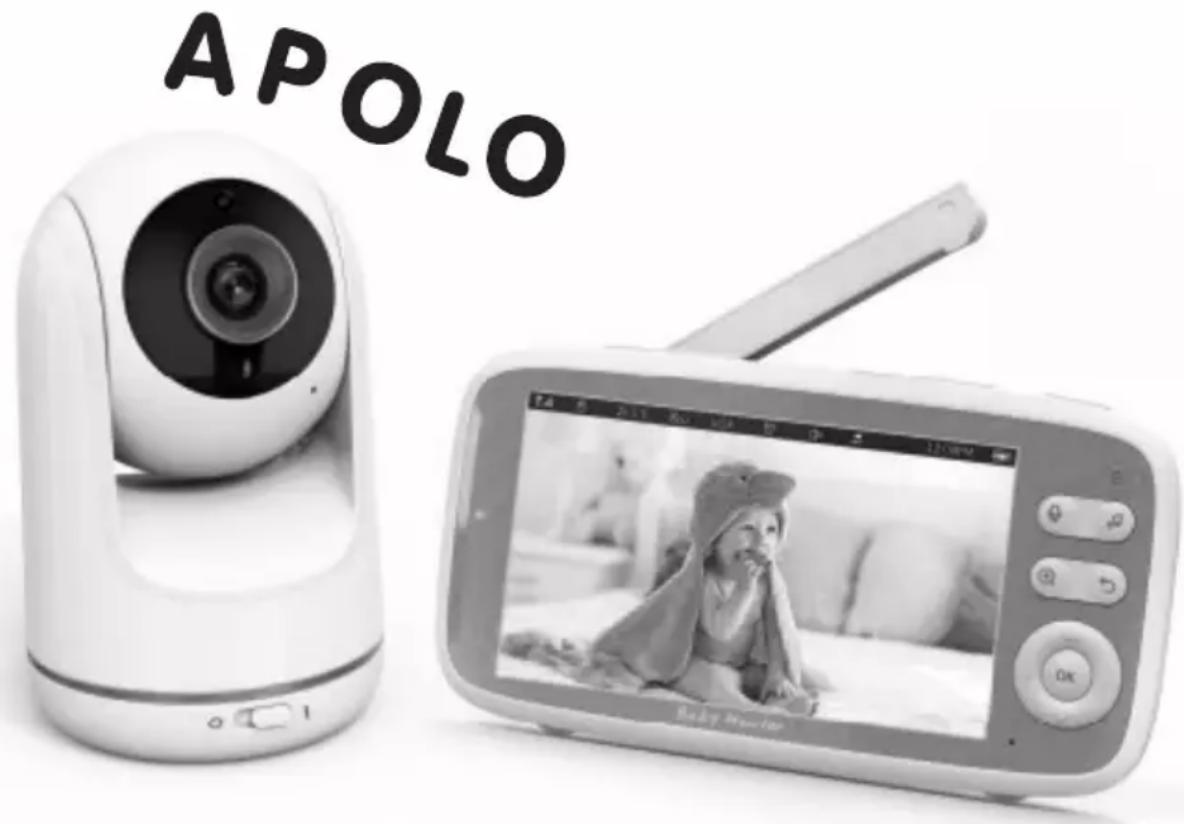
Apollo - Baby monitor Chipolino - Free user manual and instructions
Find the device manual for free Apollo Chipolino in PDF.


| Product Type | Baby Monitor |
| Brand | Chipolino |
| Model | Apollo |
| Parent Unit Dimensions | 10 x 7 x 5 cm |
| Baby Unit Dimensions | 8 x 6 x 4 cm |
| Total Weight | 250 g |
| Power Source | AC adapter (both units) or 2x AAA batteries (each unit) |
| Transmission Range | Up to 300m outdoors, 50m indoors |
| Frequency | 2.4 GHz FHSS |
| Audio | Two-way communication with crystal clear sound |
| Video | Not applicable (audio-only) |
| Night Vision | No |
| Temperature Sensor | Yes, built-in |
| Additional Features | Lullaby player, night light, low battery warning |
| Cleaning Instructions | Wipe with a dry, soft cloth. Do not use liquids. |
| Safety Compliance | CE, RoHS |
| Spare Parts Available | Replacement power adapters and batteries |
| Warranty | 2 years |
Frequently Asked Questions - Apollo Chipolino
User questions about Apollo Chipolino
0 question about this device. Answer the ones you know or ask your own.
Ask a new question about this device
Download the instructions for your Baby monitor in PDF format for free! Find your manual Apollo - Chipolino and take your electronic device back in hand. On this page are published all the documents necessary for the use of your device. Apollo by Chipolino.
USER MANUAL Apollo Chipolino
INSTRUCTION MANUAL FOR DIGITAL BABY MONITOR APOLLO
This product is manufactured in accordance with the requirements of Directives of the European Parliament and Council 2014/53/EU relating to the making available on the market of radio equipment, 2014/30/EU relating to electromagnetic compatibility and 2001/95/EU on General Product Safety as well as in accordance with National Legislation.
ATTENTION! WARNINGS!
THIS PRODUCT IS INTENDED TO AID YOU AND CANNOT SUBSTITUTE A REAL AND RESPONSIBLE ADULT SUPERVISION!
USE THE PRODUCT ONLY FOR ITS PURPOSE!
CAUTION! ONLY AN ADULT SHOULD USE THE PRODUCT!
✿ CAUTION! THIS DEVICE IS NOT A TOY AND MUST NOT BE ACCESSIBLE TO CHILDREN!
Do not let children play with parts of the monitor!
✿ CAUTION! NEVER PLACE THE BABY UNIT IN THE BABY'S BED OR PLAYPEN!
✿ CAUTION! THE ADAPTORS, PARENT AND BABY UNITS MUST ALWAYS BE OUT OF THE REACH OF THE BABY TO AVOID RISK OF INJURY OR SUFFOCATION!
✿ CAUTION! BEFORE USE, INSPECT THE GOOD WORKING ORDER OF ALL PARTS OF THE PRODUCT. Do not use the product if you find some parts are missing or damaged.
✿ CAUTION! NEVER USE THE BABY MONITOR IN MOIST ENVIRONMENT, CLOSE TO OR IMMERSED IN WATER!
✿ CAUTION! KEEP AWAY FROM FIRE. To avoid overheating keep the transmitter, receiver and adaptors away from heat sources or other devices, which release heat.
✿ CAUTION! Do not leave the adaptors in a place where a child may step on them. A hit on the adaptor when plugged in the electricity may cause damage and serious risk of injury!
◆ Use only supplied by producer adaptors.
If you use a wireless telephone, wireless video device, Wi-Fi network, microwave or Bluetooth devices at frequency of 2.4 GHz, and the video monitor units show interferences, relocate the baby unit at a larger distance until the interference disappears.
Do not use spare parts or other components, which are not supplied by the manufacturer! The producer does not assume responsibility in case spare parts have been used which are different from the approved type or recommended by the producer.
Do not make changes or modifications on the product! Do not modify the electric circuit and do not add other electrical parts! If necessary, contact the retailer or an authorized service center for advice and repair.
Before plugging the adaptors in, check if the voltage marked on the adaptor is the same as the voltage of the local electricity network. If not, you will damage the product!
Do not use damaged adaptors.
Do not remove the labels and warnings on the product! They are important for everyone who uses the product!
- Keep the nylon package away from children to avoid suffocation!
❖ ONLY an adult can plug the adaptors!
Do not bend, drill (especially with metal objects) or damage the battery in any other way.
◆ Charge the battery only with the adaptors provided by the producer!
Do not allow short circuit!
◆ Keep the product in room temperature!
Do not subject to direct sunlight!
✿ Never leave a charging battery without supervision!
REMARK: The battery compartment is located on the back of the parent unit.
ADVICE: Charge the battery fully before use to save it and prolong its life.
IMPORTANT! To replace the battery, contact the retailer or an authorized service!
CAUTION! When you stop using the product, do not dispose of it with normal household waste but hand it over in an official waste collecting point. The waste formed from damaged electrical and video devices adaptors, must be disposed of separately. Throwing them out in containers for household waste is forbidden. This will be your considerable contribution for safeguarding nature, reducing the harmful effect of substances batteries and adaptors, environment and human health.
found in the
MAIN FEATURES
natural_image
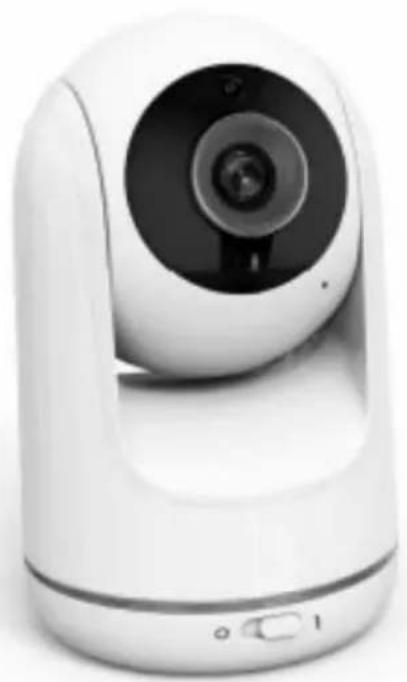
White smart camera with circular lens and control buttons (no visible text or symbols)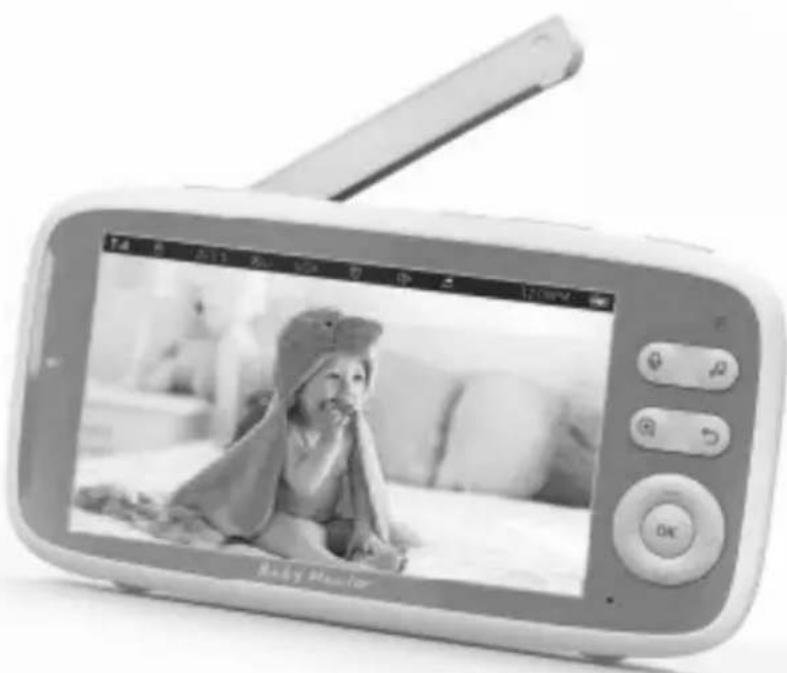
natural_image
Black-and-white photo of a baby on a baby's phone screen, no visible text or symbols on the device itself.| Digital baby monitor with frequency 2400 MHz -2483 MHz | |
| Modulation mode GFSK | |
| Spread spectrum FHSS | |
| Suitable temperature of air during usage of the product | -100 C - +450 C |
| Suitable air humidity during usage of the product | <85% |
| Range (no obstacles) from 300 m open area | |
| LED volume indicators 4 colors, 9 LEDs | |
| VOX activation mode 3 sensitivity levels | |
| Two-way communication | Press the button for two-way communication and speak (push to talk) |
| Lullabies 8 lullabies | |
| Digital zoom x1/ x2/ x3/ zoom | |
| Noise reduction Automatically noise reduction | |
| Multilanguage menu | English/ French/ German/ Italian/ Spanish/ Portuguese/ Turkish/ Russian/ Bulgarian |
| Data transmission mode AES crypt | |
Parent device: MONITOR (receiver), 1 pc
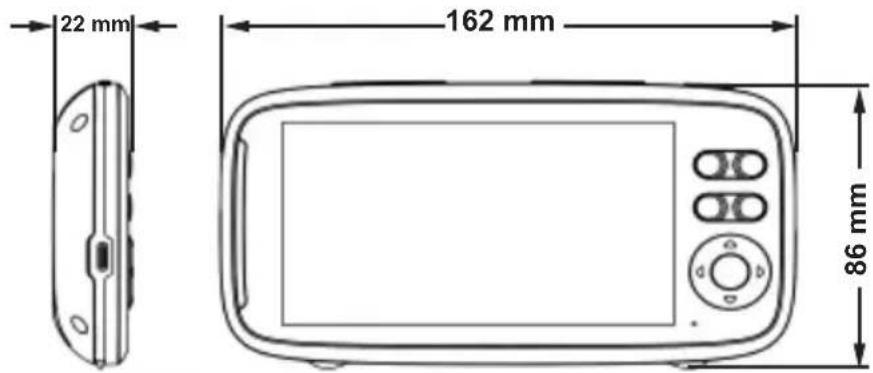
| LCD display 5” IPS LCD | |
| Resolution 320x240 pixel | |
| Battery Li-ion 3050 mAh; 3,8V; | |
| Duration (SCREEN ON) 8 hours (3 levels LCD light) | |
| Duration (audio model only) 16 hours (3 volume levels) | |
| Time for fully charged 5 hours | |
| Power magnitude by screen on 350mA (3 levels LCD light) | |
| Power magnitude by screen off 140mA | |
| Power during charging 670 mA | |
| Antenna Outside | |
| Adaptor | input: 100-240V AC, 50-60Hz,out: 5V; 1,2A, type C |
| Size (WxHxD), mm 162x86x22 | |
| Weight 0,2 kg |
Baby device: CAMERA (transmitter), 1 pc
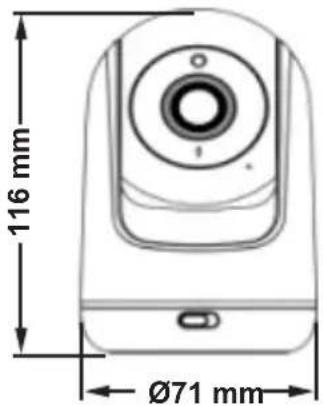
| Sensor of image, type 1/4" CMOS 1280x720 pixel | |
| Rotation angle up/down (camera reclining) 90° upwards, 45° downwards | |
| Rotation angle left/right (panoramic angle) 165° left, 165° right | |
| Vision angle 68° | |
| Curvature | < 1% |
| Night vision | 8 IR LEDs |
| Night vision range | 5 m |
| Night vision control Automatic, 1 sensor for weak light | |
| Antenna Inbuilt | |
| Adaptor | input: 100-240V AC, 50-60Hz,out: 5V; 1,2A, type C |
| Size (WxHxD), mm 71x71x116 | |
| Weight 0,19 kg | |
| FUNCTIONS | |
| Two-way communication | |
| Temperature information | |
| Musical player with 8 lullabies | |
| Multilanguage menu | |
| Automatic night vision | |
| VOX (automatically activation of baby unit when detecting sound) | |
| Zoom of the image on monitor | |
| Panoramic view/ Camera recline – remote control of camera (transmitter) from buttons at monitor (receiver) | |
| Alarm | |
MAIN PARTS DIAGRAM
Set includes:
- Parent unit: MONITOR (receiver) – 1 pc
• Baby unit: CAMERA (transmitter) – 1 pc
- Adaptors – 2 pcs
- Silicone holder
- Instruction manual – 1 pc
Please make sure that all parts are available.
MONITOR (receiver) 1. Antenna
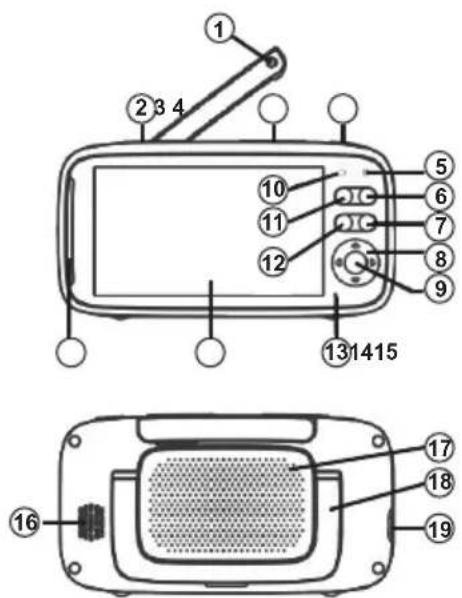
-
Brightness adjustment button
-
Volume control button
-
Button ON/OFF
-
LED indicator for charging
-
Button to select lullaby
-
Back button
-
Cursor movement button (up, down, left and right)
-
Button „OK” и „MENU“
-
LED indicator for power
-
Two-way communication button
-
ZOOM button
-
Microphone
-
LCD screen
-
LED indicator for volume level
-
Speaker
-
Battery compartment
-
Stand for monitor
-
Jack for adaptor
CAMERA (transmitter) 1. Light sensor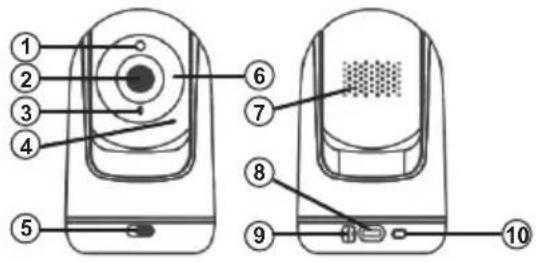 | 2. Camera lens3. LED indicator for power4. Microphone5. Switch ON/OFF6. Infrared light7. Speaker8. Jack for adaptor9. Temperature sensor10. Pairing button |
BEFORE USE
SWIFT START OF BABY MONITOR
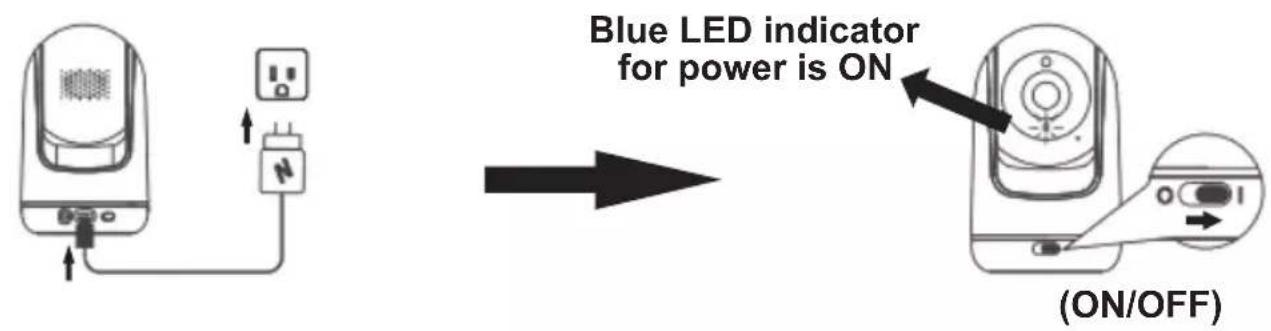
Step 1
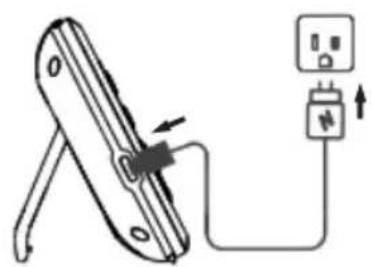
Step 2
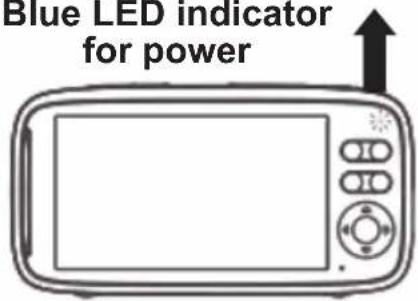
natural_image
Simple line drawing of a device with a plug and cable, no text or symbols present
Blue LED indicator for power
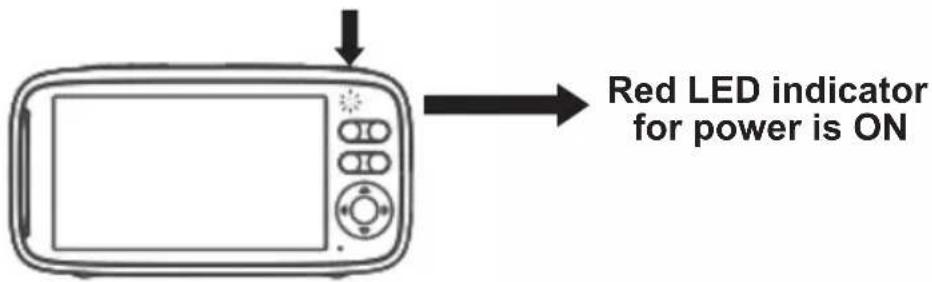
Step 3

Press and hold for 3 seconds
Step 1
Supply the baby unit (camera) with power from your local network. Insert the adaptor jack in the baby unit and plug in the socket.
Turn on the camera as setting the switch ON/OFF in position "I". The LED indicator is on in blue light i.e. the unit is operational.
Step 2
Charge the battery of the parent unit before using it for the first time or when it displays that the battery is drained.
Insert the adaptor jack in the parent unit and plug it in the socket. The battery charging blue LED indicator is on.
Step 3
Press the button for ON/OFF of monitor ⏻ and hold for at least 3 seconds to turn on the monitor. Make sure that red LED indicator is on.
ATTENTION! Use only adaptors supplied in the set from manufacturer.
STATUS OF MONITOR
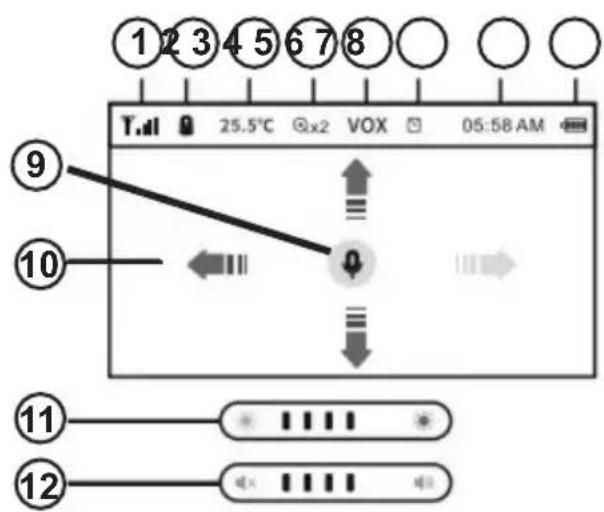
- Indicator for signal strength
- Indicator for selected camera
- Temperature in baby's room
- Zoom level
- VOX function is activated
- Activated alarm
- Current time
- Battery power
- Activated function Two-way communication
- Pan and tilt function activated
- Brightness of screen
- Volume control
MAIN FUNCTIONS
Place the baby unit (camera) at suitable place (table for example) and point the lens to the area you want to monitor. Set the baby unit until you reach the needed image at the monitor.
ATTENTION! Do not place the baby unit in baby's access area! If there are some disturbances in image or sound, move the devices at different places and make sure they are not too close to another electrical device.
PAIRING THE UNITS
natural_image
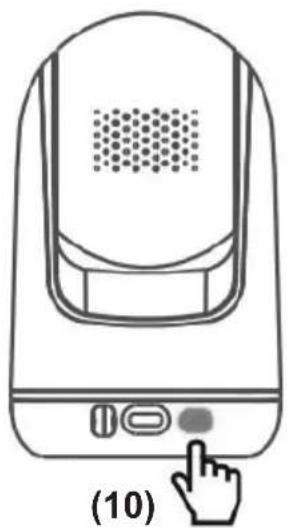
Line drawing of a device with a hand cursor pressing a button (no text or symbols)Units are paired in advance by the producer.
In case the connection between the units breaks down, do the following actions to pair the devices.
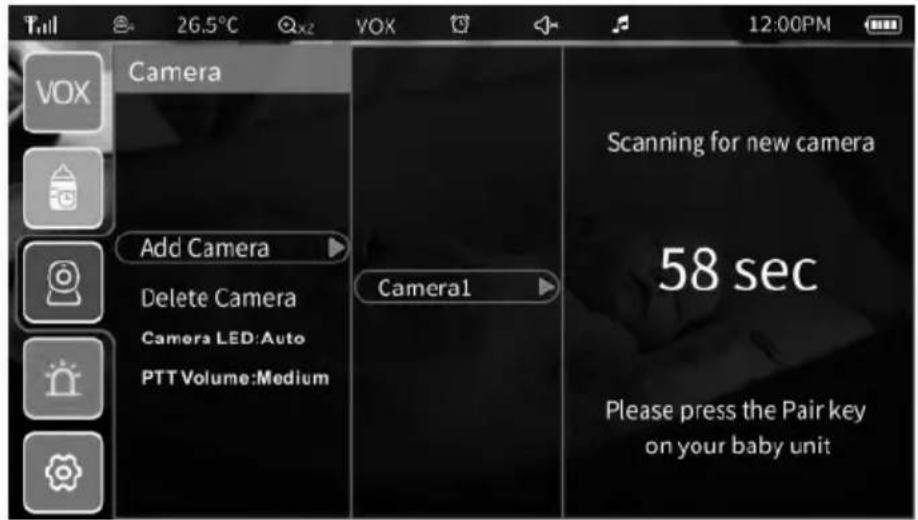
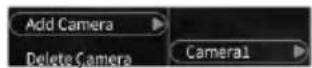
Select from the main "MENU" the icon 📄 "CAMERA", add camera (and press the button for pairing from camera (10).
IMPORTANT!
To activate functions, press button „OK“ and „MANU“ (9) from monitor. At left part of the screen appear icons for each function. Using the cursors for movement „^”, „V“ and „<”, „>” you can move in the menu and submenu of each function. For confirmation of each function, press „OK“.
To each of the functions you will see description in the language you selected, explaining also the subfunctions.
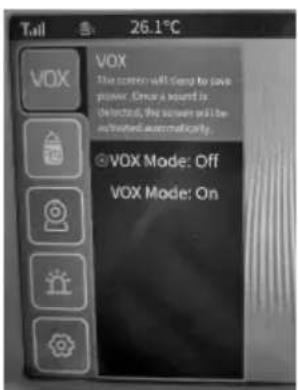
VOX or VOICE ACTIVATION

When VOX function is activated, the LCD video display is on only when the baby unit detects sound. If no sound is detected, the display if off to save energy.
To turn the VOX mode on, select VOX mode ON.
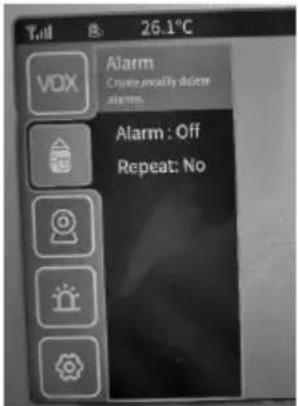
ALARM

With selection of this function you can create, change or remove already set alarm.
To turn alarm, select "Alarm:......" and time for turning on (after 1, 2,4,6 hours) or set another convenient hour from suit "Set time".
To turn off the alarm, select "Alarm: Off".
To repeat the set alarm, select "Repeat: Yes".
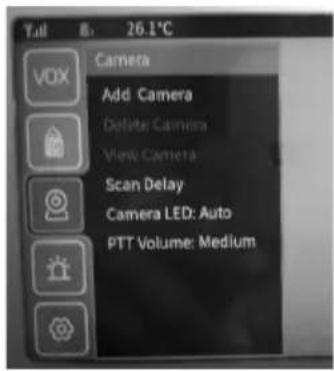
CAMERA

Adding a camera: there is a way to add 4 cameras simultaneously.
LED of camera (camera LED): Automatic/Turned on/ Turned off (Auto/On/Off)
Volume level by two-way communication (PTT volume): Low/Medium/High
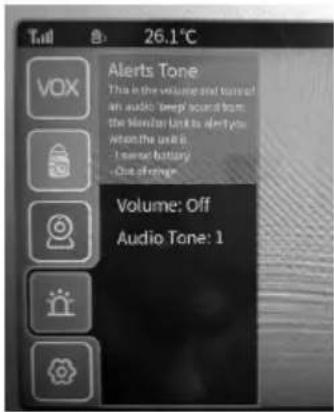
WARNING SOUND

This function is connected with volume level and tone of audio notification from monitor, when:
- Low battery
- Out of range
From submenu "Volume", you can select from 5 (1, 2, 3, 4, 5) levels and Audio tone – from 3 tones.
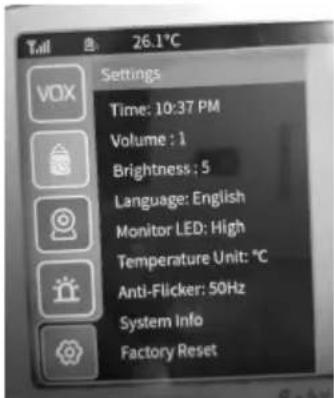
SETTINGS

• Time: for format 12 or 24 часа (12H format or 24H format)
• Volume – 6 levels
- Brightness – 7 levels
• Language: English/ French/ German/ Italian/ Spanish/ Portuguese/ Turkish/ Russian/ Bulgarian
• Temperature unit - °C (Celsius) or °F (Fahrenheit)
• Anti-Flicker: 50Hz or 60Hz
Note: Switch to alternative mode if the screen is flicking under certain lighting conditions
- System info – gives information about model of video baby monitor
- Factory reset – gives information for restoring the factory settings of video baby monitor after confirmation ("OK")
NIGH VISION
Baby unit (camera) has high intensity infrared diods to catch clear images in the dark.
MUSICAL PLAYER
Press the lullabies button on the parent unit to play music.
Press the lullabies button again and the melodies will stop playing.
TWO WAY COMMUNICATION
Press the Two way communication ON/OFF key on monitor. This will enable you to talk to your child through the speaker on the baby unit (camera). A symbol of microphone will appear in the center of the video LCD display on the parent unit.
ZOOM FUNCTION
Press the ZOOM button up to 2 times on the screen. By third pressing, the image returns into its original size.
PANORAMIC ANGLE and CAMERA RECLINE
Press and hold the buttons „^”, „v” and „<”, „>”, to remote control the suitable vertical or horizontal angle of camera. Release the button to exit this mode.
CARE AND MAINTENANCE
- Do not step on the power supply cable and keep it from twisting especially around the connectors, socket and the point where the cable comes out of the unit.
- Keep the units for the parent and baby and the adaptors so that they will have sufficient ventilation. Do not cover them with clothes, towels, covers, etc.
- Always unplug the units from the sockets whenever there is thunder or if you will not use them for a long time.
- Do not immerse the parent or baby units in water, do not wash them with running water.
- Clean the parts of the baby monitor and adaptors with a dry towel after you have turned the units off and unplugged the adaptors from the electricity network.
- Fingerprints and dust on the lens of the baby unit may affect the performance of the camera. Avoid touching the lens with fingers.
- Store in a dry and cool place.
ADVICE FOR CORRECT USE:
• Make sure all parts of the products are in good working order.
• Make sure the parent and baby units have full coverage.
• Make sure the battery in the parent unit is completely charged;
- Make sure the baby unit is plugged in the power source by the adaptor and that there is electricity in the network.
VIBEFAP02301WH /VB803

- INSTRUCTION MANUAL FOR DIGITAL BABY MONITOR APOLLO
- ATTENTION! WARNINGS!
- THIS PRODUCT IS INTENDED TO AID YOU AND CANNOT SUBSTITUTE A REAL AND RESPONSIBLE ADULT SUPERVISION!
- USE THE PRODUCT ONLY FOR ITS PURPOSE!
- MAIN PARTS DIAGRAM
- Set includes:
- Please make sure that all parts are available.
- BEFORE USE
- SWIFT START OF BABY MONITOR
- Step 1
- Step 2
- Step 3
- STATUS OF MONITOR
- MAIN FUNCTIONS
- PAIRING THE UNITS
- IMPORTANT!
- VOX or VOICE ACTIVATION
- ALARM
- CAMERA
- WARNING SOUND
- SETTINGS
- NIGH VISION
- MUSICAL PLAYER
- TWO WAY COMMUNICATION
- ZOOM FUNCTION
- PANORAMIC ANGLE and CAMERA RECLINE
- CARE AND MAINTENANCE
- ADVICE FOR CORRECT USE:
Brand : Chipolino
Model : Apollo
Category : Baby monitor