
FN-AC1S24WH - Air conditioner Finlux - Free user manual and instructions
Find the device manual for free FN-AC1S24WH Finlux in PDF.


| Type of product | Split air conditioner (indoor and outdoor units) |
| Brand | Finlux |
| Model | FN-AC1S24WH |
| Cooling capacity (nominal) | 24,000 Btu/h (7.0 kW) |
| Heating capacity (nominal) | 24,000 Btu/h (7.0 kW) |
| Power supply | 220-240 V ~ 50 Hz |
| Refrigerant | R410A |
| Global warming potential (GWP) | 2088 |
| Indoor unit dimensions (WxHxD) | Approx. 1100 x 320 x 230 mm |
| Outdoor unit dimensions (WxHxD) | Approx. 950 x 700 x 400 mm |
| Indoor unit weight | Approx. 14 kg |
| Outdoor unit weight | Approx. 45 kg |
| Operating modes | Cooling, Heating, Dehumidification, Fan, Auto |
| Special functions | Turbo, ECO, Sleep, Timer, Self Clean, I Feel, Wi-Fi |
| Fan speeds | 5 speeds + Auto |
| Remote control | Yes, with LCD display |
| Filter cleaning interval | Monthly (dust filters) |
| Annual maintenance | Required by authorised service |
| Installation | Must be performed by FINLUX authorised service |
| Safety features | Grounding, overcurrent protection, auto restart |
| Warranty | Standard manufacturer warranty (check local terms) |
Frequently Asked Questions - FN-AC1S24WH Finlux
User questions about FN-AC1S24WH Finlux
0 question about this device. Answer the ones you know or ask your own.
Ask a new question about this device
Download the instructions for your Air conditioner in PDF format for free! Find your manual FN-AC1S24WH - Finlux and take your electronic device back in hand. On this page are published all the documents necessary for the use of your device. FN-AC1S24WH by Finlux.
USER MANUAL FN-AC1S24WH Finlux
Congratulations for choosing a nature and technology friendly FINLUX product.
Aspiring to present products above and beyond your expectations, FIN-LUX brings which has been manufactured and quality-controlled meticulously at modern plants, into your use. This operating manual will guide you through the use of your air conditioner. You will see that your air conditioner is equipped with the most advanced technological solutions and quite easy to use.
The life of your air conditioner will prolong if you perform necessary care and maintenance procedures.
We hope you enjoy using your air conditioner.
Important Information on Safety
The operating manual includes important information about the initial use, safety, intended use, cleaning and maintenance of your air conditioner.
Always keep this operating manual with your air conditioner. When you transfer your air conditioner make sure to transfer its manual too.
Read the operating manual carefully before using your air conditioner to prevent burns, electric shocks, fire or injury risk. Strictly follow the operating, troubleshooting and cleaning instructions for your air conditioner.
The air conditioner must be mounted by FINLUX Authorised Service.
The air conditioner must be grounded.
NING: Denotes death or severe injury risk.
ON: Denotes injury or property damage risk.
Contents
Safety Warnings 6
Safety Information on Installation of the Air Conditioner ......6
Safety Information on Use of the Air Conditioner 7
Safety Information to be Considered when Performing Cleaning and Maintenance Procedures....11
Safety Information to Take into Consideration During Handling and Transportation....11
Installation....11
Choosing the Mounting Position ....12
Indoor Unit....12
Outdoor Unit 12
Cooling Circuit....13
Heating Circuit....13
Power Connections of Indoor and Outdoor Units 15
Batteries....16
Liability Limitation 16
Technical Values.... 17
Important Information About R32 Gas....18
FN-AC1S09WH 19
FN-AC1S12WH / FN-AC1S12GR....20
FN-AC1S18WH 21
FN-AC1S24WH 22
General View 23
Indoor Unit....23
Indoor Unit Display....23
Outdoor Unit 23
Installing and Replacing Remote Control Batteries....24
Points to Take into Consideration While Using the Remote
Control 24
Operating Your Air Conditioner without Remote Control .....24
Displays & Buttons 25
Displays & Indicators 28
First use....30
ENG
Operating 30
Cooling Function....31
Heating Function 31
Energy Efficiency (ECO) Function 31
Dehumidification Function....32
Fan Function....32
Turbo Function....33
Automatic Mode....33
Horizontal Louver Function....33
Sleep Mode 34
On/Off Timer Setting Function 34
Automatic Shut Down Function 35
Favorite Function 35
Self Cleanning Function....36
I Feel Function....36
Reset Function 36
Display Light Button....36
Signal Sound Cancellation Function 36
Wifi Function 37
Practical and Useful Information ....37
Cleaning and Maintenance 38
Suggestions for Operation....39
Troubleshooting.... 40
Error and Protection Messages....42
Product Information Sheets 43
FN-AC1S09WH 43
FN-AC1S12WH / FN-AC1S12GR 43
FN-AC1S18WH 45
FN-AC1S24WH 46
Disposal of the Appliance in an Environment Friendly Manner ..47
Package Information 47
Recommendations on Energy Saving 47
Safety Warnings Safety Information on In- stallation of the Air Condi- tioner
WARNING: The air conditioner must definitely be grounded. Insufficient grounding may cause electric shocks. Do not connect the grounding wire to gas pipes, water pipes, lightning conductors or telephone grounding wire. After mounting, the appliance should be powered up in order to determine grounding leak check. If you neglect, it may cause electric shocks and damages in the product.
WARNING: The appliance should be mounted in accordance with "Mounting Instructions" by FINLUX Authorised Service. Persons other than the authorised service providers must not install the product. Otherwise, damages and injuries will occur.
WARNING: Wiring should be done by an expert electrician according to national regulations on electrical wiring.
WARNING: In the event that your air conditioner is connected permanently to a fixed harness system and has a leakage current that may exceed 10 mA, a leakage preventer relay with an operating current not more than 30 mA should be installed on the fixed cable.
WARNING: Your air conditioner should be wired up to the mains at appropriate current with a lagged V-switch.
WARNING: Do not install the air conditioner near inflammable gases or liquids to avoid situations such as the risk of fire.
WARNING: In order to avoid extraordinary noise and vibration, request from the authorised service personnel a proper fixation of the air conditioner.
WARNING: Request from the authorised service personnel the mounting of the air conditioner to somewhere that would not disturb your neighbours.
WARNING: After the mounting, electrical switch/fuse should be easily accessible.
- The air conditioner should be connected and operated only according to the information on the product label. Before using the air condi-
ENG
tioner, check that the voltage rating of your mains is compatible with the value specified on the product label.
WARNING: Connect and operate your air conditioner necessarily to a grounded energy line via a fuse.
WARNING: Manufacturer company shall not be held responsible for the damages resulting from operating without grounding.
• Installation and repairs should always be done by the Authorised Service.
- The manufacturing company shall not be held responsible for any damage due to operations conducted by unauthorised persons.
- Your indoor unit should be mounted at write that at least 15 cm from the ceiling.
Safety Information on Use of the Air Conditioner
WARNING: Do not put your fingers or any other object in the air inlet or outlet on the indoor and outdoor units.
WARNING: Do not put any obstacles in front of the outdoor unit and do not cover.
WARNING: Do not insert anything between the louver of air flow router. The indoor unit fan may get damaged and cause injuries.
WARNING: In order to prevent the air conditioner getting damaged during power cuts or thunder and lightning storms, power off the appliance by switching the fuse/power switch off. Neglecting to do so may cause fire or electric shocks.
WARNING: Contains fluorinated greenhouse gases specified within the scope of the Kyoto Protocol.
CAUTION: Do not expose your body directly to the air flow for a long time. Do not expose humans, pets or plants directly to the hot or cool airflow of the air conditioner in any way. Set the direction of the airflow in such a way that it does not blow directly onto humans.
Do not expose yourself to the cool air for a long time. This may lead to health problems.
CAUTION: Close the doors and windows; otherwise cooling or heating performance may
decrease and the product may have some problems.
- Do not use the air conditioner for a long time in spaces that is not ventilated at all. Ventilate the environment occasionally while operating the air conditioner with devices such as stove etc. at the same time.
- If the humidity is very high or the doors or windows are open, do not leave the air conditioner running for a long time.
- Do not leave the air conditioner under open air conditions (sun, rain etc.) except the outdoor unit.
- The air conditioner is designed for household applications and indoors. Do not use the air conditioner for purposes (e.g. for the protection of sensitive equipment, foods, pets, plants etc.) other than cooling and heating the space you are in.
WARNING: Operating the air conditioner for purposes other than its intended purpose may cause dangerous situations and renders the warranty void. Damages occurred due to these conditions are compensated by the user. Use your air conditioner only according to the intended use defined.
- In order to prevent overload-ing of the electrical circuit, do not operate any other high-power appliance on the same circuit. Do not connect with extension cables or multi plugs. Ignoring this instruction may result in electric shock, damages, etc.
• Children at age 8 and above, those persons with limited physical and/or mental capabilities and those who lack information must follow the relevant safety instructions and be supervised when using the product.
• Children should not be allowed to play with the air conditioner. Cleaning and user maintenance operations should not be made by children unless supervised by an adult.
• Children playing with the air conditioner, or performing cleaning and maintenance procedures without supervi-
ENG
sion may cause dangerous situations.
- Packaging materials may lead to a choking. Keep them away from the children.
- Before use, check the functions of your air conditioner accurately.
- The air conditioner should be used only if there is no damage on its body and on the power cable.
- Check the power cable for damages regularly. Do not strain the power cable of the air conditioner. Do not put any objects on the power cable.
- If the power cable is damaged, it should be replaced by the authorised service recommended by the producer only in order to avoid any danger.
Never use your air conditioner under the following conditions:
- If the air conditioner or the power cable is damaged,
- If the air conditioner is not running properly,
-
If the electrical parts of the air conditioner are visibly damaged,
-
If the air conditioner is wet, has dropped into water or any other liquid, exposed to water flooding incident, its electrical components have come into contact with water,
- If strange noises, smoke or smells emanate from the air conditioner.
If any of the cases mentioned above is detected, shut down your air conditioner immediately, disconnect the power supply connection and contact with the authorised service.
- A damaged air conditioner or damaged parts of the air conditioner may cause severe injuries and fire.
• In case of any malfunction, do not attempt to repair or disassemble the air conditioner yourself. - If it is re-mounted wrongly, it may cause electric shocks during use. There is no part within your air conditioner which can be repaired by the user.
- Use of accessories not recommended by the manufacturer may cause injuries and
damages to the air conditioner.
- Do not damage the air conditioner's cooling system in which refrigerating gas circulates with sharp objects. If the refrigeration gas blows out due to puncturing in heat exchanger gas ducts and upper surface platings of pipe joints, it may cause skin irritations and eye injuries.
- Do not cover or put any object in front of the air inlets and outlets of the air conditioner or the outdoor unit while running.
- Do not spray flammable and refrigerant gases onto the air conditioner.
- When there is a refrigerant gas leakage in the air conditioner, open the windows to ventilate the area and call the Authorised Service.
- Do not put heating devices near the air conditioner and the power cable. Excess heat that might be radiated from these devices may melt the plastic parts of the air conditioner.
- Do not touch or run the air
conditioner with wet or moist hands.
- If the air conditioner will not be used for a long time, disconnect the power supply from the fuse.
- When the power is restored after a blackout, your air conditioner will restart running again at the last mode it is set.
- If you will leave your home before the power is restored, turn the switch of your air conditioner off.
- Do not throw or insert any object inside the holes.
Make sure that the air conditioner is turned off and the power is cut from the fuse/power switch under the following conditions:
- Before installation,
- Before cleaning and maintenance,
- Before repairs,
- Do not drink the water drained off from the air conditioner. Otherwise, severe health problems may occur.
- Do not leave the indoor unit under the rain or at a location where it can get wet.
ENG
- If the air conditioner will be displaced and re-mounted at a new location, contact the authorised service.
Safety Information to be Considered when Perform- ing Cleaning and Mainte- nance Procedures
- To prevent the risk of electric shock, turn off the air conditioner, shut down its fuse or switch gear before cleaning.
- Do not use liquid or abrasive detergents to clean the air conditioner. Do not splash with water or other liquids; otherwise plastic parts may get damaged and even electric shocks may occur.
- In order to prevent short circuits and fires, keep the indoor unit dry. Clean and maintain your air conditioner as described in the "Cleaning and Maintenance" section.
- Do not use or approximate chemicals to your air conditioner. Do not use substances such as gasoline or thinner.
- Insert the air filter after it gets dry completely. Operating the appliance without filters
may cause breakdowns.
Safety Information to Take into Consideration During Handling and Transportation
- During handling and transportation of your air conditioner, watch out the ARROW sign while handling the indoor unit.
- Carry the outdoor unit vertically and keep it vertically at the place it is stored.
- Do not step on and do not put heavy objects on the indoor and outdoor unit boxes.
- For the re-mounting of the air conditioner at a new location, contact the authorised service.
Installation
WARNING: The air conditioner must be installed according to national plumbing directive.
WARNING: The air conditioner should be installed by FINLUX Authorised Service according to "Installation Instructions".
WARNING: The appliance
should not be mounted on the stairs, exits or hallways of the building.
The stable pressure by which the air conditioner is experienced is 100 Kpa.
The fuse that should be used in the electrical connection of the air conditioner is type C 16 A for 9,000 and 12,000 btu and type C 20 A for 18,000 and 24,000 btu.
Care should be given to the wire diameter cross-section in the electrical wiring of the place where the air condition will be installed.
Only the outdoor unit of your air conditioner is proper for use outside the building.
Choosing the Mounting Position Indoor Unit
- There should not be any vapour or heat source near the air conditioner.
- There should not be any ob-
stacle preventing air circulation at the mounting position.
• Air circulation should be sufficient.
- Discharge should be easily executable.
- It should not be close to the door entrance.
- There should be enough distance between the air conditioner and the wall, ceiling, decorations and other obstacles.
- The mounting position should be about 30 centimetres below the ceiling.
Outdoor Unit
- If there is an awning protecting the outdoor unit from sunlight or rain, make sure that it does not prevent condenser from distributing the heat.
- There should be enough distance between the air conditioner and the wall, ceiling, decorations and other obstacles.


Cooling Circuit
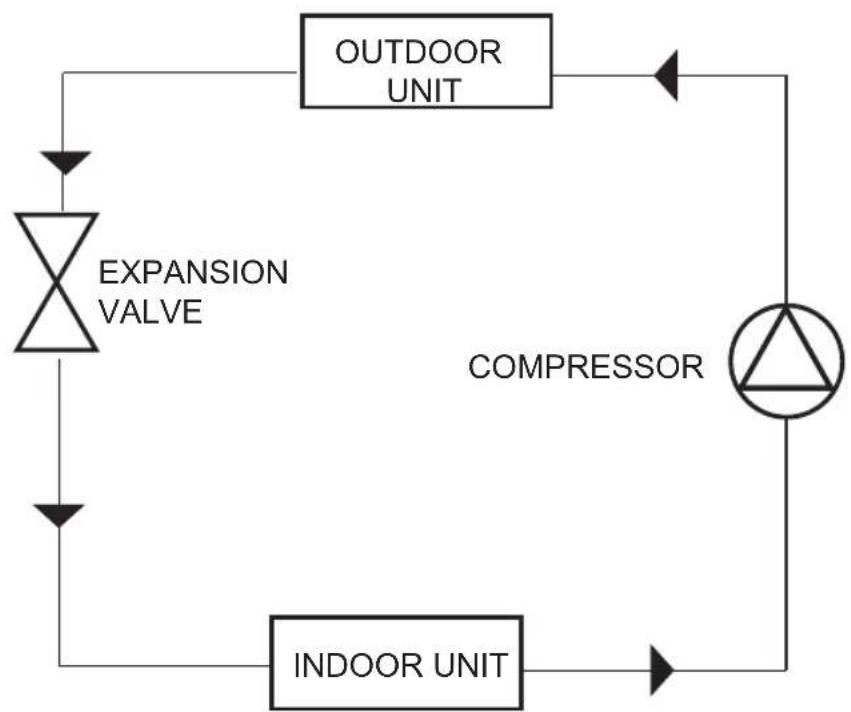
flowchart
graph TD
    A["EXPANSION VALVE"] --> B["INDOOR UNIT"]
    B --> C["OUTDOOR UNIT"]
    C --> D["COMPRESSOR"]
    D --> A
Heating Circuit

flowchart
graph TD
    A["EXPANSION VALVE"] --> B["INDOOR UNIT"]
    B --> C["OUTDOOR UNIT"]
    C --> D["COMPRESSOR"]
    D --> A
The distances stated in the chart below should be applied in the installation of indoor and outdoor units.

ENG
Power Connections of Indoor and Outdoor Units

flowchart
graph LR
    subgraph Indoor Unit
        A1["1"] --> B1["Line"]
        A2["2"] --> B2["Neutral"]
        A3["3"] --> B3["Earth"]
        A4["4"] --> B4["Signal"]
        A5["5"] --> B5["Signal"]
    end

    subgraph Outdoor Unit
        C1["Circle"] --> D1["L"] --> E1["Line"]
        C2["Circle"] --> D2["N"] --> E2["Line"]
        C3["Circle"] --> D3["S"] --> E3["Line"]
        C4["Circle"] --> D4["S"] --> E4["Line"]
        C5["Circle"] --> D5["S"] --> E5["Line"]
        E1 --> F["Power Supply"]
        E2 --> F
        E3 --> F
        E4 --> F
        E5 --> F
    end

    style Indoor Unit fill:#f9f,stroke:#333
    style Outdoor Unit fill:#bbf,stroke:#333
Batteries
- Do not expose the batteries directly to sunlight, fire, excessive heat and etc.
- Do not use used batteries together with new batteries. Replace the used batteries with the batteries whose shapes and types are the same as defined in the battery installation section. Do not use rechargeable batteries.
- Do not use the remote control if the batteries have leaked. Do not touch the liquid leaking from the batteries. In case of contact, wash out with water.
Liability Limitation
All of the technical information, instructions in this manual includes the latest information on your air conditioner, its operating and maintaining. The manufacturing firm shall not bear any responsibility for any possible damages and injuries due to non-compliance with the instructions in this operating manual, misuse of the appliance, unauthorised reparations, making unauthorised modifications on the appliance and use of spare parts unapproved by the manufacturing firm.
Make sure that the supply voltage at the installation site matches properly with the operation voltage range specified in the technical specifications of your air conditioner and that necessary measures are taken. The user is responsible for assuring the compliance of the electrical wiring at the site where the air conditioner will be installed.
Technical Values
- Nominal values are determined according to T1 climate conditions of TS EN 14511 standards. In case that indoor and outdoor temperatures are different from the temperature values on which the standard is based; cooling and heating capacities would change.
- Seasonal efficiency values are determined according to EN 14825 Standard.
- The values indicated in the product label or other documents related to the product, are obtained in the laboratory environment according to respective standards and they may change depending on the use of the product and indoor/outdoor environment conditions.
- Technical specifications and the manual are subject to change without prior notification.
Important Information About R32 Gas
This product contains fluorinated greenhouse gases. Refrigerant must not be released to the atmosphere.
Refrigerant: R32
GWP (Global Warming Potential: 675
Periodic checks may be required for gas leakage. Contact your dealer or authorised service for more information.
Note: CO2 equivalent (tCO 2 eq): Greenhouse gas emissions of the total refrigerant charge in the product is used to specify the maintenance intervals. Refer to the relevant regulations for detailed information.
Greenhouse gas emission value = GWP value × Total refrigerant amount1000
WARNING: Refrigerant used in product is flammable. Normally refrigerant leakage will not occur. Fire may arise or harmful gases may be released if the refrigerant comes into contact with the flame on heaters, cookers, etc. in the environment in case of a gas leakage.
Observe the following measures in case of a refrigerant leakage:
- Switch of all heaters, cookers and etc.
- Ventilate the room.
- Inform the dealer or authorised service from whom you have purchased the product.
- NEVER operate the product until the authorised service confirms that the problem related with the gas release is remedied.
ENG
| FN-AC1S09WH | |||
| Nominal Capacity | Cooling Btu/h | ||
| Heating Btu/h | |||
| Nominal Capacity | Cooling (kW) | ||
| Heating (kW) | |||
| Capacity Interval | Cooling Btu/h | ||
| Heating Btu/h | |||
| Input Power (Nominal) | Cooling W | ||
| Heating W | |||
| Operating Current (Nominal) | Cooling A | ||
| Heating A | |||
| Design Load | Cooling (kW) | ||
| Heating (kW) | |||
| Seasonal Energy Efficiency | (SEER) Cooling | ||
| (SCOP) Heating | |||
| Seasonal Energy Class | Cooling/Heating | ||
| Refrigerant | |||
| Power source | |||
| Outdoor Unit Measures | WxHxD mm | ||
| Indoor Unit Measures | WxHxD mm | ||
| Interconnection Pipes | Liquid line inch | ||
| Gas Line inch | |||
| Noise level | Indoor Unit dbA | ||
| Outdoor unit dbA | |||
| Outdoor Operating Temperature | Heating (Minimum) | ||
| Cooling (Maximum) | |||
| FN-AC1S12WH / FN-AC1S12GR | |||
| Nominal Capacity | Cooling Btu/h | ||
| Heating Btu/h | |||
| Nominal Capacity | Cooling (kW) | ||
| Heating (kW) | |||
| Capacity Interval | Cooling Btu/h | ||
| Heating Btu/h | |||
| Input Power (Nominal) | Cooling W | ||
| Heating W | |||
| Operating Current (Nominal) | Cooling A | ||
| Heating A | |||
| Design Load | Cooling (kW) | ||
| Heating (kW) | |||
| Seasonal Energy Efficiency | (SEER) Cooling | ||
| (SCOP) Heating | |||
| Seasonal Energy Class | Cooling/Heating | ||
| Refrigerant | |||
| Power source | |||
| Outdoor Unit Measures | WxHxD mm | ||
| Indoor Unit Measures | WxHxD mm | ||
| Interconnection Pipes | Liquid line inch | ||
| Gas Line inch | |||
| Noise level | Indoor Unit dbA | ||
| Outdoor unit dbA | |||
| Outdoor Operating Temperature | Heating (Minimum) | ||
| Cooling (Maximum) | |||

ENG
| FN-AC1S18WH | |||
| Nominal Capacity | Cooling Btu/h | ||
| Heating Btu/h | |||
| Nominal Capacity | Cooling (kW) | ||
| Heating (kW) | |||
| Capacity Interval | Cooling Btu/h | ||
| Heating Btu/h | |||
| Input Power (Nominal) | Cooling W | ||
| Heating W | |||
| Operating Current (Nominal) | Cooling A | ||
| Heating A | |||
| Design Load | Cooling (kW) | ||
| Heating (kW) | |||
| Seasonal Energy Efficiency | (SEER) Cooling | ||
| (SCOP) Heating | |||
| Seasonal Energy Class | Cooling/Heating | ||
| Refrigerant | |||
| Power source | |||
| Outdoor Unit Measures | WxHxD mm | ||
| Indoor Unit Measures | WxHxD mm | ||
| Interconnection Pipes | Liquid line inch | ||
| Gas Line inch | |||
| Noise level | Indoor Unit dbA | ||
| Outdoor unit dbA | |||
| Outdoor Operating Temperature | Heating (Minimum) | ||
| Cooling (Maximum) | |||
| FN-AC1S24WH | |||
| Nominal Capacity | Cooling Btu/h | ||
| Heating Btu/h | |||
| Nominal Capacity | Cooling (kW) | ||
| Heating (kW) | |||
| Capacity Interval | Cooling Btu/h | ||
| Heating Btu/h | |||
| Input Power (Nominal) | Cooling W | ||
| Heating W | |||
| Operating Current (Nominal) | Cooling A | ||
| Heating A | |||
| Design Load | Cooling (kW) | ||
| Heating (kW) | |||
| Seasonal Energy Efficiency | (SEER) Cooling | ||
| (SCOP) Heating | |||
| Seasonal Energy Class | Cooling/Heating | ||
| Refrigerant | |||
| Power source | |||
| Outdoor Unit Measures | WxHxD mm | ||
| Indoor Unit Measures | WxHxD mm | ||
| Interconnection Pipes | Liquid line inch | ||
| Gas Line inch | |||
| Noise level | Indoor Unit dbA | ||
| Outdoor unit dbA | |||
| Outdoor Operating Temperature | Heating (Minimum) | ||
| Cooling (Maximum) | |||


General View
Indoor Unit

- Air inlet
- Display
- Air outlet
- Front casing
- Horizontal louver
Indoor Unit Display

Outdoor Unit
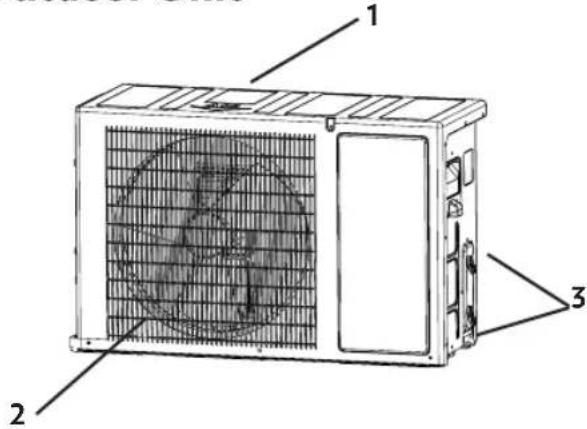
- Air inlet
- Air outlet
- Refrigeration installation connection points.
Installing and Replacing Remote Control Batteries
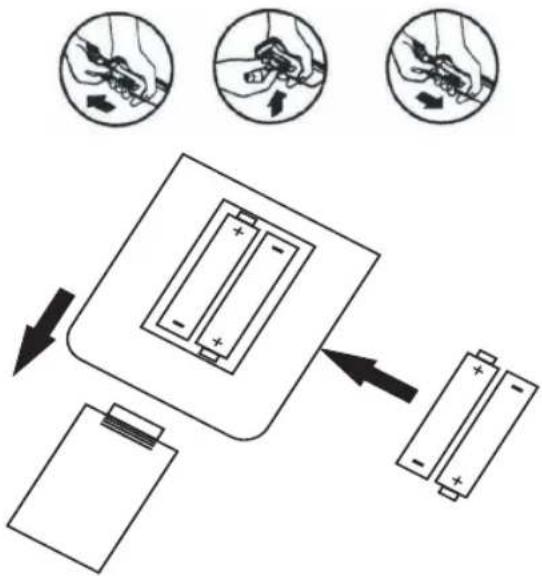
If there is a communication error with your air conditioner or if symbols do not appear on the display when you press the buttons on the remote control, you may need to replace the batteries. Use two AAA type, 1.5 V alkaline batteries, do not use rechargeable batteries. Open the battery compartment lid by sliding it in the direction of the arrow. Place the two AAA 1.5 battery in their slots while paying attention to match the (+) and (-) polarity markings correctly, then close again the lid. (+) and (-) polarity markings of the batteries are shown in the battery compartment of the remote control.
Points to Take into Consideration While Using the Remote Control
In order to use your air conditioner effectively and efficiently by means of your remote, keep the following points in mind:
- Point the remote control towards the signal receiver on the air conditioner.
The remote should at most be 6 meters away from the air conditioner.
• There should not be any obstacle between the remote and the receiver.
- Do not drop or throw the remote control.
- If you do not hear a signal (beeping) sound when you press the remote buttons, the signal is not received. In order to make your air conditioner communicate better with the remote control, position yourself in a closer and straighter way. Make sure to not to turn the signal sound off. See (Signal sound cancellation)
- Do not put the remote under sunlight or next to any heat source.
Operating Your Air Conditioner without Remote Control
If your remote gets lost or become unus- able, you can operate your air conditioner directly from the indoor unit.
Push the front casing of the indoor unit from right and left-hand sides and lift up. Turn on the air conditioner by pressing the button on the right-hand side. When you press the button, the operation display lights up and the air conditioner starts running in the most appropriate mode for room temperature. To turn off the air conditioner press the on/off button again. When you turn it on with the on/off button, the air conditioner starts to operate in the automatic mode.
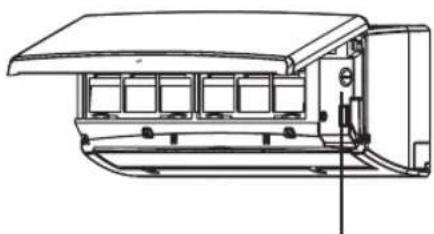
natural_image
Technical line drawing of a mechanical or electrical component with no visible text or symbolsOn/off button
Displays & Buttons
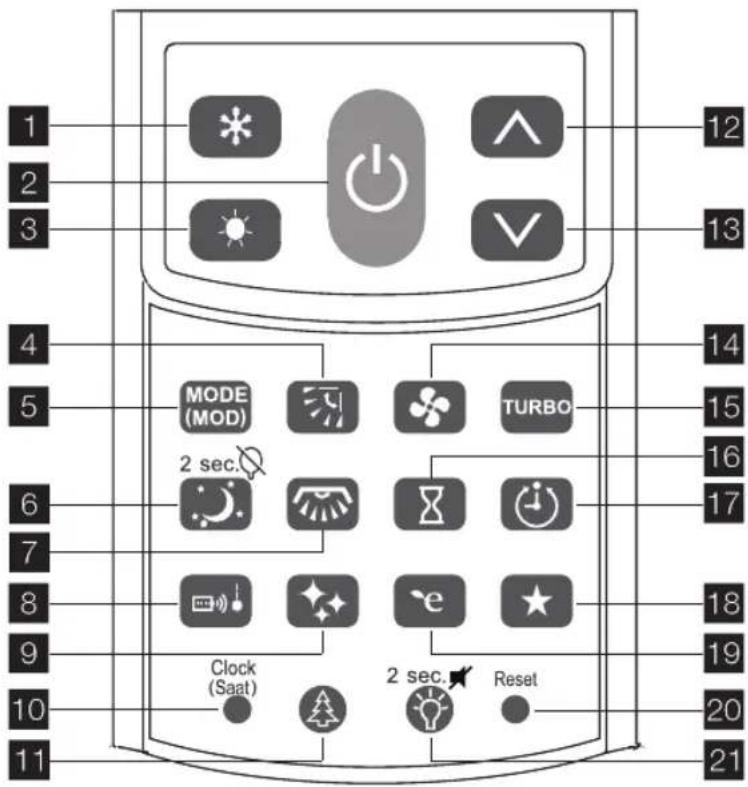
1 Cooling button
2 On-off button
3 Heating button
4 Horizontal louver setting button
5 Mode selection button
6 Sleep mode/Light off button
7 Vertical louver setting button (*)
8 I feel button
9 Self clean button
10 Clock setting button
11 lonizer button(*)
12 Increase temperature button
13 Decrease temperature button
14 Fan speed adjustment button
15 Turbo mode button
16 n/off time setting button
17 Automatic shut down setting button
18 Favorite mode button
19 Energy efficiency (ECO) mode button
20 Factory defaults button
21 Remote back light/Signal sound button
Cooling Button (\*)
On cooling mode, you may adjust the environment temperature between 18-30°C according to your comfort need.
On/Off Button (∅)
Press the button to switch on the unit. Press the button again to switch off the unit.
Heating Button ( )
On heating mode, you may adjust the environment temperature between 16-30°C according to your comfort need.
Horizontal Louver Setting Button (图)
You can adjust the direction of the air blown out by the indoor unit of your air conditioner vertically by pressing the horizontal louver button.
Mode Selection Button (MODE MOD)
By this function, your air conditioner determines its operating mode according to the environment conditions. Depending on the temperature, it makes heating, cooling or dehumidification.
Vertical Louver Setting Button
The function is available in selected models.
Sleep Mode / Light Off Button (☐)
This function prevents the over heating or cooling of the room during sleep. Your air conditioner operates with the most appropriate comfort for your sleep with a minimum sound volume. You can also turn on and off the indoor unit display light with this button.
I Feel Button ( )
The air conditioner aims at the set temperature, based on the sensor in the remote controller. It means that the air conditioner will be decreasing the air temperature until it reaches the defined level at the point where the remote controller is located. Afterwards, the device will maintain the temperature until it's set to off.
Self Cleaning Button ( )
The function starts to operate once the air conditioner has been set off. It prevents the humidity related undesired malodorous by making the indoor unit heat exchanger dry.
Clock Setting Button (Clock Set)
You can set clock of your remote control by this button.
Increase Temperature Button
Press the button to increase the temperature.
Decrease Temperature Button (Y)
Press the button to decrease the temperature.
Turbo Mode Button (MODE(MOD))
You can achieve the most rapid cooling or heating possible for 30 minutes by the turbo function.
Fan Speed Adjustment Button ( )
You may adjust the air flow speed by pressing the fan button on the remote control. There are 6 different speed level for the fan speed.
On/Off Timer Setting Button (☐)
You can program your air conditioner to be turned on or/and off at the time you set in advance.
Automatic Shut Down Setting Button (☒)
By this function, a countdown that you determined will start and your air conditioner will turn off automatically when the countdown is terminated.
Favorite Mode Button()
It makes you determine the most comfortable operating mode that you are familiar with, and use it with one touch any time you wish.
Energy Efficiency Mode Button ()
This function decrease the energy consumption on cooling and heating modes. The temperature values that are adjustable with the remote control, are limited by the most appropriate interval for the comfortable environment conditions.
Factory Defaults Button
This button restores default settings of your air conditioner.
Remote Back Light / Signal Sound Button (①)
By this button, you can turn on and off the signal (beeping) sound coming from your air conditioner when you press the remote control buttons. You can also turn on and off the remote control display light with this button.
Displays & Indicators

1 On-off timer setting indicator
2 Hour indicator
3 Automode temperature setting indicator
4 Temperature indicator
5 Silent/Ultra silent mode display
6 Turbo & Fan speed indicator
7 Signal (beep) sound cancel display
8 lonizer display (*)
9 I feel display
10 Sleep mode display
11 Low battery indicator
12 Cooling mode display
13 Energy efficiency display
14 Eating mode display
15 Fan mode display
16 Dehumidification mode display
17 Horizontal louver display
18 Automatic mode display
19 Self clean mode display
20 Unit light display
21 Favorite mode display
22 Remote back light display
ENG
On-Off Timer Setting Indicators
(12:00)▶ 18:00
Displays on and off times you preset.
Hour Indicator (10):18
Displays clock of your remote control.
Automode Temperature Setting Indicator ( )
Displays temperature changes when you increasing or decreasing temperature.
Silent/Ultra Silent Mode Display (✗)
Appears when you select the lowest speed for fan.
Turbo & Fan Speed Indicator
Displays fan speed level.
Signal Sound Cancel Display (✗)
Displays situation of indoor unit's sound.
Ionizer Display (\*)
Displays when the lonizer function is enabled.
I Feel Display ( )
The air conditioner aims at the set temperature, based on the sensor in the remote controller. It means that the air conditioner will be decreasing the air temperature until it reaches the defined level at the point where the remote controller is located. Afterwards, the device will maintain the temperature until it's set to off.
Sleep Mode Display (.)
Displays when the sleep mode is enabled.
Low Battery Indicator
Appears when your remote controller batteries weak.
Cooling Mode Display (※)
Displays when the cooling mode is enabled.
Energy Efficiency Mode Display (e)
Displays when the energy efficiency (ECO)mode is enabled.
Heating Mode Display (
Displays when the heating mode is enabled.
Fan Mode Display (♣)
Displays when FAN mode is enabled.
Dehumidification Mode Display
Displays when DRY function is enabled.
Horizontal Louver Display (F)
Displays when horizontal swing function is enabled.
Automatic Mode Display (△)
Displays when the Automatic Mode is enabled.
Self Clening Mode Display (♦)
Displays when Self Cleaning mode is enabled.
Unit Light Display (
Displays status of indoor unit's display light.
Favorite Mode Display (★)
Displays when the Favorite Mode is enabled.
Remote Back Light Display (💡)
Displays status of indoor unit's display light.
First use
• Temperature indicator blinks for 3 minutes in case of;
- The unit is plugged in and energized first time.
- After power cut.
- Ensure the unit is plugged in and power is available.
- Be sure the batteries are inserted correctly in the remote control.
- Point the remote control to the indoor unit and press ON/OFF button to turn the unit on.
- When changing the remote control batteries the microprocessor will return back to the AUTO mode.
- The default operating mode is AUTO. Once you select the operating mode with remote control, the operating conditions will be saved in the indoor unit's microcomputer memory. The next time the air conditioner will start operating under the same conditions when you simply push the ON/OFF button of the remote control.
Operating
WARNING: functions with (\*) sign may not be present on the product you purchased.
Ensure the unit is plugged in and power is available.
Getting started and rapid use
Fist of all, turn on the fuse of your air conditioner if it is off. After your air conditioner is installed and made ready for using by the authorised service, you can turn it on by pushing the button on the remote. The most used functions such as cooling-heating temperature change are placed right below the displays for rapid and easy access. You may turn on and off your air conditioner from these buttons, give it commands by changing its mode of operation or by increasing or decreasing the temperature.
- You can turn on or off your air conditioner by pressing the button.
- By pressing the button, you may shift your air conditioner to cooling mode, and set the temperature you want by and buttons.
- By pressing the button, you may shift your air conditioner to heating mode, and set the temperature you want by and buttons.
- When your remote control is off, without pressing the ⏻ button, you may operate your air conditioner in these modes by directly pressing the ✪ or ⏻ buttons.
Operating Temperature Range
Operating temperature intervals in which you can use your air conditioner;
Outdoor (Outdoor unit)
| Cooling Heating | |
| +10 / +46 °C -15 | / +24 °C |
Indoor (Indoor Unit)
| Cooling Heating | |
| +18 / +30 °C +16 / +30 °C | |
- If the outdoor temperature is high, your air conditioner may not operate in full capacity on cooling mode.
- If the outdoor temperature is low,
ENG
your air conditioner may not operate in full capacity on heating mode.
- If the indoor environment is sticky, the internal air outlet may humidify.
- If the air conditioner is operated in high humidity rates for a long time, the water may condense and drop on the surface of indoor unit.
Cooling Function
- If you want your air conditioner to cool the environment down,
- To turn your air conditioner on, press the button.
- Your air conditioner will start running again at the mode you selected last.
- Press the MODE button until the symbol at the display screen of your remote is activated. You can also switch to the cooling mode by pressing the button on your remote.
• After selecting the cooling mode, by the and buttons, you may adjust the environment temperature between 18-30 °C according to your comfort need. - Every time you press the buttons, temperature increases or decreases 1 °C. The lowest temperature at the cooling mode is 18 °C.
- In the cooling mode, you can adjust the fan speed with the ♣ button, and the direction of air flow with the 📋 button.
- You may change the mode at any time you want.
Heating Function
- If you want your air conditioner to heat the environment up,
• To turn your air conditioner on, press
the ⏻ button.
- Your air conditioner will start running again at the mode you selected last.
- Press the 📄 button until the symbol at the display screen of your remote is activated. You can also switch to the heating mode by pressing the 📄 button on your remote.
- After selecting the heating mode, by the and buttons, you may adjust the environment temperature between 16–30°C according to your comfort need.
- Every time you press the buttons, temperature increases or decreases 1°C. The highest temperature at the cooling mode is 30°C.
- In the heating mode, you can adjust the fan speed with the ♣ button, and the direction of air flow with the □ button.
- You may change the mode at any time you want.
Energy Efficiency (ECO) Function
- When the ECO function is enabled by the 📋 button, the energy consumption decreases up to 30% on cooling and heating modes depending on the model. When the ECO function is enabled, the temperature adjustment range of your remote control will be automatically between 23-28 °C on the cooling mode, and between 20-24 °C on the heating mode.
- There will be no temperature adjustment lower than 23 °C for the cooling mode and higher than 24 °C for the heating mode. When you
press the button, the icon will be displayed on the remote control display.
• After the ECO mode is enabled, if any mode switch is made, the ECO function will be disabled. It should be adjusted again when necessary.
- The ECO function can be adjusted for the cooling and heating modes. To cancel the function, press the button again.
- You may operate the sleep function when the ECO function is enabled. In this case, due to the ECO function, there will be some limitations in the adjustable temperature range.
- When both the sleep mode and the ECO function are active, you may cancel the Sleep mode or the ECO function any time you wish.
WARNING: When the ECO function is active, the air conditioner's capacity may decrease.
Dehumidification Function
- For the dehumidificaiton mode, press the MODE (MOD) button until you see the icon on the remote control display. In order to increase the air quality, you may make the high level of humidity away from the environment without significantly decreasing the temperature.
- During the dehumidification operation;
• The temperature can be changed optionally.
• The fan rotates in the lowest speed and cannot be changed. - When the dehumidification function
is active, the Turbo function does not operate.
- The horizontal louver stands in the default position.
Fan Function
When the air conditioner is in the fan mode, it circulates the air in the room without changing the room temperature.
- Turn your air conditioner on by the button.
- Press the button until the symbol appears on the control screen.
- The letters FWill light up in sequence on your air conditioner's display for 2 seconds and then the symbol will light up in sequence from top to bottom
WARNING: When the fan function is active, your air conditioner's compressor does not operate.
WARNING: The letters F will appear on the display every 5 minutes as a reminder of the fan mode.
WARNING: Whenever the fan speed is changed in fan mode, the letters FAN will alternately light up on the indoor unit display for 2 seconds.
Adjustable speed levels:
| Very low | |
| Low | |
| Medium | |
| Medium-High | |
| High |
ENG
| (respectively blinking) | Automatic |
WARNING: In the fan mode, the automatic fan speed cannot be chosen. When the fan function is active, your air conditioner's compressor does not operate.
Turbo Function
You can use the turbo mode by the button in order to achieve the temperature you like from your air conditioner at the shortest time possible. Your air conditioner will return to the last selected mode after it runs at the highest speed for 30 minutes. In order to stop the turbo mode before the time is run out, press the button again.
Automatic Mode
For the automatic mode, press the MODE (MOD) button until you see the icon on the remote control display. Your air conditioner will determine its operating mode automatically according to the environment temperature. Depending on the temperature, it makes heating, cooling or dehumidification. On this mode, the air conditioner operates with the target of 24±2 °C adjustment range. The highest and lowest temperature values that determine the operating mode of the automatic mode, are 20 and 27°C.
- If the environment temperature is below 20irc C , the air conditioner starts heating.
- If the environment temperature is between 20irc C and 27irc C , the air conditioner starts dehumidification.
- If the environment temperature is above 27irc C , the air conditioner starts cooling.
- During heating and cooling, the fan operates automatically. At the same time, the turbo mod can also be operated but the fan speed cannot be changed.
- When the automatic mode is enabled, the 24ircC temperature value is shown on the indoor unit display.
- On this mode, you may increase or decrease on cooling and heating modes the target temperature value for 1°C. You may change the temperature value by the ▲ and ▼ buttons and monitor the increase and decrease of the temperature values via the ◆ icons on the temperature display of your remote control.
- When the default temperature is 24irc C , the icon is active.
- When you increase the temperature one degree; respectively ▲ (25°C) and ▲ (26°C) upward arrow icons, when you decrease respectively ▼ (23°C) and ▼ (22°C) downward arrow icons display the temperature.
Horizontal Louver Function
You can adjust the direction of the air blown out by the indoor unit of your air conditioner vertically by pressing the button. Every time you press the button, the position of the louver changes. The horizontal louver may be adjusted in 5 different positions. If you continue to press the button, horizontal louver start to move up and down automatically. If you press the button one more time, the movement will stop.
WARNING: Never touch the horizontal louver by hand.
Sleep Mode
When the sleep mode is enabled by the button, your air conditioner operates with the most appropriate comfort for your sleep with a minimum sound volume. This function prevents the over heating or cooling of the room during sleep. On the sleep mode, the indoor and outdoor unit volume is decreased. While the indoor user's comfort is ensured, it also prevents any inconvenience made to neighbours resulting from the noise.
When you select the sleep mode, if you are currently running in the cooling mode, your air conditioner will increase the temperature 1irc C by the end of the first hour and 1irc C more by the end of the second hour. Sleep mode will end after the air conditioner runs 6 more hours at this temperature.
When you select the sleep mode, if you are currently running in the heating mode, your air conditioner will decrease the temperature 2irc C by the end of the first hour and 2irc C more by the end of the second hour. Sleep mode will end after the air conditioner runs 6 more hours at this temperature.
When the sleep mode is completed, the air conditioner will turn off completely.
After selecting the sleep mode, the display of the air condition will turn off in approximately 3 minutes.
You can operate the sleep mode and the automatic closing mode together. After switching your air conditioner to the sleep mode, you can make the automatic closing adjustment.
After selecting the sleep mode, you can enable the ECO function. In this case, due to the ECO function, there will be some limitations in the adjustable temperature interval.
When both the sleep mode and the ECO function are active, you may cancel the Sleep mode or the ECO function any time you wish.
WARNING: When you select the lowest fan sleep on the sleep mode, the 🌐 icon will be displayed on your remote control. See Indoor Unit Fan Speed Adjustment
WARNING: When the Sleep mode is active, the air conditioner's capacity may decrease
On/Off Timer Setting Function
You can separately set times in advance for your air conditioner to turn on and off at the times you wish. Your air conditioner will start running at the time you wish with the mode you set in your last use, and then turns off at the time you wish. In order to set automatic power on time, press the button while your air conditioner is off. To set the starting time you want, use the and buttons at the centre of your remote.
When the desired time value is displayed on the remote control display, the adjustments are saved automatically in 3 seconds. If you press the ⏻ button once again or turn on the air conditioner before the time set, these settings will be cancelled
ENG
12:00 ⬆ 18:00 ⬆
09:30
In order to set the automatic power off time, press the 📄 button while your air conditioner is on. To set the closing time you want, use the ▲ and ▼ buttons at the centre of your remote. When the desired time value is displayed on the remote control display, the adjustments are saved automatically in 3 seconds. If you press the 📄 button once again or turn off the air conditioner before the time set, these settings will be cancelled.
12:00 18:00
17:00
For auto power on and off feature to work properly, the clock in the remote should be adjusted correctly.
The durations you can set for power on or off will increase and decrease 10 minutes at a time. Press the Button when the desired opening and closing time is shown on the display. The time you set will be saved. The Opening/Closing time cannot be adjusted in the same way
Automatic Shut Down Function
The Button turns your air conditioner off automatically by the end of a time you set in advance. You can select among 5 different durations for auto power off. Every time you press the button, next duration is selected. When the counter on the remote display screen reaches to 00.00, the air conditioner shuts down. Durations you can select for auto power
off are 30 minutes, 1 hour, 2 hours, 3 hours and 5 hours.
Favorite Function
The function ensures that the settings of the desired operating conditions remain stored in the remote control memory. The favorite function can store the desired temperature, fan speed and horizontal louver position separately for both cooling and heating modes. After determining the settings that you prefer, you may save them pressing the button for 3 seconds. When the favorite function is enabled, the ★ icon is displayed on the remote control display. When you restart your air conditioner by the remote control, the saved settings will be in use and you won't need to adjust them again.
After making the favorite adjustment you may change the temperature, fan speed or horizontal louver position if you want. Any time you want, you may put your saved favorite settings into use again by the button.
The favorite usage is same for cooling and heating modes.
The operating of the favorite function with other modes and functions;
- When the favorite function is enabled, if either ECO or Sleep function is operated, the Favorite Function becomes disabled.
-
When ECO and Sleep functions are enabled, you may save the setting that you prefer, as your favorite settings.
-
When the Sleep function is active, the favorite function does not operate. The new settings can be saved by only pressing the button for a long time.
- When the Sleep and Favorite function operate together, the Favorite Function becomes cancelled by the cancellation of the Sleep mode.
- When the closing function is terminated or cancelled, the Favorite Function will be terminated too.
- In case that the customer changes the time in the Closing function; the Favorite function remains in use..
Self Cleanning Function
button allows your air conditioner to clean up the exchanger and dry the water accumulated on the indoor unit exchanger due to condensation of air when you turn off your air conditioner in cooling and dehumidification modes. This function starts as you turn off your air conditioner and the fan works for 15 minutes. The drying function does not run in the heating mode. SC letters will be appeared on the display
WARNING: When the function is active, do not try to turn the louver on the air outlet, it will be turned off automatically.
I Feel Function
The air conditioner aims at the set temperature, based on the sensor in the remote controller. It means that the air conditioner will be decreasing the air temperature until it reaches the defined level at the point where the remote controller is located. Afterwards, the device will maintain the temperature until it's set to off. In the sense mode, the remote control and the air conditioner communicate every 4 minutes. If the communication is interrupted for 10 minutes, the environment sensor on the air conditioner enables. When the communication is provided again, the sensor on the remote control will be enabled and the function will continue to operate until you cancel it.
Reset Function
By pressing the ● button, you can cancel all personal settings in your remote and operate your air conditioner with default settings.
Display Light Button
You can turn off the light of the indoor unit with 📄(*) button if it makes you uncomfortable. Display light will be turned on when you turn on the air conditioner again. Display will be turned on automatically when you press any button on the remote and it will be turned off in a short time.
(* The second function of button acivate by pressing two seconds with 📄 button.
Signal Sound Cancellation Function
You can mute the beep sound that the signal received by the air conditioner with 📄 button two seconds. If you want to hear the beep sound press 📄 button two seconds again.
Wifi Function
ENG
The Wi-Fi function connects your air conditioner to the local network and enable your air conditioner to communicate with other devices in the network.
You can use your air conditioner with the Veezy mobile application that you will install on your mobile device (telephone, tablet etc.) without a remote control.
Wifi Configuration Steps
Enable Wi-Fi module and then set your device to configuration mode by following the instructions below:
- Switch your Air Conditioner to Cooling Mode.
- Press Turbo button.
- Then press I Feel button on the remote control for 3 times.
When your Air Conditioner is set to configuration mode, CF message will be displayed as below.
EC
Veezy is compatible with IOS and Android systems. You can easily access the application via the internet.
WARNINGS:
- If installation can not be completed, your phone's mobile data turn it off and try again.
- Make sure your phone and your product are connected to the same network.
- If the installation cannot be completed, make sure your the internet modem protocol setting is WPA-2 or WPA-3.
- If the installation can not be completed, make sure your the internet
speed is 2.4 GHZ. (The Wi-Fi feature can not be established on a 5 GHZ internet speed.)
Practical and Useful Information
Do not cool down your room excessively. This not only expend excess energy, but it is also bad for your health.
- Avoid direct sunlight inside while your air conditioner is running. If there is a sunblind or curtain, keep them shut.
- Adjusting the direction of vertical and horizontal louver, ensure temperature and air flow to distribute evenly in the room.
- At large places usually with open doors such as cafeterias, patisseries, restaurants etc., using air curtains will reduce energy consumption, allow you to use your air conditioner more efficiently and to achieve the desired temperature much more rapidly.
- Clean the filters regularly. Dirty filters will gradually decrease the efficiency of heating, cooling, air flow and dehumidification functions and increase energy consumption.
- In order to maintain cool air in the room, keep the doors and windows shut as long as possible. If you will not use your air conditioner for a long time, run it in the fan mode for 2-3 hours. This will remove the moisture in your air conditioner. Then shut down your air conditioner from the fuse and remove the batteries in the remote control.
• The outdoor unit of the air condi-
tioner absorbs and conducts the exterior heat inside. If the exterior temperature decrease, your air conditioner will start heating less. In that case, if the temperature achieved by your air conditioner is not enough, use a supplementary heater.
- Your air conditioner circulates hot air to heat up your room. Therefore, it takes time for your air conditioner to heat up the entire room. If possible, program the air conditioner to start running shortly before you use the room.
- While the air conditioner operates in the heating mode, if the outdoor environment temperature is low and the humidity rate is high, it may lead to an icing on the outdoor unit, resulting from the decrease in the heating efficiency. In that case, the air conditioner will stop operating and the defrosting operation will be enabled automatically. This is not a fault. Defrosting operation will be completed in 5 to 9 minutes depending on the outdoor environment and outdoor unit exchanger temperatures and then, your air conditioner will restart automatically to operate in the heating mode. The defrosting operation continues even if the air conditioner is turned off, and the air conditioner turns off after the operation is done. While the defrosting operation continues, it is shown by the DF icon on the display of your air conditioner.
- If you selected the heating mode when both interior and exterior temperatures are high, outdoor unit may stop working occasionally. This is completely normal. Do nothing and
wait for your air conditioner to start running again.
- If excess voltage drops or increases occur while your air conditioner is running, the air conditioner will stop automatically and start running again as the voltage returns to normal level.
- Your air conditioner always starts to operate with the latest mode and temperature settings.
- If you will not use for a long time, you may cover the outdoor unit of your air conditioner to protect from weather conditions.
Cleaning and Maintenance
CAUTION: Depending on frequency of use and ambient conditions, full maintenance of indoor and outdoor units must be done by authorised services at least once a year.
WARNING: Make sure to turn off your air conditioner and cut the incoming power from the fuse before starting to clean.

natural_image
Technical line drawing of a mechanical device with internal components (no text or symbols)Filters
- In order to have your air conditioner operate efficiently and cleanly, you should clean the filters at certain intervals depending on the frequency of use and ambient conditions. The dust filters should be cleaned ap-
ENG
proximately once a month. The other filters should be replaced at least once a year or when they are extremely dirty/cannot be cleaned.
- Filters may vary according to the model.
- Filters are available at authorised services as spare parts.
• Full maintenance and filters are not free of charge and the price should be paid by the user.
WARNING: You may clean the filters of your air conditioner without calling the authorised service.
- In order to clean the dust filters, remove the front cover by holding on its sides.
- Lift the dust filters up from their bottom edges and pull downwards.
- Vacuum the dust filters with a vacuum cleaner. If the filters are too dirty, wash them with warm water and mild detergent. Make sure to dry the filters before re-install them. Do not dry with fire or under direct sunlight. Do not wash the filters with water hotter than 40°C.
• After you clean up the filters, place the upper part of the filter and press from the bottom part until it snaps into its slot. - Wipe the front panel with a damp cloth. Do not use inflammable chemicals such as gasoline, thinner etc absolutely.
• Annual maintenance to be done by the authorised service will allow you to use your air conditioner for a long time and more efficiently.
CAUTION: Do not wash the filters except the dust filter.
CAUTION: Do operate your air conditioner without filter. If your filters are unusable, buy new ones from the authorised service.
Suggestions for Operation
- High interior and exterior temperature; if both indoor and outdoor temperatures are high and your air conditioner is running at the heating mode, outdoor unit fan and the compressor may stop for a while. This is completely normal. Wait until your air conditioner starts running again.
- If excess voltage drops or increases occur while your air conditioner is running, the appliance will stop (you may see the voltage protection icon on the display by the code of HL) and start running again as the voltage returns to normal level.
- When the power is back after a power failure, your air conditioner will automatically start running again.
Troubleshooting
When you notice an abnormal situation in your air conditioner, you may attempt to troubleshoot according to the following instructions. If your air conditioner still do not work properly, contact with the Call Centre or the nearest Authorised Service. You may access the authorised services list and contact information from the web site.
| PROBLEM REASON SOLUTION | ||
| The air conditioner is not running. | Power cut. | Wait for the power to be back. |
| On/off button is not turned on. | Turn on the air conditioner. | |
| The fuse is broken. Have the fuse changed. | ||
| Batteries of the remote have gone down. | Change the batteries. | |
| The time set to start running has not been reached. | Wait or cancel the setting. | |
| The remote control is not detecting. | Change the batteries. | |
| Light source is too close to the air conditioner. | Some light sources that are close to the air conditioner, may prevent its functioning creating a magnetic influence. Retry to use the remote control after disabling the light source. If the problem is solved, it would be useful to change the light source. | |
| The air conditioner is blowing air, but cooling and heating performance is bad. | There is a mistake in temperature setting. | Set appropriate temperature. See application methods. |
| Air filter is clogged with dust. | Clean up dust filters. | |
| Air inlet or outlet of the air conditioner is blocked. | Clean the materials that cause blocking. | |
| Door and windows are open. | Close the windows and the doors. | |
ENG
| PROBLEM REASON SOLUTION | ||
| Air flow does not start immediately during heating. | The necessary temperature for heating has not been reached. | If air flow starts before the temperature rises, an undesired cooling effect will occur. In order to prevent this, air flow will start after necessary temperature is reached. This is not due to a malfunction of the air conditioner and it is not a failure. |
| The air conditioner is blowing air, but it does not cool. | Air inlet or outlet of the air conditioner is blocked. | Clean the materials that cause blocking and restart the air conditioner. |
| Compressor protection (3 min). | Wait. | |
| There is a mistake in temperature setting. | Set appropriate temperature. | |
| There is clicking sound coming from the air conditioner. | Temperature change. | Changes in temperature cause expansion and contraction of plastic materials. This is not due to a malfunction of the air conditioner and it is not a failure. |
Error and Protection Messages
In order to show the failures of your air conditioner or to protect it from the potential failures, customised error codes are shown on the front display of the air conditioner. Error codes are displayed, first blinking several times in a particular way for every code and then, remain stable for 35-40 seconds. Error codes continue to be displayed until the problem is fixed. Apply the following operations according to the displayed message.
Error Messages
Error Messages are displayed, respectively by first the Er icon and then the special code (01, 02, ..., 20, etc.) of the failure. In that case, do nothing to the air conditioner and contact with the Authorised Service. Er 11 and Er 13 are not error messages. If you see these messages, apply the steps under the following protection messages section.
Protection Messages
| dF | The icing on the outdoor unit is being defrosted. After the defrosting operation is accomplished, your air conditioner will continue to operate in the heating mode, the product should not be turned off while this mode is enabled. |
| AE | Make the arc control for your electrical wiring, if the problem is not fixed call for the service. If the problem comes out very frequently, contact with the authorised service. |
| Sr | In case of certain failures, in order to not to spoil you comfort, your air conditioner continues to operate despite the failure. In that case, you don't need to turn your air conditioner off. It is needed to contact with the authorized service immediately |
| HL | There is a fluctuation in the electrical voltage, wait for its recovery. |
| Erll & ER13 | The codes of ER-13 and ER-11, and the messages displayed on the indoor unit display, are protection messages in the aim of preventing the product from some harmful consequences resulting from an excessive current coming from the compressor. The product turns off right after it enters into these protections. In the case that it is re-operated by the remote control, cooling and heating functions restart. |
Product Information Sheets
FN-AC1S09WH
| Function | |||
| Cooling Y | |||
| Heating Y | |||
| Heating season | |||
| Average Y | |||
| Hotter N | |||
| Colder N | |||
| Capacity control | |||
| Constant N | |||
| Incremental N | |||
| Variable Y | |||
| unit | |||
| Cooling Mode | |||
| Design Load (Pdesignc) kW | |||
| SEER (Seasonal energy efficiency rate) - | |||
| Energy Efficiency Class - | |||
| Yearly Power Consumption kWh/year | |||
| Heating mode: Average climate (Tdesignh = -15°C) | |||
| Design Load (Pdesignh) kW | |||
| SCOP (Seasonal energy efficiency rate) | - | ||
| Energy Efficiency Class - | |||
| Additional heating power (at -15°C outdoor temperature) | kW | ||
| Declared capacity (at -15°C outdoor temperature) | |||
| Yearly Power Consumption kWh/year | |||
| Other details | |||
| Noise level (indoor unit/outdoor unit) | LWA | dB(A) | |
| Refrigerant | - | ||
| Global warming potential | GWP | kgCO2 eq. | |
| Compliant standard | EN14511:2018 | ||
| Calculation methods - Measurement standards | EN 14825 | ||
| * Leakage of refrigerant causes climate change. When refrigerants with low GWP are released to the atmosphere, they lead to lower level of global warming while the leakage of refrigerants with high GWP are released to the atmosphere, they lead to higher global warming. This appliance uses R410A refrigerant with a global warming potential (GWP) of 2088. This indicates that 1 kg of R410A gas released to the atmosphere has 2088 times more contribution to global warming in a period of 100 years with respect to 1 kg of carbon dioxide. Do not interfere to the cooling circuit of your device by no means and call our authorised services.* Yearly power consumption is specified according to standard test conditions. Actual consumption depends on the usage and the place of use of the appliance. | |||
| Function | |||
| Cooling Y | |||
| Heating Y | |||
| Heating season | |||
| Average Y | |||
| Hotter N | |||
| Colder N | |||
| Capacity control | |||
| Constant N | |||
| Incremental N | |||
| Variable Y | |||
| unit | |||
| Cooling Mode | |||
| Design Load (Pdesignc) kW | |||
| SEER (Seasonal energy efficiency rate) - | |||
| Energy Efficiency Class - | |||
| Yearly Power Consumption kWh/year | |||
| Heating mode: Average climate (Tdesignh = -15°C) | |||
| Design Load (Pdesignh) kW | |||
| SCOP (Seasonal energy efficiency rate) | - | ||
| Energy Efficiency Class - | |||
| Additional heating power (at -15°C outdoor temperature) | kW | ||
| Declared capacity (at -15°C outdoor temperature) | |||
| Yearly Power Consumption kWh/year | |||
| Other details | |||
| Noise level (indoor unit/outdoor unit) | LWA | dB(A) | |
| Refrigerant | - | ||
| Global warming potential | GWP | kgCO2 eq. | |
| Compliant standard | EN14511:2018 | ||
| Calculation methods - Measurement standards | EN 14825 | ||
| * Leakage of refrigerant causes climate change. When refrigerants with low GWP are released to the atmosphere, they lead to lower level of global warming while the leakage of refrigerants with high GWP are released to the atmosphere, they lead to higher global warming. This appliance uses R410A refrigerant with a global warming potential (GWP) of 2088. This indicates that 1 kg of R410A gas released to the atmosphere has 2088 times more contribution to global warming in a period of 100 years with respect to 1 kg of carbon dioxide. Do not interfere to the cooling circuit of your device by no means and call our authorised services.* Yearly power consumption is specified according to standard test conditions. Actual consumption depends on the usage and the place of use of the appliance. | |||

FN-AC1S18WH
| Function | |||
| Cooling Y | |||
| Heating Y | |||
| Heating season | |||
| Average Y | |||
| Hotter N | |||
| Colder N | |||
| Capacity control | |||
| Constant N | |||
| Incremental N | |||
| Variable Y | |||
| unit | |||
| Cooling Mode | |||
| Design Load (Pdesignc) kW | |||
| SEER (Seasonal energy efficiency rate) - | |||
| Energy Efficiency Class - | |||
| Yearly Power Consumption kWh/year | |||
| Heating mode: Average climate (Tdesignh = -15°C) | |||
| Design Load (Pdesignh) kW | |||
| SCOP (Seasonal energy efficiency rate) | - | ||
| Energy Efficiency Class - | |||
| Additional heating power (at -15°C outdoor temperature) | kW | ||
| Declared capacity (at -15°C outdoor temperature) | |||
| Yearly Power Consumption kWh/year | |||
| Other details | |||
| Noise level (indoor unit/outdoor unit) | LWA | dB(A) | |
| Refrigerant | - | ||
| Global warming potential | GWP | kgCO2 eq. | |
| Compliant standard | EN14511:2018 | ||
| Calculation methods - Measurement standards | EN 14825 | ||
| * Leakage of refrigerant causes climate change. When refrigerants with low GWP are released to the atmosphere, they lead to lower level of global warming while the leakage of refrigerants with high GWP are released to the atmosphere, they lead to higher global warming. This appliance uses R410A refrigerant with a global warming potential (GWP) of 2088. This indicates that 1 kg of R410A gas released to the atmosphere has 2088 times more contribution to global warming in a period of 100 years with respect to 1 kg of carbon dioxide. Do not interfere to the cooling circuit of your device by no means and call our authorised services.* Yearly power consumption is specified according to standard test conditions. Actual consumption depends on the usage and the place of use of the appliance. | |||
FN-AC1S24WH
| Function | |||
| Cooling Y | |||
| Heating Y | |||
| Heating season | |||
| Average Y | |||
| Hotter N | |||
| Colder N | |||
| Capacity control | |||
| Constant N | |||
| Incremental N | |||
| Variable Y | |||
| unit | |||
| Cooling Mode | |||
| Design Load (Pdesignc) kW | |||
| SEER (Seasonal energy efficiency rate) - | |||
| Energy Efficiency Class - | |||
| Yearly Power Consumption kWh/year | |||
| Heating mode: Average climate (Tdesignh = -15°C) | |||
| Design Load (Pdesignh) kW | |||
| SCOP (Seasonal energy efficiency rate) | - | ||
| Energy Efficiency Class - | |||
| Additional heating power (at -15°C outdoor temperature) | kW | ||
| Declared capacity (at -15°C outdoor temperature) | |||
| Yearly Power Consumption kWh/year | |||
| Other details | |||
| Noise level (indoor unit/outdoor unit) | LWA | dB(A) | |
| Refrigerant | - | ||
| Global warming potential | GWP | kgCO2 eq. | |
| Compliant standard | EN14511:2018 | ||
| Calculation methods - Measurement standards | EN 14825 | ||
| * Leakage of refrigerant causes climate change. When refrigerants with low GWP are released to the atmosphere, they lead to lower level of global warming while the leakage of refrigerants with high GWP are released to the atmosphere, they lead to higher global warming. This appliance uses R410A refrigerant with a global warming potential (GWP) of 2088. This indicates that 1 kg of R410A gas released to the atmosphere has 2088 times more contribution to global warming in a period of 100 years with respect to 1 kg of carbon dioxide. Do not interfere to the cooling circuit of your device by no means and call our authorised services.* Yearly power consumption is specified according to standard test conditions. Actual consumption depends on the usage and the place of use of the appliance. | |||

ENG
Disposal of the Appliance in an Environment Friendly Manner

natural_image
Symbol of a trash bin crossed with no text or numbers, representing waste sorting or restriction (no text present)This marking either on the product or the information label indicates that this air conditioner should not be disposed with other household wastes at the end of its life. In order to prevent the possible damages of the unsupervised waste disposal on the environment and human health, please separate this air conditioner from other wastes and ensure its recycling duly so as to support sustainable reuse of material resources. For information about where and how this air conditioner can be recycled in an environmentally friendly manner, please contact the dealer you purchased the product from and relevant local organizations. This product should not be mixed with other commercial wastes for recycling

If you want to dispose of the battery, please use appropriate waste collection systems or facilities for recycling. By this means, you will contribute to prevent potential harms to the environment and human health.
CAUTION: In case the battery contains lead, there is a "Pb" (plumb) mark under the "wheeled container figure" for batteries.
Package Information
Do not disassemble the air conditioner by yourself. Disassembling the system and operations on the refrigerant, oil or other components shall be performed by the Authorised Service in accordance with the local legislation.
The package of the appliance is made of recyclable materials. Do not dispose of the packaging waste with domestic or other waste; dispose of this waste at places designated for packaging waste disposal by the local authority.
Recommendations on Energy Saving
In order to use your air conditioner comfortably and more efficiently, you may do the following:
- Make sure that the capacity of your air conditioner is appropriate for the space where you want to use it. An air conditioner with cooling capacity smaller than what is required by the space will have to activate the compressor as it cannot cool efficiently, which will lead to increased energy consumption.
- On the other hand, an air conditioner with cooling capacity larger than the requirement of the space will cool the environment very rapidly and turns the compressor on and off frequently. In that case, energy consumption of your air conditioner will increase. The place in which your air conditioner is installed will cool down excessively and leads to discomfort. Furthermore, since higher capacity
air conditioners have a higher noise level, the loud noise in the small space will also lead to discomfort.
- Heat insulation of the place in which you use the air conditioner will increase your comfort and reduce energy consumption. Therefore, it is important to isolate the heat exchange points of the room well.
- While your air conditioner is running in cooling mode, having the blinds, curtains or shutters closed during sunny hours will reduce the energy consumption of your air conditioner.
- Provided that they do not prevent air flow on the outdoor unit, using shades, tarpaulin etc. will prevent your energy consumption to increase.
- It is important to conform with the location rules of indoor and outdoor units during the installation of your air conditioner. Especially, there should not be any obstacle in front of air inlets and outlets of indoor and outdoor units to prevent air flow.
- Setting your air conditioner to lower temperatures than you require in the cooling mode will increase energy consumption and reduce comfort. You can use your air conditioner at higher temperature settings rather than using it at the lowest temperature setting all the time.
- Clean up the dust filters of your air conditioner at regular intervals. Since blockage of filters will prevent air flow, it will withhold you have the performance you expect from the air conditioner. This will increase energy consumption as it will overburden your air conditioner.
- You may reduce energy consumption by using the programming features of your air conditioner. You may ensure your air conditioner to turn off while you are not using the room and turn on while you are using the room.
- Cleaning of heat exchange elements of the indoor and outdoor units is crucial. When heat exchange elements are dirty or clogged, your air conditioner will have to operate more to ensure cooling, which will lead to greater energy consumption in turn. Therefore, we recommend you to have your air conditioner serviced at least once a year.
• Annual maintenance is not under warranty coverage.
• We recommend you to adjust air routing louver in a way that the air flow does not disturb anyone in the room.
- Operation settings of your air condition should not be altered unless it is indeed necessary.
- While using your air conditioner, it is much more appropriate for energy saving to set it between 24-28°C for cooling and 25-28°C for heating. They should not be altered unless it is indeed necessary.
PL
Szanowni Klienci
natural_image
Technical line drawing of a mechanical device with internal components and mounting brackets (no text or symbols)Przycisk ON/OFF
Symbole i przyciski

natural_image
Abstract blue gradient background with scattered light blue geometric shapes (no text or symbols)


- Important Information on Safety
- Contents
- Safety Warnings 6
- ENG
- Operating 30
- Practical and Useful Information ....37
- Cleaning and Maintenance 38
- Suggestions for Operation....39
- Troubleshooting.... 40
- Error and Protection Messages....42
- Product Information Sheets 43
- Disposal of the Appliance in an Environment Friendly Manner ..47
- Package Information 47
- Recommendations on Energy Saving 47
- Safety Warnings Safety Information on In- stallation of the Air Condi- tioner
- Safety Information on Use of the Air Conditioner
- Safety Information to be Considered when Perform- ing Cleaning and Mainte- nance Procedures
- Safety Information to Take into Consideration During Handling and Transportation
- Installation
- Choosing the Mounting Position Indoor Unit
- Outdoor Unit
- Power Connections of Indoor and Outdoor Units
- Batteries
- Liability Limitation
- Technical Values
- Important Information About R32 Gas
- General View
- Installing and Replacing Remote Control Batteries
- Points to Take into Consideration While Using the Remote Control
- Operating Your Air Conditioner without Remote Control
- Displays & Buttons
- Cooling Button (\*)
- On/Off Button (∅)
- Heating Button ( )
- Horizontal Louver Setting Button (图)
- Mode Selection Button (MODE MOD)
- Vertical Louver Setting Button
- Sleep Mode / Light Off Button (☐)
- I Feel Button ( )
- Self Cleaning Button ( )
- Clock Setting Button (Clock Set)
- Increase Temperature Button
- Decrease Temperature Button (Y)
- Turbo Mode Button (MODE(MOD))
- Fan Speed Adjustment Button ( )
- On/Off Timer Setting Button (☐)
- Automatic Shut Down Setting Button (☒)
- Favorite Mode Button()
- Energy Efficiency Mode Button ()
- Factory Defaults Button
- Remote Back Light / Signal Sound Button (①)
- Displays & Indicators
- On-Off Timer Setting Indicators
- Hour Indicator (10):18
- Automode Temperature Setting Indicator ( )
- Silent/Ultra Silent Mode Display (✗)
- Turbo & Fan Speed Indicator
- Signal Sound Cancel Display (✗)
- Ionizer Display (\*)
- I Feel Display ( )
- Sleep Mode Display (.)
- Low Battery Indicator
- Cooling Mode Display (※)
- Energy Efficiency Mode Display (e)
- Heating Mode Display (
- Fan Mode Display (♣)
- Dehumidification Mode Display
- Horizontal Louver Display (F)
- Automatic Mode Display (△)
- Self Clening Mode Display (♦)
- Unit Light Display (
- Favorite Mode Display (★)
- Remote Back Light Display (💡)
- First use
- Operating
- WARNING: functions with (\*) sign may not be present on the product you purchased.
- Getting started and rapid use
- Operating Temperature Range
- Cooling Function
- Heating Function
- Energy Efficiency (ECO) Function
- Dehumidification Function
- Fan Function
- Turbo Function
- Automatic Mode
- Horizontal Louver Function
- Sleep Mode
- On/Off Timer Setting Function
- Automatic Shut Down Function
- Favorite Function
- Self Cleanning Function
- I Feel Function
- Reset Function
- Display Light Button
- Signal Sound Cancellation Function
- Wifi Function
- EC
- WARNINGS:
- Practical and Useful Information
- Cleaning and Maintenance
- Suggestions for Operation
- Troubleshooting
- Error and Protection Messages
- Error Messages
- Product Information Sheets
- Disposal of the Appliance in an Environment Friendly Manner
- Package Information
- Recommendations on Energy Saving
- PL
- Szanowni Klienci
- Symbole i przyciski
Brand : Finlux
Model : FN-AC1S24WH
Category : Air conditioner