
Grami - Kitchen scale Eta - Free user manual and instructions
Find the device manual for free Grami Eta in PDF.


| Product type | Digital kitchen scale |
| Brand | Eta |
| Model | Grami (3777) |
| Maximum weighing capacity | 8 kg |
| Accuracy | 1 g |
| Weight (approx.) | 0.25 kg |
| Dimensions (W x D x H) | 168 x 205 x 15 mm |
| Battery type | 1x 3V CR2032 (included) |
| Units of measurement | g, oz, lb:oz, ml (water), ml (milk) |
| Functions | TARE (weight reset), UNIT selection, auto shut-off after 60 sec of inactivity or stable reading |
| Overload indication | EEEE (over 8 kg) |
| Low battery indication | Lo |
| Unstable surface indication | unST |
| Startup overload indication | ouT2 |
| Cleaning | Wipe with a soft, damp rag; do not immerse in water |
| Storage | Horizontal or hang via eyelet |
| Safety | Do not immerse; keep away from children; do not use aggressive detergents |
| Material | Plastic (not specified further) |
| Protection class | III |
Frequently Asked Questions - Grami Eta
User questions about Grami Eta
0 question about this device. Answer the ones you know or ask your own.
Ask a new question about this device
Download the instructions for your Kitchen scale in PDF format for free! Find your manual Grami - Eta and take your electronic device back in hand. On this page are published all the documents necessary for the use of your device. Grami by Eta.
USER MANUAL Grami Eta
VI. ÚDRŽBA
Digital kitchen scale
eta 3777
Grami
USER MANUAL
Dear customer, thank you for purchasing our product. Please read the operating instructions carefully before putting the appliance into operation and keep these instructions including the warranty, the receipt and, if possible, the box with the internal packing.
I. SAFETY PRECAUTIONS

- Consider the instructions for use as a part of the appliance and pass them on to any other user of the appliance.
- The product is intended for home use and similar (in shops, offices and similar workplaces, in hotels, motels and other residential environments, in facilities providing accommodation with breakfast). It is not intended for commercial use!
- This appliance can be used by children aged from 8 years and above and persons with reduced physical, sensory or mental capabilities or lack of experience and knowledge if they have been given supervision or instruction concerning use of the appliance in a safe way and understand the hazards involved. Children shall not play with the appliance. Cleaning and user maintenance shall not be made by children without supervision.
- Do not immerse the appliance into water and wash under running water!
- When the appliance is in operation, prevent pets, plants or insects to get in contact with it.
- If the scale was stored in lower temperatures, let it adjust to the room temperature.
- Use the scale horizontally only on places without danger of turning over, keep the appliance sufficiently far from heat power sources (e.g. oven, stove, fireplace, heat radiators) and strong electro-magnetic field (e.g. microwave oven, radio, mobile phone).
- Do not expose the appliance to direct sunlight, low or high temperatures and high moisture.
- Unstable or soft pad under the appliance may influence accuracy of the appliance negatively.
- Protect the scale against dust, moisture, chemicals and abrupt temperature changes.
- Handle the scale with care not to damage it (do not overload and throw it).
- Do not disassemble the scale and do not take any parts out.
- Do not put any objects on the surface of the scale during storing, they could be damaged.
- If the battery is leaking, remove it immediately; it can damage the scale.
- Dispose of a discharged battery in a suitable way (see par. VII. ENVIRONMENT).
- Never use the appliance for any other purpose than for that described in these instructions for use!
- Keep battery and scale out of reach of children and incapacitated people. A person, who would swallow the battery, must seek medical help immediately.
- All text in other languages and pictures shown on the packaging, or the product itself, are translated and explained at the end of this language mutation.
- The pictures in instruction manual are only illustrative.
- The manufacturer is neither liable for damage caused by improper use of the appliance (e.g. degradation of foods, damage to the appliance etc.) nor for damage caused by failure to observe the safety precautions by operation of the warranty.
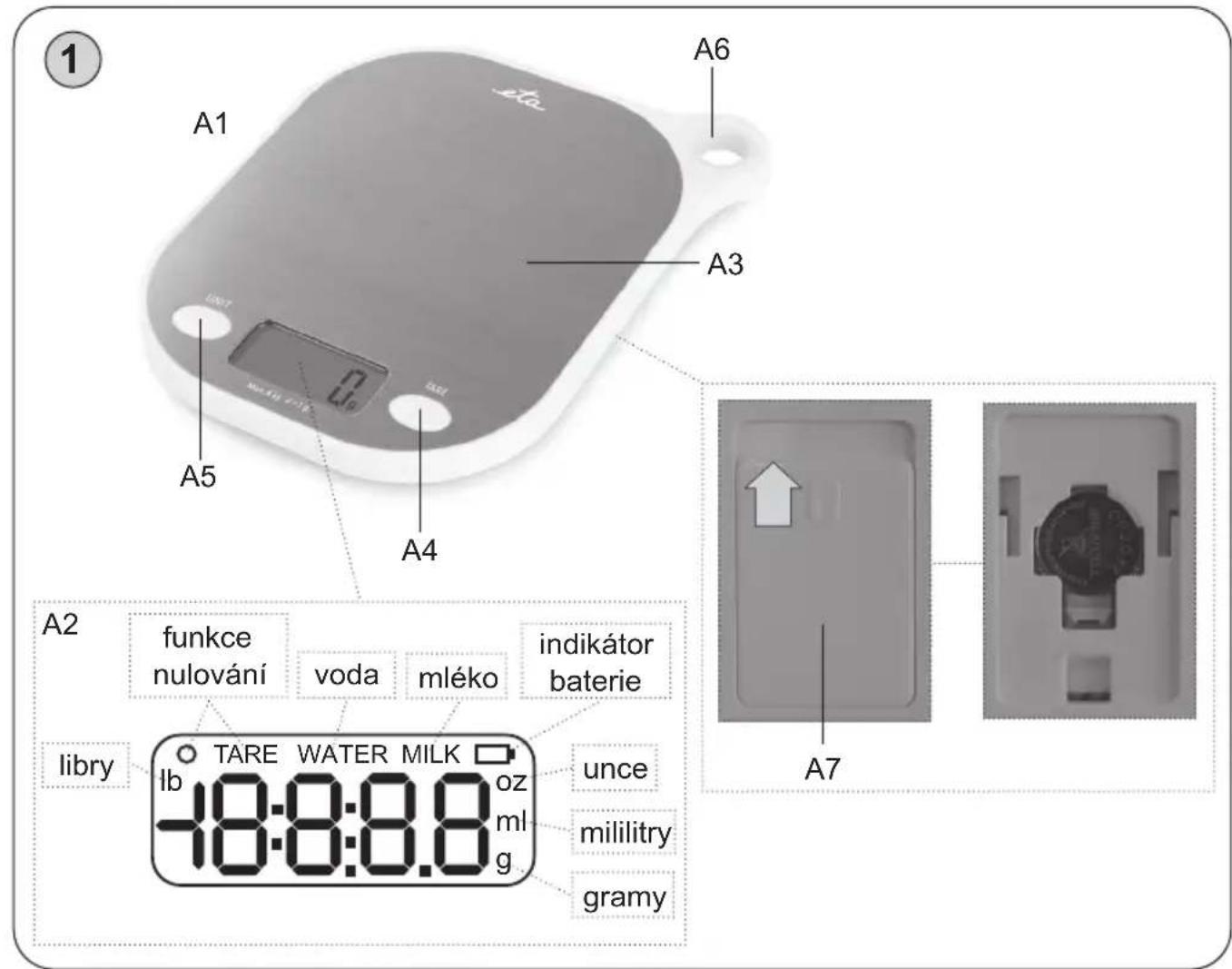
II. DESCRIPTION OF THE APPLIANCE (Fig. 1)
A1 — unit of scale
A2 — display
A3 — plate
A4 — TARE button – switching the scale on/off and selecting the weight reset function
A5 — UNIT button – change the units mode (g>oz>lb:oz>ml(water)>ml(milk))
A6 — hole for hanging
A7 — battery cover
Unpack the scale from packaging. Before the very first use, wipe that part of the appliance that may come in contact with foods.
Installation of battery
Battery: 1x 3V CR2032 (included; if there is an insulation band on the battery, remove it to connect the battery).
To replace battery
Remove the battery compartment cover on the back side of the scale by shifting it in the direction of the arrow (see Fig. 1) and connect a new 3V battery to the connectors. Please take note to the polarity. The other way round replace the battery cover until it engages, an audible click will be heard.
Notes
- Batteries not intended for this purpose must not be charged.
- Remove the battery if you will not be using the appliance for a long time.
- The supply terminals must not be short-circuited.
IV. OPERATION INSTRUCTIONS
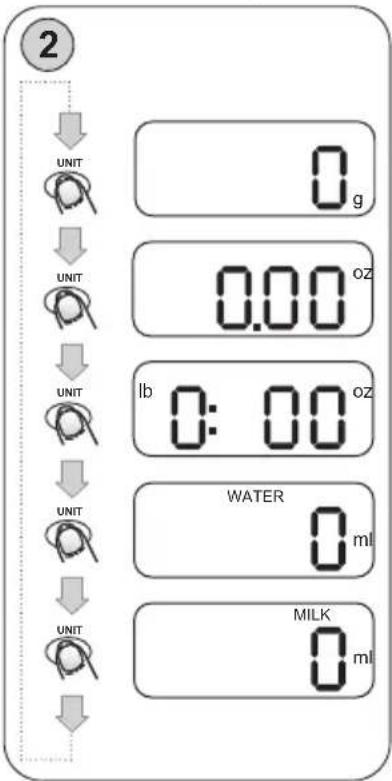
The scale can measure weight and volume in the following units of measurement (see Fig. 2):
g weight in grams
oz weight in ounces
lb:oz weight in pounds and ounces
ml (WATER) water volume in millilitres
ml (MILK) milk volume in millilitres
Results of measuring and readings on the display
| Data on display Unit Indication | ||
| 1100 g 1100 grams | ||
| 1:14.6 lb:oz 1 pound and 14.6 ounces | ||
| 1500 ml (WATER) | 1500 milliliters of water | |
| 1500 | ml (MILK) | 1500 milliliters of milk |
Change of units of weight and volume
Press the UNIT button to choose between weighing and measuring volume of water and milk. The selected mode and units of measurement are shown on the display (see Fig. 2)
Note
- The scale is always switched on in the mode that was used last time.
- If you remove the battery from the scale and re-insert it again (e.g. when replacing it) and switch the scale on, it will switch on in the "g" mode (weight measurement in grams).
- You can put the container or bowl on the scale even before switching the scale on. If you do so, the scale will automatically switch on with the value 0.
- In case that you put the bowl or container on the scale after it has been switched on, press the TARE button A4 (weight reset). The display will show 0. You can then proceed with the required measuring.
- Auto shut-off occurs if display shows ,0' or shows the same weight reading for 60 sec.
- The results of measuring the volume of milk differ from measuring the volume of water due to their density. Milk has subtly higher density than water (approx. 1,026 x).
Operation
1) Put the scale on a suitable flat surface and switch it on using the TARE button A4.
2) Put the bowl (if you use one) on the scale before switching it on.
Do not put things you want to weight on the plate before you turn the appliance on!
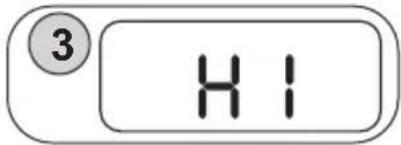
3) After the scale is switched on, first of all it is calibrated. The display is showing "HI" (see Fig. 3). When the display shows 0, the appliance is ready for weighing.
4) Using the UNIT button A5, set the required mode / units of measurement.
5) Put the food (object) in the middle of the weighing plate A3. When weighing liquid or loose material (e.g. flour), place it in a bowl or container prepared in advance (on the weighing plate A3). Then wait until the value on the display becomes stable.
6) The scale can then be switched off by holding the TARE button A4 for a longer time or wait ca. 60 seconds after which the scale switches off automatically.
„TARE“ function
To weigh different loads consecutively without removing loads from the scale. Put first Load on the scale, get weight reading. Press A4 TARE button to reset the LCD reading to „0“ before adding next load. The display will show “TARE” in the upper left corner. Add another item and the display will read the added weight. You can repeat this operation. If all products are taken away from the weighing plate, a negative value will appear on the display.
Note
When total sum of all loads on scale ≤ 100 g, LCD will show „O“ each time TARE is pressed. Icon „O“ will show on upper left corner of LCD, indicating function is active. Max. weight capacity remains unchanged.
Attention
Remove the excessive weight product from the scales to avoid damage to the appliance.
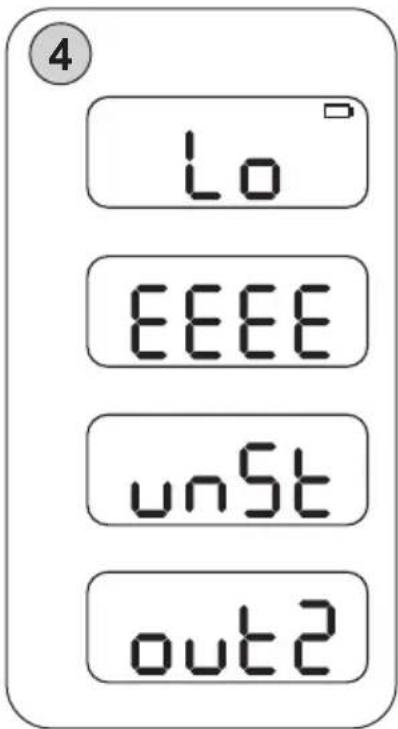
Error messages shown on the scale display (see Fig. 4)
- Lo — replace the batteries
- EEEE — scale overload, the weight exceeds 8 kg
- unST — unstable indicator - When the scale switched on is it the unstable state, the LCD will indicate „UNST“. Put the scale on hard flat surface, leave it recalibrated, it will work normal
- ouT2 — scale overload - this error message will show on the display if before switching the scale on you put an object onto the weighing plate that is heavier than 8 kg and then switch the scale on.
If symptoms such as flashing of the display or erroneous indications appear, remove the scales away from disturbing sources (e.g. microwave oven) or turn off the source for the term of weighing.
V. STORAGE
After use, put the scale in a horizontal position, or hang it using the eyelet A6.
VI. MAINTENANCE
Clean the scale only after it has cooled down! Do not use coarse or aggressive detergents (e.g. sharp things, thinners or other solvents)! Wipe the scale surface with a soft wet rag. Pay attention no water penetrates the appliance. DO NOT immerse the scale in water or use chemical/abrasive cleaning agents. All parts should be cleaned immediately after contact with fats, spices, vinegar and strongly flavored/colored foods. Avoid contact with acids citrus juices.
Never dry plastic mouldings over a heat source (e.g. heater, electric/gas stove). Some food can colour the accessories in some way. However, this does not affect the function of the appliance and it is not a reason for a claim. This colouring usually disappears after some time.
VII. ENVIRONMENT

If dimensions permit, all pieces have printed symbols of materials used for production of packing, components and accessories as well as recycling symbols. The symbols on the product or documentation means the electric or electronic parts used in the appliance may not be disposed off together with communal waste. Hand over the electric or electronic part to a waste collection yard for free disposal. Proper disposal of the product will help preserving valuable natural resources and preventing potential negative impacts on environment and human health that would otherwise result from improper waste disposal. For more details, please contact your local authorities or collection yard. Fines may be imposed for improper disposal of this type of waste pursuant to national directives. Remove flat batteries from the appliance and dispose them off in a suitable way using special collection centres. Do not incinerate the batteries!
Specialized service is required for overhaul maintenance or maintenance requiring disassembly of the internal components of the appliance! The right for warranty repair expires if the above mentioned instructions are not adhered to.
VIII. TECHNICAL DATA
Maximum weighing capacity (kg) 8
Accuracy (g) 1
Weight (kg) about 0.25
Protection class of the appliance III.
Size of the product (mm) 168 x 205 x 15
The manufacturer reserves the right to change the technical specifications and accessories for the respective models.
HOUSEHOLD USE ONLY.
DO NOT IMMERSE IN WATER.
TO AVOID DANGER OF SUFFOCATION, KEEP THIS PLASTIC BAG AWAY FROM BABIES AND CHILDREN. DO NOT USE THIS BAG IN CRIBS, BEDS, CARRIAGES OR PLAYPENS. THIS BAG IS NOT A TOY.

NOTICE
V. TÁROLÁS
V. LAGERUNG
- ÚDRŽBA
- Digital kitchen scale
- eta 3777
- Grami
- USER MANUAL
- SAFETY PRECAUTIONS
- DESCRIPTION OF THE APPLIANCE (Fig. 1)
- Installation of battery
- To replace battery
- Notes
- OPERATION INSTRUCTIONS
- Change of units of weight and volume
- Note
- Operation
- „TARE“ function
- Attention
- Error messages shown on the scale display (see Fig. 4)
- STORAGE
- MAINTENANCE
- ENVIRONMENT
- TECHNICAL DATA
- TÁROLÁS
- LAGERUNG
Brand : Eta
Model : Grami
Category : Kitchen scale