
EU-KJ210G-C46 - Air purifier Hanseatic - Free user manual and instructions
Find the device manual for free EU-KJ210G-C46 Hanseatic in PDF.


| Product Type | Air Purifier |
| Model | EU-KJ210G-C46 |
| Brand | Hanseatic |
| Net Weight | 5 kg |
| Gross Weight | 6 kg |
| Power Supply | 220-240 V~, 50/60 Hz |
| Power Consumption | 22 W |
| Protection Class | II |
| Sound Power Level | ≤ 55 dB(A) |
| Fan Speeds | Low, Mid, High, Turbo |
| Timer Settings | 1H, 2H, 4H, 8H |
| Operating Modes | Auto, Sleep, Ionizer, Child Lock |
| Sensor Type | Particle sensor + Light sensor |
| Air Quality Indicator | Green (good), Orange (normal), Red (bad) |
| Filter Type | Air inlet filter (washable/replaceable) |
| Filter Cleaning Interval | Every 2 weeks |
| Filter Replacement Interval | Every 6 months or when filter warning lights up |
| Spare Part Filter Order Number | 7933 8630 |
| Order Number | 1260 6643 |
Frequently Asked Questions - EU-KJ210G-C46 Hanseatic
User questions about EU-KJ210G-C46 Hanseatic
0 question about this device. Answer the ones you know or ask your own.
Ask a new question about this device
Download the instructions for your Air purifier in PDF format for free! Find your manual EU-KJ210G-C46 - Hanseatic and take your electronic device back in hand. On this page are published all the documents necessary for the use of your device. EU-KJ210G-C46 by Hanseatic.
USER MANUAL EU-KJ210G-C46 Hanseatic
Gebrauchsanleitung
Anleitung/Version:
1901-02684 DE 20210315
Lieferumfang
![graph TD A["POWER"] --> B["Air Quality"] C["FAN"] --> D["Turbo"] C --> E["High"] C --> F["Mid"] C --> G["Low"] H["TIMER"] --> I["8H"] H --> J["4H"] H --> K["2H"] H --> L["1H"] M["AUTO"] --> N["Rotation"] O["SLEEP"] --> P["Sun"] Q["ION"] --> R["Press 3s to last Filter!"] S["(11)(10)(9)(8)"] --> T["(1…](/content/2026/05/850116/images/e049912acc1e779943ac7a1be9d5b6a1be642aa1d4d81ece65848be544898df3.jpg)
User manual
Manual/version: 1901-02684 EN 20210315
Article no.: 1260 6643
Reproduction, even of excerpts, is not permitted!
Air purifier
Table of contents
Delivery ...... EN-3
Package contents ..... EN-3
Check the delivery..... EN-3
Safety ...... EN-4
Intended use ..... EN-4
Explanation of terms ..... EN-4
Safety notices ..... EN-5
Appliance parts ..... EN-10
Start-up..... EN-12
Unpacking the appliance EN-12
Inserting the filter..... EN-12
Setting up the appliance EN-13
Operation ..... EN-15
Control panel functions . EN-15
Switching the
appliance on and off . . . EN-16
Setting and changing
the fan speed. . . . . . . . EN-17
Activating and deactivating the Timer function EN-17
Activating and deactivating Auto mode ..... EN-17
Activating and deactivating Sleep mode .... EN-18
Activating and deactivating Safety lock (child safety lock). . . . . EN-18
Care and maintenance... EN-20
Cleaning the appliance . EN-20
Cleaning the filter cover EN-21
Cleaning/changing the filter ..... EN-22
Troubleshooting table. . . . EN-24
Service....EN-26
Advice, order and complaint. . . . . . . . . EN-26
Spare parts ..... EN-26
Environmental protection/disposal ..... EN-27
Our contribution to the ozone layer ..... EN-27
Waste prevention ..... EN-27
Disposing of old elec- trical devices in an environmentally-friendly manner. . . . . . . . . . . EN-28
Technical data ..... EN-29
Delivery

Package contents
- Air purifier
- User manual
Check the delivery
- Move the appliance to a suitable place and unpack it.
- Check that the delivery is complete.
- Check whether the appliance was damaged during transit.
- If the delivery is incomplete or the appliance has been damaged during transit, please contact our service department (see page EN-26).

WARNING!
Do not operate the appli- ance if it has visible dam- age.
Safety

Please read through the safety instructions and user manual carefully
before using the appliance. This is the only way you can use all the functions reliably and safely.
Be absolutely sure to also observe the national regulations in your country, which are also valid in addition to the regulations specified in this user manual.
Keep all safety notices and instructions for future reference. Pass all safety notices and instructions on to the subsequent user of the appliance.
Intended use
The purpose of the appliance is to clean ambient air.
The appliance is designed for use in private households only and is not designed for commercial use or multiple use (e.g.: use by several families in an apartment building).
Use the appliance exclusively as described in this user manual. Any other use is deemed improper and may result in damage to property or even personal injury. The manufacturer accepts no
liability for damage caused by improper use.
Explanation of terms
The following symbols can be found in this user manual.

WARNING
This symbol indicates a hazard with a medium level of risk which, if not avoided, could result in death or serious injury.

CAUTION
This symbol indicates a hazard with a low level of risk which, if not avoided, could result in minor or moderate injury.

NOTICE
This symbol warns against possible damage to property.

This symbol refers to useful additional information.
Safety notices
In this chapter you will find general safety notices which you must always observe for your own protection and that of third parties. Please also observe the warning notices in the individual chapters on operation, cleaning, etc.
Risks in handling house- hold electrical appliances

WARNING
Risk of electric shock!
Touching live parts may result in severe injury or death.
■ Only use the appliance indoors. Do not use in wet rooms or in the rain.
■ Never expose the appliance to effects of the weather (rain, etc.).
■ Do not operate or continue to use the appliance, if it
■ shows visible signs of damage, e.g. the mains cord is defective.
■ starts smoking or there is a smell of burning.
■ makes unfamiliar noises. In this case, you should pull the mains plug out of the
socket and have the appliance repaired (see "Service" on page EN-26).
■ Connect the appliance only to an easily accessible socket so that you can quickly disconnect it from the mains in the event of a fault.
- Keep the appliance, the mains plug and the mains cable away from open fl ames and hot surfaces.
■ Do not kink, pinch or run over the mains cord with the appliance. This can result in a break in the cable.
■ If the supply cord is damaged, it must be replaced by the manufacturer, its service agent or similarly qualified persons in order to avoid a hazard.
■ Never leave the appliance unattended while the mains plug is connected to the socket.
■ Never pull the mains plug out of the socket by the mains cable, always hold the mains plug itself.
■ When moving to another location, do not pull the
appliance by the power cord or plug.
■ In the event of a fault, and before cleaning and maintenance (e.g. changing filter), always pull the mains plug out of the socket.
■ Never touch the mains plug with wet hands.
■ Do not use the appliance in humid rooms or rooms with high ambient temperature (bathroom, toilet, kitchen).
■ Ensure that no water seeps into the appliance. Never immerse the appliance in water.
■ Only insert the mains plug into the socket if all appliance components are completely dry.
■ Disconnect the power plug from the socket before cleaning or changing the fi Iter.
■ Changes and repairs to the appliance may be carried out only by authorised specialists, such as our Service team (see page EN-26). Unauthorised repairs to the appliance can cause property damage and personal
injury, and invalidate liability and warranty claims. Never try to repair a defective or suspected defective appliance yourself.
■ Only parts corresponding to the original appliance specifications may be used for repairs.
Risks to children
Risk of suffocation!
■ Do not allow children to play with the packaging fi Im. Children may get caught in it or suffocate.
■ Prevent children from pulling small parts off the appliance or putting them in their mouths.

CAUTION
Risks for certain groups of people
Danger to children and people with impaired physical, sensory or mental abilities!
■ This appliance may be used by children aged eight years and above, as well as persons with reduced physical, sensory or mental capacities or those lacking experience and/or knowledge, if they are supervised or have been instructed in how to safely use the appliance and have understood the dangers associated with operating it.
■ Children should not be allowed to play with the appliance nor should they have access to the appliance when left unattended.
■ Do not leave the appliance unsupervised while in operation.
■ Cleaning and maintenance must not be carried out by children unless they are supervised.
Even with the fi Iters, the appliance exhaust air may still contain small quantities of dirt particles. If breathed in by small children, these can lead to allergic reactions.
■ Avoid placing in the immediate vicinity of children.
Risks when handling the air purifier
Risk of injury!
Improper handling of the appliance may result in injury.
■ Never grasp moving parts of the appliance. There is a risk of fingers becoming trapped.
■ Lay the mains cord in such a way that no one trips over it.
Fire hazard!
Vacuuming glowing ash, burning cigarettes, etc. will set the fi Iter on fi re.
- Keep glowing ashes, burning cigarettes or matches away from the appliance.
Fire hazard!
■ Do not block the air inlet or outlet. The appliance may overheat and catch fire.
■ Mist produced by ultrasonic humidifi ers may get into the appliance through the air inlet and/or outlet and set it on fi re.
Danger of explosion!
■ Do not spray fl ammable substances on or near the appliance.
■ Do not spray water or chemical cleaners such as alcohol directly onto the appliance.
Health hazard!
Improper handling of the appliance may result in health hazards.
■ Do not use the appliance if the fi Iter is missing or damaged.
Otherwise, dust in the sucked-in air can penetrate the appliance and from there escape into the ambient air.
! NOTICE
Risk of damage!
Improper handling of the appliance can lead to property damage.
■ Do not use sharp objects to unpack the appliance.
■ Never sit on the appliance or place objects on it.
■ Use the appliance only if the fi Iter is in place. The fi I-ter must not be damaged.
■ Only the original supplied accessories and the speci-fi ed fi iter may be used.
■ Never place the air purifi er directly next to a heater or oven.
■ Never place the air purifi er in direct sunlight.
■ Never dry the fi Iter on a heater or with a hairdryer or tumble dryer, etc. The fi Iter will become porous as a result and can be damaged.
■ Never wash the filter in a washing machine or dishwasher.
■ The fi Iter must be air-dried only.
■ Do not use any abrasive cleaners (scouring or thinning agents) to clean the appliance and accessories. They could damage the surface of the appliance.
Appliance parts

![graph TD A["POWER"] --> B["FAN"] B --> C["TIMER"] C --> D["AUTO"] D --> E["SLEEP"] E --> F["ION"] style A fill:#f9f,stroke:#333 style B fill:#ccf,stroke:#333 style C fill:#cfc,stroke:#333 style D fill:#fcc,stroke:#333 style E fill:#cff,stroke:#333 style F fill:#ffc,stroke:#333 subgraph AirQuality di…](/content/2026/05/850116/images/ed766d4f5337c416158ddbb49725f0baf0a665ff5cf3e69b517a5ae664e22818.jpg)
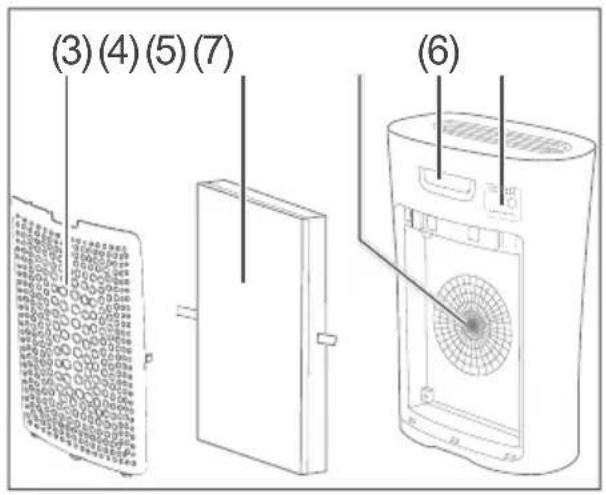
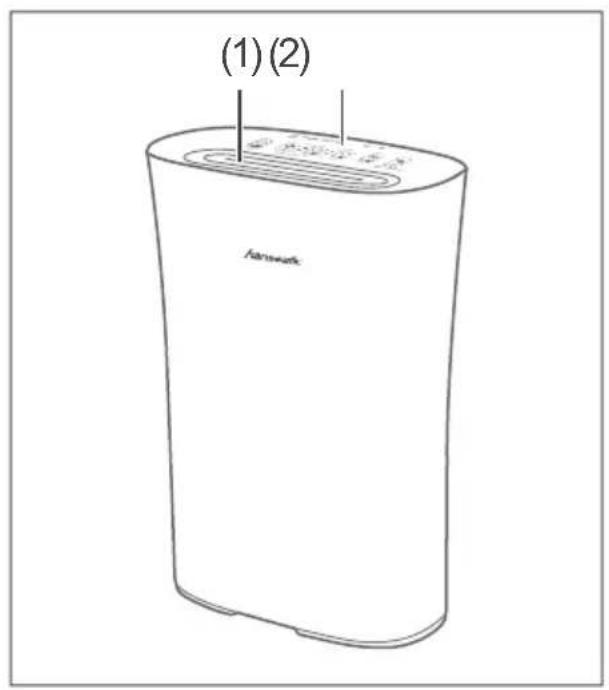
(1) Air outlet
(2) Control panel
(3) Filter cover
(4) Air inlet filter
(5) Air inlet
(6) Handle
(7) Particle sensor
(8) On/Off button
(10) Air quality indicator
(13) ION button to reset filter
(14) Sleep mode button
(15) Auto mode button
(16) Timer button
(17) Fan speed button
(9) Light sensor: detects the incidence of light in the environment and switches to Sleep mode at dusk
(11) Safety lock indicator (child safety lock)
(12) Filter warning: Indicates when the air inlet filter (4) needs to be cleaned/replaced
Start-up
Unpacking the appliance

NOTICE
Risk of damage!
Improper handling of the appliance may result in damage.
■ Do not use sharp objects to unpack the appliance.
- Unpack the appliance.
- Carefully remove all parts of the packaging, plastic profiles, tape and foam padding.
Inserting the filter
The filter may not already have been inserted in the factory. If this is the case, the filter must be inserted first.

- Remove the filter cover (3).

- Remove the air inlet filter (4) from the protective cover.
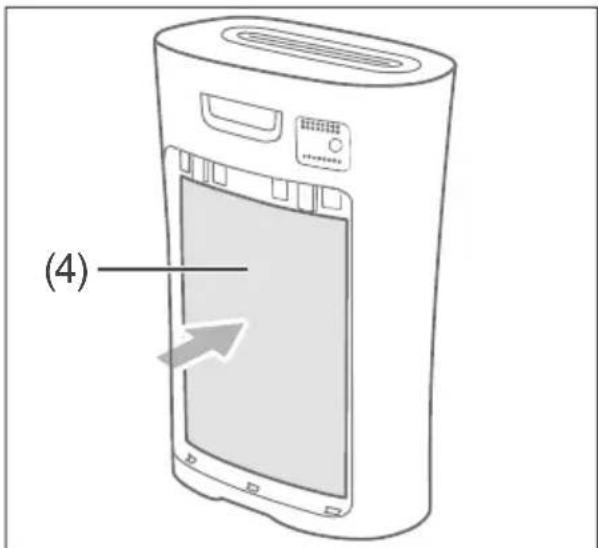
- Insert the air inlet filter (4).

- Replace the filter cover (3).
The air purifier is now ready to use.
Setting up the appliance

WARNING
Risk of electric shock! Touching live parts may result in severe injury or death.
■ Only use the appliance indoors. Do not use in wet rooms or in the rain.
■ Never expose the appliance to effects of the weather (rain, etc.).

NOTICE
Risk of damage!
Improper handling of the appliance can lead to property damage.
■ Do not use sharp objects to unpack the appliance.
■ Never sit or stand on the appliance.
■ Use the appliance only if the fi Iter is in place. The fi I-ter must not be damaged.
■ Only the original supplied accessories and the speci-fi ed fi iter may be used.
■ Never place the air purifi er directly next to a heater or oven.
■ Never place the air purifi er in direct sunlight.

- Set up the appliance so that there is a gap of at least 30 cm on either side and to the wall.
- Connect the mains plug to a properly installed power outlet.
Operation
You can use the appliance if
- You have read the ‘Safety’ chapter and in particular the safety information (see page EN-4).
- The appliance has been placed as described in the chapter "Start-up" (see page EN-12).

CAUTION
Health hazard!
Improper handling of the appliance may result in health hazards.
■ Do not use the appliance if the fi Iter is missing or damaged.
Control panel functions On/Off button
The On/Off button (8) switches the appliance on and off. When you switch the appliance on, it starts at the last selected fan speed.
Light sensor
If you have activated Sleep mode, the light sensor (9) will cause the Sleep mode to be activated, i. e. the indicators dim and the fan speed is at its lowest level when it gets dark. When it gets light again, the Sleep mode automatically switches off.
Air quality indicator
The particle sensor (7) checks the air quality; the result of this test is shown on the air quality indicator (10):
Air quality Indicator colour
good green normal orange bad red
Safety lock (child safety lock)
The air purifier is equipped with a safety lock. The function is described in section „Activating and deactivating Safety lock (child safety lock)“ (see page EN-18).
If the security lock is activated, the safety lock indicator (11) lights up.
Filter warning
The filter warning indicator (12) alerts you to the fact that the filter needs to be cleaned or replaced.
ION button
The ION button (13) resets the filter function after the filter is replaced.
Sleep mode button
The Sleep mode button (14) activates and deactivates Sleep mode.
In sleep mode, the indicators dim except the “Sleep” indicator and the fan speed is at its lowest level.
Auto mode button
The Auto Mode button (15) activates or deactivates Auto mode.
When Auto mode is on, the indicators dim and the fan speed switches to its lowest level when the light sensor (9) registers that the ambient light level is decreasing, such as at dusk.
As the ambient light level increases again (e.g. in the morning), the indicators revert to normal light levels and the fan speed resets to its set level.
Timer button
The Timer function allows you to set the number of hours after which the appliance is to automatically switch off. The following settings are available: 1 hour, 2 hours, 4 hours, 8 hours.
The Timer function can be switched on or off with the Timer button (16).
Fan speed button
The (17) button controls the fan speed. The settings are “Low”, “Mid”, “High” and “Turbo”.
Switching the appliance on and off
- To switch the appliance on, press the On/Off button (8). A beep will sound. The appliance switches on with the last set fan speed.

When the appliance is switched on for the first time, or if it has been disconnected from the power supply for a long time, it starts with the fan speed on "Low".
- To switch the appliance off, press the On/Off button (8) again.
Setting and changing the fan speed

To be able to set or change the fan speed, the appliance must be turned on.
- Switch the appliance on, as described in Section "Switching the appliance on and off" on page EN-16.
- Press the fan speed button(17) as often as required until the desired fan speed is selected. Each time the button is pressed, a beep will sound and one of the indicators next to the button will light up.
Activating and deactivating the Timer function

To be able to activate or deactivate the Timer function, the fan must be checked on.
- Switch the appliance on, as described in Section "Switch-
ing the appliance on and off" on page EN-16.
-
Press the Timer button (16) as often as required until the desired time is selected.
Each time the button is pressed, a beep will sound and one of the indicators next to the button will light up.
If you have set the Timer function to "8 hours" and press the Timer button (16) again, the Timer function will be deactivated. -
To deactivate the Timer function, press the Timer button (16) as often as required until the Timer function is deactivated.
Activating and deactivating Auto mode

To be able to activate or deactivate the Auto mode, the appliance must be switched on.
- Switch the appliance on, as described in Section „Switching the appliance on and off“ (see page EN-16).
- Press the Auto mode button (15). A beep will sound; the indicator next to the button will light off;
the fan speed will be set to "Low".
- To switch off the Auto mode, press the Auto mode button (15) again.
A beep will sound and the indicator next to the button will light up.

If you have switched off Auto mode, the fan speed will remain on the "Low" setting.
If you switch off the appliance while the Auto mode is activated, the Auto mode will still be active when the appliance is switched back on.
Activating and deactivating Sleep mode

To be able to activate or deactivate the Sleep mode, the appliance must be switched on.
-
Switch the appliance on, as described in Section "Switching the appliance on and off" on page EN-16.
-
Press the Sleep mode button (14).
A beep will sound; the indicator next to the button will light
up; the fan speed will be set to "Low".
- To switch off Sleep mode, press the Sleep mode button (14) again.
A beep will sound and the indicator next to the button will light off.
Activating and deactivating Safety lock (child safety lock)

To be able to activate or deactivate the safety lock, the appliance must be switched on.
-
Switch the appliance on, as described in Section "Switching the appliance on and off" on page EN-16.
-
Press the Fan button (8) and the Timer button (16) simultaneously for about one second.
A beep will sound and the "Lock" indicator (11) will light up.
All controls are now blocked. When one of the buttons is pressed, the "Lock" indicator (11) will flash two times.
- To deactivate the safety lock, press the Fan button (8) and the Timer button (16) again simultaneously for about one second. A beep will sound and the "Lock" indicator (11) will light off.
Care and maintenance
Cleaning the appliance

WARNING
Risk of electric shock! Improper use of the appli- ance may lead to serious injury or death.
■ Before cleaning the appliance, pull the mains plug out of the socket.
■ Ensure that no water seeps into the appliance.
■ Never immerse the appliance in water.
■ Only insert the mains plug into the socket if all appliance components are completely dry.
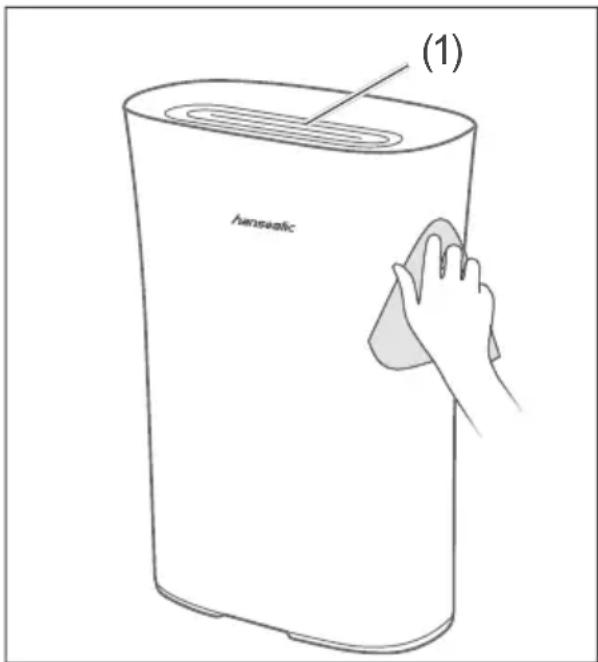
- Wipe the housing with a damp cloth if necessary. Never allow liquid to penetrate the vacuum.
• Occasionally clean the air outlet (1) with a soft brush.

NOTICE
Risk of damage! Improper cleaning of the appliance can impair the surface.
■ Do not use any abrasive cleaners (scouring or thinning agents) to clean the appliance.
Cleaning the filter cover

- Remove the filter cover (3).

- Replace the filter cover (3).
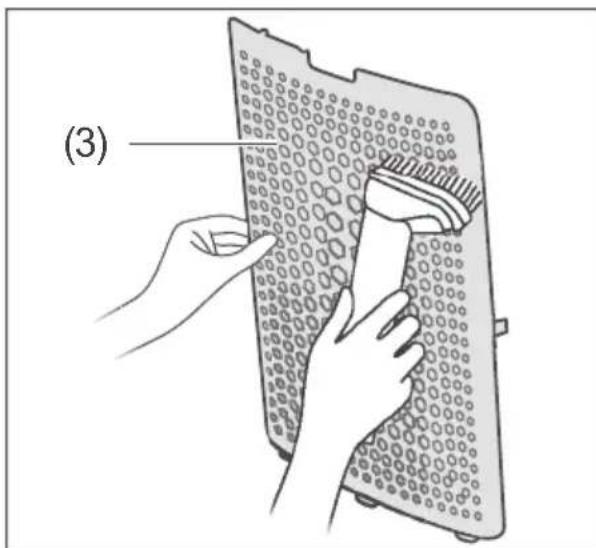
- Clean the filter cover (3) either by vacuuming it with the crevice- or furniture nozzle of a vacuum cleaner or by cleaning with a soft brush.
Cleaning/changing the filter

NOTICE
Risk of damage!
Improper handling of the appliance may result in damage.
■ Only dry clean the fi Iter (= no liquid).
■ Always use the correct fi l-ter for the appliance, otherwise the air purifi er may not function optimally.
■ Never operate the appliance without fi Iters or with damaged fi Iters. Dust can penetrate the appliance and damage the motor.
■ When cleaning the fi lter with a vacuum cleaner, always keep the vacuum cleaner nozzle 5-10 mm away from the fi lter surface.

It is recommended that the filter be cleaned about every two weeks and changed about every six months, but at the latest when the "Filter Warning" (12) indicator lights up red.
If there is a lot of cigarette smoke in the environment in which the air purifier is placed, the filter should be cleaned every two to five days. It should be replaced if the odour of cigarette smoke has settled in it.
- Disconnect the mains plug from the socket.
- Remove the filter cover (3), as described in section "Cleaning the filter cover" on page EN-21.

- Remove the air inlet filter (4). To do so, pull on the strips (18).
- Clean the air intake filter (4) either with a brush by brushing sideways over the air intake filter or with the vacuum cleaner. When cleaning the air intake filter (4) with the vacuum cleaner, always keep the nozzle of the vacuum cleaner about 5-10 mm from the surface of the air intake filter.
- Insert the air inlet filter (4) or, if necessary, a new air inlet filter as described in section "Inserting the filter" on page EN-12.
- Replace the filter cover (3).
- Connect the mains plug to the socket and switch the appliance on.
- Press the ION button (13) for approx. three seconds to reset the air inlet filter.
Troubleshooting table
Malfunctions can occur in all electrical appliances. This does not necessarily mean there is a defect in the appliance. For this reason, please check the tables to see if you can correct the malfunction.

WARNING
Risk of electric shock in case of improper repair! Never try to repair a defective or suspected defective appliance yourself. You can put your own and future users' lives in danger. Only authorised specialists are allowed to carry out this repair work.
| Problem Possible cause Solutions, tips | ||
| Appliance is not working. | On/Off button (8) not pressed. | Switch the appliance on. |
| Mains plug is loose. | Check that the mains plug is firmly inserted into the socket. | |
| The socket is defective. | Try the appliance with a different socket. | |
| Check fuses and/or circuit breakers. | ||
| Mains cord is defective. | Check mains cord for damage. Contact our Service Centre, where necessary (see “Service” on page EN-26). | |
| The air quality indicator (10) lights red during continuous operation. | The room is too big for the purifying capacity of the appliance. | Let the air purifier continue to work continuously. |
| No filter is inserted. Insert a filter. | ||
| Cigarette smoke and other odours are not adequately removed. | Filter is not inserted or not inserted correctly. | |
| Filter is dirty. Change filter. | ||
| Air inlet is blocked by an object. | ||
| The (new) filter is still in the protective cover. | ||
| The air quality indicator (10) does not change. | The sensor is still unstable for a short time after being switched on. | |
| The appliance is placed in a position where the sensor cannot adequately measure the air quality. | ||
| Strong odours in the room (e.g. cigarette odour) reduce the sensitivity of the sensor. | ||
| The filter warning indicator (12) does not go out. | After a filter change or filter cleaning, the ION button (13) was not pressed or not pressed for at least three seconds. | |
| Press the ION button (13) for at least three seconds. If the problem persists, clean the filter again, and then press the ION button (13) for at least three seconds. | ||
Service
In order for us to help you quickly, please tell us:
| Name of appliance Order number | |
| Hanseatic Air purifier EU-KJ210G-C46 1260 6643 | |
| Accessories Order number | |
| 1 × filter 7933 8630 |
Advice, order and complaint
Please contact your mail order company's customer service centre if
– the delivery is incomplete,
– the appliance is damaged during transport,
– you have questions about your appliance,
- a malfunction cannot be rectified using the troubleshooting table,
– you would like to order further accessories.
Spare parts
Customers in Germany
– Please contact the company Hermes Fulfilment GmbH:
Tel. +49 (0)57 32 99 66 00
Monday-Thursday 8 am–3 pm, Friday 8 am–2 pm
Customers in Austria
- Please contact your mail order company's customer service centre or product advice centre.
Please note:
You are responsible for the condition of the appliance and its proper use in the household. Damage resulting from non-compliance with this manual unfortunately cannot be recognised.
Environmental protection/disposal
Our contribution to the ozone layer

Our packaging is made from environmentally friendly, recyclable materials:
– Outer packaging made of cardboard
- Moulded parts made of foamed, CFC-free polystyrene (PS)
– Films and bags made of poly-ethylene (PE)
– Straps made of polypropylene (PP).
If you have sufficient space, we recommend keeping the packaging, at least during the warranty period. If the appliance has to be sent in for repair or brought to one of the repair service points, the appliance will only be adequately protected in the original packaging.
Dispose of the packaging re- sponsibly.
Waste prevention
According to the provisions of Directive 2008/98/EC, waste prevention measures always take priority over waste management.
For electrical and electronic devices, waste prevention measures include extending the lifespan of defective devices through repair and reselling used working appliances instead of disposing of them.
Please help us reduce waste and contact our customer service if your product is faulty.
More information can be found in the brochure “Waste Prevention Programme - of the German Government with the Involvement of the Federal Länder”.
Disposing of old elec- trical devices in an en- vironmentally-friendly manner

Electrical appliances contain harmful substances as well as valuable resources.
Every consumer is therefore required by law to dispose of old electrical appliances at an authorised collection or return point. They will thus be made available for environmentally-sound, resource-saving recycling.
You can dispose of old electrical appliances free of charge at your local recycling centre.
Please contact your dealer directly for more information about this topic.
Technical data
| Manufacturer | hanseatic |
| Name of appliance Air purifier | |
| Model EU-KJ210G-C46 | |
| Sound power level in dB(A) ≤ 55 | |
| Output in W 22 | |
| Supply voltage in V~ / 50/60 Hz | 220–240 |
| Protection class II | |
| Weight (gross) in kg, ca. | 6 |
| Weight (net) in kg, ca | 5 |
| Order number 1260 6643 |
- LIEFERUMFANG
- TABLE OF CONTENTS
- DELIVERY
- PACKAGE CONTENTS
- CHECK THE DELIVERY
- WARNING
- SAFETY
- INTENDED USE
- EXPLANATION OF TERMS
- CAUTION
- NOTICE
- SAFETY NOTICES
- RISKS IN HANDLING HOUSE- HOLD ELECTRICAL APPLIANCES
- RISKS TO CHILDREN
- RISKS FOR CERTAIN GROUPS OF PEOPLE
- RISKS WHEN HANDLING THE AIR PURIFIER
- FIRE HAZARD
- DANGER OF EXPLOSION
- HEALTH HAZARD
- APPLIANCE PARTS
- START-UP
- UNPACKING THE APPLIANCE
- INSERTING THE FILTER
- SETTING UP THE APPLIANCE
- OPERATION
- CONTROL PANEL FUNCTIONS ON/OFF BUTTON
- LIGHT SENSOR
- AIR QUALITY INDICATOR
- AIR QUALITY INDICATOR COLOUR
- SAFETY LOCK (CHILD SAFETY LOCK)
- FILTER WARNING
- ION BUTTON
- SLEEP MODE BUTTON
- AUTO MODE BUTTON
- TIMER BUTTON
- FAN SPEED BUTTON
- SWITCHING THE APPLIANCE ON AND OFF
- SETTING AND CHANGING THE FAN SPEED
- ACTIVATING AND DEACTIVATING THE TIMER FUNCTION
- ACTIVATING AND DEACTIVATING AUTO MODE
- ACTIVATING AND DEACTIVATING SLEEP MODE
- ACTIVATING AND DEACTIVATING SAFETY LOCK (CHILD SAFETY LOCK)
- CARE AND MAINTENANCE
- CLEANING THE APPLIANCE
- CLEANING/CHANGING THE FILTER
- TROUBLESHOOTING TABLE
- SERVICE
- ADVICE, ORDER AND COMPLAINT
- SPARE PARTS
- PLEASE NOTE
- ENVIRONMENTAL PROTECTION/DISPOSAL
- OUR CONTRIBUTION TO THE OZONE LAYER
- WASTE PREVENTION
- DISPOSING OF OLD ELEC- TRICAL DEVICES IN AN EN- VIRONMENTALLY-FRIENDLY MANNER
- TECHNICAL DATA
Brand : Hanseatic
Model : EU-KJ210G-C46
Category : Air purifier