
P0070 - Power outlet Emos - Free user manual and instructions
Find the device manual for free P0070 Emos in PDF.


| Product Type | Remote-controlled socket set with controller |
| Number of Sockets | 3 receivers (sockets) |
| Number of Controllers | 1 remote controller |
| Operating Voltage | 230 V~, 50 Hz |
| Maximum Load per Socket | 1000 W (resistive) |
| Maximum Current per Socket | 4.35 A |
| Transmission Frequency | 433.92 MHz |
| Maximum RF Output Power | 0.181 mW e.r.p. |
| Range (Open Area) | Up to 25 m |
| Protection Class | IP20 (indoor use only) |
| Remote Controller Battery | 1x CR2032 3V (included) |
| Number of Control Channels | 4 independent channels (A, B, C, D) |
| Manual Override | ON/OFF button on each socket |
| Pairing Method | Push-button on socket and remote |
| Operating Temperature | Not specified; use in dry indoor areas |
| Cleaning Instructions | Wipe with soft dry cloth; no liquids or cleaning agents |
| Safety Certifications | CE, compliant with EU Directive 2014/53/EU |
| Warranty | Standard warranty as per local regulations |
| Spare Parts Available | CR2032 battery (user-replaceable); sockets not user-serviceable |
| Included Accessories | 3 sockets, 1 remote controller, 1 CR2032 battery |
Frequently Asked Questions - P0070 Emos
User questions about P0070 Emos
0 question about this device. Answer the ones you know or ask your own.
Ask a new question about this device
Download the instructions for your Power outlet in PDF format for free! Find your manual P0070 - Emos and take your electronic device back in hand. On this page are published all the documents necessary for the use of your device. P0070 by Emos.
USER MANUAL P0070 Emos
GB Remote-controlled Sockets + Controller
GB | Remote-controlled Sockets + Controller
Dear customer, thank you for purchasing our product. Please read carefully the following instructions and abide by them so that the product can serve you safely and to your full satisfaction. Doing so will prevent improper use and damage to the device. Prevent improper handling of the device and always observe the principles of using electrical appliances. Save these instructions for future use. The products should only be used by an adult. Never expose the product to an environment with very high humidity (such as sauna, rooms where vapours gather etc.) and prevent the product from coming into contact with liquids. Prevent the proximity or contact with home and computer electronics.
Contents
1× remote controller
3× receiver – socket with 4.35 A max. /1 000 W max. μ

Specifications
range: max. 25 m in an open area
IP20 protection
voltage: 230 V\~, 50 Hz
max. load on the socket: 1 000 W
max. current load on the socket: 4.35 A
Remote controller
transmission frequency: 433.92 MHz
max. high-frequency output of the transmission unit: 0.181 mW e.r.p.
power supply: 1× CR2032 3 V (included)
Basic information
- Do not plug the sockets into one another.
• The distance between two sockets during use should be over 50 cm. - Do not plug the wireless socket into an extension cable. Plug only into the main, wall-mounted power source.
- Do not connect devices which should always be supervised – doing so could cause fire or other damage (e.g. an iron or an electric pan).
- Do not open the device. Repairs must be done by a professional only. Improper use or unskilled repair can cause injury by electric current, or short circuit.
- Signal range is always provided as maximum in an open area without obstacles and may be significantly affected by the construction material used in the building where the device is installed. The signal range also depends on the placement of the transmitter and receiver. Avoid placing parts of the device in the proximity of heat sources, areas with increased air humidity, sources of electromagnetic radiation, power conductors and large metal objects.
Information for use
The wireless set of sockets can be used immediately after unpacking. Receiver – socket: The socket can be plugged into any wall-mounted socket. The device which is to be wirelessly controlled must be plugged into the wireless socket. The wirelessly controlled appliance must always be turned on.
Remote controller – transmitter
- Open the battery compartment cover and remove the protective film. Close the cover.
- A socket can be assigned to each of the A, B, C, D button pairs.
• Each pair of buttons works separately. The left-side buttons turn the corresponding socket on, the right-side buttons turn it off.
• The red LED light indicates signal transmission.
Replacing battery in the remote controller
- Open the battery compartment cover at the back of the remote controller.
- Remove the used battery.
- Insert a new CR2032 3 V battery. Make sure you observe the correct polarity. Use primary batteries only, not rechargeable ones.
- Close the cover
Socket - receiver
- Insert the male plug of the remote-controlled socket into a 230 V\~ network socket.
- The ON/OFF button located on the socket is used for manually turning the connection on and off and also serves for the activation of the pairing process of the socket and the remote controller.
- The light on the socket is on only if the socket is turned on. It begins flashing when the socket is ready for pairing.
Settings – pairing socket with a remote controller
- Insert the male plug of the remote-controlled socket into a 230 V\~ network socket.
- Press and hold the ON/OFF button located on the socket for 3 seconds, then release the button. The LED light will start flashing. This indicates that the socket is ready for pairing with the remote controller.
- Put the remote controller in the proximity of the socket and press any button on the left side of the controller, A to D, to pair the codes. The LED light will now remain on. This indicates the pairing has been done successfully.
- Connect an electrical appliance into the socket and turn it on.
- Press the corresponding ON button on the remote controller to turn on the socket. The LED light on the socket will turn on, indicating the socket is running.
- You can pair other sockets with the remote controller using the above method.
- If you make a mistake during pairing and need to make changes, press and hold the button on the socket for 6 seconds and release. The LED light will start flashing and turn off after 3 seconds. The set values are now erased.
- Maintain the minimum distance of wireless sockets from one another. When in use, the sockets should be more than 50 cm apart.

Important Warning
- Only a connecting cable can be connected into the remote-controlled socket (not an appliance with a direct plug).
- The remote-controlled sockets must be connected to a 230 V\~/50 Hz power network fitted with circuit protection.
- Only appliances powered by 230 V\~/50 Hz voltage can be connected to the sockets.
- Pay attention to the data on the type label of the appliances connected to the device.
- Maximum input power of connected electrical appliances must not exceed 1 000 W (max. current 4.35 A).
- The remote controller is powered by CR2032 primary batteries. Do not recharge, short circuit or destroy the batteries or throw them in a fire. Do not combine new and old batteries, different types, systems or brands. Remove the batteries if the device is not used for a longer period of time. Store the batteries out of range of children.
- Any use of the device not listed in the previous sections of the instructions will lead to damaging the product and could cause danger in the form of short circuit, injury by electric current, etc. The product must not be altered or otherwise restructured! Safety warnings must be followed unconditionally.
- We take no responsibility for material damage and injury to persons caused by improper use of the product or disregard of instructions and safety warnings listed in the manual. Any claim for warranty is voided in these cases.
- Make sure that the lead-in protective conductor is not disrupted – the life of the user may be endangered if the protective conductor is disrupted.
- Do not expose the product to direct sunlight and protect it against heat.
- The device must only be used in areas with no danger of unfavourable operating conditions such as flammable gasses, vapours and dust.
- For safety, never use the device if water entered its interior, or in environments with extreme humidity (saunas, vapours).
- When cleaning or maintaining the device, the device must always be disconnected from lead-in power supply. The capacitors in the device may still be charged, especially if the device was only disconnected from voltage recently.
- Do not insert needles or other metal or conductive instruments into the device.
- If the device is used in a manner not specified by the manufacturer, the protection provided by the device may become damaged.
- Regularly check the device for damage.
- Any maintenance or repair of the device must be performed by a trained professional electrical engineer who is demonstrably familiar with the corresponding safety and electrical engineering regulations.
- When cleaning the device, only use a soft, dry cloth. Do not use any cleaning agents or immerse the device in water!
- This appliance is not intended for use by persons (including children) whose physical, sensory or mental disability or lack of experience and expertise prevents safe use, unless they are supervised or instructed in the use of the appliance by a person responsible for their safety. Children should be supervised to ensure that they do not play with the appliance.
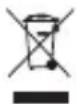
Do not dispose with domestic waste. Use special collection points for sorted waste. Contact local authorities for information about collection points. If the electronic devices would be disposed in landfill, dangerous substances may reach groundwater and subsequently food where it could affect human health.
Emos spol. s.r.o. declares that product of type P0065 is in compliance with the basic requirements and other relevant provisions of Directive 2014/53/EU. The device can be freely operated in the EU.
The Declaration of Conformity can be found at http://www.emos.eu/download.

Brand : Emos
Model : P0070
Category : Power outlet