
MeoPro Optika LR 10x42 HD - Laser pointer Meopta - Free user manual and instructions
Find the device manual for free MeoPro Optika LR 10x42 HD Meopta in PDF.


| Product Type | Laser Pointer |
| Brand | Meopta |
| Model | MeoPro Optika LR 10x42 HD |
| Wavelength | 532 nm (Green) |
| Output Power | <5 mW (Class 3R) |
| Battery Type | 2 x AAA (Alkaline) |
| Dimensions (Length x Diameter) | 150 mm x 14 mm |
| Weight (with batteries) | 55 g |
| Operation Mode | Momentary (push-button) or Continuous (twist lock) |
| Beam Distance | Up to 2,000 meters (night) |
| Focus Adjustment | Adjustable lens for beam focus |
| Safety Features | Key lock to prevent accidental activation; warning label |
| Housing Material | Aluminum alloy with black anodized finish |
| Water Resistance | Splash-proof (IPX4) |
| Included Accessories | Lanyard, carrying pouch, user manual |
| Maintenance | Clean lens with a soft, lint-free cloth; replace batteries when dim |
| Spare Parts | Batteries only (standard AAA); lens not user-replaceable |
| Repairability | Not user-serviceable; contact Meopta support |
| Certifications | FDA/CDRH Class IIIa, CE, RoHS |
Frequently Asked Questions - MeoPro Optika LR 10x42 HD Meopta
User questions about MeoPro Optika LR 10x42 HD Meopta
0 question about this device. Answer the ones you know or ask your own.
Ask a new question about this device
Download the instructions for your Laser pointer in PDF format for free! Find your manual MeoPro Optika LR 10x42 HD - Meopta and take your electronic device back in hand. On this page are published all the documents necessary for the use of your device. MeoPro Optika LR 10x42 HD by Meopta.
USER MANUAL MeoPro Optika LR 10x42 HD Meopta
A BETTER
VIEW
OF THE
WORLD
EUROPEAN
OPTICS
since
1933
MeoPro Optika LR 8x50 HD
MeoPro Optika LR 10x42 HD
me opta
www.meopta.com

NIKDY SE NEDÍVEJTE DALEKOHLEDEM PRÍMO DO SLUNCE!
NEVER LOOK DIRECTLY INTO THE SUN THROUGH THE DEVICE!
SCHAUEN SIE NIEMALS MIT DEM FERNROHR DIREKT AUF DIE SONNE!
NE JAMAIS REGARDER DIRECTEMENT LE SOLEIL AVEC LA LUNETTE !
NON GUARDARE MAI DIRETTAMENTE IL SOLE ATTRAVERSO IL CANNOCCHIALE!
INO MIREN NUNCA DIRECTAMENTE AL SOL A TRAVES DEL PRISMATICO!

EN

MeoPro Optika LR 8x50 HD
MeoPro Optika LR 10x42 HD
Thank you for your trust in the Meopta brand.
Our binoculars have been designed and manufactured with the utmost care by leading experts at Meopta - optika, s.r.o. They are the culmination of our extensive experience in design and technology and 80 years of Meopta tradition. The binoculars are crafted from high-quality materials, and top-quality optical glass is used for all optical components.
All binoculars are designed to be waterproof and dustproof and are filled with an inert gas.
For a complaint or defect, contact your dealer or the manufacturer directly — Meopta - optika, s.r.o.
For information about our products, news and dealers, visit
www.meoptasportsoptics.com


MeoPro Optika LR
Magnesium body
Magnesium alloy body
Ergonomic
Optimally balanced ergonomic design
Waterproof
The binoculars are fully waterproof even when immersed in water and they are completely protected against humidity, rain and snow
Resilient
Robust mechanical design and rubberised body armour protect the binoculars from external damage
MeoLux
New proprietary anti-reflective lens coating allows 85% light transmission.


EN
Nitrogen-filled
The pinoculars are sealed and filled with inert nitrogen gas, and protected from internal condensation build-up
Telescopic eyecups
For comfortable viewing with or without eyeglasses
Brilliant image
Maximum resolution and contrast with precise colour representation throughout the entire field of view
HD
HD glass eliminates secondary chromatic aberration
MeoDrop
MecDrop hydrophobic coating
Description of optical device
MeoPro Optika LR binoculars have an integrated laser rangefinder. It sends pulses of infrared radiation that are invisible to the naked eye. The built-in computer calculates the distance based on the radiation reflected by the measured target. In addition to the distance measurement, they also have a built-in inclination indicator.
The binoculars are crafted from high-quality materials, and top-quality optical glass is used for all optical components. All devices are designed to be water-proof and dust-proof and are filled with an inert gas.
The MeoPro Optika I.R binocular laser rangefinder's laser radiation meets the requirements for class 1 safety according to standards
IEC 60825-1:2007 (DIN EN 60825-1:2008-05)
EN

01
Rubberised binocular body
02.
Main button/OK
03
Right barrel dioptric correction knob (focusing of displayed data)
04
Menu button
05
Focusing knob
06
Lyepiece with twist-up eyecup
07
Left barrel dioptric correction knob
08
Objective

Setting the interocular (interpupillary) distance

Adjusting dioptric correction
Dioptric correction adjustment procedure:
- Cover the left objective (or close left eye)
- Press the main button (2)
- Focus the binocular's right barrel using the
knob (3) on the light-up aiming ring - Focus using the central focusing knob (5) or any target appearing in the right barrel
- Cover the right objective (or close right eye)
- Use the knob (7) to focus the oinoculars left barrel on the same target as in point 4. (Attention: Do not turn the central focusing knob (5))
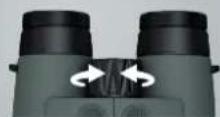
Image focusing

Adjusting the twist-up
eyecups
You can adjust the eyecups individually.
Leave eyecups in retracted position
If wearing eyeglasses
Basic optical device parameters
| Magnification | 8X |
| Optical lens diameter (mm) | 50 |
| Field of view (°) | 6.3 |
| Field of view (m/1000 m) | 110 (334 ft/1000 yds) |
| Eye relief (mm) | 17 (0.67 in) |
| Close focus (m) | 4 (4.4 yds) |
| Exit pupil diameter (mm) | 6.3 (0.25 in) |
| Dioptic compensation | -4D/+3D |
| Transmission (%) | 8S |
| Distance between pupils (mm) | 58 - 74 |
| Height (mm) | 170 (6.69 in) |
| Width (mm) | 159 (5.47 in) |
| Depth (mm) | 67 (2.64 in) |
| Weight (g) | 1125 (39.7 oz) |
| Distance measurement (in) | 14 + 2740 (15-3000 yds) |
| Batteries | 1XCR2 LI-ION 3V |
| Distance measurement precision to 1000m (m) | +/-1 |
| Inclination (°) | 1 / 40 |
| Distance measurement precision beyond 1000m (m) | 1 / 2 |
| Laser | Class 1 |
MeoPro Optika LR 10x42 HDMeoPro Optika LR 8x50 HD
| Magnification | 10X |
| Optical lens diameter (mm) | 42 |
| Field of view (°) | 6,2 |
| Field of view (m/1000 m) | 108 (330 ft/1000 yds) |
| Eye relief (mm) | 17 (0.67 in) |
| Close focus (m) | 4 (4.4 yds) |
| Exit pupil diameter (mm) | 4.2 (0.165 in) |
| Dioptic compensation | -4D/+3D |
| Transmission (%) | 85 |
| Distance between pupils (mm) | 54 + 76 |
| Height (mm) | 150 (5.91 in) |
| Width (mm) | 140 (5.51 in) |
| Depth (mm) | 70 (2.76 in) |
| Weight (g) | 950 (33.5 oz) |
| Distance measurement (m) | 12 - 2380 (12-2500 yds) |
| Batteries | 1XCR2 LI-ION 3V |
| Distance measurement precision to 1000m (m) | +/-1 |
| Inclination (°) | 1 / 40 |
| Distance measurement precision beyond 1000m (m) | 1 / 2 |
| Laser | Class 1 |
MeoPro Optika LR — Operation
EN
The device can measure and display the direct distance of the measured target and data indicating the incline (the angle between the binocular axis and the horizontal).

After a measurement is done, the display shows values that stay there until automatic shut-off (about 10 seconds) or until the next measurement. The display's brightness can be adjusted in the menu to ambient conditions.
Measurement
Briefly pressing the main button (2) turns the device on. Pressing the main button (2) again measures the distance and shows it on the display.
The distance can be measured in two ways:
- Briefly pressing the main button (2)
This method is good for simple terrain, where the device can be aimed directly at the chosen target.
- Pressing and holding the main button (2)
This method is good for complex terrain, where it is not fully clear which target's distance the device has aimed at. One of three modes can be chosen: Auto, Near Ranging and Far Ranging (see Device settings).
Device settings
Pressing and holding the menu button (4) (for about 2 seconds) puts the device into display settings mode. Pressing the button (4) repeatedly moves between the individual menu selections.
1. Choosing the measurement method
Three icons glow on the display, an 'Auto' sign, a flag (Near Ranging) and a deer (Far Ranging), and the currently chosen method flashes.
Auto — During measurement, the distance of the target within the aiming ring appears, and it changes according to how the target moves or which target is currently in the aiming mark.

Near Ranging – During measurement, the distance of the nearest target within the aiming ring appears and changes when a more distant target is aimed at.
Far Ranging - During measurement, the distance of the farthest target within the aiming ring appears and changes when a closer target is aimed at.
Pressing the main button (2) allows choosing the measurement method (the current method flashes). Pressing the menu button (4) saves the selected method and shows the next selection menu.
2. Distance measurement units
The display shows M (metres) and Y (yards) — the currently set unit flashes. Pressing the main button (2) allows choosing the unit setting (the selected unit flashes). Pressing the menu button (4) saves the selected unit and shows the next selection menu.

3. Incline data selection
The display shows <, V, H and OFF — the current setting flashes.

EN
< shows the angle in degrees.
V shows the height difference of the target in the units chosen in selection 2.
H shows the horizontal distance in the units chosen in selection 2.
OFF means the display is shut off, and after a measurement is done only the direct distance will remain on the display until automatic shut-off (about 10 seconds) or until the next measurement.
Pressing the main button (2) allows choosing the incline data (the current data flash). Pressing the menu button (4) saves the selected data and shows the next selection menu.
4. Display brightness
The display lights up the sign b1 R2 and flashes.
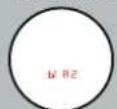
Pressing the main button (2) allows choosing the display brightness from 1-5 (bl R1 to bl R5). Pressing the menu button (4) saves the selected brightness and returns to measurement mode.
Low battery indicator
When the battery voltage drops below 1.5V, the display lights up the battery icon.

Replacing the battery
The MeoPro Optika LR 10×42 HD / MeoPro Optika LR 8×50 HD runs on a type CR2 3V battery.
Battery replacement procedure:
- Unscrew the battery cover anti-clockwise using a coin or something similar
- Insert the battery with the positive pole first.
- Screw the battery cover back in clockwise.
Notes:
- Low temperatures may adversely affect battery performance. The binoculars should be held as close to the body as possible during cold weather.
- If the binoculars will not be used for an extended time, the battery should be removed.
- Batteries should be stored in a cool, dry place.
• The battery has enough power for about 1,500 measurements at 20°C.
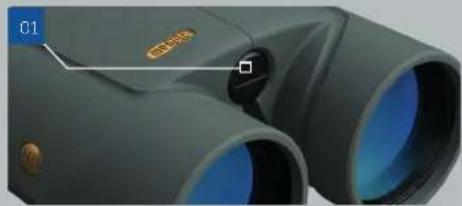
01 battery lid for MeoPro Optika LR 8x50 HD
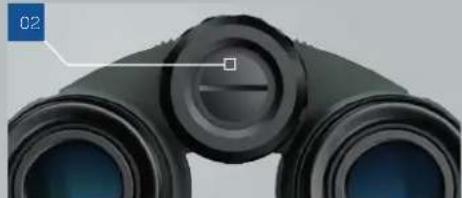
02 battery lid for MeoPro Optika LR 10x42 HD
Table showing different effects of measuring environment and object measurement
| The rangefinder reach is about 2.380 / 2.740 m under ideal conditions. This 2.380 / 2.740 m maximum reach is specified for a light-coloured, adequately large target under optimal atmospheric conditions and with a stable binocular support.The following table summarizes the known effects on rangefinder reach. |
HIGHER REACH LOWER REACH
| Object colour | white dark | |
| Object angle | vertical plane oblique plane | |
| Size of the object in relation to the sighting ring diameter | large small | |
| Object's texture | homogeneous (wall, billboard) | non-homogeneous (shrub, fence) |
| Atmospheric conditions (visibility) | good visibility fog, rain, snow, haze | |
| Sunshine | overcast clear, air turbulence |
Troubleshooting
CAUSE SOLUTIONPROBLEM OR INDICATED ERROR
| Circular image is not visible. | 1. Eye pupil is not aligned with the exit pupil of the binoculars.2. Distance between eyes is not properly adjusted.3. Eyecup not set properly. | 1. Place your eye at the centre of the eyecup.2. Adjust the distance between eyes to the individual user.3. Adjust the eyecup height to the individual user. |
| Display image is not sharp. | The eyepieces aren't focused. Slide out the eyecups. | |
| "--" symbol appears instead of measurement result. | Object is too close. | For measurement, select an object at least 10 m away |
| "----" symbol appears instead of measurement result. | 1. The object is further away than the maximum measurable distance.2. Measurement into the sky.3. Measurement under impaired conditions (fog, rain, etc.). | Choose a better object for the measurement. |
| Along with the measurement result, the display shows the dead battery icon. | Battery is almost dead. Change the battery. | |
| Animal distance measurement is doesn't work, no icon appears. | Dead battery. Change the battery. | |
| Unexpected data is displayed when measuring distant targets. | 1. Small angular size of object.2. Inaccurate focusing caused by shaky hands. | 1. Object must be in the middle of the aiming ring.2. Choose a better object for the measurement.3. Use support, e.g. tripod. |
Maintenance and cleaning
Important!
- Protect the binocular from falls and hard impact
- Clean the glass only as recommended
- Protect the optical surfaces with the caps
Meopta binoculars feature a robust dust-proof, water-proof design but, like any other optical-mechanical device, they require careful handling and protection of the optical surfaces against damage. When the binocular is not being used, its outer optical surfaces should be protected with the supplied covers. Dust deposits on the mechanical parts of the binocular should be removed with a soft cloth. Dust on the optical parts should be blown off or wiped off gently with an anti-static cloth supplied with the binocular. After using the binocular in rain, we recommend thorough drying with a soft cloth. Make sure to store the binocular in a dry, ventilated area. For storage in humid or tropical conditions we recommend placing the binocular in a case along with a moisture absorbing agent such as silica gel.
Optical cleaning kit
To keep your optical device in optimal condition, we recommend that a special Meopta cleaning kit be purchased; 2-in-1 brush, optical cloth, squeeze blower, cleaning fluid.
In the event of a complaint or defect, contact your dealer or the manufacturer directly — Meopta - opuka, s.r.o. For our product information, news and dealers visit www.meoptasportsoptics.com Thank you for your trust in the Meopta brand.

Accessories
THE PACKAGE INCLUDES:
| 01 | MeoPro Optika LR 10x42 HD / MeoPro Optika LR 8x50 HD binoculars 1 unit |
| 02 | Carrying bag with strap 1 unit |
| 03 | Caps for eyepieces and lenses 1 unit. |
| 04 | Optical wipe 1 unit |
| 05 | Cardboard box, user manual, warranty certificate, battery 1 unit. |
MeoPro Optika LR 10x42 HD / MeoPro Optika LR 8x50 HD
Important!
Instructions for disposing of the product at the end of its useful life.
Batteries
Never discard batteries with ordinary waste. By law, you must return the used batteries to the previously specified location. They may be disposed of free of charge near your home (such as in stores or at a recycling centre). Batteries are marked with a symbol of a crossed-out wheel bin, along with chemical symbols indicating dangerous substances contained in batteries: 'Cd' for cadmium, 'Hg' for mercury and 'Pb' for lead.
Conformity
The products conform to European Union directives 2004/108/EU and 2012/19/EU.
Product
At the end of its useful life, the product must not be disposed of with household waste. By law, these products must be disposed of separately from ordinary waste. They may be disposed of free of charge near your home (such as thrown into an electrical waste container or handed over to a recycling centre).


- THANK YOU FOR YOUR TRUST IN THE MEOPTA BRAND
- MEOPRO OPTIKA LR
- DESCRIPTION OF OPTICAL DEVICE
- MEOPRO OPTIKA LR — OPERATION
- MEASUREMENT
- DEVICE SETTINGS
- CHOOSING THE MEASUREMENT METHOD
- DISTANCE MEASUREMENT UNITS
- INCLINE DATA SELECTION
- DISPLAY BRIGHTNESS
- REPLACING THE BATTERY
- BATTERY REPLACEMENT PROCEDURE
- NOTES
- TROUBLESHOOTING
- MAINTENANCE AND CLEANING
- IMPORTANT
- OPTICAL CLEANING KIT
- ACCESSORIES
- MEOPRO OPTIKA LR 10X42 HD / MEOPRO OPTIKA LR 8X50 HD
- BATTERIES
- CONFORMITY
- PRODUCT
Brand : Meopta
Model : MeoPro Optika LR 10x42 HD
Category : Laser pointer