
Master Pro - Loudspeaker Xblitz - Free user manual and instructions
Find the device manual for free Master Pro Xblitz in PDF.


| Product Type | Wireless Bluetooth Speaker |
| Brand | Xblitz |
| Model | Master Pro |
| Dimensions | 8.5 cm (diameter) x 12 cm (height) |
| Weight | 500 g |
| Power Output | 5 W x 2 (10 W total) |
| Battery Capacity | 1800 mAh / 3.7 V |
| Charging Time | Approximately 4 hours |
| Operating Time | Up to 4 hours |
| Bluetooth Version | 5.0 |
| Bluetooth Range | Up to 10 m (33 ft) |
| Frequency Response | 120 Hz – 20 kHz |
| Signal-to-Noise Ratio (SNR) | ≥ 90 dB |
| Audio File Support | MP3 (USB flash drive or microSD card up to 32 GB) |
| Input Voltage | 5 V / 1000 mA (micro USB) |
| Ports | USB-A, micro USB, microSD card slot, AUX (3.5 mm) |
| FM Tuner | Yes (87.5 – 108 MHz) |
| LED Backlighting | Yes, multiple modes (toggle with LIGHT button) |
| Built-in Microphone | Yes (for hands-free calls) |
| Maintenance | Clean with a dry cloth; do not use abrasive or caustic cleaners |
| Safety Precautions | Do not immerse in water; keep away from heat sources and moisture; do not block ventilation |
| Spare Parts & Reparability | No user-serviceable parts; contact service department for repairs |
| Warranty | 24 months (conditions at https://xblitz.pl/gwarancja/) |
| Compliance | CE (Directive 2014/53/EU) |
Frequently Asked Questions - Master Pro Xblitz
User questions about Master Pro Xblitz
0 question about this device. Answer the ones you know or ask your own.
Ask a new question about this device
Download the instructions for your Loudspeaker in PDF format for free! Find your manual Master Pro - Xblitz and take your electronic device back in hand. On this page are published all the documents necessary for the use of your device. Master Pro by Xblitz.
USER MANUAL Master Pro Xblitz
natural_image
Black cylindrical device with blue neon light and control buttons, no visible text or symbols on body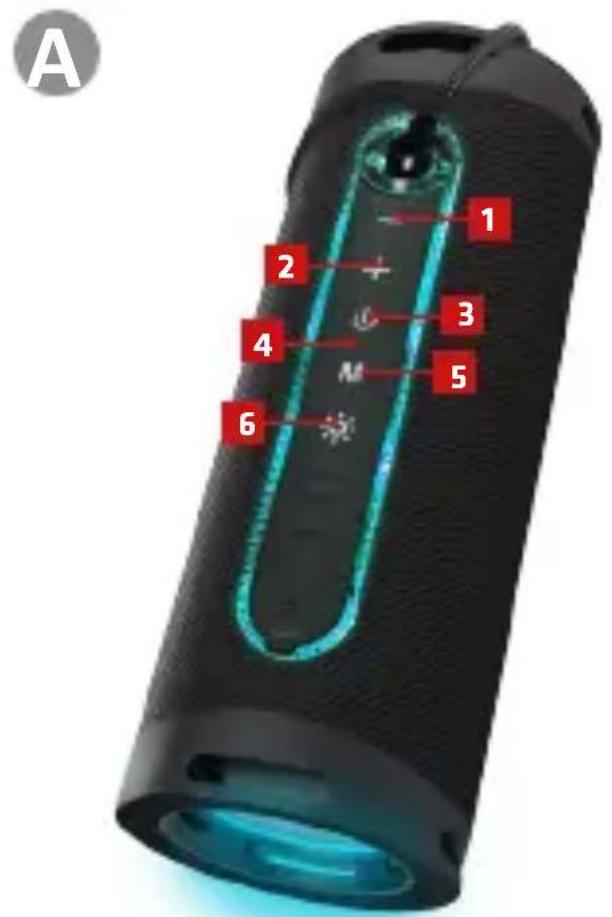
INSTRUKCJA OBSŁUGI
Szanowny Kliencie,
Thank you for purchasing the XBLITZ MASTER PRO speaker. The device is a wireless speaker that connects to your phone or other mobile device using Bluetooth technology and support the mass storage files playback. Please read the instructions carefully before using the device.
01. CONTENTS OF THE KIT
- Xblitz Master Pro speaker
- USB cable
- AUX cable
- User manual
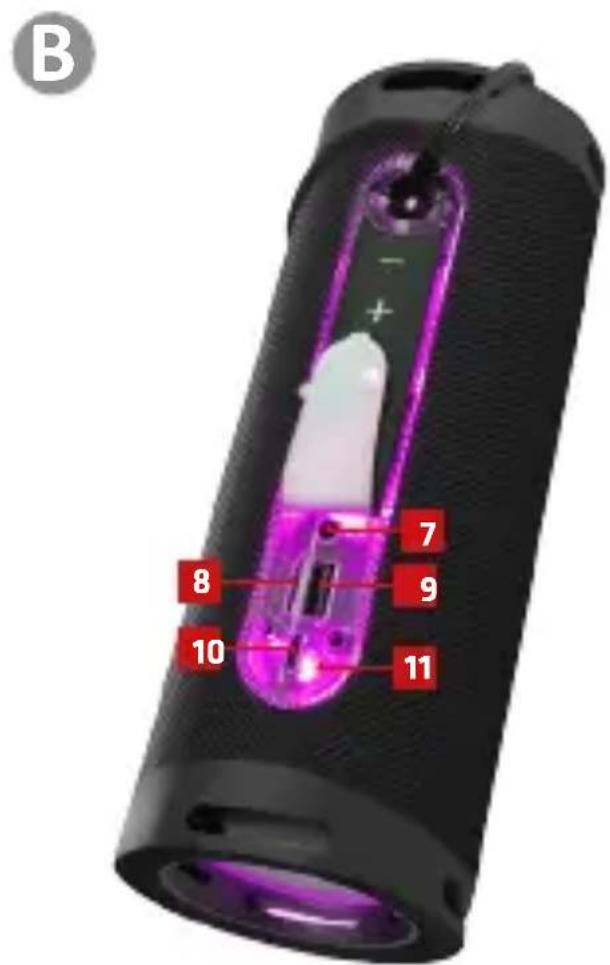
02. PRODUCT DESCRIPTION SEE ILLUSTRATION A, B
-
- button
-
- button
- POWER button
- Microphone
- MODE button
- LED button (LED backlight adjustment)
- AUX socket
- Micro-SD card slot
- USB flash drive socket
- Micro-USB socket (device charging)
- LED Backlighting
03. CHARGING THE DEVICE
To recharge the device, connect it to the charge using the USB cable. The time required to fully charge the battery is approximately 2h. When the device's battery is about to deplet, the speaker will start beeping.
04. DESCRIPTION OF THE MODES
1. BT mode
When the device is switched on, BT mode, which is the default mode of ope-
ration, will automatically turn on. The speaker will confirm the activation of BT mode with a sound notification and message on the display. Before first use, pair the speaker with the selected device by activating BT connection on the latter and select XBLITZ MASTER PRO from the list. Successful connection will be confirmed by a sound notification from the speaker.
To switch to the next track, briefly press the + button. To switch to the previous song, briefly press the - button. To increase or decrease the volume, hold down the + button or the - button respectively. Briefly press the M button to switch the unit to FM mode.
During a phone call, the speaker will read out the caller's phone number, then start beeping the incoming call. Briefly press the POWER button to answer the call or hold the same button to reject the call.
2. FM mode
To enter FM mode, briefly press the M button. For automatic programming of radio stations, press the POWER button. The unit will scan the frequencies in the broadcast band 87.5 - 108 MHz and will store radio stations in scanning order. These will be stored in the speaker's memory. To switch between the preset radio stations, briefly press the + or - button. Increasing and decreasing the volume is analogous to BT mode - by holding down the + or - buttons.
Note: To improve the quality of radio signal, it is recommended to plug the supplied USB cable into the micro-USB port on the device.
3. AUX mode
Connect the speaker to another device using the AUX line. The device will automatically switch to AUX mode. To switch the speaker to another mode, use the MODE button or remove the AUX cable (the speaker will then return to the default BT mode).
4. Playback from external storage media
The device plays .mp3 files from external storage media - USB flash drives and micro-SD cards. To switch to .mp3 playback simply insert the selected storage media into the corresponding slot on the speaker. To switch between tracks, briefly press the + or - buttons. A short press on the POWER button stops playback from the mass storage.
Note: to avoid the possibility of damaging the mass storage, it is recommended to plug and unplug it when the device is switched off.
5. LED Backlighting
The device has several LED backlight modes. To switch between the modes,
briefly press the LIGHT buton. To switch off the LED backlight, hold down the button.
05. PRECAUTIONS
- Do not immerse the device or any of its parts in water. Do not use the device near water.
- Do not expose the device to intense sunlight and do not use it in hot, humid or dusty conditions.
- Do not block the ventilation openings of the unit.
- Do not store the device in areas with high temperatures and humidity. Keep the device away from heating sources.
- Use only accessories approved by the manufacturer.
- Do not use the device if it has become wet or mechanically damaged. In such cases, contact the service department.
- Never use caustic or abrasive cleaning substances for maintenance.
- Clean the unit with a dry cloth.
06. TECHNICAL SPECIFICATIONS
BT version: 5.0 | BT range: up to 10 m | Power: 5 W x 2 | Frequency response: 120 Hz - 20 kHz | SNR: ≥ 90 dB | Battery: 1800 mAh/ 3.7 V | Maximum capacity of supported micro-SD card: 32 GB | Supported audio file format: .mp3 | Charging time: up to 4h | Operating time: up to 4h | Input voltage: 5V/ 1000 mA | Ports: USB, micro USB, micro SD | FM tuner: yes | Variable backlighting modes: yes | Built-in microphone: yes | Weight: 500 g | Dimensions: 8,5 x 12 cm
07. WARRANTY/COMPLAINT CARD
The product comes with a 24-month warranty. Warranty conditions can be found at: https://xblitz.pl/gwarancja/
Complaints should be made using the complaint form found at:
Details, contact and service address can be found at: www.xblitz.pl.
Specifications and contents are subject to change without notice. We apologise for any inconvenience.
KGK Trade declares that the XBLITZ MASTER PRO device complies with the essential requirements of Directive 2014/53/EU. The text of the declaration can be found at the following link: https://xblitz.pl/download/DOC/deklaracja-UE-Xblitz-Master_Pro.pdf
BEDIENUNGSANLEITUNG
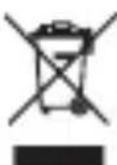
The crossed out trash can symbol indicates that unusable electrical or electronic devices, its accessories (such as power supplies, cords) or components (for example batteries, if included) cannot be disposed of alongside with household waste. In order to dispose of the devices or its components (for example, batteries) deliver the device to the collection point, where it will be accepted free of Disposal is subject to the recast version of the WEEE Directive (19/ EU) and the Directive on batteries and accumulators (2006/66 / oper disposal of the device prevents degradation of the natural ment. Information about the collection points of the facilities is by the competent local authorities. Incorrect disposal of waste is to penalties provided for by the law in force in the given area.
DE
- INSTRUKCJA OBSŁUGI
- Szanowny Kliencie,
- CONTENTS OF THE KIT
- PRODUCT DESCRIPTION SEE ILLUSTRATION A, B
- CHARGING THE DEVICE
- DESCRIPTION OF THE MODES
- BT mode
- FM mode
- AUX mode
- Playback from external storage media
- LED Backlighting
- PRECAUTIONS
- TECHNICAL SPECIFICATIONS
- WARRANTY/COMPLAINT CARD
- BEDIENUNGSANLEITUNG
- DE
Brand : Xblitz
Model : Master Pro
Category : Loudspeaker