Trigon-6 - Uncategorized Dave Smith - Free user manual and instructions
Find the device manual for free Trigon-6 Dave Smith in PDF.


| Product Type | Analog Polyphonic Synthesizer |
| Brand | Dave Smith Instruments |
| Model | Trigon-6 |
| Number of Voices | 6 |
| Sound Engine | Analog with discrete VCOs, VCFs, VCAs |
| Keyboard | 61-note velocity-sensitive with aftertouch |
| Effects | Chorus, delay, reverb |
| Sequencer | 16-track step sequencer with 64 steps |
| Arpeggiator | Programmable arpeggiator with multiple modes |
| Connectivity | MIDI In/Out/Thru, USB, CV/Gate, Audio In/Out |
| Dimensions (W x D x H) | 33.5 x 13.5 x 4.5 inches |
| Weight | 18.5 lbs |
| Power Supply | External 9V DC power adapter (included) |
| Display | Backlit LCD with clear parameter readout |
| Presets | 500 factory and 500 user programs |
| Maintenance | Clean with a soft, dry cloth; avoid solvents |
| Safety | Do not expose to moisture or extreme temperatures |
| Spare Parts & Repairs | Contact Dave Smith Instruments or authorized service centers |
| General Information | Professional-grade synthesizer for studio and stage |
Frequently Asked Questions - Trigon-6 Dave Smith
User questions about Trigon-6 Dave Smith
0 question about this device. Answer the ones you know or ask your own.
Ask a new question about this device
Download the instructions for your Uncategorized in PDF format for free! Find your manual Trigon-6 - Dave Smith and take your electronic device back in hand. On this page are published all the documents necessary for the use of your device. Trigon-6 by Dave Smith.
USER MANUAL Trigon-6 Dave Smith
Dave Smith, Art Arellano, Gerry Bassermann, Gus Callahan, Fabien Cesari, Bob Coover, Carson Day, Sally Decker, David Gibbons, Chris Hector, Tony Karavidas, Mark Kono, Justin Labrecque, Andy Lambert, Karl Lee, Michelle Marshall, Andrew McGowan, Joanne McGowan, Julio Ortiz, Steve Starkweather, Brian Tester, Tracy Wadley, Gabby Wen, and Mark Wilcox
TRIGON-6 SOUND DESIGN
Gil Assayas, Rory Dow, Peter Dyer, Mike Hiegemann, Tim Koon, Kurt Kurasaki, Drew Neumann, Bob Oxley, Julian Pollack, Francis Preve, Lorenz Rhode, Robert Rich, Paul Schilling, Huston Singletary, Matia Simovich, James Terris, Mitch Thomas, Taiho Yamada
TRIGON-6
Operation Manual
Version 1.1
November, 2022
Sequential LLC
1527 Stockton Street, 3rd Floor
San Francisco, CA 94133
USA
2022 © Sequential LLC. All rights reserved
www.sequential.com
FC
Tested to Comply With FCC Standards FOR OFFICE USE
CE
This device complies with Part 15 of the FCC Rules. Operation is subject to the following two conditions: (1) This device may not cause harmful interference and (2) this device must accept any interference received, including interference that may cause undesired operation.
This Class A digital apparatus meets all requirements of the Canadian Interference-Causing Equipment Regulations.
For pluggable equipment, the socket-outlet must be installed near the equipment and must be easily accessible.
For Technical Support, email: support@sequential.com
Trigon-6 is a registered trademark of Sequential Synths Limited in the UK and other territories.
CALIFORNIA PROP 65 WARNING
This product may expose you to chemicals including BPA, which is known to the State of California to cause cancer and birth defects or other reproductive harm. Though independent laboratory testing has certified that our products are several orders of magnitude below safe limits, it is our responsibility to alert you to this fact and direct you to: https://www.p65warnings.ca.gov for more information.
Table of Contents
Getting Started....1
Sound Banks 2
Selecting Programs 2
Stepping Through Presets Using the Inc/Dec Buttons ..... 3
Editing Programs 3
How to Check a Parameter Setting in a Preset 4
Comparing an Edited Program to its Original State ..... 4
Creating a Program from Scratch....5
Live Panel Mode....5
Saving a Program....6
Canceling Save. 7
Using Poly Chain 8
Moving to the Next Level 9
Connections....10
Global Settings 12
Globals - Top Row 13
Oscillators 17
Oscillator Parameters....18
Volume 20
Feedback<>Drive....20
Noise....21
Filter 21
Filter Envelope....22
Amplifier Envelope 25
Effects....26
Main Parameters 29
Low Frequency Oscillator....32
Poly Mod. 34
Poly Mod Parameters....35
Arpeggiator 36
Arpeggiator Beat Sync 37
Arpeggiator Parameters 37
Sequencer 38
Programming the Sequencer 39
Correcting Notes When Recording a Sequence 40
MIDI Note Output from the Arpeggiator and Sequencer....41
Sequencer Parameters.... 42
Clock....42
Master Volume/Program Volume 43
Distortion 44
Vintage 44
Pan Spread....44
Pgm Volume....44
P Whl Range 45
Key Mode ....45
Transpose....45
Hold. 46
Glide 46
Unison 47
Using Chord Memory 48
Write 49
Canceling Save....50
Comparing Before You Save 51
Globals 51
Preset 52
Pitch and Mod Wheels 53
Pitch Wheel....53
Modulation Wheel 54
Aftertouch 54
Exporting Programs and Banks....57
Calibrating the Trigon-6 58
How and When to Calibrate the Oscillators and Filters ..... 58
Calibrating the Pitch and Mod Wheels 59
Resetting the Global Parameters 59
Using USB 60
Support....61
Troubleshooting 61
Recovering from a Failed OS Udate....62
Contacting Technical Support....63
Warranty Repair 63
Appendix A: Alternative Tunings 65
Appendix B: MIDI Implementation....95
MIDI Messages....96
NRPN Messages 100
Control NRPN Data 104
Sysex Messages....104
Packed Data Format 107
Getting Started
The Trigon-6 is a six-voice, polyphonic analog synthesizer with discrete voltage-controlled oscillators and filters, and voltage-controlled amplifiers. It was designed to provide all of the warmth and presence of a vintage-era, ladder filter-equipped synth with the added convenience and stability of a state-of-the-art, modern instrument.
The Trigon-6 is first and foremost a performance instrument. All of its sound-shaping controls are immediately accessible on its front panel, packing a tremendous amount of power and versatility into a compact, easy-to-use format.
You can find in-depth information about each of the Trigon-6's parameters in later sections of this manual. But don't hesitate to dive right in and start turning knobs and pressing buttons before you begin reading. You can always get back to where you started, even if you have no idea what you're doing. So start exploring and keep your ears and mind open!

Trigon-6 front panel
Sound Banks
The Trigon-6 contains a total of 1000 programs. 500 are permanent and 500 can be overwritten. Banks 0-4 are User Banks that can be overwritten. Banks 5-9 are Factory Banks that are permanent. You can edit the programs of either bank, but you can only save them to Banks 0-4. As shipped from the factory, presets 000-499 are identical to 500-999.

Program bank, tens, and number selectors
Selecting Programs
Use the BANK, TENS, and PROGRAM SELECTOR buttons to select and recall programs.
To choose a program:
- Hold down the BANK button then press a PROGRAM SELECTOR button (0-9) to specify the "hundreds" bank of the program.
- Hold down the TENS button then press a PROGRAM SELECTOR button (0-9) to specify the "tens" digit of the program.
- Press a PROGRAM SELECTOR button (0-9) to specify the "ones" digit of the program.
To choose program 123, for example:
- Hold BANK and press 1. Then release the BANK button.
- Hold TENS and press 2. Then release the TENS button.
- Press PROGRAM SELECTOR button 3.
It's not always necessary to enter all 3 digits of a program number to recall it.
For example:
- If the current program is 100 and you want to recall program 101, simply press “1.”
- If the current program is 100 and you want to recall program 110, hold down the TENS button and press “1.”
- If the current program is 100 and you want to recall program 115, hold down the TENS button and press “1.” Then release the TENS button and press “5.”

Pressing the GLOBALS button three times in a row saves the current program as the default program that appears when you turn on the Trigon-6.
Stepping Through Presets Using the Inc/Dec Buttons
Instead of having to manually enter the Banks, Tens, and Ones digits to recall a preset, you can also use the Increment/Decrement buttons to step through programs sequentially, one by one.
To do this:
-
Hold BANK SELECT/DEC and press TENS SELECT/INC to increment by a single program.
-
Hold TENS SELECT/INC and press BANK SELECT/DEC to decrement by a single program.
Editing Programs
Because all of the sound-shaping controls of the Trigon-6 appear on its front panel, editing an existing program is simple: just turn a knob and listen to its effect. Keep turning knobs and pressing buttons and if you like what you've created, save the program. (See “” on page 5.)

The rotary controls on the front panel are a mixture of "endless" rotary encoders and potentiometers or "pots." You can choose between three different modes that determine how the synth reacts when parameters are edited with a pot. For details, see "Pot Mode" on page 15.
How to Check a Parameter Setting in a Preset
When you're editing a preset, the Trigon-6 has a convenient way of indicating the programmed (saved) value for any knob parameter: Whenever you turn a knob and reach the saved value of a given parameter, an LED dot in the main Trigon-6 display will illuminate.
This dot illuminates

BANKPROGRAM
The dot illuminates when a knob position matches a preset's saved parameter value
Comparing an Edited Program to its Original State
When editing a program, it's often useful to compare its edited state to its original state to evaluate your edits. Alternatively, before saving a program to a new location you may want to check the program in the target location before you overwrite it.
To compare an edited program to a saved version:
- Edit a program.
- Press the WRITE button. It starts flashing.
- Press the GLOBAL button. Both LEDs on the button light up, indicating COMPARE mode.
- Play the keyboard to hear the saved version of the sound.
- To disable the compare function and return to the edited sound, turn off the GLOBAL button. Programs can't be written while in compare mode.
- If you want to save the edited sound, the WRITE button is still flashing and ready to save, so enter a location with the PROGRAM SELECTOR buttons. The sound is saved.
- Alternatively, if you want to cancel saving and continue editing, press the WRITE button. It stops flashing and saving is canceled.
Creating a Program from Scratch
An existing program can be very useful as a jumping off point for new sounds. But it’s also useful (and educational) to create a new sound from scratch. The Trigon-6 makes this easy by providing a “Basic Preset” that you can quickly recall at any time. This preset is very simple, with a single oscillator as its basis.
To recall the Basic Preset:
- Hold down the PRESET button.
- Press the WRITE button.
Live Panel Mode
The Trigon-6 also features a “live panel” mode in which its sound switches to the current settings of its knobs and switches. In other words, the current preset is ignored and what you see on the front panel is what you hear. This is a great mode for learning, experimentation, and instant gratification.
To enter live panel mode:
- Press the PRESET button to toggle it off. Note that you can't change programs or banks with Preset off.
To return to preset mode:
- Press the PRESET button again to toggle it on.

PRESET
Toggling off the PRESET button enables "live panel" mode
Saving a Program
If you've created a sound that you like, you'll probably want to save it. Saving a program overwrites a previously saved program. Sound designers often save many incremental versions of a program as they continue to refine it. These intermediate versions often make good jumping off points for new sounds.
To save a program to the same preset location:
- Press the WRITE button. Its LED begins blinking.
- Press a PROGRAM SELECTOR button (0-9) to specify the “ones” digit of the program.
- The WRITE button LED stops blinking and the program is saved.

Be careful when WRITE is enabled. You can change banks and tens without ting WRITE, but once you press a PROGRAM SELECTOR button (0-9) for the “ones” he WRITE command is executed and the program at that location is overwritten.
To save a program to a different bank location:
- Press the WRITE button. Its LED begins blinking.
- Hold down the BANK button then press a PROGRAM SELECTOR button to specify the "hundreds" bank of the program. You can only save to Banks 0-4.
- Hold down the TENS button then press a PROGRAM SELECTOR button (0-9) to specify the "tens" digit of the program.
- Press a PROGRAM SELECTOR button (0-9) to specify the "ones" digit of the program.
- The WRITE button LED stops blinking and the program is saved.
Canceling Save
Sometimes you may want to cancel saving a program before you commit.
To cancel the Save process before you commit:
- If the WRITE button LED is flashing, press it again. The LED stops flashing and saving is canceled. You can return to editing if you want.
Comparing Before You Save
Before saving a program to a new location, it's a good idea to listen to the program in the target location to make sure you really want to overwrite it.
To evaluate a program before you overwrite it:
- Get ready to save by pressing the WRITE button. It starts flashing.
- Press the GLOBAL button. Both LEDs on the button light up, indicating COMPARE mode.
- Use the program buttons to navigate to the sound you want to compare and play the keyboard to hear the sound.
- To disable the compare function and go back to the edited sound, turn off the GLOBAL button. Programs can't be written while in compare mode.
- If you want to save the edited sound, the WRITE button is still flashing and ready to save, so enter a location with the program buttons. The sound is saved.
- Alternatively, if you want to cancel saving and continue editing, press the WRITE button. It stops flashing and saving is canceled.
Using Poly Chain
If you have two Trigon-6 synthesizers you can link them together with MIDI to increase the total available polyphony to 12 voices. We call this poly chaining. If you have a Trigon-6 keyboard and a Trigon-6 module, you will most likely use the keyboard as the master and the module as the slave.
To poly chain two Trigon-6 synths:
- With a MIDI cable, connect the rear-panel MIDI OUT of the first Trigon-6 (the master) to the MIDI IN of the second Trigon-6 (the slave).
- On the master Trigon-6, press the GLOBALS button then press program selector button 9 (MIDI OUT).
- Use the BANK/DECREMENT and TENS/INCREMENT to select PLY (poly).
- Press the GLOBALS button twice to exit GLOBALS mode.
The two synths are now poly chained. You can now play up to twelve notes simultaneously. Another advantage of this arrangement is that notes with long release times are less likely to be cut off as you play additional notes.
Moving to the Next Level
The Trigon-6 is filled with possibilities for sound creation. Although we realize that you'd rather spend your time exploring its capabilities, we'd like to point you toward a few things that will help you tailor the instrument to your needs.
First, check out the Global Settings section of this manual. Read about Pot Modes and determine which works best for you when you're editing sounds. You'll also find information about MIDI setup. Read this to more effectively integrate the Trigon-6 into your MIDI rig. To get the most out of the Trigon-6's live performance capabilities, read up on using a footswitch or expression pedal.
And finally, be on the lookout for tips and notes scattered throughout this manual to gain a better working knowledge of the Trigon-6. The better you know your instrument, the more you'll get out of it. We wish you many hours of musical exploration!
Connections
SEQUENTIAL
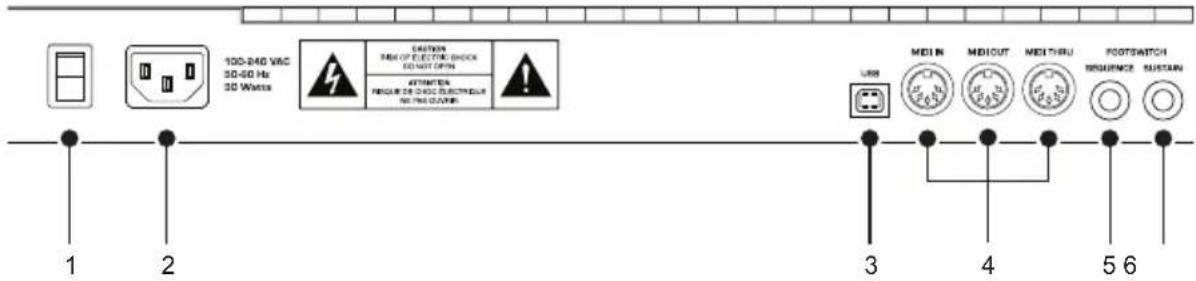
- On/Off Switch—Turns the synth on and off.
- AC Power Connector—Accepts a standard, grounded IEC power cord. Operates over a range of 100 to 240 volts and 50 to 60 Hz.
- USB Connector—For bidirectional MIDI communication with a computer. The Trigon-6 is a Class Compliant USB device and does not require additional drivers when used with Mac OS or Windows. See “Using USB” on page 60 for more information.
4.MIDI In, Out, and Thru—Standard 5-pin MIDI DIN connectors.
-
Footswitch-Sequence—Accepts a momentary, normally open or normally closed footswitch to turn the sequencer or arpeggiator on and off. Alternatively, an audio signal connected to this jack can be used to either control sequencer/arpeggiator playback, or to gate the filter and amplifier envelopes while notes are held. See “Seq Jack” on page 15 for more information about choosing the appropriate mode for these behaviors.
-
Footswitch-Sustain—Accepts a momentary, normally open or normally closed footswitch to control sustain. See “3. Sustain +/- : Nor, Rev, n-r, r-n (Normally Open, Normally Closed, Sustain Normally Open/Sequencer Normally Closed, Sustain Normally Closed/Sequencer Normally Open)—The Sustain pedal polarity parameter affects both the sustain pedal and sequencer jack input ports. There are two types of momentary footswitches, normally open and normally closed. Either type can be used with the Trigon-6. Not sure which type you have? If
TRIGON-6

the behavior of the footswitch is the opposite of what is expected — that is, down is off and up is on — changing this setting will correct that.” on page 16 for more information.
-
Expression Pedal-Volume—Accepts a standard expression pedal that has a variable resistor on a TRS (tip-ring-sleeve) 1/4 inch phone plug. Once connected, you can use the pedal to control volume to add expressiveness and dynamics to live performance.
-
Expression Pedal-LP Filter—Accepts a standard expression pedal that has a variable resistor on a TRS (tip-ring-sleeve) 1/4 inch phone plug. Once connected, you can use the pedal to control the cutoff frequency of the low-pass filter to add expressiveness to live performance.
-
Audio Outputs—Unbalanced, 1/4 inch audio outputs. The Trigon-6 sounds great in stereo, but can be switched to mono if needed. See “Mono/Stereo” in Global Settings on page 16.
-
Headphones—A 1/4 inch stereo headphone jack. Headphone volume is controlled by the MASTER VOL knob on the front panel.
Global Settings
Global settings are parameters that affect all programs. These include settings such as Master Tune, MIDI Channel, MIDI Clock, and others. Global parameters are printed above the numeric program selector switches (0 - 9). Use the Globals switch to choose between the two sets. The red LED indicates that the upper row is active. The yellow LED indicates that the lower row is active
GLOBALS
The Globals button

Transpose
Master Tune
MIDI Channel
MIDI Clock
Clock Port

Local Ctrl Seq Jack Pot Mode Sustain +/- Alt Tuning

0

1

2

3

4
Globals 0-4
Param Xmit
Param Rcv
MIDI Control
MIDI SysEx
MIDI Out
Vel Response AT Response Stereo/Mono Pgm Dump Beat Sync

56789


Globals 5-9
Decrement
BANK
Increment
TENS

Use the Bank and Tens buttons to scroll forward and backward, respectively, through parameter settings
To set a Global parameter:
- Press the GLOBALS button. Pressing it once activates the upper set of parameters. Pressing it a second time enables the lower set of parameters.
- Press the program selector button (0 - 9) that corresponds to the desired parameter. The parameters are printed above each switch.
- Use the BANK and TENS buttons as decrement and increment buttons to step through available settings.
- Once you've chosen the desired setting, press the GLOBALS button again to exit.
Globals - Top Row
-
Transpose: -12...12—Master Transpose control, 0 is centered. Steps in semitones up to one octave up (+12) or down (-12).
-
Master Tune: -50...50—Master Fine Tune control; 0 centered. Steps in cents as much as a quarter-tone up (+50) or down (-50).
- MIDI Channel: All, 1...16—Selects which MIDI channel to send and receive data, 1 to 16. ALL receives on all 16 channels.
- MIDI Clock: Sets the Trigon-6's ability to send and receive MIDI clock messages:
- Off: MIDI Clock is neither sent nor received
• Out: MIDI Clock is sent, but not received
• In Thru (i-0): MIDI Clock is received and passed to MIDI Out
- In, No Start/Stop (nSS): Receives MIDI Clock but does not respond to MIDI Start or Stop commands.

When set to IN or IN THRU, if no MIDI clock is present at the selected input, the arpeggiator and sequencer will not function.
-
Clock Port: MID, USB—Sets the ports, MIDI or USB, by which MIDI clock signals are received.
-
Param Xmit: Off, CC, NR, CAS, nAS—Changes to the values of front panel controls are transmitted via MIDI as Continuous Controllers (CC) or Non-registered Parameter Number (NR). Transmission of parameters can also be turned off. You could, for example, turn the filter CUTOFF frequency knob on the Trigon-6 and have it affect the cutoff frequency of another synthesizer. CAS allows the transmission of MIDI Out for the Arp/Sequencer in addition to Continuous Controllers. nAS allows the transmission of MIDI Out for Arp/Sequencer in addition to NRPNs. For a list of Trigon-6 CCs and NRPNs, see the online MIDI Implementation document.

NRPNs are the preferred method of parameter transmission, since they cover the complete range of all parameters, while CCs are limited to a range of 128.
-
Param Rcv: Off, CC, NR—Sets the method by which parameter changes are received via MIDI. As with transmission, NRPNs are the preferred method.
-
MIDI Control: Off, On—When On, the synth will respond to MIDI controllers, including Pitch Wheel, Mod Wheel, Pedal, Volume.
-
MIDI Sysex: MID, USB— When set to MIDI (MID) it will receive and transmit them using the MIDI ports/cables When set to USB it will receive and transmit them using the USB port/cable. MIDI SysEx messages are used when sending and receiving a variety of data including, programs, alternative tunings, system updates, and more.
-
MIDI Out: MID, USB, btH, PLY— Sets the port by which MIDI data will be transmitted (MIDI, USB, both MIDI and USB, polychain). Selecting the PLY/polychain option allows you to link two Trigon-6 synths to each other, to increase the total available polyphony to 12 voices.
Globals - Bottom Row
-
Local Control: Off, On—When on (the default), the keyboard and front panel controls directly affect the Trigon-6. When off, the controls are transmitted via MIDI but do not directly affect the “local” synth (that is, the Trigon-6). This is primarily useful for avoiding MIDI data loops that can occur with some external sequencers.
-
Seq Jack: NOR, Tri, Gat, T-g (Normal, Trigger, Gate, T-G)—Selects the mode for signals received on the rear-panel Sequencer jack.
-
With NORMAL selected, a footswitch will start sequencer playback.
- With TRIG selected, an audio signal connected to the SEQUENCER jack will step the sequencer when the sequencer's PLAY button is on.
- With GATE selected, an audio signal connected to the SEQUENCER jack will trigger and gate the envelopes while you hold a note or chord. Additionally, turning on the sequencer or arpeggiator will add sequencer or arpeggiator playback—but controlled by the Trigon-6's clock BPM and VALUE settings and not the audio trigger.
- With T-G (TRIGGER+GATE) selected, an audio signal connected to the SEQUENCER jack will trigger and gate the envelopes while you hold a note or chord. Additionally, pressing the sequencer's PLAY button will also add synchronized sequencer playback.

For best results when triggering the sequencer with an audio signal, use a loud signal with a sharp attack/decay and little or no sustain.
- Pot Mode: Rel, Pas, Jup (Relative, Passthru, Jump)—The rotary controls on the front panel are a mixture of “endless” rotary encoders and potentiometers or “pots.” The pots are identifiable by their lined knobs and the fact that they have about 300° of travel. There are three pot modes to determine how the synth reacts when the programmable parameters are edited. (Master volume is not programmable, so these modes don’t apply.)
In Relative mode, changes are relative to the stored setting. In Relative mode, the full value range is not available until either the minimum or maximum value and the respective lower or upper limit of the pot's travel is reached. For example, the RESONANCE parameter has an internal value range of 0 to 127. Let's say the physical position of the RESONANCE pot is the equivalent to a value of 100. If you switch to a program that has a stored Resonance setting of 63 and turn the pot all the way up, it will only go to 90. To get to the maximum value of 127, you first have to turn down until the value is at the other extreme and the pot is at the limit of its travel (in this case, 0 and fully counter-clockwise, respectively).
In Passthru mode, turning the pot has no effect until after the edited value equals the preset value (that is, until the edited value “passes through” the stored value).
Jump mode uses an absolute value based upon the position of the pot when edited: turn a pot and the value jumps immediately from the stored value to the edited value.
-
Sustain +/- : Nor, Rev, n-r, r-n (Normally Open, Normally Closed, Sustain Normally Open/Sequencer Normally Closed, Sustain Normally Closed/Sequencer Normally Open)—The Sustain pedal polarity parameter affects both the sustain pedal and sequencer jack input ports. There are two types of momentary footswitches, normally open and normally closed. Either type can be used with the Trigon-6. Not sure which type you have? If the behavior of the footswitch is the opposite of what is expected — that is, down is off and up is on — changing this setting will correct that.
-
Alt Tuning: Nor, 1...16 (Normal, 1...16)—Selects one of the Trigon-6's built-in tunings. Set to NORMAL, the tuning is standard, chromatic tuning. Choosing 1 through 16 selects an alternative, non-chromatic, non-Western scale that can be used to emulate ethnic instruments or in other creative ways.
See “Appendix A: Alternative Tunings” on page 59?> for a description of each tuning. Additional tunings can be imported into the Trigon-6 as a SysEx message. For more information, see Appendix A.
-
Vel Response: 0-7 (Curve 0, Curve 1, Curve 2, Curve 3, Curve 4, Curve 5, Curve 6, Curve 7)—Sets one of eight velocity curves to adjust the keyboard's velocity response to your playing style.
-
AT Response: 0-3 (Curve 0, Curve 1, Curve 2, Curve 3)—Sets one of four pressure curves to adjust the keyboard’s aftertouch response to your playing style.
-
Stereo/Mono: Ste, Mon (Stereo, Mono)—The Trigon-6 defaults to stereo operation. When set to Mono, this parameter defeats all pan settings and modulation, effectively making each of the outputs a mono output.
-
Pgm Dump: Prg, Ten, Ban, usr, All (Program, Tens, Bank, User Banks, All)—Transmits the current program, ten programs from the currently selected bank and tens location, the current bank, all user banks (0-4), or all banks (both user and factory) in SysEx format via the selected MIDI port. (See: “MIDI Sysex.”) Dumped programs will load back into the same bank and program location in memory when received by the Trigon-6 via MIDI.
-
Arp Beat Sync: Off, On---When set on, Arpeggiator note playback occurs only on the beat (relative to the current clock divide setting) regardless of when you press a key on the keyboard.
Oscillators
Oscillators provide the raw building blocks of the Trigon-6's sound by producing waveforms, each of which has its own inherent sound character based on its harmonic content. The Trigon-6 has three oscillators and a noise generator per voice. Level controls for each of these are located in the Oscillator section.
Oscillators 1 and 2 are capable of generating triangle, sawtooth, and variable-width pulse waves. Oscillator 3 is capable of generating triangle, sawtooth, reverse sawtooth, and variable-width pulse waves. These waveshapes are selected by pressing the corresponding waveshape button. Multiple waveshapes can be selected simultaneously for each of the three oscillators.

The oscillators on the Trigon-6 are extremely stable. To emulate the pleasing instability of vintage instruments, use the VINTAGE parameter to dial in as little or as much voice-to-voice variation as you like.

Oscillators
Oscillator 2 can be hard-synced to Oscillator 1 for complex, harmonically-rich sounds when modulated.
Oscillators 2 and 3 feature a fine PITCH knob for detuning and thickening sounds. Oscillator 3's OCTAVE control features a LO setting that allows it to function as an LFO for modulation purposes, and a KEYBOARD switch that disables keyboard control over its pitch (useful when used as an LFO, or for drones and other effects).
Oscillator Parameters
Octave: Sets the base oscillator frequency of an oscillator over a 5-octave range from -2 to +2, while Oscillator 3 can be dropped to LFO frequency by setting this parameter to LO.

The global Master Tune settings affect the pitch of all oscillators. See “Globals -ow” on page 13 for more information.
Pitch: Fine tune control with a range of 7 semitones (a major 5th) up or down. The 12 o'clock position is centered. Steps are in cents (50 cents = 1/2 semitone). This can be used to set Oscillators 2 & 3 to different intervals from each other and from Oscillator 1.
Waveshape: Triangle, Sawtooth, (Reverse Sawtooth), Pulse—Used to select the waveshape generated by the oscillator. Multiple waveshapes can be set for each oscillator by pressing multiple Waveshapes buttons. This can allow for interesting harmonic-up effects by selecting both sawtooth and pulse, for example.
In the case of Oscillator 3 in LO mode, complex LFO waveforms can be created by selecting multiple Waveshapes. Note also that Oscillator 3 features an additional reverse sawtooth waveshape.
Pulse Width: Changes the width of the pulse wave from a square wave when the PULSE WIDTH knob is at center position, to a zero duty cycle pulse (off) at counter clockwise, and a narrow pulse when the PULSE WIDTH knob is fully clockwise.

Applying pulse width modulation using POLY MOD or the LOW FREQUENCY OSCILLATOR is a great way to add movement and thickness to a sound, especially when creating pad or string-like sounds.
Sync Osc 2: Off, On—Turns Oscillator 2 hard sync on. SYNC forces Oscillator 2 to restart its cycle every time Oscillator 1 starts a cycle. This provides a way to create more complex, harmonically rich shapes from simple waveforms—especially when the frequency of Oscillator 2 is set to a different interval than Oscillator 1.

Oscillator hard sync

Use Poly Mod to sweep the pitch of Oscillator 2 when it is synced to generate the classic, hard-edged sync sound.
Keyboard: Off, On—When off, Oscillator 3 ignores the keyboard and note data received via MIDI and plays at its base frequency setting. Oscillator 3 pitch can still be affected by modulation from other sources when in this mode.
Volume
Each oscillator features a volume control. This allows you to mix the levels of the three oscillators into the filter.

Rather than limit the Trigon-6's outputs to keep the instrument from clipping, we allow you to adjust levels at various points in its signal path. This gives you the option to "overload" things in interesting ways, if you wish to do so. If not, try reducing the levels of the oscillators using the VOLUME controls. VOLUME at 50% results in relatively clean signals into the filter.
Feedback<>Drive
The FDBK ⇔ DRIVE knob is bidirectional and controls two separate parameters.
When the knob is turned clockwise, DRIVE affects the amount of filter saturation by increasing the oscillators' overall output.
When turned counter-clockwise, FEEDBACK can introduce a range of tones from harmonic to chaotic by feeding the Trigon-6's voice card outputs back into the filter stage. This allows a feedback path for each voice.
Noise
Sets the output level of the white noise generator.
Filter
Filters take the basic, raw sound of the oscillators and noise generator and subtract frequencies, changing the harmonic content and character of their sound. This change can be varied over time using the Filter Envelope to produce more dynamic, animated timbres.
In simple terms, a lowpass filter cuts high frequencies. The Trigon-6's 2/4-pole switchable lowpass filter allows for a wide range of sonic possibilities, with a classic sound. Just like in historic 4-pole lowpass filter circuits, when RESONANCE is increased some bass is lost from the signal.
FILTER








The Filter section.
Cutoff: Sets the filter's cutoff frequency. A lowpass filter removes frequencies from high to low — cutting the high frequencies and passing the low, hence the name “lowpass.”
Resonance: Emphasizes a narrow band of frequencies around the cutoff frequency. High levels of resonance can cause the filter to self oscillate and generate its own pitch.
Env Amount: Sets the amount of modulation from the filter envelope to the filters. Higher amounts more dramatically affect the cutoff frequency. This control is bipolar. Positive settings produce standard behavior as described in “Filter Envelope” on page 22. Negative settings invert the envelope. Experiment with this control to create a variety of expressive filtering effects.
2-Pole: on, off—When enabled, sets the filter to two-pole mode. A 2-pole lowpass filter has a less steep cutoff slope, which allows more upper order oscillator harmonics to pass through the filter stage.
Keyboard: off, half, full—Sets the amount of modulation from the keyboard to the filter's cutoff frequency. Selecting HALF or FULL means that the higher the note played on the keyboard, the more the filter opens. This is useful for adding brightness to a sound as higher notes are played, which is typically how acoustic instruments behave. If both HALF and FULL are off, keyboard filter tracking is off, meaning that filter frequency is unaffected by playing higher or lower notes on the keyboard.

Setting KEYBOARD to FULL when the filter is self oscillating will cause the filter-generated pitch to follow the keyboard in tune (i.e. in semitones). Setting the KEYBOARD to HALF will cause the filter-generated pitch to follow the keyboard pitch in quarter tones.
Filter Envelope
The Trigon-6's lowpass filter is modulated by a dedicated four-stage envelope generator. The Filter Envelope is used to shape the harmonic characteristics of a synthesized sound over time by giving you filtering control over its attack, decay, sustain, and release stages.
This is one of the most important factors in designing a sound. Without an envelope, the filters would be completely static. They would stay open or closed by a fixed amount that wouldn't change over the duration of a sound. That's not very interesting to listen to and it's not how instruments behave in the real world.
In general, sounds produced by an instrument are brighter at their beginning (the attack stage) and grow mellower as they die out (the decay and release stages). In other words, their harmonic content changes over time. This is exactly what the filter envelope is designed to emulate.


Filter envelope

A typical 4-stage envelope
Attack: Sets the attack time of the envelope. The higher the setting, the slower the attack time and the the longer it takes for the filter to open from the level set with the filter CUTOFF knob to the level set by the filter envelope amount. Percussive sounds typically have sharp (short) attacks.
Decay: Sets the decay time of the envelope. After a sound reaches the filter frequency set at its attack stage, DECAY controls how quickly the filter then transitions to the cutoff frequency set with the SUSTAIN knob. The higher the setting, the longer the decay. Percussive sounds, such as synth bass, typically have shorter decays (and a generous amount of low-pass filter resonance).
Sustain: Sets the filter cutoff frequency for the sustained portion of the sound. The sound will stay at this filter frequency for as long as a note is held on the keyboard.
Release: Sets the release time of the envelope. This controls how quickly the filter closes after a note is released.

The description of envelope behavior above is true when the ENVELOPE AMOUNT parameter is set to a positive value. But since this control is actually bi-polar, it is possible to set a negative amount of modulation. In this case, the envelopes are inverted and their behavior changes. The best way to get a feel for the difference is to experiment with both positive and negative settings of the ENVELOPE AMOUNT parameter.

The cutoff frequency setting may limit the effect of the envelope on the filter. For example, if CUTOFF is at its highest setting, a positive envelope amount will have no effect on the filter since the filter is already completely open.
Velocity: Allows key velocity to influence filter cutoff frequency. If on, the harder you play, the more the filter will open and the brighter the sound will be. If off, key velocity will not affect the filter. This control allows for more touch-sensitive sounds.
Changing the Filter Envelope's Response Curve
By default, the envelopes of all synthesizers are designed to have certain type of response curve that is largely dependent on the preference of the designer. In most cases, this can't be changed. The current preference is that the faster or snappier the envelopes, the better.
However, in the case of the Trigon-6, there is a hidden feature in the Poly Mod section that allows you to modify the responsiveness of the Filter Envelope's ADSR controls. This opens up a new level of fine adjustment of these controls that is subtle but powerful. Try it and see.
To adjust the responsiveness of the filter envelope:
- Select a program — such as a synth brass sound — that has a slightly soft but bright attack.
- Repeatedly play a series of notes or chords on the keyboard, so you can hear the effect of the adjustments as you follow the steps below.
- In the Poly Mod section, enable FILTER as the only destination (disable all other Poly Mod destinations).
- In the Poly Mod section, turn the FILTER ENV control slightly counterclockwise. Try a setting of about 11 o'clock.
- Continue to play a series of chords and turn the ENV AMOUNT knob clockwise in the LOW-PASS FILTER section. Try moving it back and forth between 1 o'clock and 3 o'clock.
- As you do this, compare different settings of the Poly Mod FILTER ENV control, the Low-Pass Filter ENV AMOUNT, and different Attack, Decay, Sustain, and Release settings on the Filter Envelope.
The interaction of these controls is worth exploring for greater flexibility and control of the Filter Envelope.
Amplifier Envelope
After passing through the filters, a synthesized sound goes into an analog voltage controlled amplifier or VCA, which controls its overall loudness. The VCA has a dedicated four-stage envelope generator.
The Amplifier Envelope is used to shape the volume characteristics of a sound over time by giving you control over its attack, decay, sustain, and release stages. Along with the filter envelope, this is one of the most important factors in designing a sound.
Without a volume envelope, the loudness of a sound wouldn't change over the duration of a note. It would begin immediately, remain at its full volume for the duration of the note, then end immediately when the note was released. Again, that's not very interesting sonically and it's not typically how instruments behave in the real world.
To give you a real-world example, the main difference between the sound of the wind and the sound of a snare drum is that they have very different volume envelopes. Otherwise, they are essentially both white noise. Wind has a relatively slow attack, a long sustain, and a long decay and release. A snare drum has a sharp attack, no sustain, and virtually no decay or release. But again, they are both fundamentally white noise.

Amplifier envelope

A typical four-stage, ADSR envelope shape
Attack: Sets the attack time of the envelope. The higher the setting, the slower the attack time and the longer it takes for a sound to reach its full volume. Pads typically have softer (longer) attacks. Percussive sounds have sharper (shorter) attacks.
Decay: Sets the decay time of the envelope. After a sound reaches its full volume at its attack stage, DECAY controls how quickly the sound transitions to the level set with the SUSTAIN control. The higher the setting, the longer the decay. Percussive sounds, such as synth bass, typically have shorter decays.
Sustain: Sets the sustain level of the envelope. The higher the setting, the louder the sustained portion of the sound will be. The sound will stay at this level for as long as a note is held on the keyboard.
Release: Sets the release time of the envelope. This controls how quickly a sound dies out after a note is released.

To recreate the “gated VCA” effect used on certain classic rock anthems, choose an organ sound, then set the VCA ENV amount to zero, route the LFO square wave to AMP with an INITIAL AMT setting of 100% and hold a few chords.
Velocity: This button enables keyboard velocity to modulate the VCA Envelope Amount. The harder you play, the more the VCA envelope is affected. This makes for more touch-sensitive sounds.
Effects
The Trigon-6 EFFECTS section allows you to add up to two, 24-bit, 48 kHz digital effects to any sound. Though the Trigon-6 sounds great on its own, adding a touch of reverb or delay can enhance many sounds with a subtle (or not so subtle) sense of ambience and depth. Other effects such as the chorus and phaser are useful for adding more conspicuous tonal enhancement as well as emulating classic instruments such as string ensembles and so on.
The effects path is fully digital, even with only a single effect active. The ON/OFF switch enables and disables both Effect A and Effect B, using a true bypass, ensuring a pure analog signal path with effects off.
Effects settings are saved individually with each program. Time-based effects such as the Delays can be synchronized to the arpeggiator, sequencer, or MIDI clock to produce repeats that occur on the beat.
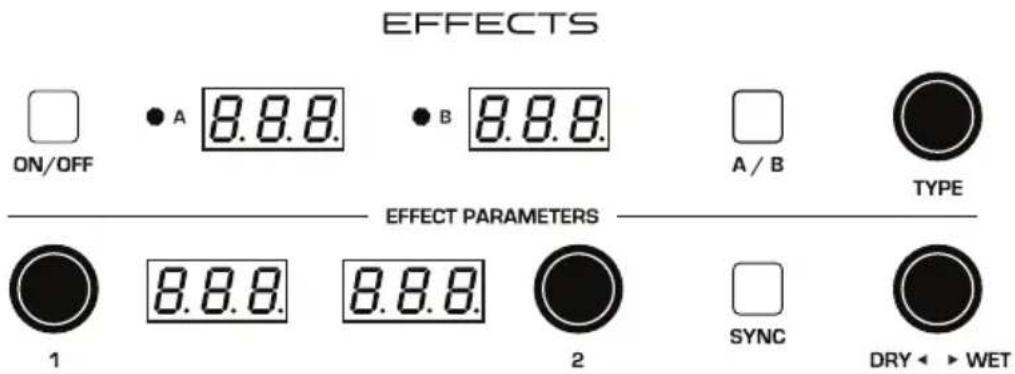
The Effects section
Effects are divided into sets A and B. You can choose a single effect from each set. Effect A and B are applied one after another, in series. For this reason, reverb effects are only available as Effect B, since it's the last stage in the serial effects chain — where reverb is traditionally applied. Either effect can also be set to “off.”
Effect A:
- “bbd” - vintage bucket-brigade emulation
- “ddl” - classic digital delay
- “CHO” - vintage chorus
- “PH1” - vintage 6-stage phaser, high resonance
- “PH2” - vintage 6-stage phaser, lower resonance
- “PH3” - emulation of Tom Oberheim’s original phaser design
- “rin” - ring modulator
- “FL1” - vintage flanger, high resonance
- “FL2” - vintage flanger, low resonance
Effect B:
- “bbd” - vintage bucket-brigade emulation
- “ddl” - classic digital delay
- “CHO” - vintage chorus
- “PH1” - vintage 6-stage phaser, high resonance
- “PH2” - vintage 6-stage phaser, lower resonance
- “PH3” - emulation of Tom Oberheim’s original phaser design
- “rin” - ring modulator
- “FL1” - vintage flanger, high resonance
- “FL2” - vintage flanger, low resonance
- “HAL” - classic hall emulation
- “rOO” - classic room emulation
- “PLA” - classic plate emulation
- “SPr” - vintage guitar-amp-style spring emulation
To use Effects:
- Press the ON/OFF switch to turn on Effects.
- Press EFFECT and choose A or B, depending on which you want to apply and configure.
- Turn the TYPE knob to select an effect. Names are abbreviated. For instance "bbd" is the bucket-brigade delay. Refer to the list above.
- Turn the DRY◇WET knob to the right to blend in a good amount of the processed signal. You'll want to be able to clearly hear the effect when you tweak its settings. You can dial it down afterward.
- Use the parameter 1 and parameter 2 knobs to adjust the effect's parameters to your taste. See "Main Parameters" on page 30 for details on the adjustable parameters on each effect type.
- Finally, adjust the MIX knob to optimize the amount of the effect. A value of 0 is completely dry, while a value of 127 is completely wet (a 100% processed signal).
- Repeat as needed to add a second effect.
Main Parameters
On/Off: Turns both effects, A and B, on and off. The ON/OFF switch uses a true bypass, ensuring a pure analog signal path.
Effect: A, B—Selects either effect A or B for editing. Once selected, all adjustments apply to that effect.
Type: Off, bbd, ddl, CHO, PH1, PH2, HAL, rOO, PLA, SPr—Selects the effect type.
Mix: 0...127—Sets the balance between the processed (wet) signal and unprocessed (dry) signal. 0 is completely dry, and 127 is completely wet.
Clock Sync: On, Off—When a delay effect is chosen, this enables syncing of the timed delay repeats (feedback) to the Arpeggiator, Sequencer, or MIDI clock. When Sync is on, delay time provides the following values:
| Value Delay Time | |
| 1 4 beats | |
| 2d 3 beats | |
| 2 2 beats | |
| 4t 1 beat | |
| 4d 1 1/2 beat | |
| 4 1 beat | |
| 8d 3/4 of 1 beat | |
| 8 1/2 of 1 beat | |
| 8t 1/2 of 1 beat | |
| 16d 3/8 of 1 beat | |
| 16 1/4 of 1 beat | |

Maximum delay time is 1 second. The combination of longer synced delay times with slower tempos can result in delay times that would be greater than 1 second. When that happens, the delay time is divided by 2 until it no longer exceeds the 1 second limit. For example, if the BPM is set to 60 and Delay Time is set to Half, the expected delay time would be 2 seconds. The actual delay time will be 1 second (i.e. 2 seconds divided by 2).
Parameter 1: Variable, depending on the effect—This knob adjusts parameter 1 for the chosen effect. Each effect has two adjustable parameters, which differ depending on the effect. See “Main Parameters” on page 30 for details about the adjustable parameters on each effect type.
Parameter 2: Variable, depending on the effect—This knob adjusts parameter 2 for the chosen effect. Each effect has two adjustable parameters, which differ depending on the effect.
| Display Effect Type Parameter 1 Parameter 2 | |||
| bbd | bucket-brigade delay delay | time feedback amount | |
| ddl | digital delay delay time feedback amount | ||
| cho | chorus rate depth | ||
| PH1 | phaser 1 rate depth | ||
| PH2 | phaser 2 rate depth | ||
| HAL | hall reverb time early reflections | ||
| rOO | room reverb time early reflections | ||
| PLA | plate reverb time early reflections | ||
| SPr | spring reverb decay tone | ||
bbd: This is a vintage bucket-brigade delay emulation. Bucket-brigade delays were originally a type of analog delay characterized by relatively short delay times and a warmer character than digital delays due to their loss of treble and clarity in the delayed analog signal. Adjustable parameters are delay time and feedback amount.

To recreate a classic bucket-brigade time-shifting effect, try adjusting the TIME parameter in real time.
ddl: This is a classic digital delay, Adjustable parameters are delay time and feedback amount.
CHO: This is a vintage chorus emulation. Use it to thicken and add animation to any sound. Adjustable parameters are rate and depth.
PH1: This is a vintage phaser emulation with high resonance. Use it to add a deep, sweeping, swirling resonant effect to a sound. Adjustable parameters are rate and depth.
PH2: This is a vintage phaser emulation with lower resonance. Use it to add a swirling resonant effect to a sound. Adjustable parameters are rate and depth.
PH3: This is a faithful emulation of Tom Oberheim's original phaser design. Use it to add a swirling resonant effect to a sound. Adjustable parameters are rate and depth.
rin: This is a faithful emulation of Tom Oberheim's original ring modulator design. Use it to add a complex harmonic effect to a sound. Adjustable parameters are the modulation frequency and low note pitch tracking on/off.
HAL: This is a Hall reverb. It's the largest of the available reverbs. Adjustable parameters are reverb time and early reflection amount.
rOO: This is a Room reverb. It's the second largest of the available reverbs. Adjustable parameters are reverb time and early reflection amount.
PLA: This is a Plate reverb. It emulates a classic reverb plate. Adjustable parameters are reverb time and early reflection amount.
SPr: This is a Spring reverb. It emulates a vintage, guitar-amp-style reverb. Adjustable parameters are decay and tone.
Low Frequency Oscillator
The LFO is a special-purpose oscillator that produces a frequency below the range of human hearing. The LFO is typically used for periodic modulation such as vibrato (periodic pitch modulation) and tremolo (periodic amplitude modulation).
The LFO on the Trigon-6 produces a variety of waveshapes, including triangle, sawtooth, reverse sawtooth, square, and random. Though most often used for low-frequency modulation, the Trigon-6 LFO can actually function at speeds that extend into the audible range for extreme effects.
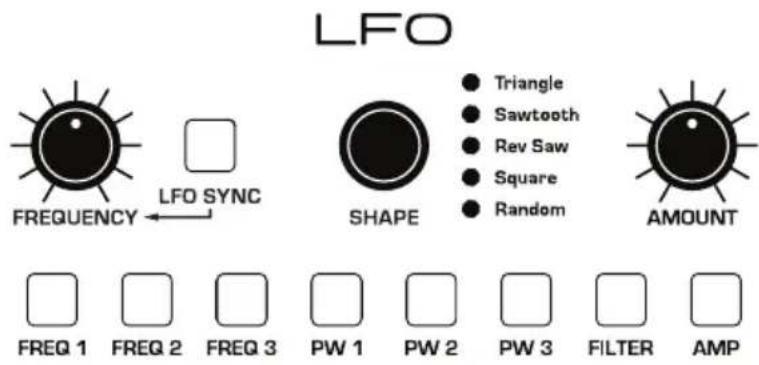
The Low-Frequency Oscillator
Triangle and Random waves are bipolar. That is, their waveshape is positive for half of their cycle and negative for the other half. In the case of the triangle wave, this makes it possible to generate a natural-sounding vibrato that goes alternately sharp and flat in equal amounts on either side of a center frequency. Random, also known as “sample and hold,” generates a series of random values, each held for the duration of one cycle
The square wave, sawtooth, and reverse sawtooth generate only positive values. In the case of the square wave this makes it possible to generate natural-sounding trills.


The Trigon-6 has a sixth "hidden" LFO waveshape that you can use as a modulation source — noise. To access this, choose RANDOM then turn FREQUENCY all the way clockwise. This generates a white noise waveform.
The LFO can be free-running or synced to the arpeggiator, sequencer, or MIDI clock for tempo-synced effects such as filter sweeps, tremolo, and so on.
Frequency: Sets the frequency of the LFO waveshape routed to the destination. See also “LFO Sync” below.
LFO Sync: When on, the LFO synchronizes with the arpeggiator, sequencer, or MIDI clock. By default, the LFO wave cycle is reset when you press a key (but is not reset if you press a key while other notes are held).
Shape: Triangle, Sawtooth, Reverse Sawtooth, Square, Random—The wave shape of the LFO. A sixth waveshape, noise, can be generated by selecting RANDOM and turning the FREQUENCY knob all the way to the right.
Amount: Sets the initial amount of LFO modulation routed to the selected destinations. Setting an amount here applies the selected modulation continuously. If you set this parameter to zero but still select a modulation destination, modulation is only applied when using the Mod Wheel.
Freq 1: Selects the frequency of Oscillator 1 as a modulation destination. Use a triangle wave as a source to create vibrato. Use a square wave to create trills.
Freq 2: Selects the frequency of Oscillator 2 as a modulation destination.
Freq 3: Selects the frequency of Oscillator 3 as a modulation destination. Can be applied while Oscillator 3 is in LO mode.
PW 1: When Oscillator 1 is set to square wave, this modulates the pulse width of the wave. Use a triangle wave LFO to create a chorus-like effect often used to emulate strings.
PW 2: When Oscillator 2 is set to square wave, this modulates the pulse width of the wave.
PW 3: When Oscillator 3 is set to square wave, this modulates the pulse width of the wave. Can be applied while Oscillator 3 is in LO mode.
Filter: Selects the Filter frequency as a modulation destination. Use a triangle wave LFO to create an auto-wah effect. Modulating Filter at high frequencies can create interesting timbres.
Amp: Selects the amplitude level as a modulation destination. Use a triangle wave LFO to create a tremolo effect.
Poly Mod
Although the overall sonic character of the Trigon-6 is determined by its analog oscillators and filters, much of its power to make truly unique and unusual sounds comes from the Poly Mod section.
POLYMOD


The Poly Mod section
Poly Mod modulation sources:
- Oscillator 3 Amount
- Filter Envelope
Poly Mod modulation destinations:
- Oscillator 1 frequency
- Oscillator 2 frequency
- Oscillator 3 frequency
- Oscillator 1 pulse width
- Oscillator 2 pulse width
- Feedback
- Filter frequency
You can control how much the source affects the destination by dialing in a specific modulation amount with the osc 3 or FILTER ENV knobs. Modulation amount can either be positive or negative.
Use Poly Mod to create complex harmonic effects ranging from FM (frequency modulation) to audio-rate filter modulation and beyond. Many classic sounds can be created through clever use of Poly Mod.
Poly Mod Parameters
Freq 1: Selects Oscillator 1 frequency as a modulation destination.
Choose osc 3 as a modulation source to produce FM effects with their characteristic complex harmonics and metallic timbre. Choose FILTER ENV as a destination source to sweep Oscillator 1's frequency.
Freq 2: Selects Oscillator 2 frequency as a modulation destination.
Choose osc 3 as a modulation source to produce FM effects with their characteristic complex harmonics and metallic timbre.
Freq 3: Selects Oscillator 3 frequency as a modulation destination.
Choosing osc 3 as a recursive modulation source could produce chaotic effects. Choose FILTER ENV as a modulation source to sweep Oscillator 3's frequency (in LO mode for a modulated modulator effect, for example).
PW 1: When Oscillator 1 is set to pulse wave, choosing this as a destination modulates its pulse width. This will animate the timbre of Oscillator 1 in interesting ways.
PW 2: When Oscillator 2 is set to pulse wave, choosing this as a destination modulates its pulse width. This will animate the timbre of Oscillator 2 in interesting ways.
Feedback: Choosing this as a destination allows you to modulate the amount of filter feedback.
Filter: Selects filter cutoff as a modulation destination.

When using osc 3 as a modulation source, the modulation character is affected by the waveshape currently chosen for Oscillator 3 (triangle, sawtooth, rverse sawtooth, or square/pulse). Try setting Oscillator 3 to low frequency (using the LO setting) to further increase modulation possibilities.
Arpeggiator
The Trigon-6 has a full-featured Arpeggiator. Turn it on, hold a chord and the Trigon-6 will play a pattern based on the individual notes held. Choose a mode (up, down, random, etc.), an octave range (1, 2, or 3), and a tempo, then pair it with an appropriately percussive sound, and you'll be surprised at the number of creative things you can do.
When HOLD is active, the Arpeggiator is in “relatch” mode, where playing a new chord latches to the new chord rather than adding notes to the existing chord.
If you enable HOLD, you can release the notes on the keyboard and the Arpeggiator will continue to play. In addition, the Arpeggiator features auto-latching: With HOLD on, played notes are held on and arpeggiated, and any additional notes you play are added to the arpeggio—as long as at least one key is continuously held.
You can sync the Arpeggiator to external MIDI clock, or even an external audio signal. When the Arpeggiator is playing, the Sequencer is disabled.

The Arpeggiator section
To use the Arpeggiator:
- Press the Arpeggiator ON/OFF switch to turn it on.
- Hold down one or more notes on the keyboard. The Arpeggiator plays them according to the settings you've chosen.
- To latch arpeggiation on (so that you don't have to continuously hold down notes) press the HOLD button.
- Adjust settings such as MODE, OCTAVE, BPM and VALUE.
- To synchronize a delay effect to the Arpeggiator, turn on CLOCK SYNC in the Effects section, choose a delay, and adjust its delay time setting as desired.
Arpeggiator Beat Sync
This feature quantizes keyboard performance of the arpeggiator so that notes are quantized to the current clock divide setting. With this option enabled, arpeggiator note onset is quantized to the current DIVIDE value — regardless of the precision of your playing.
To enable Arpeggiator Beat Sync:
- Press the GLOBALS button twice to activate the lower set of parameters.
- Press program selector button 9.
- Use the BANK and TENS buttons as decrement and increment buttons to set Beat Sync on or off.
- Once you've chosen the desired setting, press the GLOBALS button again to exit.

An audio signal connected to the rear-panel FOOTSWITCH - SEQUENCE jack can be used to control arpeggiator (and sequencer) playback. This makes it possible to tempo sync the arpeggiator to a recorded drum track or other audio source. See "Seq Jack" on page 15 for more information about choosing the appropriate mode for these behaviors.
Arpeggiator Parameters
Divide—Selects a beat division relative to the BPM. See the table below:
| Name Tempo Timing Division | ||
| Half BPM/2 Half note | ||
| Qtr BPM Quarter note | ||
| 8th BPM x 2 Eighth note | ||
| 8th D BPM x 2 Eighth note, dot | ||
| 8th S BPM x 2 Eighth note, swing timing | ||
| 8th T BPM x 3 Eighth note triplets | ||
| 16th BPM x 4 Sixteenth note | ||
| 16th S BPM x 4 Sixteenth note, full swing timing | ||
| 16th T | BPM x 6 Sixteenth note triplets | |
| 32nd | BPM x 8 Thirty-second note | |
On/Off—Turns the Arpeggiator on and off.
Octave: 1 Octave, 2 Octaves, 3 Octaves—Set to 1 Octave, only the keyed notes are arpeggiated. Set to 2 Octaves, the keyed notes and the notes one octave above them arpeggiate. Set to 3 Octaves, the keyed notes and the notes one and two octaves above them arpeggiate.
Mode: Sets the order in which notes play when Arpeggiator is on. See the table.
| Arp Mode Behavior | |
| Up Plays from | lowest to highest note |
| Down Plays from | highest to lowest note |
| Up + Down Plays | from lowest to highest and back to lowest |
| Random Plays | notes in random order |
| Assign Plays | notes in the order the keys were pressed |
Sequencer
The Trigon-6's sequencer is similar to a classic step sequencer. It allows you to create a single sequence of up to 64 steps, including rests and ties, with up to 6 notes per step. In addition, you can play along with a sequence (provided there is available polyphony), making it a powerful live performance tool. When the Sequencer is playing, the Arpeggiator is disabled.
SEQUENCER

PLAY

RECORD
The Sequencer

An audio signal connected to the rear-panel FOOTSWITCH - SEQUENCE jack can be used to control sequencer playback. This makes it possible to tempo sync the sequencer (or arpeggiator) to a recorded drum track or other audio source. See "Seq Jack" on page 15 for more information about choosing the appropriate mode for these behaviors.
Programming the Sequencer
Though programming the sequencer is simple, you can create sequences that are rhythmically and melodically complex by combining a repeating phrase or bass line with chords, ties, and rests. You can play up to 64 steps with up to 6 notes held simultaneously per step. For most sequences you'll probably want to use sounds with a relatively sharp attack and short release.

Most factory programs have a sequence associated with them. Recall a program and press the Sequencer's PLAY button to hear its associated sequence.
To program a note sequence:
-
Press the RECORD button.
-
Play the sequence on the keyboard, step by step. The display indicates the current step as you play.

When recording a chord as a step, as long as you continue to hold at least one note down, you can keep adding notes to the chord/step, and even use the TRANSPOSE buttons to extend the keyboard range while doing it.
-
To add a rest as you play, press the TENS/INCREMENT button for that step, then continue playing.
-
To add a “tie” that extends the length of a note, continue to hold down the note(s) and press the TENS/INCREMENT button repeatedly to extend the note the number of steps you want.
-
When you're done, press PLAY to listen to your sequence.
-
To save the sequence, save the program and they are saved together. (See “Saving a Program” on page 5.)

If you want to play live along with the sequencer, be sure to leave voices available. In other words, don't play 6-note chords for every step in the sequence!
To play a sequence:
-
Press PLAY. The sequence plays back at the current BPM & DIVIDE setting.
-
To stop playback, press PLAY again.

Alternatively, you can start and stop sequencer playback using a footswitch connected to the rear-panel SEQ jack or using MIDI start/stop messages sent from a DAW or other MIDI device. See “Seq Jack” on page 15 for more information.

Use the BPM, DIVIDE, or TAP TEMPO controls to adjust sequencer playback speed.
To transpose a sequence:
- Press PLAY. The sequence begins playback.
- Press and hold RECORD and press a key on the keyboard. "Middle C" is the reference point. Playing a note above middle C transposes the sequence higher by that interval. Playing a note below middle C transposes the sequence lower by that interval.
If you're using a program with Unison enabled, you don't need to hold down the REC button. You can simply press a note on the keyboard and the sequence is transposed to that key. (When not using Unison, you must still hold down the REC button to enable transposition.)
Remember that “Middle C” is the reference point. Playing a note above middle C transposes the sequence higher by that interval. Playing a note below middle C transposes the sequence lower by that interval.
Correcting Notes When Recording a Sequence
While you are recording a sequence, it is possible to step backward using the Bank/Decrement button to correct notes. You can decrement as many steps as you like, but each time you step backward the sequencer erases the step. You must then re-record any steps/notes that occur after the current step. For example, if you play notes on steps 1-8, then decrement to step 4, you will need to manually re-play steps 5-8 again on the keyboard.
To step backward while recording a sequence:
-
Record a sequence normally by pressing the RECORD button, then playing notes on the keyboard. The display indicates the current step as you play.
-
Press the BANK SELECT/DECREMENT button. This will step back to the previous step so that you can re-record it. Stepping back erases the step.
MIDI Note Output from the Arpeggiator and Sequencer
The Trigon-6's arpeggiator and sequencer can output MIDI note numbers. Any notes that you hold on the Trigon-6 keyboard will be arpeggiated according to the current settings of the arpeggiator and output over MIDI (or USB) as MIDI notes. Similarly, any notes output by the sequencer will be output over MIDI (or USB) as MIDI notes. You can use this feature to drive other MIDI-equipped devices such as synthesizers and drum machines.
To enable MIDI Note output from the arpeggiator and sequencer:
- Press the GLOBALS button then press program selector button 5 (PARAM XMIT).
- Use the BANK and TENS buttons as decrement and increment buttons to step through available settings and select either CAS or NAS. Your choice depends on whether you were previously using CC or NRPN to send MIDI controller data to your external device, as either setting will send MIDI notes out. Choose CAS if CC. Choose NAS if NRPN.
- Once you've chosen the desired setting, press the GLOBALS button twice to exit.
To control an external MIDI device:
- Connect the MIDI or USB output of the Trigon-6 to the MIDI or USB input of the external device, depending on which type of connection the external device requires.
- On the Trigon-6, press the GLOBALS button, then press program selector button 9 (MIDI OUT) to select nid (MIDI) or usb(USB).
- Press the GLOBALS button twice to exit the Global menu.
- On the external device, set the MIDI Channel and MIDI Receive port to match the Trigon-6.
- Hold down a chord on the Trigon-6 or start sequencer playback. The external device will be triggered by the arpeggiated or sequenced notes.
Sequencer Parameters
Here are the controls and parameters used when interacting with the sequencer.
Record: On, Off—This switch turns sequencer recording on and off.
Play: On, Off—This switch turns sequencer playback on and off.
Clock
Sets the internal master clock for both the Sequencer and Arpeggiator.
BPM: 30...250—Sets the tempo for the Sequencer and Arpeggiator in BPM (beats per minute). The TAP TEMPO LED flashes at the BPM rate. When LFO SYNC is turned on, the BPM rate affects the LFO frequency. When syncing to an external MIDI clock source, the BPM setting has no effect.
Tap Tempo: 30...250—Tap this button at least 4 times to quickly set the tempo for the Sequencer and Arpeggiator. The LED flashes at the BPM rate you set.
Divide: Sets the note value for each sequencer/arpeggiator step relative to the BPM. DIVIDE works with both internal and external clock sources. The following table lists the values:
| Name Tempo Timing Division | ||
| Half BPM/2 Half note | ||
| Qtr BPM Quarter note | ||
| 8th BPM x 2 Eighth note | ||
| 8th D BPM x 2 Eighth note, dot | ||
| 8th S BPM x 2 Eighth note, swing timing | ||
| 8th T BPM x 3 Eighth note triplets | ||
| 16th BPM x 4 Sixteenth note | ||
| 16th S BPM x 4 Sixteenth note, full swing timing | ||
| 16th T | BPM x 6 Sixteenth note triplets | |
| 32nd | BPM x 8 Thirty-second note | |
Master Volume/Program Volume
The master output level of the Trigon-6 is controlled by the front-panel MASTER VOL knob. In addition, the volume of an individual program can be set with the PRGM VOL knob in the Additional Parameters section. This is useful for ensuring that your sounds have roughly the same volume from program to program. Unison sounds in particular can be very loud compared to other programs.
VOLUME

The Volume knob




The program volume knob (PRGM VOLUME) in the Miscellaneous Parameters section
To set the volume of an individual program:
- Choose a program.
- In the ADDITIONAL PARAMETERS section, turn the PRGM VOL knob to set its volume.
- Save the program. (See "Saving a Program" on page 4.)

MIDI volume can also influence the overall volume of the Trigon-6 if you are controlling it from an external MIDI source.
Distortion
The Trigon-6 provides stereo analog distortion. This can be used to add warmth, harmonic complexity, and an aggressive edge to sounds. The character of the distortion is affected by the harmonic content of a program. Sounds with more high-end will sound different than sounds with fewer harmonics. To add distortion, use the DISTORTION knob.
Vintage
Introduces parameter variations from voice to voice. This electronic circuit variation behavior was a big part of why vintage synths sounded so warm, organic, and alive. Turning up the vintage knob adds progressively more variation between voices. Try it out!
Pan Spread
Pans the audio in the stereo field individually per voice. Set to 0, all voices are panned to the center. As Pan Spread is turned up, the audio in each voice is gradually moved away from the center by greater amounts. Every other voice goes in a different direction, left or right.
Pgm Volume
Adjusts the overall volume of an individual program.

There is enough gain in the Trigon-6 that if you set some programs to a high PROGRAM VOLUME, clipping distortion may occur. If this happens, try lowering the PROGRAM VOLUME, the volumes of the oscillators, or the RESONANCE parameter of the filter.
P Whl Range
0...12 Semitones— Selects the range in semitones when moving the Pitch Wheel forward or backward. Twelve semitones equals 1 octave.
Key Mode
Low Note (LO), High Note (Hi), Last Note (Las), Low Note Retrigger (LOr), High Note Retrigger (Hir), Last Note Retrigger (LAr)—Selects the key priority when more than one key is played simultaneously when in Unison mode. LOW NOTE, HIGH NOTE and LAST NOTE are monophonic playback modes that give priority to the lowest, highest, or last note played, as their names imply.
Transpose
The UP and DOWN buttons in the TRANSPOSE section transpose the keyboard up or down in octaves. The LED indicates the current keyboard transposition state. Transposing the keyboard also changes the MIDI note numbers of the keys so that MIDI notes sent are also transposed. Transpose settings are global and are not saved with individual programs.

The Transpose controls
Hold
When HOLD is on, any notes played will continue to play until HOLD is turned off. When used in conjunction with the Arpeggiator, notes are latched on and replaced by any new note(s) struck. If HOLD is on and at least one key continuously held down, any new notes played are added to the arpeggio.

The Hold button
Glide
Glide or portamento causes the pitch of a note to glide up or down from the pitch of the previously played note on the triggered voice. Glide is turned on and off using the GLIDE switch, but the GLIDE AMOUNT must also be set. If the GLIDE button is on, but GLIDE AMOUNT is set to 0, GLIDE has no effect.

The Glide controls
There are four modes that determine how GLIDE behaves.
Fixed Rate (FR): The time to transition between notes varies with the interval between the notes; the greater the interval, the longer the transition time. The glide rate is fixed. This is the default glide mode.
Fixed Rate A (FRA): The same as Fixed Rate, but glide is only applied when playing legato when Unison mode is on. That is, glide only occurs when a note is held until the next note is played. This effectively allows glide to be turned on and off from the keyboard.
Fixed Time (FT): Glide is set to a fixed time, regardless of the interval between notes.
Fixed Time A (FTA): The same as Fixed Time, but glide only occurs when playing legato.
To select a glide mode:
- Press and hold the GLIDE switch. The numeric display shows the currently selected Glide mode.
- To select a different mode, continue to hold down the GLIDE switch then press the BANK/DECREMENT and TENS/INCREMENT switches to step through the other choices.
- When finished, release the GLIDE switch.
Unison
When UNISON is on, the Trigon-6 functions like a monophonic synthesizer in that only 1 note can be played at a time. However, that one note can be powered by as many as six voices, depending on how many you choose to use. With up to 18 oscillators powering a single note (3 oscillators per voice x 6 voices), you can create some very dense, speaker-rattling sounds.

If you want to create an ultra heavy synth bass, try using Unison!
Unison gives you control over not only how many voices to stack, and what note gets priority if you happen to play more than one note on the keyboard. (This is called the key assign mode or note priority. See “Key Assign Modes” on page 48 for details.) You can also detune the Oscillators using the PITCH controls to thicken a sound. The VINTAGE control can also detune and add density to a Unison patch.

The Unison button
To use Unison:
-
Press and hold the UNISON switch.
-
With the Unison switch held down, use the BANK/DECREMENT and TENS/INCREMENT switches to choose the number of voices to stack, then release the Unison switch.
-
To detune oscillators 2 and 3, use the PITCH knobs.
Using Chord Memory
Unison has another useful feature: chord memory. Instead of assigning voices to a single note, hold down a chord on the keyboard and press the Unison switch. The Trigon-6 memorizes the notes of the chord. Single notes played on the keyboard will then trigger all notes of the stored chord, transposing them as you play up or down the keyboard. Try using this feature to create powerful chord stabs and hits.
If you save a program that uses chord memory, the chord is saved with the program. “CHD” always appears as a choice if you step through voice stacking options using the BANKS/DECREMENT and TENS/INCREMENT buttons while holding down UNISON.
To use chord memory:
- Hold down a chord on the keyboard (6 notes maximum).
- Press the UNISON switch. The chord voicing is memorized. Play a few notes to listen to the result.
- If you save the program, the unison chord memory is saved with it.
To exit Chord mode:
- Hold UNISON.
- Use the DEC button to deselect CHD.
- Press the UNISON button.
- Save the program again.
Key Assign Modes
Key Assign (sometimes called note priority) determines what note has priority when more than one note is played on the keyboard or via MIDI:
- Low-note priority (LO) is most common in vintage synths and is often used for playing trills by holding a note and repeatedly tapping a lower note.
- Low retrigger (LOr) causes the envelopes to be retriggered with each keystroke.
- High note (Hi) and high retrigger (Hir) are similar to the low note settings, except that the highest note is given priority.
- Last note (LAS) and last retrigger (LAr) give priority to the last note played.
To choose the Key Assign mode:
- Press and hold KEY MODE in the MISC PARAMETERS section. The numeric display shows the currently selected mode.
- To select a different mode, continue to hold down the KEY MODE switch then press the BANK/DECREMENT and TENS/INCREMENT switches to step through the other choices.
- Release the KEY MODE switch when you're finished.

Key Assign settings affect polyphonic playback in the case that sustain/hold is on and a voice is stolen. In this case, key priority is always last.
Write
The WRITE button saves the currently active program. Saving a program overwrites a previously saved program.
The Trigon-6 contains a total of 1000 programs. 500 are permanent and 500 can be overwritten. Banks 0-4 are User Banks that can be overwritten. Banks 5-9 are Factory Banks that are permanent. You can edit the programs of either bank, but you can only save them to Banks 0-4. As shipped from the factory, presets 000-499 are identical to 500-999.

WRITE
The Write button

Program bank, tens, and number selectors
To save a program to the same preset location:
- Press the WRITE button. Its LED begins blinking.
- Press a PROGRAM SELECTOR button (0-9) to specify the “ones” digit of the program.
- The WRITE button LED stops blinking and the program is saved.
To save a program to a different bank location:
- Press the WRITE button. Its LED begins blinking.
- Hold down the BANK button then press a PROGRAM SELECTOR button (0-9) to specify the “hundreds” bank of the program. You can only save to Banks 0-4.
- Hold down the TENS button then press a PROGRAM SELECTOR button (0-9) to specify the "tens" digit of the program.
- Press a PROGRAM SELECTOR button (0-9) to specify the “ones” digit of the program.
- The WRITE button LED stops blinking and the program is saved.
Canceling Save
Sometimes you may want to cancel saving a program before you commit.
To cancel the Save process before you commit:
- If the WRITE button LED is flashing, press it again. The LED stops flashing and saving is canceled. You can return to editing if you want.
Comparing Before You Save
Before writing a program to a new location, it's a good idea to listen to the program in the target location to make sure you really want to overwrite it.
To evaluate a program before you overwrite it:
- Get ready to save by pressing the WRITE button. It starts flashing.
- Press the GLOBAL button. Both LEDs on the button light up, indicating COMPARE mode.
-
Use the program buttons to navigate to the sound you want to compare and play the keyboard to hear the sound.
-
To disable the compare function and go back to the edited sound, turn off the GLOBAL button. Programs can't be written while in compare mode.
-
If you want to save the edited sound, the WRITE button is still flashing and ready to save, so enter a location with the program buttons. The sound is saved.
-
Alternatively, if you want to cancel saving and continue editing, press the WRITE button. It stops flashing and saving is canceled.
Globals
Global settings are parameters that affect all programs. These include settings such as Master Tune, MIDI Channel, MIDI Clock, and others. Global parameters are printed in two rows the program number switches (0 - 9). Press the Globals switch once to access the top row. Press it twice to access the bottom row. For details on the various Global parameters, see “” on page 1112.
GLOBALS
The Globals button
To change a Global setting:
-
Press the GLOBALS button. Pressing it once accesses the top row of Global parameters. Pressing it twice accesses the bottom row of Global parameters. The LED indicates which row is active.
-
Press the PROGRAM SELECTOR button that corresponds to the Global parameter you want to change.
-
Use the BANK/DECREMENT and TENS/INCREMENT buttons to step through the available settings until you reach the one you want.
-
When finished, press GLOBALS again to exit.

Pressing the GLOBALS button three times in a row saves the current program as the default program that appears when you turn on the Trigon-6.
Preset
The PRESET switch toggles “live panel” mode on and off. In live panel mode the Trigon-6 ignores the currently active preset and reverts to the current front-panel settings of its knobs and switches. In other words, what you see on the front panel is what you hear. This is a great mode for learning, experimentation, and instant gratification.

PRESET
The Preset button
To enter live panel mode:
- Press the PRESET button to toggle it off. The Trigon-6 is now in live panel mode. What you see on the front panel is what you hear. Note that you can't change programs or banks with Preset off.
To return to preset mode:
- Press the PRESET button again to toggle it on. The LED is lit. The current program is what you hear.
Pitch and Mod Wheels
The Trigon-6 has a spring loaded Pitch wheel and a Mod wheel. You can use these controls to enhance live performance by bending notes and adding modulation in real time as you play.
In the same way that guitar players use note bends and vibrato to give their playing expressiveness and character, these two controls can really help you define your sound as a performer and take you beyond just playing notes on the keyboard.

The Pitch and Modulation wheels
Pitch Wheel
You can set a range in semitones for the Pitch wheel, depending on your playing preference. The range is up to 12 semitones (1 octave). Many musicians use a range of 2 semitones (a whole step) since this is the bend range of many acoustic instruments. For guitar whammy bar effects, you many wish to set a wider range.
To set the pitch bend range:
- In the Miscellaneous Parameters section, press and hold the P WHL RANGE button.
- With the button still held down, use the BANK/DECREMENT and TENS/INCREMENT switches to choose the number of semitones (up to 12) for the pitch bend range, then release the P WHL RANGE button.
Modulation Wheel
The Mod wheel controls the amount of modulation applied to any destinations chosen in the LFO section. This allows you to “perform” LFO modulation in real time by moving the Mod wheel. This is a great way to add expressiveness to a sound or performance.
To choose a modulation destination for the Mod wheel:
- In the LFO section, choose a modulation destination as well as a SHAPE and FREQUENCY for the LFO. (See “Low Frequency Oscillator” on page 31 for more details.)
- To apply modulation only when using the Mod wheel, set the INITIAL AMT knob to zero. (Turing this knob up will apply LFO modulation continuously — not just when the Mod wheel is used.)

Many programs use the Mod wheel to add vibrato. In this case, Freq 1 and Freq 2 are enabled as modulation destinations in the LOW-FREQUENCY OSCILLATOR section. This adds vibrato when you push the mod wheel forward. Set the INITIAL AMT knob to zero to apply vibrato only when using the Mod wheel.
Aftertouch
Aftertouch is a performance feature that allows you to add modulation to a sound by applying additional pressure to a key after the key is already down. The greater the pressure applied, the more modulation is applied. The Trigon-6 provides monophonic (or “channel”) aftertouch, which means that applying pressure to any key within a chord will apply modulation to all notes currently held.
The Aftertouch section lets you choose the amount of modulation applied using aftertouch and which parameters are modulated (oscillator frequency, filter cutoff, etc.). You can set either a positive or negative amount.
For example, if you select the Low-Pass Filter as destination (FILTER), set a positive amount of aftertouch, then press the keys harder, the filter cutoff frequency will increase, making the filter open wider and the sound become brighter.
Conversely, if you select the Low-Pass Filter as destination (FILTER), set a negative amount of aftertouch, then press the keys harder, the filter cutoff frequency will be lowered, making the filter close more and the sound become more muted.

The Trigon-6 provides 8 different aftertouch response settings for your convenience. The default setting provides a linear response. To choose a different response curve, use the AT RESPONSE button in the GLOBALS section. See page 16 for more details.

The Aftertouch controls
Amount: Selects the amount of aftertouch applied to an active destination. Positive AMOUNT settings apply positive amounts of modulation. Negative AMOUNT settings apply negative amounts of modulation.
Freq 1: Selects Oscillator 1 frequency as an aftertouch modulation destination. With a positive AMOUNT setting, pressing the keys harder will shift the Oscillator 1 pitch upward. With a negative AMOUNT setting, pressing the keys harder will shift the Oscillator 1 pitch downward.
Freq 2: Selects Oscillator 2 frequency as an aftertouch modulation destination.
Freq 3: Selects Oscillator 3 frequency as an aftertouch modulation destination.
Filter: Selects the Filter cutoff frequency as a modulation destination. With a positive AMOUNT setting, pressing the keys harder will open the filter wider and make a sound become brighter. With a negative AMOUNT setting, pressing the keys harder will close the filter more and make a sound more muted.
Amp: Selects Amplitude as an aftertouch modulation destination. With a positive AMOUNT setting, pressing the keys harder will increase the volume of a sound. With a negative AMOUNT setting, pressing the keys harder will decrease the volume of a sound.
LFO : Selects the LFO AMOUNT parameter as an aftertouch modulation destination. With a positive AMOUNT setting, pressing the keys harder will increase the amount of LFO modulation to any destination selected in the LFO section. With a negative AMOUNT setting, pressing the keys harder will decrease the amount of LFO modulation — with the LFO waveform inverted.
FX Mix A : Selects the EFFECTS A DRY<>WET parameter as an aftertouch modulation destination. With a positive AMOUNT setting, pressing the keys harder will increase the amount of Effect A's WET mix. With a negative AMOUNT setting, pressing the keys harder will decrease the level of Effect A's WET mix.
FX Mix B : Selects the EFFECTS B DRY<>WET parameter as an aftertouch modulation destination. With a positive AMOUNT setting, pressing the keys harder will increase the amount of Effect B's WET mix. With a negative AMOUNT setting, pressing the keys harder will decrease the level of WET mix.
Exporting Programs and Banks
You can use the PGM DUMP command in the GLOBALS section to transmit the current program, bank, or all banks in SysEx format via the selected MIDI port. This allows you to save your programs so that you can share them or archive them.
To export a program or bank as a SysEx file over MIDI:
- Press the GLOBALS button once (this enables the upper set of parameters) then press program selector 8 to select the MIDI SYSEX command.
- Use the BANK/DECREMENT and TENS/INCREMENT buttons to select the appropriate MIDI port — MIDI (MID) or USB (usb).
- Press GLOBALS a second time (this enables the lower set of parameters) then press program selector 8 to select the PGM DUMP command. The WRITE button begins flashing.
- Use the BANK/DECREMENT and TENS/INCREMENT buttons to select the desired option — program (PRO), tens (ten), bank (ban), user banks (USR), all (all).
- Press WRITE. The program or bank is exported.

Dumped programs will load back into the same bank and program location in memory when received by the Trigon-6 via MIDI.
Calibrating the Trigon-6
The Trigon-6 is calibrated at the factory. Controls such as the pitch and mod wheels shouldn't require re-calibration. However, because its oscillators and filters are voltage controlled and can be affected by extremes of temperature, you may need to use the built-in calibration function to tune them occasionally.
How and When to Calibrate the Oscillators and Filters
The first time you use the Trigon-6, please run its built-in oscillator and filter calibration procedure. Let it warm up for several minutes and come to its normal operating temperature before doing so.
Repeat the calibration procedure as needed over the next few days of use. The Trigon-6 learns the range of temperatures at your location and will keep itself in tune over this range.
A good rule of thumb is to cover the main temperature ranges as the Trigon-6 heats up. Calibrate several minutes after powering on, at about 30 minutes, and at about 1 hour.
Later, if you use the Trigon-6 in a different environment that is measurably warmer or cooler (on stage, in an air-conditioned studio, and so on) run the calibration procedure again.
To calibrate the oscillators and filters:
- Hold down the PRESET button and press 0.
- The front panel LEDs and display begin flashing as the Trigon-6 performs its auto-calibration procedure.
- When finished, the front panel controls will return to normal and you can play the Trigon-6 again.
Calibrating the Pitch and Mod Wheels
In general, the Pitch and Mod wheels shouldn't require re-calibration. However, if you experience what seems like a persistent problem with either of them, the Trigon-6 has built-in auto-calibration procedure that you can use to remedy the problem.
To calibrate the Pitch and Mod wheel's low position:
- Rotate and hold both wheels in their low position.
- Hold down the PRESET button and press 7.
To calibrate the Pitch wheel's center position:
- With the Pitch wheel centered, hold down the PRESET button and press 8.
To calibrate the Pitch and Mod wheel's high position:
- Rotate and hold both wheels in their high position.
- Hold down the PRESET button and press 9.
Resetting the Global Parameters
If you're trying to track down a problem, it's sometimes a good idea to reset the Global parameters to their defaults. This is a quick way to make sure that the Trigon-6 returns to its factory settings.
To reset all Global parameters to their default settings:
- Hold down the GLOBAL button and press WRITE.
- The main display will show rst to indicate a successful reset.
Using USB
The Trigon-6's USB 2.0 port enables bidirectional MIDI communication with a computer. A MIDI interface and MIDI cables are not necessary, just a USB cable. The Trigon-6 is a Class Compliant USB device. That means it does not require any additional drivers to be installed to communicate with a Mac or Windows computer. The Trigon-6 transmits and receives MIDI data via USB, but does not transmit audio.

MIDI In and USB should not be used at the same time, as overlapping messages from different sources may cause the Trigon-6 to respond unpredictably. MIDI Out and USB can be used at the same time and transmit the same data.
USB Notes
Under Mac OS X, “Trigon-6 Keyboard” will appear as a MIDI port when connected via USB and can be configured using the Mac’s Audio MIDI Setup utility (typically found in Applications/Utilities).
Under Windows, the first time the Trigon-6 is connected via USB, the “Found new hardware” alert appears and it is automatically installed as “Trigon-6 Keyboard.”
In Windows, if you unplug the USB cable and plug it back in while a program has the Trigon-6 port open, you may have to resync. That usually means going to the Trigon-6 Keyboard Properties — in the Windows Device Manager under “Sound, video, and game controllers” — and clicking OK. If Trigon-6 Keyboard is no longer listed in the Device Manager, power the Trigon-6 down and back up again while it is connected via USB. It should be detected on power up.
Support
Troubleshooting
Here are a few suggestions for resolving problems that may occur.
The sequencer or arpeggiator has stopped running.
Check the Clock settings (Global button 3) to ensure the Trigon-6 is set to Out or, if set to In, make sure the Trigon-6 is receiving MIDI clock.
Some of the programs sound different than before.
Check the Mod Wheel position. The Mod Wheel can do a lot more than just add vibrato. Also, check the Clock settings (Global button 3) to ensure the Trigon-6 is set to Out or, if set to In, make sure the Trigon-6 is receiving MIDI clock.
Sometimes after updating the OS or loading sound banks, you may need to reset the global parameters. This resets all background globals back to factory default state. To do this, hold the GLOBALS button and press the WRITE button. Note that this does not affect or change any of your saved presets.
There is a ground hum in the audio output.
USB can cause ground loops, so try to resolve any grounding issues between the computer and the Trigon-6. Or use MIDI, which is opto-isolated.
The Trigon-6 is behaving erratically.
This is almost always caused by a MIDI data loop. Make sure that any MIDI Thru functionality is turned off on the MIDI interface/hardware or in the MIDI software application (sequencer or whatever). Disconnect all the Trigon-6's MIDI connections—MIDI and USB cables—and see if the problem persists. You can also monitor the MIDI traffic with MIDI Monitor (Mac OS) or MIDI-OX (Windows) to see if the Trigon-6 is being overrun with duplicate messages.
MIDI System Exclusive data is not being transmitted/received.
Check the SysEx settings to make sure the correct port is selected (MID,USB) using Global button 8.
The Trigon-6 plays out of tune.
Check Master Tune (Global button 1). If it seems correct, calibrate the oscillators and filters.
To calibrate the oscillators and filters:
- Hold down the PRESET button and press 0.
- The front panel LEDs and display begin flashing as the Trigon-6 performs its auto-calibration procedure. Don't turn off the power while it's doing this.
- When finished, the front panel controls will return to normal and you can play the Trigon-6 again.

. It is hot usually necessary to run the calibration routine on a regular basis. You should only run it if you are experiencing problems, or have brought the Trigon-6 into a new environment (on a stage with hot stage lights, for example).
Recovering from a Failed OS Udate
In very rare cases, the Trigon-6 OS might fail to load correctly when you update. There is now a safe and easy way to recover in such situations. The Trigon-6 is now equipped with a MIDI boot loader, which will allow you to reload the OS in the event the you accidentally “brick” your synth (permanently freeze it) while updating its OS.
To restore your Trigon-6 if it is frozen.
- Power on the Trigon-6 while holding the WRITE switch to enter boot loader mode. You'll see an animation in the main display.
- Use a MIDI cable (not USB) to transmit the new OS to your synth. You must use a standard MIDI cable for this. USB MIDI doesn't work in boot loader mode.
- As the OS loads, you will see the main display count backwards from 999. When it gets to 0, another countdown will begin between the main display and the EFFECTS parameter 1 display. Do not power down until this countdown has finished. The Trigon-6 will restart itself when it is done.

If your Trigon-6 is currently equipped with OS 1.2 (which is included with
Trigon-6 serial numbers #2415 and later) you cannot downgrade to an OS version earlier than 1.2. If you try, your Trigon-6 will freeze. If this happens, you can enter recovery mode by holding the WRITE button while powering up as described above. You can then update your synth to the latest OS via MIDI DIN (not USB).
Contacting Technical Support
If you are still having a problem with the Trigon-6, contact Technical Support at support@sequential.com. Please include your Trigon-6's serial number, the version of the operating system (displayed on startup), and the purchase date.

If you have not already reset the Global parameters and run the calibration es (see Troubleshooting, above), you should do it before contacting Technicalort. It's probably the first thing they'll ask you to do.
Warranty Repair
Sequential warrants that the Trigon-6 will be free from defects in materials and/or workmanship for 1 year from the date of purchase.
Please register your product online at www.sequential.com to establish the date of purchase. (This is not a requirement for warranty service, but it will help expedite the process.)
Please contact support@sequential.com to determine the best course of action for getting your Trigon-6 repaired. For your own protection, as well as ours, please do not return any product to Sequential without a return authorization (RA) number. To issue an RA number, Technical Support needs:
- Your name
- Your return address
- Your email address
• A phone number where you can be reached - Your Trigon-6's serial number
• The date of purchase and where purchased
If you need to return your instrument for repair, you are responsible for getting it to Sequential. We highly recommend insuring it and packing in the original packaging. Damage resulting from shipping a product with insufficient packaging is not covered by warranty.
Appendix A: Alternative Tunings
By default, the Trigon-6 is set to standard, chromatic western tuning. Additionally, it supports up to 63 additional alternative tunings, which you can access using the alt tunings parameter in the global menu.
These 64 alternative tunings range from Equal temperament to Indonesian Gamelan tunings. If you want, you can replace these with other tunings that you can find on the Internet. These must be in SysEx format. You can download them into the Trigon-6 using SysEx Librarian for Mac or MIDI-OX for Windows.
Here are descriptions of the default Trigon-6 alternative tunings:
1. 12-Tone Equal Temperament (non-erasable)
The default Western tuning, based on the twelfth root of two.
2. Harmonic Series
MIDI notes 36-95 reflect harmonics 2 through 60 based on the fundamental of A = 27.5 Hz. The low C on a standard 5 octave keyboard acts as the root note (55Hz), and the harmonics play upwards from there. The remaining keys above and below the 5 octave range are filled with the same intervals as Carlos' Harmonic 12 Tone that follows.
3. Carlos Harmonic Twelve Tone
Wendy Carlos' twelve note scale based on octave-repeating harmonics. A = 1/1 (440 Hz). 1/1 17/16 9/8 19/16 5/4 21/16 11/8 3/2 13/8 27/16 7/4 15/8
4. Meantone Temperament
An early tempered tuning, with better thirds than 12ET. Sounds best in the key of C. Use this to add an authentic touch to performances of early Baroque music. C=1/1 (260 Hz)
5. 1/4 Tone Equal Temperament
24 notes per octave, equally spaced 24root2 intervals. Mexican composer Julian Carillo used this for custom-built pianos in the early 20th century.
6. 19 Tone Equal Temperament
19 notes per octave (19root2) offering better thirds than 12 ET, a better overall compromise if you can figure out the keyboard patterns.
7. 31 Tone Equal Temperament
Many people consider 31root2 to offer the best compromise towards just intonation in an equal temperament, but it can get very tricky to keep track of the intervals.
8. Pythagorean C
One of the earliest tuning systems known from history, the Pythagorean scale is constructed from an upward series of pure fifths (3/2) transposed down into a single octave. The tuning works well for monophonic melodies against fifth drones, but has a very narrow palate of good chords to choose from. C=1/1 (261.625 Hz) 1/1 256/243 9/8 32/27 81/64 4/3 729/512 3/2 128/81 27/16 16/9 243/128
9. Just Intonation in A with 7-Limit Tritone at D#
A rather vanilla 5-limit small interval JI, except for a single 7/5 tritone at D#, which offers some nice possibilities for rotating around bluesy sevenths. A=1/1 (440 Hz) 1/1 16/15 9/8 6/5 5/4 7/5 3/2 8/5 5/3 9/5 15/8
10. 3-5 Lattice in A
A pure 3 and 5-limit tuning which resolves to very symmetrical derived relationships between notes. A=1/1 (440 Hz) 1/1 16/15 10/9 6/5 5/4 4/3 64/45 3/2 8/5 5/3 16/9 15/8
11. 3-7 Lattice in A
A pure 3 and 7-limit tuning which resolves to very symmetrical derived relationships between notes. Some of the intervals are very close together, offering several choices for the same nominal chords. A=1/1 (440 Hz) 1/1 9/8 8/7 7/6 9/7 21/16 4/3 3/2 32/21 12/7 7/4 63/32
12. Other Music 7-Limit Black Keys in C
Created by the group Other Music for their homemade gamelan, this offers a wide range of interesting chords and modes. C=1/1 (261.625 Hz) 1/1 15/14 9/8 7/6 5/4 4/3 7/5 3/2 14/9 5/3 7/4 15/8
13. Dan Schmidt Pelog/Slendro
Created for the Berkeley Gamelan group, this tuning fits an Indonesian-style heptatonic Pelog on the white keys and pentatonic Slendro on the black keys, with B and Bb acting as 1/1 for their respective modes. Note that some of the notes will have the same frequency. By tuning the 1/1 to 60 Hz, Dan found a creative way to incorporate the inevitable line hum into his scale. Bb, B = 1/1 (60 Hz) 1/1 1/1 9/8 7/6 5/4 4/3 11/8 3/2 3/2 7/4 7/4 15/8
14. Yamaha Just Major C
When Yamaha decided to put preset microtunings into their FM synth product line, they selected this and the following tuning as representative just intonations. As such, they became the de-facto introduction to JI for many people. Just Major gives preferential treatment to major thirds on the sharps, and a good fourth relative to the second. C= 1/1 (261.625) 1/1 16/15 9/8 6/5 5/4 4/3 45/32 3/2 8/5 5/3 16/9 15/8
15. Yamaha Just Minor C
Similar to Yamaha's preset Just Major, the Just Minor gives preferential treatment to minor thirds on the sharps, and has a good fifth relative to the second. C= 1/1 (261.625) 1/1 25/24 10/9 6/5 5/4 4/3 45/32 3/2 8/5 5/3 16/9 15/8
16. Harry Partch 11-Limit 43 Note Just Intonation
One of the pioneers of modern microtonal composition, Partch built a unique orchestra with this tuning during the first half of the 20th century, to perform his own compositions. The large number of intervals in this very dense scale offers a full vocabulary of expressive chords and complex key changes. The narrow spacing also allows fixed-pitched instruments like marimbas and organs to perform glissando-like passages. G = 1/1 (392 Hz, MIDI note 67)
1/1 81/80 33/32 21/20 16/15 12/11 11/10 10/9 9/8 8/7 7/6 32/27 6/5 11/9 5/4 14/11 9/7 21/16 4/3 27/20 11/8 7/5 10/7 16/11 40/27 3/2 32/21 14/9 11/7 8/5 18/11 5/3 27/16 12/7 7/4 16/9 9/5 20/11 11/6 15/8 40/21 64/33 160/81
17. Arabic 12-Tone
A 12-tone approximation of an Arabic scale, which appears in some electronic keyboards designed for use with Arabic music. Not a JI scale, nor equal tempered. These are the intervals in Cents relative to C:
6 0 = Cents 0
6 1 = Cents + 1 5 1
6 2 = C e n t s + 2 0 4
6 3 = C e n t s + 2 9 4
6 4 = C e n t s + 3 5 5
6 5 = C e n t s + 4 9 8
6 6 = C e n t s + 6 4 9
6 7 = Cents + 7 0 2
6 8 = C e n t s + 8 5 3
6 9 = C e n t s + 9 0 6
7 0 = C e n t s + 9 9 6
7 1 = C e n t s + 1 0 5 7
7 2 = C e n t s + 1 2 0 0
18. 12 Out of 19-tET Scale from Mandelbaum's Dissertation
An interesting non-just 12 tone scale that has some unusual relationships.
note 0=0
note 1=63
note 2=189
note 3=253
note 4=379
note 5=505
note 6=568
note 7=695
note 8=758
note 9=884
note 10=947
note 11=1074
note 12=1200
19. 12 Out of 31-tET, Meantone Eb-G#
note 0=0
note 1=77
note 2=194
note 3=310
note 4=387
note 5=503
note 6=581
note 7=697
note 8=774
note 9=890
note 10=1006
note 11=1084
note 12=1200
20. Terry Riley's Harp of New Albion scale, Inverse Malcolm's Monochord
Original 1/1 on C#, here it is set to C.
| 60 = Cents 0. | Ratio: 1/1 (JUST) |
| 61 = Cents +111.731285 | Ratio: 16/15 (JUST) |
| 62 = Cents +203.910002 | Ratio: 9/8 (JUST) |
| 63 = Cents +315.641287 | Ratio: 6/5 (JUST) |
| 64 = Cents +386.313714 | Ratio: 5/4 (JUST) |
| 65 = Cents +498.044999 | Ratio: 4/3 (JUST) |
| 66 = Cents +609.776284 | Ratio: 64/45 (JUST) |
| 67 = Cents +701.955001 | Ratio: 3/2 (JUST) |
| 68 = Cents +813.686286 | Ratio: 8/5 (JUST) |
| 69 = Cents +884.358713 | Ratio: 5/3 (JUST) |
| 70 = Cents +996.089998 | Ratio: 16/9 (JUST) |
| 71 = Cents +1088.268715 | Ratio: 15/8 (JUST) |
| 72 = Cents +1200. | Ratio: 2/1 (JUST) |
21. Lute tuning of Giovanni Maria Artusi (1603). 1/4-comma w. Acc. 1/2-way Naturals
| 60 = Cents 0. | Ratio: 1/1 (JUST) |
| 61 = Cents +96.578 | Ratio: 8607/8140 |
| 62 = Cents +193.157 | Ratio: 2889/2584 |
| 63 = Cents +289.735 | Ratio: 11687/9886 |
| 64 = Cents +386.313714 | Ratio: 5/4 (JUST) |
| 65 = Cents +503.422 | Ratio: 5267/3938 |
| 66 = Cents +600. | Ratio: 11482/8119 |
| 67 = Cents +696.578 | Ratio: 7876/5267 |
| 68 = Cents +793.157 | Ratio: 14771/9342 |
| 69 = Cents +889.735 | Ratio: 11718/7009 |
| 70 = Cents +986.314 | Ratio: 17561/9934 |
| 71 = Cents +1082.892 | Ratio: 18204/9739 |
| 72 = Cents +1200. | Ratio: 2/1 (JUST) |
22. J.S. Bach "well temperament", Acc. to Jacob Breetvelt's Tuner
60 = Cents 0. Ratio: 1/1 (JUST)
61 = Cents +92.18 Ratio: 10472/9929
62 = Cents + 200. Ratio: 5252/4679
63 = Cents + 296.09 Ratio: 11781/9929
64 = Cents +390.225 Ratio: 9638/7693
65 = Cents + 500. Ratio: 6793/5089
66 = Cents + 590.225 Ratio: 45 / 32 (just)
67 = Cents + 700. Ratio: 10178/6793
68 = Cents +794.135 Ratio: 15708/9929
69 = Cents +895.1125 Ratio: 14857/8859
70 = Cents + 998.045 Ratio: 12503/7025
71 = Cents +1090.225 Ratio: 18484/9847
72 = Cents +1200. Ratio: 2/1 (JUST)
23. Bulgarian Bagpipe tuning, Empirically Measured.
0 = Cents 0. Ratio: 1/1 (JUST)
1 = Cents +66. Ratio: 5427/5224
2 = Cents + 202. Ratio: 1925/1713
3 = Cents + 316. Ratio: 11586/9653
4 = Cents + 399. Ratio: 4965/3943
5 = Cents + 509. Ratio: 7451/5553
6 = Cents + 640. Ratio: 13435/9283
7 = Cents +706. Ratio: 857/570
8 = Cents + 803. Ratio: 2681/1686
9 = Cents + 910. Ratio: 12130/7171
10 = Cents + 1011. Ratio: 1205 / 672
11 = Cents + 1092. Ratio: 12599 / 6705
12 = Cents + 1200. Ratio: 2/1 (JUST)
24. Wendy Carlos' Alpha Scale with Perfect Fifth Divided in Nine. 19 Tone cycle
Octaves are stretched, and the tuning is quite microtonal.
| 0 = Cents 0. | Ratio: 1/1 (JUST) |
| 1 = Cents +78. | Ratio: 7241/6922 |
| 2 = Cents +156. | Ratio: 8994/8219 |
| 3 = Cents +234. | Ratio: 10686/9335 |
| 4 = Cents +312. | Ratio: 11873/9915 |
| 5 = Cents +390. | Ratio: 11636/9289 |
| 6 = Cents +468. | Ratio: 13024/9939 |
| 7 = Cents +546. | Ratio: 12433/9070 |
| 8 = Cents +624. | Ratio: 11605/8093 |
| 9 = Cents +702. | Ratio: 14999/9999 |
| 10 = Cents +780. | Ratio: 3471/2212 |
| 11 = Cents +858. | Ratio: 15361/9358 |
| 12 = Cents +936. | Ratio: 11467/6678 |
| 13 = Cents +1014. | Ratio: 17889/9959 |
| 14 = Cents +1092. | Ratio: 12599/6705 |
| 15 = Cents +1170. | Ratio: 18593/9459 |
| 16 = Cents +1248. | Ratio: 14957/7274 |
| 17 = Cents +1326. | Ratio: 8049/3742 |
| 18 = Cents +1404. | Ratio: 9617/4274 |
| 19 = Cents +1482. | Ratio: 1111/472 |
25. Wendy Carlos' Beta Scale with Perfect Fifth Divided by Eleven. 23-Tone Cycle
Octaves are stretched, and the tuning is quite microtonal (First repeat shown.)
| 0 = Cents 0. | Ratio: 1/1 (JUST) |
| 1 = Cents +63.8 | Ratio: 6191/5967 |
| 2 = Cents +127.6 | Ratio: 9725/9034 |
| 3 = Cents +191.4 | Ratio: 7739/6929 |
| 4 = Cents +255.2 | Ratio: 8821/7612 |
| 5 = Cents +319. | Ratio: 7636/6351 |
| 6 = Cents +382.8 | Ratio: 11690/937 |
| 7 = Cents +446.6 | Ratio: 9007/6959 |
| 8 = Cents +510.4 | Ratio: 1500/1117 |
| 9 = Cents +574.2 | Ratio: 13547/9723 |
| 10 = Cents +638. | Ratio: 12529/8667 |
| 11 = Cents +701.8 | Ratio: 5584/3723 |
| 12 = Cents +765.6 | Ratio: 9281/5964 |
| 13 = Cents +829.4 | Ratio: 15760/9767 |
| 14 = Cents +893.2 | Ratio: 1047/625 |
| 15 = Cents +957. | Ratio: 9629/5540 |
| 16 = Cents +1020.8 | Ratio: 16551/9178 |
| 17 = Cents +1084.6 | Ratio: 16263/8692 |
| 18 = Cents +1148.4 | Ratio: 13585/6998 |
| 19 = Cents +1212.2 | Ratio: 17231/8559 |
| 20 = Cents +1276. | Ratio: 12503/5983 |
| 21 = Cents +1339.8 | Ratio: 10583/4887 |
| 22 = Cents +1403.6 | Ratio: 12564/5589 |
| 23 = Cents +1467.4 | Ratio: 8727/3739 |
26. Wendy Carlos' Gamma Scale with Third Divided by Eleven or Fifth by Twenty. 36 Tone
Octaves are stretched, and the tuning is quite microtonal.
| 0 = Cents 0. | Ratio: 1/1 (JUST) |
| 1 = Cents +35.099 | Ratio: 1146/1123 |
| 2 = Cents +70.198 | Ratio: 7449/7153 |
| 3 = Cents +105.297 | Ratio: 4118/3875 |
| 4 = Cents +140.396 | Ratio: 475/438 |
| 5 = Cents +175.495 | Ratio: 5363/4846 |
| 6 = Cents +210.594 | Ratio: 3990/3533 |
| 7 = Cents +245.693 | Ratio: 11307/9811 |
| 8 = Cents +280.792 | Ratio: 4495/3822 |
| 9 = Cents +315.891 | Ratio: 9707/8088 |
| 10 = Cents +350.99 | Ratio: 1989/1624 |
| 11 = Cents +386.089 | Ratio: 1926/1541 |
| 12 = Cents +421.188 | Ratio: 7321/5740 |
| 13 = Cents +456.287 | Ratio: 2089/1605 |
| 14 = Cents +491.386 | Ratio: 8563/6447 |
| 15 = Cents +526.485 | Ratio: 6117/4513 |
| 16 = Cents +561.584 | Ratio: 148/107 |
| 17 = Cents +596.683 | Ratio: 2895/2051 |
| 18 = Cents +631.782 | Ratio: 7627/5295 |
| 19 = Cents +666.881 | Ratio: 13901/9457 |
| 20 = Cents +701.98 | Ratio: 3/2 (just) |
| 21 = Cents +737.079 | Ratio: 5477/3578 |
| 22 = Cents +772.178 | Ratio: 6981/4469 |
| 23 = Cents +807.277 | Ratio: 14613/9167 |
| 24 = Cents +842.376 | Ratio: 10660/6553 |
| 25 = Cents +877.475 | Ratio: 1255/756 |
| 26 = Cents +912.574 | Ratio: 3959/2337 |
| 27 = Cents +947.673 | Ratio: 16513/9552 |
| 28 = Cents +982.772 | Ratio: 15424/8743 |
| 29 = Cents +1017.871 | Ratio: 7563/4201 |
| 30 = Cents +1052.97 | Ratio: 7367/4010 |
| 31 = Cents +1088.069 | Ratio: 11918/6357 |
| 32 = Cents +1123.168 | Ratio: 13310/6957 |
| 33 = Cents +1158.267 | Ratio: 17050/8733 |
| 34 = Cents +1193.366 | Ratio: 14586/7321 |
| 35 = Cents +1228.465 | Ratio: 13368/6575 |
| 36 = Cents +1263.564 | Ratio: 1276/615 |
27. Carlos Super Just
60 = Cents 0. Ratio: 1/1 (JUST)
61 = Cents +104.95541 Ratio: 17/16 (JUST)
62 = Cents + 203.910002 Ratio: 9/8 (JUST)
63 = Cents +315.641287 Ratio: 6/5 (JUST)
64 = Cents +386.313714 Ratio: 5/4 (JUST)
65 = Cents + 498.044999 Ratio: 4/3 (JUST)
66 = Cents + 551.317942 Ratio: 11/8 (JUST)
67 = Cents +701.955001 Ratio: 3/2 (JUST)
68 = Cents + 840.527662 Ratio: 13/8 (JUST)
69 = Cents +884.358713 Ratio: 5/3 (JUST)
70 = Cents + 968.825906 Ratio: 7/4 (JUST)
71 = Cents +1088.268715 Ratio: 15/8 (JUST)
72 = Cents +1200. Ratio: 2/1 (JUST)
28. Jon Catler 24-tone JI from "Over and Under the 13 Limit"
60 = Cents 0. Ratio: 1/1 (JUST)
61 = Cents + 53.272943 Ratio: 33 / 32 (JUST)
62 = Cents + 111.731285 Ratio: 16 / 15 (JUST)
63 = Cents + 203.910002 Ratio: 9/8 (JUST)
64 = Cents + 231.174094 Ratio: 8/7 (JUST)
65 = Cents + 266.870906 Ratio: 7/6 (JUST)
66 = Cents +315.641287 Ratio: 6/5 (JUST)
67 = Cents +342.905379 Ratio: 128/105
68 = Cents + 359.472338 Ratio: 16 / 13 (JUST)
69 = Cents + 386.313714 Ratio: 5/4 (JUST)
70 = Cents + 470.780907 Ratio: 21/16 (JUST)
71 = Cents +498.044999 Ratio: 4/3 (JUST)
72 = Cents +551.317942 Ratio: 11/8 (JUST)
73 = Cents +590.223716 Ratio: 45/32 (JUST)
74 = Cents +648.682058 Ratio: 16/11 (JUST)
75 = Cents +701.955001 Ratio: 3/2 (JUST)
76 = Cents +813.686286 Ratio: 8/5 (JUST)
77 = Cents +840.527662 Ratio: 13/8 (JUST)
78 = Cents +884.358713 Ratio: 5/3 (JUST)
79 = Cents +905.865003 Ratio: 27/16 (JUST)
80 = Cents +968.825906 Ratio: 7/4 (JUST)
81 = Cents +996.089998 Ratio: 16/9 (JUST)
82 = Cents + 1061.427339 Ratio: 24/13 (JUST)
83 = Cents +1088.268715 Ratio: 15/8 (JUST)
84 = Cents +1200. Ratio: 2/1 (JUST)
29. John Chalmers JI-1, Based loosely on Wronski's and similar JI scales, May 2, 1997.
(Chalmer's book “Divisions of the Tetrachord” is a late 20th century masterwork, exploring the mathematical underpinnings of just tunings.)
| 60 = Cents 0. | Ratio: 1/1 (JUST) |
| 61 = Cents +104.95541 | Ratio: 17/16 (JUST) |
| 62 = Cents +203.910002 | Ratio: 9/8 (JUST) |
| 63 = Cents +297.513016 | Ratio: 19/16 (JUST) |
| 64 = Cents +386.313714 | Ratio: 5/4 (JUST) |
| 65 = Cents +498.044999 | Ratio: 4/3 (JUST) |
| 66 = Cents +603.000409 | Ratio: 17/12 (JUST) |
| 67 = Cents +701.955001 | Ratio: 3/2 (JUST) |
| 68 = Cents +795.558015 | Ratio: 19/12 (JUST) |
| 69 = Cents +884.358713 | Ratio: 5/3 (JUST) |
| 70 = Cents +999.468017 | Ratio: 57/32 (JUST) |
| 71 = Cents +1088.268715 | Ratio: 15/8 (JUST) |
| 72 = Cents +1200. | Ratio: 2/1 (JUST) |
30. John Chalmers JI-3, 15 16 17 18 19 20 21 on 1/1, 15-20 on 3/2, May 2, 1997.
| 60 = Cents 0. | Ratio: 1/1 (JUST) |
| 61 = Cents +111.731285 | Ratio: 16/15 (JUST) |
| 62 = Cents +216.686695 | Ratio: 17/15 (JUST) |
| 63 = Cents +315.641287 | Ratio: 6/5 (JUST) |
| 64 = Cents +409.244301 | Ratio: 19/15 (JUST) |
| 65 = Cents +498.044999 | Ratio: 4/3 (JUST) |
| 66 = Cents +582.512193 | Ratio: 7/5 (JUST) |
| 67 = Cents +701.955001 | Ratio: 3/2 (JUST) |
| 68 = Cents +813.686286 | Ratio: 8/5 (JUST) |
| 69 = Cents +918.641696 | Ratio: 17/10 (JUST) |
| 70 = Cents +1017.596288 | Ratio: 9/5 (JUST) |
| 71 = Cents +1111.199302 | Ratio: 19/10 (JUST) |
| 72 = Cents +1200. | Ratio: 2/1 (JUST) |
31. John Chalmers JI-4, 15 16 17 18 19 20 on 1/1, same on 4/3, + 16/15 on 16/9
| 60 = Cents 0. | Ratio: 1/1 (JUST) |
| 61 = Cents +111.731285 | Ratio: 16/15 (JUST) |
| 62 = Cents +216.686695 | Ratio: 17/15 (JUST) |
| 63 = Cents +315.641287 | Ratio: 6/5 (JUST) |
| 64 = Cents +409.244301 | Ratio: 19/15 (JUST) |
| 65 = Cents +498.044999 | Ratio: 4/3 (JUST) |
| 66 = Cents +609.776284 | Ratio: 64/45 (JUST) |
| 67 = Cents +714.731694 | Ratio: 68/45 (JUST) |
| 68 = Cents +813.686286 | Ratio: 8/5 (JUST) |
| 69 = Cents +907.289301 | Ratio: 76/45 (JUST) |
| 70 = Cents +996.089998 | Ratio: 16/9 (JUST) |
| 71 = Cents +1107.821284 | Ratio: 256/135 |
| 72 = Cents +1200. | Ratio: 2/1 (JUST) |
32. Chinese scale, 4th century
| 0 = Cents 0. | Ratio: 1/1 (JUST) |
| 1 = Cents +99.2 | Ratio: 3735/3527 |
| 2 = Cents +199.5 | Ratio: 11126/9915 |
| 3 = Cents +296.7 | Ratio: 9181/7735 |
| 4 = Cents +398. | Ratio: 10405/8268 |
| 5 = Cents +492.9 | Ratio: 448/337 |
| 6 = Cents +595.2 | Ratio: 11312/8021 |
| 7 = Cents +699. | Ratio: 6439/4300 |
| 8 = Cents +790.9 | Ratio: 7578/4799 |
| 9 = Cents +896.1 | Ratio: 15436/9199 |
| 10 = Cents +984.9 | Ratio: 6357/3599 |
| 11 = Cents +1091.4 | Ratio: 1591/847 |
| 12 = Cents +1200. | Ratio: 2/1 (JUST) |
33. Chinese Lu scale by Huai Nan Zi, Han era. (P. Amiot 1780, Kurt Reinhard)
| 60 = Cents 0. | Ratio: 1/1 (JUST) |
| 61 = Cents +98.954592 | Ratio: 18/17 (JUST) |
| 62 = Cents +203.910002 | Ratio: 9/8 (JUST) |
| 63 = Cents +315.641287 | Ratio: 6/5 (JUST) |
| 64 = Cents +394.347297 | Ratio: 54/43 (JUST) |
| 65 = Cents +498.044999 | Ratio: 4/3 (JUST) |
| 66 = Cents +608.351986 | Ratio: 27/19 (JUST) |
| 67 = Cents +701.955001 | Ratio: 3/2 (JUST) |
| 68 = Cents +800.909593 | Ratio: 27/17 (JUST) |
| 69 = Cents +905.865003 | Ratio: 27/16 (JUST) |
| 70 = Cents +1017.596288 | Ratio: 9/5 (JUST) |
| 71 = Cents +1106.396986 | Ratio: 36/19 (JUST) |
| 72 = Cents +1200. | Ratio: 2/1 (JUST) |
34. Colonna 1
Fabio Colonna lived in Naples, and published a treatise in 1618 called “La Sambuca Lincea”, which included a description of the instrument by that name which he built on commission from Scipione Stella, who had had the opportunity in 1594 to examine Vincentino’s “Archicembalo” — a 31-tone-per-octave (not equal-tempered) keyboard instrument.
| 60 = Cents 0. | Ratio: 1/1 (JUST) |
| 61 = Cents +70.672427 | Ratio: 25/24 (JUST) |
| 62 = Cents +182.403712 | Ratio: 10/9 (JUST) |
| 63 = Cents +287.359122 | Ratio: 85/72 (JUST) |
| 64 = Cents +386.313714 | Ratio: 5/4 (JUST) |
| 65 = Cents +498.044999 | Ratio: 4/3 (JUST) |
| 66 = Cents +568.717426 | Ratio: 25/18 (JUST) |
| 67 = Cents +701.955001 | Ratio: 3/2 (JUST) |
| 68 = Cents +733.721654 | Ratio: 55/36 (JUST) |
| 69 = Cents +884.358713 | Ratio: 5/3 (JUST) |
| 70 = Cents +989.314122 | Ratio: 85/48 (JUST) |
| 71 = Cents +1088.268715 | Ratio: 15/8 (JUST) |
| 72 = Cents +1200. | Ratio: 2/1 (JUST) |
35. Colonna 2 - Second 12 Note Subset of the Colonna Scale
| 60 = Cents 0. | Ratio: 1/1 (JUST) |
| 61 = Cents +70.672427 | Ratio: 25/24 (JUST) |
| 62 = Cents +203.910002 | Ratio: 9/8 (JUST) |
| 63 = Cents +315.641287 | Ratio: 6/5 (JUST) |
| 64 = Cents +386.313714 | Ratio: 5/4 (JUST) |
| 65 = Cents +498.044999 | Ratio: 4/3 (JUST) |
| 66 = Cents +582.512193 | Ratio: 7/5 (JUST) |
| 67 = Cents +701.955001 | Ratio: 3/2 (JUST) |
| 68 = Cents +813.686286 | Ratio: 8/5 (JUST) |
| 69 = Cents +884.358713 | Ratio: 5/3 (JUST) |
| 70 = Cents +1017.596288 | Ratio: 9/5 (JUST) |
| 71 = Cents +1049.362941 | Ratio: 11/6 (JUST) |
| 72 = Cents +1200. | Ratio: 2/1 (JUST) |
36. Ivor Darreg's 19 ratios in 5-limit JI for his Megalyra Family
Darreg was one of the great modern theorists of just intonation.
| 60 = Cents 0. | Ratio: 1/1 (JUST) |
| 61 = Cents +70.672427 | Ratio: 25/24 (JUST) |
| 62 = Cents +111.731285 | Ratio: 16/15 (JUST) |
| 63 = Cents +182.403712 | Ratio: 10/9 (JUST) |
| 64 = Cents +203.910002 | Ratio: 9/8 (JUST) |
| 65 = Cents +274.582429 | Ratio: 75/64 (JUST) |
| 66 = Cents +315.641287 | Ratio: 6/5 (JUST) |
| 67 = Cents +386.313714 | Ratio: 5/4 (JUST) |
| 68 = Cents +498.044999 | Ratio: 4/3 (JUST) |
| 69 = Cents +590.223716 | Ratio: 45/32 (JUST) |
| 70 = Cents +609.776284 | Ratio: 64/45 (JUST) |
| 71 = Cents +701.955001 | Ratio: 3/2 (JUST) |
| 72 = Cents +772.627428 | Ratio: 25/16 (JUST) |
| 73 = Cents +813.686286 | Ratio: 8/5 (JUST) |
| 74 = Cents +884.358713 | Ratio: 5/3 (JUST) |
| 75 = Cents +905.865003 | Ratio: 27/16 (JUST) |
| 76 = Cents +976.537429 | Ratio: 225/128 |
| 77 = Cents +1017.596288 | Ratio: 9/5 (JUST) |
| 78 = Cents +1088.268715 | Ratio: 15/8 (JUST) |
| 79 = Cents +1200. | Ratio: 2/1 (JUST) |
37. Dorian Diatonic Tonos
| 60 = Cents 0. | Ratio: 1/1 (JUST) |
| 61 = Cents +111.731285 | Ratio: 16/15 (JUST) |
| 62 = Cents +231.174094 | Ratio: 8/7 (JUST) |
| 63 = Cents +359.472338 | Ratio: 16/13 (JUST) |
| 64 = Cents +427.372572 | Ratio: 32/25 (JUST) |
| 65 = Cents +498.044999 | Ratio: 4/3 (JUST) |
| 66 = Cents +571.725653 | Ratio: 32/23 (JUST) |
| 67 = Cents +648.682058 | Ratio: 16/11 (JUST) |
| 68 = Cents +813.686286 | Ratio: 8/5 (JUST) |
| 69 = Cents +902.486984 | Ratio: 32/19 (JUST) |
| 70 = Cents +996.089998 | Ratio: 16/9 (JUST) |
| 71 = Cents +1095.04459 | Ratio: 32/17 (JUST) |
| 72 = Cents +1200. | Ratio: 2/1 (JUST) |
38. Almost Equal 12-tone Subset of Duodenarium
| 60 = Cents 0. | Ratio: 1/1 (JUST) |
| 61 = Cents +92.178716 | Ratio: 135/128 |
| 62 = Cents +203.910002 | Ratio: 9/8 (JUST) |
| 63 = Cents +296.088718 | Ratio: 1215/1024 |
| 64 = Cents +405.866283 | Ratio: 512/405 |
| 65 = Cents +498.044999 | Ratio: 4/3 (JUST) |
| 66 = Cents +609.776284 | Ratio: 64/45 (JUST) |
| 67 = Cents +701.955001 | Ratio: 3/2 (JUST) |
| 68 = Cents +794.133717 | Ratio: 405/256 |
| 69 = Cents +903.911282 | Ratio: 2048/1215 |
| 70 = Cents +998.043719 | Ratio: 3645/2048 |
| 71 = Cents +1107.821284 | Ratio: 256/135 |
| 72 = Cents +1200. | Ratio: 2/1 (JUST) |
39. Ellis's Just Harmonium
| 60 = Cents 0. | Ratio: 1/1 (JUST) |
| 61 = Cents +111.731285 | Ratio: 16/15 (JUST) |
| 62 = Cents +203.910002 | Ratio: 9/8 (JUST) |
| 63 = Cents +315.641287 | Ratio: 6/5 (JUST) |
| 64 = Cents +386.313714 | Ratio: 5/4 (JUST) |
| 65 = Cents +498.044999 | Ratio: 4/3 (JUST) |
| 66 = Cents +519.551289 | Ratio: 27/20 (JUST) |
| 67 = Cents +701.955001 | Ratio: 3/2 (JUST) |
| 68 = Cents +813.686286 | Ratio: 8/5 (JUST) |
| 69 = Cents +884.358713 | Ratio: 5/3 (JUST) |
| 70 = Cents +1017.596288 | Ratio: 9/5 (JUST) |
| 71 = Cents +1088.268715 | Ratio: 15/8 (JUST) |
| 72 = Cents +1200. | Ratio: 2/1 (JUST) |
40. Bali/Java Slendro, Siam 7, empirical
| 0 = Cents 0. | Ratio: 1/1 (JUST) |
| 61 = Cents +111.731285 | Ratio: 16/15 (JUST) |
| 62 = Cents +203.910002 | Ratio: 9/8 (JUST) |
| 63 = Cents +315.641287 | Ratio: 6/5 (JUST) |
| 64 = Cents +386.313714 | Ratio: 5/4 (JUST) |
| 65 = Cents +498.044999 | Ratio: 4/3 (JUST) |
| 66 = Cents +519.551289 | Ratio: 27/20 (JUST) |
| 67 = Cents +701.955001 | Ratio: 3/2 (JUST) |
| 68 = Cents +813.686286 | Ratio: 8/5 (JUST) |
| 69 = Cents +884.358713 | Ratio: 5/3 (JUST) |
| 70 = Cents +1017.596288 | Ratio: 9/5 (JUST) |
| 71 = Cents +1088.268715 | Ratio: 15/8 (JUST) |
| 72 = Cents +1200. | Ratio: 2/1 (JUST) |
41. Tibetan Ceremonial, empirical
0 = Cents 0. Ratio: 1 / 1 (JUST)
1 = Cents +58. Ratio: 2762/2671
2 = Cents + 232. Ratio: 6889/6025
3 = Cents + 310. Ratio: 10601/8863
4 = Cents + 378. Ratio: 11945/9602
5 = Cents + 522. Ratio: 849/628
6 = Cents +618. Ratio: 483/338
7 = Cents +725. Ratio: 605/398
8 = Cents + 773. Ratio: 13070/8363
9 = Cents +896. Ratio: 14076/8389
10 = Cents + 1019. Ratio: 12585/6986
11 = Cents + 1086. Ratio: 16205 / 8654
42. Erlangen, revised
60 = Cents 0. Ratio: 1/1 (JUST)
61 = Cents +92.178716 Ratio: 135/128
62 = Cents +203.910002 Ratio: 9/8 (JUST)
63 = Cents +294.134997 Ratio: 32/27 (JUST)
64 = Cents +386.313714 Ratio: 5/4 (JUST)
65 = Cents +498.044999 Ratio: 4/3 (JUST)
66 = Cents +590.223716 Ratio: 45/32 (JUST)
67 = Cents +701.955001 Ratio: 3/2 (JUST)
68 = Cents +794.133717 Ratio: 405/256
69 = Cents +905.865003 Ratio: 27/16 (JUST)
70 = Cents +996.089998 Ratio: 16/9 (JUST)
71 = Cents +1088.268715 Ratio: 15/8 (JUST)
72 = Cents +1200. Ratio: 2/1 (JUST)
43. Euler - Monochord (1739)
| 60 = Cents 0. | Ratio: 1/1 (JUST) |
| 61 = Cents +70.672427 | Ratio: 25/24 (JUST) |
| 62 = Cents +203.910002 | Ratio: 9/8 (JUST) |
| 63 = Cents +274.582429 | Ratio: 75/64 (JUST) |
| 64 = Cents +386.313714 | Ratio: 5/4 (JUST) |
| 65 = Cents +498.044999 | Ratio: 4/3 (JUST) |
| 66 = Cents +590.223716 | Ratio: 45/32 (JUST) |
| 67 = Cents +701.955001 | Ratio: 3/2 (JUST) |
| 68 = Cents +772.627428 | Ratio: 25/16 (JUST) |
| 69 = Cents +884.358713 | Ratio: 5/3 (JUST) |
| 70 = Cents +976.537429 | Ratio: 225/128 |
| 71 = Cents +1088.268715 | Ratio: 15/8 (JUST) |
| 72 = Cents +1200. | Ratio: 2/1 (JUST) |
44. Fokker's 7-limit 12-tone Just Scale
| 60 = Cents 0. | Ratio: 1/1 (JUST) |
| 61 = Cents +119.442808 | Ratio: 15/14 (JUST) |
| 62 = Cents +203.910002 | Ratio: 9/8 (JUST) |
| 63 = Cents +266.870906 | Ratio: 7/6 (JUST) |
| 64 = Cents +386.313714 | Ratio: 5/4 (JUST) |
| 65 = Cents +498.044999 | Ratio: 4/3 (JUST) |
| 66 = Cents +590.223716 | Ratio: 45/32 (JUST) |
| 67 = Cents +701.955001 | Ratio: 3/2 (JUST) |
| 68 = Cents +821.397809 | Ratio: 45/28 (JUST) |
| 69 = Cents +884.358713 | Ratio: 5/3 (JUST) |
| 70 = Cents +968.825906 | Ratio: 7/4 (JUST) |
| 71 = Cents +1088.268715 | Ratio: 15/8 (JUST) |
| 72 = Cents +1200. | Ratio: 2/1 (JUST) |
45. Bagpipe tuning from Fortuna ("Try Key of G with F Natural")
| 60 = Cents 0. | Ratio: 1/1 (JUST) |
| 61 = Cents +29.849602 | Ratio: 117/115 |
| 62 = Cents +187.681869 | Ratio: 146/131 |
| 63 = Cents +256.596489 | Ratio: 196/169 |
| 64 = Cents +343.090647 | Ratio: 89/73 (JUST) |
| 65 = Cents +493.957077 | Ratio: 141/106 |
| 66 = Cents +548.648344 | Ratio: 81/59 (JUST) |
| 67 = Cents +684.728649 | Ratio: 150/101 |
| 68 = Cents +729.878736 | Ratio: 125/82 (JUST) |
| 69 = Cents +871.94838 | Ratio: 139/84 (JUST) |
| 70 = Cents +985.798925 | Ratio: 205/116 |
| 71 = Cents +1049.362941 | Ratio: 11/6 (JUST) |
| 72 = Cents +1200. | Ratio: 2/1 (JUST) |
46. Gamelan Udan Mas (approx) s6,p6,p7,s1,p1,s2,p2,p3,s3,p4,s5,p5
| 60 = Cents 0. | Ratio: 1/1 (JUST) |
| 61 = Cents 0. | Ratio: 1/1 (JUST) |
| 62 = Cents +182.403712 | Ratio: 10/9 (JUST) |
| 63 = Cents +266.870906 | Ratio: 7/6 (JUST) |
| 64 = Cents +427.372572 | Ratio: 32/25 (JUST) |
| 65 = Cents +510.367002 | Ratio: 47/35 (JUST) |
| 66 = Cents +571.725653 | Ratio: 32/23 (JUST) |
| 67 = Cents +701.955001 | Ratio: 3/2 (JUST) |
| 68 = Cents +745.786052 | Ratio: 20/13 (JUST) |
| 69 = Cents +996.089998 | Ratio: 16/9 (JUST) |
| 70 = Cents +996.089998 | Ratio: 16/9 (JUST) |
| 71 = Cents +1126.319346 | Ratio: 23/12 (JUST) |
| 72 = Cents +1200. | Ratio: 2/1 (JUST) |
| 73 = Cents +1200. | Ratio: 2/1 (JUST) |
47. Kraig Grady's 7-limit "Centaur" Scale, 1987.
See Xenharmonikon 16.
| 60 = Cents 0. | Ratio: 1/1 (JUST) |
| 61 = Cents +84.467193 | Ratio: 21/20 (JUST) |
| 62 = Cents +203.910002 | Ratio: 9/8 (JUST) |
| 63 = Cents +266.870906 | Ratio: 7/6 (JUST) |
| 64 = Cents +386.313714 | Ratio: 5/4 (JUST) |
| 65 = Cents +498.044999 | Ratio: 4/3 (JUST) |
| 66 = Cents +582.512193 | Ratio: 7/5 (JUST) |
| 67 = Cents +701.955001 | Ratio: 3/2 (JUST) |
| 68 = Cents +764.915905 | Ratio: 14/9 (JUST) |
| 69 = Cents +884.358713 | Ratio: 5/3 (JUST) |
| 70 = Cents +968.825906 | Ratio: 7/4 (JUST) |
| 71 = Cents +1088.268715 | Ratio: 15/8 (JUST) |
| 72 = Cents +1200. | Ratio: 2/1 (JUST) |
48. Harmonics 1 to 12 and Subharmonics Mixed
| 60 = Cents 0. | Ratio: 1/1 (JUST) |
| 61 = Cents +203.910002 | Ratio: 9/8 (JUST) |
| 62 = Cents +231.174094 | Ratio: 8/7 (JUST) |
| 63 = Cents +386.313714 | Ratio: 5/4 (JUST) |
| 64 = Cents +498.044999 | Ratio: 4/3 (JUST) |
| 65 = Cents +551.317942 | Ratio: 11/8 (JUST) |
| 66 = Cents +648.682058 | Ratio: 16/11 (JUST) |
| 67 = Cents +701.955001 | Ratio: 3/2 (JUST) |
| 68 = Cents +813.686286 | Ratio: 8/5 (JUST) |
| 69 = Cents +968.825906 | Ratio: 7/4 (JUST) |
| 70 = Cents +996.089998 | Ratio: 16/9 (JUST) |
| 71 = Cents +1200. | Ratio: 2/1 (JUST) |
49. Michael Harrison, Piano Tuning for "Revelation" (2001)
Original 1/1=F, here it is set to C.
| 60 = Cents 0. | Ratio: 1/1 (JUST) |
| 61 = Cents -27.264092 | Ratio: 63/64 (JUST) |
| 62 = Cents +203.910002 | Ratio: 9/8 (JUST) |
| 63 = Cents +176.64591 | Ratio: 567/512 |
| 64 = Cents +407.820003 | Ratio: 81/64 (JUST) |
| 65 = Cents +470.780907 | Ratio: 21/16 (JUST) |
| 66 = Cents +611.730005 | Ratio: 729/512 |
| 67 = Cents +701.955001 | Ratio: 3/2 (JUST) |
| 68 = Cents +674.690909 | Ratio: 189/128 |
| 69 = Cents +905.865003 | Ratio: 27/16 (JUST) |
| 70 = Cents +968.825906 | Ratio: 7/4 (JUST) |
| 71 = Cents +1109.775004 | Ratio: 243/128 |
| 72 = Cents +1200. | Ratio: 2/1 (JUST) |
50. Helmholtz's two-keyboard Harmonium Tuning Untempered, 24 notes per octave
| 60 = Cents 0. | Ratio: 1/1 (JUST) |
| 61 = Cents +92.178716 | Ratio: 135/128 |
| 62 = Cents +111.731285 | Ratio: 16/15 (JUST) |
| 63 = Cents +182.403712 | Ratio: 10/9 (JUST) |
| 64 = Cents +203.910002 | Ratio: 9/8 (JUST) |
| 65 = Cents +274.582429 | Ratio: 75/64 (JUST) |
| 66 = Cents +294.134997 | Ratio: 32/27 (JUST) |
| 67 = Cents +386.313714 | Ratio: 5/4 (JUST) |
| 68 = Cents +405.866283 | Ratio: 512/405 |
| 69 = Cents +478.49243 | Ratio: 675/512 |
| 70 = Cents +498.044999 | Ratio: 4/3 (JUST) |
| 71 = Cents +590.223716 | Ratio: 45/32 (JUST) |
| 72 = Cents +609.776284 | Ratio: 64/45 (JUST) |
| 73 = Cents +680.448711 | Ratio: 40/27 (JUST) |
| 74 = Cents +701.955001 | Ratio: 3/2 (JUST) |
| 75 = Cents +772.627428 | Ratio: 25/16 (JUST) |
| 76 = Cents +792.179997 | Ratio: 128/81 (JUST) |
| 77 = Cents +884.358713 | Ratio: 5/3 (JUST) |
| 78 = Cents +905.865003 | Ratio: 27/16 (JUST) |
| 79 = Cents +976.537429 | Ratio: 225/128 |
| 80 = Cents +996.089998 | Ratio: 16/9 (JUST) |
| 81 = Cents +1088.268715 | Ratio: 15/8 (JUST) |
| 82 = Cents +1107.821284 | Ratio: 256/135 |
| 83 = Cents +1178.49371 | Ratio: 160/81 (JUST) |
| 84 = Cents +1200. | Ratio: 2/1 (JUST) |
51. North Indian Gamut, Modern Hindustani 12 Selected from 22 or More Shrutis
| 60 = Cents 0. | Ratio: 1/1 (JUST) |
| 61 = Cents +111.731285 | Ratio: 16/15 (JUST) |
| 62 = Cents +203.910002 | Ratio: 9/8 (JUST) |
| 63 = Cents +315.641287 | Ratio: 6/5 (JUST) |
| 64 = Cents +386.313714 | Ratio: 5/4 (JUST) |
| 65 = Cents +498.044999 | Ratio: 4/3 (JUST) |
| 66 = Cents +590.223716 | Ratio: 45/32 (JUST) |
| 67 = Cents +701.955001 | Ratio: 3/2 (JUST) |
| 68 = Cents +813.686286 | Ratio: 8/5 (JUST) |
| 69 = Cents +905.865003 | Ratio: 27/16 (JUST) |
| 70 = Cents +1017.596288 | Ratio: 9/5 (JUST) |
| 71 = Cents +1088.268715 | Ratio: 15/8 (JUST) |
| 72 = Cents +1200. | Ratio: 2/1 (JUST) |
52. Carnatic Gamut. Kuppuswami: Carnatic Music and the Tamils, p. v
| 60 = Cents 0. | Ratio: 1/1 (JUST) |
| 61 = Cents +98.954592 | Ratio: 18/17 (JUST) |
| 62 = Cents +203.910002 | Ratio: 9/8 (JUST) |
| 63 = Cents +315.641287 | Ratio: 6/5 (JUST) |
| 64 = Cents +394.347297 | Ratio: 54/43 (JUST) |
| 65 = Cents +498.044999 | Ratio: 4/3 (JUST) |
| 66 = Cents +596.999591 | Ratio: 24/17 (JUST) |
| 67 = Cents +701.955001 | Ratio: 3/2 (JUST) |
| 68 = Cents +800.909593 | Ratio: 27/17 (JUST) |
| 69 = Cents +905.865003 | Ratio: 27/16 (JUST) |
| 70 = Cents +1017.596288 | Ratio: 9/5 (JUST) |
| 71 = Cents +1096.302298 | Ratio: 81/43 (JUST) |
| 72 = Cents +1200. | Ratio: 2/1 (JUST) |
53. Observed South Indian Tuning of a vina, Ellis
Octaves are stretched.
| 60 = Cents 0. | Ratio: 1/1 (JUST) |
| 61 = Cents +97. | Ratio: 8644/8173 |
| 62 = Cents +195. | Ratio: 10974/9805 |
| 63 = Cents +312. | Ratio: 11873/9915 |
| 64 = Cents +397. | Ratio: 3372/2681 |
| 65 = Cents +515. | Ratio: 9782/7265 |
| 66 = Cents +596. | Ratio: 12731/9023 |
| 67 = Cents +692. | Ratio: 13439/9011 |
| 68 = Cents +782. | Ratio: 6031/3839 |
| 69 = Cents +883. | Ratio: 6793/4079 |
| 70 = Cents +997. | Ratio: 4863/2734 |
| 71 = Cents +1092. | Ratio: 12599/6705 |
| 72 = Cents +1207. | Ratio: 15117/7528 |
54. 7-limit 12-tone Scale
| 60 = Cents 0. | Ratio: 1/1 (JUST) |
| 61 = Cents +111.731285 | Ratio: 16/15 (JUST) |
| 62 = Cents +203.910002 | Ratio: 9/8 (JUST) |
| 63 = Cents +266.870906 | Ratio: 7/6 (JUST) |
| 64 = Cents +386.313714 | Ratio: 5/4 (JUST) |
| 65 = Cents +498.044999 | Ratio: 4/3 (JUST) |
| 66 = Cents +582.512193 | Ratio: 7/5 (JUST) |
| 67 = Cents +701.955001 | Ratio: 3/2 (JUST) |
| 68 = Cents +813.686286 | Ratio: 8/5 (JUST) |
| 69 = Cents +933.129094 | Ratio: 12/7 (JUST) |
| 70 = Cents +968.825906 | Ratio: 7/4 (JUST) |
| 71 = Cents +1088.268715 | Ratio: 15/8 (JUST) |
| 72 = Cents +1200. | Ratio: 2/1 (JUST) |
55. Alternate 7-limit 12-tone Scale
| 60 = Cents 0. | Ratio: 1/1 (JUST) |
| 61 = Cents +70.672427 | Ratio: 25/24 (JUST) |
| 62 = Cents +182.403712 | Ratio: 10/9 (JUST) |
| 63 = Cents +266.870906 | Ratio: 7/6 (JUST) |
| 64 = Cents +386.313714 | Ratio: 5/4 (JUST) |
| 65 = Cents +470.780907 | Ratio: 21/16 (JUST) |
| 66 = Cents +582.512193 | Ratio: 7/5 (JUST) |
| 67 = Cents +701.955001 | Ratio: 3/2 (JUST) |
| 68 = Cents +813.686286 | Ratio: 8/5 (JUST) |
| 69 = Cents +933.129094 | Ratio: 12/7 (JUST) |
| 70 = Cents +968.825906 | Ratio: 7/4 (JUST) |
| 71 = Cents +1088.268715 | Ratio: 15/8 (JUST) |
| 72 = Cents +1200. | Ratio: 2/1 (JUST) |
56. Kurzweil "Just with Natural b7th", is Sauveur Just with 7/4
| 60 = Cents 0. | Ratio: 1/1 (JUST) |
| 61 = Cents +70.672427 | Ratio: 25/24 (JUST) |
| 62 = Cents +203.910002 | Ratio: 9/8 (JUST) |
| 63 = Cents +315.641287 | Ratio: 6/5 (JUST) |
| 64 = Cents +386.313714 | Ratio: 5/4 (JUST) |
| 65 = Cents +498.044999 | Ratio: 4/3 (JUST) |
| 66 = Cents +590.223716 | Ratio: 45/32 (JUST) |
| 67 = Cents +701.955001 | Ratio: 3/2 (JUST) |
| 68 = Cents +813.686286 | Ratio: 8/5 (JUST) |
| 69 = Cents +884.358713 | Ratio: 5/3 (JUST) |
| 70 = Cents +968.825906 | Ratio: 7/4 (JUST) |
| 71 = Cents +1088.268715 | Ratio: 15/8 (JUST) |
| 72 = Cents +1200. | Ratio: 2/1 (JUST) |
57. 3 and 7 prime rational interpretation of 17-tET
| 60 = Cents 0. | Ratio: 1/1 (JUST) |
| 61 = Cents +62.960904 | Ratio: 28/27 (JUST) |
| 62 = Cents +140.949098 | Ratio: 243/224 |
| 63 = Cents +203.910002 | Ratio: 9/8 (JUST) |
| 64 = Cents +294.134997 | Ratio: 32/27 (JUST) |
| 65 = Cents +357.095901 | Ratio: 896/729 |
| 66 = Cents +435.084095 | Ratio: 9/7 (JUST) |
| 67 = Cents +498.044999 | Ratio: 4/3 (JUST) |
| 68 = Cents +561.005903 | Ratio: 112/81 (JUST) |
| 69 = Cents +638.994097 | Ratio: 81/56 (JUST) |
| 70 = Cents +701.955001 | Ratio: 3/2 (JUST) |
| 71 = Cents +764.915905 | Ratio: 14/9 (JUST) |
| 72 = Cents +842.904099 | Ratio: 729/448 |
| 73 = Cents +905.865003 | Ratio: 27/16 (JUST) |
| 74 = Cents +996.089998 | Ratio: 16/9 (JUST) |
| 75 = Cents +1059.050902 | Ratio: 448/243 |
| 76 = Cents +1137.039096 | Ratio: 27/14 (JUST) |
| 77 = Cents +1200. | Ratio: 2/1 (JUST) |
58. 11-limit 'prime row' from Ben Johnston's "6th Quartet".
Not octave repeating, with some very narrow intervals. These are the first 30 pitches:
| 0 = Cents 0. | Ratio: 1/1 (JUST) |
| 1 = Cents +70.672427 | Ratio: 25/24 (JUST) |
| 2 = Cents +182.403712 | Ratio: 10/9 (JUST) |
| 3 = Cents +274.582429 | Ratio: 75/64 (JUST) |
| 4 = Cents +386.313714 | Ratio: 5/4 (JUST) |
| 5 = Cents +505.756522 | Ratio: 75/56 (JUST) |
| 6 = Cents +568.717426 | Ratio: 25/18 (JUST) |
| 7 = Cents +733.721654 | Ratio: 55/36 (JUST) |
| 8 = Cents +772.627428 | Ratio: 25/16 (JUST) |
| 9 = Cents +884.358713 | Ratio: 5/3 (JUST) |
| 10 = Cents +923.264486 | Ratio: 75/44 (JUST) |
| 11 = Cents +1088.268715 | Ratio: 15/8 (JUST) |
| 12 = Cents +1151.229619 | Ratio: 35/18 (JUST) |
| 13 = Cents +1221.902045 | Ratio: 875/432 |
| 14 = Cents +1333.633331 | Ratio: 175/81 (JUST) |
| 15 = Cents +1425.812047 | Ratio: 875/384 |
| 16 = Cents +1537.543332 | Ratio: 175/72 (JUST) |
| 17 = Cents +1656.986141 | Ratio: 125/48 (JUST) |
| 18 = Cents +1719.947045 | Ratio: 875/324 |
| 19 = Cents +1884.951273 | Ratio: 1925/648 |
| 20 = Cents +1923.857046 | Ratio: 875/288 |
| 21 = Cents +2035.588332 | Ratio: 175/54 (JUST) |
| 22 = Cents +2074.494105 | Ratio: 875/264 |
| 23 = Cents +2239.498333 | Ratio: 175/48 (JUST) |
| 24 = Cents +2302.459237 | Ratio: 1225/324 |
| 25 = Cents +2373.131664 | Ratio: 30625/7776 |
| 26 = Cents +2484.862949 | Ratio: 6125/1458 |
| 27 = Cents +2577.041666 | Ratio: 30625/6912 |
| 28 = Cents +2688.772951 | Ratio: 6125/1296 |
| 29 = Cents +2808.215759 | Ratio: 4375/864 |
| 30 = Cents +2871.176663 | Ratio: 30625/5832 |
59. 1/9-Harrison's comma mean-tone scale
60 = Cents 0. Ratio: 1 / 1 (JUST)
61 = Cents +74.23293 Ratio: 8315/7966
62 = Cents + 192.63798 Ratio: 6334/5667
63 = Cents +266.870906 Ratio: 7/6 (JUST)
64 = Cents +385.27596 Ratio: 6671/5340
65 = Cents +503.68101 Ratio: 13025/9737
66 = Cents +577.91394 Ratio: 2632/1885
67 = Cents +696.31899 Ratio: 14567/9743
68 = Cents +770.55192 Ratio: 9743/6243
69 = Cents + 888.95697 Ratio: 1885/1128
70 = Cents + 963.1899 Ratio: 13187/7560
71 = Cents +1081.59495 Ratio: 1780/953
72 = Cents +1200. Ratio: 2/1 (JUST)
60 = Cents 0. Ratio: 1/1 (JUST)
61 = Cents + 70.672427 Ratio: 25/24 (JUST)
62 = Cents +203.910002 Ratio: 9/8 (JUST)
63 = Cents + 315.641287 Ratio: 6/5 (JUST)
64 = Cents +386.313714 Ratio: 5/4 (JUST)
65 = Cents + 498.044999 Ratio: 4/3 (JUST)
66 = Cents + 568.717426 Ratio: 25 / 18 (JUST)
67 = Cents +701.955001 Ratio: 3/2 (JUST)
68 = Cents +813.686286 Ratio: 8/5 (JUST)
69 = Cents + 884.358713 Ratio: 5/3 (JUST)
70 = Cents +1017.596288 Ratio: 9/5 (JUST)
71 = Cents +1088.268715 Ratio: 15/8 (JUST)
72 = Cents +1200. Ratio: 2/1 (JUST)
61. Persian santur tuning. 1/1=E in Original
Here it is set to C. Note that scale is 8 notes per octave, so it will not map normally to a 12 note keyboard.
60 = Cents 0. Ratio: 1 / 1 (JUST)
61 = Cents +129.99971 Ratio: 10727/9951
62 = Cents + 345. Ratio: 4710/3859
63 = Cents +490.00034 Ratio: 5797/4368
64 = Cents +630.00051 Ratio: 8153/5666
65 = Cents + 849.99952 Ratio: 13952/8539
66 = Cents + 1034.99975 Ratio: 20 / 11 (just)
67 = Cents +1137.00011 Ratio: 15866/8227
68 = Cents + 1200. Ratio: 2/1 (JUST)
69 = Cents +1329.99971 Ratio: 21454/9951
70 = Cents + 1545. Ratio: 18281/7489
71 = Cents +1690.00034 Ratio: 5797/2184
72 = Cents + 1830.00051 Ratio: 28347/9850
73 = Cents +2049.99952 Ratio: 32211/9857
74 = Cents + 2234.99975 Ratio: 36331/9991
75 = Cents +2337.00011 Ratio: 38073/9871
76 = Cents +2400. Ratio: 4/1 (JUST)
62. Vallotti & Young (Vallotti Version)
60 = Cents 0. Ratio: 1/1 (JUST)
61 = Cents +94.135 Ratio: 10487/9932
62 = Cents +196.09 Ratio: 10851/9689
63 = Cents +298.045 Ratio: 4679/3939
64 = Cents +392.18 Ratio: 3843/3064
65 = Cents + 501.955 Ratio: 5467/4091
66 = Cents +592.18 Ratio: 13863/9847
67 = Cents +698.045 Ratio: 8182/5467
68 = Cents +796.09 Ratio: 13019/8220
69 = Cents +894.135 Ratio: 2427/1448
70 = Cents +1000. Ratio: 17189/9647
71 = Cents +1090.225 Ratio: 18484/9847
72 = Cents +1200. Ratio: 2/1 (JUST)
63. LaMonte Young, Tuning of For Guitar '58. 1/1 March '92, inv.of Mersenne lute 1
| 60 = Cents 0. | Ratio: 1/1 (JUST) |
| 61 = Cents +111.731285 | Ratio: 16/15 (JUST) |
| 62 = Cents +182.403712 | Ratio: 10/9 (JUST) |
| 63 = Cents +315.641287 | Ratio: 6/5 (JUST) |
| 64 = Cents +386.313714 | Ratio: 5/4 (JUST) |
| 65 = Cents +498.044999 | Ratio: 4/3 (JUST) |
| 66 = Cents +590.223716 | Ratio: 45/32 (JUST) |
| 67 = Cents +701.955001 | Ratio: 3/2 (JUST) |
| 68 = Cents +813.686286 | Ratio: 8/5 (JUST) |
| 69 = Cents +884.358713 | Ratio: 5/3 (JUST) |
| 70 = Cents +1017.596288 | Ratio: 9/5 (JUST) |
| 71 = Cents +1088.268715 | Ratio: 15/8 (JUST) |
| 72 = Cents +1200. | Ratio: 2/1 (JUST) |
64. LaMonte Young's Well-Tuned Piano
| 60 = Cents 0. | Ratio: 1/1 (JUST) |
| 61 = Cents +176.64591 | Ratio: 567/512 |
| 62 = Cents +203.910002 | Ratio: 9/8 (JUST) |
| 63 = Cents +239.606814 | Ratio: 147/128 |
| 64 = Cents +470.780907 | Ratio: 21/16 (JUST) |
| 65 = Cents +443.516816 | Ratio: 1323/1024 |
| 66 = Cents +674.690909 | Ratio: 189/128 |
| 67 = Cents +701.955001 | Ratio: 3/2 (JUST) |
| 68 = Cents +737.651813 | Ratio: 49/32 (JUST) |
| 69 = Cents +968.825906 | Ratio: 7/4 (JUST) |
| 70 = Cents +941.561815 | Ratio: 441/256 |
| 71 = Cents +1172.735908 | Ratio: 63/32 (JUST) |
| 72 = Cents +1200. | Ratio: 2/1 (JUST) |
Appendix B: MIDI Implementation
The Trigon-6 receives MIDI data according to the settings you have chosen in the GLOBAL settings. In addition, there is interaction between some of the Program parameters that determine the overall response of Trigon-6 to MIDI data. Following are the Global parameters that affect response to MIDI:
MIDI Channel: All, 1...16—Selects which MIDI channel to send and receive data, 1 to 16. All receives on all 16 channels.
MIDI Clock: Sets the Trigon-6's ability to send and receive MIDI clock messages:
- Off: MIDI Clock is neither sent nor received
• Out: MIDI Clock is sent, but not received
• In: MIDI Clock is received, but not sent - Clock Thru (i-0): MIDI Clock is received and passed to MIDI Out
- In, No Start/Stop (n55): Receives MIDI Clock but does not respond to MIDI Start or Stop command.

When set to IN or IN THRU, if no MIDI clock is present at the selected input, the arpeggiator and sequencer will not function.
Clock Port: MID, USB—Sets the port(s), MIDI or USB, by which MIDI clock signals are received.
Param Xmit: Off, CC, NR—Changes to the values of front panel controls are transmitted via MIDI as Continuous Controllers (CC) or Non-registered Parameter Number (NR). Transmission of parameters can also be turned off.

NRPNs are the preferred method of parameter transmission, since they cover the complete range of all parameters, while CCs are limited to a range of 128.
Param Rcv: Off, CC, NR—Sets the method by which parameter changes are received via MIDI. As with transmission, NRPNs are the preferred method.
MIDI Control: Off, On—When On, the synth will respond to MIDI controllers, including Pitch Wheel, Mod Wheel, Pedal, Volume.
MIDI Sysex: MID, USB— When set to MIDI (MID) it will receive and transmit them using the MIDI ports/cables When set to USB it will receive and transmit them using the USB port/cable. MIDI SysEx messages are used when sending and receiving a variety of data including, programs, alternative tunings, system updates, and more.
MIDI Out: MID, USB, btH, PLY— Sets the port by which MIDI data will be transmitted (MIDI, USB, MIDI + USB, or Poly Chain)..
MIDI Messages
System Real-Time Messages
| Status Description | |
| 1111 1000 MID | Timing Clock |
Received Channel Messages
| Status Second | Third Description | |
| 1000 nnnn 0kkkkkkk 0vvvvvvv Note Off. Velocity is ignored | ||
| 1001 nnnn 0kkkkkkk 0vvvvvvv Note On. Note off if vvvvvvv = 0 | ||
| 1010 nnnn 0kkkkkkk 0vvvvvvv Polyphonic Key Pressure | ||
| 1011 nnnn 0vvvvvvv 0vvvvvvv Control Change; see “Received Controller Messages” | ||
| 1100 nnnn 0ppppppp Program change, 0-99 for Programs 1-100 within current Bank | ||
| 1101 nnnn 0vvvvvvv Channel Pressure | ||
| 1110 nnnn 0vvvvvvv 0vvvvvvv Pitch Bend LS Byte then MS Byte | ||
Notes: 0kkkkkkk Note number 0 — 127 nnnn Channel number 0 to 15 (MIDI channel 1-16). Ignored if MIDI channel set to ALL 0vvvvvvv Value
Received Controller Messages
| Status Second Third Description | |||
| 1011 nnnn 1 0v | vvvvvv Mod Wheel: directly assignable controller | ||
| 1011 nnnn 4 0v | vvvvvv Foot Controller: directly assignable controller | ||
| 1011 nnnn 7 0v | vvvvvv Volume: Combined with Master Volume and Voice Volume | ||
| 1011 nnnn 74 0v | vvvvvv Brightness: Added to low-pass filter cutoff frequency | ||
| 1011 nnnn 32 0v | vvvvvvv Bank Select: 0 - 4 select user banks 0 - 4; 5 - 9 select factory banks 0 - 4; others ignored | ||
| 1011 nnnn 64 0v | vvvvvvv Damper pedal: Holds envelopes in Sustain if 0100 0000 or higher | ||
| 1011 nnnn 123 0v | vvvvvvv All Notes Off: Clear all MIDI notes | ||
| 1011 nnnn 121 0v | vvvvvvv Reset All Controllers: Clears all MIDI controllers to 0, MIDI volume to maximum | ||
See sections below for additional Continuous Controller (CC) and Non-registered Parameter Number (NRPN) messages received.
Transmitted Channel Messages
| Status Second Third Description | |||
| 1000 nnnn 0kkkkkk 0000000 Note Off. | |||
| 1001 nnnn 0kkkkkk 0vvvvvvv Note On. | |||
| 1011 nnnn 0vvvvvv 0vvvvvvv Control Change; see “Transmitted Controller Messages” | |||
| 1100 nnnn 0ppppppp Program change, 0-99 for Programs 00-99 within current Bank | |||
| 1101 nnnn 0vvvvvv Channel Pressure | |||
| 1110 nnnn 0vvvvvv 0vvvvvvv Pitch Bend LS Byte then MS Byte | |||
Notes: 0kkkkkkk Note number 0 — 127
nnnn Channel number 0 to 15 (MIDI channel 1-16).
Ignored if MIDI channel set to ALL
0vvvvvvv Value
Transmitted Controller Messages
| Status Second | Third Description | |
| 1011 nnnn 0000 | 0001 0vvvvvv Mod Wheel | |
| 1011 nnnn 0000 | 0100 0vvvvvv Foot Controller: When assigned to Pedal 1 or Pedal 2 | |
| 1011 nnnn 0000 | 0111 0vvvvvv Volume: When assigned to Pedal 1 or Pedal 2 | |
| 1011 nnnn 0100 | 1010 0vvvvvv Brightness: When assigned to Pedal 1 or Pedal 2 | |
| 1011 nnnn 0010 | 0000 0vvvvvv Bank Select: 0 - 9 | |
| 1011 nnnn 0100 | 0000 0vvvvvv Damper pedal: Sends 0 if off, 0111 1111 when on | |
| 1011 nnnn 0000 | 0111 0vvvvvv Volume knob |
See sections that follow for additional Continuous Controller (CC) and Non-registered Parameter Number (NRPN) messages transmitted.
Additional Continuous Controllers Transmitted/Received
The following table details how MIDI Continuous Controllers (CCs) are mapped to Trigon-6 controls. They are transmitted when Param Xmit is set to CC, and recognized/received when MIDI Rcv Receive is set to CC.
| CC# Param | |
| 0 | Bank Select MSB |
| 1 | Mod Wheel |
| 3 | BPM |
| 4 | Foot Controller |
| 5 | Glide Mode (Portamento Time) |
| 6 | Data Entry MSB |
| 7 | MIDI Volume |
| 9 | Distortion Amount |
| 11 | Expression |
| 12 | Voice Volume |
| 38 | Data Entry LSB |
| 40 | VCA Env Amt |
| 41 | VCA Env Vel Amt |
| 43 | VCA Env Attack |
| 44 | VCA Env Decay |
| 45 | VCA Env Sustain |
| 46 | VCA Env Release |
| 47 | Filter Env Amt |
| 50 | Filter Env Attack |
| 51 | Filter Env Decay |
| 52 | Filter Env Sustain |
| 53 | Filter Env Release |
| 58 | Arp On/Off |
| 59 | Arp Mode |
| 60 | Arp Range |
| 62 | Clock Divide |
| 65 | Glide On/Off |
| 67 | Osc 1 Octave |
| 68 | Osc 1 Synch |
| 69 | Osc 1 Level |
| 70 | Osc 1 Saw On |
| 71 | Osc 1 Pulse Tri On |
| CC# Param | |
| 72 | Osc 1 Pulse On |
| 73 | Osc 1 Pulse Width |
| 75 | Osc 2 Octave |
| 76 | Osc 2 Freq Fine |
| 77 | Osc 2 Level |
| 78 | Osc 2 Saw On |
| 79 | Osc 2 Tri On |
| 80 | Osc 2 Pulse On |
| 81 | Osc 2 Pulse Width |
| 82 | Osc 3 Osctave |
| 83 | Osc 3 Freq Fine |
| 84 | Osc 3 Level |
| 85 | Osc 3 Saw On |
| 86 | Osc 3 Tri On |
| 87 | Osc 3 Pulse On |
| 88 | Osc 3 Pulse Width |
| 89 | Osc 3 Key On/Off |
| 96 | Data Inc |
| 97 | Data Dec |
| 102 | Lowpass Frequency |
| 103 | Lowpass Resonance |
| 104 | Lowpass Key Amount |
| 105 | Lowpass Velocity On |
| 106 | Lowpass Drive |
| 107 | Lowpass 2/4 Pole |
| 120 | All Sound Off |
| 121 | Reset Controllers |
| 122 | Local Control On/Off |
| 123 | All Notes Off |
| 124 | Omni Mode Off |
| 125 | Omni Mode On |
| 126 | Mono Mode On |
| 127 | Poly Mode On |
NRPN Messages
The Non-Registered Parameter Number (NRPN) MIDI messages are used to transmit and receive both global and program parameters. They are transmitted when MIDI Parameter Send is set to NRPN in Global, and received when MIDI Parameter Receive is set to NRPN in Global.
The messages are handled in standard MIDI format using the NRPN CC commands in running status byte format. Below is the format used for transmitting a NRPN parameter.
Transmitted NRPN Messages
| Status Description | |
| 1011 nnnn Control | Change |
| 0110 0011 NRPN | parameter number MSB CC |
| 0vvv vvvv Parameter | Number MSB |
| 0110 0010 NRPN | parameter number LSB CC |
| 0vvv vvvv Parameter | Number LSB |
| 0000 0110 NRPN | parameter value MSB CC |
| 0vvv vvvv Parameter | value MSB |
| 0010 0110 NRPN | parameter value LSB CC |
| 0vvv vvvv Parameter | value LSB |
The parameter number can be found in the two tables below, one for Global parameters, and the other for Program parameters. The parameter numbers and the parameter values are broken into two 7-bit bytes for MIDI transmission; the LSB has the seven least-significant bits, and the MSB has the seven most-significant bits, though in most cases the MSB will be zero or one, and never more than two.
When receiving an NRPN, all messages do not necessarily need to be transmitted, since the synth will track the most recent NRPN number, though it is usually good practice to send the entire message above.
Once an NRPN is selected, the synth will also respond to NRPN Data Increment and Decrement commands, which some controllers utilize. Finally, it responds to one RPN (Registered Parameter Number) command, the RPN/NRPN Reset command, which can be handy for resetting the currently selected parameter to a known state.
Received NRPN Messages
| Status Second | Third Description | |
| 1011 nnnn 0110 | 0011 0vvvvvvv NRPN parameter number MSB CC | |
| 1011 nnnn 0110 | 0010 0vvvvvvv NRPN parameter number LSB CC | |
| 1011 nnnn 0000 | 0110 0vvvvvvv NRPN parameter value MSB CC | |
| 1011 nnnn 0010 | 0110 0vvvvvvv NRPN parameter value LSB CC | |
| 1011 nnnn 0110 | 0000 0xxxxxxx NRPN parameter value Increment | |
| 1011 nnnn 0110 | 0001 0xxxxxxx NRPN parameter value Decrement | |
| 1011 nnnn 0010 | 0101 0111111 RPN parameter number MSB CC - Reset NRPN param-eter number (when both MSB and LSB received) | |
| 1011 nnnn 0010 | 0100 0111111 RPN parameter number LSB CC - Reset NRPN param-eter number (when both MSB and LSB received) | |
Global Parameter Data
The table shows the Global data sent and received on global parameter dumps, and corresponding NRPN number when sent/received individually.
| NRPN Range Description | |
| 1024 0-100 Master Fine Tune | |
| 1025 0-24 Master Coarse Tune | |
| 1026 0-16 MIDI Channel0 = All | |
| 1027 0-3 MIDI Clock Mode0 = Off1 = Master2 = Slave3 = Slave Thru | |
| 1028 0-1 MIDI Clock Port0 = MIDI Port1 = USB | |
| 1029 0-2 MIDI Param Send*0 = NRPN1 = CC2= Off | |
| 1030 0-2 MIDI Param Receive†0 = NRPN1 = CC2= Off | |
| 1031 0-1 MIDI Control Enable0 = Off1 = On | |
| 1032 0-1 MIDI SysEx Enable0 = Off1 = On |
*Controller received, but not transmitted.
†Controller transmitted, but ignored when received.
| NRPN Range Description | ||
| 1033 0-3 MIDI Out Select | ||
| 1035 0-1 Local Control* | ||
| 1037 0-2 Pot Mode | ||
| 1039 0-3 Seq Jack | ||
| 1040 0-3 | Sustain Polarity0 = normally open1= normally closed2= Sustain Normally Open/Sequencer Normally Closed3= Sustain Normally Closed/Sequencer Normally Open | |
| 1041 0-3 Velocity Response | ||
| 1042 0-3 Aftertouch Response | ||
| 1043 0-1 Mono/Stereo | 0 = Stereo1 = Mono | |
| 1044 0-16 Alt Tuning | ||
Program Parameter Data
The following table lists Trigon-6's program parameters.
| NRPN Value Description | |
| 0 0-4 Osc 1 Octave | |
| 1 0-4 Osc 2 Octave | |
| 2 0-5 Osc 3 Octave | |
| 3 0-1400 Osc 2 Pitch | |
| 4 0-1400 Osc 3 Pitch | |
| 5 0-1 Osc 1 Saw | |
| 6 0-1 Osc 2 Saw | |
| 7 0-1 Osc 3 Saw Fall | |
| 8 0-1 Osc 1 Tri | |
| 9 0-1 Osc 2 Tri | |
| 10 0-1 Osc 3 Tri | |
| 11 0-1 Osc 1 Square | |
| 12 0-1 Osc 2 Square | |
| 13 0-1 Osc 3 Square | |
| 14 0-127 Osc 1 PW | |
| 15 0-127 Osc 2 PW | |
| 16 0-127 Osc 3 PW | |
| 17 0-127 Osc 1 Volume | |
| 18 0-127 Osc 2 Volume | |
| 19 0-127 Osc 3 Volume | |
| 20 0-1 Osc 1 Sync | |
| 21 0-1 Osc 1 Keyboard | |
| 23 0-127 Glide Rate | |
| 24 0-3 Glide Mode | |
| 25 0-1 Glide On/Off | |
| 26 0-12 Pitch Wheel Range | |
| 27 0-127 Vintage | |
| 29 0-164 Filter Cutoff | |
| 30 0-127 Filter Resonance | |
| 31 0-2 Filter Keyboard | |
| 32 0-1 FEnv Velocity | |
| 33 0-1 Filter 2-Pole | |
| NRPN Value Description | ||
| 34 0-100 Program Volume | ||
| 35 0-127 Pan Spread | ||
| 36 0-254 FEnv Amount | ||
| 40 0-127 FEnv Atatck | ||
| 41 0-127 VCA Attack | ||
| 42 0-127 FEnv Decay | ||
| 43 0-127 VCA Decay | ||
| 44 0-127 FEnv Sustain | ||
| 45 0-127 VCA Sustain | ||
| 46 0-127 FEnv Release | ||
| 47 0-127 VCA Release | ||
| 48 0-1 VCA Velocity | ||
| 49 0-9 FX A Type | ||
| 50 0-13 FX B Type | ||
| 51 0-1 FX On/Off | ||
| 53 0-127 FX A Wet/Dry | ||
| 54 0-127 FX B Wet/Dry | ||
| 55 0-127 FX A Param 1 | ||
| 56 0-127 FX B Param 1 | ||
| 57 0-127 FX A Param 2 | ||
| 58 0-127 FX B Param 2 | ||
| 59 0-1 FX A Sync On/Off | ||
| 60 0-1 FX B Sync On/Off | ||
| 63 0-127 Distortion | ||
| 64 0-254 LFO Freq | ||
| 66 0-1 LFO Sync On/Off | ||
| 68 0-255 LFO Amount | ||
| 69 0-1 LFO Osd 1 Freq | Dest | |
| 70 0-1 LFO Osd 2 Freq | Dest | |
| 71 0-1 LFO Osd 3 Freq | Dest | |
| 72 0-1 LFO PW | 1 Dest | |
| 73 0-1 LFO PW | 2 Dest | |
| 74 0-1 LFO PW | 3 Dest | |
| 75 0-1 LFO Filter | Dest | |
| 76 0-1 LFO Amp | Dest | |
| 77 0-254 Aftertouch Amount | ||
| 78 0-1 Touch | Osc 1 Freq | Dest |
| 79 0-1 Touch | Osd 2 Freq | Dest |
| 80 0-1 Touch | Osc 3 Freq | Dest |
| 81 0-1 Touch | Filter Dest | |
| 82 0-1 Touch | Amp Dest | |
| 83 0-1 Touch | Amp LFO | |
| 84 0-1 Touch | FX A Mix | |
| 85 0-1 Touch | FX B Mix | |
| 86 0-254 Polymod | FEnv Amt | |
| 87 0-254 Polymod | Osc 3 Amt | |
| 88 0-1 Polymod | Osc 1 Freq | Dest |
| 89 0-1 Polymod | Osc 2 Freq | Dest |
| 90 0-1 Polymod | Osc 3 Freq | Dest |
| 91 0-1 Polymod | PW 1 Dest | |
| 92 0-1 Polymod | PW 2 Dest | |
| 93 0-1 Polymod | Feedback | Dest |
| 94 0-1 Polymod | Filter Dest | |
| 95 0-1 Unison | On/Off | |
| 96 0-6 Unison | Voice Count | |
| 97 0-5 Key Mode | ||
| 98 30-250 BPM | ||
| 100 0-4 Arp Mode | ||
| 101 0-2 Arp Octave | ||
| 102 0-1 Arp On/Off | ||
| 103 0-9 Clock | Divide | |
| NRPN Value Description | |
| 104 0-1 Arp Hold | |
| 105 0-1 Sequencer On/Off | |
| 106 0-1 Sequencer Rec On | |
| 137-200 0-127 Seq Step 1-64 Vel 3 | |
| 201-264 12-108 Seq Step 1-64 Note 4 | |
| 265-328 0-127 Seq Step 1-64 Vel 4 | |
| 329-392 12-108 Seq Step 1-64 Note 5 | |
| 393-456 0-127 Seq Step 1-64 Vel 5 | |
| 457-520 12-108 Seq Step 1-64 Note 6 | |
| 521-584 0-127 Seq Step 1-64 Vel 6 | |
| 1024 0-100 Tuning Fine | |
| 1025 0-24 Tuning Coarse | |
| 1026 0-16 MIDI Channel | |
| 1027 0-4 MIDI Clock | |
| 1028 0-1 MIDI Clock Port | |
| 1029 0-2 MIDI Param Send | |
| 1030 0-2 MIDI Param Receive | |
| 1031 0-1 MIDI MIDI Control | |
| 1032 0-1 MIDI SysEx Control | |
| 1033 0-1 MIDI Out | |
| 1035 0-1 Local Control | |
| 1037 0-2 Pot Mode | |
| 1039 0-3 Seq Jack | |
| 1040 0-3 Sustain Polarity | |
| 1041 0-3 Velocity Response | |
| 1042 0-3 At Response | |
| 1043 0-1 Stered Mono | |
| 1044 0-16 Alt Tuning | |
Control NRPN Data
The following table lists the Trigon-6's control NRPN data. It is received and transmitted but not saved as part of a program.
| NRPN Value Description | ||
| 1088 0-1 Seq Play/Stop * | ||
| 1 0-1 Osc 1 Sync | ||
| 2 0-127 Osc 1 Level | ||
| 3 0-254 Osc 1 Shape | ||
*Only available in NORMAL Seq jack mode.
Sysex Messages
Universal System Exclusive Message (Device Inquiry)
| Status Description | |
| 1111 0000 System Exclusive (SysEx) | |
| 0111 1110 Non-realtime message | |
| 0vvv vvvv If MIDI channel is set to 1 - 16, 0vvvvvvv must match (unless MIDI Channel = ALL); always responds if 0vvvvvvv = 0111 1111. | |
| 0000 0110 Inquiry Message | |
| 0000 0001 Inquiry Request | |
| 1111 0111 End of Exclusive (EOX) |
The Trigon-6 responds with:
| Status Description | |
| 1111 0000 System Exclusive (SysEx) | |
| 0111 1110 Non-realtime message | |
| 0vvv vvvv If MIDI Channel = ALL, 0vvvvvv = 0111 1111. Otherwise 0vvvvvv = Channel Number 0 - 15. | |
| 0000 0110 Inquiry Message | |
| 0000 0010 Inquiry Reply | |
| 0000 0001 DSI ID | |
| 0010 1101 Trigon-6 ID (Family LS) | |
| 0000 0001 Family MS | |
| 0000 0000 Family Member LS | |
| 0000 0000 Family Member MS | |
| 0jjj nnnn Main Software version: jjj - Minor rev; nnnn - Major rev | |
| 1111 0111 End of Exclusive (EOX) |
Request Program Dump
| Status Description | |
| 1111 0000 System Exclusive (SysEx) | |
| 0000 0001 DSI ID | |
| 0010 1101 Trigon-6 ID | |
| 0000 0101 Request Program Transmit | |
| 0000 00vv Bank Number, 0 - 9 | |
| 0vvv vvvv Program Number, 0 - 99 | |
| 1111 0111 End of Exclusive (EOX) |
The Trigon-6 will respond by sending out the Program Data in the format described below in Program Data Dump.
Request Program Edit Buffer Dump
| Status Description | |
| 1111 0000 System Exclusive (SysEx) | |
| 0000 0001 DSI ID | |
| 0010 1101 Trigon-6 ID | |
| 0000 0110 Request Program Edit Buffer Transmit | |
| 1111 0111 End of Exclusive (EOX) |
The Trigon-6 will respond by sending out the current Program edit buffer in the format described below in Program Edit Buffer Data Dump.
Request Global Parameter Dump
| Status Description | |
| 1111 0000 System Exclusive (SysEx) | |
| 0000 0001 DSI ID | |
| 0010 1101 Trigon-6 ID | |
| 0000 1110 Request Global Parameter Transmit | |
| 1111 0111 End of Exclusive (EOX) |
The Trigon-6 will respond by sending out the current values of Global Parameters in the format described in Global Parameters Data Dump.
Program Data Dump
| Status Description | |
| 1111 0000 System Exclusive (SysEx) | |
| 0000 0001 DSI ID | |
| 0010 1101 Trigon-6 ID | |
| 0000 0010 Program Data | |
| 0000 00vv Bank Number: 0 - 9 | |
| 0vvv vvvv Program Number: 0 - 99 | |
| 0vvv vvvv 1024 bytes expanded to 1171 MIDI bytes in “packed MS bit” format | |
| 1111 0111 End of Exclusive (EOX) |
Program Edit Buffer Data Dump
| Status Description | |
| 1111 0000 System Exclusive (SysEx) | |
| 0000 0001 - ID | |
| 0010 1101 Trigon-6 ID | |
| 0000 0011 Edit Buffer Data | |
| 0vvv vvvv 1024 bytes expanded to 1171 MIDI bytes in “packed MS bit” format | |
| 1111 0111 End of Exclusive (EOX) | |
Global Parameters Data Dump
| Value Description | |
| 1111 0000 System Exclusive (SysEx) | |
| 0000 0001 DSI ID | |
| 0010 1101 Trigon-6 ID | |
| 0000 1111 Main Parameter Data | |
| 0vvv vvvv 50 nlobles (LS then MS) for 25 Global parameters | |
| 1111 0111 End of Exclusive (EOX) |

The Global Parameters Data Dump is not recognized when received; it is only transmitted when requested. NRPN messages are used to change Globals.
Packed Data Format
Data is packed in 8 byte “packets”, with the MS bit stripped from 7 parameter bytes, and packed into an eighth byte, which is sent at the start of the 8 byte packet.
Example:
| Input Data | Packed MIDI data | ||||||||||||||||
| 1 | A7 | A6 | A5 | A4 | A3 | A2 | A1 | A0 | 1 | 00 | G7 | F7 | E7 | D7 | C7 | B7 | A7 |
| 2 | B7 | B6 | B5 | B4 | B3 | B2 | B1 | B0 | 2 | 00 | A6 | A5 | A4 | A3 | A2 | A1 | A0 |
| 3 | C7 | C6 | C5 | C4 | C3 | C2 | C1 | C0 | 3 | 00 | B6 | B5 | B4 | B3 | B2 | B1 | B0 |
| 4 | D7 | D6 | D5 | D4 | D3 | D2 | D1 | D0 | 4 | 00 | C6 | C5 | C4 | C3 | C2 | C1 | C0 |
| 5 | E7 | E6 | E5 | E4 | E3 | E2 | E1 | E0 | 5 | 00 | D6 | D5 | D4 | D3 | D2 | D1 | D0 |
| 6 | F7 | F6 | F5 | F4 | F3 | F2 | F1 | F0 | 6 | 00 | E6 | E5 | E4 | E3 | E2 | E1 | E0 |
| 7 | G7 | G6 | G5 | G4 | G3 | G2 | G1 | G0 | 7 | 00 | F6 | F5 | F4 | F3 | F2 | F1 | F0 |
| 8 | 00 | G6 | G5 | G4 | G3 | G2 | G1 | G0 | |||||||||
This explains why it takes 1171 MIDI bytes to transmit 1024 Program data bytes.
Sequential LLC
1527 Stockton Street, 3rd Floor
San Francisco, CA 94133
USA
www.sequential.com
- TRIGON-6 SOUND DESIGN
- TRIGON-6
- OPERATION MANUAL
- FC
- TESTED TO COMPLY WITH FCC STANDARDS FOR OFFICE USE
- CE
- CALIFORNIA PROP 65 WARNING
- TABLE OF CONTENTS
- GETTING STARTED....1
- CONNECTIONS....10
- GLOBAL SETTINGS 12
- OSCILLATORS 17
- VOLUME 20
- FEEDBACKDRIVE....20
- NOISE....21
- FILTER 21
- FILTER ENVELOPE....22
- AMPLIFIER ENVELOPE 25
- EFFECTS....26
- LOW FREQUENCY OSCILLATOR....32
- POLY MOD. 34
- ARPEGGIATOR 36
- SEQUENCER 38
- CLOCK....42
- MASTER VOLUME/PROGRAM VOLUME 43
- DISTORTION 44
- VINTAGE 44
- PAN SPREAD....44
- PGM VOLUME....44
- P WHL RANGE 45
- KEY MODE ....45
- TRANSPOSE....45
- HOLD. 46
- GLIDE 46
- UNISON 47
- WRITE 49
- GLOBALS 51
- PRESET 52
- PITCH AND MOD WHEELS 53
- AFTERTOUCH 54
- EXPORTING PROGRAMS AND BANKS....57
- CALIBRATING THE TRIGON-6 58
- USING USB 60
- SUPPORT....61
- APPENDIX A: ALTERNATIVE TUNINGS 65
- APPENDIX B: MIDI IMPLEMENTATION....95
- GETTING STARTED
- SOUND BANKS
- SELECTING PROGRAMS
- TO CHOOSE A PROGRAM
- TO CHOOSE PROGRAM 123, FOR EXAMPLE
- FOR EXAMPLE
- STEPPING THROUGH PRESETS USING THE INC/DEC BUTTONS
- TO DO THIS
- EDITING PROGRAMS
- HOW TO CHECK A PARAMETER SETTING IN A PRESET
- COMPARING AN EDITED PROGRAM TO ITS ORIGINAL STATE
- TO COMPARE AN EDITED PROGRAM TO A SAVED VERSION
- CREATING A PROGRAM FROM SCRATCH
- TO RECALL THE BASIC PRESET
- LIVE PANEL MODE
- TO ENTER LIVE PANEL MODE
- TO RETURN TO PRESET MODE
- SAVING A PROGRAM
- TO SAVE A PROGRAM TO THE SAME PRESET LOCATION
- TO SAVE A PROGRAM TO A DIFFERENT BANK LOCATION
- CANCELING SAVE
- TO CANCEL THE SAVE PROCESS BEFORE YOU COMMIT
- COMPARING BEFORE YOU SAVE
- TO EVALUATE A PROGRAM BEFORE YOU OVERWRITE IT
- USING POLY CHAIN
- TO POLY CHAIN TWO TRIGON-6 SYNTHS
- MOVING TO THE NEXT LEVEL
- CONNECTIONS
- SEQUENTIAL
- GLOBAL SETTINGS
- TO SET A GLOBAL PARAMETER
- GLOBALS - TOP ROW
- GLOBALS - BOTTOM ROW
- OSCILLATORS
- OSCILLATOR PARAMETERS
- VOLUME
- FEEDBACKDRIVE
- NOISE
- FILTER
- FILTER ENVELOPE
- CHANGING THE FILTER ENVELOPE'S RESPONSE CURVE
- TO ADJUST THE RESPONSIVENESS OF THE FILTER ENVELOPE
- AMPLIFIER ENVELOPE
- EFFECTS
- EFFECT A
- EFFECT B
- TO USE EFFECTS
- MAIN PARAMETERS
- LOW FREQUENCY OSCILLATOR
- POLY MOD
- POLY MOD MODULATION SOURCES
- POLY MOD MODULATION DESTINATIONS
- POLY MOD PARAMETERS
- ARPEGGIATOR
- TO USE THE ARPEGGIATOR
- ARPEGGIATOR BEAT SYNC
- TO ENABLE ARPEGGIATOR BEAT SYNC
- ARPEGGIATOR PARAMETERS
- SEQUENCER
- PROGRAMMING THE SEQUENCER
- TO PROGRAM A NOTE SEQUENCE
- TO PLAY A SEQUENCE
- TO TRANSPOSE A SEQUENCE
- CORRECTING NOTES WHEN RECORDING A SEQUENCE
- TO STEP BACKWARD WHILE RECORDING A SEQUENCE
- MIDI NOTE OUTPUT FROM THE ARPEGGIATOR AND SEQUENCER
- TO ENABLE MIDI NOTE OUTPUT FROM THE ARPEGGIATOR AND SEQUENCER
- TO CONTROL AN EXTERNAL MIDI DEVICE
- SEQUENCER PARAMETERS
- CLOCK
- MASTER VOLUME/PROGRAM VOLUME
- TO SET THE VOLUME OF AN INDIVIDUAL PROGRAM
- DISTORTION
- VINTAGE
- PAN SPREAD
- PGM VOLUME
- P WHL RANGE
- KEY MODE
- TRANSPOSE
- HOLD
- GLIDE
- TO SELECT A GLIDE MODE
- UNISON
- TO USE UNISON
- USING CHORD MEMORY
- TO USE CHORD MEMORY
- TO EXIT CHORD MODE
- KEY ASSIGN MODES
- TO CHOOSE THE KEY ASSIGN MODE
- WRITE
- GLOBALS
- TO CHANGE A GLOBAL SETTING
- PRESET
- PITCH AND MOD WHEELS
- PITCH WHEEL
- TO SET THE PITCH BEND RANGE
- MODULATION WHEEL
- TO CHOOSE A MODULATION DESTINATION FOR THE MOD WHEEL
- AFTERTOUCH
- EXPORTING PROGRAMS AND BANKS
- TO EXPORT A PROGRAM OR BANK AS A SYSEX FILE OVER MIDI
- CALIBRATING THE TRIGON-6
- HOW AND WHEN TO CALIBRATE THE OSCILLATORS AND FILTERS
- TO CALIBRATE THE OSCILLATORS AND FILTERS
- CALIBRATING THE PITCH AND MOD WHEELS
- TO CALIBRATE THE PITCH AND MOD WHEEL'S LOW POSITION
- TO CALIBRATE THE PITCH WHEEL'S CENTER POSITION
- TO CALIBRATE THE PITCH AND MOD WHEEL'S HIGH POSITION
- RESETTING THE GLOBAL PARAMETERS
- TO RESET ALL GLOBAL PARAMETERS TO THEIR DEFAULT SETTINGS
- USING USB
- USB NOTES
- SUPPORT
- TROUBLESHOOTING
- THE SEQUENCER OR ARPEGGIATOR HAS STOPPED RUNNING
- SOME OF THE PROGRAMS SOUND DIFFERENT THAN BEFORE
- THERE IS A GROUND HUM IN THE AUDIO OUTPUT
- THE TRIGON-6 IS BEHAVING ERRATICALLY
- MIDI SYSTEM EXCLUSIVE DATA IS NOT BEING TRANSMITTED/RECEIVED
- THE TRIGON-6 PLAYS OUT OF TUNE
- RECOVERING FROM A FAILED OS UDATE
- TO RESTORE YOUR TRIGON-6 IF IT IS FROZEN
- CONTACTING TECHNICAL SUPPORT
- WARRANTY REPAIR
- APPENDIX A: ALTERNATIVE TUNINGS
- 12-TONE EQUAL TEMPERAMENT (NON-ERASABLE)
- HARMONIC SERIES
- CARLOS HARMONIC TWELVE TONE
- MEANTONE TEMPERAMENT
- 1/4 TONE EQUAL TEMPERAMENT
- 19 TONE EQUAL TEMPERAMENT
- 31 TONE EQUAL TEMPERAMENT
- PYTHAGOREAN C
- JUST INTONATION IN A WITH 7-LIMIT TRITONE AT D
- LATTICE IN A
- OTHER MUSIC 7-LIMIT BLACK KEYS IN C
- DAN SCHMIDT PELOG/SLENDRO
- YAMAHA JUST MAJOR C
- YAMAHA JUST MINOR C
- HARRY PARTCH 11-LIMIT 43 NOTE JUST INTONATION
- ARABIC 12-TONE
- 12 OUT OF 19-TET SCALE FROM MANDELBAUM'S DISSERTATION
- 12 OUT OF 31-TET, MEANTONE EB-G
- TERRY RILEY'S HARP OF NEW ALBION SCALE, INVERSE MALCOLM'S MONOCHORD
- LUTE TUNING OF GIOVANNI MARIA ARTUSI (1603). 1/4-COMMA W. ACC. 1/2-WAY NATURALS
- J.S. BACH "WELL TEMPERAMENT", ACC. TO JACOB BREETVELT'S TUNER
- BULGARIAN BAGPIPE TUNING, EMPIRICALLY MEASURED
- WENDY CARLOS' ALPHA SCALE WITH PERFECT FIFTH DIVIDED IN NINE. 19 TONE CYCLE
- WENDY CARLOS' BETA SCALE WITH PERFECT FIFTH DIVIDED BY ELEVEN. 23-TONE CYCLE
- WENDY CARLOS' GAMMA SCALE WITH THIRD DIVIDED BY ELEVEN OR FIFTH BY TWENTY. 36 TONE
- CARLOS SUPER JUST
- JON CATLER 24-TONE JI FROM "OVER AND UNDER THE 13 LIMIT
- JOHN CHALMERS JI-1, BASED LOOSELY ON WRONSKI'S AND SIMILAR JI SCALES, MAY 2, 1997
- JOHN CHALMERS JI-3, 15 16 17 18 19 20 21 ON 1/1, 15-20 ON 3/2, MAY 2, 1997
- JOHN CHALMERS JI-4, 15 16 17 18 19 20 ON 1/1, SAME ON 4/3, + 16/15 ON 16/9
- CHINESE SCALE, 4TH CENTURY
- CHINESE LU SCALE BY HUAI NAN ZI, HAN ERA. (P. AMIOT 1780, KURT REINHARD)
- COLONNA 1
- COLONNA 2 - SECOND 12 NOTE SUBSET OF THE COLONNA SCALE
- IVOR DARREG'S 19 RATIOS IN 5-LIMIT JI FOR HIS MEGALYRA FAMILY
- DORIAN DIATONIC TONOS
- ALMOST EQUAL 12-TONE SUBSET OF DUODENARIUM
- ELLIS'S JUST HARMONIUM
- BALI/JAVA SLENDRO, SIAM 7, EMPIRICAL
- TIBETAN CEREMONIAL, EMPIRICAL
- ERLANGEN, REVISED
- EULER - MONOCHORD (1739)
- FOKKER'S 7-LIMIT 12-TONE JUST SCALE
- BAGPIPE TUNING FROM FORTUNA ("TRY KEY OF G WITH F NATURAL")
- GAMELAN UDAN MAS (APPROX) S6,P6,P7,S1,P1,S2,P2,P3,S3,P4,S5,P5
- KRAIG GRADY'S 7-LIMIT "CENTAUR" SCALE, 1987
- HARMONICS 1 TO 12 AND SUBHARMONICS MIXED
- MICHAEL HARRISON, PIANO TUNING FOR "REVELATION" (2001)
- HELMHOLTZ'S TWO-KEYBOARD HARMONIUM TUNING UNTEMPERED, 24 NOTES PER OCTAVE
- NORTH INDIAN GAMUT, MODERN HINDUSTANI 12 SELECTED FROM 22 OR MORE SHRUTIS
- CARNATIC GAMUT. KUPPUSWAMI: CARNATIC MUSIC AND THE TAMILS, P. V
- OBSERVED SOUTH INDIAN TUNING OF A VINA, ELLIS
- 7-LIMIT 12-TONE SCALE
- ALTERNATE 7-LIMIT 12-TONE SCALE
- KURZWEIL "JUST WITH NATURAL B7TH", IS SAUVEUR JUST WITH 7/4
- 3 AND 7 PRIME RATIONAL INTERPRETATION OF 17-TET
- 11-LIMIT 'PRIME ROW' FROM BEN JOHNSTON'S "6TH QUARTET
- 1/9-HARRISON'S COMMA MEAN-TONE SCALE
- PERSIAN SANTUR TUNING. 1/1=E IN ORIGINAL
- VALLOTTI & YOUNG (VALLOTTI VERSION)
- LAMONTE YOUNG, TUNING OF FOR GUITAR '58. 1/1 MARCH '92, INV.OF MERSENNE LUTE 1
- LAMONTE YOUNG'S WELL-TUNED PIANO
- APPENDIX B: MIDI IMPLEMENTATION
- MIDI MESSAGES
- ADDITIONAL CONTINUOUS CONTROLLERS TRANSMITTED/RECEIVED
- NRPN MESSAGES
- GLOBAL PARAMETER DATA
- PROGRAM PARAMETER DATA
- CONTROL NRPN DATA
- SYSEX MESSAGES
- PROGRAM DATA DUMP
- PROGRAM EDIT BUFFER DATA DUMP
- GLOBAL PARAMETERS DATA DUMP
- PACKED DATA FORMAT
Brand : Dave Smith
Model : Trigon-6
Category : Uncategorized