
CalorMATIC B - Thermostat VAILLANT - Free user manual and instructions
Find the device manual for free CalorMATIC B VAILLANT in PDF.


Pick your language and provide your email: we'll send you a specifically translated version.
| Product Type | Programmable Thermostat |
| Brand | Vaillant |
| Model | CalorMATIC B |
| Power Supply | 2 x AA Batteries (1.5V) |
| Display | LCD with backlight |
| Programming | 7-day, 4 time periods per day |
| Temperature Range | 5°C to 30°C |
| Operating Modes | Auto, Manual, Frost Protection |
| Dimensions | Approx. 120 x 80 x 30 mm |
| Weight | Approx. 150 g (without batteries) |
| Mounting | Wall-mounted (screw or adhesive) |
| Wireless Protocol | None (wired connection to boiler) |
| Sensor Type | Built-in temperature sensor |
| Clock | 24-hour or AM/PM selectable |
| Daylight Saving Time | Automatic adjustment |
| Holiday Mode | Yes (temporary override) |
| Frost Protection | Yes, activates at 5°C |
| Battery Low Indicator | Symbol on display |
| Cleaning | Wipe with a dry, soft cloth |
| Safety | Overheating protection, low battery warning |
| Spare Parts | Batteries, wall mounting plate |
| Repairability | Not user-serviceable; contact technician |
Frequently Asked Questions - CalorMATIC B VAILLANT
How do I set the time on my CalorMATIC B thermostat?
Press the Menu button, navigate to Clock using the arrow keys, then set hours and minutes with the + and - buttons. Confirm with OK.
What does the 'CH 1' value in the chart mean?
CH 1 refers to Channel 1 (heating circuit 1). The value (e.g., 100) indicates the temperature setting or a percentage related to the desired comfort level.
How do I program the weekly schedule?
Enter Program mode via the menu. Select a day or group of days. For each time period (e.g., Morning, Day, Evening, Night), set the start time and target temperature.
Why is the display showing 'b 20'?
The 'b' likely stands for battery and 20 is the battery voltage indicator (e.g., 2.0V). A low value (below 10) means batteries need replacement.
How do I replace the batteries?
Remove the thermostat from its wall plate. Open the battery compartment on the back. Insert two AA alkaline batteries (1.5V) observing polarity. Reattach the thermostat.
Can I use this thermostat with any Vaillant boiler?
The CalorMATIC B is compatible with most Vaillant boilers using a wired connection (usually 2-wire). Check your boiler manual for compatibility.
What does the 'Prog.' value mean?
'Prog.' refers to the program number or program setting currently active. Values like 50 indicate a specific pre-programmed temperature profile.
How to reset the thermostat to factory settings?
Press and hold the Menu and OK buttons simultaneously for 5 seconds until the display resets. All settings will be lost.
What does the symbol '1...7' mean on the chart?
It likely denotes the day of the week (1=Monday ... 7=Sunday). The value (10) may represent a temperature or program number for that day.
Is the thermostat backlit?
Yes, the CalorMATIC B has an LCD display with backlight that activates briefly when a button is pressed for better readability in low light.
User questions about CalorMATIC B VAILLANT
0 question about this device. Answer the ones you know or ask your own.
Ask a new question about this device
No questions yet. Be the first to ask one.
Download the instructions for your Thermostat in PDF format for free! Find your manual CalorMATIC B - VAILLANT and take your electronic device back in hand. On this page are published all the documents necessary for the use of your device. CalorMATIC B by VAILLANT.
USER MANUAL CalorMATIC B VAILLANT
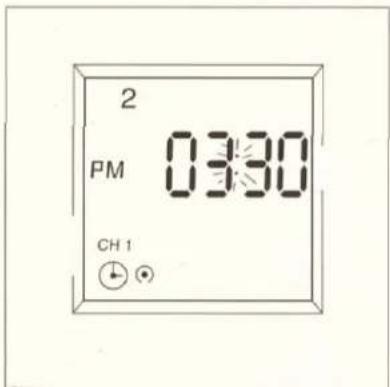
AM = Vormittag PM = Nachmittag
pie
| Category | Value | |---|---| | CH 1 | 100 | | Prog. | 50 | | | | | | | | | | | | | | | | | | | | | | | | | | | | | | | | | | | | | | | | | | | | | | | | | | | | | | | | | | | | | | | | | | | | | | | b | 20 | | 1...7 | 10 | The chart displays a single value for 'CH 1' at the center of the ring. The other categories are not explicitly labeled but are visually represented as colored segments on the ring.
Manual assistant
Powered by Anthropic
Waiting for your message
Product information
Brand : VAILLANT
Model : CalorMATIC B
Category : Thermostat