CDM2:2 MKII 2 - Mixer Citronic - Free user manual and instructions
Find the device manual for free CDM2:2 MKII 2 Citronic in PDF.


| Product Type | DJ Mixer |
| Brand | Citronic |
| Model | CDM2:2 MKII 2 |
| Power Supply | 12V AC, 500mA |
| Number of Channels | 2 |
| Input Channels | 4 line inputs (selectable as Line 1/2 or Line 3/4) |
| Microphone Input | Yes, with volume control |
| Equalization | High and Mid frequency adjustments |
| Crossfader | Replaceable, designed for easy replacement |
| Cue Function | Pre-fade monitor switch per channel |
| Master Output Display | LED level meter |
| Headphone Output | 6.3mm jack |
| Gain Control | Per channel input gain adjustment |
| Recommended Cable Quality | Good quality cables and connectors |
| Turn-On Sequence | Mixer and input devices first, amplifier last |
| Crossfader Replacement | Quick and easy; spares available from Citronic dealers |
Frequently Asked Questions - CDM2:2 MKII 2 Citronic
User questions about CDM2:2 MKII 2 Citronic
0 question about this device. Answer the ones you know or ask your own.
Ask a new question about this device
Download the instructions for your Mixer in PDF format for free! Find your manual CDM2:2 MKII 2 - Citronic and take your electronic device back in hand. On this page are published all the documents necessary for the use of your device. CDM2:2 MKII 2 by Citronic.
USER MANUAL CDM2:2 MKII 2 Citronic
The following pages give a full description of the connectors and their purpose. You should study this carefully before you power up the mixer to ensure you get the very best performance from the CDM2:2 mkII
General advice:
Cables & Connectors:
Always use good quality cables and connectors. Over 75% of all problems with DJ systems are simple connector ones. Don't get caught out.
Switching on your system:
Always turn on your mixer and input devices before you turn on the amplifier. The CDM2:2mkl has been designed not to harm your amplifiers or speakers if you turn them on first, but this may not be true of the inputs plugged into the mixer. Play Safe and always turn your amplifiers on last.
Crossfader:
This is commonly the most used feature on your mixer. Even though a great deal of care has been taken in the choice of components for this function, it is the most likely thing to wear out first on your mixer. So we've made it quick and easy to replace. Don't get caught out always carry a spare (available from any Citronic dealer).

TECHNICAL SPECIFICATIONS
Power Supply - 12Vac, 500mA

COMPONENT DIAGRAM
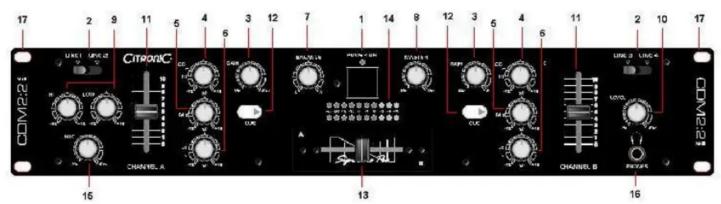
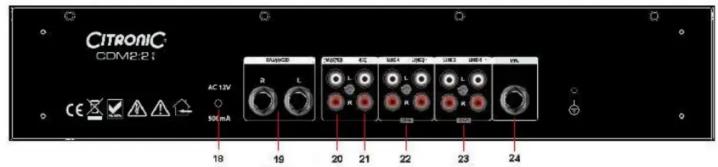

- Power control switch
- Line input selector switch (Line 1 or 2, Line 3 or 4)
- Gain: Input control
-
High: Hi range adjust
5 Mid·Mid range adjust -
Cue: Prefade monitor switch
- Cross fader
- Master output display
- Microphone volume control
- 6.3mm Headphone output
17 10 ^9 D-4....+5-4


Brand : Citronic
Model : CDM2:2 MKII 2
Category : Mixer