
GTR 1200.1 - Car radio Crunch - Free user manual and instructions
Find the device manual for free GTR 1200.1 Crunch in PDF.


| Product Type | Car Stereo (1-DIN) |
| Dimensions (W x H x D) | 178 mm x 50 mm x 160 mm |
| Weight | 1.5 kg |
| Power Supply | 12V DC (negative ground) |
| Maximum Power Output | 4 x 50 Watts |
| Radio Tuner | AM/FM with 30 presets |
| Playback Formats | CD, CD-R/RW, MP3, WMA |
| Bluetooth | Hands-free calling and audio streaming |
| USB Input | Front USB port for MP3 playback and device charging |
| Auxiliary Input | 3.5 mm front AUX input |
| Remote Control | Included wired remote control |
| Display | LCD with white backlight |
| Equalizer | 3-band EQ (bass, mid, treble) |
| Audio Outputs | 2 pairs of RCA preamp outputs (2V) |
| Maintenance | Wipe with a soft, dry cloth. Do not use solvents. |
| Safety | Replace fuse with same rating. Disconnect battery before installation. |
| Spare Parts | Fuses (type ATO/ATC), wiring harness, mounting sleeve |
| General Information | Crunch GTR 1200.1, 1-DIN car stereo with Bluetooth, CD/MP3 playback, and AM/FM tuner. |
Frequently Asked Questions - GTR 1200.1 Crunch
User questions about GTR 1200.1 Crunch
0 question about this device. Answer the ones you know or ask your own.
Ask a new question about this device
Download the instructions for your Car radio in PDF format for free! Find your manual GTR 1200.1 - Crunch and take your electronic device back in hand. On this page are published all the documents necessary for the use of your device. GTR 1200.1 by Crunch.
USER MANUAL GTR 1200.1 Crunch

Owner's Manual in English from Page 10
Installation & Stromanschluss GTR1200.1 - GTR2400.1
Installationshinweise
natural_image
3D rendering of a heat exchanger or cooling unit with visible cooling fins and mounting points (no text or symbols)natural_image
Top-down line drawing of a car interior with a speaker and seat (no text or symbols)Kabelanschlüsse
natural_image
Top-down line drawing of a car interior with a speaker and seat (no text or symbols)Kabelanschlüsse
Installation of the Amplifier, Electrical Connection 11
GTR1200.1 ANALOG MONO BASS AMPLIFIER
Functions & Controls 12
Speaker- & RCA-Connections 13
GTR2400.1 DIGITAL MONO BASS AMPLIFIER
Functions & Controls 14
Speaker- & RCA-Connections 15
SPECIFICATIONS 16
TROUBLE SHOOTING 17
Installation & Electrical Connection
GTR1200.1 · GTR2400.1
General Installation Notes
A car audio amplifier is generally mounted in the rear trunk area but can be mounted in any convenient area such as beneath a seat. Please be sure to locate this unit where you have reasonable air circulation and protection from moisture. When considering the mounting location you should minimize the length of the power and speaker leads. Minimizing both leads will yield a more reliable installation. It is also important to ensure that the heat sink fins are not against a panel or a surface, preventing air circulation. Do not install the amplifier on a subwoofer box or on vibrating parts of the vehicle, since the vibrations can cause damage to the amplifiers electrical components.
Installation of the amplifier
Mark the location for the mounting screw holes by using the amplifier as a template. Drill holes at the marked locations and firmly fasten the amplifier in place with the mounting screws supplied in the accessory kit. Before drilling or cutting any holes, investigate the layout of your automobile thoroughly:
Take care when working near the gas lines or hydraulic lines and electrical wiring of your car.
Electrical Connection
Ground (GND)
This wire is the electrical ground and must be fastened securely to the vehicle chassis. The best method is to use a threading sheet metal screw since the threads cut into bare metal. Ensure that all paint or other insulation is remove from around the hole area, and using self tapping screw, securely affix the bare wire ends to the vehicle chassis. Use as short a piece of cable as possible - use the same gauge as was used for the +12V cable.
Make sure that the connection is safe, a loose connection may result in amplifier noise and fault condition.

natural_image
3D rendering of a layered electronic device with 'CRUWEI' branding and mounting points (no readable text or symbols beyond branding)Remote (REM)
Many music sources have an output terminal for connection of the remote turn-on of the power amplifier. If a radio doesn't have a remote turn-on feature, then you can use the antenna relay wire, which activates the antenna motor. Please note, if the power antenna retracts when the radio is operating, then you cannot use the antenna relay wire to operate the remote turn-on.
Battery Connection (+12V)
This wire is usually connected directly to the positive battery terminal. Ensure that the + power supply wire is fused via an assigned fuse in line with the + power supply wire. Please use a sufficient gauge for the installed amplifiers (min 16-25 mm). This connection must be completed using spade lug with insulating sleeve.
Fuses
The integrated amplifier fuses protect the units from short circuit and overload. The fuse rating is for 4 Ohm loads (impedance) of the speakers, for 2 Ohm and 1 Ohm loads the fuses may have to get increased in case of higher power consumption.
Power / Ground / Remote Connection

Functions & Controls
GTR1200.1

Speaker- & RCA-Connection
GTR1200.1
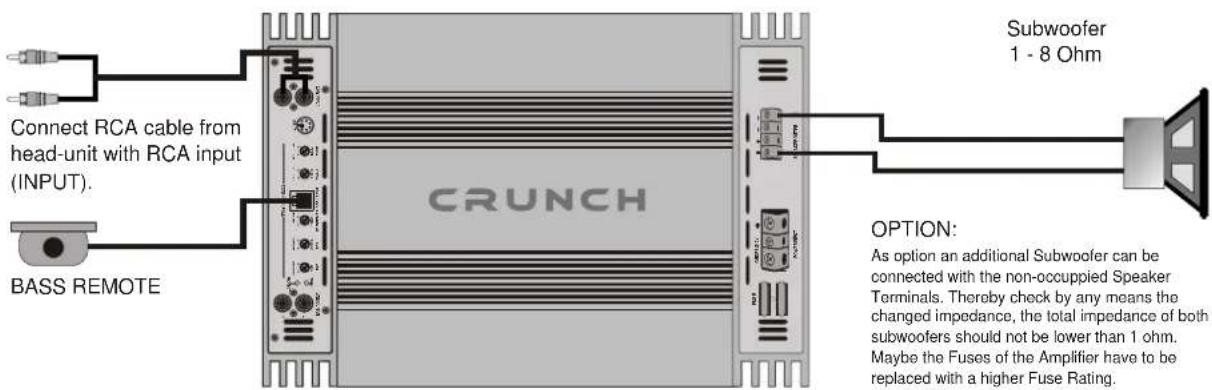
1-Channel-Mode: 1 Subwoofer / Mono

natural_image
Top-down line drawing of a car interior with a speaker and seat (no text or symbols)Cable connection
- Connect INPUT of the amplifier to the head unit line output with good quality RCA cables. By connecting the RCA jacks OUTPUT with a additional amplifier, a full range signal will be provided to the amplifier. If your head unit is equipped with a separate Subwoofer Output it is suggested to use this.
- Connect the subwoofer with the terminal block (SPEAKER OUTPUTS + / -) of the amplifier. As option a additional Subwoofer can also be connected. The minimum total impedance of both Subwoofer must be higher than 1 Ohm.
- Too low speaker loads result in too high heat dissipation and may cause the amplifier run into protection.
- Please observe speaker channel and polarity as printed by the speaker terminal block. Incorrect phasing of the speakers results in total loss of bass response.
Caution
Please avoid to connect speaker (-) to the ground or vehicle chassis.
LOW PASS - Control
- Adjust a frequency between 40Hz - 150Hz, depending on the size and response of the Subwoofer.
SUBSONIC - Control
- The SUBSONIC - Control adjusts the cut-off of the Subsonic-Frequency (lower Frequency cut-off).
Therewith a BANDPASS-Signal will be generated, where too low and not hearable frequencies will be eliminated.
Thereby a clean and powerful Bass-Signal will be generated. The adjustable level depends on the size and response of the subwoofer and should be between 15Hz (no cut-off) and 55Hz (max. cut-off Level).
NOTE: If the SUBSONIC - Level is higher than the LOW PASS - Level, no Sound is hearable.
LEVEL INPUT - Control
- Turn the LEVEL INPUT - Control on the amplifier to "6V" position.
- Turn the head unit volume control to about 80 - 90% of its full setting.
- Turn the LEVEL INPUT - Control clockwise until you hear some distortion.
- Then turn back the LEVEL INPUT - Control slightly until you can hear clean sound.
BASS BOOST - Control
- The BASS BOOST - Control adjusts the bass level at 45 Hz from 0 up to 12dB. Please use the Bass-Boost carefully.
BASS REMOTE
- The BASS REMOTE allows to control the Bass-Level for example from the driver's seat.

Functions & Controls
GTR2400.1

PROTECT - LED
Indicates the fault operation of the amplifier. When the fault conditions (overload, excessive heat or short circuit of speaker) arise, the protection circuit is engaged to protect the speakers and the amplifier against damage.
Attend in this case TROUBLE SHOOTING on page 22.
Speaker- & RCA-Connection
GTR2400.1
1-Channel-Mode: 1 Subwoofer / Mono

natural_image
Top-down line drawing of a car interior with a speaker and battery (no text or symbols)Cable connection
- Connect INPUT of the amplifier to the head unit line output with good quality RCA cables. By connecting the RCA jacks OUTPUT with a additional amplifier, a full range signal will be provided to the amplifier. If your head unit is equipped with a separate Subwoofer Output it is suggested to use this.
- Connect the subwoofer with the terminal block (SPEAKER OUTPUTS + / -) of the amplifier. As option a additional Subwoofer can also be connected. The minimum total impedance of both Subwoofer must be higher than 1 Ohm.
- Too low speaker loads result in too high heat dissipation and may cause the amplifier run into protection.
- Please observe speaker channel and polarity as printed by the speaker terminal block. Incorrect phasing of the speakers results in total loss of bass response.
Caution
Please avoid to connect speaker (-) to the ground or vehicle chassis.
LOW PASS - Control
- Adjust a frequency between 35Hz - 150Hz, depending on the size and response of the Subwoofer.
SUBSONIC - Control
- The SUBSONIC - Control adjusts the cut-off of the Subsonic-Frequency (lower Frequency cut-off).
Therewith a BANDPASS-Signal will be generated, where too low and not hearable frequencies will be eliminated.
Thereby a clean and powerful Bass-Signal will be generated. The adjustable level depends on the size and response of the subwoofer and should be between 15Hz (no cut-off) and 55Hz (max. cut-off Level).
NOTE: If the SUBSONIC - Level is higher than the LOW PASS - Level, no Sound is hearable.
LEVEL INPUT - Control
• See page 13.
PHASE SHIFT - Control
- Allows to adjust the Phase of the Subwoofer between "0 - 180°". The adjustment depends on the size and installation of the subwoofer.
BASS BOOST - Control
- The BASS BOOST - Control adjusts the bass level at 45 Hz from 0 up to 15dB. Please use the Bass-Boost carefully.
BASS REMOTE
- The BASS REMOTE allows to control the Bass-Level for example from the driver's seat.
Trouble Shooting
System does not turn on
- Check all fuses.
- Check all connections.
- Measure the +12 volt and remote turn on voltages at the amplifier terminals. If these are non existent or too low, take voltage measurements at fuse holders, distribution blocks, the head unit's +12 volt and remote leads to localize the problem.
Noise problems
- Check the speaker wiring
- Speakers are damaged
No Signal at Channels
- Set Balance and Fader from head unit on Zero-Position
- Check wiring (Amplifier, Speakers)
- Speakers are damaged
- The SUB SONIC - Control is adjusted too high. Turn the Control back.
- If you use the separate Subwoofer-Output of your head-unit, the level could be adjusted too low.
Hiss or white noise
- Speakers are overload
- High levels of white noise usually occurs when amplifier level controls are turned up too high.
- Another major problem that can cause excessive hiss, is a noisy head unit - unplug the amplifier input RCA cables, and if the hiss level reduces, the source unit is at fault.
No Stereo-Sound or Low Output
- Check speaker wiring (- and +)
Amplifier Protect-Mode (the LED lights up red)
- Speaker cables are shorted
- Inadequate cooling - relocate or remount to provide better natural airflow. Driving high power levels into low impedances - back off on the volume control, and/or make sure you are not loading the amplifier with less than the recommended loudspeaker impedance.
- Make sure that the battery voltage, as measured at the amplifier's +12 volt and ground terminals, is 11 volts or more.
Electrical Interferences
The inside of an automobile is a very hostile electrical environment. The multitude of electrical systems, such as the ignition system, alternator, fuel pumps, air conditioners to mention just a few, create radiated electrical fields, as well as noise on the +12 volt supply and ground. Remember to isolate the problem - first unplug amplifier input RCA cables, if the noise is still present, check the speaker leads, if not, plug the RCA's back, and investigate the source driving the amplifier, one component at a time.
A ticking or whine that changes with engine RPM:
- This problem could be caused by radiation pickup of RCA cables too near to a fuel pump or a distributor, for instance, - relocate cables.
- Check that the head unit ground is connected straight to the vehicle chassis, and does not use factory wiring for ground.
- Try to supply the head unit with a clean +12 volt supply directly from the battery +, instead of using a supply from the in dash Wiring/fusebox. This type of noise can be more difficult to pinpoint, but is usually caused by some kind of instability, causing oscillations in the system.
A constant whine:
- Check all connections, especially for good grounds.
- Make sure that no speaker leads are shorting to exposed metal on the vehicle chassis.
- RCA cables are notorious for their problematic nature, so check that these are good, in particular the shield connections.
Caution!
In your amplifier are protection circuits integrated. Short Circuit Protection engaged: The amplifier will turn off and try to come back immediately. The amplifier will cycle like this indefinitely, with "blips" of sound each time. If this is the case, check your speakers and wiring for low impedance and short circuits. Thermal Protection engaged: The amplifier will turn off and several minutes later will come back on. In this case, ensure that there is nothing blocking the normal convective airflow of the amplifier. If the display is still lighting up red, the amplifier is damaged.
Specifications
| GTR1200.1 | GTR2400.1 | |
| Channels | 1 | 1 |
| Watts RMS/MAX. @ 4 Ohms | 1 x 275/550 | 1 x 550/1100 |
| Watts RMS/MAX. @ 2 Ohms | 1 x 450/900 | 1 x 900/1800 |
| Watts RMS/MAX. @ 1 Ohms | 1 x 600/1200 | 1 x 1200/2400 |
| Damping Factor | >200 | >200 |
| S/N Ratio | >90 dB | >90 dB |
| Channel Separation | >70 dB | >70 dB |
| THD&N | <0,10 % | <0,10 % |
| Input Sensitivity | 0,2 - 6 Volt | 0,2 - 6 Volt |
| Input Impedance | >47 kOhm | >47 kOhm |
| Balanced Line Input | - | • |
| Adjustable Subsonic Filter | 15Hz - 55Hz | 15Hz - 55Hz |
| Adjustable Low Pass Filter | 40Hz - 150Hz | 35Hz - 250Hz |
| Adjustable Bass-Boost @ 45Hz | 0 - 12 dB | 0 - 15 dB |
| Adjustable Phase Shift | -0 - 180° | |
| Fuse Rating | 3 x 30 A 2 x 50 A | |
| Dimensions in mm | ||
| Width x Height | 255 x 53 | 255 x 53 |
| Length Heatsink | 400/430 | 350/380 |
All specifications are object to change!
NOTES
NOTES
CRUNCH
CAR AUDIO USA
GTR PRO SERIES

Distribution:
Audio Design GmbH
Am Breilingsweg 3
76709 Kronau
Tel. 07253/9465-0, Fax 07253/9465-10
www.audiodesign.de

- Owner's Manual in English from Page 10
- Installation & Stromanschluss GTR1200.1 - GTR2400.1
- Installationshinweise
- Kabelanschlüsse
- GTR1200.1 ANALOG MONO BASS AMPLIFIER
- GTR2400.1 DIGITAL MONO BASS AMPLIFIER
- Installation & Electrical Connection
- GTR1200.1 · GTR2400.1
- General Installation Notes
- Installation of the amplifier
- Electrical Connection
- Ground (GND)
- Remote (REM)
- Battery Connection (+12V)
- Fuses
- Power / Ground / Remote Connection
- Functions & Controls
- GTR1200.1
- Speaker- & RCA-Connection
- 1-Channel-Mode: 1 Subwoofer / Mono
- Cable connection
- LOW PASS - Control
- SUBSONIC - Control
- LEVEL INPUT - Control
- BASS BOOST - Control
- BASS REMOTE
- GTR2400.1
- PROTECT - LED
- Caution
- Please avoid to connect speaker (-) to the ground or vehicle chassis.
- PHASE SHIFT - Control
- Trouble Shooting
- System does not turn on
- Noise problems
- No Signal at Channels
- Hiss or white noise
- No Stereo-Sound or Low Output
- Amplifier Protect-Mode (the LED lights up red)
- Electrical Interferences
- A ticking or whine that changes with engine RPM:
- A constant whine:
- Caution!
- NOTES
- CRUNCH
- CAR AUDIO USA
- GTR PRO SERIES
Brand : Crunch
Model : GTR 1200.1
Category : Car radio