
ACR 4230 - Car radio BLAUPUNKT - Free user manual and instructions
Find the device manual for free ACR 4230 BLAUPUNKT in PDF.


| Product Type | Car Stereo |
| Brand | Blaupunkt |
| Model | ACR 4230 |
| Dimensions (W x H x D) | 178 mm x 50 mm x 150 mm (DIN size) |
| Weight | 0.5 kg |
| Power Supply | 12V DC (negative ground) |
| Maximum Power Output | 4 x 20W RMS |
| Frequency Range | FM: 87.5–108 MHz; AM: 522–1620 kHz |
| Supported Media | Cassette tape |
| Front Panel | Detachable, anti-theft design |
| Controls | Rotary volume, tuning knobs, hard buttons for source, preset, and audio settings |
| Display | LCD with white backlight |
| Audio Settings | Bass, treble, balance, fader, loudness |
| Preset Stations | 30 (FM: 18, AM: 12) |
| Antenna Type | DIN standard, auto antenna output |
| Clock | Digital, adjustable via front panel |
| Maintenance | Clean faceplate with soft, dry cloth; avoid liquids |
| Safety | Use with 5A fuse; disconnect battery before installation |
| Spare Parts Accessories | Available from Blaupunkt service centers; includes mounting sleeve, trim ring, wiring harness |
| Repairability | Serviceable by qualified technicians; some internal adjustments via trim pots |
Frequently Asked Questions - ACR 4230 BLAUPUNKT
User questions about ACR 4230 BLAUPUNKT
0 question about this device. Answer the ones you know or ask your own.
Ask a new question about this device
Download the instructions for your Car radio in PDF format for free! Find your manual ACR 4230 - BLAUPUNKT and take your electronic device back in hand. On this page are published all the documents necessary for the use of your device. ACR 4230 by BLAUPUNKT.
USER MANUAL ACR 4230 BLAUPUNKT
Operating instructions
ACR 4230
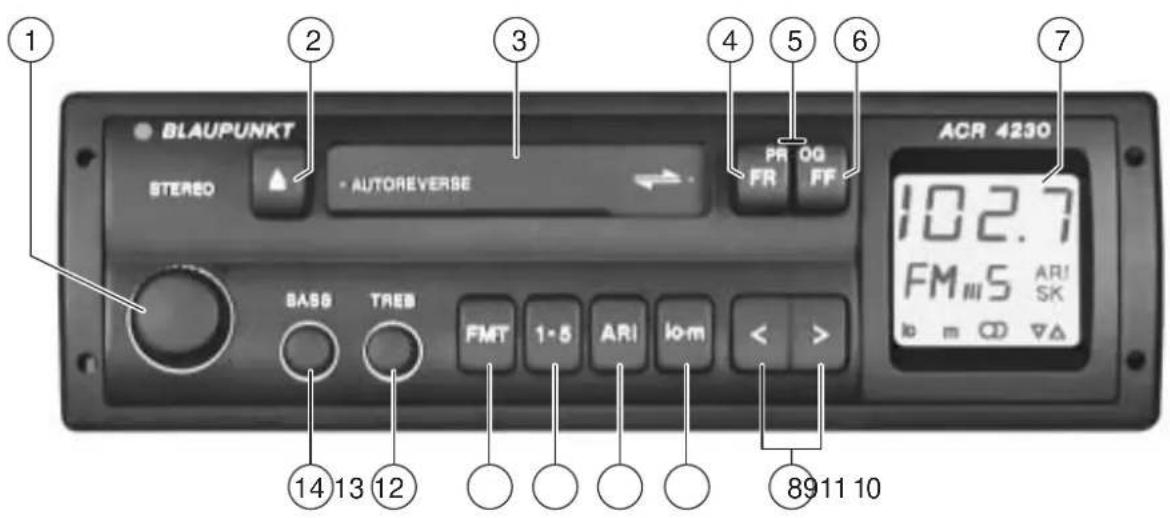
Table of Contents
Important information ...... 11
Traffic safety 11
Installation / Hook-up 11
Radio operation 11
Station search 11
Manual station search 11
Adjusting station search sensitivity for FM.... 11
Stereo - mono switch 11
Storing stations 12
Storing the strongest stations automatically 12
Recalling stored stations 12
Traffic messages (ARI) 12
Switching the traffic messages (ARI) on and off 12
Warning beep.... 12
Switching the warning beep off .... 13
Automatic search start 13
Cassette tape operation .... 13
Insert cassette tape.... 13
Remove cassette tape 13
Fast forward 13
Fast rewind 13
Autoreverse function 13
Care of your audio equipment.... 14
Appendix.... 14
Technical data.... 14
Legend
① On/off
Turn knob.
On
Off
Adjust volume:
Turn knob.
② ▲ - Eject cassette tape
③Cassette tape slot
④FR (Fast Rewind):
Rewinds tape quickly to the beginning.
To switch off: press FF button.
⑤PROG (Autoreverse)
To switch over to the other tape track - press both buttons.
⑥ FF (Fast Forward)
Forwards tape quickly to the end.
To switch off: press FR button.
⑦Display for
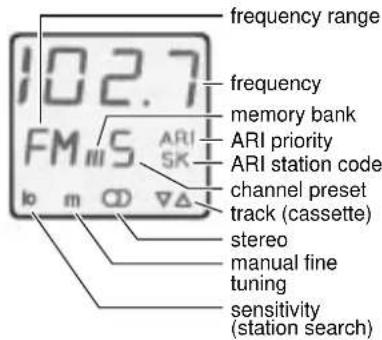
⑧<>
Station selection
automatic or manual ("m" in display).
Switch over by pressing lo·m ⑨
⑨ lo·m
Changing the search tuning sensitivity for FM stations
lo lit up in the display indicates normal sensitivity for the station search function.
lo not lit up in the display indicates high sensitivity for the station search function.
m lit up indicates manual station fine tuning.
Added feature:
Switch over from stereo to mono:
Press lo · m for longer than 2 seconds.
⑩ ARI (traffic messages)
When ARI is visible in the display, you are able to tune into only those radio stations which broadcast traffic messages.
⑪1-5
For storing and recalling radio stations
⑫ FM·T (frequency modulation)
Switch for the FM memory banks I, II, III and "T" (Travelstore) - for storing and recalling the six nearest, strongest station signals.
Store "T":
Press FM·T until the search begins in the display.
Recall "T":
Press FM-T until T appears in the display. Then press the station button quickly and repeatedly if necessary.
⑬TREB (treble)
For adjusting the treble
⑭ BASS
For adjusting the bass
Important information
Traffic safety
As the driver of a motor vehicle, it is your responsibility to pay attention to the traffic situation at all times. Never use your car radio in a way that could distract you. Should the traffic situation become particularly demanding, we would advise you not to use the radio. Please keep in mind that you travel a distance of 14 m per second at a speed of only 50 km/h. When adjusting the volume, make sure that you are still able to hear sounds coming from outside of the vehicle, so that you are always able to react to warning signals.
Installation / Hook-up
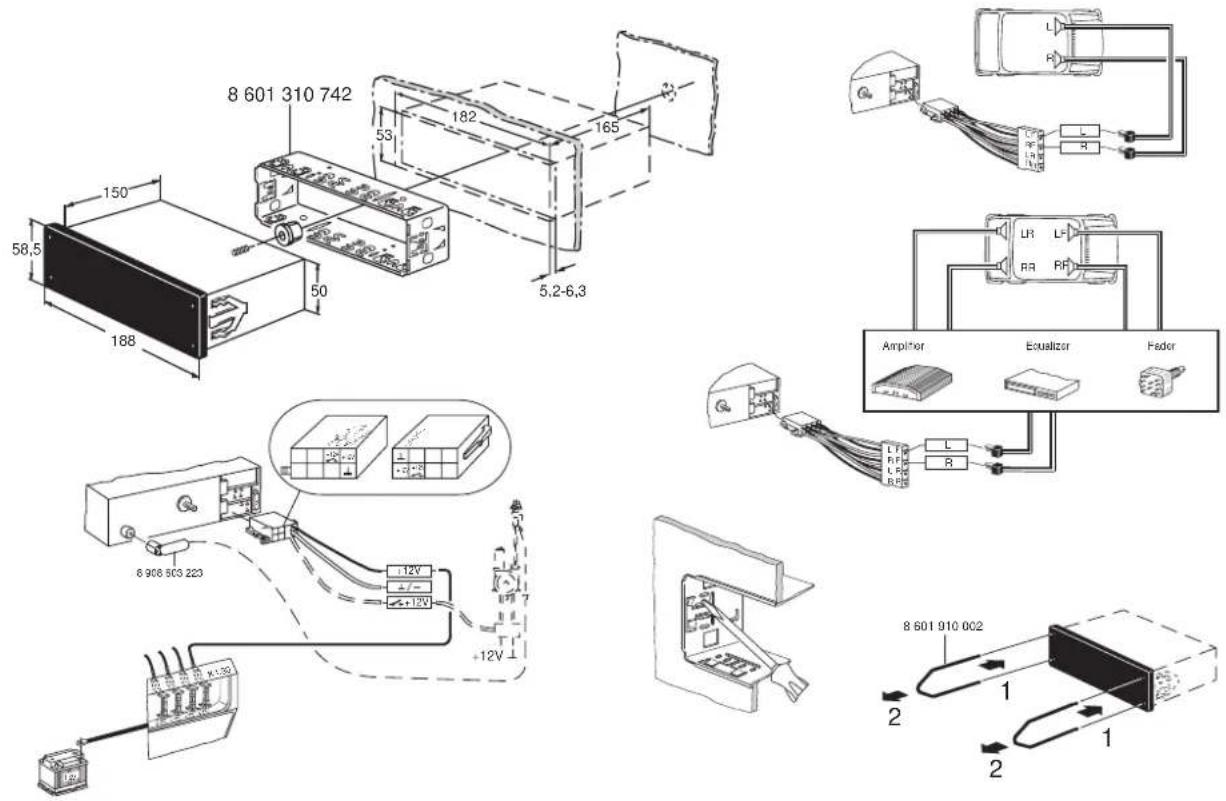
If you would like to install your new car radio yourself or add other audio components to the existing ones, then please read the enclosed instructions on installation and hook-up carefully.
Do not ground the loudspeaker outputs! Use only Blaupunkt-certified accessories and spare parts.
Radio operation
With this car radio you can receive FM frequencies ranging from 87.5 to 108 MHz.
Station search
m should not be lit up in the display. If it is, switch it off by pressing lo · m
- <> press right or left.
The car radio will automatically tune into the next station.
If you hold the button pressed, the search function will forward quickly.
Manual station search
m (manual) must be lit up in the display. If it is not, switch it on by pressing lo · m.
- <> press right or left quickly.
The frequency will move up or down in short intervals.
If you hold the button pressed, then the frequencies will move up or down more quickly.
Adjusting station search sensitivity for FM
You can adjust the sensitivity of the automatic station search.
- Press lo · m.
When "lo" is visible in the display, then only those stations with relatively strong signals will be picked up (low sensitivity).
When "lo" is not visible in the display, then stations with weaker signals will also be picked up (high sensitivity).
Stereo - mono switch
If you would like to switch between stereo and mono reception:
- Press lo • m for approximately 2 seconds.
During mono reception the stereo symbol will light up in the display.
Each time the car radio is switched on, the reception will automatically be set to stereo. The radio will automatically switch to mono when the reception conditions are poor.
Storing stations
For each memory bank (I, II, III, T) you can store up to five stations using the button 1-5.
- Select the memory bank by pressing FM·T.
- Select the button 1-5 to store the new station and press it.
- Press < > to tune in the station you want to store (automatically or manually).
- Press the button 1-5 and hold it. First the station will be muted and then become audible again.
The station has been stored in the memory bank.
The corresponding memory bank and the button preset will appear in the display.
Note:
If you tune into a station which has already been stored, then the corresponding button preset and the memory bank will flash in the display for approximately 5 seconds.
Storing the strongest stations automatically
(Travelstore)
In your reception area you can automatically store the five nearest FM stations, sorted according to their frequencies.
This feature is particularly useful when you are travelling.
- Press FM·T for at least 2 seconds. The radio will search for the nearest FM stations and store them in the memory bank “T” (Travelstore). When the process has been completed, the first station will be set.
If you wish, you can also store stations in the Travelstore memory bank manually.
Recalling stored stations
You can recall the stored stations by pressing the corresponding buttons.
- Select the memory bank.
Press FM•T until I, II, III or T appears in the display. - Select the station by pressing the button 1-5, press repeatedly if necessary.
Traffic messages (ARI)
Many FM stations broadcast traffic news for their reception area at regular intervals. Stations using the ARI system broadcast an "ARI signal" during their programmes, so that your car radio can recognize them. Another signal is broadcast to indicate the beginning and end of a traffic message. These traffic messages are broadcast at a preset volume. If you are playing a cassette, it will be interrupted until the traffic message has ended and will then resume operation.
Switching the traffic messages (ARI) on and off
If you want to switch the reception of traffic messages (ARI) on or off
- Press ARI.
ARI will light up in the display, when the reception is switched on.
Now the radio will only pick up those stations broadcasting the ARI signal.
Warning beep
Should you leave the reception area of the station you are tuned to, then you will hear a warning beep after approximately 30 seconds. If you should press a button preset for a station which does not broadcast the ARI signal, then you will also hear a warning beep.
Cassette tape operation
Switching the warning beep off
a) Tune to a different station broadcasting the ARI signal:
- Press <> or
- select a stored station with the ARI signal by pressing the button preset 1-5.
or
b) Switch the traffic message priority off:
- Press ARI.
Automatic search start
(during cassette operation)
If you should leave the reception area of your ARI station while you are playing a cassette, then the car radio will automatically tune into a different station broadcasting the ARI signal.
Insert cassette tape
- Switch the car radio on.
- Insert a cassette tape with side A or 1 facing up, the open side facing to the right. Do not use force.
The cassette tape will be played in the direction used last. The display will indicate which side is being played.
▼ - indicates side A or 1
▲ - indicates that side B or 2 is being played (reverse operation).
Remove cassette tape
- Press ▲ The cassette will be ejected.
Fast forward
- Press FF (fast forward). At the end of the tape, the tape will switch to the opposite track and start playing.
Stop fast forward
- Press FR.
Fast rewind
- Press FR (fast rewind). When the tape has rewound to the beginning, it will switch to play.
Stop fast rewind
- Press FF.
Autoreverse function
Switching tracks during playback.
- Press FR and FF at the same time.
At the end of the tape, the unit will automatically switch to the other track.
Note:
If there is too much tension on the cassette tape during playback, it may switch to the other track by itself. Check the condition of the tape. Sometimes it helps to rewind the cassette tape completely.
Care of your audio equipment
We recommend that you use only C60/C90 cassette tapes in your car radio. Protect your cassettes from dirt, dust and temperatures exceeding 50 °C. During cold weather, allow cold cassettes to warm up somewhat before playing them in order to avoid uneven tape transport. Operating problems and sound distortions may occur after approximately 100 hours of playing time and are caused by dust particles which adhere to the rubber roller pad and the tape head. Use a cleaner cassette to remove normal dirt build-up. If more dirt than usual has accumulated, use a cotton bud dipped in rubbing alcohol to clean these parts. Never use any hard tools.
Appendix
Technical data
Amplifier:
Output power: 2 x 6.5 W RMS power according to DIN 45324/3.1 at 4 Ω
FM:
Sensitivity: 1.3 μV at 26 dB S/N ratio
Response: 35 - 15 000 Hz (-3 dB)
Cassette:
Response: 32 - 16 000 Hz (-3 dB)
Information subject to change!
ILLUSTRATIONEN · ILLUSTRATIONS · ILUSTRACIONES · ILLUSTRAZIONI · ILLUSTRATIONER · AFBEELDINGEN


- Table of Contents
- Important information ...... 11
- Radio operation 11
- Traffic messages (ARI) 12
- Cassette tape operation .... 13
- Appendix.... 14
- Legend
- Station selection
- Important information
- Traffic safety
- Installation / Hook-up
- Radio operation
- Station search
- Manual station search
- Adjusting station search sensitivity for FM
- Stereo - mono switch
- Storing stations
- Note:
- Storing the strongest stations automatically
- (Travelstore)
- Recalling stored stations
- Traffic messages (ARI)
- Switching the traffic messages (ARI) on and off
- - Press ARI.
- Warning beep
- Cassette tape operation
- Switching the warning beep off
- Automatic search start
- Insert cassette tape
- Remove cassette tape
- Fast forward
- Stop fast forward
- Fast rewind
- Stop fast rewind
- Autoreverse function
- Care of your audio equipment
- Appendix
- Technical data
- Amplifier:
- FM:
- Cassette:
Brand : BLAUPUNKT
Model : ACR 4230
Category : Car radio