
G22 - Mouse Natec - Free user manual and instructions
Find the device manual for free G22 Natec in PDF.


Pick your language and provide your email: we'll send you a specifically translated version.
| Brand | Natec |
| Model | G22 |
| Product Type | Wired Mouse |
| Interface | USB |
| DPI Range | 1000 - 1600 DPI (adjustable) |
| Number of Buttons | 6 (left, right, middle, forward, backward, DPI) |
| Scroll Wheel | Yes, with click |
| Cable Length | 1.5 m (approx.) |
| Dimensions (L x W x H) | 125 x 70 x 40 mm (approx.) |
| Weight | 130 g (approx.) |
| Power Source | USB powered (5V DC) |
| Operating System Compatibility | Windows, macOS, Linux |
| Main Functions | Pointing, clicking, scrolling, DPI adjustment, forward/backward navigation |
| Cleaning Instructions | Wipe with a soft dry cloth; do not use liquids or abrasives |
| Safety Precautions | Avoid exposure to moisture, extreme temperatures, and direct sunlight; do not disassemble |
| Spare Parts / Repairability | Not designed for user repair; contact support for issues |
| Environmental Compliance | RoHS, WEEE |
| Certifications | CE |
Frequently Asked Questions - G22 Natec
How do I install the Natec G22 mouse?
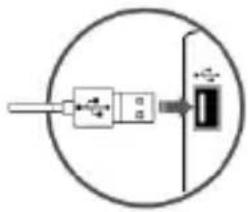
Simply plug the USB cable into an available USB port on your computer. The mouse should be automatically recognized and installed. No additional drivers are required for basic functionality.
How can I change the DPI setting on the G22 mouse?
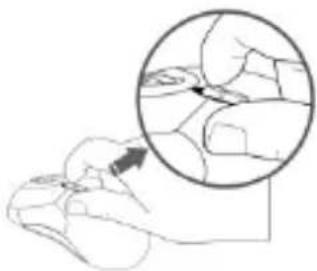
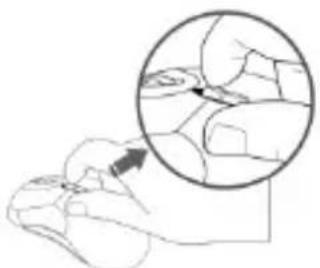
Press the DPI button located on the top of the mouse (usually behind the scroll wheel) to cycle through predefined DPI levels. The change is indicated by the movement speed of the cursor.
What are the safety precautions for using the mouse?
Avoid exposing the mouse to water, excessive heat, or direct sunlight. Do not attempt to disassemble the device. Clean only with a dry cloth.
Is the Natec G22 compatible with macOS?
Yes, it works with macOS as a standard HID device. Some additional features may require system preferences adjustments.
How do I clean my mouse?
Unplug the mouse and use a soft dry cloth to wipe the surface. For stubborn dirt, slightly dampen the cloth (not wet). Avoid using harsh chemicals or abrasive materials.
What should I do if the cursor is not moving?
Check that the USB cable is properly connected. Try a different USB port. If the issue persists, restart your computer. If the problem continues, the mouse may be defective.
Can I use the mouse on a glass surface?
The mouse is designed for use on opaque surfaces. Glass or reflective surfaces may impair tracking. A mouse pad is recommended for optimal performance.
How do I dispose of the mouse responsibly?
Do not throw it in household waste. Follow local regulations for WEEE (Waste Electrical and Electronic Equipment) disposal. Contact your local recycling center.
Are there any special drivers required for the mouse?
No special drivers are needed for basic functions. However, for advanced customization (e.g., button remapping), you may need to download software from the Natec website.
What is the warranty period for the Natec G22?
The standard warranty period is 2 years from the date of purchase. Keep your receipt for warranty claims.
User questions about G22 Natec
0 question about this device. Answer the ones you know or ask your own.
Ask a new question about this device
No questions yet. Be the first to ask one.
Download the instructions for your Mouse in PDF format for free! Find your manual G22 - Natec and take your electronic device back in hand. On this page are published all the documents necessary for the use of your device. G22 by Natec.
USER MANUAL G22 Natec
EN - NATEC GENESIS G22 - USER'S GUIDE
MOUSE INSTALATION:
natural_image
Pure electrical circuit lines without any symbols
natural_image
Gray circular button with a white checkmark symbol (no text or numbers)DPI CHANGE

natural_image
Illustration of a hand holding a small object with an arrow pointing to it, showing a magnified view of the object (no text or symbols present)SAFETY

natural_image
Four circular symbols representing weather and safety restrictions: no sun, snowflake, cloud, and wrench (no text or labels)GENERAL
- The safe product, conforming to the EU requirements.
- The product is made in accordance with RoHS European standard. The standard was issued in order to decrease the amount of the electronic and electrical waste emitted into the atmosphere.
- The WEEE symbol (the crossed-out wheeled bin) using indicates that this product in not home waste. You protect the environment when you recycle hazardous waste appropriately. In order to get detailed information about recycling this product please contact your retailer or a local authority.

natural_image
Pure electrical connector diagram without any text or symbols
natural_image
Gray circular button with a white checkmark symbol (no text or numbers)DPI SCHALTEN:

natural_image
Illustration of a hand pressing a button on a computer mouse, with an inset showing the hand being held (no text or symbols present)natural_image
Four circular signs showing weather and safety symbols: no sun, snowflake, cloud, and wrench (no text or labels)WICHTIGE HINWEISE:
natural_image
Illustration of a hand pressing down on a computer mouse, with an inset showing the hand holding a ball (no text or symbols present)BEZPIECZEŃSTWO

UWAGI OGÓLNE
natural_image
Pure electrical circuit lines without any symbols
natural_image
Gray circular button with a white checkmark symbol (no text or numbers)ZMĚNA DPI
natural_image
Illustration of a hand pressing a small object with an arrow, showing no text or symbols.BEZPEČNOSTNÍ INFORMACE:

natural_image
Prohibition symbol with sun and radiating lines inside a circle (no text)
natural_image
Prohibition sign with a circular border and a diagonal line crossing over a snowflake pattern (no text)
natural_image
Prohibition sign with no text, featuring a cloud and raindrops inside a circle (no text or symbols)
natural_image
Prohibition sign with crossed wrench and hammer inside a circle (no text)OBECNÉ INFORMACE:
natural_image
Pure electrical circuit lines without any symbols
natural_image
Gray circular button with a white checkmark symbol (no text or numbers)ZMENA DPI
natural_image
Illustration of a hand pressing a small object on a computer mouse, with an arrow indicating motion (no text or symbols present)BEZPEČNOSTNÉ INFORMÁCIE:

natural_image
Four circular symbols representing weather and safety restrictions: no sun, snowflake, cloud, and wrench (no text or labels)VŠEOBECNÉ INFORMÁCIE:
natural_image
Pure electrical connector diagram without any text or symbols
natural_image
Gray circular button with a white checkmark symbol (no text or numbers)MODIFICARE DPI

natural_image
Illustration of a hand pressing down on a small object, with an inset showing the hand holding a piece of tissue (no text or symbols present)SIGURANTA IN UTILIZARE

natural_image
Four circular symbols representing weather and labor restrictions: no sun, snowflake, cloud, and wrench (no text or labels)GENERAL INFORMATION


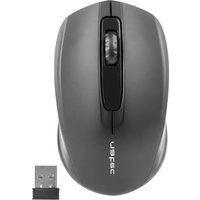


Table of contents
Click a title to access it
- EN - NATEC GENESIS G22 - USER'S GUIDE
- MOUSE INSTALATION:
- DPI CHANGE
- SAFETY
- GENERAL
- DPI SCHALTEN:
- WICHTIGE HINWEISE:
- BEZPIECZEŃSTWO
- UWAGI OGÓLNE
- ZMĚNA DPI
- BEZPEČNOSTNÍ INFORMACE:
- OBECNÉ INFORMACE:
- ZMENA DPI
- BEZPEČNOSTNÉ INFORMÁCIE:
- VŠEOBECNÉ INFORMÁCIE:
- MODIFICARE DPI
- SIGURANTA IN UTILIZARE
- GENERAL INFORMATION
Manual assistant
Powered by Anthropic
Waiting for your message
Product information
Brand : Natec
Model : G22
Category : Mouse