
AM 5 - Pregnant CANTON - Free user manual and instructions
Find the device manual for free AM 5 CANTON in PDF.


| Product Type | Active 2-Way Bass Reflex Loudspeaker (Monitor) |
| Power Supply | 100-240V~, 50/60Hz, 95W |
| Standby Power Consumption | < 0.5W |
| Inputs | Balanced XLR and Unbalanced RCA (Cinch) |
| Input Sensitivity | Switchable: -6 dBu (0.39V), 0 dBu (0.775V), +10 dBu (2.45V) |
| High Pass Filter | Switchable: 50Hz, 70Hz, 100Hz |
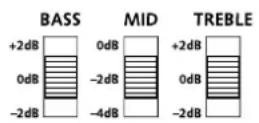
| Bass Adjustment | -2dB, 0dB, +2dB |
| Midrange Adjustment | -4dB, -2dB, 0dB |
| Treble Adjustment | -2dB, 0dB, +2dB |
| Amplifier Mode | ON (permanent) or AUTO (automatic on/off with 20-minute timeout) |
| Auto Power Off | After approx. 20 minutes of no signal (in AUTO mode) |
| Cabinet Type | Bass reflex |
| Placement Options | On shelf, table, sideboard; wall mount with optional bracket (Canton accessory) |
| Included Accessories | Mains cable (1.80m), 4x self-adhesive feet |
| Breaking-in Time | 15–20 hours at normal volume |
| Guarantee | 2 years (active speakers) |
| Cleaning | Use a clean, dry cloth; do not use aggressive, alcohol-based or abrasive agents |
| Safety | Indoor use only; do not open housing; no modifications; avoid moisture and extreme temperatures |
| Environmental Compliance | CE marked; complies with EU directives (EMC, Low Voltage, RoHS, WEEE, Ecodesign) |
| Declaration of Conformity | Available at www.canton.de/en/doc.htm |
| Connection Note | Do not operate inputs in parallel; use only shielded signal cables |
| LED Indication | Red: no signal/standby; Green: active; Off: no power |
Frequently Asked Questions - AM 5 CANTON
User questions about AM 5 CANTON
0 question about this device. Answer the ones you know or ask your own.
Ask a new question about this device
Download the instructions for your Pregnant in PDF format for free! Find your manual AM 5 - CANTON and take your electronic device back in hand. On this page are published all the documents necessary for the use of your device. AM 5 by CANTON.
USER MANUAL AM 5 CANTON

Deutsch
natural_image
Illustration of a bookshelf with books and a speaker (no text or symbols)im Regal
natural_image
Line drawing of a desktop computer setup with monitor, speaker units, and keyboard (no text or symbols)neben dem PC
Anschluss-Terminal
Deutsch
Anschlüsse AM 5
natural_image
Simple line drawing of a speaker on a stand inside a 3D cube (no text or symbols)natural_image
Simple line drawing of a table with a speaker on top, enclosed in a rounded rectangle (no text or symbols)natural_image
Simple line drawing of a speaker on a cabinet with three drawers, enclosed in a rectangular frame (no text or symbols)Tisch-/Sideboardaufstellung, wandnah BASS -2dB | MID -2dB | TREBLE X
natural_image
Simple line drawing of a table with a speaker on top, no text or symbols presentnatural_image
Illustration of a person facing a camera on a table, with an arrow pointing to the face (no text or symbols present)natural_image
Simple line drawing of a 3D box with a speaker icon on top (no text or symbols)Wandmontage in Wandmitte BASS 0dB | MID -2dB | TREBLE X
natural_image
Simple line drawing of a rectangular box with a speaker icon on top (no text or symbols)Wandmontage in Deckennähe BASS -2dB | MID -4dB | TREBLE X
natural_image
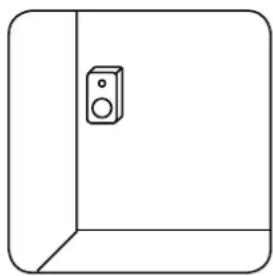
Simple line drawing of a cabinet or cabinet with a speaker on the door (no text or symbols)Eckmontage BASS -2dB | MID -4dB | TREBLE X
Deutsch
Fehlersuche
German loudspeaker tradition
English
Welcome to the world of pure music
We are delighted that you have chosen a Canton loudspeaker. Our products combine high quality components with many years of development experience and meticulous production methods. In order to get the best out of your loudspeaker you need to observe a few points, as detailed in the Operating Instructions of your Active Monitor AM 5.
We wish you many hours of listening pleasure!
Contents
Safety advice......Page 19
Unpacking...... Page 24
Breaking in Page 24
Installation Page 24
Connection terminal......Page 25
Connection and function ...... Page 26
Adjusting to the installation site ......Page 27
Troubleshooting Page 28
Declaration of conformity ...... Page 30
Further information......Page 31
Guarantee Page 31

The user is responsible for ensuring that the loudspeaker is correctly positioned and connected. Canton cannot accept any responsibility for damages or accidents caused by inappropriate positioning or connection.
English
Safety advice

Please follow the safety advice when positioning and maintaining your loudspeaker.
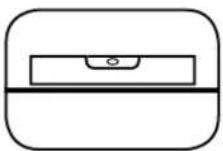
Choose a level surface Avoid moisture Avoid vibrations


Protect against extreme cold

Do not open housing
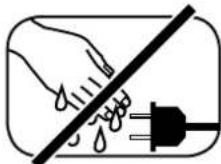
Never touch the power cable with wet hands

Do not discard in household rubbish

Avoid direct sunlight

Do not use aggressive, alcohol-based or abrasive cleaning agents

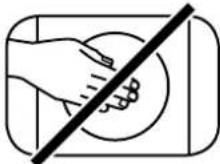
Do not reach inside the speaker

Do not drill into cables or water pipes
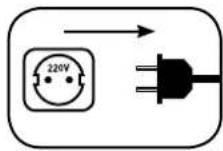
Keep access to socket clear
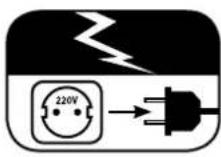
Unplug the device during thunderstorms

In case of overload
turn the volume down
English
Important Safety Instructions

| Notices |
| Read and follow all instructions. |
| Keep these instructions. |
| Heed all warnings. |
| Use this apparatus only in moderate climates (not in tropical climates). |
| Indoor use only. Do not use outdoors or in humid rooms. |
| To reduce the risk of fire and electric shock, do not expose this apparatus to rain or moisture. |
| Do not use this apparatus near water. |
| The apparatus should not be exposed to dripping or splashing. |
| Strong fluctuations in temperature lead to condensation (water droplets) forming inside the apparatus.Wait until the moisture has evaporated before starting up the apparatus (min. 3hours). |
| Objects filled with liquids (such as vases) should not be placed on the apparatus. |
| No naked flame source, such as lighted candles, should be placed on or beside the apparatus. |
| Do not install the apparatus near any heat sources such as radiators, heat registers, stoves, or other apparatus (incl. amplifiers) that produce heat. |
| Prevent exposure to direct sunlight. |
| Observe a free space of at least 5cm around the apparatus. |
| Do never defeat the safety purpose of a polarized or ground plug: A polarized plug has two blades with one wider than the other. The wide blade is provided for your safety. When the provided plug doesn't fit into your outlet, consult an electrician for replacement of the obsolete outlet. |
| To prevent electric shock, do not use the plug with an extension cord, socket, or other outlet unless the blades can be fully inserted to prevent blade exposure. |
| Never touch signal and power cords with wet hands. |
| Protect the power cord from being walked on or pinched particularly near the plug, socket, and the point where they exit from the apparatus. |
| Where the mains plug or an appliance coupler is used as the disconnect device, the mains plug of the power cord or appliance coupler should remain readily operable. |
| Unplug this apparatus during thunderstorms or when unused for long periods of time. |
| To completely disconnect this apparatus from the mains, disconnect the supply cord plug from the socket. |
| Power down the apparatus before connecting or disconnecting any cable. |
| Always pull the plugs and not the cables. |
| Install this apparatus in accordance with the manufacturer's instructions. |
| Always choose a level surface. The apparatus has to be in perfect vertical alignment. |
| Do not use force on operating elements, connections and cables. |
| The apparatus may only be operated with the voltage and frequency specified on the apparatus or the name plate. |
English
Important Safety Instructions

Notices
Do not insert any objects or body parts into the apparatus openings. Live components inside the enclosure could get touched and / or damaged. This could lead to short circuiting, electric shock and fire.
Only use attachments and accessories specified by the manufacturer and / or provided with the apparatus.
Use only with a cart, stand, tripod, bracket, or table specified by the manufacturer, or sold with the apparatus. When a cart is used, use caution when moving the cart/apparatus combination to avoid injury from tip-over.

Clean the apparatus only with a clean, dry cloth.
Do not use aggressive, alcohol-based or abrasive cleaning agents.
To reduce the risk of electric shock, do not open the housing! There are no serviceable parts inside.
Refer all servicing to qualified service personnel. Servicing is required when the apparatus has been damaged in any way, such as power supply cord or plug is damaged, liquid has been spilled or objects have fallen into the apparatus, the apparatus has been exposed to rain or moisture, does not operate normally, or has been dropped.
Do not make any modification to the apparatus or the accessory. Unauthorized alterations may affect the safety, regulatory compliance, or the system performance. In this case, the operating licence/warranty can expire.
Turn down the volume level immediately if sound distortions, such as unnatural knocking, beating or high-frequency clicking can be heard.
To prevent possible hearing damage, do not listen at high volume levels for long periods.

The equipment and/or accessories may contain small parts that could be swallowed. Not suitable for children under three years of age.

This symbol is intended to alert the user to the presence of uninsulated dangerous voltage within the product's enclosure that may be of sufficient magnitude to constitute risk of fire and electric shock.
This symbol is intended to alert the user to the presence of important operating and maintenance instructions in the literature accompanying this product.
This symbol denotes equipment with Class II Protection Rating. These devices are deemed to be fully protected against the risk of electric shock during normal use by means of double or reinforced insulation, and therefore require no earth conductor.


CAUTION
Risk of electric shock. Do not open!

CAUTION:
To reduce the risk of fire and electric shock, do not open the device. There are no serviceable parts inside. Refer all servicing to qualified service personnel only.
English
Unpacking
Unpack the box carefully and check that all the following parts are present:
• 1x Active Monitor AM 5
• 1x mains cable (length 1.80 m)
- 4x feet (self-adhesive)
Breaking in
Maximum sound quality requires a breaking-in time of 15 - 20 operating hours.
- During this time operate the loudspeaker at normal volume
- Avoid high volume levels
- Listen to a variety of music
Installation
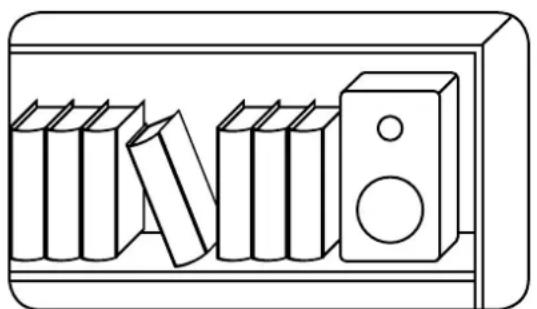
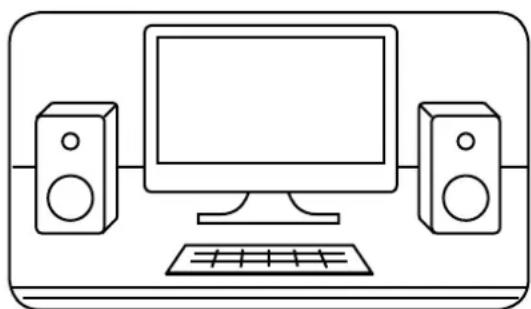
The Active Monitor AM 5 can be operated on a shelf, table or sideboard. The self-adhesive feet must be attached to the underside of the loudspeaker to ensure it cannot slip. For secure wall mounting you can find the appropriate bracket in the Canton accessories range.
natural_image
Illustration of a bookshelf with books and a speaker (no text or symbols)On a shelf
natural_image
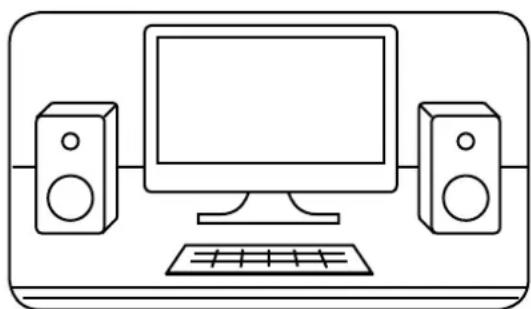
Line drawing of a desktop computer setup with monitor, speaker units, and keyboard (no text or symbols)Next to the PC
©
English
Connection and function
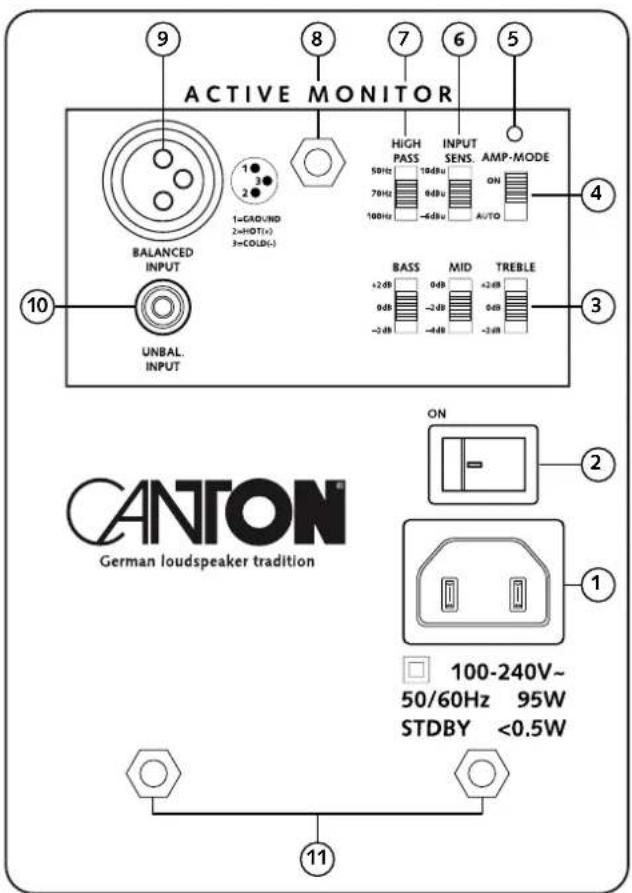
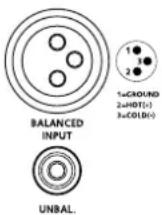
Please ensure that all electrical components are switched off before connecting. With its universal connection options the Active Monitor is ready for operation with most signal sources. Depending on the type and fittings of the sources used you can choose between the symmetrical XLR or the conventional cinch input. We strongly recommend that you do not operate the inputs in parallel.
Automatic on/off switch
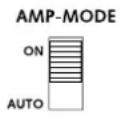
To make your Active Monitor easier to use the AM 5 is equipped with automatic switch-on. If the "AMP MODE" switch is set to "AUTO" the Active Monitor turns on automatically when there is a music signal and turns off after about 20 minutes when there is no music signal. If the "AMP MODE" switch is in the "ON" position the Active Monitor stays permanently on.
Input sensitivity
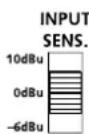
The "INPUT SENS." switch allows the input sensitivity of the Active Monitor to be adjusted to suit the output level of the connected sound source. The factory setting is 0 dBu (0.775 V). To increase the input sensitivity switch it to -6 dBu (0.39 V) and to reduce the input sensitivity switch it to 10 dBu (2.45 V).
High pass filter
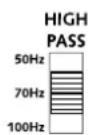
The high pass filter has three settings, allowing the bass reproduction to be limited to 50 Hz, 70 Hz or 100 Hz. This enables it to be adjusted perfectly to the location and function, helps to prevent low frequency distortion and can be adjusted if an additional active subwoofer is used.
Adjusting to the installation site
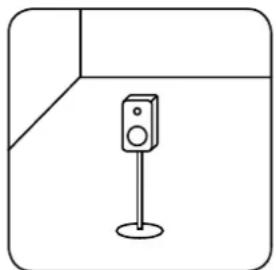
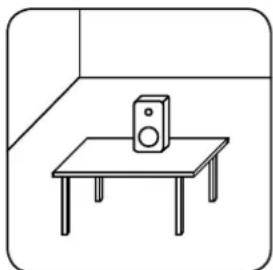
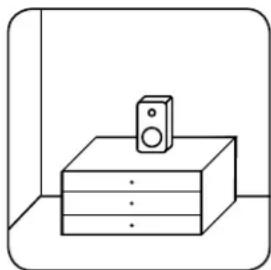
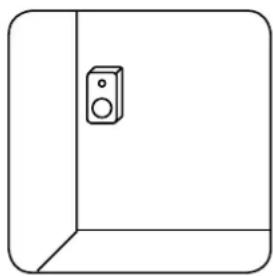
The Active Monitor AM 5 can be used at many different places. To ensure that it is perfectly adjusted to the location, function and personal listening tastes, the AM5 is equipped with three sound settings. Use the following table to find the right start settings for your installation location. The areas marked with „X“ are not critical for the acoustics of your location and can be chosen according to personal listening tastes. The basic principle is: in a less damped space “TREBLE = -2dB”, for a normal damped space “TREBLE = 0dB” and for a more damped space “TREBLE = +2dB”.
natural_image
Simple line drawing of a speaker on a stand inside a corner frame (no text or symbols)Freestanding in the room BASS +2dB | MID 0dB | TREBLE X
natural_image
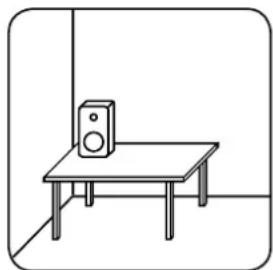
Simple line drawing of a table with a speaker on top, enclosed in a rounded square frame (no text or symbols)Table mounted, away from wall BASS 0dB | MID -2dB | TREBLE X
natural_image
Simple line drawing of a speaker on a cabinet with three drawers, enclosed in a rectangular frame (no text or symbols)Table/sideboard mounted, close to wall BASS -2dB | MID -2dB | TREBLE X
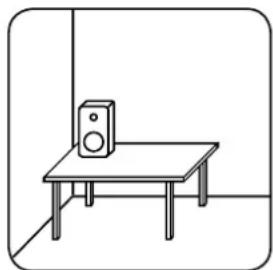
natural_image
Simple line drawing of a table with a speaker on top, no text or symbols presentTable mounted in corner BASS -2dB | MID -4dB | TREBLE X
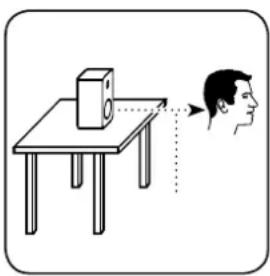
natural_image
Illustration of a person facing a camera on a table, with an arrow pointing to the face (no text or symbols present)Table mounted at ear height BASS 0dB | MID -2dB | TREBLE -2dB
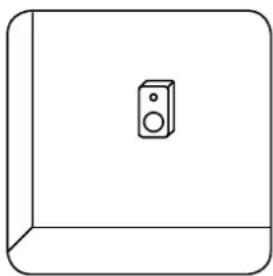
natural_image
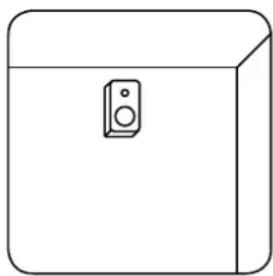
Simple line drawing of a 3D box with a speaker icon on top (no text or symbols)Wall mounted in middle of wall BASS 0dB | MID -2dB | TREBLE X
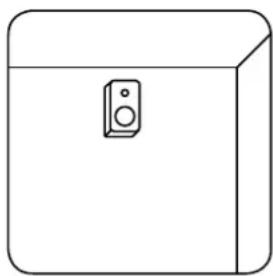
natural_image
Simple line drawing of a rectangular box with a speaker icon on top (no text or symbols)Wall mounted near ceiling BASS -2dB | MID -4dB | TREBLE X
natural_image
Simple line drawing of a cabinet or cabinet with a speaker on the door (no text or symbols)Corner mounted BASS -2dB | MID -4dB | TREBLE X
English
Troubleshooting
Here is an overview of the most common problems. If you have any further questions please contact your Canton dealer, call our Service Hotline on +49 (0) 60 83 28 70 or send us an e-mail at info@canton.de.
| Problem Possible cause | Solution | |
| No playback, LED is red or off. | 1. No mains connection. 1. Connect power cable to power outlet and AM 5. | |
| 2. Mains switch not switched on. 2. Switch mains switch to “ON”. | ||
| 3. No input signal. 3.1 Check signal line and replace where necessary. | ||
| 4. Input signal too low – automatic ON/OFF circuit does not detect sound signal. | 4. Set “AMP-MODE” to “ON”. The AM 5 is now always active. | |
| No playback, LED is green. | No input signal. 1. Check signal line and replace where necessary. | |
| AM 5 switches off during playback. | Input signal too low – automatic ON/OFF circuit does not detect sound signal. | Set “AMP-MODE” switch to “ON”. The AM 5 is now always active. |
| Playback too silent. 1. | Wrong input sensitivity “INPUT SENS.” selected. | 1. Select higher input sensitivity 0 dBu or even -6 dBu. |
| 2. Wrong pin configuration on signal line of the “BALANCED INPUT”. | 2. Check pin configuration based on panel imprint and correct it if necessary. | |
English
| Problem Possible cause | Solution | ||
| Distorted sound reproduction. | Wrong input sensitivity “INPUT SENS.” selected (input overdriven). | Select lower input sensitivity 0 dBu or even +10 dBu. | |
| No deep bass reproduction. | “HIGH PASS” switch set to 70 Hz or 100 Hz. Switch to 50 Hz. | ||
| Unbalanced bass, midrange and/or treble reproduction. | “BASS”, “MID” and/or “TREBLE” switches do not match the installation position. | Check the switch settings and set them to the setup position in line with the advice on Page 28. | |
| AM 5 hums. 1. The “BALANCED INPUT” is only connected asymmetrically. | 1. Connect the “BALANCED INPUT” to a symmetrical output or use “UNBALANCED INPUT”. | ||
| 2. The signal line is defective. 2. Change the signal line. | |||
| 3. Signal line used is not shielded. 3. Only use shielded signal lines. | |||
| 4. You have connected two different sources at the same time. | 4. Disconnect the signal line of one of the two sources from the AM 5. | ||
English
EU – Declaration of Conformity
CE Marking
We, Manufacturer / Importer
confirm and declare under our sole responsibility that the product
Active Monitor AM 5
[Active 2-way bass reflex loudspeaker (monitor) with symmetrical and asymmetrical input,
various (filter) settings and internal wide range power supply]
is in conformity with the directives of the European Parliament and of the Council
Directive 2004/108/EG (Electromagnetic Compatibility)
Directive 2006/95/EG (Low Voltage Directive)
Directive 2011/65/EU (Restriction of the use of certain Hazardous Substances)
Directive 2002/96/EG (Waste of Electric and Electronic Equipment)
Directive 2009/125/EG (Ecodesign requirements for Energy-related Products)
Operation is permitted within all countries of the European Union.
A complete Declaration of Conformity can be found at: www.canton.de/en/doc.htm
Authorized Signature:
Guithen dein
Date: March 20 ^th 2014
Name: Günther Seitz
Function: CEO
Further Information
Information for "normal use"
The Active Monitor AM5 is designed for indoor use and must not be used outdoors or in wet conditions. The devices must not be modified or altered in any way. Connect the Active Monitor as described in the instructions and pay attention to the warning notices. Only operate the device with the mains voltage and frequency specified on the rating plate.
Information about environmentally friendly operation
When not in use for longer periods switch off the Active Monitor by using the "ON/OFF" power switch. The power input drops to zero, this saves electricity and reduces your electricity bill. Use the automatic on/off switch (set "AMP-MODE" to "AUTO"). The Active Monitor will then switch automatically to Standby mode when not in use. This reduces the power input to approx. 0.4 watts.

All electrical and electronic equipment sold in the European Union must carry a CE mark to show that the device in question complies with the legal requirements (e.g. electromagnetic compatibility or safety requirements).

In line with the regulations governing the disposal of old electrical and electronic equipment, all devices that carry this symbol should not be disposed of in general household waste. Please contact your local recycling centre or the local authorities to find out about free disposal where applicable. This serves to protect the environment and public health as well as saving (scarce) resources through recycling.
DEU GARANTIE
Above and beyond the legally prescribed warranty period Canton offers a guarantee of 5 years on all its passive loudspeakers. A 2-year guarantee is offered for DM Systems and active speakers. The guarantee period begins at the time of purchase and only applies to the purchaser. Guarantee claims will only be accepted if accompanied by the original packaging. The guarantee does not cover damages incurred in transit or damages caused by improper use. The guarantee is not extended if parts are exchanged within the period covered by the guarantee. This applies to all loudspeakers purchased from an authorised Canton dealer. In the event of damage please contact your dealer or the Canton Service department direct.
Seriennummer / Serial Number


- Deutsch
- Anschluss-Terminal
- Anschlüsse AM 5
- Fehlersuche
- English
- Welcome to the world of pure music
- Contents
- Safety advice
- Important Safety Instructions
- Notices
- CAUTION
- CAUTION:
- Unpacking
- Breaking in
- Installation
- Connection and function
- Automatic on/off switch
- Input sensitivity
- High pass filter
- Adjusting to the installation site
- Troubleshooting
- EU – Declaration of Conformity
- Active Monitor AM 5
- Further Information
- Information for "normal use"
- Information about environmentally friendly operation
- DEU GARANTIE
Brand : CANTON
Model : AM 5
Category : Pregnant