
MC-125 - Tripod Ultimate Support - Free user manual and instructions
Find the device manual for free MC-125 Ultimate Support in PDF.


| Product Type | Tripod Microphone Stand |
| Brand | Ultimate Support |
| Model | MC-125 |
| Height Adjustment Range | 51.5" to 82.75" (130.8 cm to 210.2 cm) |
| Boom Length Range | 35" to 61" (88.9 cm to 154.9 cm) |
| Wheel Type | Inline skate-style locking casters (3 swivel casters) |
| Base Type | Large diameter base with low center of gravity |
| Boom Adjustment | 3-way: front-to-back, up-and-down, and rotational, with control knob |
| Clutch Mechanism | Friction-free clutch for height and boom length adjustment |
| Counterweight | Adjustable along boom for optimized balance |
| Cable Management | Integrated clips on boom and upright |
| Warranty | Limited Lifetime Warranty (original purchaser) |
| Compatibility | Standard microphone mount |
| Weight Capacity | Not specified; typical for medium to large microphones |
Frequently Asked Questions - MC-125 Ultimate Support
User questions about MC-125 Ultimate Support
0 question about this device. Answer the ones you know or ask your own.
Ask a new question about this device
Download the instructions for your Tripod in PDF format for free! Find your manual MC-125 - Ultimate Support and take your electronic device back in hand. On this page are published all the documents necessary for the use of your device. MC-125 by Ultimate Support.
USER MANUAL MC-125 Ultimate Support
Visit www.ultimatesupport.com for a quick and convenient process for registering your new Ultimate Support product. Warranty Registration and Proof of Purchase are required for warranty fulfilment. Full Limited Lifetime Warranty and Ultimate Protection Plus Premium Service and Support Plan details are available online under Music Gear & Instrument Stands / Customer Support.
ULTIMATE SUPPORT™
LIMITED LIFETIME WARRANTY
Ultimate Support products are constructed of the finest materials and designed and tested to stand up to the demanding lifestyle of the touring musician, gigging DJ, and working sound engineer. In the unlikely event that a product should fail due to manufacturing defect, Ultimate Support is pleased to repair or replace that product.
Please see www.ultimatesupport.com for more information.
This warranty applies to the original purchaser only and does not include damage to the product resulting from normal wear and tear, accident, misuse, improper installation or operation, or unauthorized repair or alterations.
800.525.5628 . www.ultimatesupport.com . Copyright 2009, Ultimate Support Systems . All Rights Reserved
ULTIMATE SUPPORT™
THE STRENGTH OF INNOVATION
Product Manual for Ultimate Support
MC-125 ITEM #16124


natural_image
Black adjustable stand with four wheels and a long black handle, no visible text or symbolsRevision 5, 07.27.09 . Product Manual Item #MC-125-M
ULTIMATE SUPPORT™
Congratulations on your purchase!
Highly Mobile – With innovative, inline skate -style wheels, the MC -125 glides smoothly along nearly any flat surface with very little effort.
Super Stable Base – The MC-125 offers a large diameter base with locking, rollerblade-style wheels which provide a low center of gravity and extraordinary stability.
Highly Adjustable – The long boom telescopes from 35" - 61" and features a friction - free clutch arm extension while the MC-125's height is adjustable from 51.5" to 82.75".
ASSEMBLY INSTRUCTIONS
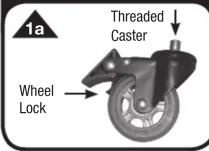


STEP 1a - 1b Attaching Swivel Casters: Put caster into “Lock” position (1a). Screw all three swivel casters into the threaded corners on the underside of the base (1b). Securely tighten.
STEP 2 Attaching Upright Shaft: Thread upright assembly securely into the base (2).
STEP 3 Attaching Boom: Thread the boom portion of the stand onto the top of the upright shaft (3). Securely tighten.
STEP 4 Attaching Boom Extension: Screw the boom extension onto the threaded end of the main boom portion of the stand (4).
USER INSTRUCTIONS


1 - Casters: Unlock to move the stand on the smooth, rolling casters. Lock in place (1).
2 - Height Adjustment: Loosen the upright clutch (2) by turning counterclockwise. Adjust to your desired height. Tighten the clutch by turning clockwise.
3 - Boom Length Adjustment: Loosen the clutch (3) by turning counterclockwise. Adjust to your desired length. Tighten the clutch by turning clockwise.
4- Boom Positioning: The boom has 3-way adjustment: front-to-back, up-and-down, and rotationally. Simply loosen the control knob (4), make all three adjustments and tighten snugly.
5- Counterweight & Boom Extension: For optimum balance, the boom counterweight can be repositioned. Simply unscrew the two halves of the counterweight, position along the boom portion of the stand and tighten. Set boom extension to vertical or hanging straight down (see figure 4, page 2). Securely tighten. Attach microphone.
6 - Cable Management: Easy-to-use cable management clips are conveniently located in two places along the boom and on the upright portion of the stand. Simply press your mic cable into the clip for a clean look. Gently pull the cable out to remove.


Brand : Ultimate Support
Model : MC-125
Category : Tripod