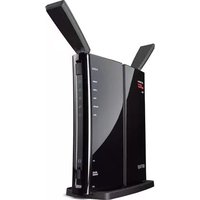
BUFFALO AirStation N300 DD-WRT - Router

AirStation N300 DD-WRT - Router BUFFALO - Free user manual and instructions

Find the device manual for free AirStation N300 DD-WRT BUFFALO in PDF.

📄 2 pages English EN Download 💬 AI Question 10 questions ⚙️ Specs
Notice BUFFALO AirStation N300 DD-WRT - page 1
Pick your language and provide your email: we'll send you a specifically translated version.
Product Type Wireless Router
Brand Buffalo
Model AirStation N300 DD-WRT
Wireless Standard IEEE 802.11b/g/n
Maximum Wireless Speed 300 Mbps
Frequency Band 2.4 GHz
WAN Ports 1 x 10/100 Mbps
LAN Ports 4 x 10/100 Mbps
USB Ports None
Antenna Type 2 x External Detachable
Antenna Gain 5 dBi each
Power Supply 5V DC, 1A
Dimensions (W x D x H) 160 x 120 x 30 mm
Weight 200 g
Firmware DD-WRT
VPN Support Yes (PPTP, OpenVPN, L2TP)
QoS Yes
Guest Network Yes
Security WEP, WPA/WPA2, WPA3
Operation Temperature 0°C to 40°C
Humidity 20% to 80% (non-condensing)
Certifications FCC, CE

Frequently Asked Questions - AirStation N300 DD-WRT BUFFALO

How do I reset the Buffalo AirStation N300 DD-WRT to factory defaults?
Press and hold the Reset button on the back of the router for about 10 seconds until the power LED blinks. Release the button and wait for the router to reboot.
What is the default IP address and login credentials?
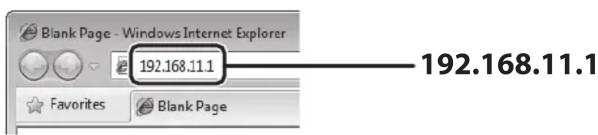
The default IP is 192.168.11.1. Default username is root and password is admin (or blank). For DD-WRT, default is often root/admin.
Can I install third-party firmware on this router?
The router already comes with DD-WRT pre-installed, which is a popular open-source firmware. You can update it with newer DD-WRT builds.
How do I set up a VPN on the AirStation N300 DD-WRT?
Log into the web interface, go to Services > VPN, and configure OpenVPN or PPTP as desired. You'll need to enter your VPN provider's server details.
What is the maximum range of this router?
Typical indoor range is about 50-70 meters depending on obstacles. With dual 5 dBi antennas, it offers good coverage for small homes.
How can I improve the wireless signal?
Place the router in a central location, away from metal objects and electronics. Adjust the antennas vertically. You can also change the wireless channel to reduce interference.
Does this router support WPA3?
Yes, DD-WRT supports WPA3 in later builds. You can enable it under Wireless > Security if your firmware version supports it.
How do I configure QoS for gaming?
Go to NAT/QoS > QoS in DD-WRT. Enable QoS, choose your internet speeds, and set priority rules for gaming devices or applications.
Can I use this router as a repeater?
Yes, DD-WRT supports Repeater Bridge mode. Go to Wireless > Basic Settings and set Wireless Mode to 'Repeater Bridge.' Then configure the root SSID.
How do I update the DD-WRT firmware?
Download the latest .bin file from the DD-WRT website. In the router interface, go to Administration > Firmware Upgrade, select the file, and click upgrade. Do not power off during update.

User questions about AirStation N300 DD-WRT BUFFALO

0 question about this device. Answer the ones you know or ask your own.

Ask a new question about this device

The email remains private: it is only used to notify you if someone responds to your question.

No questions yet. Be the first to ask one.

Download the instructions for your Router in PDF format for free! Find your manual AirStation N300 DD-WRT - BUFFALO and take your electronic device back in hand. On this page are published all the documents necessary for the use of your device. AirStation N300 DD-WRT by BUFFALO.

USER MANUAL AirStation N300 DD-WRT BUFFALO

AirStation Quick Setup Guide

2013-10

Setup
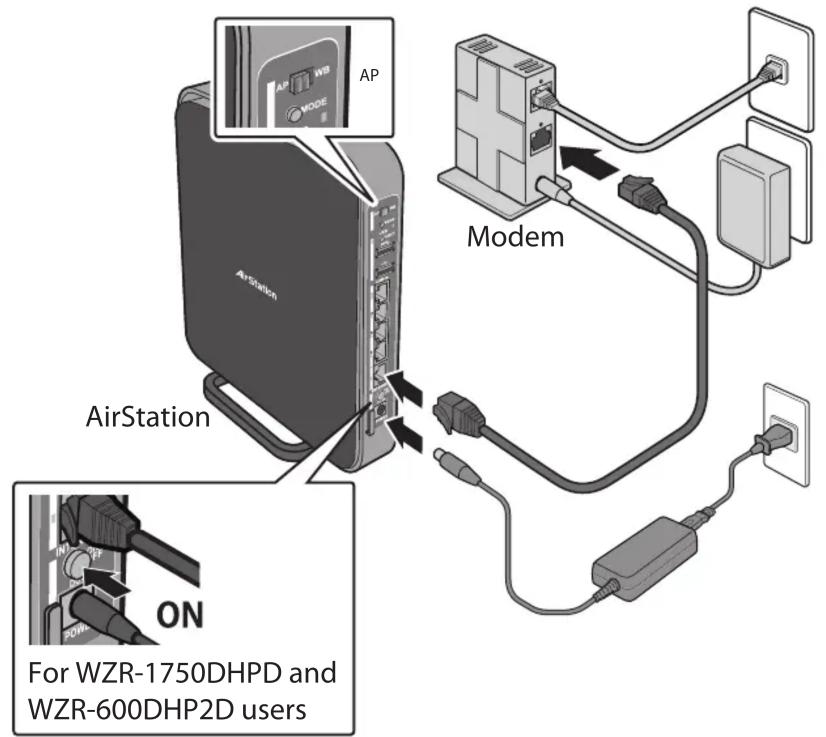
AirStation AirStation AP Modem ON For WZR-1750DHPD and WZR-600DHP2D users

Default Values

graph TD A["AirStation Setup Card"] --> B["WZR-1750DHPD WZR-600DHP2D"] B --> C["Client Access"] D["WHR-300HP2D"] --> E["Client Access"] E --> F["Security Type: WPA2-AES"] G["Wireless Access"] --> H["Key: 87654321, Buffalo-G-1234, Buffalo-A-1234, Key: 87654321"]

Opening Settings

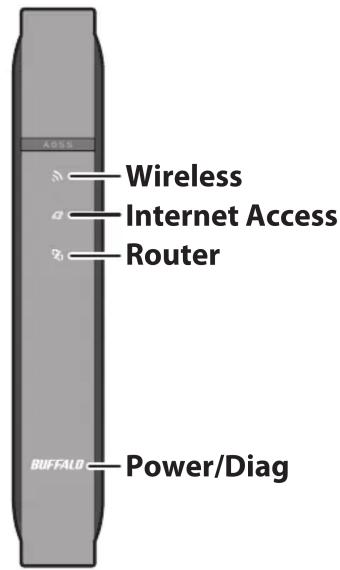
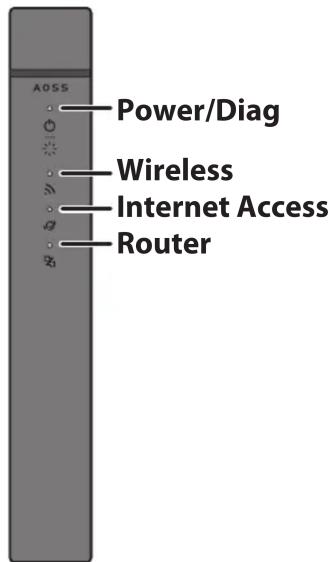
LEDs

1
Blank Page - Windows Internet Explorer 192.168.11.1 Favorites Blank Page 192.168.11.1

2
Windows Security The server 192.168.11.1 at DD-WRT requires a username and password. Warning: This server is requesting that your username and password be sent in an insecure manner (basic authentication without a secure connection). admin password OK Cancel admin password

3
BUFFALO POWERED BY ID-MNT Setup Wireless Services Security Access Restrictions NAT / QoS Administration Status Basic Setup DMSG MAC Address Close Advanced Routing VLA Networks ExIP Tunnel Setup Card Click on any information in the Setup Card to edit it. Wireless Network 1 (5 GHz) - Compatible with 8…

WZR-1750DHPD
AOSS Wireless Internet Access Router BUFFALO Power/Diag

WZR-600DHP2D
AOS5 Power/Diag Wireless Internet Access Router

Technical Support

WHR-300HP2D

Buffalo Americas

www.buffalotech.com

DD-WRT

www.dd-wrt.com

DD-WRT Forum

www.dd-wrt.com/phpBB2

ADSS Power/Diag Wireless Internet Access Router

Manual assistant
Powered by Anthropic
Waiting for your message
Product information

Brand : BUFFALO

Model : AirStation N300 DD-WRT

Category : Router