
SCT 3015MR - Car radio SENCOR - Free user manual and instructions
Find the device manual for free SCT 3015MR SENCOR in PDF.


| Product Type | Car stereo receiver |
| Brand | Sencor |
| Model | SCT 3015MR |
| Form Factor | 1-DIN |
| Power Supply | 12V DC, negative ground |
| Maximum Output Power | 4 x 50W (peak) |
| Number of Channels | 4 |
| FM Tuner Frequency Range | 87.5 - 108 MHz |
| AM Tuner Frequency Range | 530 - 1710 kHz |
| RDS Support | Yes |
| USB Playback | MP3, WMA files via USB 2.0 |
| AUX Input | 3.5mm front audio input |
| SD Card Slot | Yes, up to 32GB |
| Display Type | LCD with adjustable backlight |
| Detachable Front Panel | Yes, for theft prevention |
| Equalizer Presets | 5 presets (Pop, Rock, Classic, Jazz, Flat) |
| Clock Function | Yes, 12/24 hour mode |
| Wiring Connector | Standard ISO connector |
| Weight | 0.45 kg |
| Dimensions (W x H x D) | 178 x 50 x 160 mm |
Frequently Asked Questions - SCT 3015MR SENCOR
User questions about SCT 3015MR SENCOR
0 question about this device. Answer the ones you know or ask your own.
Ask a new question about this device
Download the instructions for your Car radio in PDF format for free! Find your manual SCT 3015MR - SENCOR and take your electronic device back in hand. On this page are published all the documents necessary for the use of your device. SCT 3015MR by SENCOR.
USER MANUAL SCT 3015MR SENCOR
natural_image
Line drawing of a vintage television set with front panel, buttons, and screen (no text or symbols)CAR RADIO WITH A MULTIMEDIA PLAYER, RDS AND RADIO
AUTORÁDIO S MULTIMEDIÁLNÍM PŘEHRÁVAČEM, RDS A RADIOPŘIJÍMAČEM
AUTORÁDIO S MULTIMEDIÁLNYM PREHRÁVAČOM, RDS A RÁDIOPRIJÍMAČOM
AUTORÁDIÓ MULTIMÉDIA LEJÁTSZÓVAL, RDS-SZEL ÉS RÁDIÓVAL
RADIO SAMOCHODOWE Z MULTIMEDIALNYM ODTWARZACZEM, RDS I ODBIORNIKIEM RADIOWYM
POKYNY NA INŠTALÁCIU
Postup montáže A
natural_image
Simple line drawing of a rectangular electronic device with a side panel and an arrow indicating rotation (no text or symbols)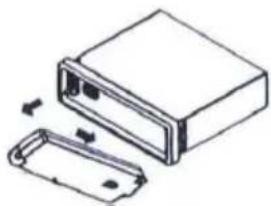
natural_image
Technical line drawing of a mechanical housing with two components, one open and one partially filled (no text or symbols)natural_image
Simple line drawing of a rectangular device with a detached rectangular component (no text or symbols)Konektor
Otvor
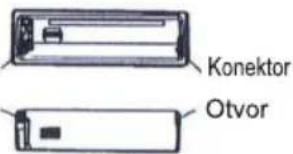
natural_image
Technical line drawing of a rectangular electronic device with internal components and mounting holes (no text or symbols)natural_image
Simple line drawing of a rectangular electronic component with a small protrusion and mounting holes (no text or symbols)natural_image
Simple line drawing of a rectangular object with a small mechanical component attached (no text or symbols)Vložte batériu do držiaka s polaritou (+) smerom nahor.
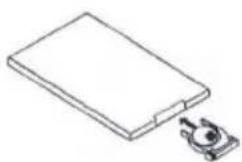
natural_image
Simple line drawing of a rectangular electronic component with a small mechanical bracket attached (no text or symbols)Zasuňte držiak batérie do diaľkového ovládača.
ON/OFF (Zapnutie/Vypnutie)


Brand : SENCOR
Model : SCT 3015MR
Category : Car radio